Intercom
 Shopify
 Stripe
 Slack
Slack Notion
 Google Workspace
 Confluence

Why Are Intercom Attachments Not Working? Dropped Files, Blocked Extensions and 'Attachment Access Is Unavailable'


If Intercom has swallowed a customer's file, first establish whether it ever reached Intercom: an inbound email over 20 MB is rejected outright, a blocked extension is stripped and logged, and a Messenger upload can fail to open 30 minutes later because its link expired. Each has a different fix, and Intercom's error messages don't tell them apart.
Key takeaways
- Intercom attachments usually fail for policy reasons: a file type the workspace hasn't allowed, an inbound email over 20 MB, or a Messenger link that expired after 30 minutes.
- Intercom rejects an entire inbound email over 20 MB including attachments, while Messenger uploads are capped at 100 MB per file with no limit on file count.
- Intercom permanently blocks 64 file extensions across every workspace, including .webp and executables, and no workspace setting can enable them.
- Intercom's default allowed attachment types are gif, jpeg, jpg, mov, mp4, pdf, png, txt, heic, oga, ogg, dng and mp3, and admins must enable anything else.
- Intercom email attachments use signed URLs lasting around six months, while Messenger and chat uploads expire after 30 minutes, a change Intercom made in April 2021.

Intercom attachments fail for eight reasons, and the three most common are policy rather than bugs: a file type your workspace hasn't allowed (the defaults are 13 types, from gif to mp3), an inbound email over the 20 MB total limit, which Intercom rejects outright, and a Messenger link that expired after 30 minutes. Check the conversation for a dropped-attachment event first, because it tells you whether the file ever reached Intercom.
| Symptom | Likely cause | Fixable in settings? |
|---|---|---|
| "Attachments have been dropped from this message" | File type not allowed, or email over 20 MB | File type yes; size no |
| Extension such as .webp or .exe always stripped | Permanently blocked list (64 extensions) | No |
| File listed but won't open | Link expired (30 minutes for Messenger) or malware quarantine | No; reload or resend |
| Only winmail.dat arrives | Outlook TNEF wrapper | No; sender-side fix |
| File won't reach Jira or a workflow | Not built | No |
How do you triage a missing Intercom attachment in 30 seconds?
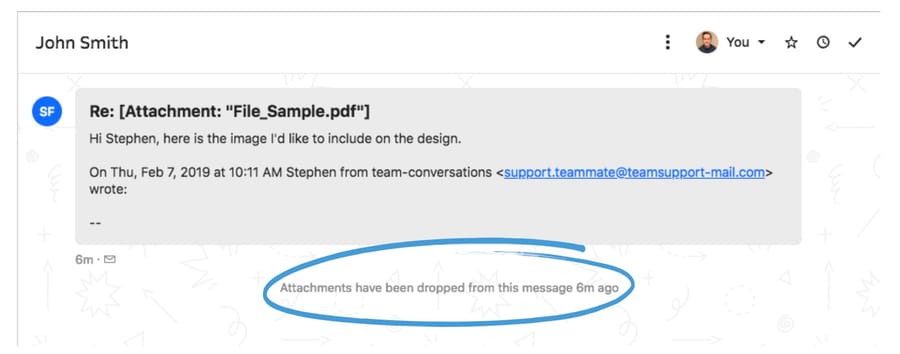
- Conversation shows "Attachments have been dropped from this message"? The file type is blocked in your workspace, or the email was too large. Go to cause 1 or cause 3.
- File is listed but won't open, or errors? Either the link expired or the scanner quarantined it. Go to cause 4 or cause 6.
- Customer swears they attached something and there's no event at all? Check winmail.dat, cause 5.
- You can see it in Intercom but can't get it into Jira, an export or a forwarded email? That's cause 7, and it's mostly working as designed.
Which attachment problems do Intercom users report most?
We pulled every topic from Intercom's community sitemap and filtered the titles. Sixty carry the word "attachment", and the split shows where the pain is:
| Where | Threads | What they're about |
|---|---|---|
| Ideas (feature requests) | 26 | Bigger size limits, more file types, listing and searching attachments, keeping files through a forward |
| Helpdesk / Inbox | 12 | Files that won't open, dropped attachments, forwarding, downloads |
| Mobile SDKs | 6 | Crashes and UI faults in the in-app attachment picker |
| API and webhooks | 4 | Getting a usable file URL out of a payload |
| Apps and integrations | 3 | Link expiry across systems, Jira sync, a v2.15 webhook change |
| Outbound | 3 | Attaching files to outbound and transactional messages |
| Workflows, settings, Messenger | 6 | Auto-forwarding, changing allowed types, size ceilings |
Nearly half are feature requests, not faults. Worth knowing before you open a ticket: a good share of "attachments not working" is Intercom working as designed, and the design not matching the job. If you're new to how Intercom's inbox stores and threads these messages, our guide to the Intercom shared inbox covers the model underneath.
Cause 1: is the file type allowed in your workspace?
The single most common diagnosable cause, and the fastest to fix.
Check: the conversation shows an event saying the attachment was dropped or an unsupported file type was sent. Then go to Settings > Workspace > Security and open Receiving attachments.
What it means: Intercom allows a short default list and blocks everything else until you say otherwise. The defaults are gif, jpeg, jpg, mov, mp4, pdf, png, txt, heic, oga, ogg, dng and mp3. Spreadsheets, Word documents, presentations, archives, logs and .eml files all sit outside it. In February 2024 a team couldn't open .xlsx files that had worked before; in 2021 another couldn't send xlsx or csv to customers and a third couldn't open an .eml. Same setting, three years apart.
Fix: turn on Allow leads and users to send other file types and list the extensions, each with a leading period and separated by commas: .docx, .xlsx, .csv, .pptx, .rtf, .log. In February 2026 an Intercom team member answering a request for .mpg, .webm, .webp, .tiff, .docx, .txt, .rtf, .pptx, .ppt confirmed all but one could be enabled this way.
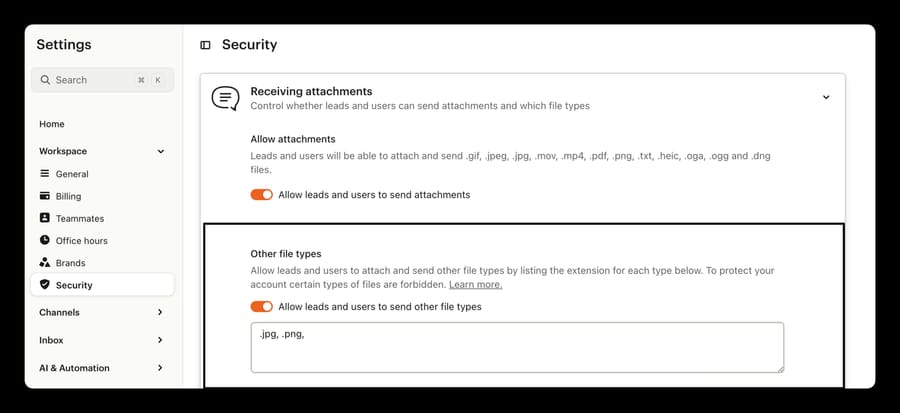
One detail decides whether the fix looks like it worked: allowing a type only applies to attachments in future emails. Anything already received and denied under the old settings stays inaccessible. Ask the customer to resend.
Cause 2: is the file type permanently blocked?
This one is Intercom's policy, and no setting overrides it.
Check: compare the extension against Intercom's permanently blocked list.
What it means: Intercom blocks 64 extensions across every workspace as malware vectors (the count in its "Accessing unsupported attachment file types" article on September 24, 2026): ade, adp, apk, app, bat, cab, chm, cmd, com, cpl, dll, dmg, exe, hta, img, inf, iso, jar, jnlp, js, lnk, mde, mht, msc, msi, msix, msp, mst, pif, ps1, psm1, reg, scr, sct, sys, vb, vbe, vbs, vhd, vxd, wsc, wsf, wsh, xll and more, and it adds to the list over time. Two entries surprise people:
- .webp is on it. Intercom calls it an unsupported image format and it cannot be enabled, which matters because Chrome's "Copy image" and plenty of CMS exports produce webp by default.
- Password-protected archives are blocked because an antivirus scanner can't open them to check what's inside. A password-protected .zip fails even if .zip itself is allowed.
Fix: there isn't one inside Intercom, and Intercom's own recommendation is to move the file somewhere else: host it as a secure download on your site, or use a file-sharing service and send the link. None of this varies by plan, so upgrading changes nothing here; our Intercom pricing breakdown covers what the seat tiers do and don't include. For inbound webp specifically, ask the customer for a PNG or a JPEG, or have them paste the screenshot straight into the Messenger.
Cause 3: was the email over 20 MB?
Check: ask the sender how big the message was, including every attachment and every inline signature image.
What it means: the two channels have very different ceilings, and mixing them up sends people looking in the wrong place. An Intercom team member spelled both out in February 2026:
| Path | Limit | Behavior at the limit |
|---|---|---|
| Messenger upload | 100 MB per file, no cap on the number of files | The upload fails |
| Incoming email | 20 MB total for the whole message including attachments | The entire email is rejected |
| Outbound email, Hosted mode (default) | No file size limit; files are sent as links | Recipient clicks through to the file |
| Outbound email, Attached mode | 20 MB total across all files, not per file | The send errors |
The incoming cap is the painful one, because it rejects the whole message rather than stripping the file, so the customer's text is lost along with their PDF.
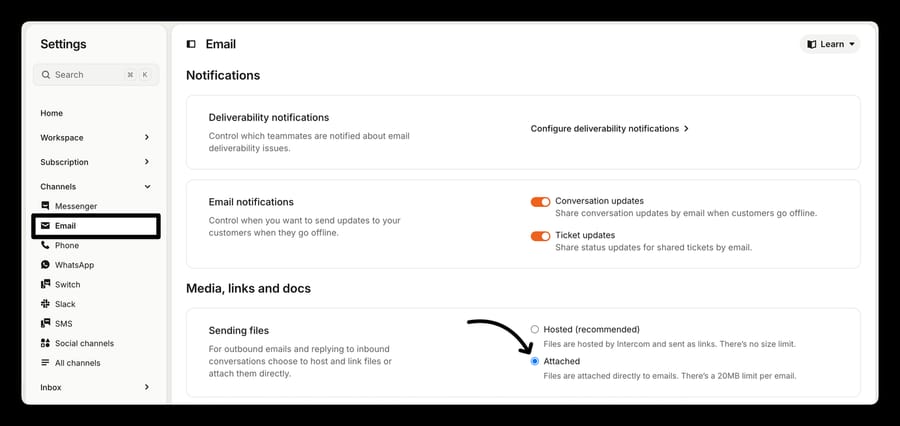
Fix: for inbound, ask for a link. For outbound, check which mode you're on at Settings > Channels > Email: Hosted has no size limit and is Intercom's recommendation for deliverability, and Attached exists for recipients whose firewalls strip linked files.
Cause 4: has the attachment link expired?
This is the cause behind most "it worked yesterday" reports, and behind nearly every integration complaint.
Check: look at the attachment URL. If it carries expires= and a Unix timestamp, it's a signed link with a deadline.
What it means: Intercom changed this in April 2021. Uploads used to be publicly reachable for 30 days by anyone holding the URL, which Intercom judged a security risk. Messenger and chat-uploaded attachments now expire after 30 minutes. Attachments sent or received over email get a much longer signed URL, around six months, because an email link has to survive being opened, forwarded and re-read weeks later.
The incentive behind that change is worth naming, because it isn't an upsell: a permanent public URL on every customer upload is a liability Intercom carries and a storage bill it pays, so the short window serves Intercom's risk and cost position, and your integrations are what absorb it. That makes the 30-minute window fine inside Intercom and hostile to everything outside it. A team pushing conversations into Zendesk hit it in 2021 through both the native app and Zapier, and Intercom's answer was that there was no way past it. A developer team ran into it again in 2024, and Intercom's Engineering Support confirmed the behavior and gave the workaround. Any data warehouse, BI tool or third-party integration that stores the URL rather than the file will show broken links later.
Fix: as a teammate, reload the page; the URLs regenerate. As a customer, hit back in the Messenger and re-open the conversation. Programmatically, don't cache the URL. Make a Retrieve a conversation call immediately before you need the file and use the freshly signed URL from the attachments array. If you need the file permanently, download the bytes within the window and store them yourself.
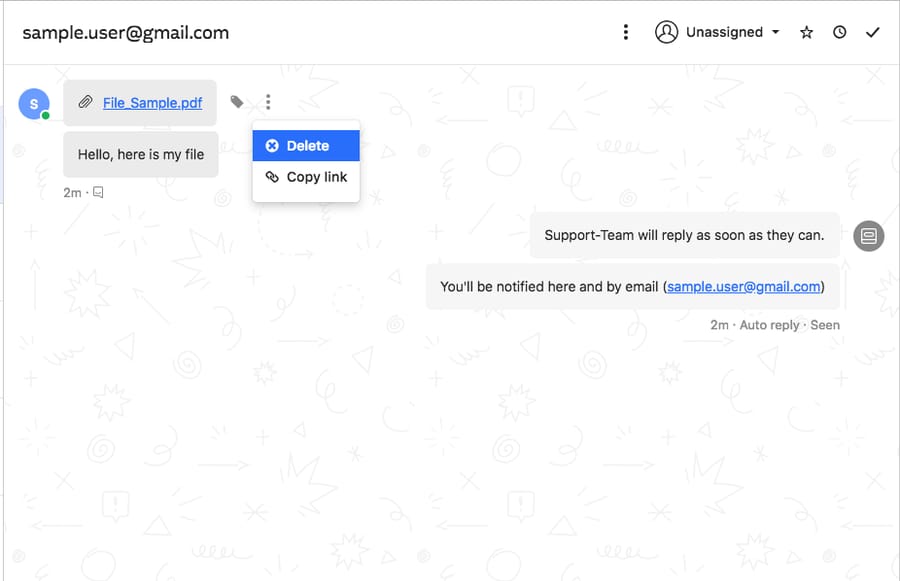
Two related quirks live here. Intercom's Customer Support Engineering team confirmed in 2022 that there's no way to list every attachment in a conversation, because attachments carry an expiry and aren't stored for indefinite access; filename search is the closest substitute. And deleting a message revokes its file links immediately, so a teammate who deletes a mis-sent reply turns the recipient's link into a "not found" page.
Cause 5: did Outlook pack the files into winmail.dat?
Check: the sender uses Outlook or Exchange, insists they attached something, and the conversation either shows nothing or shows a single file called winmail.dat.
What it means: Microsoft sometimes packages attachments using Transport Neutral Encapsulation Format, a proprietary wrapper that non-Microsoft mail systems can't unpack. Intercom documents this and doesn't decode it. The file is there; it's inside a container Intercom can't open.
Fix: this one gets fixed on the sender's side. Have them send in plain text or HTML rather than Rich Text Format, which is what triggers TNEF, or configure the Exchange remote domain to disable TNEF for outbound mail. As a one-off, ask them to resend from a webmail client. No Intercom setting affects it.
Cause 6: did the malware scanner quarantine or flag it?
Check: open the attachment and read the status card above it.
What it means: Intercom scans every attachment and upload across every channel. Five states exist, and only one removes the file:
| Status | What happened | Is the file accessible? |
|---|---|---|
| No issues detected | Scanned clean | Yes |
| Inconclusive | The scan couldn't complete | Yes, with an orange warning |
| Extension mismatch | The extension doesn't match the actual content type | Yes, with an orange warning |
| This file is likely malicious | Flagged but not confirmed | Yes, with an orange warning |
| Malware detected | Confirmed | No, removed |
Images get an extra pass. A picture is quarantined if its integrity check fails, if it's corrupted, if it carries other content under an image content type, if it can't be validated, or if resizing fails. That last one catches legitimate files: a corrupt screenshot from a customer's flaky phone disappears the same way a disguised payload does.
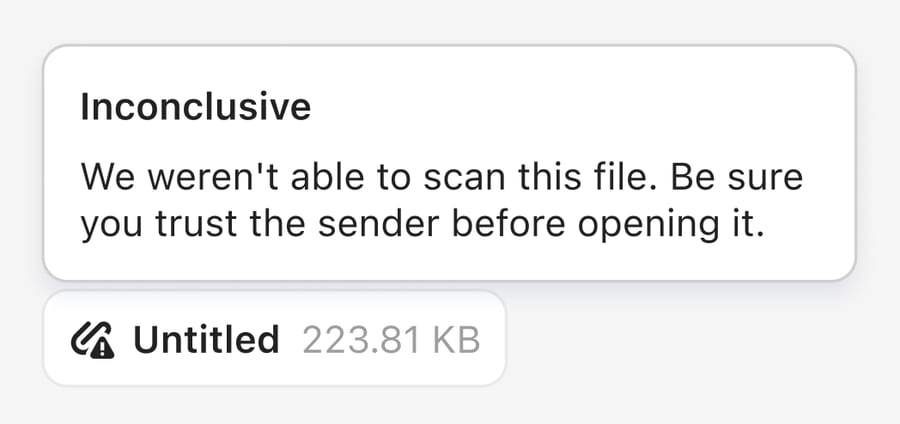
Fix: for a quarantined image, ask for a fresh screenshot or a different format. For an orange warning, the file is still there and the decision is yours; hovering the icon gives the reason. Note that no status at all usually means the scan is still running, and most complete in seconds.
Cause 7: why can't the file leave Intercom?
The largest cluster in the forum data, and the one where "not working" usually means "was never built".
Check: ask what you're trying to move the file into. Each destination has its own answer.
Forwarding to a colleague. The Forward message button appears on the three-dot menu of an email message only. If the conversation started as a chat, the option isn't there, which is what a team routing inbound attachments to a processing address worked around in 2023. The practical fix is a forwarding rule at your mail provider, before the message reaches Intercom.
Automatic forwarding by workflow. Asked in June 2024 whether a workflow could detect an inbound PDF and forward it, Intercom's Engineering Support answered that workflows detect words in a message body and there's no condition for the presence of an attachment. The related request for attachment metadata in the event log is still open with six upvotes.
Jira. Attachments don't transfer when the Jira for Tickets app creates an issue from an Intercom conversation. That was raised again on September 18, 2026 and is unanswered at the time of writing. Our Jira and Intercom integration guide covers what the app does carry across.
Your own integration. From API version 2.15, embedded images pasted into a message appear in both the body HTML and the attachments array, where v2.14 put them only in the body; a developer reported customers receiving doubled images as a result. And when a customer uploads several files, Intercom fires a separate webhook per file, so a handler expecting one event with an array has to aggregate.
Cause 8: is it an Intercom bug?
Rare, but real, and worth ruling in rather than chasing your own settings forever.
Check: is the failure universal in your workspace, and did it start without a change on your side?
What it means: three of the twelve Helpdesk threads turned out to be Intercom's. In December 2023 a team couldn't open standard PDFs, and Intercom identified and resolved it the same day. In February 2024 Intercom's Engineering Support confirmed an ongoing issue with attached files erroring on open. In April 2024 a team forwarding an email with many attachments found the compose window pushed the Send button off screen, and a second customer confirmed it three weeks later. On mobile, six SDK threads cover picker crashes on Android and, in March 2026, a Liquid Glass layout fault on iOS 26.
Fix: report it through the Messenger with a conversation ID, the number after /conversations/ in your browser's URL, then post on the community forum. The April 2024 bug only got a second data point because another customer found the public thread.
Why does an attachment open in a tab instead of downloading?
If an attachment opens in a new browser tab instead of downloading, that's your browser. Intercom's Support Engineering team tested a .log file in 2022, found it downloaded normally, and traced the reporter's problem to Chrome's auto-open setting for that file type. Clear it under Chrome's download settings and the file saves as expected.
Where is Intercom's attachment setting?
Worth flagging because it wastes real time. Intercom's three current attachment articles route you to the same control three different ways:
- "Accessing unsupported attachment file types" (July 28, 2026): Settings > Workspace > Security > General > Receiving attachments
- "Attachment safety" (August 20, 2026): Settings > Workspace > Security > Attachment settings
- "Control how attachments are uploaded and used": Workspace > Security > Attachments
The screenshots in all three show one panel headed Receiving attachments on the Security page. Open Settings > Workspace > Security and look for that heading; the sub-path in whichever article you landed on may be stale.
While you're there, check whether audience rules are in play. Intercom lets you restrict uploads to segments using predicate conditions on user attributes, and customers who don't match are silently blocked: the upload button, drag-and-drop and paste all disappear with no message. If one cohort of customers reports that they can't attach anything and everyone else is fine, that's where to look.
Can an AI agent layer help with dropped attachments?
Most of this post is limits and policy, and an AI layer doesn't move any of it. A blocked extension stays blocked, a 20 MB email stays rejected, and a signed URL still expires in 30 minutes whoever is reading the conversation.
The narrow exception is the silence. Intercom logs "Attachments have been dropped from this message" without naming the file, so your agents write back to ask what the customer tried to send, which is exactly the request the open feature idea makes. An agent watching new conversations can catch that event and reply immediately with the allowed types and an upload link, which turns a two-day round trip into one message. Macha is an AI agent layer on the help desk a team already uses, and on Intercom it reads conversations, replies or leaves a private note, assigns, tags and closes, with triggers on new conversations and new customer messages. It suits teams whose attachment problem is the back-and-forth around a dropped file; it's the wrong tool for the limits themselves, which are Intercom's to change.
How we researched this
We do not have an Intercom workspace, so nothing here is first-hand and every screenshot comes from Intercom's own help center. On September 21, 2026 we pulled all 10,373 topics from community.intercom.com/sitemap-topics-1.xml, filtered the 60 whose titles mention attachments, and read 22 of them in full rather than working from search snippets. Every path, limit, extension and error string was checked against Intercom's current documentation the same day, and the size limits, expiry times, default types and blocked list were re-checked on September 24, 2026: "Control how attachments are uploaded and used", "Accessing unsupported attachment file types" (July 28, 2026), "Attachment safety: How we scan files for malware" (August 20, 2026) and "Forwarding email conversations externally" (May 7, 2026). What we could not verify: whether the February 2024 .xlsx issue was ever resolved, since the thread ends with Intercom investigating; whether the Jira attachment gap is on a roadmap, since the September 2026 thread is unanswered; and the true size of the permanently blocked list, since the article says more may be added over time.
Frequently asked questions
What does "Attachments have been dropped from this message" mean in Intercom? Intercom received the email but removed the files before storing the conversation. The two usual reasons are a file type your workspace doesn't allow and an email over the 20 MB incoming limit. The event doesn't name the dropped file, which is the subject of an open feature request, so you have to ask the customer what they sent.
What is Intercom's attachment size limit? 100 MB per file for Messenger uploads, with no limit on how many files go in one message, and 20 MB total for an incoming email including every attachment. Outbound email is unlimited in the default Hosted mode, where files are sent as links, and capped at 20 MB total across all files if you switch to Attached mode.
How do I allow more file types in Intercom? Go to Settings > Workspace > Security, find Receiving attachments, turn on "Allow leads and users to send other file types", and list the extensions with a leading period and commas between them. Allowed types work immediately for future emails, but attachments already received and denied under the old settings stay inaccessible, so ask the customer to resend.
Why can't I enable .webp attachments in Intercom? Because .webp is on Intercom's permanently blocked list of 64 extensions, alongside executables and password-protected archives. No workspace can enable it. Ask for a PNG or JPEG, or have the customer paste the screenshot into the Messenger instead.
Why do Intercom attachment links expire? Messenger and chat uploads use signed URLs that last 30 minutes, a change Intercom made in April 2021 after previously making uploads publicly reachable for 30 days. Email attachments use much longer signed URLs, around six months. Teammates get a working link by reloading the page; customers get one by re-opening the conversation in the Messenger.
How do I access an Intercom attachment from another system? Don't store the URL. Call the Retrieve a conversation endpoint immediately before you need the file and use the freshly signed URL from the attachments array, or download the bytes inside the 30-minute window and keep your own copy. Anything that caches the URL will show broken links later.
Can an Intercom workflow forward an email when it has an attachment? No. Intercom's Engineering Support confirmed that workflows match on words in the message body and there's no condition for whether an attachment is present. The workaround is a forwarding rule at your mail provider, applied before the message reaches Intercom.
Why don't attachments transfer from Intercom to Jira? The Jira for Tickets app doesn't carry files across when it creates an issue from a conversation. It was raised again on the community forum in September 2026 and is unanswered. Teams that need the file in Jira generally fetch it through Intercom's API and attach it through Jira's.
Why can some of my customers attach files and others can't? Intercom lets you restrict uploads with audience rules based on user attributes. Customers who don't match are silently blocked: the upload button, drag-and-drop and paste all disappear with no error message. Check the audience conditions under Receiving attachments in your workspace security settings.
Sources: Control how attachments are uploaded and used · Accessing unsupported attachment file types · Attachment safety: How we scan files for malware · Forwarding email conversations externally · Retrieve a conversation (Intercom REST API) · Intercom occasionally dropping attachments · attachment access is unavailable · Attachment files issue · Unsupported file extensions that would be beneficial · Maximum file size allowed to be shared via chats · Show email attachment file metadata logs · Handling and accessing file attachment · Is there a way to list all attachments from a conversation? · Disable or extend expiry times on attachment links · auto-forward emails with PDF attachment · Forward incoming email message with attachment · Attachments in Webhook: Breaking Changes in v2.14 · Intercom + Jira sync: Attachments not transferring · Trouble opening attachments · UI issues in Intercom chat attachment popup on iOS 26 · Attachments open in a different tab
Add AI agents to your Intercom
Macha reads the conversation, drafts the reply and takes the action, inside the Intercom you already run.