Intercom
 Shopify
 Stripe
 Slack
Slack Notion
 Google Workspace
 Confluence

Why Is the Intercom Messenger Not Showing? 9 Causes and Fixes (2026)


Open the Network tab, filter for ping and reload: no ping means the Intercom snippet isn't running, and a 403 means a Messenger setting such as trusted domains or identity verification is blocking it. The nine causes below each come with the check and the fix.
Key takeaways
- The Intercom Messenger usually fails to show for one of nine reasons, and a missing ping request points at the snippet while a 403 on the ping points at a setting.
- In single-page apps built with React or Next.js, the standard Intercom snippet fails because the page never fully reloads, so boot on route entry and call Intercom('update') on route changes.
- Intercom throttles the Intercom('update') call at 20 calls per user per page, with the quota resetting every 30 minutes.
- A 403 response on the Intercom ping with a Missing user_hash error means identity verification or a JWT is enforced without a valid token being sent.
- The Intercom Messenger cannot set its required cookie on public suffix domains such as yourapp.herokuapp.com or yourapp.firebaseapp.com, so it must be installed on a custom domain.

The Intercom Messenger usually fails to show for one of nine reasons, and the ping request in your browser's Network tab tells you which half to look at: no ping means the snippet isn't running, and a 403 on the ping means a Messenger setting, usually trusted domains or identity verification, is blocking it.
| # | Cause | What you see | Fix |
|---|---|---|---|
| 1 | Snippet missing, misplaced or still has the placeholder app_id | No ping | Real app_id, snippet before </body>, user traffic on |
| 2 | Single-page app (React, Next.js) | Ping succeeds, no launcher | Boot on route entry, update on route change |
| 3 | Audience rules or hide_default_launcher | Launcher hidden for you | Check who the Messenger is shown to |
| 4 | Identity verification or JWT enforced | 403, "Missing user_hash" | Send a valid token or relax enforcement |
| 5 | Domain not trusted | 403, no user_hash message | Add the domain under Keep your Messenger secure |
| 6 | Ad blocker or private browsing | Works in a clean profile | None you control |
| 7 | Public suffix domain (herokuapp.com) | No cookie set | Use your own domain |
| 8 | EU or AU region mismatch | GTM install fails | Pass the regional api_base |
| 9 | Duplicate contacts | 409 in console | Remove the duplicate or boot with user_id |
The ordering is worth being honest about: it draws on Intercom's troubleshooting article plus the mix of community threads we read, and the single-page-app case is promoted to second because it is the largest cluster by views. It is not a measured distribution of real incidents, and it is not the order Intercom uses: the article runs through nine checks from subscription and user traffic to the 409 error.
1. Is the snippet installed where it needs to be?
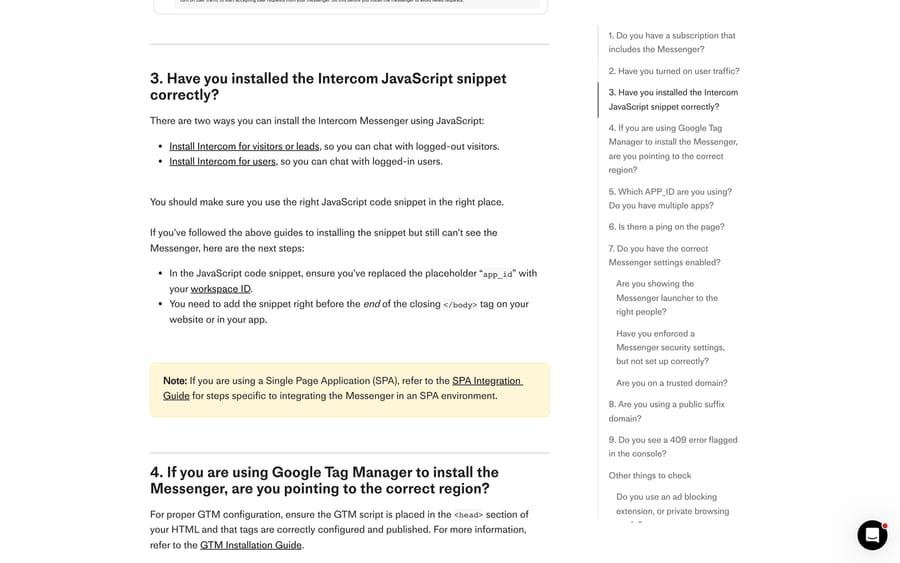
Check: open the console and run Intercom('show'). If nothing happens and there's no ping in the Network tab, the snippet isn't loading.
Fix: three things, in order.
- Replace the placeholder
app_idin the snippet with your actual workspace ID. A copied snippet withAPP_IDstill in it produces exactly this symptom. - Put the snippet immediately before the closing
</body>tag. - Use the right snippet. Intercom ships one for visitors and leads (logged out) and a different one for users (logged in), and they aren't interchangeable.
Two related settings sit upstream of the code. The workspace needs a trial or subscription that includes the Messenger, and user traffic has to be switched on at Settings › Channels › Messenger › Install. Intercom's own advice is to turn user traffic on before you install, so requests don't fail while you're testing.
2. Why doesn't the Messenger show in a React or Next.js app?
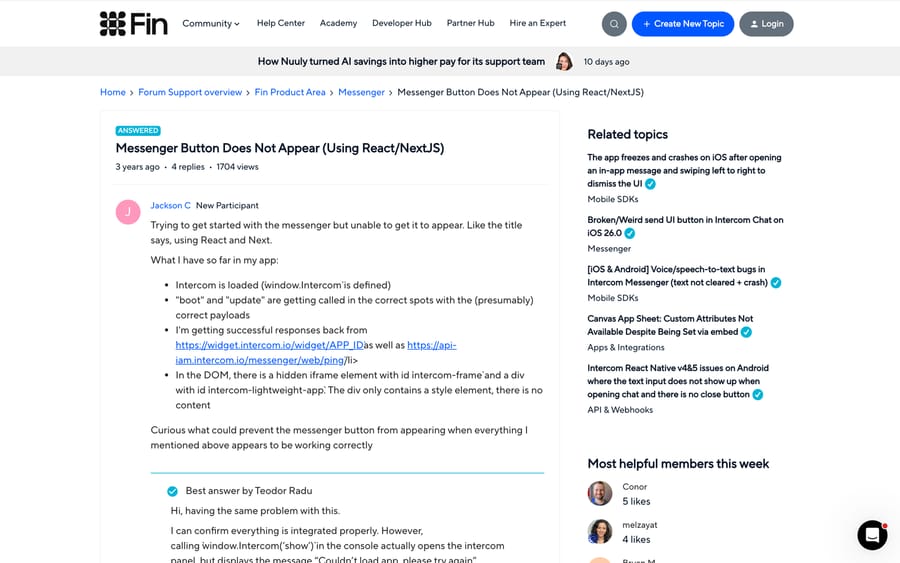
This is the biggest cluster in the community. A thread titled "Messenger Button Does Not Appear (Using React/NextJS)" has 1,704 views, and the poster's description is the classic one: window.Intercom is defined, boot and update are called, widget.intercom.io and the ping both return successfully, intercom-frame and intercom-lightweight-app exist in the DOM, and no launcher appears. A later reply on Next.js 14 with the App Router reports the same thing, with Intercom('show') opening a panel that says the app couldn't load.
Check: are you using the standard snippet in an app that doesn't do full page reloads?
Fix: use the SPA integration pattern instead. Intercom is explicit that the standard snippet "won't work reliably because the page doesn't fully reload on navigation". Concretely:
- Include the Intercom JS library in the HTML
<head>. - Call
window.Intercom('boot', {...})on route entry, once you have the user's details. - Call
window.Intercom('update', {...})on every route change, because a URL change without a page reload sends nothing on its own. - Call
Intercom('shutdown')on logout. Intercom sets a cookie that lasts a week, so skipping this shows the previous user's history on a shared browser.
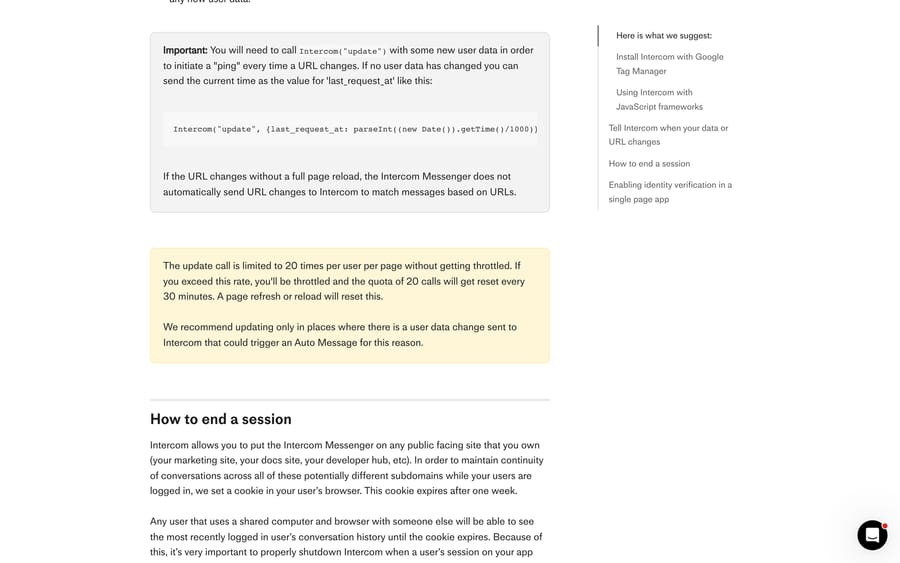
One limit shapes how you wire step 3: update is throttled at 20 calls per user per page, and exceeding it resets the quota only after 30 minutes. If you call update on every navigation in a wizard-style app, a real user can burn through that in a couple of minutes and the Messenger stops responding to changes. Intercom's recommendation is to update only where user data has actually changed; when nothing has, the documented minimum is Intercom("update", {last_request_at: parseInt((new Date()).getTime()/1000)}).
There's also a framework shortcut: Settings › Channels › Messenger › Install › Install for web lists framework-specific npm packages.
3. Is the Messenger hidden from the people looking at it?
Check: in Messenger settings, open Control your inbound conversation volume.
Fix: this section decides who sees the launcher, and it can be set to visitors, users, or only people matching certain data. Intercom's example is the one that bites: restrict it to users with VIP status and only VIP users see it, including you when you're testing as yourself. If you configured this before launch and forgot, the Messenger is working exactly as instructed.
Two smaller variants of the same cause. hide_default_launcher: true in the intercomSettings object hides the launcher deliberately, so check it isn't left over from a staging config. And if you modified the install snippet or applied your own CSS to Intercom elements, Intercom advises against both and this is one of the ways it shows up.
4. Is identity verification or a JWT enforced with a wrong token?
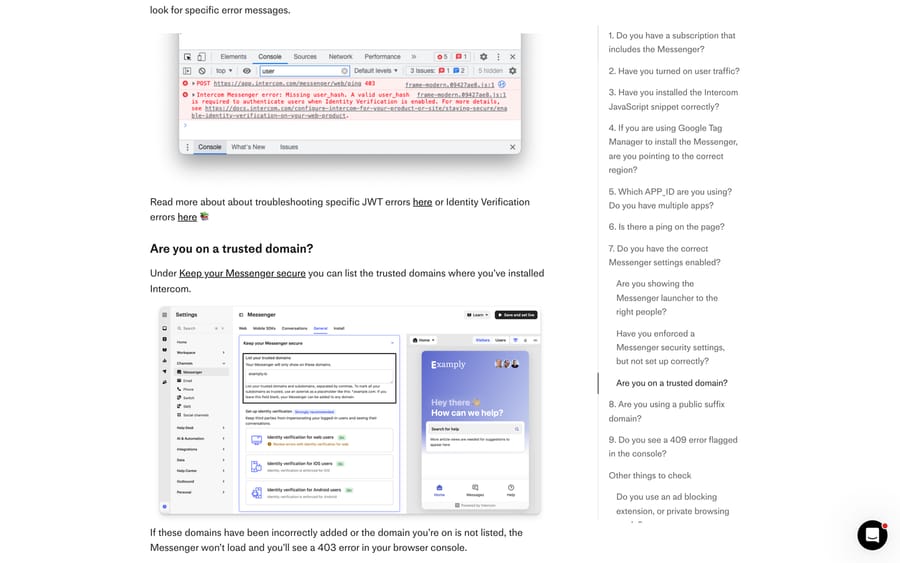
Check: the console. A 403 on POST .../messenger/web/ping accompanied by "Intercom Messenger error: Missing user_hash" is the signature of this one. A Customer Support Engineer gives the same diagnosis in the React thread above: if you enforce identity verification but want the Messenger visible to visitors and leads, the Messenger will not load and you'll get a 403.
Fix: either send a valid token for every logged-in user, or turn the enforcement off until you can. Three details decide which:
- Enforcement is configured separately for web, iOS and Android. Turning it off on web doesn't touch the mobile apps, and a half-migrated integration fails only on the platform you forgot.
- If your test session is a logged-out visitor and you've enforced verification for users, you've created a state the Messenger can't satisfy.
- Verbose failure logs and a token debugger live in your security settings.
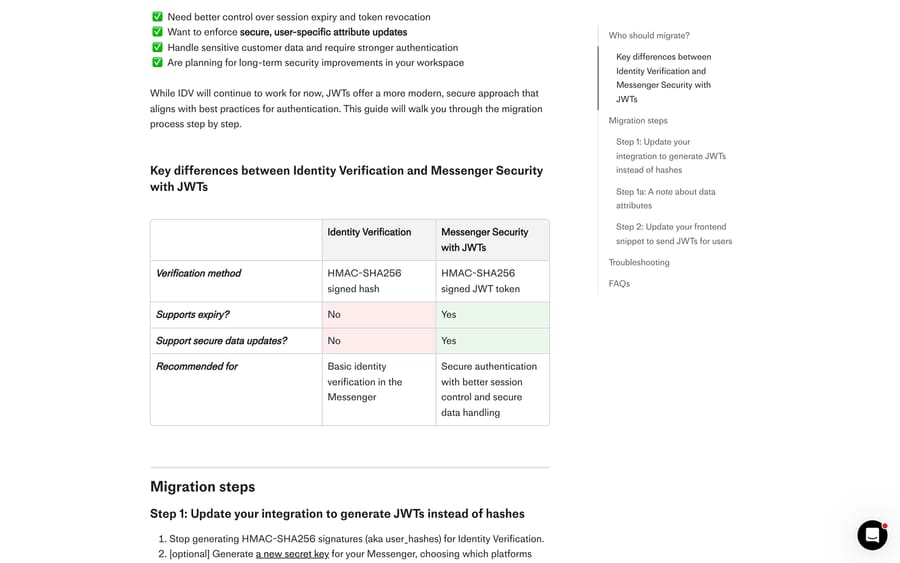
This is also the moment to notice that Identity Verification is deprecated. Intercom marks all three IDV articles [Deprecated] and its migration guide says JWTs are the recommended replacement, with IDV continuing to work "for now". The practical differences: both use HMAC-SHA256, but a JWT supports expiry and secure attribute updates and a user hash supports neither. Migrating means generating a signed token server-side with user_id in the payload and passing it as intercom_user_jwt in the boot call instead of user_hash. If you already have IDV working, the Messenger-not-showing bug is a reasonable moment to do the migration rather than repair the old path.
5. Is the domain on the trusted list?
Check: console, Network tab, filter for ping, open the Response tab. A 403 here with no user_hash complaint points at the domain.
Fix: under Keep your Messenger secure, list every domain and subdomain where Intercom is installed, separated by commas. An asterisk works as a wildcard for subdomains, as in *.example.com. Leaving the field blank allows any domain, which is why a working install can break the day someone tightens it. Staging domains and preview URLs from your host are the usual omissions.
6. Is an ad blocker or private browsing blocking the script?
Check: load the page in a clean browser profile with no extensions.
Fix: there isn't one you control. Intercom notes that some ad-blocking extensions block JavaScript with tracking functionality, which includes the Messenger. Blocklists are maintained by people whose interest is stopping trackers, and the Messenger ships in the same script family as the things they're blocking, so it gets caught by category rather than by name. The practical answer is to know the blind spot exists, keep a non-Messenger contact route on the page, and stop debugging your own code when a clean profile works.
7. Is the site on a public suffix domain?
Check: is the Messenger installed on something like yourapp.herokuapp.com or yourapp.firebaseapp.com?
Fix: move to your own domain. The Messenger needs a first-party cookie on your domain, and modern browsers refuse to set one on a registered public suffix. Intercom links the full public suffix list. This one is common on staging environments and then blamed on the staging build.
8. Is an EU or AU workspace pointing at the wrong region?
Check: is your workspace hosted in the EU or Australia, and was the Messenger installed through Google Tag Manager?
Fix: pass api_base with the regional value, https://api-iam.eu.intercom.io or https://api-iam.au.intercom.io. In a GTM install it goes in as a custom data attribute under the tracking-custom-data section. While you're in GTM, check the script sits in <head> and the tags are published; an unpublished container is its own silent failure.
9. What does a 409 in the console mean?
Check: a 409 error in the browser console.
Fix: 409 means conflict, and for the Messenger it almost always means two contacts share the email address you're booting with, so Intercom can't tell which one to log in. Archive or delete the duplicate, or boot with user_id as the unique identifier rather than email.
What else can stop the Messenger loading?
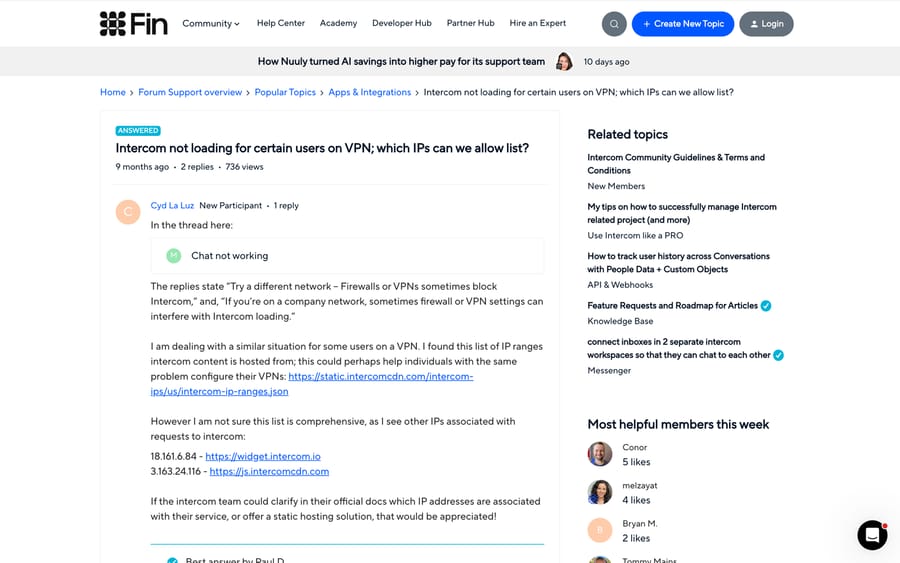
A corporate VPN or firewall. A community thread from December 2025 with 736 views asks which IPs to allowlist, and an Intercom Technical Support Engineer confirms the published region JSON at static.intercomcdn.com/intercom-ips/us/intercom-ip-ranges.json is the complete list. Worth knowing before you promise a fix: a later reply in the same thread reports adding every address to Proton VPN split tunneling and still being blocked.
Script conflicts in mobile web views. A thread from April 2026 describes a third-party script manager that works on desktop and stops the launcher initializing on mobile web. The suggested fix is ordering: load the Intercom snippet and window.intercomSettings before the other script, boot Intercom first, and wrap the competing initialization in a window.addEventListener('load', ...) handler. For a genuine native webview, Intercom's recommendation is the mobile SDKs rather than the web Messenger.
The WordPress plugin. If you're chatting to logged-out visitors, log out of the WordPress admin dashboard before you test. The plugin needs WordPress 4.2.0 and PHP 5.6 or higher, and it inserts the snippet into the footer element, so a theme without one needs the snippet added by hand.
One last thing that looks like a bug and isn't: the Messenger is deliberately hidden inside Intercom's own Inbox so it doesn't clash with the sidebar. Open it from another page in the app.
What order should you check things in?
- Console, Network, filter
ping, reload. No ping means the snippet; a 403 means a setting. - On a 403, read the Response tab. A
user_hashor JWT complaint is cause 4; silence on that front is cause 5. - No ping at all: check
app_id, snippet placement, and whether this is a single-page app. - Ping succeeds and still no launcher: check the audience rules and
hide_default_launcher. - Works for you, fails for one user: clean browser profile, then VPN, then 409.
If you can't get to Messenger settings at all, you're missing the Can access Messenger settings permission, which is its own five-minute detour.
How we researched this
We checked every path, error message and limit on this page against Intercom's help center on September 21, 2026, and re-checked the nine troubleshooting checks, the update throttle, the regional api_base values and the public suffix examples on September 24, 2026, using the Messenger troubleshooting article, the single-page-app integration guide and the JWT migration guide, plus three public community threads. We don't have an Intercom workspace or a site with the Messenger installed, so no cause was reproduced first-hand and no screenshot here is from our own console; the console image is Intercom's own.
For more on the Messenger as a channel, see our guide to Intercom for customer support and our Intercom shared inbox guide. If you're debugging the data going into the boot call, our Intercom API guide covers contacts and identifiers.
Frequently asked questions
Why is my Intercom Messenger not showing? Open the browser console and look for the ping request. No ping means the snippet isn't running: check that you replaced app_id with your workspace ID, that the snippet sits before the closing body tag, and that user traffic is on. A ping returning 403 means a Messenger setting is blocking it, usually trusted domains or enforced identity verification.
Why does the Intercom Messenger not work in React or Next.js? Because the standard snippet expects full page reloads. Use Intercom's single-page-app pattern: include the library in the head, boot on route entry with the user's details, call update on route changes, and shutdown on logout. Intercom also publishes framework npm packages under Settings, Channels, Messenger, Install.
What does a 403 on the Intercom ping mean? Either the domain you're on isn't in the trusted domains list under Keep your Messenger secure, or you've enforced a Messenger security setting without sending a valid token. Check the Response tab; a "Missing user_hash" message points at identity verification rather than the domain.
Is Intercom identity verification still supported? It works, but it's deprecated. Intercom marks its identity verification articles as deprecated and recommends Messenger Security with JWTs instead, which adds token expiry and secure attribute updates. Identity verification will "continue working for now", in Intercom's words.
Do ad blockers block the Intercom Messenger? Some do. Intercom says ad-blocking extensions that block JavaScript with tracking functionality can block the Messenger, and private browsing modes can have the same effect. There's no configuration on your side that changes this, so keep another contact route visible.
Why does the Messenger work on my site but not on staging? Two common reasons. Staging domains are often missing from the trusted domains list, and hosts like herokuapp.com and firebaseapp.com are public suffix domains where the Messenger can't set the first-party cookie it needs.
How many times can I call Intercom('update')? Twenty per user per page. Exceed that and you're throttled, with the quota resetting every 30 minutes; a page refresh also resets it. Intercom recommends calling update only where user data actually changed.
Why can't I see the Messenger inside Intercom itself? That's deliberate. Intercom hides the Messenger in parts of the Inbox so it doesn't clash with the sidebar. Open it from a different page in the app.
Sources: Troubleshooting when the Messenger doesn't appear · Integrate Intercom in a single page app · Migrating from Identity Verification to Messenger Security with JWTs · Messenger Button Does Not Appear, Using React/NextJS (Intercom Community) · Intercom not loading for certain users on VPN (Intercom Community) · Script execution conflict on mobile web views (Intercom Community)
Add AI agents to your Intercom
Macha reads the conversation, drafts the reply and takes the action, inside the Intercom you already run.