Intercom
 Shopify
 Stripe
 Slack
Slack Notion
 Google Workspace
 Confluence

How Do You Run Customer Support on Intercom in 2026? Inbox, Fin, SLAs, CSAT and Cost


Intercom combines a shared inbox and ticketing, the Messenger chat widget, the Fin AI agent, a Help Center, and Workflows for routing and SLAs in one support product. Here is how each layer works day to day, what it costs, and how to set up CSAT so surveys actually go out.
Key takeaways
- Running customer support on Intercom costs $29, $85 or $132 per seat a month billed annually, plus $0.99 per Fin outcome charged once per conversation.
- Intercom's 50-outcome monthly minimum for Fin applies when Fin runs on another help desk; on an Intercom plan Fin usage is pay-as-you-go after one full seat.
- Intercom never sends a CSAT survey if the conversation is under 250 characters or if neither side has replied within seven days of close.
- Intercom's Advanced plan at $85 a seat adds Workflows automation, multiple team inboxes, round-robin assignment and 20 free Lite seats, while SLAs sit on the $132 Expert plan.
- Salesforce completed its acquisition of Fin, formerly Intercom, on September 10, 2026, for roughly $3.6 billion, folding the technology into Agentforce.

Running customer support on Intercom means paying for help desk seats ($29, $85 or $132 per seat a month, billed annually) plus $0.99 per Fin outcome: customers reach you through the Messenger, email, WhatsApp, SMS or social, Fin answers first, and humans work the rest in a shared Inbox as tickets routed by Workflows and held to SLAs.
| Layer | What it does for support | Lowest plan |
|---|---|---|
| Messenger + channels | Intake from chat, email, phone, WhatsApp, SMS, Instagram, Facebook | Essential ($29) |
| Fin AI Agent | Resolves questions first, $0.99 per outcome | Every plan |
| Inbox + tickets | Shared human workspace; customer, back-office and tracker tickets | Essential ($29) |
| Workflows + round robin | Routing, assignment, automation | Advanced ($85) |
| SLAs | Response and resolution targets by rule | Expert ($132) |
| Help Center | Self-service, and the main source Fin answers from | Essential (private/multilingual on Advanced) |
| CSAT + CX Score | Survey ratings plus an AI estimate on unrated conversations | Every plan |
For the "what is this product and who makes it" overview, start with what is Intercom. This page is about using it for customer service. We checked every path, price and plan gate below against Intercom's own product and help pages on September 20, 2026, and rechecked prices on September 24, 2026.
How does a support operation on Intercom fit together?
Before the feature-by-feature tour, it helps to see the shape of a support operation on Intercom. A customer reaches you through the Messenger, or by email, WhatsApp, SMS, or social. Fin, the AI agent, takes first crack at resolving it. Anything Fin can't handle is handed off to a human in the Inbox, where it can be tracked as a ticket, routed by Workflows, held to an SLA, and answered faster with macros and Copilot. Your Help Center feeds both self-service and Fin. And reporting tells you how the whole thing is performing. Each layer below belongs to one of those stages.
What does the Intercom Inbox do for support agents?
The Inbox is where human support happens. It's an omnichannel shared inbox that pulls conversations from email, live chat, phone, WhatsApp, SMS, Instagram, and Facebook into one place, so agents aren't tab-switching between channels. Conversations can be assigned to teammates or team inboxes, tagged, snoozed, and worked with internal notes and side conversations for collaboration.
A few things make the Inbox stand out for day-to-day support work:
- Copilot. An AI assistant built into every agent's Inbox that surfaces instant answers, suggested replies, and summaries drawn from your knowledge. Intercom cites internal testing where agents using Copilot closed roughly 31% more conversations per day (treat that as a vendor figure, not a promise).
- AI translation. Messages are translated inline across 45+ languages, so an agent can serve customers in languages they don't speak.
- Full customer context. The conversation, the customer's attributes, past interactions, and any connected data sit in the right-hand panel, so reps answer with context instead of asking the customer to repeat themselves.
For the queue mechanics in depth, including assignment methods, away mode, snooze and auto-close, merging duplicates and macros, see the Intercom shared inbox guide.
When should a conversation become a ticket?
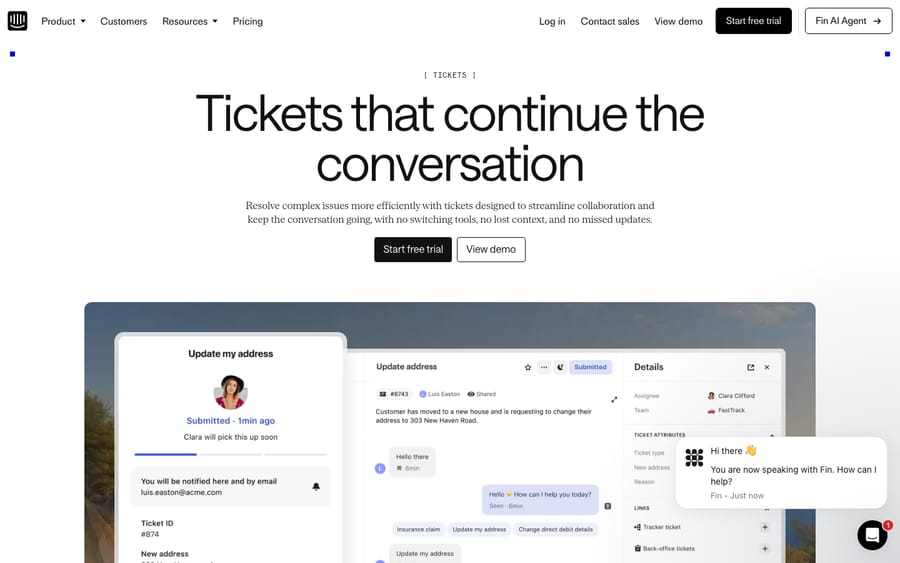
Live chat is great for quick questions, but real support needs tickets for issues that take time, involve a back-office team, or track a known bug across many customers. Intercom lets you turn any conversation into a ticket, which is then automatically categorized, prioritized, and routed to the right team with full context intact.
Intercom distinguishes three ticket types, and knowing the difference is the key to setting it up well:
- Customer tickets. Front-line issues a customer is waiting on, such as a refund request or a login problem.
- Back-office tickets. Work handled by a team that doesn't talk to the customer directly, such as engineering or billing ops, while the front-line agent keeps the customer updated.
- Tracker tickets. A single parent ticket, say a widespread outage, linked to many customer tickets, so you can update everyone affected at once when it's resolved.
This is the model that lets front- and back-office teams collaborate without losing the customer thread, and it's a meaningful step up from treating every conversation as a flat chat.
Which channels does Intercom support?
The Messenger is Intercom's signature chat widget, the bubble in the corner of a website or inside a mobile app. For support, it's the primary intake channel: customers ask in real time, can be shown relevant help articles before they even reach an agent, and stay in one continuous conversation thread. Because Intercom grew up messenger-first, the in-app chat experience is genuinely best-in-class.
Around the Messenger, Intercom is omnichannel: email, phone, WhatsApp, SMS, Instagram, Facebook, and Slack all land in the same Inbox and can be handled by the same agents, and the same AI. For a support team, that means one queue and one set of metrics instead of siloed channels.
How does Fin resolve tickets, and when are you charged?
Fin is the centerpiece of doing support on Intercom in 2026. It's an autonomous AI agent that resolves customer questions end to end across channels. Not just deflecting with an article link, but reading from and writing to connected systems, answering multi-step questions, completing workflows like a refund or an account update, and escalating to a human when it isn't confident. It runs on Intercom's proprietary Apex model, purpose-built for support.
Fin is included on every plan but billed by usage at $0.99 per outcome, charged once per conversation even if Fin answers several questions in it. On an Intercom plan Fin usage is pay-as-you-go; the 50-outcome monthly minimum applies when you run Fin on another help desk. The charge lands when Fin actually resolves a conversation, defined on Fin's own pricing page as "no further help is requested after Fin's last answer," and also when it completes a handoff you configured. Salesforce's completion announcement cites an average resolution rate of 76%; treat that as a vendor average, not your number, because real-world resolution depends heavily on your Help Center content and how repetitive your ticket mix is. For the full mechanics of how Fin works, what counts as an outcome, and how to tune it, see Intercom Fin AI explained.
Why does the Help Center matter so much for Fin?
Intercom includes a Help Center, a knowledge base where customers find answers on their own. On higher plans it can be private (login-gated) and multilingual. Two reasons it matters more than it looks:
- Deflection. Every question a customer self-serves is one your team never touches.
- It's Fin's brain. The same articles that power self-service are the primary source material Fin draws on to answer automatically. A thin or outdated Help Center caps your AI resolution rate, no matter how good the model is.
Practical takeaway: investing in clear, current help content is the single highest-return thing you can do, because it pays off three times, in self-service, in Fin's resolution rate, and in Copilot's suggestions to your agents.
How do Workflows, assignment and SLAs work?
This is the automation layer that keeps a queue from descending into chaos.
Workflows is Intercom's visual, no-code automation builder. Workflows run on inbound conversations to deflect, triage, and route them, and run in the background to assign, close, and apply SLAs automatically. You build them by chaining conditions and actions. For example: if the customer is on the Pro plan and spends over $500/month, apply the priority SLA and route to the senior team.
Assignment and routing sit inside Workflows. You can assign teammates to specific inboxes and let Workflows route conversations to them, and for live queues Intercom recommends balanced assignment, routing each conversation to the most available, relevant agent so nothing piles up on one person.
SLAs are also configured through Workflows. When a conversation matches an SLA rule, agents see the nearest target right in the Inbox, and SLA metrics surface in the conversation details. SLAs are how you guarantee, say, a one-hour first response for VIP customers and keep the team accountable to it. Note that SLAs and round-robin assignment live on the higher plans, covered in pricing below.
What can Intercom macros do?
Macros are Intercom's saved replies, canned responses for the questions your team answers over and over. But they're more than text snippets: a macro can also trigger follow-up actions in one click, such as assigning or re-assigning the conversation, changing a ticket's state, or applying tags. Building a tight library of macros for your top 20 repeat questions is one of the fastest ways to cut handle time and keep answers consistent across the team.
How do reporting, CSAT and the CX Score work?
Intercom's reporting ships with 12 pre-built reports covering the standard support use cases: volume, response and resolution times, team performance, and AI performance. On the Advanced and Expert plans you can build custom reports with a chart library, advanced filters, and time-period comparisons.
For satisfaction, you get classic CSAT via conversation ratings and survey templates, plus separate Fin CSAT so you can see how customers rate AI-resolved conversations specifically. Intercom also offers an AI-generated CX Score that estimates satisfaction across every conversation, without sending a survey, by scoring signals like answer quality, customer effort, and strong emotion. That's useful because survey response rates are usually low, and the CX Score gives you a read on conversations customers never rated.
CSAT is the part of this section teams most often get wrong, usually by switching it on and then wondering why so few surveys go out. Here is the actual setup, and the gates that silently suppress it.
Turning CSAT on: the simple automation
The basic switch is not in a settings menu called Settings. It lives at Fin AI Agent > Simple automations, under For User or For Lead, in the section "Ask for conversation rating (CSAT)". Toggle it on and it takes effect immediately, with the first request going out the next time a qualifying conversation closes (Intercom docs).
The survey itself is a five-emoji scale. Your reported CSAT percentage is the top two options divided by every rating received, so four positive ratings out of ten responses reads as 40%. Worth knowing before you compare Intercom's number to a five-star average from another tool, because it is a different calculation, not a different result.
Two settings worth reviewing at the same time. You can prevent customers from rating after a given period of time, and prevent customers from changing their rating after a given period of time, both specified in hours. And a workspace admin can hide the CSAT widget from the conversation stream entirely under Settings → General, which removes it from agents' view while the data keeps flowing to reporting as normal. That last one is a management decision rather than a technical one, and it cuts both ways: agents who cannot see their scores cannot self-correct, but agents who watch every score in real time tend to start chasing them.
The gates that stop a survey going out
If you turned CSAT on and the volume looks far lower than your closed-conversation count, it is almost certainly one of these two rules rather than a bug:
- The conversation must be over 250 characters, including spaces. Short exchanges never get a survey.
- If neither side has replied in seven days, no rating request is sent on close. This is the one that bites teams who bulk-close a stale queue, because a cleanup pass generates no CSAT at all.
Both are deliberate, and both are why your response count and your close count will never line up.
Sending CSAT on close with a Workflow
The simple automation is fine for a blanket policy. When you want CSAT on some conversations, or want to act on a bad score, build it as a Workflow instead, which also bypasses the seven-day gate above (Intercom docs).
- Go to Workflows, choose + New Workflow, and build from scratch.
- Pick the category "During conversation only" and the trigger "If teammate changes the conversation state." In the trigger settings, select the Closed state, so it fires only when a teammate closes the conversation.
- Use the Audience section to narrow it: specific teams, channels, tags, or a boolean attribute. This is how you survey your VIP tier and leave everyone else alone.
- Click + Add Step and choose "Ask for conversation rating."
- If you want to branch on the answer, open the step and enable "Wait for customers to give a rating before continuing." Then add a condition such as "If Conversation Rating is less than Ok" and hang the recovery off it: a follow-up question, a tag, a reassignment to a lead, or a Slack notification.
- Set it live.
Step 5 is the one worth the effort. A CSAT score you only read in a monthly report is a metric; a CSAT score that routes an unhappy customer back to a human the same hour is a process. WhatsApp is the exception to watch, because its 24-hour messaging window still applies.
Fin CSAT and the CX Score
Keep the AI and human numbers apart. Fin CSAT reports on AI-resolved conversations specifically, which is the only way to tell whether a falling overall score means your content is stale or your team is stretched. The CX Score then fills the gap both surveys leave, by scoring conversations nobody rated. Read it as a trend rather than a number: it is a model's estimate, and it will move when Intercom changes the model.
What do well-run Intercom support teams do differently?
A few things consistently separate teams that get value from Intercom from those that just pay for it:
- Invest in the Help Center first. It's the ceiling on both self-service deflection and Fin's resolution rate. Audit and refresh it before you blame the AI.
- Let Fin take the first line, deliberately. Configure what Fin is allowed to handle and where it must escalate. Don't set it loose on sensitive flows without guardrails.
- Build macros for your top repeat questions. Pull your most common tags or topics and write a macro for each, with the follow-up action attached rather than just the text.
- Use Workflows for routing and SLAs, not manual triage. Manual assignment doesn't scale, so encode your rules once.
- Route bad CSAT, don't just record it. A Workflow that branches on a low rating turns the survey into a recovery path.
- Watch the per-outcome line, not just seats. Fin billing scales with volume, so review outcome counts monthly the way you'd review any usage-based cost.
- Report on Fin and humans separately. Track Fin CSAT and resolution alongside human metrics so you can tell where to improve content versus staffing.
How much does running support on Intercom cost?
Intercom uses a two-part model that matters for budgeting: a per-seat subscription plus a per-outcome fee for Fin. Per seat, per month, billed annually, checked on September 20, 2026:
| Plan | Price (per seat/mo, billed annually) | What you get for support |
|---|---|---|
| Essential | $29 (moved from $19 in September 2026) | Messenger, Inbox, tickets, public Help Center, Fin |
| Advanced | $85 | Multiple team inboxes, Workflows automation, round-robin, custom reports, private/multilingual Help Center, 20 free Lite seats |
| Expert | $132 | Advanced security, SLAs, and management controls for larger teams |
Month-to-month billing costs more on every plan: the structured pricing data on Intercom's page lists $39 for Essential, $99 for Advanced and $139 for Expert, and the page says annual billing saves up to 26%. Essential is the one to watch. Its annual rate showed $19 on September 20, 2026 and $29 on September 24, 2026, so Intercom has either raised it or is still testing it. Advanced and Expert held steady across both checks. The minimum to start is one full seat, and there is a 14-day free trial with no credit card. Check the number on intercom.com/pricing on the day you budget rather than trusting any figure written down, ours included.
On top of seats, Fin costs $0.99 per outcome on every plan and is pay-as-you-go on Intercom, with hard limits available to cap spend. Run Fin on a different help desk instead and a 50-outcome monthly minimum applies. Common add-ons: Copilot at $29 per teammate a month (every agent gets 10 Copilot conversations a month free), Proactive Support Plus at $99/mo including 500 messages, and the Pro add-on at $99/mo, which covers analysis of 1,000 conversations a month. Fin Voice is sold through sales at $1.99 per voice outcome. Free "Lite" seats exist for occasional collaborators. The full math and edge cases are in Intercom pricing explained.
The incentive worth naming: a per-outcome AI price and a per-seat subscription pull in opposite directions. Fin resolving more means a bigger usage bill and a smaller headcount bill, which is a genuinely good trade for most teams, but it means the vendor is not neutral about which line grows. Model both at your real volume before you decide the AI is saving you money.
Who is Intercom a good fit for, and where does it fall short?
Intercom is a strong fit if you:
- Run a digital-first, product-led business where customers live inside a web or mobile app.
- Want real-time chat and omnichannel support in one queue.
- Are ready to lean into AI resolution as your default first responder.
- Value a fast, modern, well-designed product over a deeply configurable enterprise one.
The honest watch-outs:
- Cost at scale, and cost predictability. The seat-plus-per-outcome model makes budgets harder to forecast than a flat per-agent help desk, and add-ons (Copilot, Proactive Support Plus, Pro analysis) stack up quickly. High-volume teams should model the Fin bill carefully.
- Complexity. Intercom is broad, spanning Messenger, tickets, Workflows, outbound, and AI in one product. Teams that only want a straightforward email-and-phone help desk can find it more than they need, with a real setup and learning curve.
- Plan gating. Key support features, including SLAs, custom reports, round-robin, and the private or multilingual Help Center, sit on the higher plans, so the real cost is often above the entry price.
- New ownership. Covered below.
Put plainly: Intercom is for teams whose customers ask questions inside a product. It is the wrong fit if your volume is mostly phone and email against deep custom forms and long approval chains, where a configurable enterprise help desk will fight you less.
Where does an AI agent layer fit alongside Intercom?
One reality worth understanding before you commit: a platform's native AI is excellent at deflecting repetitive questions and assisting agents, but some teams want autonomous resolution layered onto a help desk they already run, without re-platforming.
That's the category Macha sits in, an AI agent layer that runs on top of an existing help desk, reading the customer's actual question, drawing on your connected knowledge and conversation history, and resolving in-thread, with a full-context handoff to a human when it isn't confident. Two honest caveats, because this is a guide and not an ad: Macha runs on Zendesk, Freshdesk, Gorgias, Front, HubSpot or Intercom, so it can work your Intercom inbox, but it is not a replacement for Intercom the platform. And like any AI agent, it's only as good as the knowledge you connect it to. On Intercom, Fin is the native version of this autonomous-resolution layer, built in rather than bolted on. If your ticket mix is mostly repetitive questions, pricing is one plan on monthly ticket volume, from $299 a month for up to 750 tickets, billed per ticket rather than per message (pricing page), with $50 of free usage to try it, no credit card.
What does Salesforce's acquisition of Fin change for Intercom customers?
One development to factor into any 2026 decision. Salesforce completed its acquisition of Fin, the company formerly known as Intercom, on September 10, 2026, folding its technology and team into Agentforce. The definitive agreement was signed on June 15, 2026 at roughly $3.6 billion (Salesforce press release, TechCrunch). A separate event people conflate with it: the company renamed itself from Intercom to Fin on May 12, 2026, before the deal was signed, and Intercom remains the name of the help desk. Practically, the product continues, but its roadmap, pricing, and packaging are now shaped inside Salesforce, which is worth weighing if you're committing to it as your support platform.
Frequently asked questions
Is Intercom good for customer support? Yes, especially for digital-first, product-led teams. It combines a shared omnichannel inbox, ticketing, a best-in-class chat Messenger, a strong AI agent (Fin), self-service, and the workflow, SLA and reporting tooling a support team needs. The main trade-offs are cost predictability, since you pay for seats plus per-outcome Fin billing, and a breadth that can be more than a simple help desk needs.
How does Intercom's help desk work? Conversations from chat, email, and other channels land in a shared Inbox. Fin attempts to resolve them first; anything it can't handle goes to a human, who can convert it into a ticket, route it via Workflows, hold it to an SLA, and answer faster with macros and Copilot. Reporting then tracks volume, resolution times, and CSAT.
How do I set up a CSAT survey in Intercom? Two ways. For a blanket policy, toggle "Ask for conversation rating (CSAT)" on at Fin AI Agent > Simple automations, under For User or For Lead; it takes effect immediately. For anything conditional, build a Workflow: + New Workflow, from scratch, category "During conversation only", trigger "If teammate changes the conversation state" set to Closed, narrow it in the Audience section, then add the "Ask for conversation rating" step and set it live.
Why isn't Intercom sending my CSAT surveys? Two built-in gates account for almost all of it. The conversation must be over 250 characters including spaces, and no rating request is sent if neither side has replied in seven days, which is why bulk-closing a stale queue produces no CSAT. A Workflow-based survey on conversation close bypasses the seven-day rule.
Can I act on a bad CSAT score automatically in Intercom? Yes, but only via a Workflow. On the "Ask for conversation rating" step, enable "Wait for customers to give a rating before continuing," then branch on a condition such as "If Conversation Rating is less than Ok" and attach the recovery: a follow-up question, a tag, a reassignment, or a Slack notification.
What's the difference between a conversation and a ticket in Intercom? A conversation is the live chat or message thread. A ticket is a structured record for issues that need tracking over time or across teams. Any conversation can be turned into a ticket, and Intercom has three types, customer, back-office, and tracker, so front- and back-office teams can collaborate without losing the customer thread.
Does Intercom have SLAs and routing? Yes, and both are configured through Workflows. You can auto-assign conversations, with Intercom recommending "balanced assignment" for live queues, and apply SLA targets by rule, with the nearest target shown in the agent's Inbox. SLAs and round-robin sit on the higher plans.
How much does Intercom cost for a support team? Billed annually, plans are $85 (Advanced) and $132 (Expert) per seat per month, with the entry Essential plan at $29 (it showed $19 four days earlier), plus $0.99 per Fin outcome on every plan. Monthly billing costs more ($39, $99 and $139), so check the live figure. Add-ons like Copilot ($29 per teammate/mo) and Proactive Support Plus ($99/mo) cost extra. See Intercom pricing explained.
Is there a minimum spend on Intercom? One full seat. Fin is pay-as-you-go on an Intercom plan; the 50-outcome monthly minimum applies only when Fin runs on another help desk such as Salesforce or HubSpot.
Has Intercom been acquired? Yes. Salesforce completed its acquisition of Fin, formerly Intercom, on September 10, 2026, at roughly $3.6 billion, with the technology folding into Agentforce.
What should you set up first on Intercom?
Set up the layers in this order. Running customer support on Intercom means orchestrating these layers: the Messenger for intake, Fin for automated resolution, the Inbox and tickets for human work, Workflows, SLAs, and macros for keeping the queue sane, the Help Center for self-service, and reporting to measure it all. It's a genuinely strong, modern stack, best suited to digital-first teams ready to push AI resolution hard, and it prices accordingly, with a per-seat subscription plus $0.99 per Fin outcome that rewards results but makes budgets harder to predict. Invest in your Help Center, let Fin take the first line with guardrails, encode routing and SLAs in Workflows, set CSAT up so it both measures and recovers, and watch the per-outcome line as closely as the seat count. And factor in the headline 2026 change, Salesforce's completed acquisition, before you commit for the long term.
Sources:
- Measure customer satisfaction with conversation ratings, Intercom Help
- Configuring and sending a CSAT survey when a conversation is closed, Intercom Help
- Analyze and report on Fin AI Agent CSAT, Intercom Help
- Intercom pricing, Intercom
- Fin pricing, Fin
- Salesforce completes acquisition of Fin, Salesforce newsroom
Verified against Intercom's official help desk, reporting, and help-center documentation and primary press coverage on September 20, 2026; prices and add-ons rechecked on intercom.com/pricing and fin.ai/pricing on September 24, 2026. Intercom revises packaging and pricing periodically, so confirm current figures before relying on them.
Add AI agents to your Intercom
Macha reads the conversation, drafts the reply and takes the action, inside the Intercom you already run.