Intercom
 Shopify
 Stripe
 Slack
Slack Notion
 Google Workspace
 Confluence

How Does the Intercom API Work in 2026? Auth, Rate Limits, Pagination and the 8 Calls Support Teams Use


The Intercom REST API runs on a bearer token at https://api.intercom.io with a pinned Intercom-Version header, and 2.16 (released 15 July 2026) is the current version. Most integrations break on four things: the wrong credential, the wrong region, the 10-second rate-limit window and the two pagination shapes.
Key takeaways
- The Intercom REST API uses a bearer token at https://api.intercom.io and a pinned Intercom-Version header, with 2.16, released 15 July 2026, as the current version.
- Intercom allows 10,000 API calls a minute per app and 25,000 per workspace, but enforces them in 10-second windows, so an app can burst only about 1,667 calls per window.
- Intercom list endpoints take per_page and starting_after as query parameters, search endpoints nest them in a pagination object, and both default to 20 and cap at 150 per page.
- Version 2.16 made qualified_id mandatory in the Reporting Data Export enqueue call, a breaking change that can quietly fail an existing nightly export job.
- Fin costs $0.99 per outcome, and the 50-outcome monthly minimum applies only when Fin runs on a help desk other than Intercom.

The Intercom REST API takes a bearer token at https://api.intercom.io, expects a pinned Intercom-Version header (2.16 is current, released 15 July 2026), and allows 10,000 calls a minute per app, enforced in 10-second windows of about 1,667 calls each. Cursor pagination tops out at 150 records per page.
| Question | Short answer |
|---|---|
| Which credential? | Access token for your own workspace; OAuth for anyone else's |
| Which version? | 2.16 (15 July 2026), set per request with Intercom-Version |
| Rate limit? | 10,000 a minute per app, 25,000 per workspace, about 1,667 per 10 seconds |
| Page size? | Default 20, maximum 150, cursor only |
| Regions? | US, EU (api.eu.intercom.io) and Australia (api.au.intercom.io) |
| Plan needed? | None: API access is on every plan |
How do I make a working Intercom API call in 60 seconds?
Three headers and one host get you a working call:
curl https://api.intercom.io/me \
  -H 'Authorization: Bearer <YOUR_ACCESS_TOKEN>' \
  -H 'Accept: application/json' \
  -H 'Intercom-Version: 2.16'
/me returns the admin and the workspace the token belongs to, including a region field. That one call answers the two questions that cause most first-day failures: is this token live, and which region is this workspace in.
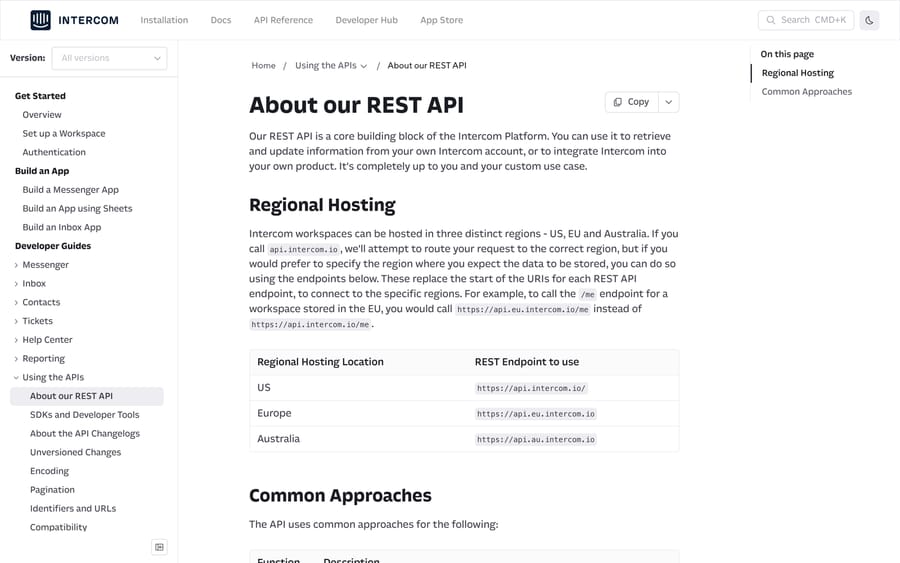
Workspaces are hosted in the US, the EU or Australia. Intercom's REST API overview says a call to api.intercom.io is routed to the right region, and publishes https://api.eu.intercom.io and https://api.au.intercom.io for calls you want pinned. If you run one integration across customer workspaces in several regions, pin the host per workspace and store it next to the token.
Should I use an access token or OAuth?
There are two, and the choice is structural rather than a preference.
- An access token, for anything that only touches your own workspace. Create an app in your workspace, then read the token from Developer Hub › your app › Configure › Authentication. Intercom's authentication guide says to treat it like a password; it carries whatever permissions the app has.
- OAuth, for anything that touches somebody else's workspace. This is the route for a public app in the App Store, and the only sanctioned way to get access to a customer's data.
The OAuth flow is a standard authorization-code exchange with two details worth knowing before you build it. The authorization host is regional: app.intercom.com/oauth for the US, app.eu.intercom.com/oauth for the EU, app.au.intercom.com/oauth for Australia. Send an EU customer to the US host and they are asked to pick their region on the sign-in page; send an EU customer who signs in with Google to the US host and it fails outright, per Intercom's OAuth setup guide.
The token exchange is a POST to https://api.intercom.io/auth/eagle/token carrying code, client_id and client_secret. The response includes both token and access_token, which are the same string. Intercom's own docs flag the trap: the code in your redirect URL can end in =, and dropping it returns a 401 with Unauthorized Code.
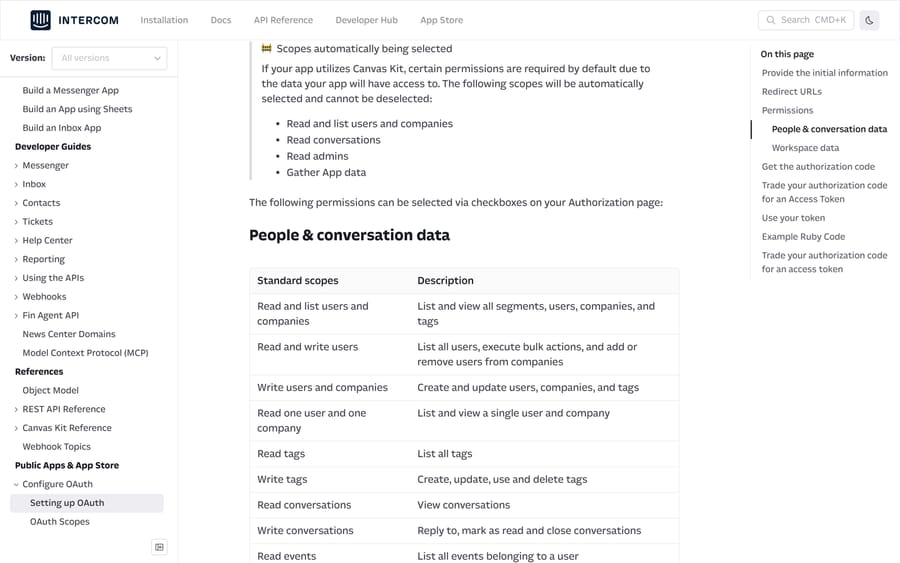
Scopes are granular and split into "People & conversation data" and "Workspace data". Reading conversations and replying to them are separate permissions: Read conversations views them, Write conversations covers replying, marking as read and closing. Tickets are separate again, with Read tickets and Write tickets. Request the narrow set, because the list you ask for goes to Intercom's app review.
Plan gates
Intercom does not put the REST API behind a seat tier the way some help desks do, and API access is available across its plans. Seat pricing is the gate that actually affects you, because a teammate who needs to see the results usually needs an inbox seat. Essential, the entry plan, is $29 a seat billed annually ($39 monthly); Intercom has also shown $19 in a pricing test on the same page. Advanced is $85 annually ($99 monthly) and Expert $132 ($139 monthly). The full breakdown is in our Intercom pricing guide.
Which Intercom API version should I pin?
Every Intercom app has a version selected in the Developer Hub, and every request can override it with an Intercom-Version header. Intercom's version guide is explicit that the header wins over the app setting, which makes the header the safer place to do an upgrade: ship the new version and the code that handles it in the same deploy, then move the app setting afterwards.
Intercom's changelog index dates the recent versions as 2.16 on 2026-07-15, 2.15 on 2026-02-10 and 2.14 on 2025-08-15. The version number moves by 0.1 per release, breaking changes are confined to a new version, and Intercom's definition of breaking includes renaming a response field or adding a validation rule to an existing parameter.
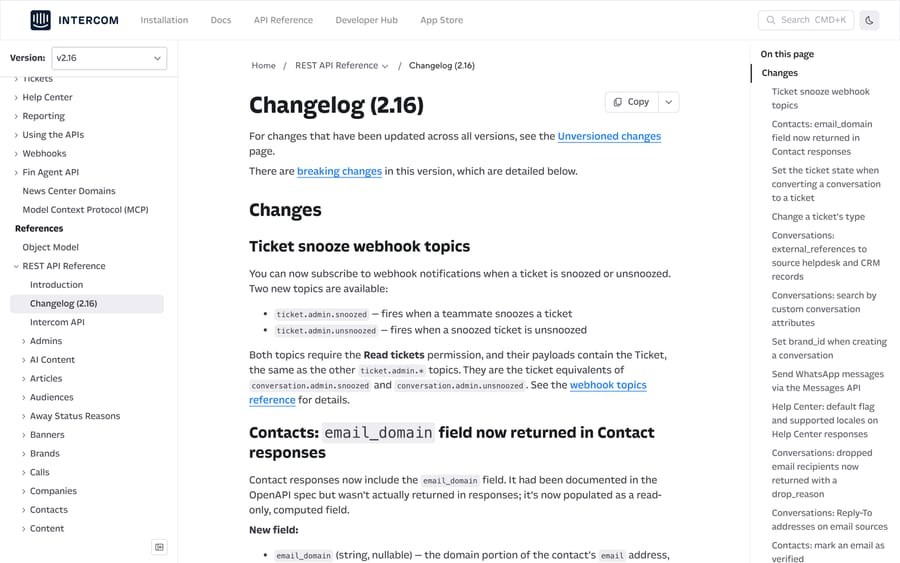
The July 2026 release is worth reading before you upgrade, because several changes touch the conversation object that support integrations lean on. The 2.16 changelog adds:
external_referenceson conversations, listing the source record a synced conversation came from, with types includingzendesk_ticket,salesforce_case,freshdesk_ticketandhubspot_conversation, capped at 20 entries.channel, an object withinitialandcurrent, so channel-mix reporting stops being guesswork.- Custom conversation attributes as searchable fields on
POST /conversations/search, addressed ascustom_attributes.{attribute}. drop_reasonon email recipients, naming why a message was not delivered (user_bounced,user_suppressed,user_not_contactableand others), where previously those recipients were omitted.ticket.admin.snoozedandticket.admin.unsnoozedwebhook topics, and a newPOST /tickets/{id}/change_type.- A breaking change in the Reporting Data Export API: the
enqueuecall now requires the namespacedqualified_id(conversation.Brand) instead of the bareid.
That last one is the kind of change that fails quietly in a nightly job, so check any reporting export before you move an app to 2.16.
What are the Intercom API rate limits, and how do they count?
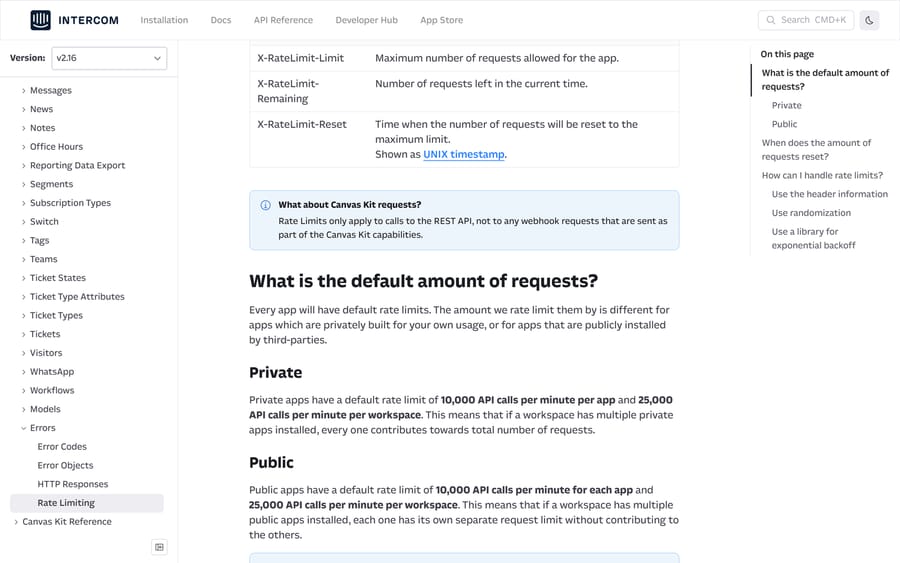
Intercom's rate limiting reference publishes the same headline figure for both app types: 10,000 API calls a minute per app, and 25,000 a minute per workspace. The difference is how they pool. Private apps installed on one workspace all draw on that workspace's 25,000; public apps each get their own allowance and don't contribute to one another.
The number that catches people is not the per-minute figure. Intercom splits the minute evenly into 10-second windows, so the real ceiling is a sixth of the headline: a 10,000-a-minute app can burst about 1,667 calls in any 10 seconds and no more. A backfill script that fires 4,000 requests in the first second of a minute gets 429s even though it is well inside the minute's budget.
Three headers come back on every response:
| Header | What it holds |
|---|---|
X-RateLimit-Limit | The maximum requests allowed for the app in the current window |
X-RateLimit-Remaining | Requests left in the current window |
X-RateLimit-Reset | UNIX timestamp for when the window resets |
Exceeding the limit returns 429 Too Many Requests with the same three headers and X-RateLimit-Remaining: 0. The practical recipe is to read X-RateLimit-Remaining on every response, pause until X-RateLimit-Reset when it drops under a floor you set, and add randomized backoff on top so that parallel workers don't retry in lockstep. Intercom says higher limits are available on request through the messenger in their dashboard.
One clarification from the same page that saves an hour of confusion: rate limits apply to REST calls only. Canvas Kit requests that Intercom sends to your app are not counted.
How does Intercom API pagination work?
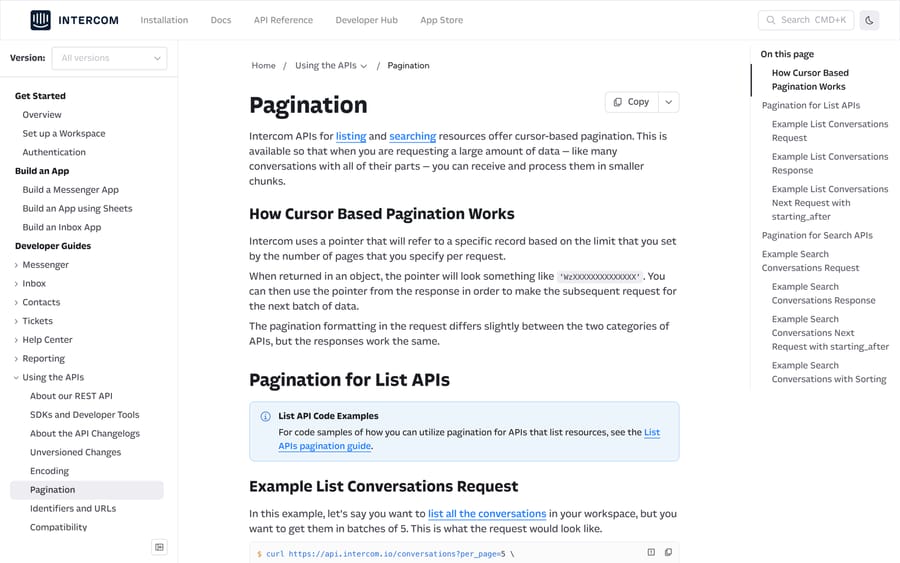
Intercom's pagination overview uses cursors everywhere, but the request shape depends on which family of endpoint you're calling.
List endpoints take query parameters:
curl 'https://api.intercom.io/conversations?per_page=50' \
  -H 'Authorization: Bearer <TOKEN>' \
  -H 'Intercom-Version: 2.16'
Search endpoints nest the same two values in a pagination object inside the POST body:
curl -X POST https://api.intercom.io/conversations/search \
  -H 'Authorization: Bearer <TOKEN>' \
  -H 'Content-Type: application/json' \
  -H 'Intercom-Version: 2.16' \
  -d '{
    "query": { "field": "updated_at", "operator": ">", "value": "1758412800" },
    "pagination": { "per_page": 150 }
  }'
Both return the same pages object, and the only field you should branch on is pages.next:
{
  "pages": {
    "type": "pages",
    "page": 10,
    "per_page": "5",
    "total_pages": 11,
    "next": { "page": 11, "starting_after": "Wy0xLCI2NWU3NGYyYmY2ZGFhMTcwNTA1NTE1MGYiLDld" }
  },
  "total_count": 53
}
per_page defaults to 20 and maxes out at 150 on both families. You cannot jump to page 7; you walk the cursor until next disappears.
Four things about that walk are worth building for:
- The cursor is stateless. Intercom's own page says so plainly: records updated between your requests can appear twice or be missed entirely. For a nightly sync, sort by an immutable field or accept that you will need to de-duplicate on
id. - Build the next URL fresh. Intercom's list pagination tutorial appends
&starting_after=…to the previous URL on each iteration, so the sample's URL accumulates another copy of the parameter every loop. Reconstruct the query string each time and you never have to find out which copy the server reads. total_pagesis a function ofper_page. It moves when you change the page size, so it is not an object count.total_countis the count.- Search has hard nesting limits. The search conversations reference allows a maximum of 2 nested filters and 15 filters inside any one AND or OR group. Deeper logic belongs in your code.
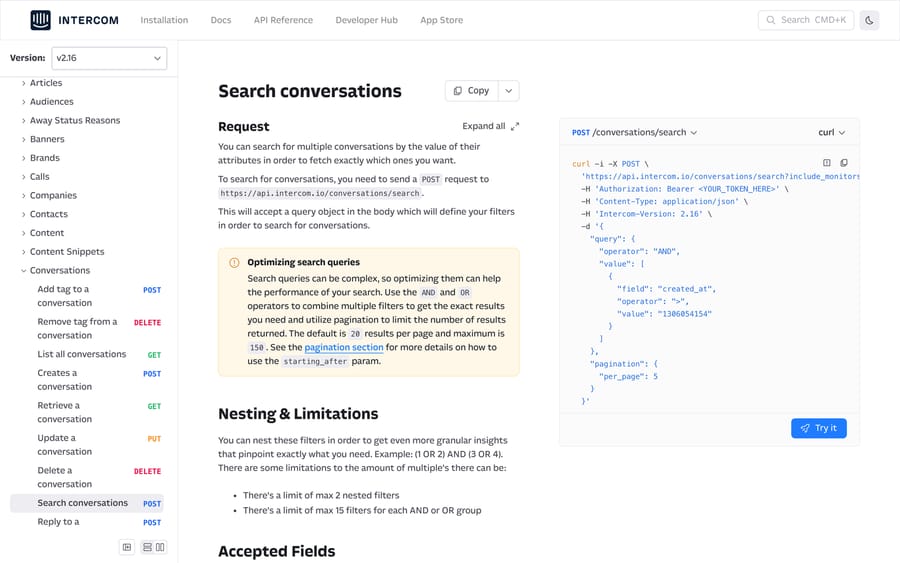
The searchable field list is where this endpoint earns its place. Beyond state, open, tag_ids, admin_assignee_id and team_assignee_id, you can filter on the statistics block (statistics.time_to_admin_reply, statistics.count_reopens, statistics.first_close_at) and on Fin's own outcome fields: ai_agent_participated, ai_agent.resolution_state, ai_agent.last_answer_type and ai_agent.rating. A weekly "conversations Fin touched that a human then reopened" report is one search call plus a cursor loop.
One quirk on source.body: the search matches each element of the value separately rather than the whole string, so a conversation opening "I need support" is returned by = with the value support and not by = with the value need support.
Which eight API calls does a support team actually use?
Most support integrations are built from a small set. These are the ones that come up repeatedly, with the shape rather than the full parameter list, which lives in Intercom's reference.
| # | Call | What it's for |
|---|---|---|
| 1 | GET /me | Verify a token and read the workspace region |
| 2 | POST /conversations/search | Pull a filtered slice: open, tagged, unassigned, Fin-handled |
| 3 | GET /conversations/{id} | Fetch one conversation with its parts |
| 4 | POST /conversations/{id}/reply | Post a reply or an internal note as an admin or a user |
| 5 | POST /conversations/{id}/parts | Assign, snooze, close or open, via the manage operation |
| 6 | POST /contacts/search | Find contacts by email, external ID, attribute or created date |
| 7 | POST /conversations/{id}/tags | Tag a conversation for reporting and for view filters |
| 8 | GET /admins and GET /teams | Resolve assignee IDs to names before you report on them |
Two habits make these safer. Store workspace_id alongside every id you cache: Intercom's identifiers page says IDs are unique only within a workspace, and a contact and a company can share one. And follow the must-ignore rule from Intercom's compatibility page: drop fields you don't recognize instead of failing on them, because new response fields ship inside minor versions.
If you're building something that writes back into conversations rather than reading from them, our guides on custom Intercom integrations and building an AI agent for Intercom cover the write path and the tool-calling patterns in more detail than belongs here.
Should I poll the API or use webhooks?
A search-and-poll loop is the obvious way to keep an external system in step, and it's the wrong default. At one poll a minute across three searches you burn 4,320 calls a day to notice events that Intercom would have pushed to you for free, and you still inherit the stateless-cursor problem. Webhooks carry the object in the payload, and topics like conversation.user.replied, conversation.admin.replied and ticket.state.updated cover most of what a poller is looking for. Poll when you need a reconciliation pass, push for everything else.
Can I use the API to migrate to or from Intercom?
Two of the strongest search queries landing on this site are about moving data between Intercom and Zendesk in both directions, and the API is how that gets done for anything past a few thousand conversations. The export side is POST /conversations/search walked with a cursor, then GET /conversations/{id} for the parts; the 2.16 external_references field is useful in the other direction, because a conversation synced in from Zendesk now tells you which ticket it came from.
Two constraints shape the plan. Intercom's cursor is stateless, so a multi-day export needs a stable sort and de-duplication on id. And the 10-second sub-window means a migration script has a real ceiling of roughly 1,667 calls per 10 seconds however generous the per-minute number looks. Our Intercom to Zendesk migration guide covers the mapping decisions; this page covers the mechanics.
If the reason you're looking at the API is that Fin's per-outcome billing makes automation costs hard to forecast, that's a pricing question rather than an API one. Fin is $0.99 per outcome, and the 50-outcome monthly minimum applies only when Fin runs on a help desk other than Intercom. Fin's pricing page counts a resolution and a completed Procedure handoff to a human as outcomes, so the meter also runs on conversations that still reach a person; a conversation simply passed to your team without an outcome is not charged. Salesforce completed its acquisition of Fin on 10 September 2026, and the price has not changed since. Macha is priced the other way, per ticket rather than per outcome, from $299 a month for up to 750 tickets, and it fits teams whose tickets already live in Zendesk, Freshdesk, Gorgias, Front, HubSpot or Intercom. It layers on top of a desk rather than replacing one. The numbers are on our pricing page.
How did we research this?
We checked every figure, path and header on this page against developers.intercom.com on September 21, 2026, and re-checked the version list, rate limits and pricing on 24 September 2026 (intercom.com/pricing and fin.ai/pricing), across the REST API overview, authentication and OAuth guides, the rate limiting reference, the pagination overview and both pagination tutorials, the versioning guide, the changelog index and the 2.16 changelog, and the conversation search reference. We do not have an Intercom workspace, so nothing here was executed against a live token, and no figure in this post came from our own measurement. Where we describe behavior we could not test, we say which page states it.
Frequently asked questions
What is the Intercom API rate limit? Private and public apps both default to 10,000 calls a minute per app and 25,000 a minute per workspace. Private apps on one workspace share that 25,000; public apps each get their own allowance. Intercom splits the minute into 10-second windows, so the working ceiling is about 1,667 calls per 10 seconds on a 10,000 app. Exceeding it returns a 429.
How do I get an Intercom API key? Create an app in your workspace, open Developer Hub, select the app, and read the access token under Configure, Authentication. Send it as Authorization: Bearer <token>. Use OAuth instead if the integration needs to reach anyone else's workspace.
Which Intercom API version should I use? 2.16 is the current default, released July 15, 2026. Set it per request with an Intercom-Version header, which overrides the version selected on the app in Developer Hub, then change the app setting once the new version is live in production.
How does Intercom API pagination work? With cursors. List endpoints take per_page and starting_after as query parameters; search endpoints nest the same fields in a pagination object in the POST body. Both return a pages object, and you keep going while pages.next is present. Default page size is 20, maximum 150.
Can I search conversations by custom attribute? Yes, from version 2.16. Use the field name custom_attributes.{attribute} in a POST /conversations/search query. Earlier versions only accept the standard conversation fields.
Does the Intercom API have different URLs for the EU? Yes. US workspaces use https://api.intercom.io, EU workspaces https://api.eu.intercom.io and Australian workspaces https://api.au.intercom.io. Calls to the US host are routed for you, but pinning the regional host is the safer build. The OAuth authorization host is regional too.
Should I poll the API or use webhooks? Webhooks for events, the API for reconciliation. A one-minute poll across three searches costs 4,320 calls a day to learn things Intercom would have pushed, and the search cursor is stateless, so polling also needs de-duplication.
What changed in the July 2026 Intercom API release? Version 2.16 added external_references and channel to conversations, custom-attribute search, drop_reason on undelivered email recipients, two ticket snooze webhook topics and a change-ticket-type endpoint. It also made qualified_id mandatory in the Reporting Data Export enqueue call, which is the change most likely to break an existing job.
Do I need a particular Intercom plan to use the API? No. API access is available on Essential, Advanced and Expert. The cost that matters is seats: Essential is $29 a seat billed annually, Advanced $85 and Expert $132.
Sources: About our REST API · Authentication · Setting up OAuth · Rate Limiting · Pagination · Use Pagination with List APIs · Update your API version · About the API Changelogs · Changelog (2.16) · Search conversations · Identifiers and URLs · Compatibility · Intercom pricing · Fin pricing
Add AI agents to your Intercom
Macha reads the conversation, drafts the reply and takes the action, inside the Intercom you already run.