Intercom
 Shopify
 Stripe
 Slack
Slack Notion
 Google Workspace
 Confluence

What Are the Most Common Zendesk Problems? 12 Fixes for Admins (2026)


Most Zendesk faults come down to about a dozen causes, from SSO and email forwarding to triggers, SLAs, the AI agent and API errors. Find your symptom in the table, run the one-minute check, then follow the link to the dedicated guide if the quick fix doesn't clear it.
Key takeaways
- The twelve most common Zendesk problems each have a first check that takes under a minute, such as opening the Suspended tickets view when customer emails aren't becoming tickets.
- A Failed to deliver notice under a comment in the Agent Workspace means Zendesk sent the message and the receiving server refused it, while no outbound email at all means no trigger fired.
- Zendesk triggers fire top to bottom on the same update, so a trigger listed above another can change a ticket's fields and stop the lower trigger's conditions from matching.
- Zendesk API scripts failing with 401 need email/token:API_TOKEN for Basic auth, 422 errors name the field in the details object, and 429 errors require honoring the Retry-After header.
- Entering your subdomain at status.zendesk.com shows your pod's current incidents and a 90-day service history, which a global green banner cannot tell you.
Most Zendesk problems trace to one of twelve causes, and the first check for each takes under a minute: the Suspended tickets view for inbound mail that never became a ticket, the delivery notice under a comment for outbound mail, the active-trigger list for rules that stopped, and status.zendesk.com with your subdomain for outages.
Which Zendesk problem do you have?
| Symptom | Most likely cause | Section |
|---|---|---|
| Nobody can sign in | SSO or password policy change, or an agent suspension | 1. Login |
| Customer emails aren't becoming tickets | Forwarding broken, or the mail is in Suspended Tickets | 2. Email in |
| Your replies never reach the customer | SPF, DKIM or DMARC missing on the sending domain | 3. Email out |
| A rule that worked for months does nothing | Trigger deactivated, condition drift, or run order | 4. Triggers |
| Agents or customers stop getting notified | The notification trigger, or a missing placeholder | 5. Notifications |
| A macro won't apply, or applies the wrong thing | Visibility restriction, or an inactive macro | 6. Macros |
| The Web Widget won't load on your site | Snippet placement, or a Content Security Policy block | 7. Widget |
| SLA timers look wrong | Business hours, or the first-reply clock definition | 8. SLAs |
| The AI agent never answers | Trigger conditions, channel scope, or thin knowledge | 9. AI agent |
| Scripts fail with 401, 422 or 429 | Auth header format, field validation, or rate limits | 10. API |
| Everything is broken at once | A Zendesk incident on your pod | 11. Outage |
| The account is slow or refusing uploads | Attachment and storage limits | 12. Storage |
A note on labels before you start. Zendesk renames things, and the docs follow: its voice troubleshooting article is now titled "Issues with Zendesk Voice (formerly Talk)", so a runbook that says Talk is not out of date, just out of vocabulary. Admin Center paths change less often than product names do.
1. Why can't anyone log in?
The most common cause is a change nobody connected to the symptom: SSO was reconfigured, a password policy tightened, or the agent in question was suspended or downgraded. The second most common is simpler, which is that the person is signing in at the end-user help center URL instead of the agent interface.
The check. Try a different account on the same URL, then the same account in a private window. If one account fails and others work, it's that user's role or suspension state. If every account fails at the same step, it's SSO or a policy.
The fix. For a single user, check their profile in the team member list for suspension and role. For everyone, check the SSO configuration and whether the identity provider's certificate expired, which is the failure that looks like a Zendesk outage and isn't. Can't log in to Zendesk is the full diagnostic, including the password-reset loop and the two-factor cases.
2. Why aren't customer emails becoming tickets?
The most common cause is forwarding: the external address stopped forwarding into Zendesk, or the forwarding service strips headers Zendesk needs. The second is the spam filter, which suspends the mail rather than dropping it, so the evidence is still there.
The check. Open the Suspended tickets view first, because it takes ten seconds and answers the question. Mail that arrived and was held shows there with a reason. If the view is empty, the mail never reached Zendesk, and the fault is upstream in forwarding.
The fix. Recover a suspended ticket to teach the filter, and check the forwarding rule at the source mailbox. Zendesk states that it does not support email aliases, distribution lists or Google Groups as support addresses, which is the configuration that most often looks correct and isn't. Zendesk email not creating tickets walks the whole path.
3. Why are replies landing in spam, or never arriving?
Two different failures share one complaint. Either Zendesk never sent the message, or it sent it and the receiving server filed it as junk.
The check. Look under the comment in the Agent Workspace. A "Failed to deliver" notice means the send happened and was refused. No outbound email at all means no trigger fired, and DNS is not your problem yet.
The fix. For a refusal or a junk-folder landing, the cause is nearly always authentication on the sending domain: an SPF record that doesn't include mail.zendesk.com, missing DKIM CNAMEs, or no DMARC policy. Fix those three in that order. Google has required DMARC from anyone sending more than 5,000 messages a day to Gmail since 1 February 2024. If the junk started suddenly and your configuration didn't change, suspect sending reputation, which is where the inbound relay-spam problem bleeds into the outbound one: how to stop Zendesk spam emails covers closing that hole.
4. Why did a trigger that worked for months stop?
The most common cause is that somebody deactivated it, and the second is condition drift, where a tag or field the trigger depends on was renamed elsewhere.
The check. Go to Admin Center › Objects and rules › Business rules › Triggers, filter to active, and confirm yours is in the list. Then open it and read its conditions against a ticket that should have matched.
The fix. Reactivate, or repair the condition that no longer matches reality. Run order is the third cause and the hardest to see: triggers fire top to bottom on the same update, so a trigger above yours that changes a field can stop yours matching. Zendesk triggers not firing has the debugging sequence, including reading the ticket's own events log.
5. Why aren't notifications going out?
Usually the same root as section 4, because notifications in Zendesk are triggers. The distinct cause here is the one that leaves no trace: an email notification whose body has had all its placeholders removed.
The check. Open the notification trigger and look at the email body. Zendesk requires at least one placeholder for the notification to send at all.
The fix. Put a placeholder back. Then confirm the default conditions are intact: Ticket > Ticket | Is | Updated and Ticket > Comment | Is | Public. Zendesk notifications not sending covers the agent-side cases too, including group membership and CC settings.
6. Why aren't macros working?
The most common cause is visibility: the macro is restricted to a group the agent isn't in, so it exists but they can't see it. The second is that it was deactivated rather than deleted.
The check. Ask the agent to search for the macro by name. If it doesn't appear for them and does for you, it's a visibility restriction, not a broken macro.
The fix. Widen the macro's availability, or add the agent to the group. If the macro appears but sets the wrong values, check whether a trigger is overwriting the field immediately after. Why your Zendesk macros aren't working covers both, plus the nested-macro naming rules.
7. Why won't the Web Widget show on your site?
The most common cause is the snippet: it was placed in the wrong part of the page, or a tag manager is injecting it after the page has finished loading. The second is a Content Security Policy that blocks Zendesk's domains.
The check. Open your browser console on the page where it should appear. A blocked script logs a CSP violation naming the domain it refused. If there's no error and no widget, the snippet isn't on the page.
The fix. Move the snippet into the head, or allowlist Zendesk's domains in your CSP. Zendesk Web Widget not showing covers the full list of causes, including the widget being switched off for a brand.
8. Why are SLA timers calculating wrong?
Almost always business hours, and specifically an SLA policy set to calendar hours when the team works business hours, or the other way around. The second cause is a misunderstanding about which events pause a first-reply timer.
The check. Open a ticket whose SLA looks wrong and compare its timestamps against the schedule assigned to its policy. A ticket created at 6pm Friday with a Monday-morning breach is doing exactly what calendar hours ask it to.
The fix. Set the policy to the right hours and confirm the schedule's holidays are current. Zendesk SLA not calculating correctly covers the pause conditions, which are where most of the remaining confusion lives.
9. Why does the AI agent never answer?
The most common cause is scope: the AI agent is enabled for a channel the ticket didn't arrive on. The second is knowledge, where the help center simply has no article that answers the question.
The check. Send a test question through the exact channel the customers use, not through the one that's easiest to test. Then search your own help center for the same question and see what comes back.
The fix. Widen the channel scope, then fix the knowledge gap, in that order. Why your Zendesk AI agent isn't triggering covers both, and the gap between what the agent can answer and what customers ask is usually the larger of the two problems.
10. Why do scripts fail with 401, 422 or 429?
Three different faults that get reported as "the API is broken". A 401 means the credential didn't authenticate, and the usual cause is a missing /token suffix on the Basic auth username. A 422 means the data failed validation, and the response body names the field. A 429 means you hit a rate limit.
The check. Log the status code, the response body and the response headers on every failure. Those three carry the answer for all three errors.
The fix. For 401, use email/token:API_TOKEN for Basic auth and Bearer for OAuth. For 422, read the details object. For 429, honor the Retry-After header and make fewer calls. Zendesk API errors and rate limits has the worked examples and the per-plan limits.
11. What if everything broke at once?
If every agent, every ticket and every view is failing simultaneously, stop debugging your configuration and check whether Zendesk is up.
The check. Go to status.zendesk.com and enter your subdomain, because Zendesk hosts accounts on isolated pods and an incident can hit yours while sparing everyone else's. A global green banner is not an answer for your account. Per Zendesk's status page article, clicking Check shows your pod's current incidents and a 90-day service history by product.
The fix. There isn't one on your side, which is the point. Subscribe to status notifications for your subdomain, post a customer-facing note, and leave your settings alone until the incident clears. Zendesk status and how to check it covers the pod model and the outage runbook.
12. Why is the account slow, or refusing attachments?
The most common cause is a limit rather than a fault: per-attachment size caps and account storage allowances both bite quietly, and the error message is not always specific about which one you hit.
The check. Compare the file size against your plan's attachment limit before assuming a bug, and check the account's storage usage in Admin Center.
The fix. Either compress the file, or clear old data under a deletion schedule. Worth naming the incentive before you reach for the upgrade button: storage allowance scales with plan tier, so the path the vendor is optimizing for when you run out is a bigger subscription, while the cheaper path is a retention policy you own. Managing Zendesk storage limits covers the limits themselves and how to see usage before it becomes a ticket.
Where does an AI agent layer fit?
Half of the list above is configuration, and no amount of AI fixes a DNS record or a deactivated trigger. The parts it does touch are sections 9 and, indirectly, 2 and 5: triage, routing and the repetitive tickets that make a queue too big to keep clean.
Macha is an AI agent layer on top of your existing Zendesk, resolving repetitive tickets inside the ticket itself. It fits teams already running Zendesk, Freshdesk, Gorgias, Front, HubSpot or Intercom, and it's the wrong fit if what you need is a help desk rather than a layer on one. Setup and monitoring are done by the Macha team on every plan. The pricing page has the numbers, and the ten most common Zendesk setup mistakes is the better read if your instance is new and misbehaving for structural reasons.
How we researched this
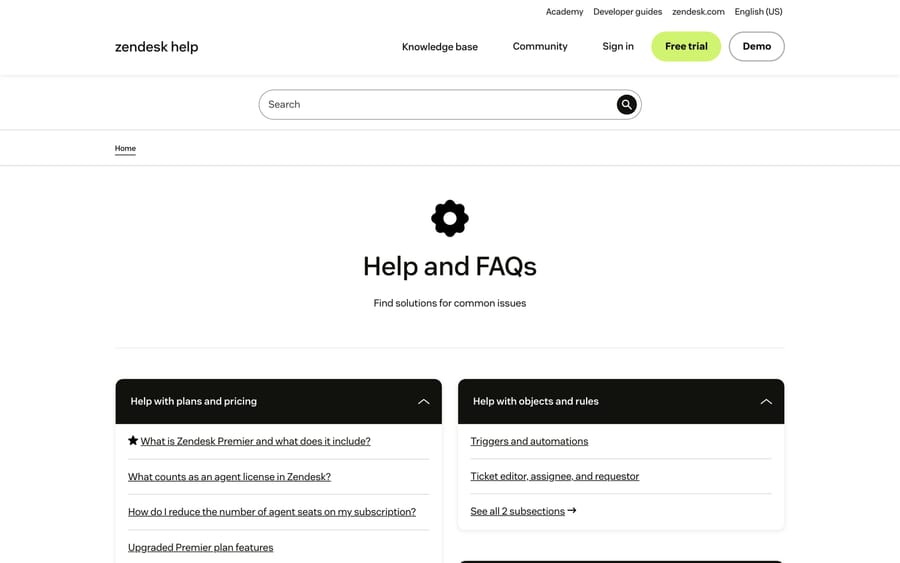
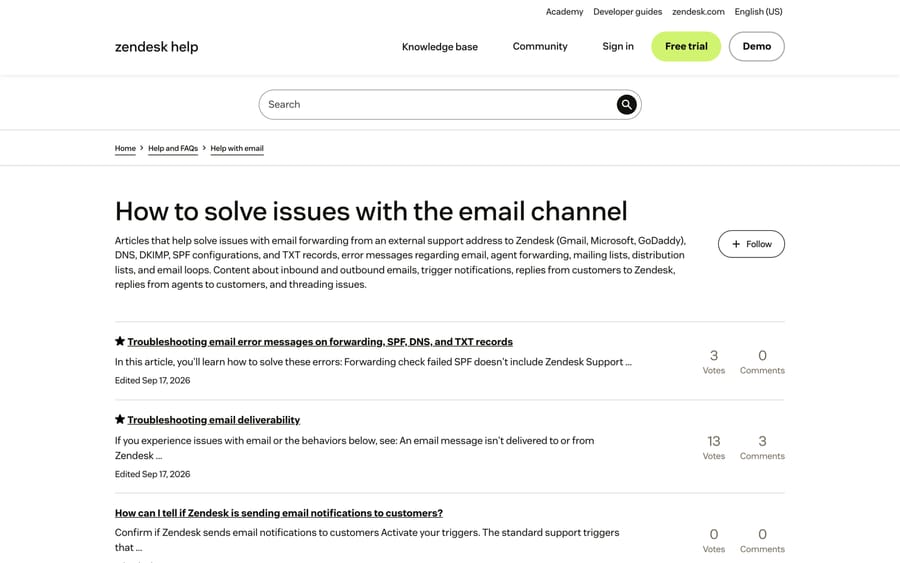
We checked each admin path and label against Zendesk's current documentation on 20 September 2026, rechecked the status-page steps on 24 September 2026, and captured two of its own index pages as the screenshots above. The section order reflects how often each symptom shows up across the fourteen dedicated Zendesk problem guides we maintain and the sections Zendesk itself publishes for troubleshooting. Where a fix depends on a plan tier, the linked guide states it; this page stays at the level of the check that identifies the cause.
Frequently asked questions
Why is Zendesk not working today? Check whether it's Zendesk or you before anything else. Go to status.zendesk.com and enter your subdomain, because accounts sit on isolated pods and an incident can affect yours alone. If your subdomain is green, test from another network and in a private window, then work out whether one feature is broken or all of them. One broken feature with everything else fine is almost never a platform outage.
What are the most common Zendesk problems? In rough order of how often admins hit them: login and SSO failures, email not creating tickets, outbound replies landing in spam, triggers that stopped firing, notifications not sending, macros that agents can't see, the Web Widget not loading, SLA timers calculating against the wrong schedule, the AI agent not answering, and API errors. Each has its own section above.
Where is the Zendesk troubleshooting section in Admin Center? There isn't a single troubleshooting screen. The checks are spread across the areas that own each object: Admin Center › Objects and rules › Business rules › Triggers for rules, Admin Center › Channels for email and messaging, and the Suspended tickets view in Support for inbound mail that was held.
Why did my Zendesk trigger stop working? Usually because it was deactivated, or because a field or tag it depends on was renamed somewhere else, so its conditions no longer match. Run order is the third cause: triggers fire top to bottom on the same update, and one above yours can change the ticket so that yours no longer matches. Check the ticket's own events log to see what actually ran.
Why are my Zendesk emails going to customers' spam folders? The sending domain isn't authenticating. Add mail.zendesk.com to your SPF record, add Zendesk's two DKIM CNAMEs, and publish a DMARC policy. If nothing in your configuration changed and delivery got worse anyway, the likelier cause is damaged sending reputation, which is what an inbound relay-spam incident does to a domain.
Is Zendesk down or is it just me? Enter your subdomain at status.zendesk.com. Because of pod isolation, an incident can take down your account while another company's Zendesk runs normally, so the per-subdomain check is the only one that answers your question. If your pod is green and you're still broken, it's your network, your browser session or one integration.
Does Zendesk have a troubleshooting guide of its own? Yes. Its Help and FAQs category and its per-channel sections cover email, live chat, voice and account issues, and they're the right place for a plan-specific or account-specific answer. This page is the faster route when you have a symptom and want the likely cause first.
How should you approach any Zendesk fault?
Work symptom first, cause second, and resist the urge to change settings while you're still guessing. The table at the top of this page routes twelve symptoms to a first check that takes under a minute, and nine of the twelve are resolved by that check plus one setting. The two that aren't are an outage, where the correct action is to stop touching things, and sending reputation, which recovers over weeks rather than minutes. If you run more than one help desk, the same index exists for Front and Freshdesk.
Sources:
- Zendesk Help and FAQs
- Zendesk: How to solve issues with the email channel
- Zendesk: Troubleshooting email deliverability
- Zendesk: Creating ticket triggers for automatic ticket updates and notifications
- Zendesk: Monitoring your account status with the Zendesk Status page
- Zendesk: Troubleshooting Issues with Zendesk Voice (formerly Talk)
Add AI agents to your Zendesk
Macha reads the ticket, drafts the reply and takes the action, inside the Zendesk you already run.