Intercom
 Shopify
 Stripe
 Slack
Slack Notion
 Google Workspace
 Confluence

Why Isn't My Zendesk AI Agent (Answer Bot) Triggering?


Answer Bot is now Zendesk AI agents, and when one stays silent the cause is usually a missing channel connection or an agent that was saved but never published. Work down the ranked causes below, from channel setup to plan gating, and stop at the one that matches.
Key takeaways
- A Zendesk AI agent usually fails to trigger because it isn't connected to the channel as the default responder, or because it was saved but never published.
- Publishing a Zendesk AI agent to email auto-creates one trigger and two automations: a Generative reply trigger, a bump automation and a solve automation.
- Zendesk legacy autoreplies with articles went legacy on July 31, 2025 and stop working on December 10, 2026, so email deflection still using them needs an AI agent.
- Zendesk lists AI agents on Suite Team and above, and the separate AI agents - Advanced add-on only applies to accounts that bought it before 10 March 2026.
- Since 18 May 2026 each Zendesk seat earns a monthly allowance toward AI agent usage, capped at $5,000 a year, on top of the plan's automated resolutions.
A Zendesk AI agent (the product that replaced Answer Bot) usually fails to trigger because it isn't connected to the channel as the default responder, or because it was saved but never published. The next most common causes are no published, public Help Center articles and a deactivated email autoreply trigger. Most have nothing to do with the AI itself.
| Symptom | Most likely cause | Where to check |
|---|---|---|
| Widget opens, bot never speaks | Agent not connected to the messaging channel, or not published | Admin Center → AI → AI agents |
| Bot talks but never offers articles | No published, public articles in the right brand and language | Guide, article visibility settings |
| Email tickets get no AI reply | The auto-created "Generative reply" trigger is off or too narrow | Objects and rules → Triggers |
| Bot hands off instantly | Business-hours branch or early transfer step in the flow | The AI agent's flow |
| Menus from a setup guide are missing | Plan, legacy product, or no automated-resolution allowance | Your plan and the About AI agents article |
The sections below rank the causes by how often they're the real culprit, with a way to confirm and fix each.
What does "not triggering" actually look like?
"Not triggering" covers a few distinct failures, and naming yours narrows the cause fast:
- The bot never speaks in the widget. The messaging window opens but the AI agent doesn't greet or respond — usually a channel-connection or publish problem.
- It responds but never suggests articles. The bot talks, but it never offers help-center content — usually a knowledge problem (no published, public articles it can reach).
- Email tickets get no autoreply. Customers email in and get a human queue, no AI-generated reply — usually the trigger that invokes the autoreply is off or its conditions aren't met.
- It hands off to a human immediately. The bot appears, then instantly routes to an agent — usually a flow/business-hours branch sending conversations straight to people.
Hold onto which of these matches you; each section below maps to one or more.
What should you check first?
Before changing anything, gather three facts. They eliminate most causes at once:
- Which channel? Messaging (widget/app), email (including API and web form), or voice. Zendesk lists all three as AI agent channels, but they're configured and debugged differently.
- Is the agent Published — not just Saved? This single distinction is the most common real-world cause. A bot, flow, or answer can be saved and look complete while being unpublished, in which case it does nothing live.
- Do you have published, public Help Center articles? Open your help center in an incognito window. If you can't read articles while signed out, neither can the bot.
Now work down the ranked list and stop when one matches.
What are the causes, ranked by likelihood?
1. The AI agent isn't connected to the channel (or messaging is off)
This is the number-one cause of a silent widget. An AI agent only responds on channels it's actually assigned to, and messaging has to be turned on in the first place.
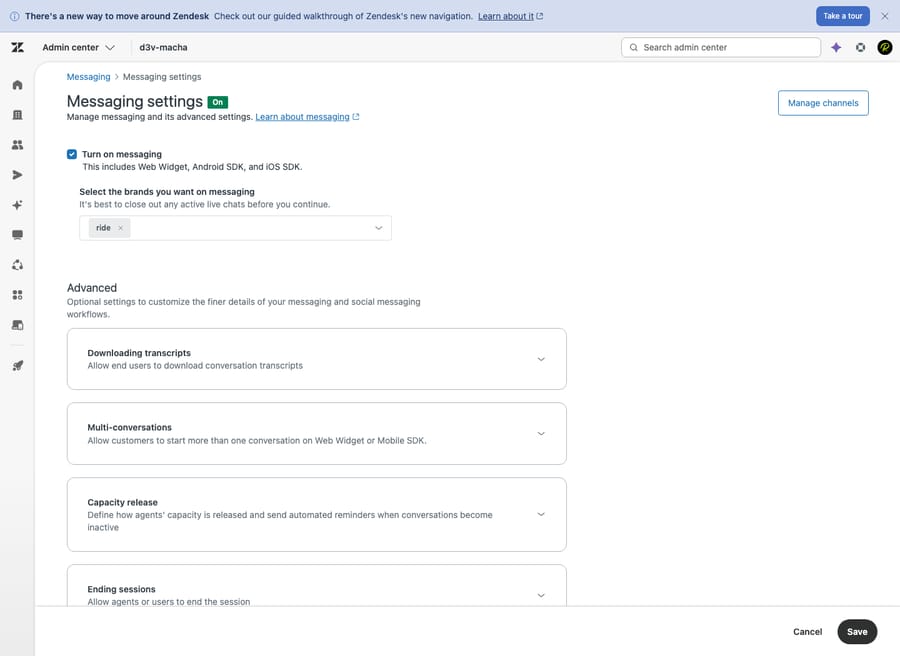
Confirm: In Admin Center, go to Channels → Messaging and social → Messaging and check messaging is on for the brand in question. Then go to AI → AI agents → AI agents. Zendesk automatically assigns the AI agent carrying the default label as the responder for any new channel — but if you created the channel before the agent, or run multiple brands, that link may not exist. If your account bought the AI agents - Advanced add-on before 10 March 2026, open AI agents - Advanced, find the Channels section, and confirm your messaging channel/brand is selected; Zendesk's docs say those older agents must have been created with the messaging channel type.
Fix: Connect the agent to the channel and set it as the default responder for that messaging channel, then click Publish — selecting channels without publishing doesn't take effect. Zendesk documents this flow in Setting an AI agent as the default responder for a messaging channel (written for pre-March 2026 Advanced buyers) and Managing AI agents connected to messaging channels. This is the Messaging settings page where it all starts:
One more real-world variant worth ruling out: if the widget itself doesn't load (so the bot never gets a chance to speak), a browser ad-blocker or privacy extension may be blocking Zendesk's scripts — a frequently reported cause of "it works for me but not for customers." Test in a clean incognito window with extensions disabled.
2. No published Help Center articles (or Guide isn't active)
An AI agent that deflects with article suggestions needs published, public knowledge to suggest from. If your help center is empty, in draft, or switched off, the bot has nothing to surface — so it stays quiet or jumps to a human.
Confirm: Check that Guide is active and that you have published articles, not drafts. Then load the help center while signed out (incognito) and confirm articles are readable.
Fix: Publish your core articles and make sure Guide is enabled for the brand. Either way the bot needs published, public content to work from: the legacy article-recommendation autoreplies surface help-center articles in the reply (Zendesk recommends at least 10 articles covering common questions before turning them on), while modern AI agents generate answers grounded in that same published knowledge — both fall flat with a thin or unpublished knowledge base. See Optimizing your help center content for AI agents. If your knowledge base is thin or disorganized, that's the root fix, not a bot setting; our guide to building a Zendesk knowledge base walks through structuring content the bot can actually match.
3. Articles are restricted, or in the wrong brand or language
A subtler version of the knowledge problem: the articles exist and are "published," but the bot still can't surface them because of who they're visible to or where they live.
Confirm: Check the visibility on the articles the bot should be using. If they're restricted to signed-in users or a specific user segment, an anonymous customer in the widget — and the bot acting on their behalf — can't see them. Also confirm the articles belong to the same brand the AI agent serves, and that they exist in the customer's language.
Fix: For deflection content, set article visibility to public/everyone. Move or duplicate articles into the brand the agent is connected to. The brand point matters in multi-brand accounts especially: an agent published to the wrong brand won't respond even when everything else looks correct — Zendesk's brand and channel configuration is where you verify the mapping.
4. The flow or answer isn't published (or has no matching intent)
A bot that opens but never gives a useful response often has unpublished answers, or answers with no training that matches what customers actually type.
Confirm: In the bot builder, check that each answer/flow shows Published, not Saved. Then look at the training phrases / intents behind your answers — vague or near-duplicate intents make recognition fail, so the bot can't decide which answer applies and defaults to nothing (or a handoff).
Fix: Publish the flow. Tighten intents so each answer has distinct, realistic example phrases, and remove duplicates that dilute matching. After every change, re-publish and test with the exact wording a customer would use. (New to this? Our step-by-step AI agent / Answer Bot setup guide covers building and publishing answers from scratch.)
5. For email autoreplies: the trigger that invokes the bot is off
Email is wired differently from messaging. When you publish an AI agent to an email or web form channel, Zendesk automatically creates one trigger and two automations: the trigger (named "Generative reply for <AI agent's name>") sends the initial AI-generated reply, a "[GenAI] Bump on autoreply with generative AI" automation follows up to check it solved the issue, and a "[GenAI] Solve on autoreply with generative AI" automation sets the ticket to Solved. If that trigger is deactivated — or its conditions don't match the incoming ticket — no autoreply ever sends.
Confirm: In Admin Center, check Objects and rules → Business rules → Triggers for the AI agent's autoreply trigger and confirm it's active. Inspect its conditions against a real incoming ticket — a too-narrow condition (specific brand, channel, group, or tag) silently excludes most tickets.
Fix: Reactivate the trigger and loosen conditions so qualifying tickets actually meet them. Zendesk documents the exact rules created in Reference: Default ticket trigger and automations created for AI agents on the email channel, and the broader setup in Configuring email autoreplies to recommend articles — note this article-recommendation autoreply went legacy on July 31, 2025 and Zendesk says it stops working on December 10, 2026. If your email deflection still runs on it, move to an AI agent on the email channel before that date. One caution that bites: an overly broad separate trigger that solves or reassigns tickets first can intercept the conversation before the autoreply runs.
6. The bot hands off too early (business-hours or flow routing)
If the AI agent appears and instantly routes to a person, the bot is technically "working" — it's just been told to step aside. The usual culprits are a business-hours branch ("outside hours → transfer to agent") or a flow step that escalates before attempting an answer.
Confirm: Walk your flow in the bot builder and look for early transfer/handoff steps. Check whether business hours are configured such that off-hours conversations skip straight to a queue. Note the related routing trap: if conversations route to an agent group that's offline or at capacity, they get stuck looking unanswered.
Fix: Reorder the flow so the bot attempts to answer (and offer articles) before any handoff, and reserve escalation for the explicit "talk to a human" path or low-confidence cases. Adjust business-hours branches so the bot still deflects off-hours instead of dumping everyone into an empty queue.
7. Language mismatch: the customer's language has no content
AI agents respond in the customer's language only when there's content and configuration to support it. If a customer writes in a language your bot and help center don't cover, the agent can't match an answer and falls back to a handoff or silence.
Confirm: Reproduce the issue in the language that's failing. If English works and another language doesn't, this is your cause.
Fix: Add the language to your AI agent configuration and publish localized articles for it. Without translated, published content, there's nothing for the bot to surface in that language regardless of how good your English knowledge base is.
8. Plan gating: your plan doesn't include what you're trying to use
Because the bot products were renamed and re-tiered, it's easy to expect a capability your plan doesn't include. Zendesk lists AI agents on Suite Team, Growth, Professional, Enterprise and Enterprise Plus, and on Support Team, Professional and Enterprise. Each account gets an allowance of automated resolutions based on its plan and can buy more. The old two-tier split has gone: AI agents - Essential is now marked legacy, and the separate AI agents - Advanced add-on only applies to accounts that bought it before 10 March 2026, which is why some setup guides show menus you don't have.
Confirm: Check your plan, your remaining automated-resolution allowance, and whether you're on a legacy Essential or pre-March 2026 Advanced setup. If menus referenced in setup guides simply aren't there, gating is the likely reason.
Fix: Confirm the feature against About AI agents and upgrade or buy more automated resolutions if needed. Since 18 May 2026 each seat also earns a monthly dollar allowance toward AI agent usage ($2, $5 or $10 depending on plan, capped at $5,000 a year). Also note the August 21, 2024 billing change: Zendesk says accounts without an existing bot-usage commitment can no longer buy legacy Answer Bot resolution or MAU packages and must move to automated resolutions to use AI agent features. If your old package lapsed, the bot can go quiet.
9. Confidence threshold / not enough content to match
Last and least common: the bot is connected, published, and on the right plan, but it still won't answer because it isn't confident enough to. With sparse or overlapping knowledge, the agent can't clear its internal match bar, so it correctly chooses to stay silent or escalate rather than guess wrong.
Confirm: If a question with an obvious article still gets no suggestion, and you've ruled out items 1–8, you're likely below the matching threshold.
Fix: This is a content problem more than a setting. Add focused articles for the questions customers actually ask, write them in plain customer language, and split bloated catch-all pages into specific ones. More clear, distinct content gives the bot more to match confidently against.
How do you stop it breaking again?
A few habits stop these from recurring:
- Always publish, then test in incognito. After any change to a flow, answer, channel link, or article, re-publish and try the real customer wording in a clean browser. "Saved" is not "live."
- Treat the help center as the engine. The bot is only as good as your published, public, well-structured knowledge. Keep articles current, public for deflection content, and localized where you support multiple languages.
- Verify brand and channel on every agent. In multi-brand accounts, confirm each AI agent is mapped to the right brand and set as default responder for its channel.
- Audit autoreply triggers periodically. For email, make sure the auto-created trigger stays active and its conditions still match your real ticket flow after any business-rules cleanup.
- Re-check after plan changes. Upgrades, downgrades, lapsed bot commitments or a used-up resolution allowance can change what the AI agent is allowed to do.
- Put 10 December 2026 in the calendar if any email flow still uses legacy autoreplies with articles.
What if the bot triggers but only deflects?
Even fully working, Zendesk's built-in bot leans on deflection: it answers from your articles and runs flows, then hands off when a question goes beyond known content. Many "not triggering" complaints are really "it triggered, but only pointed at an article and gave up" — the bot can surface knowledge, but it doesn't always resolve the issue.
That's the gap an AI agent layer like Macha fills. Macha isn't a help desk and it's not a Zendesk replacement — it runs on top of your existing Zendesk channels. Instead of only suggesting an article, it reads the customer's actual question, pulls from your connected knowledge and past conversations, and resolves the issue inside the same thread across messaging and email — while still doing the ticket housekeeping (tagging, status, routing) and escalating to a human, with full context, when it isn't confident. The honest caveat: it's another integration to configure, and it's only as good as the knowledge you connect to it.
The pricing model differs in a way worth understanding when you're weighing the built-in bot's costs. Zendesk bills AI agents per automated resolution. Macha bills per ticket — one conversation, charged once, however many steps it takes to finish: drafting a reply, tagging, routing, resolving — so the bill never hangs on an outcome definition you don't control. If your volume is mostly repetitive questions your help center could answer, that's the line where the built-in bot stops scaling. See Macha on Zendesk for how the layer works, and you can try it free — $50 of free usage, no credit card required.
Frequently asked questions
Is Answer Bot still a thing in Zendesk? Not by that name. Zendesk renamed Answer Bot to Zendesk bots (with Flow Builder becoming bot builder and Article Recommendations becoming autoreplies), then in 2024 consolidated bots into AI agents (Essential and Advanced). Essential is now marked legacy, and the old article-suggestion autoreplies are legacy too, ending on December 10, 2026. Current email and messaging answers come from AI agents. A guide that says "click Answer Bot" is out of date.
Why does my Zendesk bot open but never respond? Most often the AI agent isn't connected to that channel or isn't set as the channel's default responder, or the flow/answers are Saved but not Published. Confirm the agent is published and assigned to the brand and channel, then re-test in an incognito window. Also rule out an ad-blocker blocking the widget.
Why isn't Answer Bot suggesting articles? Because it has no published, public articles to suggest. Make sure Guide is active, your articles are published (not draft), set to public visibility (not restricted to signed-in users), and in the same brand and language the agent serves.
My email tickets get no AI autoreply — why? Publishing an AI agent to an email channel auto-creates a trigger plus two automations. If that trigger is deactivated, or its conditions don't match the incoming ticket (wrong brand, channel, group, or tag), no autoreply sends. Reactivate it and loosen the conditions, and make sure no other trigger solves or reassigns the ticket first.
Why does the bot jump straight to a human? Usually a flow step or business-hours branch routes conversations to agents before the bot attempts an answer. Reorder the flow so the bot tries to answer and offer articles first, and adjust off-hours routing so it still deflects instead of dumping everyone into a queue.
When do legacy autoreplies with articles stop working? Zendesk moved them to legacy on July 31, 2025 and says they will no longer be available after December 10, 2026. Email deflection that still depends on them needs an AI agent published to the email channel before then.
Could my plan be the problem? Yes. AI agents need Suite Team / Support Team or higher with an automated-resolution allowance, and accounts on the legacy Essential tier or a pre-March 2026 Advanced add-on see different menus from current accounts. After the August 2024 billing change, lapsed legacy bot packages must move to automated resolutions — if yours lapsed, the bot can stop responding.
What is the fastest fix to try first?
When a Zendesk Answer Bot is not working, start by remembering it's now an AI agent, then triage by channel, publish status, and whether you have public, published Help Center content. Work the ranked causes: channel not connected or messaging off, no published articles, restricted/wrong-brand/wrong-language content, an unpublished flow or weak intents, a deactivated email autoreply trigger, an early handoff, language gaps, plan gating, and finally confidence. Nine times out of ten it's something mundane — an unpublished answer or an agent pointed at the wrong brand — not the AI. And when the bot triggers but only deflects, that's the ceiling of the built-in tool, and where an AI agent layer on top of Zendesk earns its keep.
Plan availability, the legacy dates and the email trigger names checked against Zendesk's documentation on 24 September 2026; the rest was verified in June 2026. Zendesk updates its product and naming periodically — confirm labels in your own account before relying on them.
Add AI agents to your Zendesk
Macha reads the ticket, drafts the reply and takes the action, inside the Zendesk you already run.