





 Shopify
 Stripe
 Slack
Slack Notion
 Google Workspace
 Confluence

What Are the Most Common Freshdesk Problems and How Do You Fix Them? (2026)


Most Freshdesk problems come down to five patterns: emails that never become tickets, wrong SLA timers, automations that don't fire, missed notifications and replies landing in spam. Each one traces to a specific setting, and the fix usually takes minutes once you know which menu to open.
Key takeaways
- The five most common Freshdesk problems are emails not converting into tickets, SLA timers showing the wrong time, automation rules not firing, missed notifications, and replies landing in spam.
- Freshdesk Ticket Creation automations stop at the first matching rule, so a broad rule placed above a stricter one prevents the stricter rule from ever running.
- Freshdesk automations skip tickets where the requester is an agent, and a test ticket raised with New Email instead of New Ticket never triggers creation automations.
- To stop Freshdesk replies landing in spam, add the 4 DKIM CNAME records from Admin, Channels, Email, Advanced Settings; Freshworks says propagation can take up to 48 hours.
- When emails stop converting to Freshdesk tickets, check Helpdesk Restrictions under Admin, Account, Helpdesk Settings, where an unwhitelisted domain can be silently dropped.

The five Freshdesk problems admins search for most are emails that never become tickets, SLA timers showing the wrong time, automation rules that don't fire, notifications nobody receives, and replies landing in spam, and each one traces back to a specific setting you can check in a few minutes. The table below maps each symptom to the first place to look and the deep-dive guide for it.
| Symptom | First place to check | Deep dive |
|---|---|---|
| Emails not becoming tickets | Forwarding config; Spam/Trash views; Helpdesk Restrictions | Email not working |
| SLA shows wrong time / breaches early | Business hours; SLA-pausing statuses; policy order | SLA not calculating |
| Automation rule doesn't fire | Rule order; agent-as-requester; invalid custom field; Show Activities | Automations not firing |
| Agents/customers miss notifications | Admin → Workflows → Email Notifications; profile preferences | Notifications not working |
| Replies land in spam | DKIM CNAMEs; SPF; DMARC alignment | Emails going to spam |
How should you troubleshoot Freshdesk before touching any single setting?
Freshdesk is deterministic. It does exactly what its rules, policies and channel settings tell it to, so "it's not working" almost always means a rule is matching in the wrong order, a setting is toggled off, or a mailbox has quietly disconnected. Three habits solve most of these tickets:
- Check the ticket's own activity log. Open the ticket and click Show Activities (top-right of the ticket detail view). It's the most useful diagnostic Freshdesk has: it shows which automations ran, which SLA was applied, and what changed when.
- Remember that order decides everything. Both SLA policies and Ticket Creation automations stop at the first match. A broad rule near the top will "swallow" tickets meant for a stricter rule below it.
- Confirm the plan gate. Several features people assume are universal, such as multiple SLA policies, reminders, escalations and some analytics, are gated to higher plans or add-ons. If a toggle is missing entirely, it's usually the plan, not a bug.
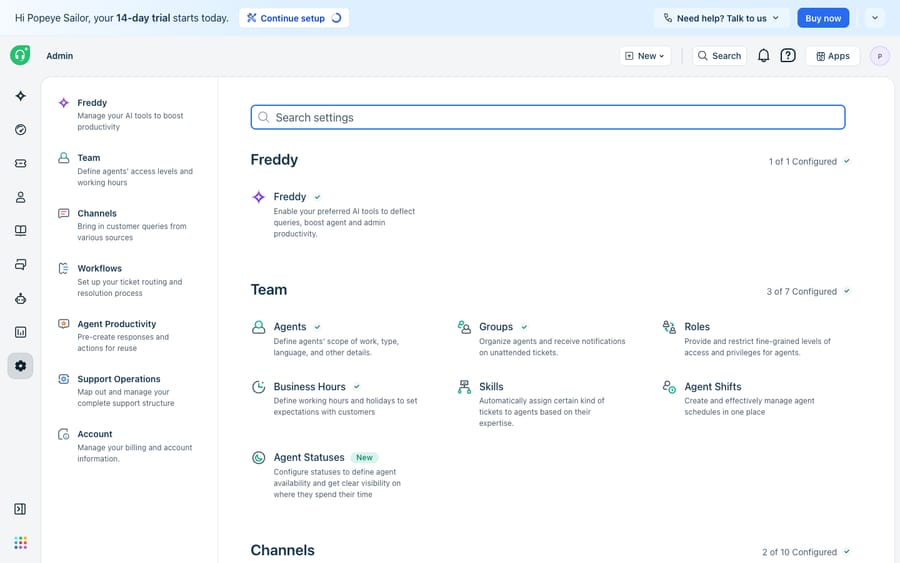
Almost every fix below starts from this Admin hub, so learn the left-nav grouping: Channels holds email, Workflows holds SLAs, automations and notifications, and Account holds the helpdesk-wide restrictions that quietly block mail.
Why aren't emails turning into tickets in Freshdesk?
This is the most common Freshdesk problem, and the most alarming, because it looks like customers are being ignored. The cause is almost always in the email plumbing rather than in Freshdesk itself. Freshworks splits it into two cases in its guides on what to do when none of your emails are getting converted into tickets and why emails are not converted as tickets. Work through these in order:
- Confirm forwarding is set up from your support mailbox to the Freshdesk forwarding address (Admin → Channels → Email, then edit the support email), and check that your support email address and the Freshdesk forwarding address are not the same. Freshdesk blocks mail where the From and To (or Reply-to and To) addresses match, to prevent loops.
- Check the spam and trash views inside Freshdesk. Open the ticket Views icon and look at Spam and Trash. An automation rule, an agent or the spam classifier may have caught legitimate mail, and Show Activities tells you which.
- Check Helpdesk Restrictions. Under Admin → Account → Helpdesk Settings, a domain restriction may be silently dropping mail from any domain you haven't whitelisted. A deleted contact can also stop that person's mail from converting.
- Reauthorize the mailbox and check IMAP. If you use a custom mail server, a disconnected mailbox or one with IMAP disabled stops conversion entirely. Microsoft mailboxes need periodic reauthorization because their authentication tokens expire.
For a full decision tree, including the "long forwarding address" test under Admin → Channels → Email and the Office 365 and Gmail server specifics, see our deep dive on why your Freshdesk email isn't working.
Why does a Freshdesk SLA timer show the wrong time?
The classic complaint is "my SLA says 8 hours left but the deadline is tomorrow," or a ticket that breaches when it shouldn't have. Freshdesk SLAs are almost never wrong; they're measuring against a configuration you may have forgotten. The two usual culprits are business hours (a ticket that lands at 6pm on Friday is either burning time or paused until Monday, depending on whether the target uses Business hours or a 24×7 calendar) and ticket status (statuses set to pause the SLA timer, like Waiting on Customer, stop the clock in ways that surprise people). Policy order matters too: the first SLA policy whose conditions match is the one applied.
We untangle all of this, including which statuses pause the timer and how to reconcile the timer with your reporting, in why your Freshdesk SLA isn't calculating correctly.
Why isn't a Freshdesk automation rule firing when the conditions match?
You built a rule to auto-assign or auto-tag tickets, the conditions look right, and nothing happens. Freshworks' why are my automations not working article names eight causes. These five catch even experienced admins:
- Rule order. For Ticket Creation automations, a new ticket triggers the first rule it matches and then stops, so later rules never run. Put specific rules above generic ones.
- The requester is an agent. Automations don't run when the ticket's requester is an agent, which is exactly why test tickets you raise yourself appear to "do nothing." The same applies in a sandbox where agents act as requesters.
- You used New Email instead of New Ticket. The New Email option is for outbound mail and does not trigger creation automations. Use New Ticket to test.
- An invalid custom field. If a rule references a custom field that was later deleted or renamed, the rule stops working until you fix the reference. Freshworks documents this in why is my automation rule not working even though the conditions are satisfied.
- A loose condition or a missing group. "Contains" matches substrings ("cat" matches "catapult"), so use "Has any of these words" for keywords. And an "Assign to Agent" action without a group set first can leave the ticket unassigned.
The fastest diagnostic, again, is Show Activities on the ticket, which names any rule that actually ran. Full walkthrough in Freshdesk automations not firing.
Why aren't Freshdesk notifications reaching agents or customers?
Two different failures hide under "notifications not working," and they're fixed in different places. Agent notifications (new-ticket alerts, SLA-violation emails, assignment notices) are toggled under Admin → Workflows → Email Notifications → Agent Notifications. If agents aren't getting alerted, the specific notification is usually switched off there, or the agent's own profile preferences override it. Customer notifications (the replies and confirmations your requesters expect) depend on requester notifications being enabled and, critically, on the mail being delivered rather than filtered. We cover both branches, including the profile-level overrides people forget, in Freshdesk notifications not working.
Why do Freshdesk emails land in customers' spam?
If your automated replies keep hitting junk folders, the problem is email authentication, not content. Freshdesk mail sent "on behalf of" your domain fails DMARC when DKIM or SPF isn't configured, and receiving servers quarantine it. The fixes are DNS-side:
- DKIM: copy the 4 system-generated CNAME records from Admin → Channels → Email → Advanced Settings → Configure DKIM into your DNS, per Freshworks' email domain verification using DKIM records guide. Propagation usually takes minutes to hours but can take up to 48 hours, and Freshdesk emails the admin when verification completes.
- SPF: if needed, publish
v=spf1 include:email.freshdesk.com ~all(or add the include to your existing record), following create an SPF record to ensure proper email delivery. Freshworks says SPF isn't required once DKIM is set up. - DMARC: Freshdesk doesn't generate a DMARC record, and each domain can only have one, so align your existing policy rather than adding a second.
One caveat: if you use a custom mailbox, Freshdesk's DKIM step isn't required, because mail goes out through your provider. Freshworks still recommends configuring DKIM for your own domain with that provider. Full guide: Freshdesk emails going to spam.
What can't Freshdesk's native tools fix, and where does an AI layer help?
Freshdesk's native tooling is capable, and the Freshworks help-desk troubleshooting guide plus the marketplace cover most configuration problems well. But look at the pattern across all five problems above: every one is a plumbing fix. Once the plumbing works, Freshdesk faithfully routes, times and notifies, but it still can't read a ticket, work out what the customer needs, and draft the answer. The rules you spend time ordering fire on keywords and fields; they don't reason. And the analytics that would help you spot these failures at scale sit on higher plans, so smaller teams often don't see the pattern until customers complain.
That's the seam where an AI agent layer fits, and it helps to understand the category first. The broader field of AI agents for customer service exists to do the reasoning-heavy work that keyword rules can't. Macha is one such layer: it runs on top of the Freshdesk you already use as a native connector, and it does not replace your help desk, its automations or its SLA policies. You connect Macha to Freshdesk with your subdomain and API key, and it reads and writes the same tickets your rules already touch: triaging by intent rather than brittle keyword conditions, drafting or posting grounded replies, and looking up order or account status through a custom tool that turns a REST API into something an agent can call. If your goal is fewer of these fires in the first place, start with our guide to how to automate Freshdesk with AI. (Macha's connector is for Freshdesk specifically, not Freshchat, Freshservice or Freshcaller. Macha bills per ticket, one conversation charged once however many messages it takes, never per resolution, starting at $299 a month for up to 750 tickets.)
The clean division of labor: keep Freshdesk as the system of record for channels, timing and routing, fix its configuration problems with the guides above, then add an agent on top for the reasoning the platform was never built to do.
FAQ
Why are my emails not being converted into tickets in Freshdesk? Usually it's an email-plumbing issue: forwarding isn't set up, your support address and the Freshdesk forwarding address are identical, the mail is sitting in Freshdesk's Spam or Trash views, or a Helpdesk Restrictions rule (Admin → Account → Helpdesk Settings) is dropping an un-whitelisted domain. A disconnected custom mailbox, an expired Microsoft authorization or disabled IMAP will also stop conversion.
Why isn't my Freshdesk automation rule firing even though the conditions match? Common causes: another rule higher in the order matched first and stopped execution; the requester is an agent (automations skip agent-raised tickets); you tested with New Email (outbound) instead of New Ticket; or the rule references a deleted custom field. Use Show Activities on the ticket to see what actually ran.
Why do Freshdesk emails go to my customers' spam folders? It's an authentication problem. Configure DKIM (4 CNAME records from Admin → Channels → Email → Advanced Settings), optionally SPF (v=spf1 include:email.freshdesk.com ~all), and make sure your domain's DMARC policy is aligned. If you use a custom mailbox, set up DKIM with that provider instead.
How long does Freshdesk DKIM verification take? Freshworks says DNS propagation takes anywhere from a few minutes to several hours, and up to 48 hours in some cases. Freshdesk emails the admin once the records verify.
Why does my Freshdesk SLA show the wrong time? Almost always business hours or ticket status. A target set to Business hours pauses outside working hours, and statuses configured to pause the SLA timer (like Waiting on Customer) stop the clock. Policy order also matters: the first matching SLA policy wins.
Can I add AI to Freshdesk without replacing it? Yes. An AI agent layer like Macha connects to Freshdesk as a native connector and runs on top of your existing help desk, automations and SLAs without replacing them. It handles the reasoning-heavy work (understanding intent, drafting grounded replies, looking up data) that Freshdesk's rules can't.
Fixed the plumbing and want your agents to do more than route tickets? Start a free trial of Macha and connect it to your Freshdesk in minutes.






