





 Shopify
 Stripe
 Slack
Slack Notion
 Google Workspace
 Confluence

Why Are My Freshdesk Automations Not Firing? 8 Causes to Check


Almost every Freshdesk automation that fails to fire traces back to one of eight ordinary causes, from a rule toggled off to a time trigger that only sweeps once an hour. Start with the ticket's Show Activities log, then work down the list.
Key takeaways
- Freshdesk automations most often fail to fire because the rule is toggled off, a broader rule matched first, or a Has any of these words condition misses refunded when searching for refund.
- Freshdesk's Show Activities log on a ticket lists fired automation rules by name, so a missing rule name means the conditions never matched rather than the actions failing.
- Freshdesk does not run automations when the ticket requester is an agent or when the ticket was created via the New Email option, which is meant for outbound mail.
- Freshdesk time-trigger rules scan all tickets once every hour, so a condition must still be true at the moment of that hourly sweep for the rule to fire.
- In Freshdesk, an Assign to Agent action used without first assigning a group can leave the ticket unassigned, which looks like a rule that never fired.

A Freshdesk automation that isn't firing is almost always switched off, blocked by a broader rule that matched first, or held up by a condition that doesn't match the ticket's literal text. Open the ticket's Show Activities log first: if the rule's name isn't there, the conditions never matched.
| # | Cause | Quick check |
|---|---|---|
| 1 | Rule toggled off | Toggle in the Automation Rules list |
| 2 | Broader rule matched first | Rule order and "first matching rule" mode |
| 3 | Conditions don't match the text | "Contains" vs "Has any of these words" |
| 4 | Ticket created via New Email | Test with New Ticket |
| 5 | Requester is an agent | Test from a non-agent contact |
| 6 | Rule references a deleted field | Open and re-save the rule |
| 7 | Hourly time-trigger sweep | Widen the time window |
| 8 | Webhooks dropped for API rate limits | Your API usage |
Where do you find out whether a Freshdesk rule ran?
Before changing a single rule, look at what Freshdesk already recorded. Open the ticket you expected to be affected and click Show Activities in the top-right of the ticket detail view. This is the closest thing Freshdesk has to a run log: it lists the sequence of events on that ticket, and a fired automation shows up by rule name. If your rule's name is absent, it never matched: the problem is in the conditions or the ordering, not the actions. If the name is present but the outcome looks wrong, the rule did run and you're debugging its actions or a conflict with another rule. That single distinction saves you from chasing the wrong half of the problem, and it's the diagnostic Freshworks itself points to in Why are my automations not working?.
What are the eight common causes, in order?
Here's the ranked checklist. Each item is quick to verify, and they're ordered roughly by how often they're the answer.
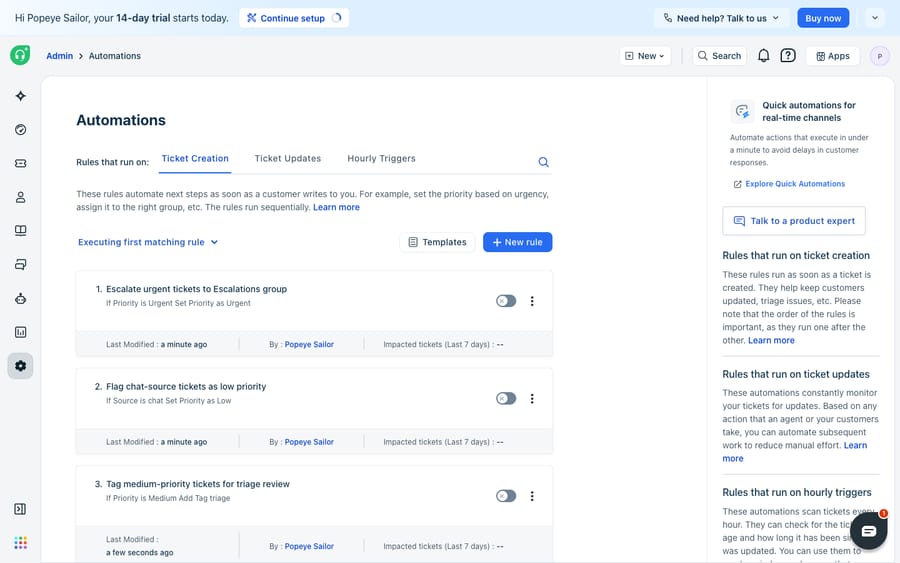
- The rule is toggled off. The most embarrassing and most common. In Admin → Workflows → Automation Rules, each rule has an on/off switch. A rule can be fully configured, correctly conditioned, and simply disabled. Check the toggle first.
- A broader rule above it matched first. For Ticket creation rules, Freshdesk offers two execution modes: "execute the first matching rule" or "execute all matching rules." If you're on first-matching, a generic rule sitting higher in the list (say, "assign all email to Tier 1") matches your ticket and stops the sweep before your specific rule is ever evaluated. Order specific rules above generic ones, and know which mode you're in. Per Freshworks' overview, Ticket-update and Time-trigger rules instead run all matching rules from top to bottom, so order there governs conflicts rather than whether a rule runs at all.
- The conditions don't actually match. The classic gotcha is text matching. The Contains operator matches partial words, but Has any of these words treats each entry as an exact term: "refund" will not match "refunded," and "can't log in" is one phrase, not three keywords. Re-read your conditions against the literal ticket text, not against what you meant.
- The ticket was created the wrong way. Automations don't fire on tickets created via the New Email option, because that path is for outbound email. Use New Ticket to test intake automations. This trips up a lot of admins validating a Dispatch'r rule.
- The requester is an agent. Freshdesk deliberately does not run automations when the requester is an agent. If you're testing by emailing in from your own admin address, the rule will correctly refuse to fire. Test with a genuine non-agent contact.
- The rule references a deleted field. If a rule's condition or action points at a custom ticket, contact, or company field that has since been deleted, the whole rule becomes invalid and silently stops working. Open the rule, remove or replace the dead field, and re-save to restore it.
- It's a time trigger, and the clock hasn't come around — or the condition wasn't true at the sweep. Time-trigger (Supervisor) rules scan all tickets once every hour, per Freshworks, not the instant a condition becomes true. A rule keyed to "no customer response in over X hours" only acts if that's still true at the moment of the hourly sweep. Because you can't know exactly when the sweep lands, set a sensible window (an upper and lower bound) rather than a single knife-edge value.
- Webhooks are being dropped for rate limiting. If your automation calls out via webhook and you've consistently exceeded your Freshdesk API rate limits, those webhook actions can be dropped. This is the rare one, but if everything else checks out and only the outbound step fails, it's worth ruling out before contacting [email protected].
How do you match the symptom to the cause?
Once you've read the activity log, this table points you at the likely cause fast.
| What you observe | Most likely cause | Where to check |
|---|---|---|
| Rule name absent from Show Activities | Toggled off, or a higher rule matched first | Automations list — toggle + order |
| Rule ran but did the wrong thing | Conflict with another matching rule | All rules that match this ticket |
| Ticket left unassigned after "Assign to Agent" | No group assigned first | Add an Assign to Group action |
| Works for some tickets, not others | Exact-match text condition ("Has any of these words") | The rule's conditions |
| Nothing fires on your own test tickets | Requester is an agent, or created via New Email | How the test ticket was raised |
| Rule "just stopped" one day | Deleted custom field made it invalid | Open + re-save the rule |
| Time-based rule inconsistent | Hourly sweep + knife-edge condition | Widen the time window |
One more trap from Freshworks' own list: a rule that uses the Assign to Agent action without first assigning the ticket to a group can leave the ticket unassigned, which looks like a rule that never fired. Add an Assign to Group action ahead of it. Freshworks also warns that editing one rule can unintentionally affect unrelated tickets, and that several rules firing on the same update can conflict.
What can't Freshdesk's native rules do?
None of this is Freshdesk's fault, and the engine deserves credit: it's deterministic, fast, and free of surprises once you understand it. That predictability is precisely why the failure modes above are so diagnosable — a rule either matched or it didn't, and the activity log tells you which. There's no black box.
But that same determinism is the ceiling. Freshdesk conditions are keyword-and-field matching. "Has any of these words" not matching "refunded" isn't a bug; it's the literal design. The engine can see that a subject contains "refund," but it cannot understand that "I was double-charged and want my money back" means the same thing, so admins end up maintaining ever-longer keyword lists to paper over the gap, and those lists are exactly what quietly break when a field is renamed or a phrasing shifts. If your automations keep "not firing" because real customer language keeps escaping your conditions, you've hit the edge of what rules can express, not a setting you missed. For the fuller tour of how the three rule types are meant to work, see Freshdesk automations explained.
When should an AI layer take over from rules?
This is the seam where an AI agent layer helps, and it's worth being clear-eyed about the build-versus-buy tradeoff before you reach for one. The broader category of AI agents for customer service exists to handle the reasoning your rules can't: matching on intent rather than exact keywords, so "double-charged, want my money back" and "please refund me" both route the same way without a hand-maintained word list. Macha is one such layer. It runs on top of the Freshdesk you already use (it also runs on Zendesk, Freshdesk, Gorgias, Front, HubSpot or Intercom). It doesn't replace your help desk; it connects to it via subdomain and API key and reads and writes the same tickets your rules touch (replies, notes, priority, status, tags, assignment). It doesn't compete with your Dispatch'r and Supervisor rules; it takes over the intent-heavy work those rules were never built for, while your deterministic routing and SLA timers keep doing what they're good at. (Macha's connector is for Freshdesk specifically — not Freshchat, Freshservice, or Freshcaller.)
Because an agent acts on meaning rather than a fixed rule, you can't just eyeball it and hope. Macha's agent simulations replay your real historical Freshdesk tickets against a candidate agent before it touches a live queue, and you can extend what it does through a custom tool that turns any REST API into an action the agent can call, looking up order or account status mid-conversation, something no native condition can do. For a step-by-step, see how to automate Freshdesk with AI, and browse the Freshdesk connector or pricing (charged per ticket, from $299 a month for 750 tickets; one conversation is charged once, not per resolution) for the specifics.
FAQ
Why is my Freshdesk automation not firing even though the conditions look right? Start with the ticket's Show Activities log. If the rule name is absent it never matched, usually because the rule is toggled off, a broader rule above it matched first under "execute the first matching rule," or an exact-match text condition ("Has any of these words") didn't hit the literal ticket text. If the name is present, the rule ran and you're debugging its actions or a conflict, not whether it fired.
Why don't automations run on my own test tickets? Two built-in reasons. Freshdesk does not run automations when the requester is an agent, so emailing in from your admin address won't trigger anything. Test with a real non-agent contact. And tickets created via the New Email option (meant for outbound mail) don't fire automations either; use New Ticket.
My Freshdesk automation suddenly stopped working — why? The most common cause is a deleted custom field. If a rule references a ticket, contact, or company field that was later removed, the entire rule becomes invalid and silently stops. Open the rule, replace or remove the dead field, and re-save. Consistently exceeding API rate limits can also cause webhook-based actions to be dropped.
Why does my time-based (Supervisor) automation only work sometimes? Time-trigger rules scan all tickets once every hour rather than the instant a condition becomes true, so a rule can miss a ticket if its condition wasn't satisfied at the moment of the hourly sweep. Set a time window with an upper and lower bound instead of a single exact value.
Why does my Assign to Agent rule leave tickets unassigned? Freshworks notes that using Assign to Agent without first assigning a group can leave the ticket unassigned. Add an Assign to Group action before it.
Can I fix "not firing" automations with AI instead of longer keyword lists? Often, yes, when the real problem is that customer wording keeps escaping your exact-match conditions. An AI agent layer like Macha connects to Freshdesk as a native connector and matches on intent rather than keywords, so it runs on top of your existing rules rather than replacing them. See the Freshdesk connector and pricing for details.
Ready to stop losing tickets to conditions that can't read? Start a free trial and grade a Macha agent against your own Freshdesk history before it goes live.






