





 Shopify
 Stripe
 Slack
Slack Notion
 Google Workspace
 Confluence

Why Are Freshdesk Notifications Not Working? Fixes for Agent and Requester Emails (2026)


Missing Freshdesk notifications almost always come from configuration: a rule switched off, an empty Notify agents list, a ticket with no assigned agent, or an automation that replaced the default email. Agent and requester notifications are separate systems with separate toggles, so the fix depends on who stopped getting emails.
Key takeaways
- Freshdesk sends no new-ticket email to agents when the Notify agents field is empty, even if the New ticket created notification is switched on.
- Most Freshdesk agent notifications, including Requester replies to ticket and Note added, go only to the assigned agent, so an unassigned ticket alerts nobody.
- Freshdesk's Ticket assigned to group notification emails every agent in the group, which covers queues where tickets wait without an individual owner.
- Freshdesk requesters are emailed only when an agent adds a public comment, so a reply written as a private note never reaches the customer.
- Freshdesk SLA reminder and violation notifications need the Pro plan or above and an active SLA policy, so they never fire on Growth.

Freshdesk notifications usually stop for one of four reasons: the rule's toggle is off, nobody is in the Notify agents list for "New ticket created", the ticket has no assigned agent, or an automation replaced the default email. Freshworks' own documentation spells out the second one: "If no agents are specified, no notification is sent, even if notifications are enabled" (Configure email notifications, checked 24 September 2026).
| Symptom | Most likely cause | Where to fix it |
|---|---|---|
| No agent gets new-ticket emails | Empty Notify agents list, or toggle off | Admin → Workflows → Email Notifications → Agent Notifications |
| Reply alerts reach nobody | Ticket has no assigned agent | Assignment rules, or the group notifications |
| Customer gets no confirmation | Requester rule off, or replaced by an automation | Requester Notifications tab; Admin → Workflows → Automations |
| Customer never hears about a reply | Agent added a private note, not a public reply | Agent workflow |
| SLA alerts never arrive | Plan below Pro, or no active SLA policy | Plan and SLA policy settings |
| Email sent but never seen | Spam folder or mailbox authentication | DKIM/SPF on your support address |
Are agent and requester notifications the same system?
No, and a fix for one does nothing for the other. Under Admin → Workflows → Email Notifications, Freshworks' Configure email notifications documentation lays out four tabs:
- Agent Notifications: alerts your team about new tickets, assignments to an agent or group, requester replies, unattended tickets, notes and threads, and (on Pro and above) SLA reminders and violations.
- Requester Notifications: the emails your customers receive: a ticket-created confirmation, "agent adds comment to ticket," "agent solves the ticket," "agent closes the ticket," plus account emails like user activation and password reset.
- CC Notifications: what CC'd users get when an agent creates a ticket or adds a public note.
- Templates: the templates that pre-fill agent replies and forwards.
So "agents aren't getting notified" and "customers aren't getting notified" are two different investigations. Start by identifying which audience is affected; it narrows the problem immediately.
Why does only "New ticket created" notify multiple agents?
This is the detail that catches almost everyone. On the Agent Notifications tab, only the New ticket created rule lets you name a list of agents to alert, through the Notify agents field. Freshworks' documentation is explicit that if the field is empty, no email goes out even with the toggle on. If your name isn't in that box, you get nothing.
For most other agent notifications (Ticket assigned to agent, Requester replies to ticket, Note added) there is no recipient list at all: per the same documentation, "only the assigned agent on the ticket receives the notification." That produces two of the most common silent failures:
- Nobody is in the Notify agents list, so new-ticket alerts reach no one. Fix: open Admin → Workflows → Email Notifications → Agent Notifications → New ticket created, confirm the toggle is on, and add each agent who should be alerted.
- The ticket has no assignee, so "Requester replies to ticket" and "Ticket assigned to agent" have no recipient. An unassigned ticket in a shared queue can sit silently because there is literally no agent for Freshdesk to notify.
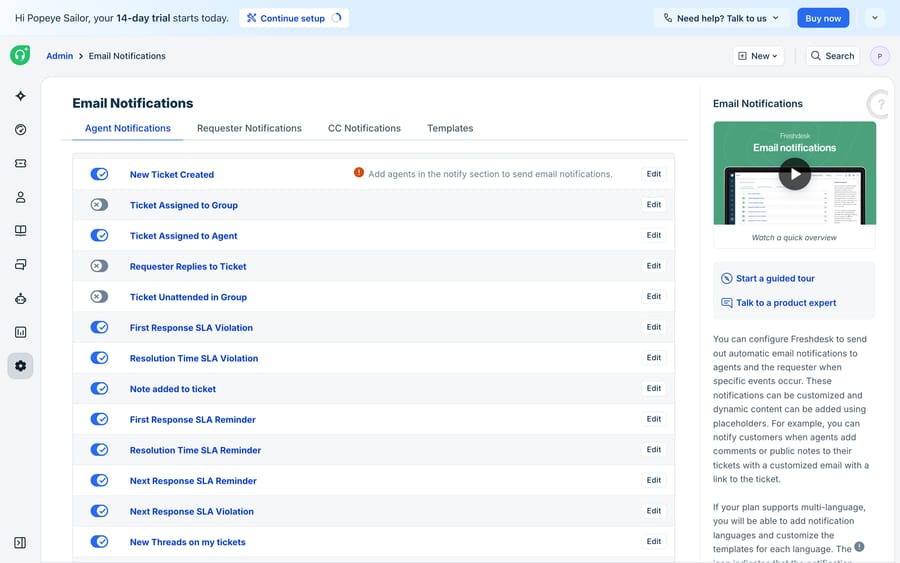
How do you fix missing agent notifications?
Work through these in order. They're roughly sorted by how often they're the culprit.
- Is the toggle on? Each rule on the Agent Notifications tab has its own switch. A recent admin change can flip one off without touching the others.
- Is the agent in the "Notify agents" list? This applies to New ticket created. No name in the box, no email.
- Does the ticket have an assignee? Assignment-dependent notifications (assigned to agent, requester replies, note added) only go to the assigned agent. For tickets that sit in a group without an owner, turn on Ticket assigned to group, which emails every agent in that group, and Ticket unattended in group, which fires when a ticket waits longer than the time set in the group's settings.
- Is an automation overriding the default? If a rule under Admin → Workflows → Automations already sends a custom notification on the same trigger, teams sometimes disable the default to avoid duplicates and then forget. Check your Ticket Creation and Ticket Update automations.
- Is the agent both an agent and the requester? An agent who is also the requester on a ticket may not receive the assignee notification. The Freshworks community documents this, and the workaround is a custom Automation on Ticket Updates that notifies the assignee explicitly.
- Deliverability. Check spam/junk folders and, if you use a custom mailbox, your DKIM/SPF setup. A notification that Freshdesk sends but the mail server quarantines looks identical to one that was never sent.
How do you fix missing requester notifications?
Requester emails fail for overlapping but different reasons.
- Is the specific rule enabled? On the Requester Notifications tab, "New ticket created," "Agent adds comment to ticket," "Agent solves the ticket," and "Agent closes the ticket" each have their own toggle. Turning off "Agent solves the ticket" is a common way teams accidentally stop resolution confirmations.
- Is an automation handling it instead? If a Ticket Creation automation sends a branded acknowledgement, the default "New ticket created" requester notification is often disabled so customers don't get two emails. That's by design, but confirm the automation is still firing.
- Public vs private note. The requester rule fires when an agent adds a public comment. If an agent adds a private note thinking it's a reply, the customer never hears anything: a workflow problem that looks like a notification bug.
- Deliverability and the "no-reply" trap. Requester emails come from your support address; if that address's authentication is misconfigured, corporate mail filters silently drop them.
Who receives each Freshdesk notification?
| Notification | Tab | Who receives it | Common silent-drop cause |
|---|---|---|---|
| New ticket created | Agent | Only agents in the Notify agents list | Nobody added to the list |
| Ticket assigned to group | Agent | All agents in the assigned group | Toggle off |
| Ticket assigned to agent | Agent | The assigned agent only | Ticket unassigned |
| Requester replies to ticket | Agent | The assigned agent only | Ticket unassigned |
| Note added to ticket | Agent | The assigned agent only | Ticket unassigned |
| SLA reminder / violation | Agent (Pro+) | Set by the SLA policy | Plan below Pro, or no active SLA policy |
| New ticket created (confirmation) | Requester | The requester | Overridden by a creation automation |
| Agent adds comment to ticket | Requester | The requester | Agent used a private note |
| Agent solves / closes ticket | Requester | The requester | Rule toggled off |
The pattern: agent-side failures are usually about who the assignee is; requester-side failures are usually about which rule is on and whether an automation took over.
What can't Freshdesk's notification system do?
Freshdesk's notification engine does what it's designed to do, and does it reliably: deterministic rules, clear toggles, per-audience separation. When it "fails," it's almost always configuration, not a bug. SLA reminders and violations are the one plan-gated piece: they need the Pro plan or above and an active SLA policy.
It is a routing layer for events, not an intelligence layer. It can tell an agent a ticket arrived; it can't read that ticket, understand the customer's problem, and act on it. Notifications also can't compensate for structural gaps: an unassigned ticket in a busy shared queue generates no per-agent email by design, so if your routing is weak, notifications won't rescue it. And because the assignee is the linchpin for most agent alerts, teams that rely on manual triage inherit a race: the ticket is quiet until someone picks it up, and the notification that would have prompted them only fires after they do.
That gap between "an event happened" and "someone handled it" is where an AI agent layer fits, and it's worth weighing the build-versus-buy tradeoff before adding one. The broader category of AI agents for customer service exists to do the part a notification can't: read the ticket and respond. Macha is one such layer, and it runs on top of the Freshdesk you already use through a native connector; it does not replace Freshdesk, its notification rules, or its automations. You connect Macha with your Freshdesk subdomain and API key, and it reads and writes the same tickets your notifications track. Instead of only alerting a human when a new ticket lands, it can draft or post a grounded first reply itself, the kind of consistent response you'd otherwise approximate with a canned response, and it can look up order or account status through a custom tool that turns a REST API into something the agent can call. Automating Freshdesk with AI walks through the connect-and-configure flow.
The division of labour: keep Freshdesk's notifications as the source of truth for what happened and who to tell, and put an agent on top for the part a notification can't do, reading and answering the ticket. Macha bills per ticket, one conversation charged once however many messages it takes, rather than per resolution; plans start at $299 a month for up to 750 tickets, and the pricing page breaks down the tiers.
FAQ
Where do I configure email notifications in Freshdesk? Go to Admin → Workflows → Email Notifications. You'll find four tabs (Agent Notifications, Requester Notifications, CC Notifications, and Templates), each rule with its own on/off toggle and editable subject line and message body.
Why am I, as an agent, not getting new-ticket notifications? Two reasons account for almost all cases: the "New ticket created" toggle is off, or your name isn't in the Notify agents field for that rule. With no agents in that field, Freshdesk sends nothing even when the rule is enabled. It's the only agent notification that takes a list of named recipients.
Why do agent notifications work for some tickets but not others? Most agent notifications (assigned to agent, requester replies, note added) go only to the ticket's assigned agent. If a ticket is unassigned or sitting in a shared group without an owner, there's no recipient, so no email is sent even though the rule is enabled. The group notifications cover that case.
Why did my customer not get a reply notification? Check that the relevant Requester Notification rule is enabled, that the agent sent a public reply rather than a private note, and that no Automation has replaced the default notification. Also check the requester's spam folder and your support address's email authentication.
Why are SLA reminder emails not arriving? SLA reminder and violation notifications are available only on the Pro plan and above, and they need an active SLA policy. On Growth, or with no policy in place, they never fire.
Can I add AI to Freshdesk without changing my notification setup? Yes. Macha connects to Freshdesk as a native connector and runs on top of your existing help desk, notifications, and automations without replacing them. It narrows the gap between an alert firing and a ticket being handled by drafting or sending a grounded first reply, while Freshdesk stays the system of record for what happened and who to notify.
Tired of chasing notifications that never arrived? Start a free trial of Macha and connect it to your Freshdesk in minutes.






