





 Shopify
 Stripe
 Slack
Slack Notion
 Google Workspace
 Confluence

Why Is Freshdesk Email Not Working? Causes and Fixes (2026)


Freshdesk email breaks in three ways: mail never becomes a ticket, a custom mailbox quietly disconnects, or replies fork into new tickets. Each has its own cause and fix, and the checks below run cheapest first.
Key takeaways
- Freshdesk email failures come from three causes: a missing forwarding rule, a disconnected custom mailbox, or a reply that fails a threading check and opens a new ticket.
- A Freshdesk custom mailbox retries a failed connection up to 8 times over about 12 minutes, then waits for an Admin to reauthorize it.
- Freshdesk's custom email server article lists IMAP port 993 with SSL for incoming mail and SMTP port 587 for outgoing mail on Gmail, Microsoft 365 and Yahoo.
- Freshdesk threads a reply by the ticket ID in the subject or a matching Message-ID in the In-Reply-To or References headers, plus a same-address sender check.
- Turning off Create a new ticket when subject line changes under Admin, Channels, Email, Advanced Settings stops edited-subject replies from forking into separate tickets.

Freshdesk email usually fails for one of three reasons: a missing forwarding rule stops mail becoming tickets, a custom mailbox disconnects after 8 failed retries over about 12 minutes, or a reply fails a threading check and opens a new ticket. Check the mailbox status under Admin → Channels → Email first, then work through the causes below in order, cheapest to rule out first.
| Symptom | Most likely cause | First fix |
|---|---|---|
| No tickets at all from an address | Forwarding rule missing, or mailbox not Verified | Re-add the forwarding rule; test the long forward-to address |
| Was working, then stopped | Custom mailbox disconnected | Reauthorize (Microsoft 365 → OAuth; Gmail → re-enter credentials) |
| One customer's mail always lands in Spam | Their contact was deleted, or an automation rule marks it spam | Restore the contact; fix the automation rule |
| Some self-addressed mail dropped | Loop suppression (From = To, or Reply-To = To) | Expected behaviour; send from a distinct address |
| Replies open new tickets | Threading marker or sender check failed | Keep the ticket-ID prefix; turn off "Create a new ticket when subject line changes" |
| Mail arrives but lands in spam | DKIM/SPF not configured | Configure DKIM/SPF (see below) |
Is the mailbox actually verified?
Before you debug anything downstream, rule out the simplest cause: the support email isn't in a working state. Go to Admin → Channels → Email and look at your support email list. Each mailbox shows a Status, and you want Verified. A mailbox that's still Pending (Freshworks-server route, waiting on a forwarding rule) or Disconnected (custom mailbox that lost its connection) will not convert mail into tickets, and no amount of threading configuration fixes that.
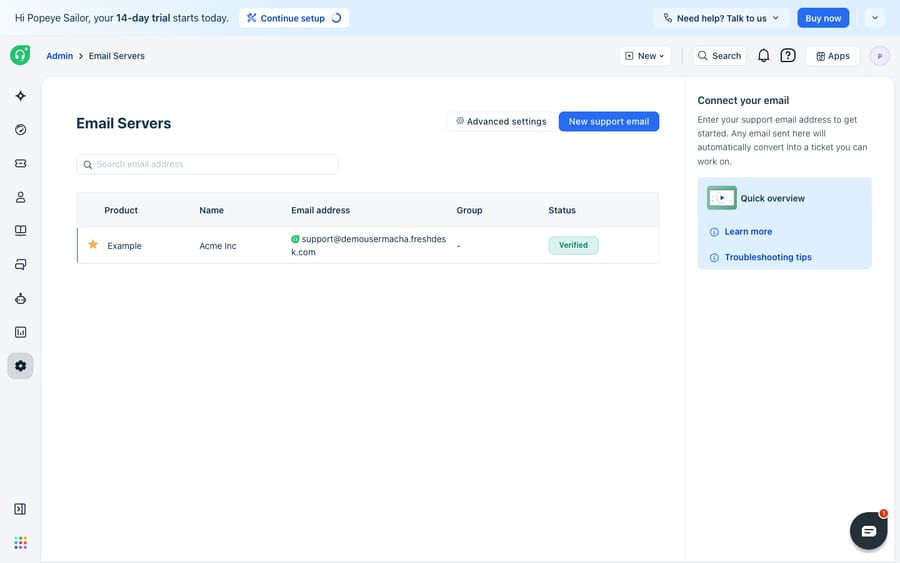
If the status is anything but Verified, jump to the section that matches your setup: forwarding (Freshworks server) or reauthorization (custom mailbox). If it is Verified and mail still isn't arriving, work down the list below.
Why are emails not creating tickets in Freshdesk?
This is the loudest failure: mail is being sent to your support address, and nothing appears in Freshdesk. Freshworks' why aren't emails converted to tickets article lists the causes. Work through them in this order:
- Check the forwarding rule (Freshworks-server route). If you use the default Freshworks mailbox, your real address (
[email protected]) must forward mail to the Freshdesk forward-to address, the long one that looks like[email protected]. If that rule was never created, or a mail-provider change dropped it, no ticket is created. Re-add the forwarding rule in Google Workspace or Microsoft 365 and re-verify. - Send two test emails. From an outside address, email (a) the long forward-to address directly and (b) your real support address. If the forward-to address creates a ticket but the support address doesn't, the problem is your forwarding rule, not Freshdesk.
- Check the Spam and Trash views inside Freshdesk. Legitimate mail sometimes lands there and looks "missing." Two things put it there on purpose: if the sender's contact was deleted, Freshdesk marks their new tickets as spam until you restore the contact, and an automation rule can mark messages as spam. The ticket's activity log shows which rule fired.
- Watch for email-loop suppression. Freshdesk deliberately will not convert a message where the From and To are the same address, or where Reply-To equals To, to stop the help desk mailing itself in a loop. Automated no-reply or self-addressed mail gets dropped for this reason.
- Check helpdesk restrictions. If an Admin set a whitelisted-domains restriction, mail from any other domain is blocked.
- Confirm IMAP is enabled on the underlying mailbox (custom-server route). If IMAP is off at the mail provider, Freshdesk can't read incoming mail at all. Check with your IT or email team.
Freshworks' what to do if none of your emails are getting converted article covers the same checklist and says to send sample email headers to Freshworks support only after the above are ruled out.
Why did my Freshdesk mailbox stop syncing?
If tickets were flowing and abruptly stopped, you almost certainly have a disconnected custom mailbox. When Freshdesk detects a connection failure, it retries the mailbox up to 8 times over about 12 minutes. If every retry fails, the mailbox needs manual reauthorization before it pulls mail again. Per the reauthorization of custom mailbox article, for Gmail and "Other" mailbox types any mail sent during the outage is automatically resent once reauthorization succeeds, so the tickets show up late rather than never. For Microsoft OAuth mailboxes that can't send, Freshdesk routes agent replies through the next connected mailbox instead.
The two most common triggers:
- Microsoft 365: Basic Auth deprecated. Microsoft has deprecated Basic Authentication on Exchange Online, and Freshdesk now requires OAuth for these mailboxes. If yours was set up on the old method, you'll see a reauthorization required banner and must reconnect over OAuth. Microsoft auth tokens can also expire, which pauses ticket creation until you reauthorize. Confirm Authenticated SMTP and IMAP are enabled on the tenant.
- Gmail and other providers: password changed or expired. If the mailbox uses a password that was rotated, the connection drops. Re-entering credentials restores it.
If the mailbox reconnects but keeps dropping, check the ports and the allowlist. Freshdesk's custom email servers article lists IMAP port 993 with SSL for incoming and SMTP port 587 for outgoing on Gmail, Microsoft 365 and Yahoo. The troubleshooting email errors article adds the other half: have IT allowlist Freshdesk's email IPs on the mail server so it stops rejecting the connection. If you're setting up a fresh Gmail or Office 365 connection, our walkthrough on connecting Office 365 or Gmail to Freshdesk covers the OAuth flow step by step.
Why do customer replies create new tickets instead of threading?
The subtlest failure: everything "works," but a customer's reply spawns a fresh ticket instead of appending to the original conversation. Freshdesk threads a reply using two checks, a marker check and a sender check, per the email threading documentation.
The marker check. Freshdesk finds the ticket ID in the subject in the format [#{{ticket.id}}], or matches the original message's Message-ID in the In-Reply-To or References headers. Freshworks' threading logic article puts it plainly: a fresh email or a forwarded thread without matching identifiers creates a new ticket. Common ways this breaks:
- Plaintext replies strip the marker. If a customer's client sends in plaintext and the subject was edited, the ticket identifier can be lost.
- The subject line changed. If Create a new ticket when subject line changes is on, a reply with an altered subject forks into a new ticket by design. To keep everything on one thread, turn that option off.
- A missing ticket-ID prefix. If your outgoing templates don't carry the
[#{{ticket.id}}]marker, replies have nothing to match against. The prefix itself is set by Configure prefix for ticket ID. - Two settings that override threading. Create a new ticket for each customer response does exactly what it says, and Ignore the ticket ids in the subject line while threading replies to tickets removes the marker check. Make sure neither is on by accident.
The sender check. The reply must come back to the same support address it left from. If your help desk has multiple support emails and an agent replied from a different product's From address, the customer's reply lands on the wrong mailbox and opens a new ticket. The Ignore the sender email address while threading replies to tickets setting relaxes this check if your customers reply from several addresses.
All of these settings live under Admin → Channels → Email → Advanced Settings, listed in Freshworks' advanced email settings article. Most threading problems resolve by confirming the ticket-ID prefix is in your templates and turning off the subject-change toggle.
What does native Freshdesk email handle well, and where does it stop?
Credit where it's due: Freshdesk's email engine is dependable. The retry-and-resend behaviour on a dropped mailbox means you rarely lose mail outright, the threading logic is predictable once configured, and the loop suppression prevents mail storms. For most of these failures, the fix is a five-minute settings change, not a rebuild.
There are honest edges, though. Threading is rule-based, so unusual clients, stripped subjects, or aggressive forwarding will still fork a conversation now and then however carefully you configure it. DKIM signs mail with your own domain (it's the first item in Advanced Settings), so deliverability suffers until you configure it; Freshdesk says DKIM isn't required for a custom mailbox but still recommends it. If replies keep hitting spam, start with our guide on Freshdesk emails going to spam and the fuller SPF, DKIM, and custom mailbox setup walkthrough. And a disconnected mailbox is silent: nothing tells the customer their message is waiting on a reauthorization.
The deeper limit is that every fix above keeps the pipe healthy, getting mail into a ticket and a reply back out, but does nothing about the reading and answering in between. A perfectly synced, perfectly threaded inbox still lands every message on a human. That's where an AI layer fits, and it's worth being clear about the build-versus-buy tradeoff before adding one. The category of AI agents for customer service exists to do the reasoning-heavy part the pipe can't. Macha is one such layer: it runs on top of the Freshdesk you already use as a native connector. It does not replace your help desk, your mailboxes, or your DKIM setup. You connect Macha to Freshdesk with your subdomain and API key, and it reads the same email-to-ticket conversations your forwarding rules create: drafting a grounded first reply, triaging by intent, and looking up order or account status through a custom tool that turns a REST API into something the agent can call. (Macha's connector is for Freshdesk specifically, not Freshchat, Freshservice, or Freshcaller. Macha bills per ticket, one conversation charged once however many messages it takes, starting at $299 a month for 750 tickets; see the pricing page.) If you want to see how that's wired, how to automate Freshdesk with AI walks through it. And if email is still misbehaving, our full guide on how to configure email in Freshdesk covers the setup end to end.
FAQ
Why are my Freshdesk emails not creating tickets? Most often the forwarding rule from your real support address to Freshdesk's forward-to address is missing or broken. Test by emailing the long forward-to address directly: if that creates a ticket but your support address doesn't, fix the forwarding rule. Also check the Spam and Trash views, restore any deleted contact, confirm IMAP is enabled, and note that Freshdesk deliberately won't convert mail where the From and To addresses are identical.
My mailbox was working and suddenly stopped. Why? Your custom mailbox likely disconnected. Freshdesk retries a failed connection up to 8 times over about 12 minutes, then waits for you to reauthorize. For Microsoft 365 you'll usually need to move from Basic Auth to OAuth; for Gmail, re-enter credentials if the password changed. For Gmail and Other mailboxes, mail sent during the outage is resent automatically after reauthorization.
Why do customer replies open new tickets instead of threading? The reply failed one of Freshdesk's two threading checks: the ticket-ID marker ([#{{ticket.id}}] in the subject, or matching In-Reply-To/References headers) or the sender address check. Keep the ticket-ID prefix in your outgoing templates, turn off "Create a new ticket when subject line changes", and reply from the same support address the ticket came in on.
What ports do I use for a custom Freshdesk mail server? Freshdesk lists IMAP port 993 with SSL for incoming and SMTP port 587 for outgoing on Gmail, Microsoft 365 and Yahoo, with IMAP and Authenticated SMTP enabled on the mailbox. If the connection keeps dropping after reconnecting, ask IT to allowlist Freshdesk's email IPs on your mail server.
Can I add AI to Freshdesk email without replacing Freshdesk? Yes. An AI agent layer like Macha connects to Freshdesk as a native connector and works on the same email-to-ticket conversations your mailboxes create, drafting grounded replies and triaging by intent, while Freshdesk stays the system of record for how mail is received, sent, and authenticated.
Once your email pipeline is healthy, the next step is letting it answer itself. Start a free trial of Macha and connect it to your Freshdesk in minutes.






