





 Shopify
 Stripe
 Slack
Slack Notion
 Google Workspace
 Confluence

How Do You Set Up SPF, DKIM and a Custom Mailbox in Freshdesk?


Freshdesk replies land in spam when your domain hasn't authorized Freshdesk to send for it, and the fix is two DNS records: one SPF TXT record and four DKIM CNAMEs. Below are the exact values, the verification steps, and what changes when you send through your own Google Workspace or Microsoft 365 mailbox.
Key takeaways
- Freshdesk email authentication starts with one SPF TXT record, v=spf1 include:email.freshdesk.com ~all, merged into any SPF record the domain already has.
- Freshdesk generates four account-specific DKIM CNAME records under Admin, Channels, Email, Advanced Settings, Configure DKIM, and verification can take up to 48 hours.
- Freshdesk DKIM only signs mail from a support address on a verified domain you own, so the default freshdesk.com address shows an empty DKIM settings page.
- Freshworks lists DKIM on every Freshdesk tier; Growth, Pro and Enterprise add multiple support emails and custom email servers, while the Free program allows one support email.
- With a Freshdesk custom mailbox on Google Workspace or Microsoft 365, the mail provider signs outbound mail, so SPF and DKIM are set up in that provider's console.

To authenticate Freshdesk email, publish one SPF TXT record with v=spf1 include:email.freshdesk.com ~all (merged into any SPF record you already have), then add the four DKIM CNAME records Freshdesk generates under Admin → Channels → Email → Advanced Settings → Configure DKIM and click Verify. DKIM only works once you have a support email on a custom domain you own; if you route mail through your own Google Workspace or Microsoft 365 mailbox instead, your mail provider does the signing.
| Record | Type | Where it comes from | Needed when |
|---|---|---|---|
| SPF | TXT on your root domain | v=spf1 include:email.freshdesk.com ~all (one per domain) | Freshdesk sends your mail; Freshworks says it's optional if DKIM is set up |
| DKIM | 4 CNAME records | Generated per account on Freshdesk's Configure DKIM page | Freshdesk sends mail from a custom-domain support address |
| DMARC | TXT at _dmarc | You write it; Freshdesk doesn't supply a value | Recommended once SPF and DKIM pass |
| Mail provider SPF/DKIM | TXT / CNAME | Google Workspace or Microsoft 365 admin console | You use a custom mailbox (your server sends the mail) |
What do SPF and DKIM actually do?
SPF (Sender Policy Framework) is a single DNS record that lists which mail servers are allowed to send email for your domain. When Freshdesk sends a reply from [email protected], the receiving server looks up your SPF record and checks whether Freshdesk's servers are on the approved list. DKIM (DomainKeys Identified Mail) goes a step further: it attaches a cryptographic signature to every outgoing message, and the receiving server validates that signature against a public key you've published in DNS. SPF answers "is this sender allowed?"; DKIM answers "was this message actually sent by them and untampered?".
You want both. Together they're what Gmail, Outlook and other mailbox providers use to decide whether your support mail is trustworthy, and they're the foundation a DMARC policy sits on later. Missing authentication is the most common reason a Freshdesk instance ends up in spam folders, so get it right before you touch anything fancier.
How do you publish the SPF record for Freshdesk?
SPF is the quicker of the two, and the value is the same for every Freshdesk account. Per Freshworks' Create an SPF record documentation, publish:
v=spf1 include:email.freshdesk.com ~all- Log in to your DNS provider (the registrar or host that controls your domain: Cloudflare, GoDaddy, Route 53, and so on).
- Look for an existing SPF record. It's a TXT record on your root domain whose value starts with
v=spf1. You can only have one SPF record per domain; a second one breaks both. - If you have no SPF record yet, add a TXT record on your domain with the value above.
- If you already have one (for Google Workspace, Microsoft 365, a marketing tool), merge Freshdesk's include into it rather than adding a new record. For example:
v=spf1 include:_spf.google.com include:email.freshdesk.com ~all. - Save, and allow time for DNS to propagate.
SPF checks count against a hard limit of DNS lookups, so if your record is getting crowded you can swap the generic include for a data-center-specific one: fdspfus.freshemail.io (US), fdspfeuc.freshemail.io (EU), fdspfind.freshemail.io (India), or fdspfaus.freshemail.io (Australia), matching wherever your Freshdesk account is hosted. Freshworks' own doc also says SPF configuration isn't required if you already have DKIM set up. Publishing both is still the safer default, because some receivers weigh SPF alignment on its own.
How do you set up DKIM in Freshdesk?
DKIM is where deliverability really lives, and it's also where the setup gets conditional. In Freshdesk, DKIM is configured under Admin → Channels → Email → Advanced Settings → Configure DKIM, as documented in Freshworks' Email domain verification using DKIM records guide.
The catch, and the reason the screenshot below looks the way it does: DKIM applies to a support email on a custom domain that you own ([email protected]), not to the default @yourcompany.freshdesk.com address you get out of the box. If you haven't added and verified a support email on your own domain yet, Freshdesk has nothing to sign, so the DKIM Settings page shows an empty state prompting you to create one first.
Once you do have a custom support domain, the flow is:
- Open Admin → Channels → Email → Advanced Settings → Configure DKIM and expand your domain.
- Freshdesk generates four CNAME records unique to your account. Copy each one exactly: the host/name on the left and the target it points to on the right.
- Add all four CNAME records at your DNS provider, matching Freshdesk's values precisely (a single wrong character fails the check).
- Return to the same DKIM page and click Verify.
- Freshdesk checks your DNS and shows a green check next to each record it can validate, or a red cross where the record isn't found yet.
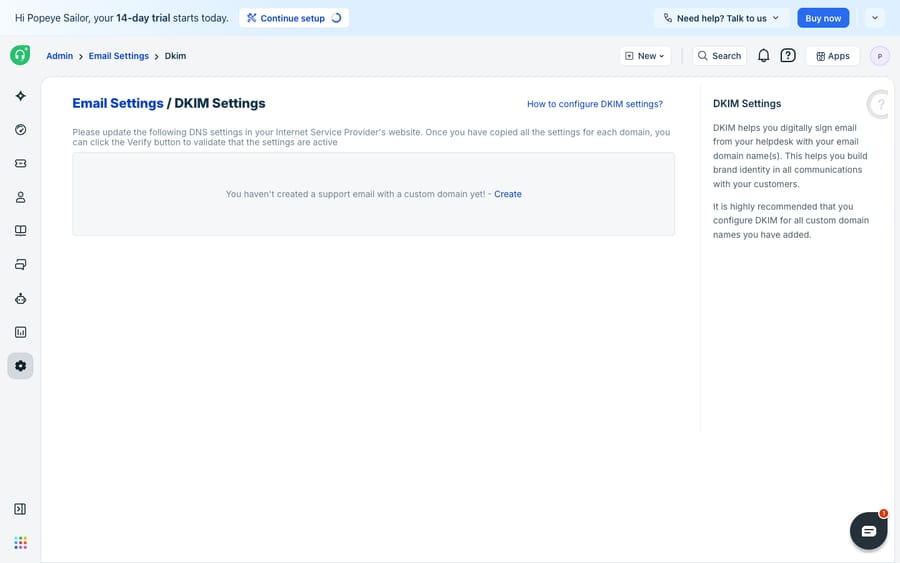
DNS changes aren't instant. Freshworks notes propagation can take anywhere from a few minutes to several hours, and in some cases up to 48 hours, so if Verify shows red crosses right after you publish the records, wait and try again before assuming you got the values wrong. You'll get an email confirmation once verification completes.
Which Freshdesk plans include DKIM?
Freshworks' DKIM doc lists it on every tier, current and legacy, so DKIM itself isn't a paid upgrade. The pricing page today sells three plans (Growth, Pro and Enterprise) and no free plan; the old Free tier now survives as a Free program for up to 2 agents for 6 months. What varies is how many support addresses you can add. Growth, Pro and Enterprise allow multiple support emails and custom email servers, while the Free program allows one support email. Either way, the practical gate is the same: DKIM needs a verified support address on your own domain before there's anything to sign.
What changes when you use a custom mailbox?
A custom mailbox (Freshworks calls it a custom email server) is when you route Freshdesk through your own mail infrastructure, connecting a Gmail/Google Workspace, Microsoft 365 or other IMAP/SMTP mailbox so mail is sent from your servers rather than Freshdesk's. Freshworks lists custom email servers on the Growth, Pro and Enterprise plans. This changes the authentication picture.
Because the mail leaves your infrastructure, Freshdesk's DKIM signing isn't doing the work; your own mail provider's authentication is. Freshworks says DKIM verification is not specifically required for a custom email server in Freshdesk, but still recommends configuring DKIM for your own DNS. In practice: set up SPF and DKIM for your mailbox with your mail provider (Google Workspace and Microsoft 365 both publish their own steps), make sure your SPF record authorizes that sending infrastructure, and treat Freshdesk's DKIM page as an optional extra rather than the primary control.
The decision comes down to who sends the mail:
| Freshdesk sends the mail | Custom mailbox (you send the mail) | |
|---|---|---|
| Who signs the message | Freshdesk (DKIM via its 4 CNAMEs) | Your mail provider (Google / Microsoft) |
| Where you set DKIM up | Freshdesk Admin → Configure DKIM | Your mail provider's admin console |
| SPF include to add | email.freshdesk.com | Your provider's (e.g. _spf.google.com) |
| Custom domain required for DKIM | Yes | Handled by your provider |
| Freshdesk DKIM page | Primary control | Optional / recommended extra |
Where does Freshdesk's native email authentication stop?
Freshdesk's built-in SPF and DKIM tooling does the job: the SPF value is a copy-paste, the DKIM page generates account-specific records and verifies them with clear green-check/red-cross feedback, and DKIM costs nothing extra. For most teams it's all you need to escape the spam folder.
Know the edges, though. The custom-domain requirement is the real gate: DKIM only signs mail from a support address on a verified domain you own. If you're still replying from the default @yourcompany.freshdesk.com address, you can't sign outbound mail through Freshdesk, and the DKIM page keeps showing that empty state. Freshdesk also doesn't provide a DMARC value (the policy layer that tells receivers what to do when SPF or DKIM fail), so you write that record yourself, usually starting at p=none to collect reports before tightening. And once your DNS is clean, deliverability stops being the bottleneck: authentication decides whether your reply is delivered, not how good or how fast it is. For the surrounding options, Freshdesk email explained covers them.
That second problem, the quality and speed of the reply itself, is where an AI agent layer fits, sitting on top of the deliverability you've just fixed. The broad category of AI agents for customer service exists to do the reading and writing that DNS records can't. Macha is one such layer: it connects to the Freshdesk you already use as a native connector and doesn't replace your help desk, your mailbox, or your DNS setup. You connect it with your subdomain and API key, and it reads and writes the same tickets, drafting or posting grounded replies and looking up order or account status through a custom tool that turns a REST API into something the agent can call. The longer version is in how to automate Freshdesk with AI. (Macha's connector is for Freshdesk specifically, not Freshchat, Freshservice, or Freshcaller. Billing is per ticket, one conversation charged once however many messages it takes, never per resolution; the pricing page has the tiers.)
The division of labor: let SPF and DKIM make sure the message arrives, and put an agent on top so the message that arrives is a fast, correct answer.
FAQ
What SPF record does Freshdesk need? Publish a single TXT record on your domain with the value v=spf1 include:email.freshdesk.com ~all. If you already have an SPF record for Google Workspace, Microsoft 365 or another tool, merge Freshdesk's include into that record rather than creating a second one; a domain can only have one valid SPF record.
Why does the DKIM page say I haven't created a custom domain? Because DKIM in Freshdesk signs mail sent from a support email on a verified custom domain you own ([email protected]), not the default @yourcompany.freshdesk.com address. Until you've added and verified a support address on your own domain, there's nothing for Freshdesk to sign, so the DKIM Settings page shows an empty state prompting you to create one first.
How long do DKIM records take to verify? DNS propagation can take anywhere from a few minutes to several hours, and in some cases up to 48 hours. If Freshdesk shows red crosses right after you publish the four CNAME records, wait and click Verify again before assuming the values are wrong.
Is DKIM limited to higher Freshdesk plans? No. Freshworks lists DKIM on every tier, including legacy plans. The limits are on support addresses: Growth, Pro and Enterprise allow multiple support emails and custom email servers, and the Free program (up to 2 agents for 6 months) allows one.
Do I still need DKIM if I use a custom mailbox? Freshdesk says DKIM verification isn't strictly required for a custom email server, because your own mail provider handles the signing, but Freshworks still recommends configuring SPF and DKIM at your provider's end (Google Workspace or Microsoft 365) so outbound mail is authenticated from your own infrastructure.
Does fixing SPF and DKIM improve my reply quality? No. Authentication only controls whether your mail reaches the inbox instead of spam. To improve the speed and quality of the reply itself, you'd layer an AI agent like Macha on top of Freshdesk, which drafts or sends grounded replies while Freshdesk and your DNS stay exactly as they are.
Once your mail is landing in the inbox, the next win is making the reply itself faster and better. Start a free trial of Macha and connect it to your Freshdesk in minutes.






