





 Shopify
 Stripe
 Slack
Slack Notion
 Google Workspace
 Confluence

How Does Freshdesk Email Work? Mailboxes, Signatures, Templates and Threading


Freshdesk email runs on four pieces: a support mailbox that turns mail into tickets, a per-agent signature, an agent reply template that wraps every outbound email, and threading that keeps replies on the right ticket. They sit on different admin screens, so it is easy to set up one and forget the others.
Key takeaways
- Freshdesk email works through a support mailbox, an agent signature, an agent reply template and threading, with most controls under Admin > Channels > Email.
- Freshdesk gives every account a default [email protected] address that converts incoming mail into tickets, and replies go out from whichever support address the ticket arrived on.
- Freshdesk's Message-ID thread match usually expires seven days after the last response, after which the ticket ID in the subject line reattaches replies.
- Freshdesk's Automatic Bcc setting can blind-copy up to 50 addresses on all ticket mail, and full quoted text includes every prior message instead of the default four, capped at 1MB.
- Freshworks documents the Freshdesk Free plan as limited to one support email, with multiple support addresses available on the Growth plan or above.

Freshdesk email works in four parts: a support mailbox (every account gets [email protected]) that turns incoming mail into tickets, a per-agent signature, an agent reply template that wraps every outbound email, and threading that matches replies by Message-ID for about seven days, then by the ticket ID in the subject line. Most of the controls sit under Admin → Channels → Email.
| Piece | What it does | Where it lives |
|---|---|---|
| Support mailbox | Catches incoming mail and converts it to tickets; replies go out from the same address | Admin → Channels → Email |
| Agent signature | Personal sign-off on one agent's replies | Admin → Agents → Signature |
| Agent reply template | Company-wide HTML wrapper: logo, footer, placeholders | Admin → Workflows → Email Notifications → Templates |
| Threading | Attaches replies to the right ticket (Message-ID, then ticket ID) | Automatic; ticket ID prefix in Advanced Settings |
| Advanced settings | DKIM, automatic Bcc, quoted text, sender handling | Admin → Channels → Email → Advanced Settings |
How does a support mailbox become a ticket?
The whole system starts with a support mailbox: an email address that Freshdesk watches and converts into tickets. Per Freshworks' email channel overview, every account is handed a default wildcard address in the form [email protected] the moment you sign up, and anything sent there lands in your ticket queue automatically.
Most teams want mail arriving at their own domain instead ([email protected]), and Freshdesk gives you two ways to wire that up:
- Use the Freshworks mail server. You keep your existing address and set a forwarding rule in Gmail, Microsoft 365, or your mail host so a copy of every message is forwarded into Freshdesk, which then converts it to a ticket.
- Connect your own mailbox (Gmail / Office 365 / custom) so Freshdesk pulls mail directly from your provider.
You add and manage all of these under Admin → Channels → Email. Note the plan gating: Freshworks' overview says the Free plan gets a single support email, while multiple addresses (support1@, sales@, and so on) need the Growth plan or above. The Freshdesk pricing page no longer lists a free plan; new accounts get a Free program for up to 2 agents for 6 months. Whichever address a ticket came in on, Freshdesk automatically uses that same address as the From on the reply, so a customer who wrote to billing@ gets the reply from billing@, not a generic catch-all.
How do agent signatures work in Freshdesk?
There are two different "signatures" in Freshdesk and people constantly conflate them. The first is the agent's personal signature: the name, title, and sign-off that gets appended to that agent's replies. You set it per agent under Admin → Agents, open the agent, and fill in the Signature field, which is a small rich-text editor (bold, italic, insert image, link, text colour). Leave it blank and that agent's replies simply go out without one. We walk through the exact fields and some copy-and-paste HTML in how to set up Freshdesk email signatures.
The second "signature" is really the company-wide branding baked into the reply template (below), which wraps every outbound email regardless of who sent it. In practice you use the two together: a consistent company footer from the template, plus a personal name/title from each agent.
What is a Freshdesk reply template?
A reply template is the HTML shell Freshdesk puts around the actual message body: logo, brand colours, a footer, and the placeholder where the agent's text drops in. You edit it under Admin → Workflows → Email Notifications, open the Templates tab, and click the edit icon next to Agent Reply Template.
Inside, you can hard-code greetings and a company signature so agents don't retype them, and use Insert Placeholder to pull in dynamic fields (the requester's name, the ticket ID, the agent's name) so a single template personalises itself per ticket. Freshworks' placeholders reference lists what you can insert. The important mental model: the template is the envelope, the agent's typing (or a canned response) is the letter, and the personal signature is the sign-off.
How does Freshdesk keep a conversation on one ticket?
The single most misunderstood part of Freshdesk email is threading: the logic that decides whether an incoming reply attaches to an existing ticket or spawns a brand-new one. Freshdesk uses a small stack of signals to make that call: the Ticket ID (carried in the subject line as [#{{ticket.id}}]), the email's Message-ID (read from the In-Reply-To or References headers), and a unique identifier it embeds in the outgoing mail.
The nuance that trips people up: per Freshworks' email channel overview, the Message-ID "usually expires seven days after the last response on the ticket." After that window, if a customer replies to an old thread, Freshdesk falls back to the Ticket ID or ticket identifier in the subject line to reattach it, which is exactly why the [#{{ticket.id}}] token has to stay in your reply template. Strip it out to make emails look cleaner and you break long-tail threading, and week-old replies start opening duplicate tickets.
What do the advanced email settings control?
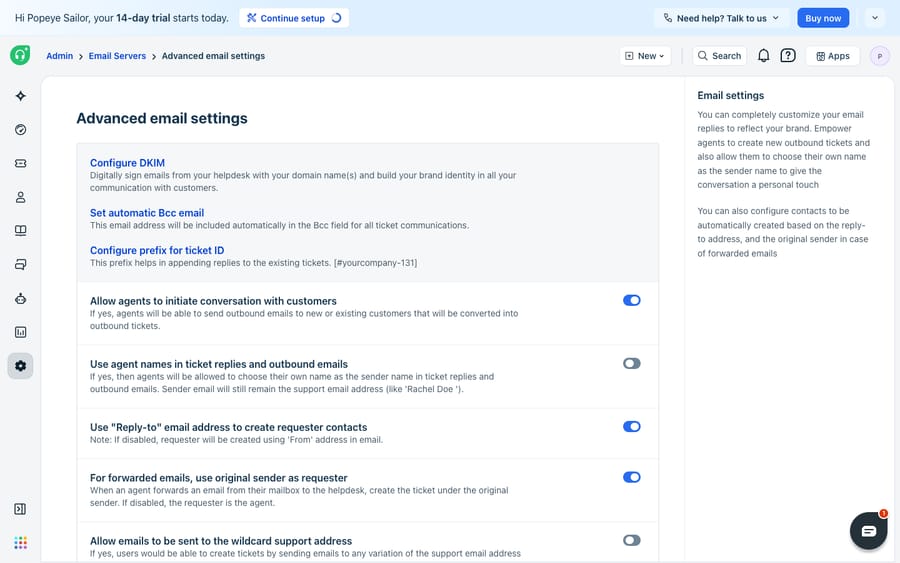
Most of the levers that control the behaviour above live in one screen: Admin → Channels → Email → Advanced Settings (older accounts see it under Email Servers). Freshworks' advanced email settings guide documents the full list; these are the ones that matter most day to day:
| Setting | What it does | Worth knowing |
|---|---|---|
| Configure DKIM | Signs outbound mail with your domain so it authenticates | Applies to your custom domain; Freshworks says it isn't required for a custom mailbox but recommends it |
| Automatic Bcc | Blind-copies an archive/monitoring address on all ticket mail | Up to 50 addresses |
| Ticket ID prefix | Custom prefix used in the subject-line identifier | Must be reflected in your email templates for threading |
| Agent names in replies | Shows the agent's name as sender (email stays the support address) | Friendlier without exposing personal inboxes |
| Allow agents to initiate email | Enables the "New email" (outbound) option for agents | Lets agents start a conversation, not just reply |
| Original sender as requester | On forwarded mail, makes the original sender the requester | Fixes the "everything is from one internal address" problem |
| Full quoted text | Includes all prior messages, not the default last four | Quoted content is capped at 1MB when fully enabled |
If your outbound email is landing in junk folders, DKIM is the setting to reach for first, and there's a fuller diagnostic in Freshdesk emails going to spam. If mail simply isn't becoming tickets at all, the mailbox verification status is usually the culprit, covered in Freshdesk email not working.
What can't Freshdesk email do, and where does an AI layer fit?
Freshdesk's email engine is well built. Mailbox-to-ticket conversion is reliable, the advanced settings are granular, and the threading logic is more forgiving than most rivals once you understand the seven-day fallback. For structuring and routing inbound email, it does its job with very little fuss.
But be clear about what all of this is: it's plumbing and formatting. A support mailbox catches the email; a reply template makes it look on-brand; threading files it correctly. None of that reads the customer's actual question or writes the answer. A DKIM record can make your reply deliverable, but it can't make the reply correct. Reply templates standardise the wrapper, not the substance: every ticket still waits on a human to read it, understand it, and type. And when the incoming email asks "where's my order #4471?", Freshdesk's email settings have no way to fetch that; they just hold the ticket open while an agent goes and looks.
This is the seam where an AI agent layer fits, and it's worth understanding how to automate Freshdesk with AI before reaching for one. The broader category of AI agents for customer service exists to do exactly the reasoning-heavy work that email plumbing can't. Macha is one such layer: it runs on top of the Freshdesk you already use (and on Zendesk, Freshdesk, Gorgias, Front, HubSpot or Intercom) as a native connector. It does not replace your help desk, your mailboxes, or your templates. You connect it to Freshdesk with your subdomain and API key, and it reads and writes the same threaded tickets your email settings already produce: drafting or posting grounded replies inside the existing thread, and looking up order or account status through a custom tool that turns a REST API into something the agent can call. (Macha's connector is for Freshdesk specifically, not Freshchat, Freshservice or Freshcaller. Macha bills per ticket, one conversation charged once however many messages it takes, from $299 a month for up to 750 tickets with setup and monitoring by the Macha team included; see the pricing page.)
The clean division of labour: let Freshdesk own the mailbox, the signature, the template, and the threading (the part it's good at), and layer an agent on top for the part email settings were never meant to do, which is understanding the message and answering it.
FAQ
Where do I add a support email in Freshdesk? Under Admin → Channels → Email. Every account starts with a default [email protected] address; you can add custom-domain addresses (like [email protected]) there too, either by forwarding into the Freshworks mail server or by connecting your Gmail/Office 365 mailbox. Freshworks documents the Free plan as limited to one support email; multiple addresses require Growth or above.
What's the difference between a signature and a reply template? A signature is the personal sign-off appended to a single agent's replies, set per agent under Admin → Agents → Signature. A reply template is the company-wide HTML wrapper around every outbound email (logo, footer, placeholders), edited under Admin → Workflows → Email Notifications → Templates. You typically use both together.
Why are old email replies creating duplicate tickets? Freshdesk's Message-ID match usually expires about seven days after the last response, after which it relies on the [#{{ticket.id}}] token in the subject line to reattach a reply. If that token has been removed from your reply template, week-old replies lose the thread and open new tickets. Keep the ticket-ID placeholder in the template.
Does DKIM require a custom domain? Yes. DKIM signing in Freshdesk (Admin → Channels → Email → Advanced Settings) authenticates outbound mail with your own domain, so it only applies to a custom support domain, not the default *.freshdesk.com address. Freshworks says DKIM isn't required to set up a custom mailbox, but recommends it for every custom email domain.
How many addresses can Automatic Bcc copy? Up to 50. Freshdesk blind-copies them on all ticket mail, which is useful for an archive or monitoring inbox. The setting is under Admin → Channels → Email → Advanced Settings.
Can I add AI to Freshdesk email without replacing Freshdesk? Yes. An AI agent layer like Macha connects to Freshdesk as a native connector and runs on top of your existing mailboxes, templates, and threading without replacing them. It reads the same threaded tickets your email channel produces and drafts or posts grounded replies, while Freshdesk stays the system of record for the email itself.
Ready to put an answer behind every threaded email instead of just a tidy history? Start a free trial of Macha and connect it to your Freshdesk in minutes.






