





 Shopify
 Stripe
 Slack
Slack Notion
 Google Workspace
 Confluence

Is HubSpot Service Hub Worth It in 2026? Review, Pricing and Ratings


HubSpot Service Hub is worth buying if your team already runs HubSpot's CRM, where Professional at $90 per seat a month puts every ticket on the same record sales and marketing use. As a standalone help desk it gets expensive fast, with a $1,500 onboarding fee and per-resolution AI charges on top of seats.
Key takeaways
- HubSpot Service Hub is worth it mainly for teams already on HubSpot CRM, because every ticket, survey and SLA timer attaches to the shared customer record.
- Service Hub Professional costs $90 per seat a month on annual billing, or $100 monthly, plus a $1,500 one-time onboarding fee.
- Service Hub Starter dropped to $7 per seat a month on annual billing and now includes one knowledge base of up to 2,000 articles.
- The Breeze Customer Agent costs 50 HubSpot Credits, or $0.50, per resolved conversation since 14 April 2026, and only Professional and Enterprise customers can use it.
- Professional's 3,000 included monthly credits cover about 60 resolved Customer Agent conversations before a team starts buying extra credits.

HubSpot Service Hub is worth it in 2026 if you already run HubSpot's CRM: Professional costs $90 per seat a month on annual billing plus a $1,500 one-time onboarding fee, and that buys support that sits on the same customer record your sales and marketing teams use. As a standalone help desk it's harder to justify, because the features most support teams need cluster on Professional and the AI agent bills per resolution on top of seats.
| Question | Short answer (checked 24 Sept 2026) |
|---|---|
| Cheapest paid plan | Starter: $7/seat/mo annual, $20 monthly, 500 HubSpot Credits |
| Plan most support teams need | Professional: $90/seat/mo annual ($100 monthly) + $1,500 onboarding |
| Enterprise | From $150/seat/mo + $3,500 onboarding |
| AI agent cost | Breeze Customer Agent: 50 credits ($0.50) per resolved conversation, Pro and Enterprise only |
| Ratings (June 2026 reading) | G2 4.4/5 (~2,856 reviews); Capterra ~4.4/5 for Service Hub |
| Best fit | Teams already on HubSpot CRM, Sales Hub or Marketing Hub |
One disclosure up front: Macha is our own product, an AI agent layer that runs on top of Zendesk, Freshdesk, Gorgias, Front, HubSpot or Intercom. It is not a help desk and not a Service Hub alternative, and it gets exactly one aside near the end, flagged as ours.
How we reviewed it: prices re-checked 24 September 2026 against HubSpot's Service Hub pricing page and HubSpot's own Customer Agent announcement. Ratings and sentiment come from G2 and Capterra as read in June 2026 (those pages block automated access, so the figures are cited, not screenshotted). The product walkthrough is grounded in HubSpot's own materials.
What is HubSpot Service Hub, and who is it built for?
Service Hub is the customer-service layer of HubSpot, built directly on HubSpot's Smart CRM. That's the whole thesis: it isn't a help desk that syncs with a CRM, it is the CRM with a support workspace, ticketing and AI on top. Every ticket, conversation, survey result and SLA timer attaches to the same contact and company record your sales and marketing teams already work from.
It's built for businesses already invested in HubSpot, companies running Sales Hub or Marketing Hub that want support on the same data, and for SMB-to-mid-market teams that prefer one platform over a best-of-breed stack. The short version: Service Hub is at its best as one hub among several, and at its weakest as the only HubSpot product you own.
What does Service Hub actually include?
Service Hub is broader than its reputation as "the support add-on" suggests.
Tickets and the help desk workspace
The core is a ticketing system with a unified help desk workspace that pulls email, live chat, Facebook Messenger, forms and calls into one inbox. Agents triage, reply, assign and track tickets to resolution, with pipelines, routing and automation behind them. Because every ticket lives on the CRM record, an agent sees the customer's deals, past tickets and marketing touches without switching tabs. That context is the most-praised thing about Service Hub.
Knowledge base and self-service
Service Hub includes a knowledge base for public help articles plus customer portals where customers track their own tickets. The articles feed the AI deflection layer, so better articles mean more conversations the agent can close on its own. Starter now includes one knowledge base of up to 2,000 articles; Professional and Enterprise raise that to 100 knowledge bases of up to 10,000 articles.
Breeze AI and the Customer Agent
HubSpot's AI is branded Breeze. For support the headline piece is the Breeze Customer Agent, a customer-facing AI that answers conversations from your knowledge base and CRM content. There's also Breeze Copilot for agent assistance (summaries, drafting, lookups). HubSpot changed how the Customer Agent is billed in April 2026, so it gets its own section below.
SLAs, feedback and surveys
You get SLA management (targets, business hours, breach tracking) on higher tiers, plus CSAT, CES and NPS surveys wired into the CRM so satisfaction scores attach to the contact and roll into reporting. Teams that want closed-loop feedback without a separate survey tool get it here.
Reporting and analytics
This is where the CRM foundation pays off most. Support, sales and marketing share one database, so Service Hub's custom reports and dashboards can answer questions a standalone help desk struggles with, such as how ticket volume tracks a customer's lifecycle stage or deal value. The deeper custom reporting sits on Professional and Enterprise.
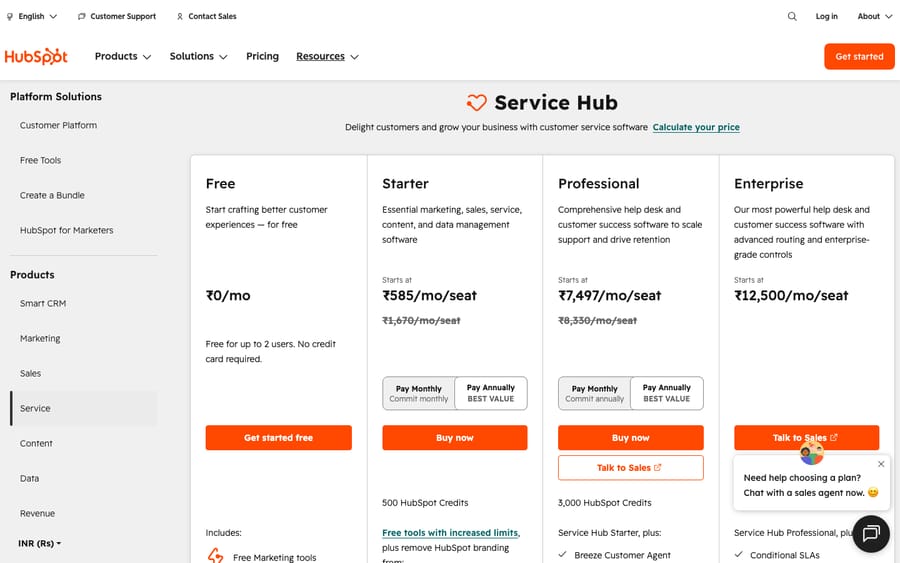
How much does HubSpot Service Hub cost in 2026?
Here's the published pricing as of 24 September 2026. Paid figures are per seat, per month.
| Plan | Annual billing | Monthly billing | One-time onboarding | Included credits |
|---|---|---|---|---|
| Free tools | $0 (up to 2 users) | $0 | None | None listed |
| Starter | $7 | $20 | None | 500 |
| Professional | $90 | $100 | $1,500 | 3,000 |
| Enterprise | From $150 | Not published | $3,500 | 5,000 |
The footnotes matter more than the table:
- Free and Starter are real but thin. Starter is cheap and now carries a knowledge base, but reviewers consistently say it "feels limiting" for actual service work. The features most support teams want (robust SLAs, custom reporting, the Customer Agent) start at Professional.
- The jump to Professional is steep and front-loaded. On annual billing, Starter at $7 to Professional at $90 is roughly a 13x per-seat leap, plus a $1,500 onboarding fee the first time. Enterprise adds a $3,500 onboarding fee, and third-party 2026 pricing guides report a 10-seat minimum, which would put the floor at $1,500 a month. Budget the onboarding fee as a real line item.
- The Breeze Customer Agent is outcome-based. Since 14 April 2026 it costs 50 HubSpot Credits ($0.50) per resolved conversation, down from $1.00 per conversation regardless of outcome. It's available to Professional and Enterprise customers with a 28-day free trial. Credits reset monthly and extra credits cost $0.010 each on annual purchase.
Do the arithmetic and the included credits look smaller than they sound. Professional's 3,000 monthly credits cover 60 resolved conversations if nothing else draws on them. A team resolving 1,000 conversations a month with the agent spends 50,000 credits, so it buys roughly 47,000 extra, about $470 a month on top of seats.
The effective price for a real support operation clusters around Professional plus onboarding plus per-resolution AI. A 10-seat Professional team is $900/mo + $1,500 onboarding before AI usage. If you already pay for HubSpot's CRM and other hubs, the marginal cost feels reasonable; as a standalone help desk it's at the premium end. We break the full math down in our HubSpot Service Hub pricing guide.
Plan prices, onboarding fees and credit allowances from hubspot.com/pricing/service; Customer Agent pricing from HubSpot's April 2026 announcement. Verify with HubSpot for your seat count and volume.
What do G2 and Capterra reviewers say about Service Hub?
Aggregate scores are the closest thing to a crowd verdict. As read in June 2026:
- G2: 4.4 / 5 from roughly 2,856 reviews on the Service Hub page (about 64% five-star, 29% four-star), a large sample.
- Capterra: 4.5 / 5 across the broader HubSpot suite (~4,400 reviews); the Service Hub listing sits at a similar ~4.4 / 5 from a smaller sample.
Those numbers are high enough to take Service Hub seriously. Just as telling is what reviewers keep praising and complaining about, quoted in their own words where we could attribute them.
What reviewers praise. Customization, the unified platform and longevity top the list. Capterra reviewer Nabil B. (a Director in marketing & advertising) wrote: "Great tool with plenty of customizations available — have been using it for support tickets for several years now." Daniel C., an automation engineer in health & wellness, called it an "adaptable, scalable automation platform for customer management, marketing and general business organisation." The through-line in positive reviews is CRM gravity: support, marketing and sales in one place.
What reviewers criticize. Two themes dominate. First, cost and complexity for smaller teams. Sean C., a marketer, summed it up: "It's complicated, sometimes clunky (need to check for errors), and the advanced plans are expensive for a small business." Second, price escalation as you scale: the Starter-to-Professional jump, onboarding fees and add-on costs keep surprising buyers. The other recurring notes are a mobile app that trails desktop and a learning curve that often pushes teams toward paid onboarding or a partner. None of these are dealbreakers for the right buyer, but they're predictable friction.
What are the pros and cons of HubSpot Service Hub?
Pros
- CRM context on every ticket. Each ticket sits on a full customer record shared with sales and marketing, which a bolt-on help desk can't easily replicate.
- Broad platform. Tickets, inbox, knowledge base, SLAs, surveys, AI and custom reporting in one place.
- Cross-functional reporting. Shared data means analytics a standalone desk can't easily produce.
- Approachable UI. Consistently praised for usability and a clean interface.
- Outcome-based AI pricing. Paying $0.50 only per resolved conversation is fairer than paying per conversation regardless of outcome.
Cons
- Costs escalate fast. Starter to Professional is roughly 13x per seat on annual billing, plus $1,500 or $3,500 onboarding fees.
- Thin lower tiers. The features most support teams need start at Professional.
- Real learning curve. Reviewers often mention training or a paid implementation partner.
- Weaker as a standalone desk. Outside the HubSpot ecosystem, the price-to-feature ratio drops against dedicated help desks.
- Mobile gaps. The mobile app is repeatedly called less capable than desktop.
Who should choose HubSpot Service Hub, and who shouldn't?
Choose Service Hub if you already run HubSpot CRM (and likely Sales or Marketing Hub), you want support data on the same customer record, you prefer one platform over a best-of-breed stack, and you can absorb Professional pricing plus onboarding. For that profile it's excellent, and the 4.4 G2 rating reflects a lot of teams in exactly that bucket.
Look elsewhere if you're buying a help desk with no other HubSpot footprint, you're a small team that needs deep support features without the jump to Professional, or you want a specialist support platform with deep ticketing ergonomics out of the box. There, it's worth weighing dedicated help desks like Zendesk (below) and Freshdesk, which are built support-first rather than CRM-first.
We line up the strongest options, including support-first platforms and other CRM-native suites, in the best HubSpot Service Hub alternatives.
How does Breeze's AI pricing compare with a per-ticket AI layer?
HubSpot's Breeze Customer Agent bills per resolved conversation ($0.50), so you pay for outcomes. HubSpot's incentive there is clear: it earns only when the agent closes a conversation, which pushes it to make the agent resolve more. For HubSpot-native teams it's the obvious path.
Our own product prices the same work differently, disclosed plainly because it's ours. Macha is an AI agent layer that runs on top of an existing help desk, not a help desk and not a Service Hub alternative, so it isn't a like-for-like option here. The contrast is the billing unit: Macha bills per ticket, one charge per thread however many steps it takes (drafting a reply, tagging, resolving), on one plan priced by volume, starting at $299 a month for up to 750 tickets with setup by the Macha team included. Outcome pricing only counts resolutions; per-ticket pricing covers assists and partial automations too but needs a volume estimate. Whichever you pick, model the AI line separately from seats. You can see how the agent layer works or try it ($50 of free usage, no credit card required). If you're committed to HubSpot, Breeze is the native route.
Frequently asked questions
Is HubSpot Service Hub worth it in 2026? For teams already in HubSpot, generally yes: the shared CRM context and reporting are hard to match, and the 4.4/5 G2 rating (from ~2,856 reviews, June 2026) reflects a lot of satisfied users. As a standalone help desk for a small team, it's harder to justify against the jump to Professional and the onboarding fee.
How much does HubSpot Service Hub cost? Per seat per month: Free ($0, up to 2 users), Starter $7 annual or $20 monthly, Professional $90 annual or $100 monthly plus a $1,500 one-time onboarding fee, and Enterprise from $150 plus a $3,500 onboarding fee. The Breeze Customer Agent adds 50 credits ($0.50) per resolved conversation. See the pricing guide for the full breakdown.
What are HubSpot Service Hub's main pros and cons? Pros: CRM-unified context, a broad platform, cross-functional reporting, an approachable UI and outcome-based AI pricing. Cons: steep cost escalation, thin lower tiers, a real learning curve, weaker value as a standalone desk and a limited mobile app.
Is HubSpot Service Hub good as a standalone help desk? It works, but it's not the sweet spot. Its biggest advantages (shared records, cross-functional analytics) pay off fully only when you use other HubSpot products. Buying it as an isolated help desk means paying for value you may not capture, and a dedicated support platform is often the better fit.
How does Breeze Customer Agent pricing work? Since 14 April 2026 it's outcome-based: 50 HubSpot Credits ($0.50) per resolved conversation, down from $1.00 per conversation. It's available on Professional and Enterprise, with a 28-day free trial, and draws on the plan's included credits (3,000 a month on Professional) before you buy more.
HubSpot Service Hub vs Zendesk: which is better? Neither wins everywhere. Service Hub wins when you want support unified with a CRM you already use; Zendesk is support-first with deeper out-of-the-box ticketing. The choice depends on whether your center of gravity is the CRM or the help desk. See the alternatives breakdown.
What should you check before you sign?
The lower tiers are thin, the jump to Professional is steep and front-loaded with onboarding fees, there's a learning curve, and the value softens outside HubSpot. If you're invested in HubSpot and want support on the same data as everything else, Service Hub is one of the strongest choices you can make. If you're buying a help desk in isolation, price the effective cost (Professional seats, the $1,500 onboarding fee and per-resolution AI beyond the included credits) and weigh it against the alternatives before you sign.
Pricing re-checked against HubSpot's pricing page, 24 September 2026. Aggregate ratings and review quotes were read in June 2026 on G2 and Capterra and may have moved. Macha is our own product (an AI agent layer on top of Zendesk, Freshdesk, Gorgias, Front, HubSpot or Intercom; it is not a Service Hub alternative), disclosed as such.






