





 Shopify
 Stripe
 Slack
Slack Notion
 Google Workspace
 Confluence

How Do You Log In to Gorgias? Sign-In, SSO and Fixes for Session Expired and 2FA Lockouts


You log in to Gorgias at gorgias.com/login by entering your workspace subdomain, then signing in with email and password or a Continue with Google, Microsoft or company SSO button. Most failed logins trace back to a few documented errors, each with a quick fix.
Key takeaways
- Gorgias has no universal login box, so agents sign in at yoursubdomain.gorgias.com or through gorgias.com/login by entering their workspace subdomain first.
- The most common Gorgias login error, "Your session has expired," is typically caused by having the same account open in multiple browser tabs at once.
- Fixing a Gorgias session-expired loop means closing all but one tab and doing a hard refresh, Cmd+Shift+R on Mac or Ctrl+F5 on Windows.
- The Gorgias error 'pk is not a valid integer' occurs when Outlook rewrites a ticket link; paste the raw link into the browser bar instead.
- A Gorgias user locked out of two-factor authentication can use a recovery code, or ask an Admin to open Settings, Users and click Reset 2FA token.
To log in to Gorgias, go to gorgias.com/login, enter your workspace subdomain, then sign in with email and password or click Continue with Google, Continue with Microsoft or your company's SSO button. When that fails, the cause is usually one of three documented errors: "Your session has expired" (the account is open in several tabs), "pk is not a valid integer" (Outlook rewrote a ticket link) or "Unable to fetch" (your own web filter is blocking gorgias.com).
Why can't I log in to Gorgias?
Find your symptom, then jump to the matching fix further down.
| What you see | Most likely cause | Fix in short |
|---|---|---|
| "Your session has expired" on a loop | Same account open in multiple tabs | Hard refresh; use one tab; clear cache |
| "pk is not a valid integer" | A ticket link opened from Outlook/another app rewrote the URL | Copy the raw URL into your browser bar |
| "Unable to fetch…" | Company web-filtering/firewall blocking Gorgias | Ask IT to whitelist gorgias.com |
| Password reset email never arrives | Wrong subdomain, or it's in spam | Check spam; confirm the subdomain |
| No "change password" option | You're an SSO user with no password | Run Forgot password to set one |
| "Too many login attempts" on mobile | Captcha wall after repeated tries | Sign out/in on desktop to clear the captcha |
| 2FA / authenticator won't accept a code | Lost or reset authenticator | Use a recovery code, or ask an Admin to reset your 2FA token |
How do you sign in to Gorgias?
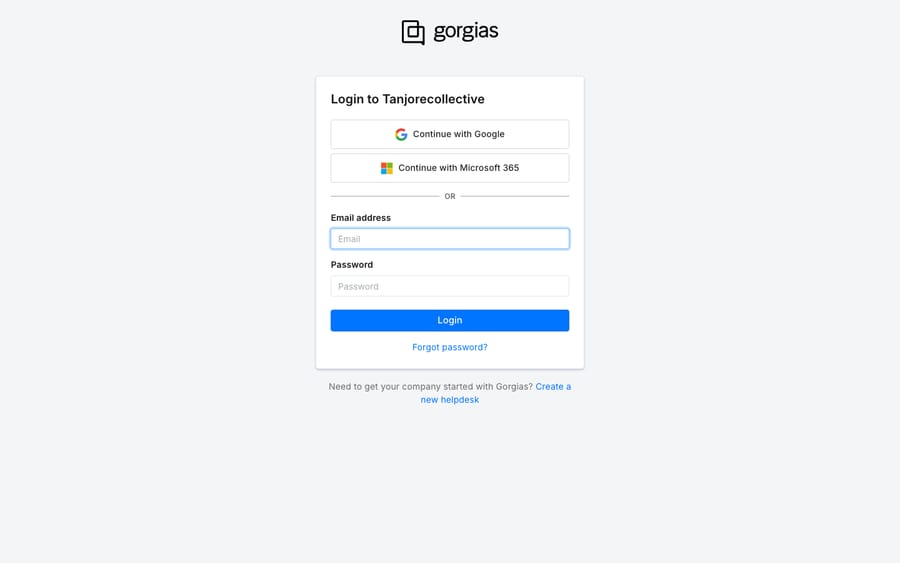
Gorgias is multi-tenant, so there's no single universal login box: every account lives at its own subdomain. To sign in, go directly to yoursubdomain.gorgias.com, or start at gorgias.com/login, enter your workspace subdomain and click Login. From there you have two paths, both visible on the same screen:
- Email and password: the standard agent login. Type the address you were invited with and your password.
- Single Sign-On (SSO): if an Admin has enabled it, click Continue with Google, Continue with Microsoft or Continue with your company's own SSO provider, and authenticate there instead of with a Gorgias password. Per Gorgias' sign-in guide, a user account is created the first time someone signs in through SSO.
One thing worth knowing up front, because it causes a lot of confusion: if you sign in with Google or Microsoft SSO, you don't have a Gorgias password at all. So if you later try to "change your password" and can't find the option, that's expected. You'd first have to run the Forgot password flow to create one. Keep that in your back pocket; it explains a surprising share of "I can't log in" tickets.
How do you fix each Gorgias login error?
1. "Your session has expired": you have Gorgias open in more than one tab
This is the single most common login complaint, and the cause is almost always mundane. Gorgias' own common account errors doc names it directly: the message "Your session has expired. You will be redirected to the login page in a few seconds" is typically triggered by multiple browser tabs pointed at the same account at once. The tabs fight over the session and one of them loses.
The fix, in order:
- Close every Gorgias tab but one, then do a hard refresh —
Cmd+Shift+Ron Mac,Ctrl+F5on Windows — to force a clean reload rather than a cached one. - If it recurs, clear your browser cache and cookies (and make sure the browser itself is up to date).
- Test in an incognito/private window or a different browser. If it behaves there but not in your normal window, you've confirmed it's stale cached data in your everyday profile — clear that browser and you're done.
Get in the habit of working Gorgias in a single tab and this one basically disappears.
2. "pk is not a valid integer": you clicked a Gorgias link inside Outlook (or another app)
This error looks alarming and technical, but it's not your account — it's a URL that got mangled in transit. When you click a Gorgias link from inside a third-party app like Outlook, that app sometimes rewrites the target URL (for safe-link scanning), and the rewritten link no longer points at a valid ticket ID. Gorgias reads that as an invalid pk (its internal record key) and throws "pk is not a valid integer."
The fix is simple: copy the link text and paste it straight into your browser's address bar rather than clicking it. The un-rewritten URL resolves fine. If your team keeps hitting this from email notifications, that's the pattern to teach — click nothing, copy-paste instead.
3. "Unable to fetch…": your own web filtering is blocking Gorgias
An "Unable to fetch…" error (often with parts of the helpdesk failing to load) usually isn't Gorgias at all. Per the same account-errors doc, it's commonly caused by third-party web-filtering software on your network blocking certain helpdesk features from loading. Because it's happening at the network layer, no amount of clearing cookies on your end will fix it.
The real fix lives with IT: ask them to whitelist all traffic from gorgias.com in your web filter, firewall, or corporate proxy. This is worth flagging early if the error shows up for everyone on your office network but not for someone on home wifi — that split is the giveaway that it's a filtering issue, not an account one.
4. Password reset email isn't arriving
To reset a password, click Forgot password? on the gorgias.com/login screen, enter your email, and follow the link in the reset email. If the email doesn't show up, two causes dominate: it's sitting in your spam/junk folder, or you're on the wrong subdomain. The reset is scoped to the specific workspace, so a typo in the subdomain sends you nowhere. Confirm the subdomain, check spam, and try again. As a general first step for any login weirdness, Gorgias' login issues guide recommends clearing cache and cookies before you sign in with the new password.
5. "Too many login attempts" on mobile
Repeated failed attempts trip a captcha wall, and the mobile app doesn't always surface the captcha to solve it. The documented workaround in Gorgias' sign-in guide: sign out and back in on desktop, accept the CAPTCHA there, and then sign in on the mobile app again. Clearing the captcha on the desktop side unblocks the account.
6. 2FA / authenticator lockout
If your authenticator app was reset or lost with a device, first try one of the recovery codes Gorgias gave you when you set up 2FA. Without one, you can't clear this yourself. An Admin on your account has to reset it: Settings → Users → [your name] → Reset 2FA token. After that you log in fresh and re-enroll. If you're the only admin and you're locked out, that's the one case where Gorgias support has to step in.
What if the problem is SSO setup or a Gorgias outage?
A couple of things the trial or a basic plan won't show you, so you're not left hunting for a button that isn't there:
- Custom SSO (your own identity provider beyond Google and Microsoft) shows up as a third Continue with button only after an Admin configures it. If your company expects it and the button is missing, the setup isn't finished; ask your Gorgias Admin rather than Gorgias support.
- If none of the above applies and the helpdesk is genuinely unreachable, it may be a Gorgias-side outage rather than your login. Check the Gorgias status page — we walk through reading it in is Gorgias down?.
Can an AI agent cut the customer login tickets in Gorgias?
Here's a distinction worth drawing: everything above is about your agents getting into Gorgias. But a large share of the login-shaped work landing in an ecommerce queue is about your customers — "how do I reset my password," "I can't log in to my account," "where do I check my order status." Those aren't Gorgias errors at all; they're repetitive tickets that still consume an agent's time to answer.
That's the seam where an AI agent layer helps, and it's worth being clear about what it is: Macha is an AI agent for customer service that runs on top of the Gorgias you already use. It doesn't replace your help desk, it connects to it and reads and writes the same tickets your agents do. It can answer the routine account and order questions on meaning rather than keyword matching, so the volume behind "I can't log in" and "where's my order" thins out before a human ever opens it. For the fuller picture of how that works on Gorgias specifically, see Gorgias AI agent explained, or start with what Gorgias is if you're newer to the platform.
Because an agent acts on meaning, you can extend it too: a custom tool turns any REST API into an action the agent can call, such as looking up a customer's order or account status mid-conversation, something a canned reply can't do. Macha bills per ticket (one conversation, charged once however many messages it takes) rather than per resolution, starting at $299 a month for up to 750 tickets; the rest of the tiers are on pricing.
FAQ
How do I log in to Gorgias? Go to your workspace URL, yoursubdomain.gorgias.com, or start at gorgias.com/login and enter your subdomain. Then sign in with your email and password, or click Continue with Google, Continue with Microsoft or your company's SSO button if an Admin has enabled SSO.
Why does Gorgias keep saying "your session has expired"? The most common cause is having the same account open in multiple browser tabs at once. Close all but one Gorgias tab, do a hard refresh (Cmd+Shift+R on Mac, Ctrl+F5 on Windows), and clear your cache and cookies if it recurs. Working in a single tab prevents it.
What does "pk is not a valid integer" mean in Gorgias? It means a Gorgias ticket link got its URL rewritten by a third-party app, most often Outlook, so it no longer points at a valid ticket. Instead of clicking the link, copy the URL and paste it directly into your browser's address bar.
I use Google/Microsoft SSO — why can't I change my password? Because you don't have a Gorgias password at all when you sign in through SSO. If you need a direct email-and-password login, run the Forgot password? flow first to create one.
I'm locked out by two-factor authentication. What now? Try a recovery code from your 2FA setup first. Without one, you can't reset your own 2FA token: ask an Admin on the account to go to Settings → Users, select your name, and click Reset 2FA token. Then log in again and re-enroll your authenticator.
Want fewer login and order-status tickets reaching your agents in the first place? Start a free trial and grade a Macha agent against your own Gorgias history before it goes anywhere near your live queue.






