





 Shopify
 Stripe
 Slack
Slack Notion
 Google Workspace
 Confluence

Front vs Spark Mail (2026): Which Team Inbox Should You Pick?


Front suits support and ops teams that need routing rules, SLAs and several channels, from $25 a seat a month billed annually, while Spark Mail suits small teams sharing an email address, with a free plan and Plus at $8.25 a user a month. Prices were checked on each vendor's pricing page on 24 September 2026.
Key takeaways
- Front suits support teams that need routing rules and several channels from $25 a seat a month, while Spark Mail suits small teams sharing an address, with a free plan.
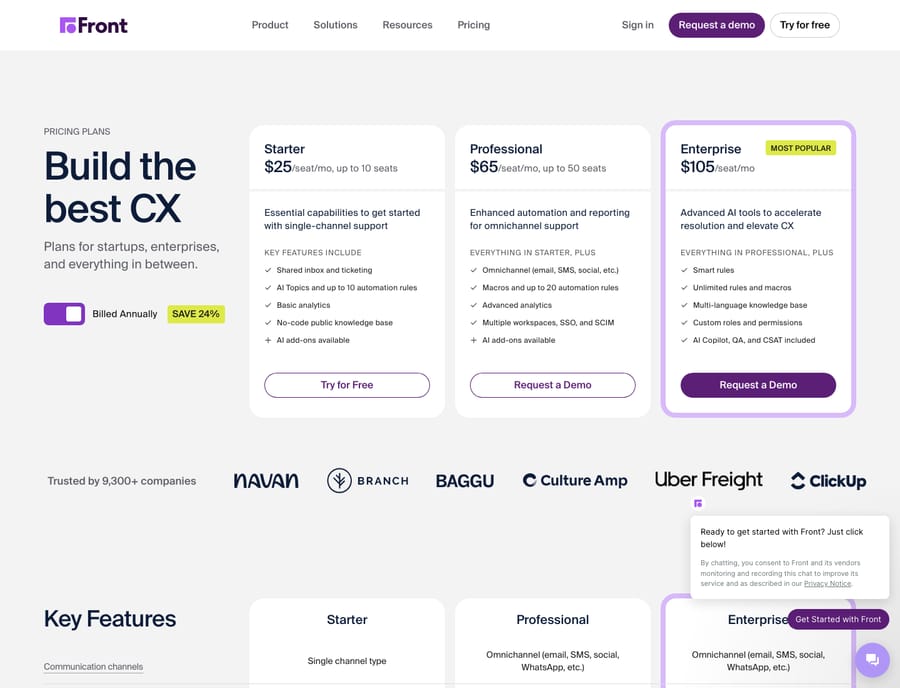
- Front's pricing page lists Starter at $25, Professional at $65 and Enterprise at $105 per seat a month, billed annually, with automation rules capped at 10, 20 and unlimited.
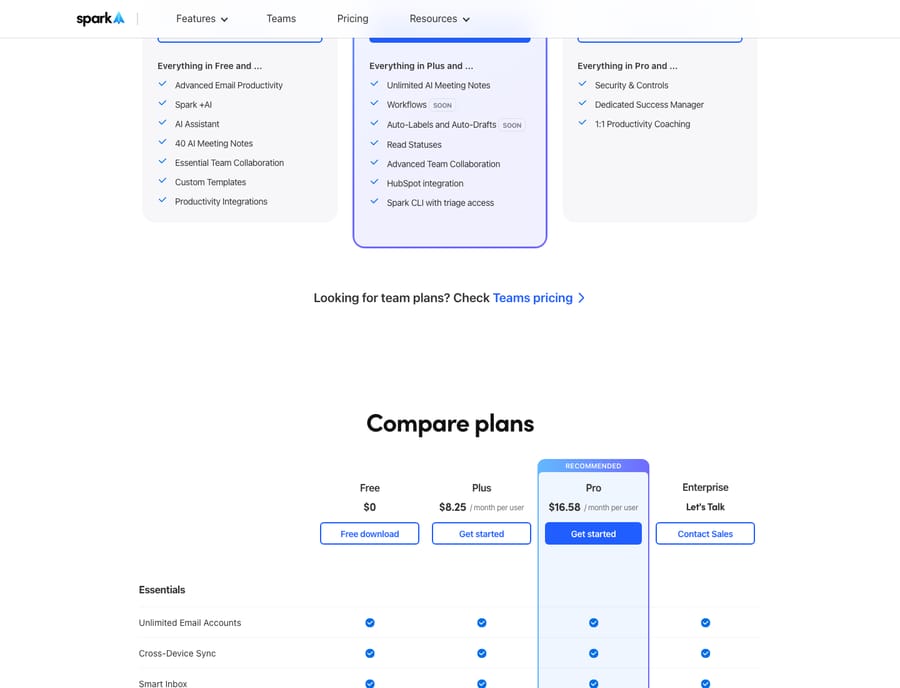
- Spark Mail's pricing page lists Plus at $8.25 and Pro at $16.58 per user a month billed annually, and its free plan allows 2 active collaborators.
- A five-person team pays $325 a month on Front Professional versus about $83 a month on Spark Pro, for very different feature depth.
- Spark Mail has no rules engine as of 24 September 2026, though its pricing page lists Workflows and Auto-Labels on Pro as coming soon.

Front is the better pick for a support or ops team that needs routing rules, SLAs and several channels in one inbox, starting at $25 a seat a month billed annually; Spark Mail is the better pick for a small team that mainly shares an email address, with a free plan and Plus at $8.25 a user a month billed annually. Both let a team work one inbox together. Front is a customer-operations platform. Spark, from Readdle, is an email client that added team features on top. Prices below were checked on each vendor's pricing page on 24 September 2026.
| Front | Spark Mail (Readdle) | |
|---|---|---|
| Best for | Support, success and ops teams running customer conversations as a workflow | Small teams and professionals who want a fast, clean shared inbox and calendar |
| Entry price (24 Sept 2026) | Starter $25/seat/mo (annual), up to 10 seats | Free $0 (2 active collaborators); Plus $8.25/user/mo (annual) |
| Collaboration / shared-inbox depth | Deep: assignments, comments, shared drafts, tags, SLAs, workspaces | Lighter: shared inboxes, private comments, shared threads and drafts, assignments (10 per team on Plus) |
| Automation | Full rules engine (When/If/Then), macros, round-robin routing | Smart inbox, templates and send-later; Workflows and Auto-Labels listed as "soon" on Pro |
| Channels | Email, SMS, chat, social, WhatsApp (by plan) | Email plus calendar; no native support channels |
| AI | Copilot $20/seat, Autopilot from $0.05 per conversation; Copilot included on Enterprise | Spark +AI writing and AI Meeting Notes (40 a month on Plus, unlimited on Pro) |
How much do Front and Spark cost?
The clearest difference is what a seat costs, and what that seat buys.
Front publishes three tiers. Per Front's pricing page (24 September 2026), the plans are Starter at $25/seat/mo (up to 10 seats), Professional at $65/seat/mo (up to 50 seats) and Enterprise at $105/seat/mo, all billed annually; paying annually saves 24%. Starter allows up to 10 automation rules, Professional 20 and Enterprise unlimited. AI is mostly extra money below Enterprise: Copilot is $20/seat/mo and Autopilot starts at $0.05 per conversation. Enterprise includes Copilot, Smart QA and Smart CSAT, but Autopilot is metered on every plan. So an "AI-enabled" Front seat costs more than the sticker: Professional plus Copilot is $85 a seat.
Spark is far cheaper because it does less. Per Spark's pricing page (24 September 2026), there's a Free plan at $0, Plus at $8.25/user/mo ($99 a year; $10 month-to-month), Pro at $16.58/user/mo ($199 a year; $20 monthly) and a custom-quote Enterprise tier. Free allows 2 active collaborators; Plus and Pro allow unlimited collaborators. Plus caps assignments at 10 per team and AI Meeting Notes at 40 a month; Pro lifts both limits.
Do the arithmetic for five people: Front Professional is $325 a month, Spark Pro about $83 a month. You aren't buying the same thing. Front's price includes routing, analytics and several channels; Spark's price buys a very good email client with sharing added. For a full breakdown of Front's tiers, see our Front pricing explained guide.
How deep is each tool's shared inbox?
Both tools let several people work the same inbox without forwarding, but the depth differs.
Front treats the shared inbox as a system of record. You get conversation assignment, internal comments (@-mentions that never reach the customer), shared drafts, tags, snooze, collision detection, SLA timers and multiple workspaces. G2 reviewers consistently praise how it keeps cross-channel conversations in context (G2 Front reviews). For the mechanics, our Front shared inbox explained piece covers it in detail.
Spark gives a useful team layer for its price: shared inboxes for addresses like sales@, so a team can manage one without sharing a password, private comments on a thread, shared threads, assignments, and shared drafts that teammates co-write. It suits teams of 3 to 10. Reviewers on G2 flag occasional sync delays across accounts and thinner integrations than dedicated tools (G2 Spark for Teams reviews). Past roughly 10 to 15 users with real routing needs, Spark's team features show their ceiling, and the 10-assignment cap on Plus arrives even sooner.
Which tool can automate routing and triage?
This is where the two tools diverge most.
Front has a real automation engine. Rules follow a When (trigger) / If (condition) / Then (action) model: route by inbox or keyword, auto-assign with round-robin or load balancing, tag, auto-reply with a template, escalate on SLA breach. Rule counts scale by plan (10 on Starter, 20 on Professional, unlimited on Enterprise). For a customer-ops team, that engine is the reason to buy Front.
Spark has no comparable rules engine today. It offers a smart inbox that groups newsletters and notifications, custom templates and send-later scheduling. Those are productivity conveniences, not workflow automation. Spark's pricing page lists Workflows and Auto-Labels and Auto-Drafts on Pro as "soon", so check what has shipped before you rule it out. As of 24 September 2026 there's no round-robin assignment, no SLA escalation and no conditional routing across a team. If your team needs automated triage at volume, that gap decides it.
Which channels does each tool support?
Front is built for several channels. On Professional and above you can pull email, SMS, chat, social messages and (as an add-on) native WhatsApp into the same shared inboxes, so every customer channel lands in one place. That's a core reason support teams choose it over an email-only tool.
Spark is email-first, with an integrated calendar and meeting features. It doesn't natively unify SMS, live chat or social support channels. If email and calendar really are all your team handles, that focus is a feature.
Which is easier to set up?
Spark wins on speed. It's a native app on Mac, iOS, Windows and Android with a clean UI; reviewers repeatedly say it needs little onboarding, and Spark +AI drafts replies and summarizes threads out of the box. A small team can be productive the same day.
Front does more and takes more setup. Configuring inboxes, rules, tags, workspaces and analytics is real implementation work, worth it for a support operation and overkill if you just want a shared address. Front offers a 14-day trial with Professional features and no card, which is enough to build a few rules and see. Our Front app review digs into the day-to-day experience.
What are the pros and cons of Front and Spark?
Front pros: deep shared inbox across channels; a genuine rules engine; strong analytics and SLAs; well reviewed on G2; scales to large support and success teams. Front cons: much more expensive per seat; AI is mostly paid add-ons below Enterprise; some reviewers note the loss of true two-way Outlook sync and pricing that stings for small teams; real setup effort (Capterra Front reviews).
Spark pros: fast native email on every platform; low cost (Free plus $8.25 Plus and $16.58 Pro); useful team collaboration and Spark +AI writing and meeting notes; almost no onboarding. Spark cons: no rules engine yet; email-first, so no native SMS, chat or social channels; team depth tops out for larger operations; G2 reviewers report sync and integration complaints.
Which should you choose?
Choose Front if you run customer conversations as an operation: a support, success or shared-ops team that needs inboxes across channels, automated routing, SLAs and analytics, and can justify $25 to $105 a seat. If you're weighing other options too, our best Front alternatives roundup is a good next stop.
Choose Spark if you're a small team or a group of professionals who want a fast shared inbox and calendar without the platform overhead or the price. For 3 to 10 people who mainly share an address, comment internally and delegate email, Spark delivers most of the everyday value at a fraction of Front's cost.
Put simply: Spark is the better email client; Front is the better customer-operations platform. Pick based on whether email is one of your tools or your whole job.
Can you add an AI agent on top of either inbox?
Neither tool fully covers this. Front's rules and Spark's smart inbox move and label messages; neither reads a customer's question, checks their actual order or account, and writes the answer (Front's Autopilot answers from knowledge sources, billed per conversation). That reasoning layer is a separate category, AI agents for customer service, and it sits on top of the inbox you already chose. Macha connects to Front through a live Macha–Front connector and runs as an agent that reads the routed conversation, works out intent, looks up data in tools like Shopify, and drafts or sends a grounded reply. Macha works on Zendesk, Freshdesk, Gorgias, Front, HubSpot or Intercom; it doesn't connect to Spark, which is an email client rather than a help desk. Macha bills per ticket, not per message, on one plan from $299 a month for up to 750 tickets, with setup and monitoring by the Macha team included.
FAQ
Is Spark cheaper than Front? Yes, by a lot. On 24 September 2026 Spark ran Free ($0), Plus at $8.25/user/mo and Pro at $16.58/user/mo (annual), while Front starts at $25/seat/mo and reaches $105/seat/mo on Enterprise. Spark is cheaper because it's a lighter email tool; Front's price includes routing across channels, automation and analytics.
Does Spark Mail have a real shared inbox like Front? Spark offers shared inboxes with private comments, assignments and shared drafts, enough for small teams. Front's shared inbox goes further, adding SLAs, collision detection, tags, workspaces and context across channels, which is why larger support teams tend to prefer it.
Can Spark replace a help desk? Not really. Spark has no rules engine, no SLA tracking and no native SMS, chat or social channels, so teams with complex support workflows usually outgrow it. Front is closer to a help-desk-style customer-ops platform; Spark is an email client with team features.
Which has better reviews, Front or Spark? Front has the larger review base on G2, and reviewers praise its collaboration depth. Spark for Teams reviewers like the clean UX and the price but flag sync and integration limits. G2 blocks automated checks, so read the current scores on the Front and Spark for Teams pages before you quote them.
Is there a free plan or trial? Spark has a free plan that allows 2 active collaborators. Front has no free plan but offers a 14-day trial with Professional features and no card.
Can I add AI to Front or Spark without switching tools? For Front, yes. An AI agent layer like Macha connects through a live connector and runs on top of it: your inbox keeps routing and labeling, and the agent reads the conversation, works out intent, and drafts or sends a grounded reply. Spark's own Spark +AI helps you write faster, but it doesn't resolve tickets for you.
Ready to turn a shared inbox into resolved conversations? Start a free trial of Macha and connect it to the inbox you already use.






