



 Intercom
 Shopify
 Stripe
 Slack
Slack Notion
 Google Workspace
 Confluence

Is Front Worth It? Front App Review 2026: Pros, Cons and Pricing


Front is worth it for teams that work shared email together across several channels, and a poor fit for high-volume B2C ticket queues. It costs $25, $65 or $105 a seat a month on annual billing, and Starter's one-channel limit pushes most multichannel teams onto the $65 Professional plan.
Key takeaways
- Front suits collaboration-heavy operations, B2B and account teams, and its per-seat price climbs from $25 a month on Starter to $65 on Professional, a 2.6x jump that Starter's one-channel limit usually forces.
- Front's Enterprise plan costs $105 a seat a month and includes Copilot, Smart QA and Smart CSAT, while Autopilot is metered separately on every plan starting at $0.05 per conversation.
- Front's Copilot and Smart QA add-ons cost $20 a seat a month each, so a 20-person team on Professional pays $1,300 a month before AI and $1,700 with Copilot.
- On G2, Front rated 4.7 out of 5 from roughly 2,429 reviews in June 2026, and Capterra rated it 4.5 from about 286 reviews, with value for money near 4.1.
- A recurring Capterra complaint about Front is the loss of true two-way Outlook sync, since archiving or tagging in Front does not always sync back to Outlook.

Front is worth buying for teams whose work runs through shared email and needs several people on one thread, and it's a poor fit for high-volume B2C ticket queues. It costs $25, $65 or $105 a seat a month on annual billing, rated 4.7 out of 5 on G2 from roughly 2,429 reviews when we read it in June 2026, and the most common complaint is the price jump from Starter to Professional that multichannel use forces. We mean Front the customer-communication software at front.com, the shared-inbox platform, not a front-end tool. Disclosure: Macha is our own product, an AI agent layer that runs on top of Zendesk, Freshdesk, Gorgias, Front, HubSpot or Intercom. It gets one flagged aside near the end, and it is not a Front alternative.
| Question | Short answer |
|---|---|
| Price | $25 Starter, $65 Professional, $105 Enterprise per seat a month, billed annually (annual saves 24%) |
| Seat caps | Starter up to 10, Professional up to 50, Enterprise unlimited |
| AI add-ons | Copilot $20, Smart QA $20, Smart CSAT $10 a seat a month (included in Enterprise); Autopilot from $0.05 per conversation |
| Ratings (June 2026) | G2 4.7 from ~2,429 reviews; Capterra 4.5 from ~286 |
| Best for | Operations, logistics, B2B, professional services and account teams |
| Look elsewhere if | You run high-volume B2C ticket queues or need deep ticket analytics on a small budget |
How we reviewed it: ratings and quotes come from G2, Capterra and TrustRadius (those pages block automated access, so the figures are dated June 2026 readings, not screenshots). Pricing, seat caps, rule limits and AI add-on prices were rechecked on Front's pricing page on 24 September 2026.
What is Front, and who is it built for?
Front is a customer-communication platform built around a shared inbox. It mixes the feel of email with the structure of a help desk and the teamwork of a chat app. Email, SMS, live chat, social, WhatsApp and other channels flow into shared inboxes, and replies go out looking like normal personal email with no case numbers in the customer's face. Behind that you get assignments, internal comments, shared drafts, @mentions, collision detection, rules, analytics and a set of AI features.
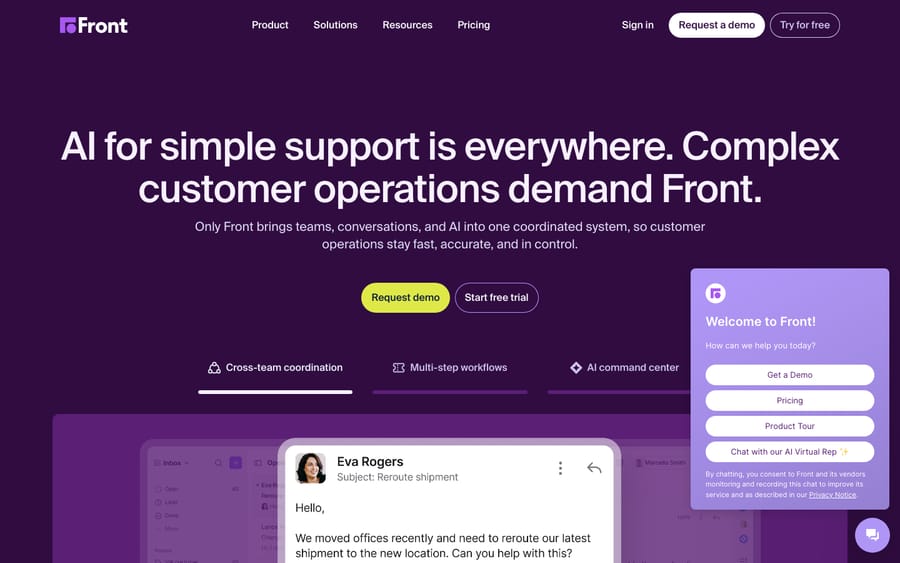
Front's identity is collaboration on top of email. Zendesk optimizes for ticketing depth and configurability; Help Scout optimizes for simplicity; Front optimizes for teams that live in their inbox and work messages together. A single thread might involve support, sales, ops and finance at once. That's why its strongest fit is operations, logistics, B2B, professional services and account management rather than pure high-volume B2C support. Front says more than 9,300 companies use it. For a fuller primer, see what is Front app.
What do you actually get in Front?
Front's reputation is "pretty email," but the platform goes further than that.
The shared inbox and collaboration
The core is the shared inbox, and it's the best part of the product. Assignments, internal comments, shared drafts, tags, snooze and collision detection let a team work one mailbox without stepping on each other or losing track of who owns what. Reviewers praise this more than anything else: discussing a message internally, drafting a reply together and sending it as one voice. One verified reviewer wrote: "I am able to stay more organized and keep the cleanest inbox that I've ever had in my entire 20+ years of work experience... I don't see how I can ever go back to the old way of just sending e-mails and losing the collaboration function that Front provides." A TrustRadius reviewer described using Front across customer service, sales and operations, with shared inboxes giving "everyone transparency on issues we need to solve together."
Email-first UX and channel breadth
Front feels like a polished email client, which lowers the adoption barrier; most reviewers call it a clear step up from Outlook or Gmail group mailboxes. On Professional and Enterprise, email, SMS, live chat, social, WhatsApp and other channels land in the same workspace with one customer history. Starter is different: it allows a single channel type, email or Front Chat or SMS.
Rules and automation
Front's rules engine handles routing, assignment, tagging, SLAs and triggered actions, and power users build detailed workflows on it. The plans cap it: Starter allows up to 10 rules, Professional adds macros and up to 20 rules, and Enterprise has unlimited rules and macros. Reviewers credit routing and auto-assignment with fewer missed messages and faster responses, and they also name the rules engine as the source of the learning curve.
Analytics and reporting
Starter gets basic analytics, Professional advanced analytics, and Enterprise custom reports. The dashboards cover volume, response and resolution times, SLA adherence and team performance. Against a dedicated help desk like Zendesk, reporting depth and ticket-style metrics are where Front's "inbox, not help desk" roots show.
AI features
Front sells four AI products: Copilot (drafting and summarizing for agents), Smart QA (AI-graded conversation review), Smart CSAT (predicted satisfaction) and Autopilot (a customer-facing AI agent that answers common requests). Copilot, Smart QA and Smart CSAT are paid add-ons on Starter and Professional and are included in Enterprise. Autopilot is metered separately on every plan, Enterprise included.
How much does Front cost in 2026?
Front prices per seat across three plans. The rates below are annual billing; monthly billing costs more, and Front's toggle says annual saves 24%.
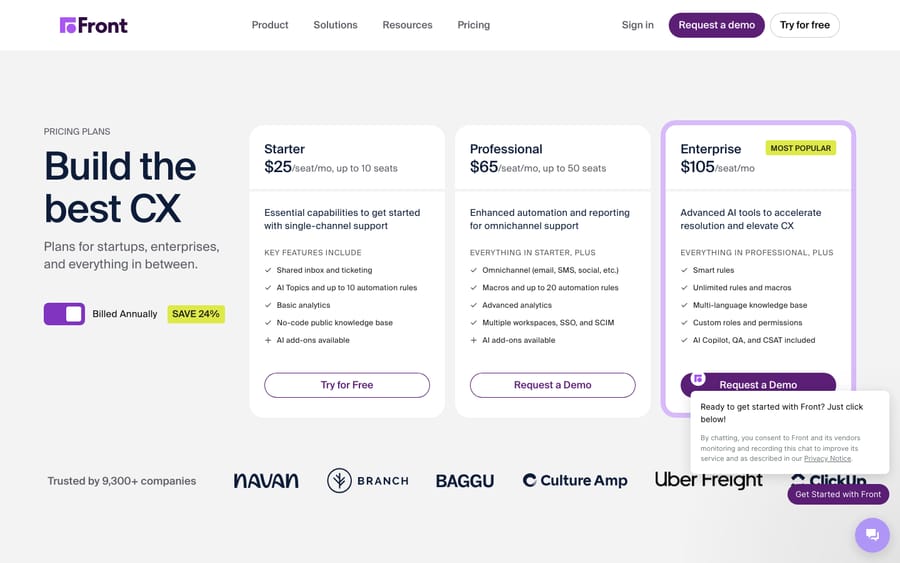
| Plan | Price (annual) | Key limits | Built for |
|---|---|---|---|
| Starter | $25/seat/mo | One channel type (email, Front Chat or SMS), up to 10 rules, basic analytics, up to 10 seats | Small teams organizing one channel |
| Professional | $65/seat/mo | Omnichannel, macros and up to 20 rules, advanced analytics, up to 50 seats | Growing teams on several channels |
| Enterprise | $105/seat/mo | Unlimited rules and macros, custom reports, custom roles and permissions, unlimited seats; Copilot, Smart QA and Smart CSAT included | Larger teams that need governance |
The footnotes matter more than the table:
- The Starter to Professional jump is steep. $25 to $65 a seat is a 2.6x step, and it's usually forced: Starter allows a single channel type, so the moment you need email and chat (or SMS, or social) in one place, you're on Professional.
- Admin controls sit at the top. Custom roles and permissions are Enterprise-only. One recurring Capterra complaint is that pricing feels "unintuitive," with management features "exclusive to the highest tier."
- AI is mostly an add-on. Copilot and Smart QA are $20 a seat a month each, Smart CSAT $10, and Smart QA plus Smart CSAT bundle for $25. Autopilot is priced "starting at $0.05 per conversation", a floor rather than a flat rate.
- Seats drive the bill. A 20-person team on Professional pays $1,300 a month before AI. Add Copilot for all 20 and it's $1,700. The same 20 seats on Enterprise cost $2,100 with Copilot, Smart QA and Smart CSAT included.
Front's incentive is plain from that structure: it earns more as you hire and as you add channels, so the entry price is friendly and the plan you actually need usually isn't Starter. Front offers a 14-day trial with no credit card. We break the full math down in our Front pricing explainer.
What do real users say about Front?
Aggregate scores, as observed in June 2026:
- G2: 4.7 / 5 from roughly 2,429 reviews, with high marks for ease of use and collaboration.
- Capterra: 4.5 / 5 from roughly 286 reviews, with sub-scores near 4.0 for ease of use, 4.1 for value for money and 4.1 for customer service. The softer value score lines up with the pricing complaints.
- TrustRadius: consistently positive, with reviewers highlighting cross-team transparency and cleaner shared mailboxes.
A 4.7 on a sample of more than 2,400 G2 reviews is one of the stronger profiles in the category. What reviewers praise and complain about says more than the score.
What reviewers praise. Collaboration and the email-like UX top every list: shared inbox, internal comments, shared drafts and @mentions. The single view of every channel with the full customer history comes up again and again, as does the clean interface. Operations teams in particular say Front ends the chaos of group mailboxes and missed messages.
What reviewers criticize. Three themes dominate. First, cost: the per-seat price, the Starter to Professional jump and the AI add-ons, especially from small and mid-sized teams. Second, complexity: rules, channels and settings can feel cluttered, and new users ask for clearer in-app guidance on automation. Third, "it's an inbox, not a help desk" plus integration gaps. Teams that want deep ticket analytics find Front thinner than Zendesk, and a recurring Capterra complaint is that Front no longer offers true two-way Outlook sync: emails come into Front, but archiving, tagging or deleting doesn't always sync back, which some users say creates duplication.
What are Front's pros and cons?
Pros
- The best shared inbox in the category. Internal comments, shared drafts, assignments, @mentions and collision detection make team email work.
- Low adoption friction. It feels like a polished email client, a clear upgrade over Outlook or Gmail group mailboxes.
- Broad channel coverage on Professional and up. Email, SMS, chat, social and WhatsApp in one inbox with one customer history.
- Flexible rules. Routing, assignment, SLA and triggered actions, with up to 20 rules on Professional and no cap on Enterprise.
- A full AI set. Copilot, Smart QA, Smart CSAT and Autopilot, with the first three included on Enterprise.
- A strong fit for cross-functional work. Threads that span support, sales, ops and finance are where Front does best.
Cons
- Per-seat cost with a steep tier jump. $25 to $65 a seat, usually forced by Starter's single-channel limit, with $20-a-seat AI add-ons on top.
- Ticket reporting trails dedicated help desks. Custom reports are Enterprise-only.
- A learning curve. Rules, channels and settings take time to learn.
- Admin features gated to Enterprise. Custom roles and permissions sit on the $105 plan.
- Integration limits. Reviewers report that actions in Front don't fully sync back to Outlook.
Who should choose Front, and who shouldn't?
Choose Front if you're an operations, logistics, B2B, professional-services or account team whose work is mostly email and collaboration, you need several channels in shared inboxes, and teamwork on messages matters more than deep ticket analytics. It's also a strong pick when threads cross departments and a personal, email-like customer experience matters.
Look elsewhere if you're a high-volume B2C support operation that lives in ticket queues and granular analytics (Zendesk may fit better), a budget-conscious small business that can't justify $65 a seat for multichannel, or an ecommerce team that wants deep store integrations and high-volume automation at a lower price. We line up the strongest options in the best Front alternatives.
Where does an AI agent layer fit with Front?
Front's AI covers drafting (Copilot), review (Smart QA and Smart CSAT) and customer-facing answers (Autopilot, from $0.05 per conversation). How much of your queue it resolves depends on the plan, the add-ons and how much knowledge you connect. Teams that want an agent to pull answers from a knowledge base, past conversations and other systems, and act inside the thread, sometimes add a dedicated AI agent on top of the help desk instead of relying only on built-in features.
That's the category our own product, Macha, sits in. It's ours, and Macha is not a help desk or a Front alternative: it runs on top of Front, so this isn't a pitch to replace it. Macha works on Zendesk, Freshdesk, Gorgias, Front, HubSpot or Intercom. It reads the customer's question, pulls from your connected knowledge, resolves in the thread, and hands off to a person with context when it isn't confident. It bills per ticket, one charge per thread however many messages it takes, from $299 a month for 750 tickets, with setup and monitoring by the Macha team included. You can see how the agent layer works or try it with $50 of free usage and no credit card. If Front's built-in add-ons cover what you need, that's a reasonable choice too.
Frequently asked questions
Is Front worth it in 2026? For a collaboration-heavy team, yes. Front rated 4.7/5 on G2 from ~2,429 reviews and 4.5/5 on Capterra in June 2026, and its shared inbox is the best in the category. The caveats are per-seat cost (with the Starter to Professional jump and AI add-ons), a learning curve, and reporting that trails dedicated help desks. Budget SMBs and high-volume B2C teams should weigh the value carefully.
How much does the Front app cost? On annual billing: Starter $25 a seat a month (one channel type, up to 10 seats), Professional $65 (omnichannel, up to 50 seats) and Enterprise $105 (unlimited seats, custom roles, AI add-ons included except Autopilot). Monthly billing costs more; annual saves 24%. Copilot and Smart QA are $20 a seat each, Smart CSAT $10, and Autopilot starts at $0.05 per conversation. See our Front pricing explainer.
Does Front have a free trial? Yes. Front offers a 14-day trial with no credit card required. There is no free plan.
What are Front app's main pros and cons? Pros: the best shared inbox and collaboration, email-first UX, broad channel coverage from Professional up, flexible rules, a full AI set and a strong fit for B2B and operations teams. Cons: per-seat cost with a steep tier jump and paid AI add-ons, thinner ticket reporting, a learning curve, admin features gated to Enterprise, and integration limits such as Outlook two-way sync.
Is Front a help desk or an email tool? Both. Front blends an email client's familiarity with help-desk structure (assignments, rules, SLAs, analytics) and chat-app collaboration. If you need deep, ticket-centric reporting and queue management, a dedicated help desk like Zendesk may suit you better.
Front vs Zendesk: which is better? It depends on the work. Front wins on collaboration, email-first UX and cross-team threads; Zendesk wins on ticketing depth, reporting and high-volume B2C workflows. Collaboration-heavy B2B and ops teams lean Front; queue-driven support teams lean Zendesk.
What do reviewers say about Front? Mostly positive: G2 4.7 from ~2,429 reviews and Capterra 4.5 in June 2026, with the loudest praise for shared-inbox collaboration and the email-like experience. The recurring complaints are per-seat cost, the learning curve, and gaps such as limited two-way Outlook sync.
Ratings and review quotes were observed in June 2026 on G2, Capterra and TrustRadius and may have changed. Pricing, seat caps, rule limits and AI add-on prices were checked on Front's pricing page on 24 September 2026; confirm with Front before you buy. Macha is our own product (an AI agent layer on top of Zendesk, Freshdesk, Gorgias, Front, HubSpot or Intercom, not a Front alternative).
Add AI agents to your Front
Macha reads the conversation, drafts the reply and takes the action, inside the Front you already run.





