



 Intercom
 Shopify
 Stripe
 Slack
Slack Notion
 Google Workspace
 Confluence

Freshdesk vs Help Scout (2026): Which Help Desk Should You Choose?


Freshdesk is an omnichannel help desk built for depth and scale, while Help Scout is an email-first shared inbox a small team can run the same day. The choice comes down to how many channels you support and how much configuration you're willing to own.
Key takeaways
- Freshdesk suits teams that need many channels, automation and room to scale, while Help Scout suits small email-first teams that want to be live the same day.
- Freshdesk's Growth plan costs $19 per agent a month billed annually, undercutting Help Scout's Standard plan at $25 per user, though Freshdesk's most-wanted features sit on Pro at $55.
- Help Scout has a permanent free plan for up to 5 users and 100 contacts a month, while Freshdesk's Free program covers up to 2 agents for 6 months.
- Freshdesk's Freddy AI Agent includes 500 sessions once per account, then charges $49 per 100 sessions, and Freddy Copilot costs $29 per agent a month on Pro and above.
- Help Scout's AI Answers charges $0.75 per successful resolution after a 3-month free trial, and AI Drafts and AI Summarize are included on Standard and above.
Choose Freshdesk if you need many channels, automation and room to scale, and Help Scout if you're a small, email-first team that wants to be live the same day. On price, Freshdesk's Growth plan is $19 per agent a month against Help Scout's Standard at $25 per user (both billed annually), but only Help Scout has a permanent free plan (up to 5 users), and both charge for AI on top of seats.
| Freshdesk | Help Scout | |
|---|---|---|
| Paid plans (annual) | $19 / $55 / $89 per agent | $25 / $45 / $75 per user |
| Free option | Free program: up to 2 agents for 6 months | Free plan: 5 users, 1 inbox, 100 contacts/mo |
| Customer-facing AI | Freddy AI Agent: 500 sessions once per account, then $49 per 100 | AI Answers: $0.75 per resolution, 3-month free trial |
| Agent-side AI | Freddy Copilot $29/agent/mo (Pro and up) | AI Assist on all plans; AI Drafts and Summarize on Standard and up |
| Best for | Omnichannel teams that want depth | Small teams that want speed and a human tone |
The real question isn't "which is better." It's depth and breadth vs. simplicity and speed, and which of those your team actually needs. One disclosure up front: Macha (the company publishing this) makes an AI agent layer that runs on top of help desks including Freshdesk, so we're adjacent to one side of this comparison. We'll keep it even-handed and save our one aside for the end.
How did we compare Freshdesk and Help Scout?
We pulled plan names and prices from the official pricing pages (Freshworks' Freshdesk pricing and the Help Scout pricing page), rechecked on 24 September 2026 and cross-checked against independent 2026 breakdowns (Quackback, Featurebase, eesel) where useful. For real-user signal we used G2 and Capterra aggregate ratings, review counts, and recurring themes, with an attributed verified-reviewer quote for each tool. Where a number isn't published on an official page (some add-on prices), we flag it. Pricing in this space moves (Help Scout's model changed recently), so confirm current rates before you budget. G2 and Capterra figures are mid-2026 readings and weren't re-read for this update. Our next review is scheduled for December 2026.
What's the real difference between Freshdesk and Help Scout?
This is the whole decision, so it's worth slowing down on.
Freshdesk wants to be your one platform. It centralizes every channel a customer might use (email, live chat, phone, WhatsApp, social) into a single ticket queue, then layers on automation, SLAs, custom reporting, and Freddy AI. The trade-off for that breadth is complexity: more setup, more settings, and a learning curve that grows with the tier.
Help Scout wants to feel like email, only better. It's built around a shared inbox that looks and behaves like a normal mailbox, so replies read as personal emails (no ticket numbers stamped on your customers). It pairs that with Docs (a knowledge base), Beacon (an embeddable help and chat widget) and, on current plans, SMS, WhatsApp, Instagram and Messenger. The trade-off is the inverse: less depth on advanced routing, telephony, and reporting, in exchange for being genuinely fast to adopt.
That single split, broad platform vs. focused inbox, drives almost every difference below.
What does Freshdesk do well?
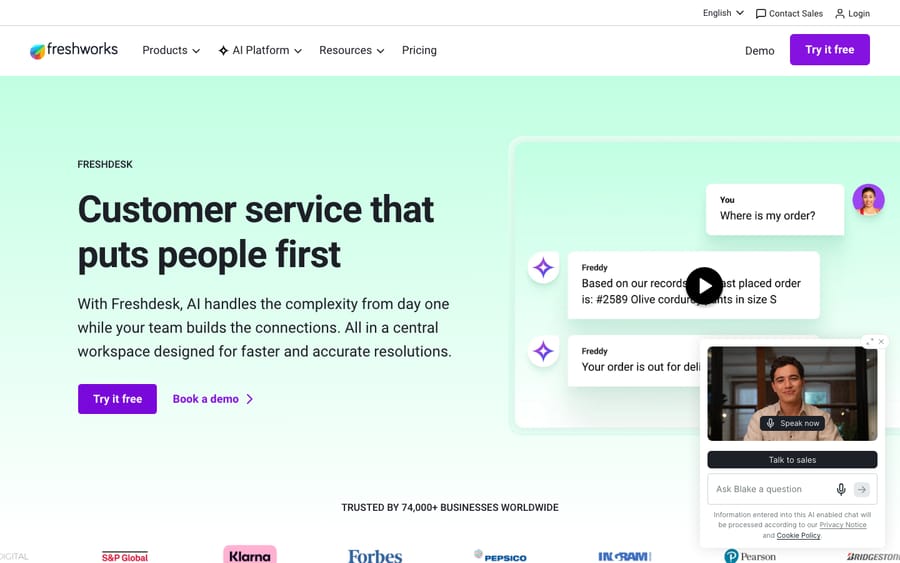
Freshdesk is Freshworks' customer support help desk, aimed at teams that want one tool to handle every channel and grow into automation and AI over time.
Core strengths:
- Omnichannel ticketing: email, chat, phone (Freshcaller), WhatsApp, and social unified into one queue with shared inbox, threads, and tasks.
- Automation and SLAs: routing rules, canned responses, SLA management, and scenario automations to move tickets without manual triage.
- Freddy AI: an autonomous AI Agent for deflection plus Copilot agent-assist and Insights analytics (priced separately; see below).
- Reporting and customization: curated and custom reports, custom objects, and configurable workflows on higher tiers.
- Self-service: a knowledge base and customer portal.
The watch-outs that show up most in reviews: the platform can feel heavy to configure, and the genuinely useful capabilities (advanced routing, CSAT, AI) cluster in the pricier tiers. For the full money breakdown, see Freshdesk pricing explained.
What does Help Scout do well?
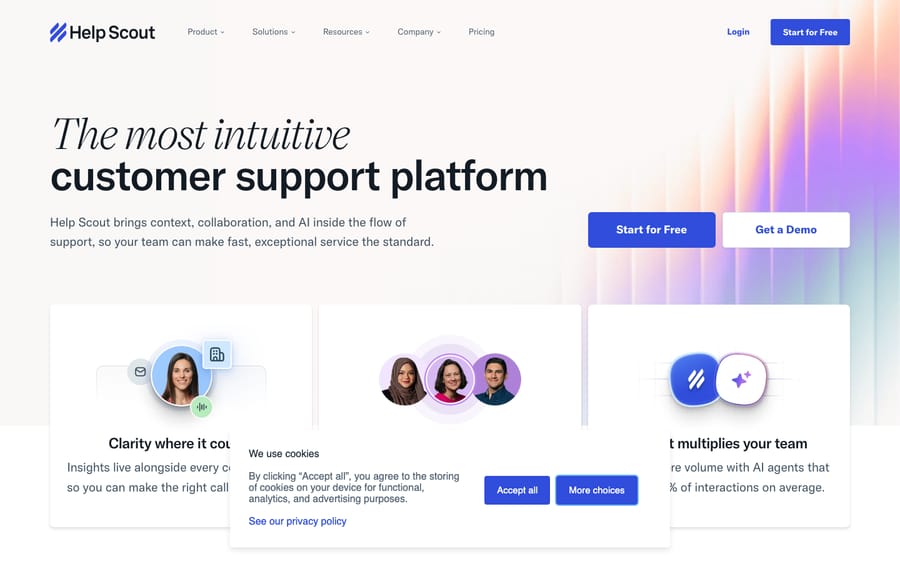
Help Scout is a shared inbox built for small and mid-sized teams that prize simplicity and a personal, human tone over platform breadth.
Core strengths:
- Shared inbox: email-first conversations that read like normal email, with collision detection, saved replies, and private notes.
- Docs + Beacon: a clean knowledge base and an embeddable widget for help content and live chat, with SMS, WhatsApp, Instagram and Messenger listed on Standard.
- Fast onboarding: minimal setup; most teams are live the same day, which is its single most-praised quality.
- AI Answers + AI Assist: customer-facing auto-resolution plus drafting and summarizing aids for agents.
- Reporting: solid conversation and happiness (CSAT) reporting, though lighter than Freshdesk's custom analytics.
The watch-outs: simplicity becomes a ceiling for teams that need heavy automation, native telephony, or deep custom reporting, and the per-resolution AI and per-extra-inbox add-ons can creep onto the bill. See Help Scout pricing explained for the details.
How do Freshdesk and Help Scout compare side by side?
| Freshdesk | Help Scout | |
|---|---|---|
| Best described as | Feature-rich omnichannel help desk | Simple, human, email-first desk |
| Built for | Growing teams wanting depth + scale | SMBs wanting speed + simplicity |
| Channels | Email, chat, phone, WhatsApp, social | Email, live chat (Beacon), SMS, WhatsApp, Instagram, Messenger, Docs |
| Billing model | Per agent / month | Per user / month (current default) |
| Free plan | No free plan on the pricing page; Free program for up to 2 agents for 6 months | Yes: up to 5 users, 100 contacts/mo |
| Entry paid (annual) | ~$19/agent/mo (Growth) | ~$25/user/mo (Standard) |
| Top tier (annual) | ~$89/agent/mo (Enterprise) | ~$75/user/mo (Pro) |
| AI | Freddy AI Agent (500 sessions once, then $49/100) + Copilot $29/agent/mo | AI Answers $0.75/resolution + AI Assist, Drafts, Summarize (incl.) |
| Setup / learning curve | Steeper; lots of configuration | Minimal; live same day |
| G2 rating | ~4.4 / 5 (~3,700 reviews) | ~4.4 / 5 (~424 reviews) |
| Capterra rating | ~4.5 / 5 (~3,444 reviews) | ~4.6 / 5 (~226 reviews) |
| Wins on | Channel breadth, automation, scale | Simplicity, tone, time-to-value |
Prices checked on the official pricing pages on 24 September 2026; ratings are mid-2026 G2/Capterra readings. Confirm before budgeting, because pricing changes often.
Is Freshdesk or Help Scout cheaper?
Both tools discount annual billing, but they bill on slightly different units, only one has a permanent free plan, and they ladder up differently.
Freshdesk (per agent/month, billed annually):
- Free program: the pricing page no longer shows a free plan; Freshworks' Free program covers up to 2 agents for 6 months.
- Growth: $19 · core omnichannel help desk, automation basics.
- Pro: $55 · custom objects, advanced ticketing, CSAT, round-robin routing, custom reporting.
- Enterprise: $89 · audit logs, approval workflows, skills-based assignment, added security.
Help Scout (per user/month, billed annually):
- Free: $0 · up to 5 users, 1 inbox, 100 contacts a month: a real free plan, not a trial.
- Standard: $25 · shared inboxes, Docs, Beacon, core reporting, AI Drafts and AI Summarize.
- Plus: $45 · more inboxes, advanced permissions, custom fields, integrations.
- Pro: $75 · enterprise features and support (annual only, ~10-user minimum).
A note on Help Scout's model: it briefly moved to contacts-based billing (charging by contacts helped rather than per seat) in late 2024, which drew enough backlash that per-user pricing is now the public default for new signups; contact-based plans are treated as legacy. If you're comparing old write-ups, that's why the numbers may not match — use the per-user figures above.
The headline read: at the entry tiers, Freshdesk's $19 Growth undercuts Help Scout's $25 Standard per seat, and Help Scout's free plan is permanent (capped at 5 users and 100 contacts a month), while Freshdesk's Free program lasts 6 months. But Freshdesk's useful features (CSAT, routing, AI) push many teams to Pro at $55, while Help Scout keeps most teams on Standard or Plus. Add AI as a separate line item on both; it's the most common source of a bigger-than-expected bill.
Which has better AI, Freddy or Help Scout AI?
Both ship AI, but they meter it differently, and both charge for it on top of the seat price.
- Freshdesk: Freddy AI. The autonomous Freddy AI Agent deflects and resolves customer queries and is session-based: the pricing page lists 500 sessions as a one-time allowance per account, then $49 per 100 additional sessions, charged per session whether or not it resolves. Freddy AI Copilot (reply suggestions, summaries) is $29/agent/month and is Pro-and-up only, as is Freddy AI Insights.
- Help Scout: AI Answers + AI Assist. AI Answers is the customer-facing auto-resolution layer, billed at $0.75 per resolution, and only when the AI actually answers without the customer escalating, capped at one charge per conversation, after a 3-month free trial. The agent-assist pieces are included: AI Assist (expand, shorten, edit, translate) on every plan including Free, and unlimited AI Drafts and AI Summarize on Standard and above.
The practical difference: Help Scout's per-resolution model is easy to reason about (you pay when it works), while Freshdesk's session bucket plus per-seat Copilot is more powerful but harder to predict. The shared reality is that AI is an add-on, not a baked-in freebie, on either platform.
Which fits your channels and team size?
If your support lives and dies on email, Help Scout's shared inbox is hard to beat for feel and speed: replies look human, and there's almost no setup tax. Add Docs and Beacon and a small team has self-service plus a chat widget without touching a config screen.
If you need more than email (inbound and outbound phone, sophisticated routing, custom objects, and granular reporting), Freshdesk is built for that breadth, and it keeps going as you scale toward enterprise. The cost is complexity: there's simply more to learn and maintain.
A useful gut check: count your channels and your appetite for configuration. One or two channels and a "we just want it to work" team points to Help Scout. Three-plus channels, automation ambitions, and someone willing to own admin points to Freshdesk. If neither fits, our best Freshdesk alternatives guide covers the wider field.
What do users say about Freshdesk and Help Scout?
Aggregate review sentiment maps cleanly onto the "breadth vs. simplicity" framing.
- Freshdesk: ~4.4/5 on G2 (~3,700 reviews) and ~4.5/5 on Capterra (~3,444 reviews). The standout themes are ease of setup and multichannel coverage from one dashboard; the recurring watch-outs are reporting/customization complexity and the cost of stacking AI add-ons. A verified Capterra reviewer, Jay R., a Project Manager in insurance, summed up the upside: "Freshdesk is very easy to set up & use. They offer great & friendly customer support."
- Help Scout: ~4.4/5 on G2 (~424 reviews) and ~4.6/5 on Capterra (~226 reviews). Reviewers consistently praise the clean, intuitive interface and near-zero onboarding; the common criticism is that simplicity becomes limiting for teams needing advanced workflows or reporting. A verified Capterra reviewer, Zofia M., a Customer Success Lead, captured the appeal: "Clear and intuitive design is what i like most. While beginners don't need instructions to get started, they are readily available."
Net: both are well-liked. Freshdesk has far more reviews (a larger, broader user base) and rates a touch lower; Help Scout's smaller, more specialized base rates it slightly higher on Capterra, and the shared sentiment is that each is loved for the thing it's built for.
Who should choose Freshdesk, and who should choose Help Scout?
- Choose Freshdesk if you support customers across multiple channels (email + chat + phone + social), want automation, SLAs, and custom reporting, and expect to scale toward larger or more complex support. You're willing to invest in setup to get depth.
- Choose Help Scout if you're a small or mid-sized team that's email-first, values a personal, human tone, and wants to be live today without an admin project. Simplicity is the feature.
- Lean Freshdesk on budget at the entry seat ($19 vs. $25), but check which tier you actually need: Freshdesk's must-have features tend to sit on Pro.
- Either way, budget AI separately. Freddy AI (sessions + per-seat Copilot) and Help Scout AI Answers ($0.75/resolution) are both add-ons on top of seats.
Where does an AI layer like Macha fit?
One narrow aside: if you land on Freshdesk and want stronger AI resolution than the built-in bot, Macha is an AI agent layer that runs on top of your existing help desk. It connects to your knowledge and content and resolves tickets inside Freshdesk. Macha bills per ticket, however many messages a conversation takes, starting at $299 a month for up to 750 tickets, with setup and monitoring by the Macha team included. Compare that with Freddy's session bucket, which charges per session whether or not it resolves.
To be clear about scope: Macha runs on Zendesk, Freshdesk, Gorgias, Front, HubSpot or Intercom, and Help Scout isn't one of them. So this is relevant only if you pick Freshdesk on this page; if Help Scout is your choice, Macha isn't part of your stack, and we won't pretend otherwise. If you do go Freshdesk and want to see the automation for yourself first, you can start with $50 of free usage, no credit card required.
Frequently asked questions
What's the main difference between Freshdesk and Help Scout? Freshdesk is a feature-rich, omnichannel help desk (email, chat, phone, social, automation, AI) built to scale; Help Scout is a simple, email-first shared inbox built for small teams that want speed and a human tone over platform depth. It's breadth vs. simplicity.
Is Freshdesk or Help Scout cheaper? At the entry paid tier, Freshdesk's Growth ($19/agent/mo annual) undercuts Help Scout's Standard ($25/user/mo). But Freshdesk's most-wanted features (CSAT, routing, AI) live on Pro ($55), while many teams stay on Help Scout's Standard or Plus. Only Help Scout has a permanent free plan, and both bill AI separately.
Which has better AI, Freddy or Help Scout AI? Both charge for AI on top of seats. Freshdesk's Freddy AI Agent is session-based (500 sessions once per account, then $49/100) with Copilot at $29/agent/mo; Help Scout's AI Answers is $0.75 per successful resolution after a 3-month trial. Freddy is more configurable; Help Scout's pay-when-it-resolves model is easier to predict.
Did Help Scout change its pricing? Yes. Help Scout briefly moved to contacts-based billing in late 2024, then made per-user pricing the public default again after pushback; contact-based plans are now treated as legacy. Use the per-user figures (Standard $25 / Plus $45 / Pro $75) for new signups.
Does Macha work with Help Scout? No. Macha is an AI agent layer for Zendesk, Freshdesk, Gorgias, Front, HubSpot or Intercom, and it doesn't integrate with Help Scout today. It's relevant to this comparison only if you choose Freshdesk.
So which should you choose?
Freshdesk vs. Help Scout comes down to what kind of support operation you're building. Freshdesk is the feature-rich, omnichannel platform: pick it when you need multiple channels, automation, reporting, and room to scale, and you're willing to invest in setup. Help Scout is the simple, human, email-first desk: pick it when you're a smaller team that wants to be live today and keep replies feeling personal. Both are well-rated by real users for exactly those strengths. Match the tool to your channels, your team size, and your tolerance for configuration, and confirm every rate on the official pricing pages before you commit, because they change often (Help Scout's did).
Prices rechecked on the official Freshdesk and Help Scout pricing pages on 24 September 2026; ratings and quotes are mid-2026 G2 and Capterra readings. Next review: December 2026.
Add AI agents to your Freshdesk
Macha reads the ticket, drafts the reply and takes the action, inside the Freshdesk you already run.





