



 Intercom
 Shopify
 Stripe
 Slack
Slack Notion
 Google Workspace
 Confluence

How Much Does Help Scout Cost in 2026? Plans, AI Answers and Real Costs


Help Scout charges $25, $45 or $75 per user a month on its paid plans billed annually, but some existing accounts still pay by contacts helped after the late-2024 billing switch. AI Answers adds $0.75 per resolution on top of either model.
Key takeaways
- Help Scout's per-user plans cost $25 for Standard, $45 for Plus and $75 for Pro per user a month billed annually, with a Free plan for up to 5 users capped at 100 contacts monthly.
- Help Scout switched to contact-based billing around November 2024, then brought per-user pricing back as the default for new signups after the change drew criticism.
- Help Scout AI Answers costs $0.75 per resolution after a 3-month free trial, charged only when the AI resolves without escalation and at most once per conversation.
- Help Scout Pro requires a minimum of 10 users, so the plan effectively starts at $750 a month on annual billing, or $900 on monthly billing.
- A 10-user Help Scout team on annual Standard with about 500 AI Answers resolutions a month pays roughly $635 monthly, or about $7,620 a year.

Help Scout costs $25, $45 or $75 per user a month on its Standard, Plus and Pro plans billed annually ($30, $54 or $90 on monthly billing), with a Free plan for up to 5 users capped at 100 contacts a month, and AI Answers adds $0.75 per resolution. Those figures come from Help Scout's official pricing page and its support docs, checked in September 2026. Some accounts still pay by contacts helped instead of by seat, and anything Help Scout does not publish is flagged below.
How much does each Help Scout plan cost?
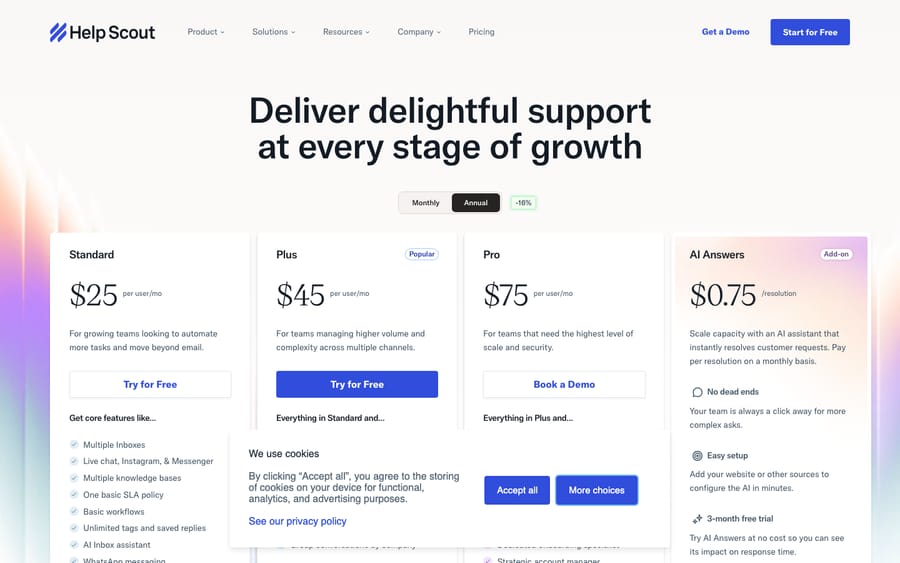
As of September 2026, the live pricing page lists four tiers, priced per user, per month:
| Plan | Price (annual billing) | Price (monthly billing) | Users | Contacts |
|---|---|---|---|---|
| Free | $0 | $0 | Up to 5 | 100 / month cap |
| Standard | $25 / user / mo | $30 / user / mo | Up to 25 | Unlimited |
| Plus | $45 / user / mo | $54 / user / mo | Up to 50 | Unlimited |
| Pro | $75 / user / mo | $90 / user / mo | Unlimited (10-user min) | Unlimited |
The pricing page opens on the Annual toggle, which shows $25 / $45 / $75 per user a month with a 16% discount badge. Switch to Monthly and the same plans cost $30 / $54 / $90 per user a month (both read on the page on 24 September 2026).
Is Help Scout billed per user or per contact?
Here's the part almost every other pricing summary gets wrong, because the model moved underneath them.
For most of its life, Help Scout charged per user (per seat) — the standard help-desk model. Around November 2024, it made a dramatic switch: it eliminated per-seat fees, gave every plan unlimited seats, and started billing by the number of "contacts helped" each month. The pitch was reasonable — add as many agents as you like, pay for the actual support volume — but it meant your bill now tracked how busy your queue was rather than your headcount, which made costs harder to predict. The change drew enough criticism (see the widely-shared "Whither Help Scout?" commentary in April 2025) that Help Scout walked much of it back.
So in 2026 you're looking at two coexisting models:
- Per-user pricing — what the public pricing page now shows, and what new signups get. This is the table above.
- Contact-based pricing — still active for accounts that adopted it, governed by Help Scout's Contact-based Fair Billing Policy (updated 3 September 2026). Help Scout maintains a separate billing guide for these accounts, and some older plans now carry a "legacy" badge — meaning they're no longer offered to new customers and you can't switch back to them once you leave.
Bottom line: if you're evaluating Help Scout fresh in 2026, you'll be quoted per user. If you're an existing customer, check your account — you may still be on the contact-based plan, and the rest of this guide covers both.
What does each Help Scout plan include?
The per-user tiers differ in channels, automation depth, and governance — not just seat count.
Free — $0 (up to 5 users)
A real free tier, but with a hard ceiling: 100 contacts per month, after which service is blocked until the next cycle. You get 1 shared inbox, 1 Docs (knowledge base) site, email, live chat, SMS and basic automation. Fine for a tiny team or a trial; you'll outgrow the contact cap quickly if support is core to your business.
Standard — $25/user/month
The real entry point for most teams. Standard lifts the contact cap to unlimited, includes 2 inboxes and 1 Docs site, and adds social channels (Messenger, Instagram, WhatsApp), basic workflows (Help Scout's automation rules) and the AI Inbox assistant. For a small team that wants organized shared-inbox support with a knowledge base, this is the plan most land on. Up to 25 users.
Plus — $45/user/month
The "growing team" tier, marked Popular on the page. Plus adds advanced workflows, integrations with Salesforce, Jira and HubSpot, internal teams/collaboration, a secure customer portal, round-robin routing, unlimited AI Drafts, and 5 inboxes with 3 Docs sites. The jump from $25 to $45 is steep — nearly double — so the question is whether you specifically need the advanced automation or the CRM integrations. Up to 50 users.
Pro — $75/user/month
The scale-and-governance tier. Pro brings unlimited workflows, SSO/SAML, HIPAA compliance, a dedicated onboarding specialist, a strategic account manager, and 10 inboxes with 5 Docs sites. Note the 10-user minimum — so Pro effectively starts at $750/month on annual billing ($900 on monthly billing) before you add anyone beyond ten. If you only need SSO or HIPAA, check the pricing page first: it lists both as add-ons on Standard and Plus.
How does Help Scout's contact-based pricing work?
If your account is on the contact-based model, the unit of billing is the contact, not the seat. Per Help Scout's Fair Billing Policy, a contact is a unique person you help in a given month, counted when:
- an email conversation gets at least one reply from your team,
- a new conversation is created (including phone),
- a channel conversation (Messenger, Instagram, etc.) gets a reply,
- a chat is accepted and replied to, or
- an issue is resolved by AI Answers.
Crucially, the same person counts only once per month, even across multiple channels and multiple back-and-forth messages — so a customer who emails you five times and also opens a chat is still one contact. The count resets monthly.
To stop seasonal spikes from blowing up your bill, Help Scout applies a Fair Billing Policy: your tier is set by the average of your last three months of contacts, not a single peak month. That smooths predictability, but it also means a busy quarter keeps you in a higher band for a while after volume drops.
The honest gap here: Help Scout does not publish the contact-based tier prices. The Fair Billing Policy doc lists no prices; they show only inside an active account. If you're on this plan, your in-app billing page is the only reliable source.
How much does Help Scout AI cost?
Help Scout bundles some AI and charges separately for the rest.
Included on paid plans: AI Assist (rewrite, change tone, translate, fix grammar inside the editor) and AI Drafts (draft a reply from your knowledge base and past conversations). AI Summarize (condense a long thread) comes in on Plus and Pro. None of these carry a per-use fee — they're part of the seat.
The metered one — AI Answers. This is the customer-facing piece: an AI agent that answers questions and resolves issues without a human. It's priced at $0.75 per resolution, with a 3-month free trial. Two details that matter for budgeting:
- You're charged only when the AI actually resolves the issue — i.e., the customer gets an answer and doesn't escalate or come back with more.
- There's a maximum of one charge per conversation, no matter how many questions the AI fields within it.
That's a relatively clean, outcome-flavored model — you pay for results, not attempts. The flip side is that your AI cost scales directly with deflection volume: at 1,000 AI resolutions a month, that's $750/month in AI Answers alone, on top of seats.
| AI feature | What it does | Cost |
|---|---|---|
| AI Assist | Rewrite / tone / translate / grammar in the editor | Included (paid plans) |
| AI Drafts | Draft a reply from docs + past tickets | Included (paid plans) |
| AI Summarize | Summarize a long conversation | Included (Plus & Pro) |
| AI Answers | Customer-facing auto-resolution agent | $0.75 / resolution (3-month trial) |
How does Help Scout billing differ from per-seat help desks?
Most help desks (Zendesk, Freshdesk, Gorgias) bill a fixed amount per agent per month, and your bill is predictable once you know your headcount. Help Scout's 2026 lineup is mostly that too — but with two wrinkles:
- The contact cap on Free, and the legacy contact-based plans, mean "how many customers you help" can still drive cost in ways a pure per-seat tool doesn't.
- AI Answers is usage-based ($0.75/resolution), so the AI portion of your bill scales with volume even though seats are fixed.
If predictability is your priority, the per-user plans plus a known AI-resolution estimate get you most of the way there. If you adopted the contact-based plan, your bill is inherently volume-linked — which is great when you're quiet and uncomfortable when you're slammed.
What hidden costs does Help Scout have?
A few things that don't show up in the headline boxes:
- Pro's 10-user minimum. Even a 6-person team pays for 10 seats on Pro — an effective floor of $750/month on annual billing ($900 monthly) before extras.
- Extra inboxes and Docs sites cost more. Beyond your plan's allotment (2, 5 or 10 inboxes on Standard, Plus and Pro), the pricing page lists additional inboxes at $10/inbox/month and extra Docs (knowledge base) sites at $20/site/month, billed annually. Multi-brand teams feel this fast.
- AI Answers after the trial. The 3-month free trial makes AI feel free up front; once it ends, $0.75/resolution becomes a real, volume-scaling line item. Estimate your deflection before you rely on it.
- The big Standard-to-Plus jump. Going from $25 to $45/user nearly doubles your seat cost — often just to reach advanced workflows or a CRM integration. Map your must-have features to the lowest tier that has them.
- Annual locks in seats. The 16% annual discount is real, but it commits you to a seat count for the year. Don't over-provision.
- The model itself may move again. Given the 2024-25 churn, re-verify the current model before you commit — what's quoted today may differ from a renewal quote later.
What does a 10-user team really pay for Help Scout?
Here's a realistic 2026 estimate for a 10-person support team on Standard, billed annually, leaning on AI for deflection:
| Line item | Calculation | Monthly | Annual |
|---|---|---|---|
| Standard seats (10 users) | 10 × $25 (annual rate) | $250 | $3,000 |
| AI Answers (~500 resolutions/mo) | 500 × $0.75 | $375 | $4,500 |
| 1 extra inbox | 1 × $10 | $10 | $120 |
| Estimated total | ~$635 | ~$7,620 |
The seats are the cheap, predictable part — about $3,000/year. The swing factor is AI Answers: at 500 resolutions/month it more than doubles the bill; at 1,500 resolutions it would add $13,500/year on its own. If you barely use AI, your real cost is close to the seat line. Model your expected AI resolution volume before you model seats — that's where the Help Scout bill is won or lost. (And if you're on a legacy contact-based plan instead, replace the seat line with your in-app contact tier, since seats are free there.)
How do other AI billing models compare?
One reason Help Scout's AI is worth scrutinizing is that $0.75/resolution ties cost to a single outcome — the conversation the AI fully closes. That's clean when deflection is the only job you want AI to do, but a lot of useful AI work (drafting, tagging, routing, summarizing, escalating with context) isn't a "resolution" at all, and resolution-based billing doesn't price that middle ground.
It's worth understanding the alternatives. Macha, for example, is an AI agent layer that runs on top of an existing help desk — it integrates natively with Zendesk, Freshdesk, Gorgias, Front, HubSpot and Intercom (not Help Scout), so it's not a help desk itself and not a Help Scout add-on. The relevant contrast here is purely the billing unit: Macha bills per ticket — one conversation, charged once however many drafts, tags or lookups it takes — rather than per resolution or per contact, so the bill tracks the volume you actually handle. Neither model is universally better; if Help Scout's per-resolution math is the number you're trying to predict, it's a useful frame for comparison. (If you're specifically weighing Help Scout against other desks, our roundup of the best Help Scout alternatives goes deeper, and you can start with $50 of free usage, no credit card required, on a supported desk to see the per-ticket model in practice.)
Is Help Scout worth it?
For the right team, yes. Help Scout's strength has always been a clean, human shared-inbox experience with a genuinely good knowledge base, and the per-user 2026 plans are competitive at the Standard tier. AI Answers' pay-per-resolution model is fair and easy to reason about. The friction points are real but predictable: the Standard-to-Plus jump is steep, Pro's 10-user minimum penalizes small teams that need SSO or HIPAA, and the pricing-model whiplash of 2024-25 means you should confirm exactly what you're being quoted. New to the product? Start with what Help Scout is for the full feature picture.
Frequently asked questions
How much does Help Scout cost per user? On the current 2026 per-user plans, it's $25/user/month (Standard), $45/user/month (Plus), and $75/user/month (Pro) billed annually, with a free plan for up to 5 users. Monthly billing costs $30, $54 and $90 per user/month.
Is Help Scout per-user or contact-based? Both, depending on your account. The public pricing page now shows per-user pricing for new signups. Help Scout switched to contact-based billing (pay by contacts helped, unlimited seats) around November 2024, but after backlash it brought per-user pricing back as the default. Contact-based plans remain active for accounts that adopted them, and some are now "legacy."
What counts as a contact on Help Scout's contact-based plan? A unique person you help in a month — via a replied email, a new or phone conversation, a replied channel/chat message, or an AI Answers resolution. The same person counts once per month regardless of channel or message count. Your tier is set by your 3-month average under the Fair Billing Policy.
How much does Help Scout AI cost? AI Assist and AI Drafts are included on paid plans (AI Summarize on Plus/Pro). AI Answers, the customer-facing auto-resolution agent, costs $0.75 per resolution after a 3-month free trial — charged only when the AI resolves without escalation, max one charge per conversation.
Does Help Scout have a free plan? Yes — up to 5 users, 1 inbox, and 1 Docs site, but capped at 100 contacts per month. Good for trials and tiny teams; the contact cap is the main reason teams upgrade.
Does Help Scout offer an annual discount? Yes — annual billing is advertised as 16% off the seat cost. It saves money but locks in your seat count for the year.
What should you check before buying Help Scout?
Help Scout pricing in 2026 is cleaner than its recent history suggests, as long as you know which model you're on. New customers get per-user plans — Free, Standard ($25), Plus ($45), Pro ($75) per user/month billed annually ($30, $54 and $90 monthly), with unlimited contacts on paid tiers. Existing customers may still be on the contact-based plan (pay by contacts helped, 3-month-average fair billing), and some plans are now legacy. The variable cost to watch on either model is AI Answers at $0.75/resolution — clean to reason about, but it scales with deflection volume. Confirm your model in-app, estimate your AI resolution volume before your seat count, and pick the lowest tier that has your must-have features.
Pricing checked against Help Scout's official pricing page and support docs, September 2026. Help Scout's model changed materially in 2024-25 and parts of the contact-based pricing aren't published publicly — confirm exact numbers in your account or a quote before you commit.
Simple per-ticket AI pricing
One thread with one person is one charge, however many replies it takes.





