



 Intercom
 Shopify
 Stripe
 Slack
Slack Notion
 Google Workspace
 Confluence

How Much Does Front Cost in 2026? Plans, AI Add-Ons and Real Totals


Front costs $25, $65 or $105 per seat a month billed annually, and AI is sold on top unless you buy Enterprise. A 10-seat Professional team with Copilot and Autopilot pays about $11,400 a year rather than the $7,800 the seats alone suggest.
Key takeaways
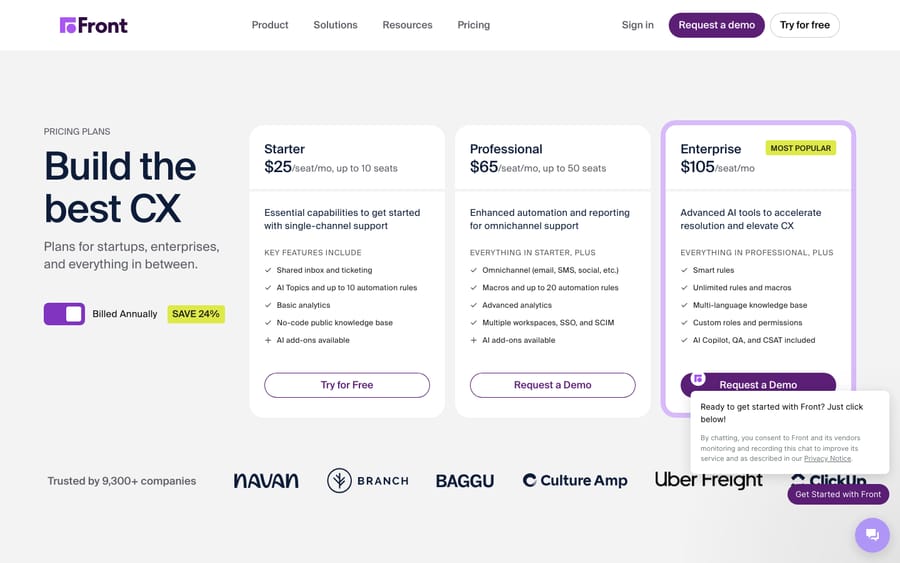
- Front costs $25 per seat a month on Starter, $65 on Professional and $105 on Enterprise, billed annually, with Starter capped at 10 seats and Professional at 50.
- Front sells Copilot at $20 a seat, Smart QA at $20 and Smart CSAT at $10 on Starter and Professional, and includes all three on Enterprise.
- Front Autopilot, the customer-facing AI agent, is a usage-based add-on on every plan, listed as starting at $0.05 per conversation.
- A 10-seat Front Professional team with Copilot and 2,000 Autopilot conversations a month pays about $950 a month, or $11,400 a year, against $7,800 for seats alone.
- Front replaced its old Starter, Growth, Scale and Premier plans, priced at $19, $59, $99 and $229 a seat, with three tiers in 2026.

Front costs $25, $65 or $105 per seat a month billed annually for its Starter, Professional and Enterprise plans, with Starter capped at 10 seats and Professional at 50 (front.com/pricing, checked 24 September 2026). AI is extra on the two lower plans: Copilot and Smart QA are $20 a seat each and Smart CSAT $10, while Autopilot, the customer-facing AI agent, is metered on every plan from $0.05 per conversation. A 10-seat Professional team with Copilot and 2,000 Autopilot conversations a month pays about $950 a month.
| Plan | Price (per seat / mo, billed annually) | Seat cap | Automation rules | Best for |
|---|---|---|---|---|
| Starter | $25 | Up to 10 seats | Up to 10 | Small teams on a single channel |
| Professional | $65 | Up to 50 seats | Up to 20 | Growing teams needing omnichannel and automation |
| Enterprise | $105 | Unlimited | Unlimited | Larger orgs needing governance and bundled AI |
Front is the customer-operations and shared-inbox platform at front.com. Front simplified its lineup in 2026, collapsing the old four-plan structure into three tiers. If an older comparison cites Starter / Growth / Scale / Premier at $19 / $59 / $99 / $229 per seat, that's the outdated model, and it still shows up across stale third-party posts, so don't budget from it.
All three prices are the per-seat, per-month, billed-annually rate. Monthly billing is available, but Front doesn't publish the month-to-month number; it says annual billing saves 24%. Working backwards from that, month-to-month would be roughly $33 / $86 / $138 per seat (our arithmetic, not Front's figures), so confirm the exact rate at checkout. Front offers a 14-day trial with all Professional features and no credit card.
What does each Front plan include?
The jump between Front's tiers isn't "more of the same." Channel breadth, automation limits and AI bundling all change as you move up.
Starter: $25/seat/month
The entry point, with the tightest limits. Starter gives you Front's shared inbox and ticketing, AI Topics, a no-code public knowledge base, basic analytics and up to 10 automation rules. The two catches: it's limited to a single channel type (email or chat or SMS, not all at once), and it's capped at 10 seats. Fine for a small team running support out of one channel, but if you need omnichannel or grow past ten people, you'll be pushed up to Professional.
Professional: $65/seat/month
The plan most support teams land on, and a steep jump from Starter. Professional adds omnichannel (several channels at once), macros, up to 20 automation rules, advanced analytics, and multiple workspaces with SSO and SCIM for provisioning. The seat cap rises to 50. This is where Front becomes the collaborative, multi-channel inbox it markets itself as. AI is still not included; the Front AI features are paid add-ons (below).
Enterprise: $105/seat/month
The governance-and-scale tier, with unlimited seats, unlimited rules and macros, a multi-language knowledge base, and custom roles and permissions. The notable extra: Enterprise includes Copilot, Smart QA and Smart CSAT, which lower tiers buy separately. The one AI piece that stays a paid add-on even on Enterprise is Autopilot. Enterprise is sold through sales, and large contracts can carry an onboarding package, so the per-seat number is a starting point, not the whole bill.
How much do the Front AI add-ons cost?
On Starter and Professional, AI is not included in your Front plan. Front AI is sold as separate add-ons on two different pricing models, which makes the total easy to under-budget.
Copilot, Smart QA, Smart CSAT: per seat
These are the agent-facing AI features, priced per seat per month:
- Copilot (drafting, summaries, in-inbox help): $20/seat/month
- Smart QA (automated quality review of conversations): $20/seat/month
- Smart CSAT (AI-scored satisfaction signals): $10/seat/month
- Smart QA + Smart CSAT bundle: $25/seat/month
All three are included on Enterprise, so the per-seat add-on math applies to Starter and Professional teams. The upside of seat pricing is that you can assign these only to the agents who will use them.
Autopilot: usage-based
Autopilot is Front's customer-facing AI agent, the one that resolves or deflects conversations automatically. Unlike the per-seat features, it's metered by usage, and it stays a paid add-on even on Enterprise. Front's pricing page lists it at "starting at $0.05 per conversation." "Starting at" means the rate can rise with the work involved, so ask Front for the rate that applies to your use case in writing before you build a budget around deflection. Either way, this line scales with conversation volume, not headcount.
| Front AI add-on | What it does | Price model | Rate (checked 24 Sept 2026) |
|---|---|---|---|
| Copilot | Agent-side drafting and summaries | Per seat / mo (included on Enterprise) | $20 / seat / mo |
| Smart QA | Automated conversation QA | Per seat / mo (included on Enterprise) | $20 / seat / mo |
| Smart CSAT | AI-scored satisfaction | Per seat / mo (included on Enterprise) | $10 / seat / mo |
| QA + CSAT bundle | Both, discounted | Per seat / mo | $25 / seat / mo |
| Autopilot | Customer-side AI agent | Usage-based (add-on on all tiers) | From $0.05 / conversation |
What other Front fees should you expect?
Beyond AI, two extras are listed on Front's pricing page:
- Native WhatsApp channel: billed at Meta's WhatsApp cost plus a 20% admin fee.
- API rate-limit increase: $200 per additional 100 API requests a minute, per month, for high-volume integrations.
Neither is unusual for the category, but each is a line outside the headline seat price. Earlier versions of this post also listed a Workforce Management module at about $20 a seat; Front's pricing page no longer shows that price, so get a quote if you need it.
What catches teams out on a Front invoice?
- Annual is the default discount. Every headline number is the annual per-seat rate. Front says annual saves 24%, so monthly costs roughly a third more per seat. The flip side: annual locks in your seat count.
- Seat minimum. Older Front plans carried a 2-seat minimum on Starter. The current pricing page doesn't show one, so confirm at checkout rather than assume a true one-seat plan.
- Seat caps push you up a tier. Starter tops out at 10 seats and Professional at 50. Growth past those ceilings forces an upgrade for capacity, not features, so a 12-person single-channel team can't stay on Starter even if Starter has everything they need.
- AI is extra on Starter and Professional. Copilot, Smart QA and Smart CSAT are paid add-ons unless you're on Enterprise. Autopilot is a paid add-on on every tier. Budget AI as separate lines from day one.
- Autopilot is metered. Deflection cost tracks conversation volume. Low volume, low cost; high volume, and it can rival your seat spend. Model it before you switch it on.
- Channel breadth and SSO are gated. Omnichannel, SSO and SCIM start at Professional. If you need email, chat and SMS together, Starter won't do it at any seat count.
What does a 10-seat Front team really pay?
Seat math says 10 seats on Professional is "$65 each." Here's a fuller 2026 estimate for a mid-sized team that wants AI doing real work, all on annual billing:
| Line item | Calculation | Monthly | Annual |
|---|---|---|---|
| Professional seats (10) | 10 × $65 | $650 | $7,800 |
| Copilot (10 seats) | 10 × $20 | $200 | $2,400 |
| Autopilot (2,000 conversations/mo) | 2,000 × $0.05 | $100 | $1,200 |
| Estimated total | $950 | $11,400 |
The base seats are $7,800 a year, but with agent-side AI and deflection switched on, the run-rate is closer to $11,400 a year. Autopilot is the swing factor: at the $0.05 starting rate it's modest, but if your conversations bill above the starting rate, the same workload costs more. Add Smart QA and Smart CSAT through the bundle and you layer another $25/seat/month on top ($250 a month for 10 seats). Confirm Autopilot's rate and model your conversation volume before you model your seats. That's where Front budgets go sideways.
Is Front worth the price?
For the right team, yes. Front's strength is the collaborative shared inbox: assignments, comments, shared drafts and a good multi-channel experience that teams who live in email tend to like. Professional is where it shines, and Enterprise's included AI can justify the per-seat premium if you'd otherwise buy Copilot, QA and CSAT separately (at $45 a seat for Copilot plus the bundle, Professional with AI costs $110 a seat, more than Enterprise's $105).
The friction points are predictable: the Starter-to-Professional jump is steep ($25 to $65), AI is sold separately on the two lower tiers, seat caps force upgrades for capacity rather than need, and Autopilot's metering makes deflection cost scale with volume. For most teams the realistic comparison isn't "Front vs. the seat price," it's "Front plus the AI add-ons you'll actually turn on." If you're weighing it against other tools, see our best Front alternatives roundup, and if you're still getting oriented, what is the Front app covers the basics.
How do AI pricing models differ?
Teams scrutinize Front AI's cost because deflection and resolution rates are the variables that matter, and usage billing means you pay as volume rises whether or not every conversation resolves cleanly. That's worth understanding in any tool, and it's where AI pricing models differ.
A short note for context: Macha is an AI agent layer that runs on top of Zendesk, Freshdesk, Gorgias, Front, HubSpot or Intercom. Macha is a layer, not a help desk, so it doesn't replace the inbox you already have. We mention it only because the billing model is a useful contrast. Front charges per seat plus AI add-ons (some per seat, Autopilot per usage); Macha bills per ticket, one charge per thread however many automated steps an agent takes along it (drafting, tagging, routing or resolving), on one plan from $299 a month for up to 750 tickets with setup and monitoring by the Macha team included. Neither model is universally better; match the model to how your volume behaves. To try the per-ticket approach on your own desk, there's $50 of free usage with no credit card, and the details are on the Macha product page.
Frequently asked questions
How much does Front cost per seat? Front's 2026 per-seat annual pricing is $25/month (Starter), $65/month (Professional) and $105/month (Enterprise). Monthly billing isn't published; Front says annual saves 24%. Starter caps at 10 seats, Professional at 50, and Enterprise is unlimited.
Is Front AI included in the price? Only partly. On Enterprise, Copilot, Smart QA and Smart CSAT are included. On Starter and Professional, they're paid add-ons (Copilot $20/seat/mo, Smart QA $20/seat/mo, Smart CSAT $10/seat/mo, or QA and CSAT bundled at $25/seat/mo). Autopilot, the customer-facing AI agent, is a usage-based add-on on every tier.
How much does Front Autopilot cost? It's usage-based. Front's pricing page lists it at "starting at $0.05 per conversation." Ask Front for the rate that applies to your conversations before budgeting deflection.
Does Front have a seat minimum? The current pricing page doesn't list one. Front's older plans carried a 2-seat minimum on Starter, so confirm at checkout rather than assume a single-seat plan.
What happened to Front's old Starter/Growth/Scale/Premier plans? Front simplified to three tiers in 2026 (Starter, Professional, Enterprise). The earlier four-plan model (Starter $19, Growth $59, Scale $99, Premier $229 per seat/month) is outdated but still appears in older comparison posts. Budget from the current lineup.
Is annual billing cheaper than monthly? Yes. Front says annual billing saves 24%, and all headline prices assume it. Annual also locks in your seat count, so don't over-provision.
Does Front have a free trial? Yes. Front offers a 14-day trial with all Professional features, and you can start without a credit card.
What should you budget for Front in 2026?
Front's pricing is clean on the surface and layered underneath. The lineup of Starter ($25), Professional ($65) and Enterprise ($105) per seat a month billed annually is simple, but the budgeting work is outside the price box: the AI add-ons (Copilot, QA and CSAT per seat, Autopilot metered), the per-tier seat caps, the annual-vs-monthly gap, and the channel and feature gating that can push you up a tier. Our 10-seat example shows a $7,800-a-year plan becoming about $11,400 a year once AI is switched on. Confirm Autopilot's rate, estimate your conversation volume before your seat count, and pick the lowest tier that clears your channel and capacity needs.
Prices checked against Front's pricing page on 24 September 2026. Front does not publish monthly rates or a current seat minimum; confirm those in a quote before you commit.
Add AI agents to your Front
Macha reads the conversation, drafts the reply and takes the action, inside the Front you already run.





