Shopify
 Stripe
 Slack
Slack Notion
 Google Workspace
 Confluence

How to Automate Ticket Routing in HubSpot (2026): Routing Rules, Workflows, Breeze and AI Agents


HubSpot routes tickets natively in three places: help desk routing rules on each channel (Service Hub Professional, $90 a seat a month on annual billing), skill-based routing on ticket properties (Enterprise only, $150 a seat), and ticket workflows that rotate owners (Professional and up). Those rules assign by channel, availability and properties you already have; they don't read what the customer wrote. HubSpot's AI Category property does read it, but only on Enterprise. To classify and route by meaning on Professional or below, you need an AI step: a workflow with HubSpot's Data Agent, eesel AI, Intercom's Fin, a Marketplace categorization app, or Macha, from $299/month for 750 tickets (about $0.40 per ticket) with setup done for you. Prices were checked on October 8, 2026.
Key takeaways
- HubSpot help desk routing assigns tickets per channel by Load Balanced, Round Robin or Random distribution, and needs Service Hub Professional at $90 a seat a month on annual billing.
- Skill-based routing, which matches ticket properties to agent skills and languages, and the AI-filled Category and Language properties both need Service Hub Enterprise at $150 a seat a month.
- On Professional, a ticket workflow can classify each ticket with Data Agent: Custom prompt at 10 HubSpot Credits ($0.10) a run, then branch and rotate the owner.
- In our test, a Macha agent read three made-up HubSpot tickets and proposed Category, Priority and owner for each, with a reason per field and the exact property values.
- Macha starts at $299/month for 750 tickets, and done-for-you setup plus a dedicated success manager come on the trial and every plan.

What are the ways to route HubSpot tickets automatically?
HubSpot ticket routing is two jobs. Deciding what a ticket is (billing, a bug, a feature request, how urgent) and deciding who gets it. HubSpot's native tools are strong on the second and gated on the first. Here's every option we found, native first.
| Option | Type | Reads the message? | What it writes | Setup | Plan and price (checked Oct 8, 2026) | Where it falls short |
|---|---|---|---|---|---|---|
| Help desk routing rules | Native | No | Ticket owner, team | Self-serve, per channel | Service Hub Professional, $90 a seat a month annual, $100 monthly, plus $1,500 onboarding | Routes by channel and availability, not by content |
| Skill-based routing | Native | No (uses properties) | Owner with the right skill or language | Self-serve, Super Admin | Service Hub Enterprise, $150 a seat a month, plus $3,500 onboarding | Only as good as the properties already on the ticket |
| Category identification (Breeze) | Native AI | Yes, the first message | Category, Language | Toggle in help desk settings | Enterprise | Four default categories plus your custom options; no owner or priority |
| Workflows: Rotate record to owner | Native | No | Ticket owner | Self-serve workflow | Service Hub Professional | Rotates every ticket it enrolls; routing by topic needs a property to branch on first |
| Workflows + Data Agent: Custom prompt | Native AI | Yes, any property you pass | A response you branch on | You write the prompt and branches | Professional; 10 HubSpot Credits ($0.10) per run | You build and test every branch |
| Pipeline automations | Native | No | Any property, tasks, notifications | Self-serve | Starter and up ($7 a seat a month annual) | Fires on stage changes, not on what the ticket says |
| AI Ticket Categorization (Exelab) | Marketplace app | Yes | Sentiment and up to 5 category properties | Self-serve | Free for 50 tickets a month, paid tiers on request | 0 reviews on its listing; categorizes, doesn't assign |
| eesel AI (AI Triage) | Third-party AI agent | Yes | Tags, fields, priority, assignment | Self-serve | $299 a month for 500 credits | You build and tune it |
| Fin for HubSpot Tickets | Third-party AI agent | Yes | Fin Status, Fin Tags, Fin Assignment properties; hands off through a workflow | Self-serve, a dedicated HubSpot seat for Fin | $0.99 per outcome, 50 outcomes a month minimum on non-Intercom help desks | Built to answer tickets; routing is its handoff path |
| Macha | AI agent layer on your help desk | Yes | Category, priority, owner, any property, a note | Done for you by the Macha team, with a dedicated success manager, included | $299/month for 750 tickets (about $0.40 per ticket) | Routes by owner ID you give it; no skills or capacity model of its own |
Everything in that table that reads the message either needs Enterprise seats, charges credits per run while you build the logic, or comes from a third party.
How do you set up HubSpot help desk routing rules?
This is the native answer for most teams on Service Hub Professional, and for many it's enough. It needs Service Hub Professional or Enterprise. Per HubSpot's routing article (updated September 7, 2026), incoming help desk tickets are left unassigned by default, and only users with a Service Seat can be in a routing rule.
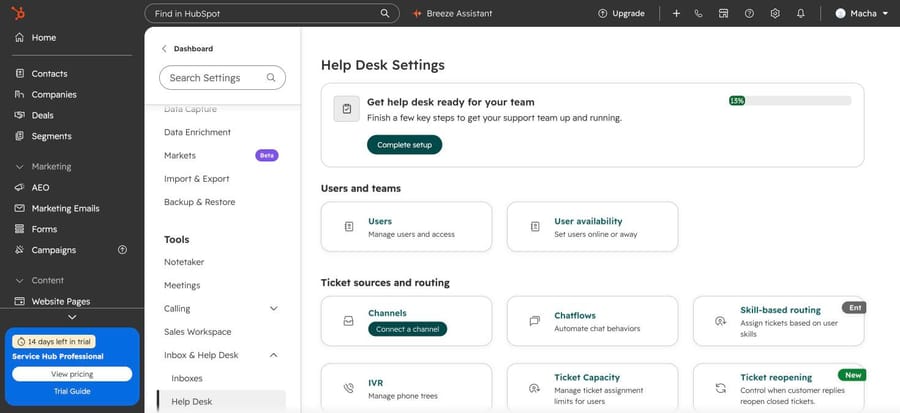
The steps:
- Click the settings icon, then Inbox & Help Desk > Help Desk in the left sidebar.
- Under Ticket sources and routing, click Channels.
- Hover over the channel (team email, form, WhatsApp, calling) and click Edit.
- Open Assign incoming tickets to and choose one of: Customer agent (HubSpot's AI agent, which reassigns when it can't answer), Specific users and teams, Team only, Use assignment workflow, Contact owner or No one.
- Open Distribution and choose Load Balanced (fewest open tickets), Round Robin or Random.
- Leave Assign to available users only checked unless you want tickets assigned to people who are away. Availability comes from working hours, out-of-office status or the user's manual setting.
- Click Save.
Load Balanced only counts open tickets from the last 30 days. If nobody is available, the ticket stays unassigned and sits in the Unassigned view until someone picks it up or replies to it, which assigns it to them.
When it's enough: one support team, one or two channels, and everyone can answer everything. Round robin is fair, and you don't need anything else.
Where it stops: the rule sees the channel, not the words. A refund request, a bug report and a sales question that arrive on the same support inbox all go into the same rotation.
Does HubSpot have skill-based routing?
Yes, on Service Hub Enterprise only. Per HubSpot's skill-based routing article, a Super Admin creates skills under Settings > Inbox & Help Desk > Help Desk > Skill-based routing. HubSpot's supported languages are available as default skills, and you can add custom ones grouped into categories. Each user gets skills on the Routing tab of their user record, including a main language and secondary languages.
Routing then runs as a ruleset per channel. Each rule has conditions on ticket properties, combined with AND and OR, and sends a matching ticket to users or teams with the right skill, by Load Balanced or Round Robin, with an optional delay of up to 10 minutes. If no rule matches, the default rule applies. If a rule matches but nobody qualified is available, the ticket stays unassigned. A report shows how many tickets matched each rule.
Those conditions are the limit. Skill-based routing is precise about who gets a ticket, and depends on something else having already decided what the ticket is.
Can HubSpot categorize tickets with AI?
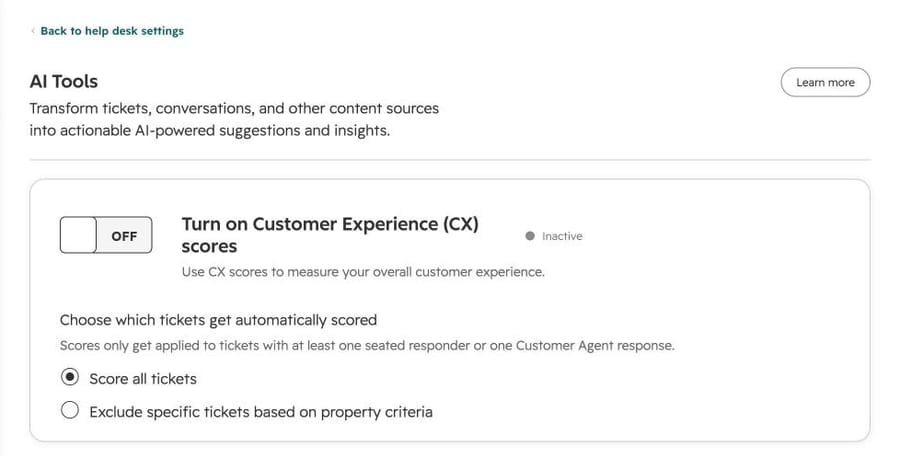
Yes, but on Enterprise. HubSpot's default Category property (internal name hs_ticket_category) is described as "automatically set using AI" from the first message of the ticket, and the default ticket properties article marks both Category and Language as needing Service Hub Enterprise. You turn it on under Help Desk settings > AI tools > Category identification; HubSpot says the model learns when a person changes the value.
On our portal, which is on a Service Hub Professional trial, the AI tools page showed only the customer experience (CX) scores toggle. There was no Category identification switch to turn on.
The Category property itself exists on every portal. On ours it was a multiple-checkboxes property with four default options: Product issue, Billing issue, Feature request and General inquiry. You can add custom options. So on Professional and below, something other than HubSpot's AI has to fill it in, whether that's a person, a workflow or an AI layer.
HubSpot's AI does other help desk work on Professional: its review-and-route page lists ticket naming and ticket summaries on Professional, and language detection on Enterprise.
How do you route HubSpot tickets with workflows?
Workflows are the native tool for routing by anything you can express as a property, and they're on Service Hub Professional and Enterprise. The two actions that matter:
- Rotate record to owner. Per HubSpot's workflow assignment article (updated September 1, 2026), it assigns tickets to users or teams with Load Balanced, Round Robin or Random distribution, can write to the Ticket owner property or any user property, and lets you choose whether to overwrite an existing owner. Only active users with paid Sales or Service seats are eligible.
- Data Agent: Custom prompt. This is the Breeze action that reads text. You give it a prompt with at least one property token, such as the ticket description, and it returns a response you use in the next steps. HubSpot's AI-in-workflows article (August 3, 2026) says it's on Professional and Enterprise, prompts are capped at 3,000 characters, and an output can be an enumeration, so a branch can split on it.
We built the first two steps on our portal to see what this looks like in HubSpot's new workflow builder: a Ticket created trigger, then the AI tab of the action picker.
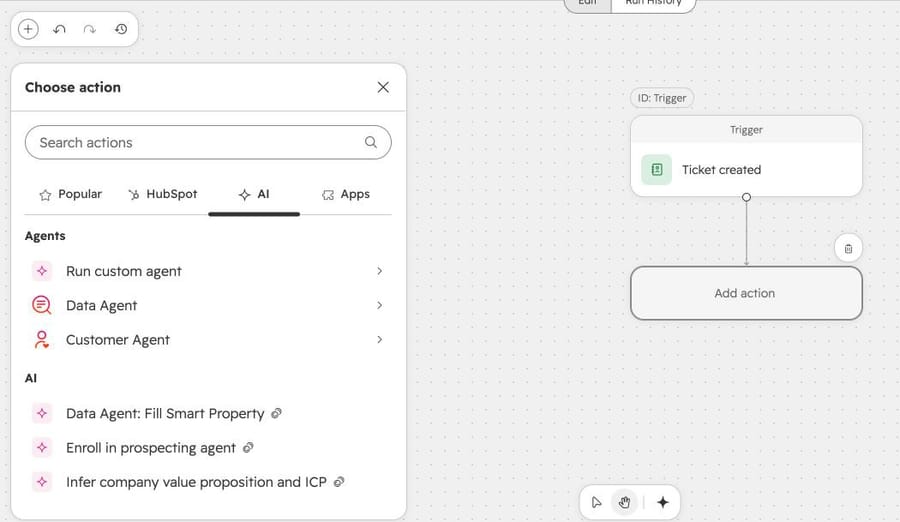
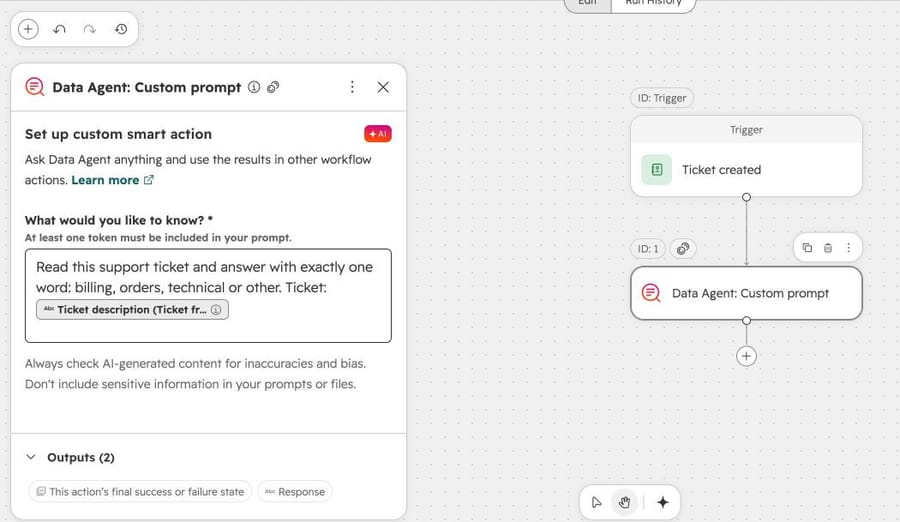
From there you add a Branch on the Response, and in each branch a Rotate record to owner (searchable as "owner" in the action picker) or an Edit record that sets Priority or Category. We didn't publish this workflow; it was a draft to show the build.
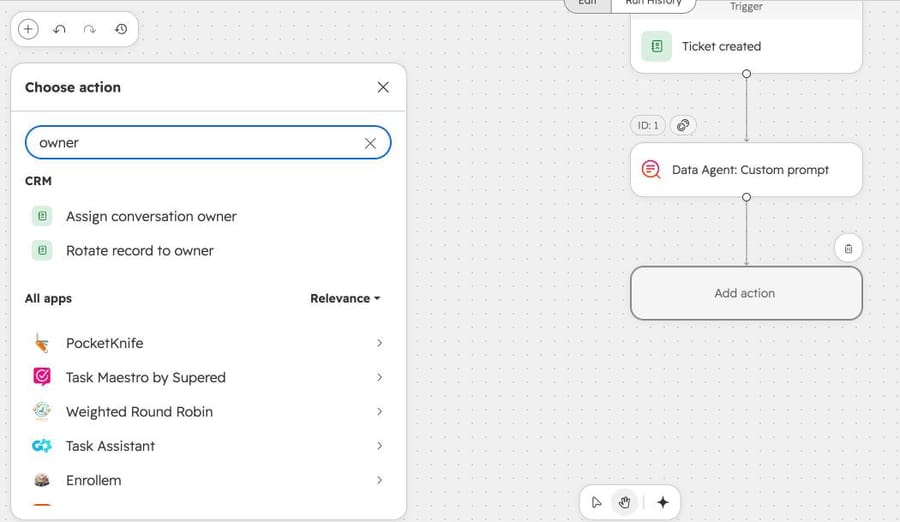
What it costs. The HubSpot Credits rate sheet lists a Data Agent prompt for one record at 10 credits, and extra credits at $0.01 each, so $0.10 per ticket classified. Service Hub Professional includes 3,000 credits a month and Enterprise 5,000, per the pricing page, which is 300 or 500 classifications if nothing else uses credits.
Where it stops: you're the engineer. Every category is a branch, every branch needs an owner rule, the prompt has to return exactly the values the branch expects, and nothing writes a note explaining why a ticket went where it did unless you add that step too.
Routing on HubSpot Starter: pipeline automations and ticket tags
Pipeline automations run on Service Hub Starter and up, per HubSpot's pipeline automation article (September 2, 2026). When a ticket enters a stage, you can create and assign a task, send an internal email notification, or edit a record, which includes setting the ticket owner. That routes by stage, so it's useful when your form or inbox already puts tickets in the right pipeline.
Pipelines also have ticket tags under Settings > Objects > Tickets > Pipelines > Ticket Tags: colored tags on ticket cards that apply automatically by conditions, such as "a certain keyword in the description". Our portal allowed 40. Keyword rules are the old way of guessing intent, and they break on the first customer who writes "charge" instead of "billing", but they're free.
If your team works in the conversations inbox rather than the help desk workspace, routing is available on every plan. Per HubSpot's inbox routing article (updated August 21, 2026), team email and form channels can assign incoming conversations to specific users and teams, to the contact owner or, where your plan includes it, to Customer agent, only to available users by default, and anyone in a rule needs a Sales or Service seat. That routes conversations by channel, the same limit as the help desk rules.
Starter was $7 a seat a month on annual billing on October 8, 2026, per HubSpot's pricing page and the upgrade card on our portal.
Which third-party tools route HubSpot tickets with AI?
These are the layers that say they classify or route HubSpot tickets. We didn't run any of them; what follows comes from their own pages on October 8, 2026.
eesel AI. eesel's AI Triage docs say the agent can "tag, categorize, and update tickets, including fields and status" and route with assign actions, and HubSpot is on its list of supported help desks. Its pricing is $299 a month for 500 credits, where a ticket is one credit, with 100 free credits to try. It's self-serve: you connect it, write the rules and tune it. We compare it in more depth in our eesel alternatives guide.
Fin for HubSpot Tickets. Intercom's Fin now runs on HubSpot email tickets. Per Fin's setup article, it needs Service Hub Professional with tickets on and a dedicated HubSpot user with a support seat, creates three ticket properties (Fin Status, Fin Tags, Fin Assignment) and deploys four workflows, initially off: Assign New Tickets, Resolution, Pending and Route to Team. Routing is how Fin hands off what it can't answer. Fin's pricing is $0.99 per outcome, with a 50-outcome monthly minimum on help desks other than Intercom. Per-outcome pricing earns the vendor more the more tickets it counts as handled, so read the definition before comparing invoices.
AI Ticket Categorization (Exelab). A HubSpot Marketplace app that analyzes chats, emails and forms and writes sentiment and up to 5 custom category properties, depending on plan. It's free for 50 tickets a month, with paid tiers priced on request; the listing showed 90+ installs and no reviews. It categorizes; assignment is still a workflow you build.
HubSpot's own Customer Agent is in the routing dropdown for a reason: it answers first and reassigns when it can't. Since April 14, 2026 it costs 50 credits ($0.50) per resolved conversation. It answers; it doesn't classify tickets for your human queue. Our Breeze customer agent guide covers it in depth.
What happened when we ran a Macha routing agent on HubSpot?
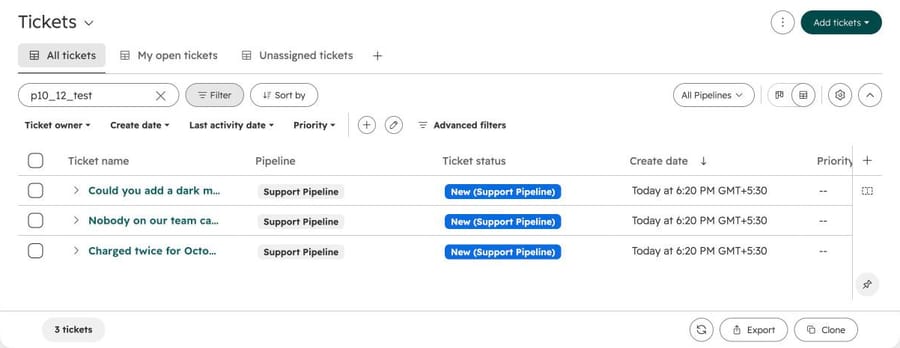
We built the agent on our Macha Demo org, which is connected to the same HubSpot portal as the screenshots above, and created three made-up tickets there, each from a made-up @example.com contact with p10_12_test in the subject so we could find them again.
The agent. We named it "P10-12 HubSpot ticket routing", left it inactive with no trigger, and ran it in proposal mode: its only tool was HubSpot Search Tickets, so it could read tickets but not change them. That's the first week of a safe rollout, when a person compares the agent's routing with what the team would have done. Here's the instruction, word for word:
You propose routing for new HubSpot support tickets. For now you don't change tickets or reply to customers: a person reviews your routing and applies it. 1. Find each ticket with Search Tickets, searching by its ticket ID, and read its subject and description. 2. Pick exactly one Category (property hs_ticket_category): BILLING_ISSUE for charges, invoices, refunds and plan changes; PRODUCT_ISSUE for errors, bugs, login problems or anything not working; FEATURE_REQUEST for requests for something new; GENERAL_INQUIRY for everything else. 3. Pick a Priority (property hs_ticket_priority): URGENT if the customer's team can't use the product at all or the ticket mentions a security problem; HIGH for a billing error (a double charge, a wrong amount) or a customer who says they'll cancel; LOW for feature requests; MEDIUM for everything else. 4. Pick the owner (property hubspot_owner_id): BILLING_ISSUE goes to the billing lead, owner ID 100689705. PRODUCT_ISSUE at URGENT or HIGH goes to the on-call engineer, owner ID 100689705. Leave every other ticket without an owner so the team's round robin assigns it. 5. For each ticket, reply with the category, priority and owner, each with its reason in under 15 words, then the exact property values to set. If you can't tell which category fits, use GENERAL_INQUIRY and MEDIUM, leave the owner empty and say why.
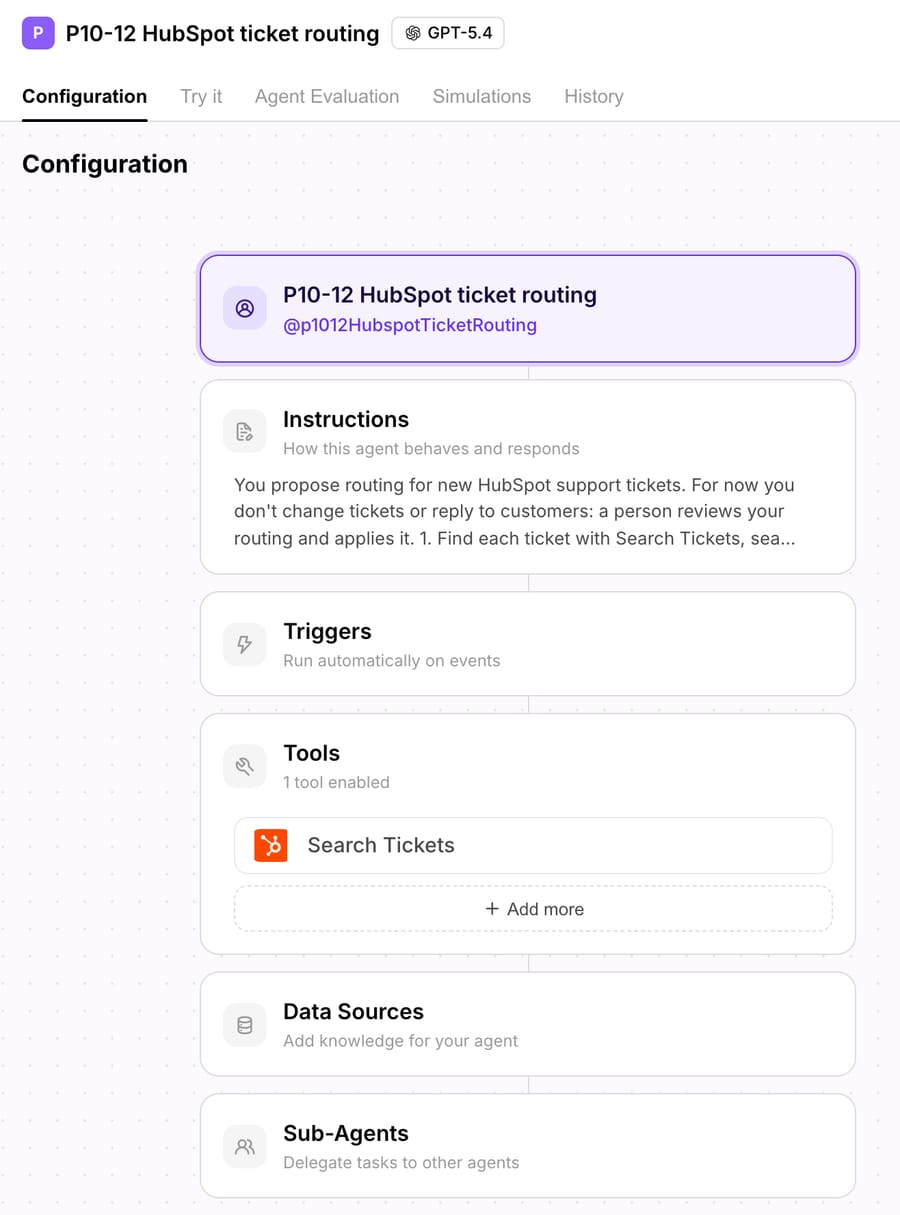
The category values are HubSpot's own four internal names, so a proposal can go straight into the Category property and its reports. The priority values are the four our portal's Priority property accepts: LOW, MEDIUM, HIGH and URGENT. And the owner is an ID. Our test portal has a single user, so the billing lead and the on-call engineer share one ID here, where a real team would list two.
The run. In the agent's Try it chat we asked it to route all three tickets by ID. It used one tool, Search Tickets, and finished in 11.6 seconds:
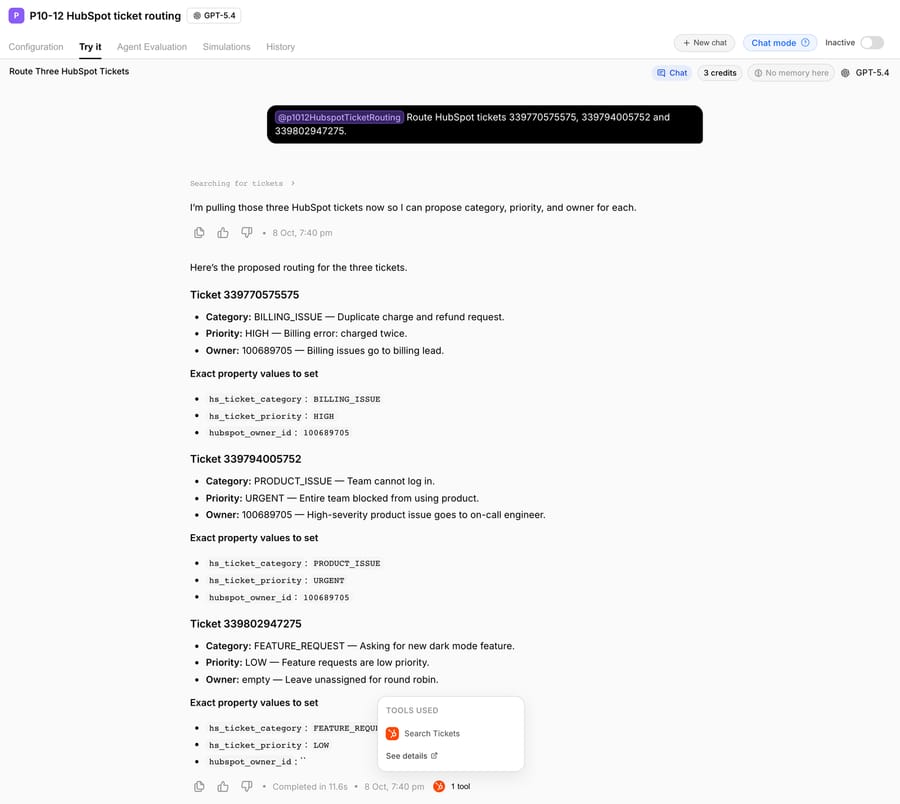
| Ticket (made up) | Category | Priority | Owner | The agent's reason |
|---|---|---|---|---|
| "Charged twice for October": $149 billed twice, asks for a refund | BILLING_ISSUE | HIGH | 100689705 | "Billing error: charged twice." |
| "Nobody on our team can log in since this morning": 12 agents locked out | PRODUCT_ISSUE | URGENT | 100689705 | "Entire team blocked from using product." |
| "Could you add a dark mode?" | FEATURE_REQUEST | LOW | none | "Leave unassigned for round robin." |
Every decision matches the instruction, including the one that's easy to get wrong. The login ticket never says "urgent" or "bug", so a keyword rule on those words would have missed it. The agent read "none of our 12 agents can log in" in the description and applied the URGENT rule.
What we didn't run. This test proposed routing; it didn't write it. We didn't attach Update Ticket, so the three tickets stayed as they were, with no priority set. In production you'd attach Update Ticket, which per Macha's HubSpot tool list updates "status, owner, priority, or any custom property", change step 5 to make that update, and run the agent from the HubSpot New Ticket Created trigger. We ran it from chat instead, because a test agent stays inactive.
Where Macha fits
Macha fits teams already running Zendesk, Freshdesk, Gorgias, Front, HubSpot or Intercom who want each ticket read and routed by what it says, on the Service Hub plan they already pay for, without building branches or buying Enterprise seats for the AI Category property. On HubSpot it works through the HubSpot connector and Macha on HubSpot (our guide to building an AI agent for HubSpot compares it with the other routes): read the ticket and contact, update any ticket property including owner and priority, add notes, and move tickets through pipeline stages.
It's the done-for-you option: the Macha team analyzes your past tickets, builds the knowledge base and the routing agent on your existing help desk, and runs it in safe mode until it routes the way your team would. That work is included on the trial and every plan. Plans run at about $0.40 per ticket (pricing), which includes setup and a dedicated success manager who handles your changes, such as a new category, a new team or a new owner.
On price: $299 gets you 750 tickets on Macha and 500 on eesel, $0.40 a ticket against $0.60, with setup done for you included. Against HubSpot's native route, the comparison is seats. Moving a 10-person team from Professional to Enterprise for skill-based routing and AI Category costs $600 a month more at list price ($150 against $90 a seat), plus the $3,500 Enterprise onboarding fee.
Macha isn't the pick if you need capacity limits, skills and availability-aware distribution across 40 agents: that's what HubSpot's Enterprise routing is built for, and Macha assigns to the owner IDs you give it. The two also work together: Macha writes Category and Priority, and HubSpot's skill-based rules (Enterprise) or a workflow assign on those properties.
How to choose
- One team, everyone answers everything: help desk routing rules with Round Robin or Load Balanced on Professional. Don't add AI.
- Tickets already arrive sorted (separate forms, inboxes or pipelines): pipeline automations on Starter, or channel rules on Professional.
- You need routing by what the customer wrote, and you have Enterprise: turn on Category identification and build skill-based rules on Category and Language.
- You need it on Professional, and someone can build workflows: Data Agent: Custom prompt plus branches and Rotate record to owner, at $0.10 a ticket in credits. Or eesel if you'd rather configure an agent than branches.
- Same outcome, and you'd rather someone else build and maintain it: Macha (done for you, per ticket, from $299/month for 750 tickets).
How to roll out AI ticket routing safely
- Write the categories down first. HubSpot's four default Category options are a reasonable start. Add a custom option only when a team owns it. Every category needs an owner rule, or it's just a label.
- Start with proposals, not owners. Have the agent propose its routing for a week, as in our test, while your rules keep assigning. Compare the two. This is the same safe-mode idea we use for replies, covered in drafting replies for agent review.
- Give owner IDs, not names. HubSpot's owner property takes an ID. Put the IDs in the instruction or the workflow, and update them when people leave; HubSpot's own Rotate action skips deactivated users.
- Keep a fallback. Our test instruction sends anything ambiguous to General inquiry with no owner, so your round robin catches it. HubSpot's skill-based routing does the same with its default rule.
- Don't let two systems fight over the owner. If a routing rule assigns on arrival and an AI agent reassigns a minute later, decide which one wins. Either the AI writes properties and HubSpot assigns, or the AI assigns and the channel rule is set to No one.
- Measure on HubSpot's side. Filter tickets by Category and Priority, and check how many were reassigned by a person in the first hour. That's your routing error rate.
For the same job on Zendesk, see our Zendesk AI ticket routing and triage guide; for order-status tickets on HubSpot, our HubSpot and Shopify guide; for the help-desk-agnostic version, triaging and routing tickets by topic.
Frequently asked questions
Does HubSpot have automatic ticket routing? Yes. On Service Hub Professional and Enterprise, each help desk channel can assign incoming tickets to specific users or teams by Load Balanced, Round Robin or Random distribution, to the contact owner, to an assignment workflow, or to HubSpot's Customer agent. Skill-based routing on ticket properties is Enterprise only.
Can HubSpot route tickets based on what the customer wrote? Natively, through Category identification on Enterprise, which sets Category from the first message, then skill-based rules on that property. On Professional, a workflow with Data Agent: Custom prompt can read the ticket description and branch on the answer, at 10 credits a run.
Is HubSpot ticket routing available on Starter? Help desk routing rules and ticket workflows aren't. The conversations inbox can assign incoming email and form conversations to users or teams on any plan, and Starter has pipeline automations that can set the owner when a ticket enters a stage, and rule-based ticket tags on keywords.
How much does AI ticket routing cost in HubSpot? Category identification comes with Enterprise seats ($150 a seat a month on annual billing plus $3,500 onboarding). A Data Agent classification in a workflow is 10 credits, $0.10 a ticket. Third parties: eesel works out to $0.60 a ticket at 500, Fin $0.99 per outcome, Macha about $0.40 per ticket including setup.
Can an AI agent assign HubSpot tickets to a specific person? Yes, if it can write the hubspot_owner_id property, which takes an owner ID, not a name. Macha's Update Ticket tool sets owner, priority or any ticket property. In our proposal-mode test, the agent picked the owner ID from its instruction for the billing and urgent product tickets and left the feature request for round robin.
Which option is best for a small team? Round Robin help desk routing on Professional, if one team answers everything. If tickets need sorting by topic and nobody has time to build workflows, Macha's team sets it up for you on the trial: $50 of free usage (about 125 tickets), no credit card, no time limit.
How we researched this
- Read on October 8, 2026: HubSpot knowledge base articles on help desk routing (updated September 7, 2026), skill-based routing, assigning tickets with workflows (September 1, 2026), pipeline automations (September 2, 2026), default ticket properties (June 25, 2026), AI in workflows (August 3, 2026) and conversations routing; HubSpot's review-and-route AI page; hubspot.com/pricing/service; the HubSpot Credits rate sheet in HubSpot's Product and Services Catalog; HubSpot's April 14, 2026 Customer Agent pricing announcement; eesel's pricing page and AI Triage docs; Fin's pricing page and its HubSpot tickets setup article; the Exelab AI Ticket Categorization Marketplace listing.
- Captured on October 8, 2026: Help Desk settings, the AI tools page, the ticket Category property and a draft ticket workflow on a HubSpot portal on a Service Hub Professional trial. The workflow was never published.
- Run live on October 8, 2026: a test agent on our Macha Demo org with one HubSpot tool (Search Tickets), on three made-up HubSpot tickets (339770575575, 339794005752 and 339802947275) from made-up @example.com contacts, in the agent's Try it chat. The agent proposed routing and changed nothing in HubSpot. All names, amounts and emails are made up.
- Not run: HubSpot's help desk channel routing (our portal had no channel connected), skill-based routing and Category identification (Enterprise), eesel, Fin and the Exelab app. Their behavior comes from their own documentation.
- Arithmetic: 10 credits × $0.01 = $0.10 per Data Agent run; 3,000 ÷ 10 = 300 runs a month on Professional's included credits, 5,000 ÷ 10 = 500 on Enterprise. 10 seats × ($150 − $90) = $600 a month. $299 ÷ 750 = $0.40 a ticket on Macha; $299 ÷ 500 = $0.60 on eesel.
To have HubSpot tickets read and routed on your own portal, start a Macha trial and the team will connect HubSpot and build the routing agent with you, or see how Macha works on HubSpot.