





 Shopify
 Stripe
 Slack
Slack Notion
 Google Workspace
 Confluence

How Do You Build an AI Agent for HubSpot Service Hub? 3 Routes Compared (2026)


You can put an AI agent on HubSpot Service Hub by turning on Breeze Customer Agent, building against the HubSpot API, or connecting a platform like Macha. Building gives full control but takes weeks; the other two run on real tickets within days.
Key takeaways
- HubSpot Service Hub teams have three AI agent routes: Breeze Customer Agent, a custom build on the HubSpot API, or a connected platform such as Macha.
- HubSpot's Breeze Customer Agent uses 50 credits per resolved conversation, $0.50 at list price, with extra credits at $9 per 1,000 on annual billing.
- HubSpot caps a private app at 100 requests per 10 seconds on Free and Starter accounts and 190 on Professional and Enterprise, so a custom agent must handle 429 errors.
- HubSpot webhook requests carry an X-HubSpot-Signature-v3 HMAC-SHA256 header, and a custom agent should reject any request with a timestamp older than 5 minutes.
- Macha's HubSpot connector adds 11 tools over OAuth, including ticket updates, pipeline moves and notes, at about $0.40 a ticket from $299 a month, with setup by the Macha team and a dedicated success manager included.

There are three ways to put an AI agent on HubSpot Service Hub: turn on HubSpot's own Breeze Customer Agent (50 HubSpot credits, $0.50 at list price, per resolved conversation), build your own agent against the HubSpot CRM and Conversations APIs, or connect an agent platform such as Macha over OAuth. Building takes weeks plus upkeep; the other two can run on real tickets within days.
| Route | Setup effort | Cost basis | Control |
|---|---|---|---|
| Breeze Customer Agent (HubSpot) | No-code, inside Service Hub | 50 credits per resolved conversation; extra credits $9 per 1,000 on annual billing | HubSpot's model and tools |
| Build on the HubSpot API | Weeks, plus hosting and upkeep | Your engineering time, model and hosting bills | Full |
| Connect Macha | Done for you by the Macha team, with a dedicated success manager, included | Per ticket, from $299 a month for 750 tickets | Your model choice, custom tools, your instructions |
Deciding who does the work rather than which tool? See HubSpot AI implementation for phases, partner prices and who tunes the agent after launch.
What does a HubSpot Service Hub AI agent do?
The loop is the same as any support agent, wired to HubSpot: a new ticket arrives → the agent reads it and the associated contact's history → it calls tools (look up the order, search your knowledge base, check a policy) → it replies, leaves a draft for a human, or routes the ticket. The hard part is doing that reliably against real tickets. (New to agents generally? Start with AI agents for customer service.)
How do you build an agent on the HubSpot Service Hub API?
HubSpot has a full REST API, so you can build the agent yourself. The pieces:
- Read tickets: the CRM Tickets object API and the Conversations API to pull the ticket, its thread, and the associated contact.
- Reply / act: update the ticket (stage, owner, properties) via the CRM API, or send a message on the conversation thread.
- Trigger on new tickets: a HubSpot workflow or webhook subscription fires your endpoint when a ticket is created.
An update tool against the real HubSpot API looks like this. HubSpot's CRM API authenticates with a private-app access token (a Bearer token you generate per app, scoped to tickets and crm.objects.contacts.read); OAuth is the alternative for apps installed across many accounts:
import requests
HS = "https://api.hubapi.com"
HEADERS = {"Authorization": f"Bearer {ACCESS_TOKEN}",   # private-app token, tickets scope
           "Content-Type": "application/json"}

def update_ticket(ticket_id: str, stage_id: str):
    r = requests.patch(f"{HS}/crm/v3/objects/tickets/{ticket_id}",
        json={"properties": {"hs_pipeline_stage": stage_id}},  # e.g. "Waiting on contact"
        headers=HEADERS, timeout=10)
    r.raise_for_status()          # handle 429 rate limits, token refresh
    return {"status": "updated"}
To post a customer-visible reply (not just update a property), you send a message on the ticket's associated thread via the Conversations API (/conversations/v3/conversations/threads/{threadId}/messages). A full agent wires up update_ticket, a send_message, a get_contact, and a search_knowledge_base, then hands them to an agent loop on the model of your choice. See our from-scratch walkthrough in how to build an AI agent: from scratch vs. platform.
What production work does a custom HubSpot agent need?
The API calls are the easy bit; making the agent run on real tickets is the work. You stand up a webhook to trigger the agent, and it has to verify HubSpot's signature and dedupe retries so one ticket never gets two replies. Per HubSpot's request validation docs, each webhook carries an X-HubSpot-Signature-v3 header: an HMAC-SHA256 of the request method, URI, raw body and the X-HubSpot-Request-Timestamp value, keyed with your app secret and Base64-encoded. You reject any request whose timestamp is older than 5 minutes. HubSpot also retries failed deliveries, so idempotency isn't optional:
import hashlib, hmac, base64, time
from fastapi import FastAPI, Request, HTTPException

app = FastAPI()
seen = set()   # back this with Redis/DB in production

def verify_hubspot_v3(req: Request, raw: bytes):
    sig = req.headers.get("X-HubSpot-Signature-v3", "")
    ts  = req.headers.get("X-HubSpot-Request-Timestamp", "0")
    if abs(time.time() * 1000 - int(ts)) > 5 * 60 * 1000:   # reject stale (>5 min)
        raise HTTPException(400, "stale timestamp")
    base = f"POST{req.url}{raw.decode()}{ts}".encode()
    digest = base64.b64encode(
        hmac.new(APP_SECRET.encode(), base, hashlib.sha256).digest()).decode()
    if not hmac.compare_digest(digest, sig):
        raise HTTPException(401, "bad signature")

@app.post("/hubspot-webhook")
async def on_ticket(req: Request):
    raw = await req.body()
    verify_hubspot_v3(req, raw)
    for event in await req.json():           # HubSpot batches events in an array
        eid = event["eventId"]
        if eid in seen:                      # idempotency: HubSpot retries on failure
            continue
        seen.add(eid)
        run_agent(event["objectId"])         # the ticket id
    return {"ok": True}
Then the rest. Rate limits: HubSpot's usage guidelines cap a private app at 100 requests per 10 seconds on Free and Starter accounts and 190 on Professional and Enterprise (250 with the API limit increase add-on), with daily account limits of 250,000 requests on Free and Starter, 625,000 on Professional and 1,000,000 on Enterprise. You back off on 429s and honor the X-HubSpot-RateLimit-Remaining header. Add grounding in your knowledge base (embed the articles and re-index when they change), guardrails (escalate refunds, redact PII, treat ticket text as untrusted input), hosting 24/7, observability, and an eval harness over real historical tickets. That's weeks of work plus permanent upkeep, and none of it is specific to your business.
What about HubSpot Service Hub's own AI?
HubSpot ships its own AI under the Breeze brand, including a Customer Agent that answers tickets and chats from your knowledge base without code, configured inside Service Hub. Per HubSpot's pricing page (checked 24 September 2026), each resolved conversation uses 50 HubSpot credits, $0.50 at list price, extra credits cost $9 per 1,000 on annual billing, and there's a 14-day free trial. It needs a Professional or Enterprise subscription. It's a real option. A quick rule of thumb for the three routes:
- HubSpot Service Hub's native AI (Breeze): fastest no-code setup, you're happy on HubSpot's model, and per-resolution credits work for your volume. Least control, least effort.
- Build on the HubSpot Service Hub API yourself: you need a specific model, custom tools wired to your own systems (orders, billing), or full control of the runtime, and you have the engineering to own it. Most control; weeks to build plus permanent upkeep (hosting, evals, maintenance).
- Connect a model-agnostic platform (Macha): model choice and custom-tool reach close to building, but live in days instead of weeks, with hosting, observability and evaluation handled. It's done for you: the Macha team analyzes your past tickets, builds the knowledge base and the agent, and runs it in safe mode until the drafts are right, at about $0.40 a ticket, which includes setup and a dedicated success manager who handles your changes.
The rest of this guide is about the second and third routes, where you want more than Breeze's native automation gives you.
How do you connect HubSpot Service Hub to Macha?
If the goal is a working agent on your HubSpot rather than a project to maintain, a platform that connects natively is far faster. Macha layers on top of HubSpot Service Hub. It's not a HubSpot replacement or a marketplace app you install; it connects via OAuth and runs agents on your tickets. Your part is that OAuth connection plus the tools your answers come from; the Macha team builds and tests the agent from there. The same agent platform runs on Zendesk, Freshdesk, Gorgias, Front, HubSpot and Intercom.
- One connect, 11 tools: authorize HubSpot and the agent can search and read tickets, contacts and deals, update a ticket's status, owner, priority or any property, move tickets through pipeline stages, and log notes on the ticket, which is how a draft reply reaches your team for review.
- Triggers: agents run on New Ticket Created, Ticket Updated (with a property filter so the agent's own edits don't loop) and New Contact Created.
- Ground on your knowledge: add your help content as a Source (Notion pages and Google Docs sync live) so replies quote real articles.
- Any other system as a tool: Custom Tools turn your order and billing APIs into agent capabilities by describing them.

Custom Tools give the agent everything beyond the help desk: describe the endpoint once, and the model can call it mid-conversation. That model-agnostic, custom-tool control is what pushes teams past a native no-code bot.
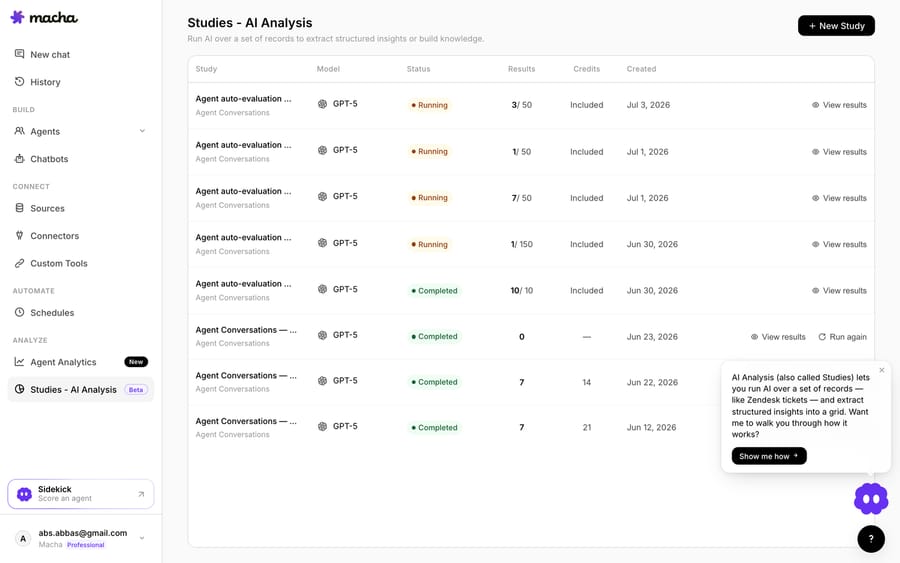
- Test before go-live: simulations replay your past tickets against the agent, and Studies grade how its answers follow its instructions, so you see how it would have answered before it touches a live customer, then widen its autonomy as it earns trust.
Should you build or connect for HubSpot Service Hub?
| Build on the HubSpot API | Connect Macha | |
|---|---|---|
| Read and update tickets | You write the API client | Native connector (OAuth) |
| Trigger on new tickets | You build a webhook endpoint | Built-in New Ticket Created trigger |
| Ground on knowledge base | You embed + host a vector store | Add it as a Source |
| Hosting, retries, observability | Your infrastructure | Built in |
| Evaluate before go-live | You build a harness | Simulations and Studies |
| Time to a live agent | Weeks + ongoing | Days |
Build on the API if you need a fully custom runtime, have strict data-residency needs, or the agent is your product. For most HubSpot Service Hub teams who want tickets resolved, a native connector gets you a measurable agent on your real tickets far faster, and you keep your model of choice. You can start free on Macha with $50 of usage and no credit card, connect HubSpot, and the Macha team builds the first agent and tests it on your own past tickets, with drafts as internal notes until they're right.
To compare HubSpot's own customer agent with third-party agents and other help desks, see the best HubSpot Breeze alternatives.
FAQ
Is a HubSpot AI agent the same as HubSpot's own AI (Breeze)? Not necessarily. HubSpot offers built-in AI, but you can also run a model-agnostic agent on top of Service Hub (via its API or a platform like Macha), which helps if you want a specific model, custom tools, or to grade the agent your own way.
How much does HubSpot's Breeze Customer Agent cost? HubSpot charges 50 credits per resolved conversation, $0.50 at list price, with extra credits at $9 per 1,000 on annual billing and a 14-day free trial. It needs a Professional or Enterprise subscription.
Do I need to install a HubSpot marketplace app? No. Macha connects to HubSpot via OAuth and runs as an AI layer on top of Service Hub, not a marketplace app you install and manage.
Can the agent take actions, not just answer? Yes. Through the HubSpot API (or Macha's connector) it can update a ticket's stage, owner and properties and log notes, and through Custom Tools it can call your own systems (order lookups, refunds), with guardrails on what it can do unattended.
How do I make sure it's accurate before it replies to customers? Ground it in your knowledge base and test it against real past tickets first (Macha's simulations do this, and the Macha team runs that testing and the rollout for you), start by leaving drafts as notes for a human, and widen autonomy per ticket type as it earns trust.






