





 Shopify
 Stripe
 Slack
Slack Notion
 Google Workspace
 Confluence

HubSpot AI Agent (Customer Agent) in 2026: What It Does, What It Costs and How to Set It Up


HubSpot's AI agent for support, now called customer agent, answers customers from your help content and charges $0.50 per resolved conversation, on Professional and Enterprise editions only. Here is what it can do, how HubSpot decides what counts as resolved, what it costs at real volumes, how to set it up, and where a third-party agent fits instead.
Key takeaways
- HubSpot's AI agent for support is now called customer agent, listed in Agent Hub, and it costs $0.50 per resolved conversation, paid as 50 HubSpot Credits.
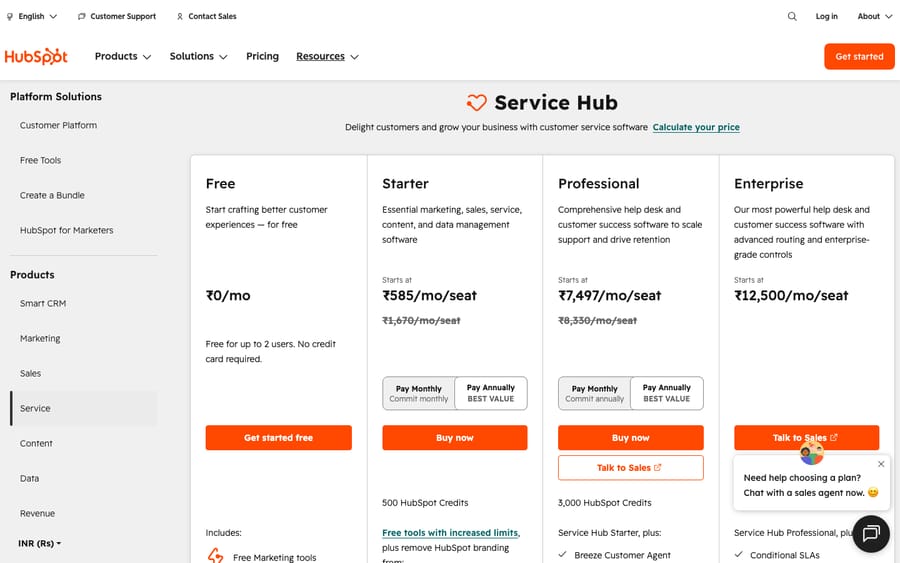
- Customer agent needs a Professional or Enterprise edition such as Service Hub Professional at $90 a seat a month on annual billing, and is not available on Free or Starter.
- Service Hub Professional includes 3,000 credits a month, about 60 resolutions, and extra credits cost $9 per 1,000 on annual billing or $0.010 each pay-as-you-go.
- Voice runs on a separate meter: HubSpot lists customer agent calls at $0.50 per minute, and its knowledge base still marks the calling channel as beta.
- At 3,000 conversations a month and a 45% to 65% resolution rate, customer agent costs $1,035 to $1,305 a month with five Professional seats, plus $1,500 onboarding.

HubSpot's AI agent for customer service is called customer agent, and it costs $0.50 per resolved conversation (50 HubSpot Credits) on a Professional or Enterprise edition, according to HubSpot's customer agent product page. It used to be sold as the Breeze Customer Agent; HubSpot now lists it in Agent Hub next to its data, prospecting and deal agents. Service Hub Professional includes 3,000 credits a month, enough for about 60 resolutions before you buy more at $9 per 1,000 credits on annual billing or $0.010 per credit pay-as-you-go. This guide covers what it does inside Service Hub, the credit math, the plan gates, the setup steps and the cases where a third-party agent fits better.
| Question | Answer (checked October 5, 2026) |
|---|---|
| Current name | Customer agent, listed in HubSpot's Agent Hub (formerly marketed as Breeze Customer Agent) |
| Price per resolution | $0.50 (50 credits), since April 14, 2026 |
| Price before April 2026 | $1.00 (100 credits) per conversation, resolved or not |
| Voice price | $0.50 per minute (calling channel marked beta) |
| Plans that can use it | Professional or Enterprise (Service Hub and six other hubs); not Free or Starter |
| Credits included per month | Starter 500, Professional 3,000, Enterprise 5,000 |
| Extra credits | $9 per 1,000 on annual billing, $0.010 per credit pay-as-you-go |
| Free access | 14 days with no credit use for first-time users |
| Channels | Live chat, email, forms, WhatsApp, Facebook Messenger, calling (beta), custom channels (beta) |
A quick disclosure: we build an AI agent ourselves (Macha, covered near the end), and it connects to HubSpot. Read this as a guide from people who watch this market closely, not a neutral encyclopedia and not a HubSpot advertisement. Where customer agent is good, we say so; where it has real watch-outs, we name them.
What is the HubSpot AI agent called now?
HubSpot's naming has changed more than once, which is why searches for "HubSpot AI agent", "Breeze AI agent" and "HubSpot AI chatbot" all land on the same product. Here is the vocabulary as HubSpot's own pages use it on October 5, 2026:
- Customer agent is the support agent this guide covers. HubSpot's product page and knowledge base now write it in lower case with no "Breeze" prefix. Older announcements, including the April 2026 pricing change, call it the Breeze Customer Agent. Same product.
- Agent Hub is the screen that lists every agent in an account. HubSpot's knowledge base (last updated September 16, 2026) names five there: AEO, data agent, prospecting agent, deal progression and customer agent (HubSpot, Understand Agent Hub).
- Agent builder is the canvas for custom agents. HubSpot's FAQ says it was "formerly known as Breeze studio", is included from Starter up, and bills custom agents in credits per run (HubSpot, Agent builder).
- Breeze Assistant keeps the Breeze name. It is the in-app copilot for your own team (formerly ChatSpot, then briefly Breeze Copilot), not an agent that talks to customers.
HubSpot appears to be keeping "Breeze" for the assistant and selling the autonomous agents as named jobs inside Agent Hub. If you are searching HubSpot's knowledge base for setup help, search "customer agent", not "Breeze".
What can the HubSpot customer agent do in Service Hub?
The agent reads a customer's question, finds the answer in your content, replies, takes an action if one is configured, and steps aside to a human when it can't or shouldn't handle it.
It answers from your content. The agent trains on existing HubSpot content (knowledge base articles, files such as PDFs) and on website pages synced by URL, up to 5,000 URLs per HubSpot's setup article (HubSpot, Set up the customer agent). Content quality is the biggest single factor in how good it is: thin, stale or contradictory documentation produces a thin, stale agent. Because it sits inside the CRM, it can also see the contact's history once you switch on the CRM data setting.
It takes configured actions. HubSpot's knowledge base gives "resetting a password or booking a meeting" as examples of actions, and the product page says the agent can act "in your CRM, Shopify, and the other tools your team uses" (HubSpot, Understand the customer agent). Qualifying a lead is also an action, and HubSpot bills it as a resolution.
It helps the human team too. Inside the help desk workspace, the same agent generates reply recommendations for your reps on conversations it isn't handling, so the content you train it on pays off twice.
It hands off with context. When confidence is low, an escalation rule fires or a customer asks for a person, it transfers the conversation to a human with the thread attached. You set its working hours, its personality (HubSpot offers Friendly, Professional, Casual, Empathetic or Witty) and its guidelines. HubSpot says it works in every language HubSpot supports.
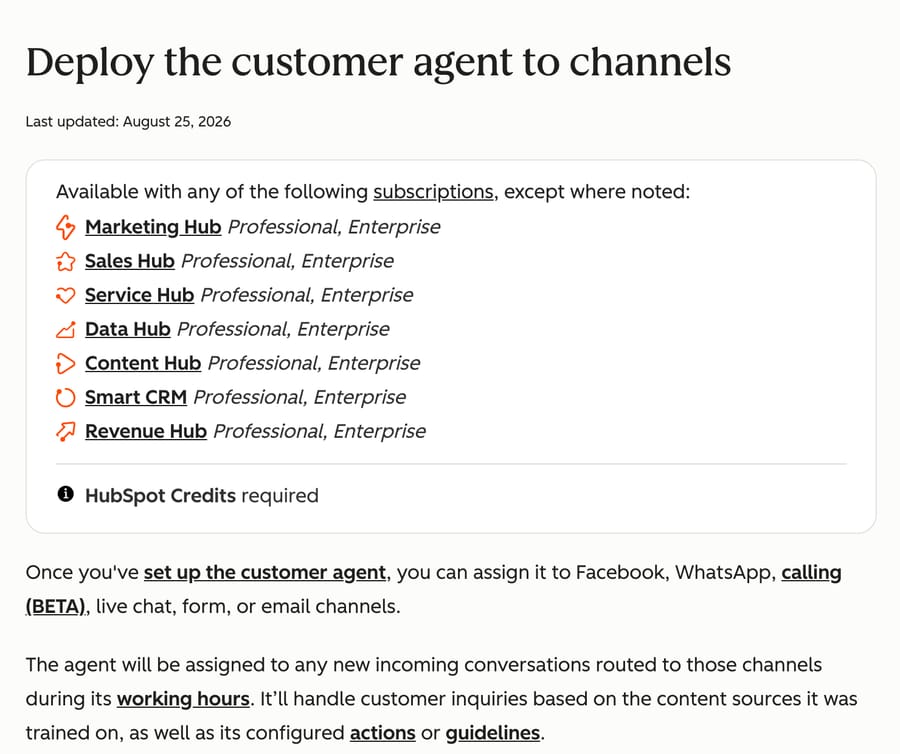
It covers more channels than it did in spring. HubSpot's deployment article lists Facebook, WhatsApp, calling (beta), live chat, forms and email, plus custom channels for accounts in a separate beta (HubSpot, Deploy the customer agent to channels). It can also be dropped into workflows and rule-based chatbots.
How well does it resolve? HubSpot's numbers have climbed with each page revision: the April 2026 announcement said customer agent "resolves 65% of conversations and cuts resolution time by 39%, across more than 8,000 customers who have activated it" (HubSpot company news), and the product page on October 5, 2026 claims a 70% average resolution rate with "top teams" at 90%. Treat both as vendor-reported averages across customers who chose to switch it on, not as independent benchmarks.
How much does the HubSpot customer agent cost?
Since April 14, 2026, messaging is outcome-based: $0.50 per resolved conversation. Each resolved conversation consumes 50 HubSpot Credits. Extra credits cost $9 per 1,000 on annual billing, or $0.010 per credit pay-as-you-go, so a resolution costs $0.45 to $0.50 once you're past the bundle (HubSpot company news; HubSpot pricing). The old model charged $1.00 (100 credits) per conversation whether or not it resolved. HubSpot halved the unit price and stopped billing for conversations the agent didn't close, which puts it in the same pay-per-outcome camp as Intercom Fin. The incentive is worth naming: per-resolution pricing means HubSpot earns more the more conversations its agent closes, so its interest is in a generous definition of "resolved."
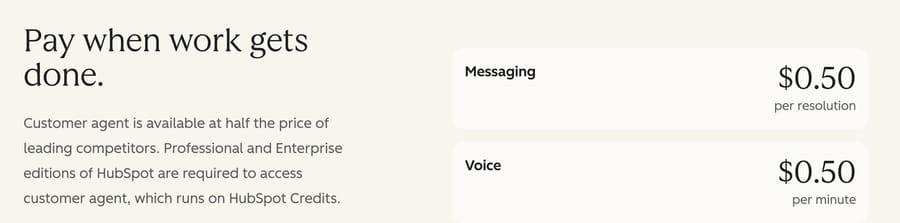
Voice runs on a different meter. The same product page prices voice at $0.50 per minute, not per resolution. That changes the arithmetic: a resolved chat costs $0.50, while a 4-minute call costs $2.00 at the listed rate. HubSpot's knowledge base still marks the calling channel as beta and, when we checked, did not document how partial minutes are counted, so price a voice pilot on your own average handle time before you switch it on for every inbound line.
What counts as "resolved" decides the bill. HubSpot evaluates an agent-handled conversation 72 hours after the last visitor response. It's resolved if the agent shared a content source or took an action and no qualifying handoff happened in that window; qualifying a lead also counts (HubSpot, Understand the customer agent; SiliconANGLE). The catch: "If a customer replies after more than 72 hours in an email thread, the conversation is reopened and the 72-hour evaluation window resets", and it can be billed again. A drawn-out issue that bounces back days later can generate more than one billable resolution. That detail barely matters at low volume and matters a lot at high volume.
Bundled credits cover the first chunk. HubSpot's pricing page lists 500 credits on Starter, 3,000 on Professional, and 5,000 on Enterprise each month (hubspot.com/pricing/service). At 50 credits per resolution, that's 60 included resolutions a month on Professional and 100 on Enterprise, assuming nothing else in your account spends credits. Credits are shared with every other credit-spending feature, including custom agents built in agent builder. Without purchased packs, usage-based features pause when the included credits run out.
There's free access to test it. HubSpot's April announcement offered a 28-day trial. The setup article and pricing page now describe 14 days of free access: buy at least one Service Hub Professional or Enterprise seat and the agent uses no credits for 14 days, with "no restrictions on the number of messages or features."
A worked example
Say you're on Service Hub Professional and the agent resolves 500 conversations in a month. The first 60 resolutions use the 3,000 bundled credits. The remaining 440 use 22,000 credits, which is $198 at the annual $9 rate or $220 pay-as-you-go, on top of your Service Hub Professional seats. At 2,000 resolutions a month, you need 97,000 credits beyond the bundle, roughly $873 to $970, again before seats. The pattern is the same for every outcome-priced agent: the more successful the agent, the bigger the invoice. Model it at your volume, and watch the 72-hour reopen rule, because it can quietly inflate the count.
For how this model compares with per-conversation and per-action approaches, see our explainer on AI agent pricing models.
What does customer agent cost at 3,000 conversations a month?
At 3,000 conversations a month, customer agent costs about $585 to $855 a month in credits on annual credit packs if it resolves 45% to 65% of them, and $1,035 to $1,305 with five Service Hub Professional seats, plus a one-time $1,500 Professional onboarding fee that HubSpot's pricing page lists as "required, one-time" (we checked it on September 28, 2026). Among the metered native agents we've priced at this volume (Zendesk, Fin, Freddy and Gorgias), that's the lowest cost per resolved conversation.
The two resolution rates bracket the likely range. Gorgias's Ecom Lab reported in April 2026 that "the median brand resolves 45% of AI-touched tickets end-to-end. The top quartile clears 65%" (Gorgias Ecom Lab, a vendor self-report on Gorgias merchants). HubSpot's April 65% claim sits at the top of that range. Assumptions: 5 Professional seats at $90 on annual billing, the agent handles all 3,000 conversations over messaging channels (no voice), nothing else in the account spends credits, and no email thread reopens after the 72-hour window.
| Line item (monthly) | 45% resolved | 65% resolved |
|---|---|---|
| Resolved conversations | 1,350 | 1,950 |
| Credits used at 50 each | 67,500 | 97,500 |
| Less 3,000 included on Professional | 64,500 | 94,500 |
| Credit cost at $9 per 1,000 (annual packs) | 65 packs = $585 | 95 packs = $855 |
| Credit cost at $0.010 per credit (pay-as-you-go) | $645 | $945 |
| Service Hub Professional seats, 5 × $90 | $450 | $450 |
| All-in, annual packs | $1,035 | $1,305 |
| All-in, pay-as-you-go credits | $1,095 | $1,395 |
| All-in per resolved conversation (annual packs) | $0.77 | $0.67 |
| One-time Professional onboarding | $1,500 | $1,500 |
Macha's plan for up to 3,000 tickets is $1,199 a month, billed per ticket handled whether it resolves or not. On the same five Professional seats that's $1,649, which is more than customer agent at either resolution rate. Customer agent's credit bill only passes $1,199 once it needs about 133,000 credits beyond the bundle, around 2,724 resolutions, which is more than 90% of 3,000 conversations. If you already pay for Professional and the job is answering questions from your knowledge base, customer agent is the cheaper way to do it at this volume.
Where the arithmetic shifts: the 72-hour reopen rule can bill the same email issue twice, which pushes the credit line up on email-heavy queues; credits are shared across HubSpot's other credit-spending features, so the 3,000 included may not all go to support; voice minutes add a separate line at $0.50 a minute; and the $1,500 onboarding is roughly $125 a month over a first year. For other volumes, see AI support cost at 1,000 tickets a month. Setup and tuning costs by route are in our HubSpot AI implementation cost breakdown.
Which HubSpot plan do you need for the AI agent?
A Professional or Enterprise edition, and it doesn't have to be Service Hub. HubSpot's setup and deployment articles list the Professional and Enterprise editions of Marketing Hub, Sales Hub, Service Hub, Data Hub, Content Hub, Smart CRM and Revenue Hub. Free and Starter accounts can't deploy it. On the Service Hub pricing page, customer agent first appears in the Professional column, next to the help desk workspace, knowledge base and customer portal.
The person setting it up needs customer agent editor permissions and an assigned seat, and your account needs HubSpot Credits to deploy it to channels. Service Hub Professional is $90 per seat per month on annual billing ($100 monthly) with a required $1,500 one-time onboarding; Enterprise is $150 per seat with a $3,500 onboarding fee. So the $0.50 headline sits on top of a paid edition. For the full plan math, see our HubSpot Service Hub pricing guide.
Starter teams do get something: agent builder is included from Starter, so a Starter account can build a custom agent that runs on credits. That is a build-it-yourself tool for internal work, not the packaged support agent with HubSpot's resolution billing.
How do you set up the HubSpot customer agent?
Setup takes an afternoon if your content is in order, and HubSpot's setup article walks the same path (HubSpot, Set up the customer agent):
- Check the prerequisites. A Professional or Enterprise edition, an assigned seat, customer agent editor permissions, and four AI settings switched on: generative AI access, CRM data, customer conversation data and files data. If the agent will run on a site not hosted by HubSpot, install the HubSpot tracking code there.
- Create the agent. Go to Service, then Customer Agent, then "Continue to agent setup". Name it and pick a personality. Note that HubSpot says an agent can't be deleted once it's created, so use a name you can live with.
- Add content sources. Select existing HubSpot content and add website URLs, setting how far the crawler goes. This step decides most of the eventual answer quality.
- Configure identity, actions and guidelines. Write the guidelines (what it should never promise, when to hand off), set up the actions it may take, and define escalation rules and working hours.
- Test in preview. Use the preview tools on email and chat scenarios before any customer sees it. Pausing the agent stops credit use while you update content.
- Deploy to channels. Connect at least one Facebook, WhatsApp or live chat channel to the inbox or help desk, then assign the agent. Email and forms need a "customer agent reply email" set. Start the 14-day free window here, on real traffic.
The recurring advice from practitioners: budget ongoing effort for knowledge upkeep. A retrieval-grounded agent is only as good as the content behind it, and HubSpot's Knowledge Base Agent (in beta on the Service Hub pricing page) exists precisely because gaps show up once real questions arrive.
What are the customer agent's strengths and limits?
What it's good at:
- Native to the CRM. If you already run on HubSpot, the agent lives where your contacts, tickets and data already are, with full record context from day one.
- Fairer pricing than before. The April 2026 move to $0.50 per resolved conversation, down from $1.00 charged regardless of outcome, is a real improvement. You broadly don't pay when the agent doesn't resolve.
- Bundled credits lower the entry cost. Low-volume teams may pay little or nothing beyond their seats.
- Wide channel list. Chat, email, forms, WhatsApp and Messenger, with calling in beta.
- Low setup friction for existing HubSpot teams, plus 14 days of free access to validate on live traffic.
Where it falls short:
- Locked to paid Professional and Enterprise tiers. The "cheap per resolution" story assumes you already pay for a fairly expensive edition. Starter teams are shut out (Capterra reviews).
- The 72-hour reopen rule. Email conversations that reopen after the window can be billed again. Audit this if you have long-running or multi-touch issues.
- Voice is beta and priced by the minute. Budget it separately; a long call costs several times a resolved chat.
- Accuracy isn't flawless. Reviewers note the agent "sometimes doesn't give correct answers" and isn't as sharp as the marketing implies. Expect to invest in content and transcript review (eesel).
- It only works inside HubSpot. The agent answers conversations in HubSpot's inbox and help desk. Teams whose tickets live in another help desk can't point it there.
- Cost scales with success. Like any outcome-priced agent, high deflection volume means a bigger bill, and forecasting at scale is harder than on a flat plan.
What do real users say about it?
We aren't HubSpot customers, so here's the third-party signal instead. As of June 2026, HubSpot Service Hub held roughly 4.4/5 on Capterra (≈186 reviews) with comparable marks on G2 (Capterra), while Trustpilot skewed far lower (~2.0/5), a gap driven mostly by billing, contract and support complaints rather than the AI itself.
On the agent specifically, sentiment splits in a familiar way: praise for how natively it fits the CRM and how much repetitive volume it deflects, and three recurring gripes. They are accuracy ("not always correct"), tier-locking (the agent is Professional-only and AI keeps landing behind upgrades), and pricing/contract friction (upsell pressure, unexpected charges, hard cancellation) (eesel; Capterra). People tend to like the tooling and grumble about the commercial model around it.
Can you use a third-party AI agent on HubSpot?
Yes. HubSpot exposes tickets, contacts, deals and notes through its public API over OAuth or a private app, so an outside agent can read and act on the same records customer agent sees. There are three practical routes: install an app from the HubSpot Marketplace, build your own agent on the API, or connect an agent platform that already ships a HubSpot connector. We compare the main options and their pricing in the best HubSpot Breeze alternatives, and walk through the build route in how to build an AI agent for HubSpot Service Hub.
The question to ask any third-party agent is what it can write back. Reading a ticket is easy; the useful differences are whether it can update ticket properties, move pipeline stages, log notes and reply to the customer, and whether the vendor's HubSpot integration actually documents each of those. Teams usually choose a third-party agent for one of three reasons: they're on Starter and can't deploy customer agent, they want a flat bill instead of one that grows with resolutions, or they need the agent to act in systems beyond HubSpot (an order system, billing, a separate knowledge base) without building each action by hand.
The two can also run together. Customer agent answers on chat and WhatsApp, and a third-party agent works the ticket queue behind it: triaging, enriching and writing internal notes for the reps who pick up escalations.
Where Macha fits on HubSpot
Macha is an AI agent layer that runs on top of Zendesk, Freshdesk, Gorgias, Front, HubSpot or Intercom. It is not a help desk of its own. On HubSpot it connects through Macha's built-in HubSpot connector over OAuth, which gives an agent 11 tools: Search Contacts, Get Contact, Update Contact, Search Deals, Get Deal, Update Deal Stage, Search Tickets, Get Ticket, Update Ticket, Add Note and List Pipelines. It can fire on three HubSpot triggers: New Ticket Created, Ticket Updated (with a property filter so the agent doesn't trigger itself) and New Contact Created. See the HubSpot integration page for the full list.
On HubSpot, Macha works the ticket: it reads the ticket and the contact's deals, sets status, owner, priority or custom properties, moves the ticket through its pipeline, and either posts a public reply on the ticket or leaves a note with a drafted answer and the context it found for the rep who replies, depending on how you set the agent up. That makes it a fit for HubSpot teams who want triage and back-office work done on every ticket, including the ones customer agent hands off, and who want the agent to reach other systems such as Shopify or Stripe through Macha's built-in connectors or custom API tools that Macha's team sets up during onboarding. If you want an agent answering live chat, WhatsApp and Messenger in real time inside HubSpot's inbox, that job is customer agent's.
Billing is per ticket rather than per resolution: one charge per thread however many steps the agent takes, from $299 a month for up to 750 tickets, or $1,199 for up to 3,000, with setup and monitoring by the Macha team included (getmacha.com/pricing). Per-resolution is cheaper when the work is answering questions; per-ticket pays for work that never counts as a clean resolution, like tagging, routing and lookups. You can try it on your own HubSpot tickets with $50 of free usage, no credit card required.
Who can set it up for you?
If you'd rather not configure customer agent yourself, there are two other routes: a HubSpot Solutions Partner, or an AI vendor whose own team does the setup. Our HubSpot AI implementation guide compares all three phase by phase. The figures below are as each source published them, checked October 14, 2026.
| Route | Weeks to live | Cost shown |
|---|---|---|
| Do it yourself with customer agent | No timeline published by HubSpot; 14 days of free access once you opt in | $0.50 per resolved conversation; Professional seats $90 a month plus $1,500 onboarding |
| A HubSpot Solutions Partner | 14 days for a help desk package, 30 for a bundle (RevPartners); 4 weeks fast track or 8 weeks standard (INSIDEA) | $2,000 for 14 days, $3,250 for 30, with knowledge base or customer agent as one line item (RevPartners); native agent setup from $2,500 with 30 days of tuning (Bluleadz); plus HubSpot's credits and seats |
| Done for you (Macha, our product) | Safe mode (drafts only) within 7 days, then public replies once your team approves the drafts, typically from week 2 | $299/month for 750 tickets, no setup fee |
A partner fits when the agent is one piece of a wider Service Hub build, such as pipelines, routing and an inbox rollout. Our HubSpot Service Hub partner ranking lists the Solutions Partners that publish customer agent scope and prices. Most partner packages end at handoff or after a set tuning window (30 days at Bluleadz), with a retainer after that. With the done-for-you route, tuning after launch is included in the monthly price: see how done-for-you setup works on HubSpot.
How customer agent compares with other AI agents
If you're cross-shopping, the obvious peers are Intercom Fin (also outcome-priced, at $0.99 per outcome, now owned by Salesforce after a deal that closed on September 10, 2026), Zendesk's AI agents ($1.50 per committed automated resolution or $2.00 pay-as-you-go, native if you're on Zendesk), and enterprise agents like Ada, Decagon and Sierra (generally quote-only). At $0.50 per resolution, customer agent is the cheapest per-outcome rate of the published ones, with the catch that it needs a Professional edition and only works inside HubSpot. We compare the first two head to head in HubSpot Breeze vs Zendesk AI pricing and Intercom Fin vs HubSpot Breeze.
How we researched this
On October 5, 2026 we loaded HubSpot's customer agent product page, its Agent Hub and agent builder page, the Service Hub pricing page and four knowledge-base articles (Understand the customer agent, Set up the customer agent, Deploy the customer agent to channels, Understand Agent Hub) in a US-locale browser, and captured the two screenshots dated that day. The Professional seat price, the $1,500 required onboarding fee, the 3,000 included credits and the $0.010 pay-as-you-go credit rate were re-read on September 28, 2026; the pricing page served to us on October 5 showed local-currency seat prices, so the US dollar figures come from that earlier read. Resolution rates (65%, 70% and 90%) are HubSpot's own claims; the 45% and 65% used in the cost model come from Gorgias Ecom Lab's April 2026 report, also a vendor self-report. Review ratings are June 2026 readings; G2 turned away every request we made.
The arithmetic: 3,000 × 45% = 1,350 resolutions × 50 = 67,500 credits, less 3,000 included = 64,500, rounded up to 65 packs × $9 = $585, plus 5 × $90 = $450 in seats = $1,035; at 65%, 1,950 × 50 = 97,500, less 3,000 = 94,500, 95 packs = $855, + $450 = $1,305. The voice example is 4 minutes × $0.50 = $2.00. Macha's break-even is $1,199 ÷ $9 per 1,000 ≈ 133,000 credits beyond the bundle, ÷ 50 ≈ 2,664, plus the 60 included = 2,724 resolutions. The Macha connector tools are taken from Macha's HubSpot integration listing; we did not run customer agent hands-on because we are not HubSpot customers, and every scenario in this guide is synthetic.
Frequently asked questions
What is the HubSpot AI agent called? HubSpot's support agent is called customer agent. It was marketed as the Breeze Customer Agent until 2026 and now sits in Agent Hub alongside the data agent, prospecting agent, deal progression and AEO. Breeze Assistant, the in-app copilot for your own team, is a separate product.
How much does the HubSpot customer agent cost? $0.50 per resolved conversation on messaging channels, paid as 50 HubSpot Credits, and $0.50 per minute on voice. Professional includes 3,000 credits a month and Enterprise 5,000; extra credits are $9 per 1,000 on annual billing or $0.010 each pay-as-you-go. First-time buyers get 14 days of free access.
What counts as a "resolved" conversation? HubSpot checks 72 hours after the last visitor response. If the agent shared a content source or took an action and no human handoff happened, it's resolved; qualifying a lead also counts. If the customer replies to an email thread after 72 hours, the conversation reopens and can be billed again.
Which HubSpot plan do I need for the AI agent? A Professional or Enterprise edition of Service Hub or of another hub such as Marketing, Sales or Smart CRM. It's not available on Free or Starter, and the person setting it up needs an assigned seat and customer agent editor permissions.
Is there a HubSpot AI chatbot on the free plan? HubSpot's free tools include a rule-based chatbot builder, but the AI customer agent that answers from your content needs a Professional or Enterprise edition. Starter accounts can build custom agents in agent builder, which bills credits per run.
Can I use a third-party AI agent with HubSpot instead? Yes. HubSpot's API lets outside agents read and update tickets, contacts and deals. Check what each one can write back; Macha on HubSpot, for example, can update tickets, add notes and post public replies on tickets.
When to turn on the HubSpot customer agent
If you already pay for a Professional edition, your support runs on chat, email and messaging, and your knowledge base is in decent shape, yes: use the 14-day free window on real traffic and model the credit bill at your own volume first. At 3,000 conversations a month it costs $1,035 to $1,305 with five seats, the lowest per-resolution rate we've priced. Hold off on voice until you know your average call length, and watch the 72-hour reopen rule on email.
If you're on Starter, if your tickets need work done in systems outside HubSpot, or if you'd rather pay per ticket than per resolution, look at a third-party agent working your HubSpot tickets, such as Macha on HubSpot, and run the numbers on your own conversations before you commit to either.
Pricing, naming and channels re-checked against HubSpot's product page, pricing page and knowledge base on October 5, 2026. HubSpot changes its agents and credit pricing often, so confirm current figures on hubspot.com before relying on them.






