Intercom
 Shopify
 Stripe
 Slack
Slack Notion
 Google Workspace
 Confluence

How Much Does Ada Cost in 2026? Ada AI Pricing From Its Own Listings


Ada publishes no price on ada.cx, but its marketplace listings do: $30,000 a year on Salesforce AgentExchange, $33,000 for 60,000 conversations a year on one AWS listing and $250,000 a year on Azure, while Vendr puts the median buyer at $72,000. Below, each figure sits next to the date it was read, followed by how Ada's agent works and what users say.
Key takeaways
- Ada's lowest published price is $30,000 a year on Salesforce AgentExchange, with no rate card on ada.cx itself and custom pricing only on one of its two AWS Marketplace listings.
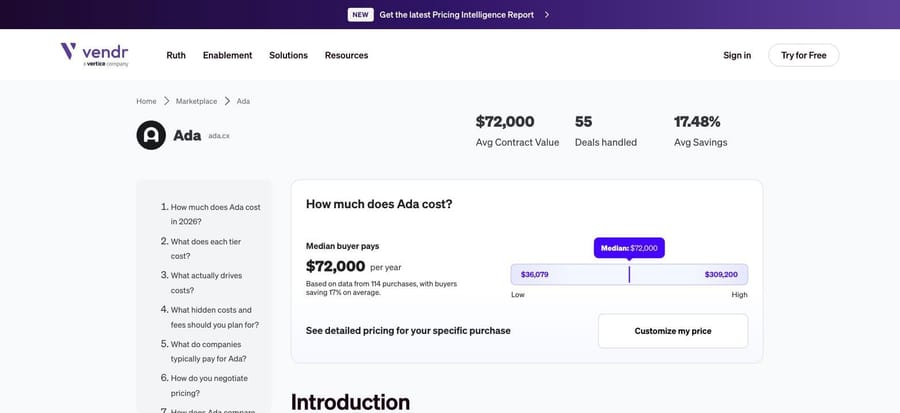
- Vendr's procurement data shows the median company that buys Ada pays $72,000 a year across 116 purchases, ranging from $36,132 to $300,000.
- Ada bills per conversation: its July 2025 pricing post illustrates $0.35 a conversation, and its AWS bundle of 60,000 conversations for $33,000 works out to $0.55 each.
- Ada holds a 4.6 out of 5 rating on G2 from 173 reviews, while its Trustpilot score from end customers sat at roughly 2.0 out of 5 in June 2026.
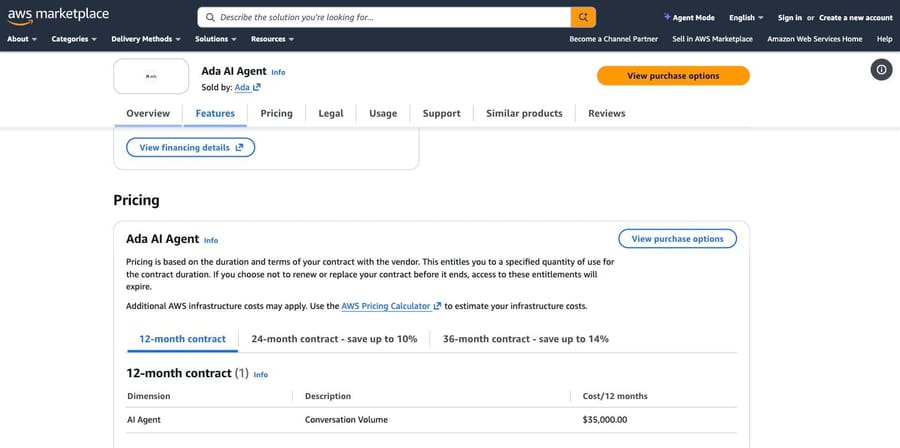
- Ada's AWS Marketplace listing "Ada AI Agent" showed $35,000 for a 12-month contract on September 22, 2026, but by September 25 it showed only custom pricing, while its second listing still lists $33,000.

Ada costs at least $30,000 a year at its own published price on Salesforce AgentExchange, while the median company that buys it pays $72,000 a year according to Vendr's procurement data. Ada puts no price on ada.cx. On AWS Marketplace, one listing that showed $35,000 for a 12-month contract on September 22, 2026 now shows only custom pricing, while a second listing still sells 60,000 conversations a year for $33,000. The $30,000 floor and the $72,000 median are the anchors to budget from.
How much does Ada cost in 2026?
Every figure below was read on the date shown (Vendr re-checked September 24, 2026). Four come from Ada's own marketplace listings, and one of those has since dropped its price. One comes from procurement data. None of them is a rate card, because Ada does not publish one.
| Source | What it says | Unit | Checked |
|---|---|---|---|
| AWS Marketplace, "Ada AI Agent", sold by Ada | On Sep 22, 2026: $35,000 for a 12-month contract; $63,000 for 24 months (10% saving); $90,000 for 36 months (14% saving). On Sep 25, 2026: "Custom pricing options" only, via a private offer | One dimension, "AI Agent / Conversation Volume" (Sep 22) | Sep 22 and Sep 25, 2026 |
| AWS Marketplace, "Ada - AI Agent", sold by Ada | "Ada Strategic includes 60,000 conversations": $33,000 for a 12-month contract, plus custom pricing via a private offer | Conversations, 60,000 a year included | Sep 25, 2026 |
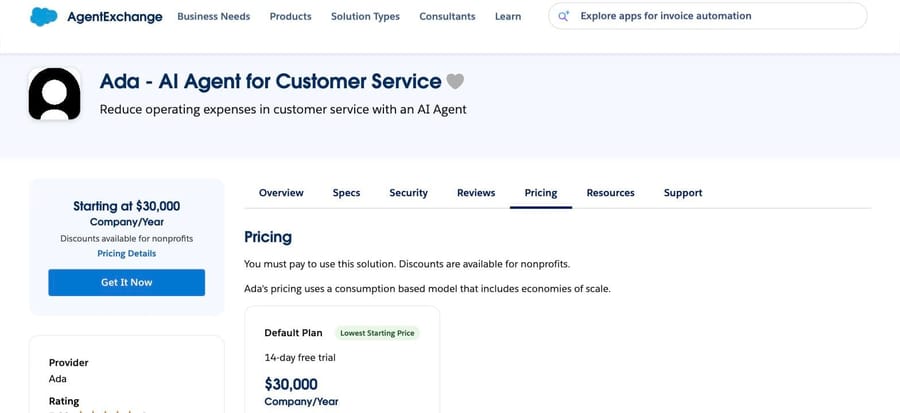
| Salesforce AgentExchange, "Ada - AI Agent for Customer Service", by Ada | "Starting at $30,000 per Company/Year", discounts for nonprofits, one Default Plan | Per company, per year | Sep 22 and Sep 25, 2026 |
| Vendr (procurement data, not a vendor) | Median buyer pays $72,000 a year, from 116 purchases; low $36,132, high $300,000; 17% average saving | Annual contract value | Sep 24, 2026 |
| ada.cx/pricing | No page. The URL redirects to Ada's Book a Demo form | n/a | Sep 22, 2026 |
| G2's Ada pricing tab | "Information about Ada pricing, plan availability, and costs is not listed on G2 by the vendor" | n/a | Sep 22, 2026 (page last updated Jul 28, 2026) |
| Azure Marketplace, "Ada's AI Agent", by Ada | Public plan: $250,000 a year on a 1-year subscription. A second plan at $13,500 a year is a private plan made for one named customer | Per year, volume unstated | Sep 25, 2026 |
The short version: Ada's own published floor is $30,000 a year, and the median company that actually buys it pays about $72,000. If someone quotes you materially below $30,000, they are quoting something Ada has not published for general sale (the $13,500 Azure plan was made for one named customer).
Which Ada does this pricing apply to?
"Ada pricing" is one of the most overloaded queries in software. When we pulled the live US results on September 22, 2026, Google's AI Overview for it answered with the price of Cardano, and three of the four People Also Ask questions were about the coin. This page is about Ada the customer service company at ada.cx, and not the ADA cryptocurrency, not the Ada programming language, not Ada Lovelace, and not the Americans with Disabilities Act. From here on, "Ada" means the CX platform.
Where does Ada publish its prices?
One AWS Marketplace listing no longer shows a price. When we rechecked "Ada AI Agent" on September 25, 2026, it read "Custom pricing options" and asked buyers to request a private offer for a custom quote. On September 22 it was the most detailed of Ada's listings: sold by Ada, it carried a single pricing dimension called "AI Agent / Conversation Volume" and priced three contract lengths: $35,000 for twelve months, $63,000 for twenty-four and $90,000 for thirty-six. The multi-year figures were exactly the discounts the tabs advertised: $63,000 is ten percent off two years at the annual rate, and $90,000 is just over fourteen percent off three. Annualized, that was $35,000, $31,500 and $30,000. The listing still carries a customer rating of 4.6 from 179 reviews. Treat those three contract prices as a snapshot of what Ada once listed, not a price you can buy at today.
What that listing did not say, even when it showed prices, is how many conversations $35,000 entitled you to. The dimension was named for conversation volume and then never quantified, so the number was an entry point rather than a rate.
A second AWS listing still shows a price, and it names the volume. Ada also sells on AWS as "Ada - AI Agent", with a hyphen. On September 25, 2026 that listing offered one tier, "Ada Strategic includes 60,000 conversations", at $33,000 for a 12-month contract, with custom quotes through a private offer as the alternative. That works out to $0.55 a conversation, and it is the only Ada listing we found that says how many conversations the price buys.
The Salesforce AgentExchange listing sets the floor. Ada's listing there reads "Starting at $30,000 per Company/Year", with discounts available for nonprofits, and a single Default Plan card. The listing states the model in Ada's own words: "Ada's pricing uses a consumption based model that includes economies of scale." One oddity worth flagging rather than smoothing over: that Default Plan card also advertises a 14-day free trial, while G2's pricing tab says flatly that Ada does not offer a free trial, and ada.cx offers no self-serve route to one. We could not reconcile those, and we would not budget on the trial existing.
Azure Marketplace lists the highest public price. Ada's own listing on Microsoft's marketplace, "Ada's AI Agent", has one public plan at $250,000 a year on a one-year subscription, with no conversation volume stated. The listing header reads "Starting at $13,500.00/year", but that figure comes from a private plan made for one named customer, so it is not a price you can buy at. We read it on September 25, 2026.
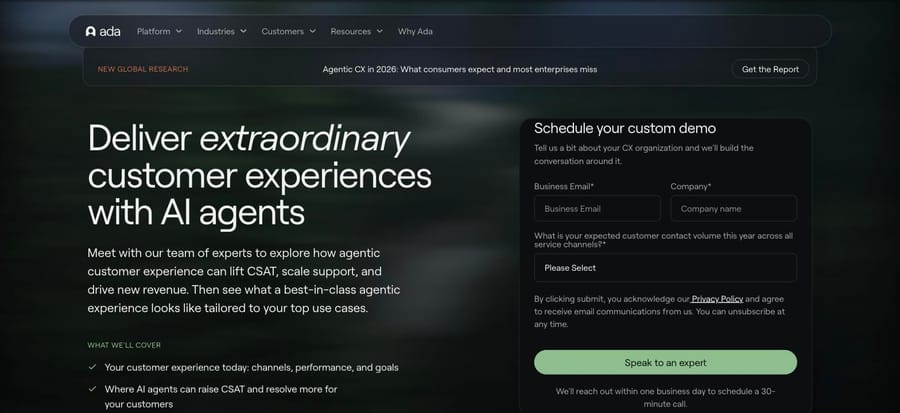
ada.cx itself publishes nothing. We checked on September 22, 2026: ada.cx/pricing is not a page in its own right, it redirects to Ada's Book a Demo form. The form asks for a business email, a company name, and one qualifying question, "What is your expected customer contact volume this year across all service channels?", whose underlying field is literally named what_is_your_average_annual_ticket_volume_. Its buckets run 0–99,999, 100,000–299,999, 300,000–499,999, 500,000–999,999, 1M–4.99M, 5M–19.99M, 20M–99.99M and "More than 100 million". That dropdown is the clearest public statement of who Ada expects to sell to.
What do Ada buyers actually pay?
Vendr sells negotiation help rather than a competing AI agent, which makes it the least conflicted source on this page. On September 24, 2026 its Ada entry showed a median annual contract value of $72,000 across 116 purchases, with a low of $36,132, a high of $300,000 and an average saving of 17%. Two days earlier the same page read 114 purchases, a $36,079 low and a $309,200 high, so the dataset moves as deals are added. (The page's own header tile says "55 Deals handled" next to the same $72,000. The two counts do not agree, and both are printed here as printed there.)
Vendr's deal-size bands, which it describes as first-year cost including implementation:
| Deployment | Conversations a month | Platform fee a year | Implementation | Source |
|---|---|---|---|---|
| Small | up to 25,000 | $30,000–$70,000 | $15,000–$30,000 | Vendr, Sep 22, 2026 |
| Mid-sized | 25,000–100,000 | $70,000–$150,000 | $25,000–$50,000 | Vendr, Sep 22, 2026 |
| Large / enterprise | 100,000+ | $150,000–$300,000+ | $50,000–$100,000+ | Vendr, Sep 22, 2026 |
The same page names the costs that sit outside the platform fee: overage at $0.20–$0.50 per conversation above the contracted volume (Vendr says buyers who negotiate it up front get $0.05 to $0.15), custom integration work at $10,000–$50,000+, premium support and named account management at $10,000–$50,000+ a year, additional languages at $5,000–$20,000+ each, and annual escalation clauses of 3–7%. Those are Vendr's observations of signed contracts, not Ada's published terms, and they are the single biggest reason a $30,000 listing price and a $72,000 median can both be true.
How does Ada model its own per-conversation cost?
Ada does publish arithmetic, just not its own rates. In a July 18, 2025 post by Mike Lidin, its Senior Director of Customer and GTM Activation, Ada argues against per-resolution pricing and works an example at $1.50 per resolution against $0.35 per conversation, over three years at 500,000 conversations growing 10% a year while the automated-resolution rate climbs from 25% to 75%. The table it prints carries the only per-conversation number Ada has put its name to:
| Year | Conversations | AR rate | Resolutions | Cost at $1.50 per resolution | Cost at $0.35 per conversation |
|---|---|---|---|---|---|
| 1 | 500,000 | 25% | 125,000 | $187,500 | $175,000 |
| 2 | 550,000 | 50% | 275,000 | $412,500 | $192,500 |
| 3 | 605,000 | 75% | 453,750 | $680,625 | $211,750 |
Ada's figures, read on ada.cx on September 22, 2026. The arithmetic checks out at both ends: 605,000 × $0.35 is $211,750, and 453,750 × $1.50 is $680,625.
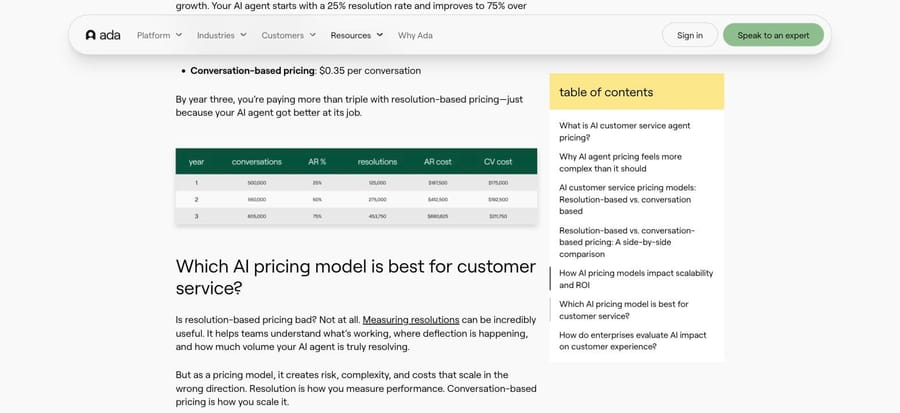
Two things follow. First, $0.35 is an illustration and not a rate card: Ada never says it charges that. Second, $35,000 (the AWS listing's price on September 22) at $0.35 a conversation is 100,000 conversations a year, which lines up neatly with the bottom bucket on Ada's own demo form. That is an inference from two Ada sources rather than a published entitlement, and we would ask Ada to confirm the volume in writing before treating it as one. The one volume Ada does publish, 60,000 conversations for $33,000 on its second AWS listing, prices each conversation at about $0.55, well above the illustration.
It also puts the widely repeated "$1.00 to $3.50 per interaction" figure in perspective. Fin reports that range as per conversation; Featurebase frames the same range as per AI resolution. Both sell against Ada, they disagree about the unit, and the range sits roughly two to ten times above the per-conversation figures Ada has attached its name to ($0.35 in its illustration, about $0.55 on AWS). Treat it as a ceiling somebody else drew.
What would Ada cost at 100,000, 500,000 or 1.2 million conversations a year?
Assumptions stated so you can rebuild these: a chat-and-email support operation, Ada's conversation-based model, and no voice minutes. Published anchors are marked; estimates are marked.
Small: 100,000 conversations a year (about 8,300 a month). The cheapest thing you can actually buy at a published price is the AgentExchange entry at $30,000 (published); one AWS Marketplace listing showed $35,000 for 12 months on September 22 but now shows custom pricing only, and the other lists $33,000 for 60,000 conversations, which would not cover this volume. Effective rate: about $0.30–$0.35 a conversation, before any implementation fee. Vendr's small-deployment band adds $15,000–$30,000 of implementation on top (estimate).
Mid: 500,000 conversations a year (about 41,700 a month). Ada's own illustration prices this at $175,000 in year one (Ada's figure, illustrative). Vendr's mid-sized band for 25,000–100,000 conversations a month puts the platform fee at $70,000–$150,000 plus $25,000–$50,000 implementation (estimate). Those two disagree, and the gap is the point: at real contract sizes, buyers appear to pay $0.14 to $0.30 a conversation. Vendr's median of $72,000 sits at the bottom of that band, which is roughly 205,000 to 240,000 conversations a year at $0.30 to $0.35.
Large: 1.2 million conversations a year (100,000 a month). Entirely quote territory. Vendr's enterprise band is $150,000–$300,000+ of platform fee plus $50,000–$100,000+ of implementation and custom development (estimate), so $200,000 to $400,000+ in year one including implementation, or $0.17 to $0.33 a conversation all in. Vendr's observed high across 116 purchases is $300,000.
Nothing here includes the 3% to 7% annual escalator Vendr says Ada contracts typically carry, or overage above the contracted volume.
Why does Ada bill per conversation instead of per resolution?
Ada championed automated resolution as the metric the category should be judged on (did the AI actually resolve the issue, or did the customer simply give up?) and it markets an automated resolution rate of up to 83%, a figure it put out over BusinessWire in May 2024 and repeats on its AWS listing. It then concluded that resolution is the wrong thing to bill on, and moved to conversations. If you read an older write-up saying Ada charges per resolution, it is out of date.
Both models are defensible and they put the risk in different places. A per-resolution price pays the vendor only when the agent succeeds, so the vendor carries the risk of a weak agent, but it earns more for everything counted as resolved, and the vendor usually owns that definition. A per-conversation price removes the definition argument and gives you a forecastable bill, and it moves the risk onto you: Ada earns the same whether the conversation ended well or badly, so its incentive is volume. Our breakdown of AI agent pricing models and the narrower comparison of per-action versus per-resolution billing go through the trade-offs in more detail.
How does Ada's price compare with Fin, Zendesk and eesel?
Prices below are each vendor's own published unit, read on the dates shown. They are not interchangeable units, so the right way to use this table is to model your own volume against each unit. Comparing the rates directly will mislead you.
| Platform | Billing unit | Published rate | Entry point | Checked |
|---|---|---|---|---|
| Ada | Conversation | None published; $0.35 used in Ada's own illustration | $30,000 a year (AgentExchange); $33,000 for 60,000 conversations (AWS) | Sep 25, 2026 |
| Intercom Fin | Outcome (resolution, procedure handoff, disqualification) | $0.99 per outcome; $9.99 for a qualification | 50-outcome monthly minimum | Sep 18, 2026 |
| Zendesk AI agents | Automated resolution | $1.50 committed, $2.00 pay-as-you-go | Up to 10,000 automated resolutions a year included with a Suite plan | Sep 21, 2026 |
| eesel AI | Task (one ticket or chat session) | $0.40 per regular task; no platform fee on self-serve | $50 of free usage; Enterprise adds a $1,000/month platform fee | Sep 21, 2026 |
At 500,000 conversations a year with 60% ending without a human, that is roughly $175,000 on Ada's illustration, about $297,000 on Fin's outcome rate, about $435,000 on Zendesk's committed resolution rate after the 10,000 included, and about $200,000 on eesel's per-task rate, all before seats, platform fees and implementation, and all built from the published rates above instead of a quote. Fin's owner changed in September 2026: Salesforce completed its acquisition on September 10, 2026, which matters on a multi-year horizon. Zendesk has also acquired Forethought, so two of Ada's long-standing rivals now sit inside larger suites. Our Decagon, Sierra and Forethought guides cover the other quote-only platforms in the same bracket, and the best Ada alternatives covers the ones that publish.
What is Ada, and how does its AI agent work?
Ada is an AI customer service automation platform, founded in Toronto in 2016 by Mike Murchison and David Hariri. It became a Canadian unicorn in 2021 and has raised roughly $200M from investors including Accel, Bessemer Venture Partners and Spark Capital. By its own numbers it has deployed 550+ AI agents and powered more than 6.4 billion interactions, for brands including Ancestry, Cebu Pacific, IPSY, monday.com, Pinterest, Square, Sky and YETI.
The architecture centers on what Ada calls the Reasoning Engine: the layer that interprets a question, retrieves knowledge from connected sources, plans the steps needed, runs safety checks, then responds or acts. Around it sit Playbooks (multi-step standard operating procedures the agent follows using live data), Coaching (you review past conversations, give feedback, and the corrections apply forward), a no-code visual builder, and channel coverage that genuinely includes voice alongside chat, email, social, ticketing and SMS. It is a standalone platform: the agent lives in Ada and reaches out to your help desk and back-end systems, which is the structural difference to tools that sit on top of a help desk you already run.
| Capability | What Ada offers |
|---|---|
| Core engine | Reasoning Engine: interprets, retrieves, plans, acts, checks safety |
| Process automation | Playbooks (multi-step SOPs on real-time data) |
| Improvement loop | Coaching from past conversations, applied forward |
| Build experience | No-code visual builder for CX and support teams |
| Channels | Chat and in-app, social, email, ticketing, voice and phone, SMS |
| Integrations | Zendesk, Salesforce, Contentful, back-end systems via actions |
| Security and compliance | SOC 2, GDPR, HIPAA, AIUC-1 |
| Headline metric | Up to 83% automated resolution (vendor-reported) |
What do users say about Ada?
Ada's reviews tell two different stories depending on who is reviewing.
On G2, where reviewers are the support and CX professionals who build and run the agent, Ada scores 4.6 out of 5 from 173 reviews, checked September 22, 2026. The praise centers on onboarding, the builder and the account teams. One G2 reviewer, a CX and support admin writing in 2025, said "the onboarding academy is fantastic and has provided users with the opportunity to upskill themselves as an AI agent builder," and another highlighted process automation: "Ada's playbooks feature allows for the easy implementation of existing SOPs into successful flows without having to build complex ones from scratch." Ada's AWS Marketplace listings carry a separate 4.6 from 179 reviews. On Capterra it sits at 4.7 out of 5 from 15 reviews as of September 21, 2026, on a much thinner base. Pricing transparency is the recurring complaint even among people who like the product.
On Trustpilot, where the reviewers are end customers who hit an Ada-powered bot, the score collapsed to roughly 2.0 out of 5 when our research checked it in June 2026. Trustpilot bot-walled a re-check in September 2026, so treat that as a June reading on a small base. The complaints are about loops and escalation. One review puts it bluntly: "I've never seen a product so ruthlessly dedicated to wasting a person's time." Another describes the mechanism: "This bot will send you in an endless loop… if they need me to come back in 8 hours just tell me and don't end the chat and make me start over again."
That split is the single most important thing to understand about Ada's reviews. It is not a contradiction so much as two populations: buyers and builders who value the platform's depth, and consumers who meet the bot when they are already frustrated and want a human. Read it as a reason to invest in clean escalation paths rather than as a verdict on the software.
What goes wrong with Ada, and how do you fix it?
Most of what goes wrong after launch is configurable, and Ada's own documentation is unusually candid about where the product stops. These were read at docs.ada.cx on September 20, 2026.
- The bot loops and the customer cannot reach a human. This is the gap between the two review populations. The fix is the Handoffs part of the build, and it is what teams under-invest in. In Ada a Handoff is a first-class object that defines how the agent escalates a conversation to a human or another system, and passes the context along. Build one per escalation scenario instead of a single catch-all, put a Handoff block inside Playbooks so a failing process ends in a person instead of a retry, turn on transcript summaries, and check each handoff integration separately, because Salesforce, Zendesk Chat and Zendesk Messaging are configured and can fail independently. Then test what customers actually type: "agent", "human", "this isn't working".
- Half your knowledge never made it in, and nothing told you. Ada's web import documentation lists its limits plainly, and each is a silent gap: it scrapes public pages only, so anything behind a login is invisible; articles over 100KB are truncated; the crawler follows links five levels deep; an agent caps at 50,000 articles and a single web source at 1,000, and "if your AI Agent reaches either number, the import will stop"; sites that block crawlers, skip semantic HTML or rely on JavaScript and geo-based redirects "may cause the scraper to retrieve unexpected, or incomplete content"; URLs cannot exceed 1,024 characters. Use a knowledge-base integration wherever one exists and keep the scraper for content that lives nowhere else.
- The answer is technically correct and useless. A customer asks why their card was declined and gets pointed at a general "Common Payment Issues" article. Ada uses that exact example in its own knowledge best practices, noting the article is accurate but "doesn't always provide the exact answer end users are looking for, leading to unnecessary frustration or escalations." The prescribed fix is structural: split one broad article into focused ones, title them with the words customers use, and put the causes and steps inside each. To find which articles need it, open Analytics › Topics & Intents, sort by AR Opportunity, take one high-volume topic with a low AR rate, and read three low-CSAT conversations in it.
- A tool quietly does nothing, mid-conversation. Ada's tool limits explain two failure modes, both silent by design: a call gets about 30 seconds, after which the agent stops waiting and continues without the result; and a response gets about 60,000 bytes, beyond which the agent drops the whole result instead of reading part of it. A third is subtler: tool descriptions cap at 4,096 characters, and a longer one is cut off during discovery. Return the fields a conversation needs instead of a whole record, keep calls inside 30 seconds, and write short, distinct descriptions.
- The agent answers in the wrong language, or will not switch. Autodetect on chat and email needs at least three meaningful words and 20 characters in a Latin-script message before it will switch, so short messages stay in whatever language the conversation started in. Some pairs are switch-disabled because the detector finds them too similar (Malay and Indonesian, Simplified and Traditional Chinese, Spanish and Catalan, Croatian and Serbian), and once a conversation is in Haitian Creole, Tagalog or Bosnian, detection cannot switch out. Put the language picker in front of customers in the chat Settings menu. And if your help content is multilingual, do not reach for the web scraper: Ada states that "multi-language content is not supported" in web import and "all scraped articles are currently set to English, regardless of the original page language."
- You cannot trial it. Ada offers no self-serve signup, and the only route in is a sales conversation, so you cannot run it on a slice of your queue before signing. The procurement fix is to ask, in the first call and in writing, for the rate and the unit separately, the annual minimum, what counts as a conversation on voice versus chat, whether the platform fee includes a volume of them, and what the escalator is. Then price the same volume against a vendor that publishes, so you know what the opacity is costing you.
How we researched this
On September 22, 2026 we read Ada's AWS Marketplace listing, its Salesforce AgentExchange listing, Vendr's Ada entry and G2's Ada pricing tab in a real browser, and confirmed that ada.cx/pricing redirects to Ada's demo form; the marketplace figures and the Vendr median in this post are our own first-hand reads of those pages, not repeats of another publisher's numbers. On September 25, 2026 we rechecked the marketplaces in a browser: AgentExchange still showed "Starting at $30,000 per Company/Year", the "Ada AI Agent" AWS listing had replaced its contract prices with custom pricing through a private offer, a second AWS listing, "Ada - AI Agent", showed $33,000 for 60,000 conversations, and Azure Marketplace showed Ada's own "Ada's AI Agent" listing with a $250,000 public plan. We searched AWS, Azure and Salesforce marketplaces by name. We re-read Ada's own July 2025 pricing post for its worked example and checked its arithmetic. Product limits come from docs.ada.cx, read on September 20, 2026. We are not an Ada customer and Ada offers no trial we could verify, so nothing here comes from our own instance of the product. ada.cx answers scripted requests with a Cloudflare block, so its pages were read in a browser; the marketplace and procurement pages are linked directly.
Who is Ada best for?
Large enterprises with high conversation volume, multiple channels including voice, and the budget and internal resources for a managed, automation-first platform. It suits teams that want a standalone AI agent sitting across many channels and back-end systems instead of one help desk. Organizations comfortable with enterprise procurement: annual contracts, a sales cycle, and a multi-week implementation.
Ada is the wrong fit if you are an SMB or mid-market team, since the published floor is $30,000 a year before implementation; if you need self-serve onboarding or a genuine trial; or if your support already lives almost entirely inside one help desk and you would rather add AI to that than adopt a separate platform.
Where does Macha fit next to Ada?
Ada is a destination: the agent lives in Ada, and you connect your help desk to it. Macha is the opposite shape: an AI agent layer that runs on top of the help desk you already have: Zendesk, Freshdesk, Gorgias, Front, HubSpot or Intercom (see Macha on Zendesk). It is not a help desk and not an Ada replacement at Ada's volumes.
The pricing contrast is the cleanest way to see the difference. Ada bills per conversation on a contract you negotiate, with a published floor around $30,000 a year. Macha is one plan priced on monthly ticket volume, $299/month for 750 tickets, about $0.40 per ticket at every tier, billed monthly, and setup and monitoring by the Macha team, included on every plan. A ticket is one thread between Macha and one person, charged once no matter how many messages it takes. Above 10,000 tickets a month the price is custom, so at the 500,000-conversations-a-year volume modeled above Macha has no published number either, which is worth saying plainly instead of implying a comparison nobody has published. Where Macha does compete is the band Ada's demo form calls 0–99,999: a team doing a few thousand tickets a month, already on one of those help desks, that wants AI inside it rather than beside it. The honest watch-out is that Macha is another integration to configure, and it is only as good as the knowledge and systems you connect to it.
If you are weighing AI options specifically around Zendesk, our best AI Zendesk alternatives comparison goes deeper, and the tiers are on our pricing page. You can try the approach with $50 of free usage (about 125 tickets), no credit card, no time limit at dashboard.getmacha.com/signup.
Frequently asked questions
How much does Ada cost? Ada's own published floor is $30,000 a year on its Salesforce AgentExchange listing, rechecked September 25, 2026. On AWS Marketplace, one listing showed $35,000 for a 12-month contract on September 22 and now shows custom pricing only, while a second lists $33,000 for 60,000 conversations a year. Azure Marketplace lists a public plan at $250,000 a year. Vendr, which tracks signed contracts, puts the median buyer at $72,000 a year across 116 purchases, in a range from $36,132 to $300,000 (read September 24, 2026). Ada publishes nothing on ada.cx itself.
Is Ada AI free? No. Ada offers no free plan and no self-serve signup. Ada's AgentExchange listing advertises a 14-day free trial, but G2's pricing tab states that Ada does not offer a free trial and when we loaded ada.cx on September 22, 2026 every signup path led to the demo form, so do not plan around it.
What is Ada's pricing per month? Ada sells annual contracts, not monthly plans. The $30,000 AgentExchange floor works out to $2,500 a month; the $33,000 AWS contract for 60,000 conversations is $2,750 a month; the $35,000 12-month contract the other AWS listing showed on September 22 (since replaced by custom pricing) would be about $2,917 a month. Vendr's $72,000 median is about $6,000 a month.
Does Ada charge per conversation or per resolution? Per conversation. Ada popularized automated resolution as a metric, then argued publicly against using it as a billing unit, on the grounds that definitions vary between vendors and a per-resolution bill rises as the agent gets better. Older articles saying Ada bills per resolution are out of date.
What is Ada's price per conversation? Ada has never published a rate. The only per-conversation number it has put its name to is $0.35, used as an illustration in its own July 2025 pricing post. Third parties quote $1.00 to $3.50 per interaction, but the two loudest sources disagree on whether that is per conversation or per resolution, and both sell against Ada.
Why is there no Ada pricing calculator? Because Ada publishes no rate card to calculate from. The closest public substitutes are the AgentExchange floor, the 60,000-conversation AWS bundle and Vendr's banded data; the demo form's volume dropdown is what Ada uses to segment you before quoting.
Is Ada worth it for a small business? Generally no. With a $30,000 published floor, annual contracts, implementation measured in weeks and a demo form whose smallest volume bucket runs to 99,999 contacts a year, Ada is built for large organizations. Smaller teams usually fit better with native help-desk AI, or with an AI layer on top of the help desk they already run.
What should I negotiate on an Ada contract? Vendr's observed levers, from its Ada page: multi-year terms (20% to 30% off list), volume commitments (15% to 25% lower per-conversation rates), annual prepayment (a further 5% to 10%), a cap on the 3% to 7% annual escalator, overage negotiated down from $0.20 to $0.50 a conversation to $0.05 to $0.15, and implementation unbundled and scoped separately.
What should you budget for Ada?
Ada is one of the most mature AI customer service platforms on the market, genuinely omnichannel including voice, enterprise-grade on security, and responsible for pushing the category from deflection toward real automated resolution. The pricing is opaque on its own website but it is not unknowable: Ada publishes $30,000 a year on AgentExchange (and $33,000 for 60,000 conversations on AWS), and the median company that signs pays about $72,000. Budget from those, not from a competitor's estimate, and ask Ada to put the rate, the unit and the included volume in writing before you compare it to anything.
Sources: AWS Marketplace: Ada AI Agent · AWS Marketplace: Ada - AI Agent · Azure Marketplace: Ada's AI Agent (adasupportinc1726764000854.adagenerative) · Salesforce AgentExchange: Ada · Vendr: Ada pricing · G2: Ada pricing · G2: Ada reviews · Ada: Unpacking AI agent pricing · Ada: Book a Demo · Fin: Ada CX pricing · Featurebase: Ada.CX pricing · Salesforce completes acquisition of Fin · Fin pricing · Zendesk pricing · eesel AI pricing · Ada product documentation at docs.ada.cx
Simple per-ticket AI pricing
One thread with one person is one charge, however many replies it takes.