Intercom
 Shopify
 Stripe
 Slack
Slack Notion
 Google Workspace
 Confluence

What Is Zendesk AI? Features, Limits & What It Actually Does


If you've seen "Zendesk AI" on a pricing page or a sales deck and assumed it was one feature you switch on, you're in for a surprise: it's a suite of separate products, sold and metered separately, with names that have changed more than once in the last two years. Some of it helps your human agents. Some of it talks directly to customers. Some of it scores your team's work after the fact. And one piece everyone still mentions — Content Cues — was actually removed in 2025.
Key takeaways
- Zendesk AI is an umbrella term for roughly six separate products, including AI agents, Copilot, intelligent triage, generative search, AI knowledge tooling, and AutoQA, each metered independently.
- Zendesk removed its Content Cues knowledge-gap tool beginning May 1, 2025, and now points customers toward newer tools like Knowledge Base Gaps Discovery instead.
- Third-party 2026 benchmarks put typical autonomous-resolution rates for Zendesk AI agents around 25 to 50 percent, with 55 to 70 percent or higher reserved for mature deployments with deep integrations.
- Copilot and AI agents do not share knowledge with each other, according to Zendesk's own documentation, since one is tuned for staff and the other for customers.
- Zendesk folded its advanced AI agent capabilities into Suite and Support plans in a phased rollout between roughly May 11 and June 12, 2026, removing the old Essential-vs-Advanced split.
This guide is the plain-English map of the whole thing. We'll walk through every component of Zendesk AI in real language — what it is, what it does, and what it's actually called in 2026 — then give a clear-eyed take on the limits, the mid-2026 packaging shake-up, and how to decide whether native AI is enough or whether you need a dedicated AI agent layer on top. We're keeping pricing light here on purpose; for the dollars-and-cents, the companion guide is Zendesk AI pricing explained.
Zendesk AI is a suite, not a feature
The single most useful thing to understand up front: "Zendesk AI" is an umbrella term for roughly six distinct capabilities, and they don't all do the same job, share the same knowledge, or get billed the same way. You can see this most plainly inside a Zendesk account, where AI shows up not as one toggle but as several independent usage meters, each drawing down its own allowance.
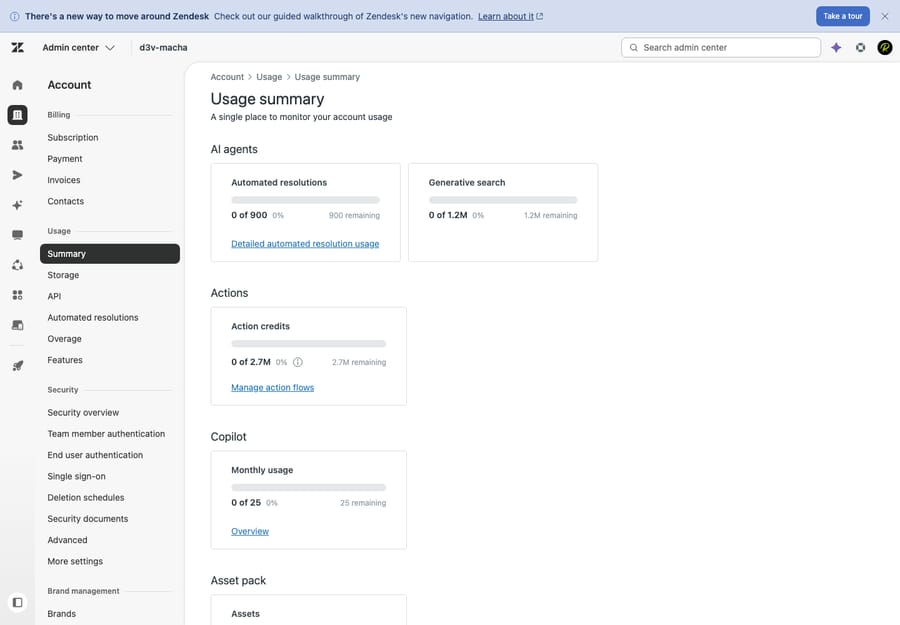
That screenshot is the whole thesis of this article in one panel: Automated resolutions, Generative search, Action credits, and Copilot are each tracked as their own line. Zendesk AI isn't a feature you have or don't — it's a collection of products you assemble. (The deeper AI admin and configuration screens are login-walled on our test instance, so we describe those below rather than show them.) Here's each piece.
AI agents (autonomous resolution)
This is the headline act: AI agents are Zendesk's customer-facing bots that talk to a customer and try to resolve the issue end to end, with no human touching it. They run on messaging (web/mobile/social) and on email and web forms, blending generative replies drawn from your help center with scripted "answer flows" for structured tasks.
If the term Answer Bot is what's in your head, you're not wrong — you're just a version behind. The old article-recommendation Answer Bot has been folded into AI agents under the Advanced AI umbrella; the classic "here are some articles" behavior still exists under the hood, but the experience is now framed as AI agents that can generate answers and take actions, not just suggest links. We unpack the legacy bot in Zendesk Answer Bot explained, trace exactly what changed in Zendesk AI agents vs. Answer Bot, and cover where the native bot hits a wall in Answer Bot's limits and alternatives.
The key thing to file away: AI agents are the only Zendesk AI component priced per outcome — each hands-off closure counts as an "automated resolution," which is the unit Zendesk bills autonomous AI on. That pricing model is its own rabbit hole, covered in full in Zendesk AI pricing explained.
Copilot (agent assist)
Where AI agents replace the human, Copilot helps the human. It's Zendesk's agent-assist layer, and it lives inside the agent workspace rather than in front of customers. In practice it:
- suggests replies and drafts a first response from your macros and help-center articles,
- expands bullet points an agent jots down into a full, polished reply, and changes tone (more formal, more friendly) on demand,
- summarizes tickets so the next agent picks up full context instantly — and, with Zendesk Talk, transcribes and summarizes calls,
- surfaces next-step suggestions as the agent works.
Copilot is a separate product from AI agents — and, importantly, per Zendesk's own documentation, Copilot and AI agents don't share knowledge: one is tuned to help your staff, the other to talk to customers, and they're configured independently. Copilot remains a standalone add-on priced per seat (it requires Suite Professional or higher). We go deep on what it includes and where it helps in Zendesk Copilot explained; the seat math is in the pricing guide.
Intelligent triage (auto-classification)
Intelligent triage is the quiet workhorse. It scans every incoming ticket and automatically detects three things — the customer's intent (e.g. "billing inquiry," "change shipping address"), the language, and the sentiment — using pre-trained models built for common industries. That metadata then drives your routing and prioritization: send angry billing tickets to the right team first, auto-tag by intent, kick off the matching workflow.
It's the least flashy piece of Zendesk AI and arguably the most broadly useful, because it makes your existing triggers, views, and SLAs smarter without replacing a single human. (Zendesk shipped further intelligent-triage improvements as part of a Copilot update in mid-2026, lowering the setup effort and widening where it applies.)
Generative search and generative replies
Under the AI agents and help-center umbrella sits generative search — sometimes surfaced to customers as "quick answers." Instead of returning a list of ten articles and making the customer read, it generates a direct, synthesized answer to the question from your knowledge base content. On the customer side it powers the conversational answers an AI agent gives; in the help center it can answer a search query in prose rather than a link list. It's metered separately (you saw "Generative search" on its own line in the usage panel above), which is your reminder that, like everything here, it's a distinct product with its own consumption.
AI-powered knowledge and content suggestions
Zendesk has long pitched AI that helps you maintain your knowledge base, not just answer from it — flagging gaps, suggesting new articles, and recommending content to update. This is the area to be most careful about, because the feature most write-ups still cite by name is gone.
Content Cues — the older ticket-driven tool that suggested topics to write about and articles to archive — was removed beginning May 1, 2025. Zendesk retired it (citing low usage) to focus on newer machine-learning-based knowledge tooling, and pointed customers toward replacements like Knowledge Base Gaps Discovery, which uses bot conversations rather than tickets to find where your KB falls short. So if a comparison post or a 2024 tutorial tells you to "turn on Content Cues," treat that as stale. The capability (AI helping you spot and fill knowledge gaps) lives on under newer names; the specific Content Cues feature does not.
Auto-QA / Workforce AI
The last piece points inward, at quality. Zendesk's AutoQA (part of its Workforce AI / quality-assurance tooling) uses AI to score conversations automatically — instead of a manager spot-checking a handful of tickets a week, AI evaluates every conversation against quality criteria. It's a different job from everything above: it doesn't answer customers or assist agents in the moment; it grades the work afterward so you can coach and catch problems at scale.
So what does Zendesk AI actually do well?
Stepping back from the parts list, native Zendesk AI has real, honest strengths:
- It's first-party and tightly integrated. Everything reads and writes to the same tickets, fields, and help center with zero plumbing. Intelligent triage feeding your existing triggers is genuinely seamless.
- Copilot is a strong agent-assist tool. For a team that lives in the agent workspace, the draft/expand/summarize loop is a real time-saver — and it's the piece of Zendesk AI hardest to argue against.
- Triage adds intelligence to rules you already run. Auto-detected intent and sentiment make routing and prioritization smarter without changing how your team works.
For a lot of teams, that bundle — smart triage plus Copilot for the humans plus a basic AI agent for deflection — is a perfectly reasonable starting point.
The honest limits
Now the clear-eyed part. Native Zendesk AI has real ceilings, and they matter most exactly when you're counting on AI to carry meaningful volume.
- Real autonomous-resolution rates are modest. Vendor marketing implies AI agents resolve most of your tickets; in practice, typical and early deployments land around 25–50% autonomous resolution, with the higher 55–70%+ figures reserved for mature setups with deep backend integration and a well-tended knowledge base. (Those ranges are third-party benchmarks across 2026, flagged as estimates — your number depends entirely on your ticket mix and content.) Plan around the modest end and treat the rest as upside.
- AI is only as good as your knowledge base. Generative answers and AI agents synthesize from your help center and docs. Thin, stale, or contradictory content produces thin, stale, or contradictory answers — and no toggle fixes that. Most "the AI is bad" problems are actually knowledge problems.
- Value is add-on-gated and usage-priced. The genuinely powerful pieces (Copilot, autonomous AI agents) sit behind add-ons and meters, not your base seat. Copilot is per-agent; automated resolutions are per-outcome with no natural ceiling. The bill can grow precisely when the AI is succeeding. We work the full cost model in Zendesk AI pricing explained.
- Uncertainty handling is weak. The native bot is at its best on common, well-documented questions. On edge cases, ambiguous phrasing, or anything needing data from outside Zendesk (an order status in your commerce platform, a subscription state in billing), it tends to either hand off or guess — and confidently guessing is the failure mode you least want in front of customers.
- The pieces are fragmented. As noted, Copilot and AI agents don't share knowledge, and each component is configured and billed on its own. It's a suite of features, not one cohesive brain.
The mid-2026 packaging change (read before you budget)
One more thing that trips up anyone reading older guides: Zendesk consolidated its AI packaging in mid-2026. The autonomous "AI agents – Advanced" capabilities — agentic reasoning, multi-step procedures, external API calls — that used to require a separate Advanced AI add-on were folded into the Suite and Support plans, in a phased rollout between roughly May 11 and June 12, 2026, removing the old Essential-vs-Advanced split.
Two clarifications, because the naming is genuinely confusing:
- This change is about the autonomous AI-agent tier (the thing that produces automated resolutions). Copilot is unaffected — it remains a separate agent-assist add-on, priced per seat, requiring Suite Professional or higher.
- Folding the capability into plans is not the same as making resolutions free. Automated resolutions are still metered and billed per outcome. Packaging moved; the meter didn't.
Because Zendesk changes AI packaging often, confirm the current shape in your own quote — and for the actual numbers, the pricing guide is the place.
When native AI isn't enough: the AI agent layer
If you've read this far because native Zendesk AI feels either too limited, too fragmented, or too unpredictable to budget, there's a different shape worth knowing about: an AI agent layer that runs on top of your Zendesk rather than inside it. Macha is one — and to be clear about what it is, it's not a help desk and not a Zendesk replacement. You keep Zendesk, your tickets, and your workflows; the layer connects to them and adds the AI.
The practical differences that address the limits above:
- One agent, one brain. Instead of a Copilot that can't see what your AI agent knows, you build agents that share a single set of knowledge and tools — and that knowledge can include sources outside Zendesk (your docs, Notion, websites, and live data pulled from systems like Shopify or Stripe), so the agent can answer the questions the native bot punts on.
- It automates any step, not just "resolution." Native AI agents are priced and built around the one outcome of closing a ticket. A layer can summarize, tag, triage, look up an order, draft a reply, or fully resolve — automating the whole workflow, with a human taking over the moment it's out of depth.
- Per-ticket pricing instead of per-outcome. Rather than a per-resolution meter with no ceiling, an agent layer like Macha bills per ticket — one charge per thread, however many steps or replies it takes — you pay for the work done, not a vendor-defined outcome. The full native-vs-layer comparison is in Zendesk AI vs. an AI agent layer.
The honest watch-outs, because this isn't free magic: it's another vendor and integration to set up and maintain; it's still only as good as the knowledge you connect (the KB problem follows you everywhere); and per-ticket cost is real at volume — a flat rate per plan tier, cheaper and more predictable than an uncapped resolution meter, but not zero. Many teams land on a sensible split: keep Copilot for in-workspace agent assist, and run an agent layer for autonomous, cross-stack resolution. If you want to see the shape of it on your own desk, it's $50 of free usage, no credit card required.
Frequently asked questions
What is Zendesk AI? It's an umbrella term for a suite of AI capabilities in Zendesk, not a single feature: AI agents (autonomous, customer-facing resolution — the evolution of Answer Bot), Copilot (agent assist for your humans), intelligent triage (auto-detecting intent, language, and sentiment), generative search/replies, AI-powered knowledge tooling, and AutoQA (automatic conversation scoring). Each is configured and metered separately.
Is Zendesk Answer Bot the same as Zendesk AI agents? Largely, yes — Answer Bot has been folded into "AI agents" under the Advanced AI umbrella. The classic article-recommendation behavior still exists, but the current experience is AI agents that generate answers and take actions, not just suggest links. See Answer Bot explained and AI agents vs. Answer Bot.
What's the difference between Zendesk Copilot and AI agents? Copilot assists your human agents inside the workspace (drafts, summaries, tone changes, triage). AI agents talk to customers and resolve issues autonomously. They're separate products, billed separately, and — per Zendesk — they don't even share knowledge.
Does Zendesk still have Content Cues? No. Content Cues was removed beginning May 1, 2025. The broader idea (AI spotting knowledge-base gaps) continues under newer machine-learning tooling, but the specific Content Cues feature is gone — ignore older guides that tell you to enable it.
How much of my tickets will Zendesk AI actually resolve? Realistically, plan for the modest end. Third-party 2026 benchmarks put typical and early autonomous-resolution rates around 25–50%, with 55–70%+ only for mature deployments with deep integrations and a strong knowledge base (estimates, not guarantees — your number depends on ticket mix and content quality).
How much does Zendesk AI cost? It's not one price. Copilot is a per-seat add-on; autonomous AI agents are billed per automated resolution; other pieces have their own usage meters. We break the whole model down in Zendesk AI pricing explained.
The bottom line
"Zendesk AI" isn't a switch — it's a suite of six-ish separate products: AI agents for autonomous resolution (the new face of Answer Bot), Copilot for agent assist, intelligent triage for auto-classification, generative search for direct answers, AI knowledge tooling (minus the now-removed Content Cues), and AutoQA for quality scoring. Each is configured and metered on its own. Native Zendesk AI is genuinely strong on integration and agent assist, and a reasonable starting point — but autonomous-resolution rates are modest in practice, quality is capped by your knowledge base, the best pieces are add-on-gated and usage-priced, and uncertainty handling is weak. Know what each component does, budget with the pricing guide open, and if native AI hits its ceiling, weigh an AI agent layer on top before you assume Zendesk's bundle is the whole story.
Component names and behavior verified against Zendesk's help documentation and corroborating 2026 third-party guides, June 2026. Resolution-rate figures are third-party estimates, flagged inline; pricing is covered in the linked pricing guide. Zendesk changes its AI packaging frequently — confirm specifics in your own account before relying on them.
Add AI agents to your Zendesk
Macha reads the ticket, drafts the reply and takes the action, inside the Zendesk you already run.