





 Shopify
 Stripe
 Slack
Slack Notion
 Google Workspace
 Confluence

How Much Does Zendesk AI Cost in 2026? Copilot, Resolutions and Real Examples


Zendesk charges for AI in two layers: Copilot at a flat $50 per agent a month, and AI agents billed per verified automated resolution after a small per-seat dollar allowance. At $1.50 committed or $2.00 pay-as-you-go per resolution, that variable meter is what makes two teams on the same plan see very different AI bills.
Key takeaways
- Zendesk prices AI in two layers: Copilot at $50 per agent a month on Suite Professional and above, and AI agents billed per verified automated resolution.
- Zendesk's pricing page lists its AI agent rate as $1.50 per committed resolution and $2.00 pay-as-you-go, charged per verified resolution.
- Since May 18, 2026 each Suite seat earns a monthly resolution allowance of $2 on Team, $5 on Growth and Professional and $10 on Enterprise, capped at $5,000 a year.
- Zendesk bills only Verified resolutions, which an LLM confirms after the conversation ends, while assisted escalations and contained resolutions do not count against the allowance.
- At 3,000 tickets a month with 5 Suite Team seats, Zendesk AI agents plus seats total $2,290 to $3,190 a month on committed pricing at 45% to 65% resolution, versus $1,474 for Macha.

Zendesk charges for AI in two layers: Copilot, a $50 per agent a month add-on on Suite Professional and above, and AI agents, which are included in every Suite and Support plan but billed per verified automated resolution. Zendesk's pricing page lists the rate: $1.50 per committed automated resolution and $2.00 pay-as-you-go. Its plan comparison table includes 5 automated resolutions per agent a month on Support Team and Suite Team and 10 on Suite Professional (up to 10,000 a year), and its help center describes that allowance as a monthly dollar amount per seat ($2, $5 or $10 by plan, capped at $5,000 a year, since 18 May 2026). Only "verified" resolutions count.
| Zendesk AI line item | How it's priced (checked 24 September 2026) | Source |
|---|---|---|
| Copilot (agent assist) | $50 per agent/month, billed annually, Suite Professional and above | Official |
| AI agents (autonomous) | Included in Suite and Support plans; billed per verified automated resolution | Official |
| Per-resolution rate | $1.50 committed, $2.00 pay-as-you-go | Official |
| Included allowance | $2 (Team), $5 (Growth, Professional), $10 (Enterprise) per Suite seat/month; $5,000 a year max | Official |
| Overage | On by default ("Allow overage"); can be switched off to pause AI at the limit | Official |
| Contact Center add-on | $83 per agent/month | Official |
Below: how each layer works, what literally counts as a "resolution," the 2026 AI-agent consolidation, the other usage meters in your account, worked examples at 5, 20 and 50 agents, and a 3,000-tickets-a-month cost model so you can estimate your real monthly AI spend. This is a spoke off our main Zendesk pricing explained guide; start there for the seat prices and come here for the AI math.
How we sourced this. The Copilot $50/agent price is official, from Zendesk's pricing page. The allowance rules come from Zendesk's managing resolution allowances article and the resolution definitions from its automated-resolution tiers and automated-resolutions help docs. The per-resolution dollar rates are also official: the "Compare all plan features" table on Zendesk's pricing page lists $1.50 per committed automated resolution and $2.00 pay-as-you-go (checked 25 September 2026). The screenshots are first-hand from a live Zendesk test account. The 3,000-ticket model uses the Suite Team seat price from the same pricing page ($55 a month billed annually, $69 monthly, read 25 September 2026) and resolution rates from Gorgias Ecom Lab (a vendor self-report); Macha's $1,199 plan is from our pricing page.
What are the two layers of Zendesk AI pricing?
Everything Zendesk calls "AI" falls into one of two buckets, and they're priced on opposite logic:
- Copilot, the assistive layer. Priced per seat: a flat $50 per agent per month. It helps your human agents. You pay the same whether they use it 5 times a day or 500. (Copilot is a distinct add-on, not the same thing as Zendesk's autonomous "AI agents," which we cover in the second layer.)
- Automated resolutions, the autonomous layer. Priced per outcome: you pay each time an AI agent verifiably closes a customer issue on its own. The more successful it is, the more you pay.
Miss this split and you'll budget wrong in both directions: over-provisioning seats you don't need, or under-provisioning for a resolution meter that grows precisely when things are going well. The incentive is worth naming too. A per-seat fee rewards Zendesk for your headcount; a per-resolution fee rewards it for your AI's volume. Let's take them one at a time.
How much does Zendesk Copilot cost?
Copilot is Zendesk's agent-assist add-on, the layer that helps your human agents inside the agent workspace. It's a separate, per-seat product, and it's easy to confuse with Zendesk's autonomous AI agents (the old "AI agents – Advanced" tier); they are not the same thing, and the autonomous tier's packaging changed in 2026 (see the consolidation note below). What Copilot includes:
- Agent copilot: suggested replies and next steps drafted for the human agent.
- Intelligent triage: auto-detects intent, language, and sentiment to categorize and route tickets.
- AI-generated replies and rewrite/tone tools.
- Macro and answer suggestions surfaced as the agent types.
The price is $50 per agent per month on an annual contract (official), and it can be added to Suite Professional or higher. So a Suite Professional seat ($115) effectively becomes $165/agent/mo once Copilot is on. On the top tier Zendesk now sells it bundled as "Suite Enterprise + Copilot," priced through sales.
The thing to internalize: Copilot cost is predictable. It's a seat multiplier. Twenty agents with Copilot is $1,000/month, full stop, regardless of how heavily they lean on it. That predictability is the opposite of the second layer.
Freshness note: the 2026 AI-agent consolidation (rollout May 11 to June 12, 2026)
Here's the packaging change most older write-ups get wrong. In an announcement dated March 30, 2026, Zendesk said it would fold its autonomous "AI agents – Advanced" capabilities into the Suite and Support plans rather than sell them as a separate add-on. The rollout ran from May 11 to June 12, 2026, and it removes the old split between "Essential" and "Advanced" AI agents: agentic reasoning, multi-step procedures and external API integrations are now included across Suite and Support plans.
Two clarifications, because the naming trips people up:
- This consolidation is about the autonomous AI-agent tier, the thing that produces automated resolutions (the second layer). It is not a change to Copilot.
- Copilot is still separate. It remains the agent-assist add-on at $50/agent/mo (official) on Zendesk's pricing page.
What didn't change: automated resolutions are still metered and billed per outcome. Folding the capability into plans isn't the same as making the resolutions free. As with all Zendesk AI packaging, this moves fast, so confirm current packaging in your own quote before you budget.
How are Zendesk automated resolutions priced?
When a customer-facing AI agent resolves an issue without a human touching it, and an LLM check verifies it, Zendesk counts one automated resolution, the unit it bills autonomous AI on. Each Suite seat earns a small dollar allowance per month that pays for the first resolutions (official, from Zendesk's allowances article):
| Plan | Suite allowance per seat/month | Support allowance per seat/month |
|---|---|---|
| Team | $2 | $2 |
| Growth | $5 | n/a |
| Professional | $5 | $2 |
| Enterprise / Enterprise Plus | $10 | $2 (Enterprise) |
A few official details that catch teams out:
- The allowance is capped at $5,000 per year on every plan.
- Monthly allowances don't carry over if you don't use them. You don't bank them.
- Overage is on by default. The "Allow overage" setting charges pay-as-you-go resolutions once you pass the allowance. The alternative, "Don't allow overage," pauses the AI at the limit instead.
Past the allowance, you pay per resolution, either from additional allowance bought ahead (committed) or at the pay-as-you-go rate. Zendesk's pricing page lists both rates:
| Mode | Per-resolution rate (Zendesk pricing page) |
|---|---|
| Committed (bought ahead) | $1.50 |
| Overage / pay-as-you-go | $2.00 |
(Confirm both in your own quote.) Because overage is switched on by default, the pay-as-you-go line is the one most likely to surprise you: it scales with how well your AI performs. Whether per-resolution billing beats a third-party agent depends on volume; this comparison runs the numbers at three volumes.
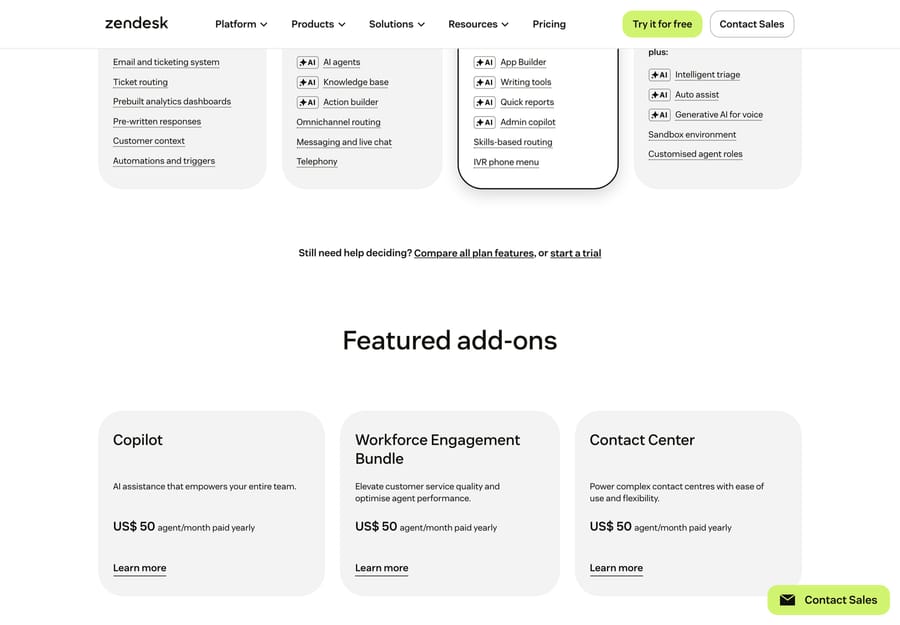
Copilot and Zendesk's other CX capabilities are sold as separate per-agent add-ons on top of your base plan. The screenshot below is from earlier in 2026; Zendesk's pricing page now lists Contact Center at $83 per agent a month.
What counts as an automated resolution in Zendesk?
This is the least understood part of Zendesk AI pricing, because it defines what you're billed for. The definition is official, and it differs by channel. First, the conversation has to end, and Zendesk sets that point per channel:
- Email and web form: 72 hours after the last email.
- Messaging (chat/social): 2 hours after the last message by default, adjustable up to 72 hours.
- Voice: immediately on hang-up.
At that point, Zendesk's automated-resolutions doc looks for signals that the AI agent handled it. For messaging, the last interaction includes one of:
- the user gave positive or no feedback, or
- the user clicked at least one help-center article link the AI shared (for article recommendations; generative replies don't require a click), or
- the user completed the final step of an answer flow.
For email and web form, all of these hold:
- the AI agent provided a generative reply to the customer's question,
- the user gave positive or no feedback,
- no human agent responded to the ticket, and
- AI evaluation confirmed the response was relevant.
Two practical takeaways. First, the "no human reply" rule means a ticket a human later touches doesn't count, so you're billed only for hands-off closures. Second, "no feedback" still passes the first gate. A customer who never replies (whether satisfied or because they gave up) can be counted, which is why the 2026 verification step below matters.
What changed on May 18, 2026: verified resolutions and the three tiers
This is the most important recent change to how the meter behaves, so price it in. Around Relate 2026, Zendesk leaned into outcome-based pricing, and on May 18, 2026 it introduced a three-tier model that decides which AI-agent interactions count against your allowance (per Zendesk's automated-resolution-tiers help doc):
- Assisted escalation: the AI agent contributed, but a human finished the job. Doesn't count against your allowance.
- Contained resolution: the AI handled the interaction to completion but the conversation failed, or didn't reach, verification. Doesn't count against your allowance.
- Verified resolution: when the conversation ends, a large language model reads the text and confirms the customer's request was satisfactorily resolved. This is the only tier that counts against your allowance and gets billed.
The practical effect: Zendesk now bills only for resolutions that pass a second, independent LLM check, a tighter bar than the older "no feedback still counts" behavior. The $1.50 committed and $2.00 pay-as-you-go rates apply to verified resolutions. The catch is that the verifying model belongs to the vendor that bills you, so you can't audit the pass rate from outside. Confirm which billing model and tier definitions your contract is on before you budget.
What other AI usage meters does Zendesk track?
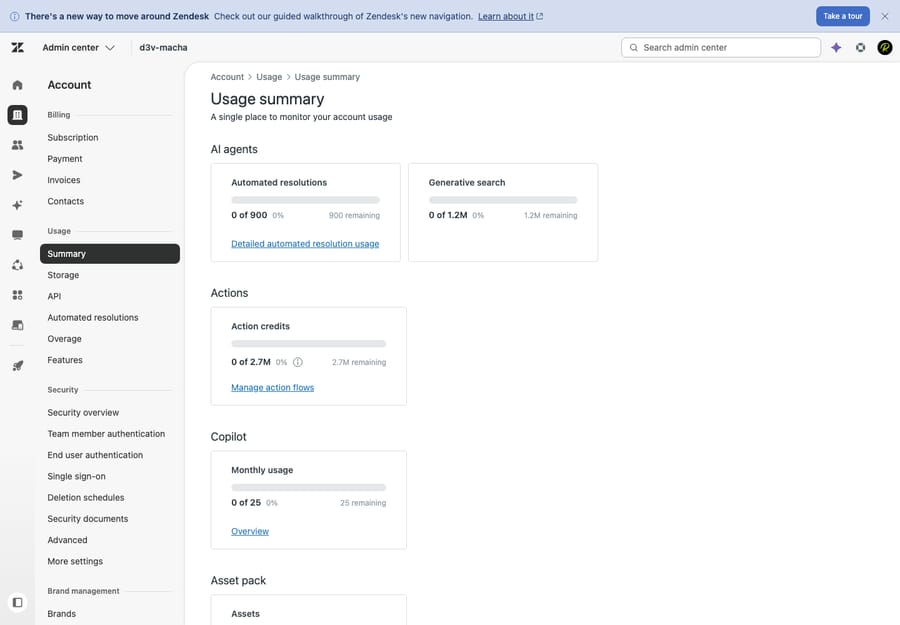
Copilot and automated resolutions get the headlines, but Zendesk's in-product Usage summary meters several AI activities, each drawing down its own allowance:
- Automated resolutions: the autonomous-AI meter above.
- Generative search: AI-generated answers in search/help-center experiences.
- Action credits: consumed when AI agents take actions (e.g., calling APIs or running steps in a flow).
- Copilot monthly usage: tracks Copilot consumption against your seats.
You won't see most of these on the marketing page; you see them in-product, after you've signed. The screenshot above is the Usage menu on our test instance.
Where to check this in your own account: your plan and seat count live in Zendesk under Admin Center → Account → Billing → Subscription. The metered AI charges are tracked separately under Admin Center → Account → Usage; look for Automated resolutions and any Overage. Agent seats are billed on your plan, while AI automated resolutions accrue as usage on top, so your real bill is "seats + usage," not just the sticker price.
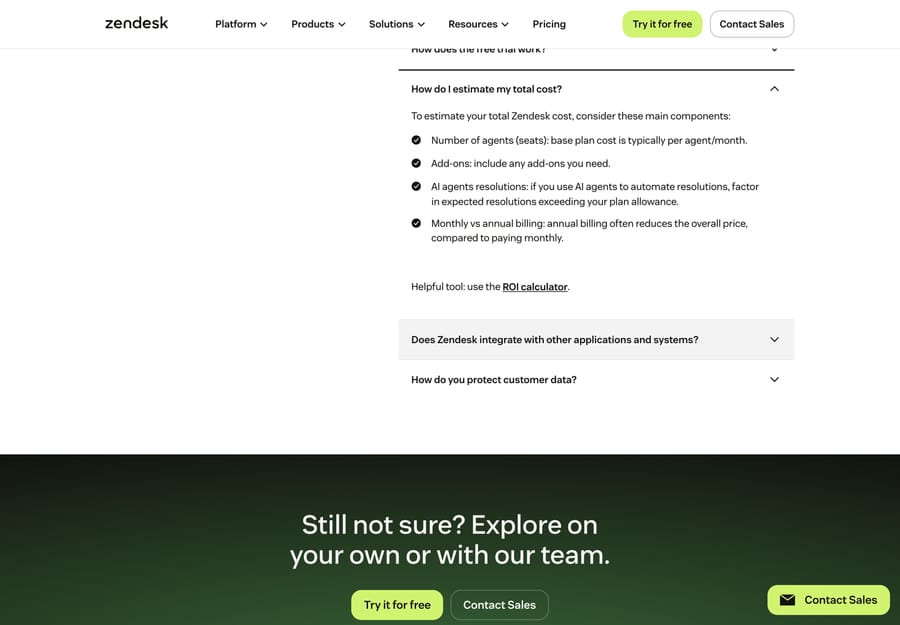
What does Zendesk AI cost for a 20-agent team?
Let's put numbers on the AI portion of a bill. Assume a 20-agent team on Suite Professional with the Copilot add-on, an AI agent producing ~500 verified resolutions a month, and overage left on its default setting.
| AI line item | Monthly |
|---|---|
| Copilot add-on: 20 × $50 (official) | $1,000 |
| Verified resolutions: 500 × $2.00 pay-as-you-go (official) | ~$1,000 |
| Less allowance: 20 seats × $5 (official) | −$100 |
| AI cost (on top of seats) | ~$1,900/mo |
(The 20 Suite Professional seats themselves are another 20 × $115 = $2,300/mo; this table isolates the AI cost. Buying committed resolutions at ~$1.50 instead would cut the resolution line to about $650 after the allowance.)
The per-resolution math is the part to feel. The $100 allowance covers only about the first 50 resolutions at $2.00, so the marginal cost of AI is close to the full rate almost from the start. Push volume to 1,000 resolutions a month and the resolution line becomes ~$2,000 − $100 = ~$1,900; at 2,000 it's ~$3,900. The Copilot half stays flat at $1,000 the whole time.
That's the defining feature of Zendesk's AI pricing: the bill grows as the AI succeeds. A great month for deflection is, by design, a more expensive month.
What does it cost for a small team and for an enterprise?
The shape of the bill changes with size, because the allowance scales with seats while the resolution charge scales with volume. Two more illustrative runs (illustrative, not a quote: Copilot $50, the $2/$5/$10 allowances and the per-resolution rates are all official):
Small team: 5 agents on Suite Team, ~150 verified resolutions/mo. Team earns $2 per seat, so 5 × $2 = $10 of allowance.
| AI line item | Monthly |
|---|---|
| Copilot add-on | Not available on Suite Team |
| Verified resolutions: 150 × $2.00 (official) | ~$300 |
| Less allowance: 5 × $2 | −$10 |
| AI cost (on top of seats) | ~$290/mo |
Copilot needs Suite Professional or higher, so a Team-plan shop can't add the assist layer until it upgrades. On Team, the AI bill is the resolution meter and almost nothing offsets it.
Enterprise: 50 agents on Suite Enterprise with Copilot, ~3,000 verified resolutions/mo. Enterprise earns $10 per seat, which would be $500 a month, or $6,000 a year. The $5,000 annual cap binds first, so the allowance averages about $417 a month.
| AI line item | Monthly |
|---|---|
| Copilot: 50 × $50 at add-on list price (official; the Suite Enterprise + Copilot bundle is priced through sales) | $2,500 |
| Verified resolutions: 3,000 × $2.00 (official) | ~$6,000 |
| Less allowance: $5,000 cap ÷ 12 | −~$417 |
| AI cost (on top of seats) | ~$8,083/mo |
At enterprise volume the resolution line (~$5,583) overtakes Copilot, and the allowance barely registers. The per-outcome meter, not the per-seat fee, becomes the thing to forecast and negotiate: committed pricing and a spending limit both matter here. For the non-AI costs that stack alongside all of this (escalation clauses, implementation, monthly-billing premiums), see what Zendesk really costs.
What does Zendesk AI cost at 3,000 tickets a month?
At 3,000 tickets a month, Zendesk's AI agents cost about $2,015 to $2,915 a month in resolution fees on committed pricing, or $2,690 to $3,890 on pay-as-you-go, depending on whether the AI resolves 45% or 65% of the tickets it touches. Add seats and a five-agent Suite Team shop lands between $2,290 and $4,165 a month. The resolution rate is the number that moves the bill, so we priced two of them.
Why 45% and 65%: in April 2026 Gorgias's Ecom Lab wrote that "the median brand resolves 45% of AI-touched tickets end-to-end. The top quartile clears 65%" (Gorgias Ecom Lab, 28 April 2026). That's a vendor measuring its own AI on its own merchants, and its denominator is AI-touched tickets, so read it as a planning range rather than a Zendesk benchmark. It's the most recent published median we found with a stated method.
The assumptions: 5 agents on Suite Team at $55 an agent a month billed annually, the AI agent touches all 3,000 tickets, every resolution it closes passes Zendesk's verification (so every one is billable), and the Team allowance of $2 a seat gives $10 a month. Zendesk's pricing-page table frames the same allowance as 5 automated resolutions per agent, which is 25 resolutions or $37.50 at the committed rate; on that reading the committed fees are $1,987.50 and $2,887.50.
| Line item (monthly) | 45% resolved (1,350 tickets) | 65% resolved (1,950 tickets) |
|---|---|---|
| Verified resolutions at $1.50 committed | 1,350 × $1.50 = $2,025 | 1,950 × $1.50 = $2,925 |
| Less the Team allowance, 5 seats × $2 | -$10 | -$10 |
| Resolution fees, committed | $2,015 | $2,915 |
| Resolution fees at $2.00 pay-as-you-go (the default overage) | $2,700 - $10 = $2,690 | $3,900 - $10 = $3,890 |
| Suite Team seats, 5 × $55 | $275 | $275 |
| Total, committed | $2,290 | $3,190 |
| Total, pay-as-you-go | $2,965 | $4,165 |
| Committed total per resolved ticket | $2,290 ÷ 1,350 = $1.70 | $3,190 ÷ 1,950 = $1.64 |
| Macha on the same 5 Suite Team seats | $1,199 + $275 = $1,474 | $1,199 + $275 = $1,474 |
| Macha total per resolved ticket | $1,474 ÷ 1,350 = $1.09 | $1,474 ÷ 1,950 = $0.76 |
Read the two columns side by side and the incentive shows. Going from a median AI to a top-quartile one adds 600 resolutions, and on Zendesk's meter that's another $900 a month committed or $1,200 on pay-as-you-go. You're paying more because the agent got better. The allowance hardly registers: $10 against a $2,000 bill is half a percent.
Four things change the number for a real 3,000-ticket team:
- Committed or not. The $1.50 rate means buying resolution volume ahead. Skip that and every resolution past the allowance bills at $2.00, because "Allow overage" is on by default. At this volume that's a $675 to $975 monthly gap.
- Your plan tier. Growth and Professional raise the allowance to $5 a seat, which is $25 a month for five agents. It won't pay for the seat upgrade on its own. Monthly billing on Suite Team is $69 a seat, which makes the seat line $345.
- Copilot. If the humans handling the other 1,050 to 1,650 tickets want Zendesk's assist layer, it's $50 an agent on Suite Professional and above, so another $250 a month plus the move off Team (Suite Professional at $115 a seat adds another 5 × $60 = $300).
- What actually verifies. Only Verified resolutions bill. Assisted escalations and contained resolutions don't count against the allowance, so if Zendesk's LLM check rejects some of what you'd call resolved, the real bill comes in under the table.
Macha prices the same volume differently. The plan that covers up to 3,000 tickets is $1,199 a month, billed per ticket handled whether or not the ticket resolves, so it's the same $1,199 at 45% or 65%. Macha fits teams already running Zendesk, Freshdesk, Gorgias, Front, HubSpot or Intercom who want a flat monthly AI line they can forecast from ticket volume alone. The trade runs the other way too: Macha charges for the 1,050 to 1,650 tickets its agent hands to a human, and past 3,000 tickets the next step is $1,999 for 5,000. On Zendesk, Macha's connector reads tickets and custom fields, posts public replies and internal notes, and runs on autonomous triggers such as New Ticket and Customer Reply, so you keep Zendesk as the desk and switch Zendesk's own AI agents off for the tickets Macha handles. For the same arithmetic at other volumes, see AI support cost at 1,000 tickets a month and at 10,000 tickets a month.
Is Zendesk's AI pricing model a good deal?
Zendesk's two-layer model has a clear logic, and it cuts both ways:
- Copilot (per seat) is predictable but blunt. You pay $50/agent whether an agent uses it constantly or never. For a team that genuinely lives in the workspace, it's good value; for one that doesn't, it's $50 × headcount of partly idle licenses.
- Automated resolutions (per outcome) are "fair" but unpredictable. You only pay when AI verifiably closes something, but the meter has no natural ceiling, overage is on by default, and your cost rises with your success. Budgeting it means forecasting volume you don't fully control, judged by a verifier you can't inspect.
Neither is wrong. But if the per-resolution meter is the part scaring your budget, it's worth knowing the autonomous-AI layer doesn't have to come from your help desk, and doesn't have to be priced per vendor-defined outcome.
Can you price AI per ticket instead of per resolution?
Yes: autonomous resolution is a feature you can add on top of Zendesk rather than buy inside it. An AI agent layer like Macha runs on top of your help desk (Zendesk, Freshdesk, Gorgias, Front, HubSpot or Intercom), with no migration: you keep your desk, tickets, and workflows, and it resolves tickets end to end. The difference is the pricing model.
It helps to separate three things AI can do:
- Deflection: stopping a ticket from reaching a human.
- Resolution: closing a ticket the customer raised.
- Automation: doing any step of the work: summarizing, tagging, triaging, looking up an order in another system, drafting, or fully resolving.
Zendesk's meter prices the resolution outcome specifically. Macha is built for the broader automation category, so it bills per ticket: one conversation between the agent and one person, charged once however many messages, lookups or drafts it takes, and whichever model it runs on. Pricing is one plan by volume, starting at $299 a month for up to 750 tickets, about $0.40 each, with setup and monitoring by the Macha team included. You pay the same whether the thread ends in a full resolution or a summarize-and-route, so there is no vendor-defined outcome to argue about. (More on how this compares: Zendesk AI vs. an AI agent layer.)
The watch-outs, because this isn't free:
- It's another vendor and integration to set up alongside Zendesk.
- It's only as good as the knowledge you connect: point it at thin or stale docs and resolution quality suffers, same as any AI.
- Volume still costs money. A flat per-ticket rate is more predictable than an uncapped per-resolution meter, but it isn't zero, so model your ticket volume either way.
If the AI line is the part of your Zendesk bill you want off the per-outcome treadmill, that's the trade to weigh. The trial gives you $50 of free usage, no credit card and no time limit: start a trial and run it on top of your existing Zendesk.
Frequently asked questions
How much does Zendesk AI cost?
Two layers. Copilot (the agent-assist add-on) is $50/agent/mo (official) on Suite Professional or higher. AI agents are included in Suite and Support plans but billed per verified automated resolution. Each Suite seat earns a $2 to $10 monthly allowance (capped at $5,000 a year), then you pay $1.50 (committed) to $2.00 (pay-as-you-go) per resolution, the rates on Zendesk's pricing page. Your total AI cost is the seat-based Copilot fee plus the variable resolution meter.
What's the difference between Zendesk Copilot and automated resolutions?
Copilot is assistive and priced per seat: it helps human agents (drafts, triage, suggestions). Automated resolutions are autonomous and priced per outcome: you pay when an AI agent closes a customer issue without a human and the verification check passes. They're separate products, billed separately.
How many automated resolutions are included in my plan?
Since May 18, 2026 the allowance is a dollar amount, not a resolution count: $2 per seat a month on Team, $5 on Growth and Professional, $10 on Enterprise and Enterprise Plus (Suite); Support plans get $2. It's capped at $5,000 a year and unused allowance doesn't carry over. At a ~$2.00 rate, a $5 seat covers about 2 resolutions a month.
What counts as an automated resolution?
The conversation must end (72 hours after the last email, 2 hours after the last message on messaging by default and up to 72, or at hang-up on voice), show resolution signals such as positive or no feedback and no human reply, and then pass an LLM verification check. Only verified resolutions are billed; assisted escalations and contained resolutions don't count against the allowance.
Why did my Zendesk AI bill spike?
Almost always resolution overage. Once you cross the allowance, every extra verified resolution is billed ($2.00 pay-as-you-go, per Zendesk's pricing page), and "Allow overage" is the default setting. The bill grows as the AI deflects more, by design. Switching to "Don't allow overage" pauses the AI at the limit instead.
Is Zendesk AI worth it, or should I use a separate AI agent layer?
Copilot is hard to beat for in-workspace human assist. For autonomous resolution, the per-outcome meter is what makes cost unpredictable, which is why some teams keep Copilot and run an AI agent layer (priced per ticket) on top for the autonomous work. See Zendesk AI vs. an AI agent layer and the best Zendesk AI agents.
What does Zendesk AI cost per month at 3,000 tickets?
With 5 Suite Team seats and the AI resolving 45% to 65% of tickets (Gorgias Ecom Lab's median and top-quartile figures), resolution fees run $2,015 to $2,915 a month on committed pricing and $2,690 to $3,890 on pay-as-you-go, after the $10 Team allowance. Seats add $275, for a total of $2,290 to $4,165. Macha's plan for up to 3,000 tickets is $1,199 a month on top of the same seats, whatever the resolution rate.
Why does a better AI resolution rate raise my Zendesk bill?
Because Zendesk bills each verified automated resolution. At 3,000 tickets, moving from a 45% to a 65% resolution rate adds 600 billable resolutions, which is $900 a month at the $1.50 committed rate or $1,200 at the $2.00 pay-as-you-go rate. The humans you still pay for handle fewer tickets, but the AI line grows.
Can I cap my Zendesk AI spend?
Yes, bluntly. The allowance setting "Don't allow overage" stops charges at the limit by pausing AI functionality, so customers stop getting AI answers until the next month. Negotiating committed resolutions at the lower rate is the other lever. For the full plan-by-plan picture, see the Zendesk pricing pillar.
Copilot pricing, allowances and resolution tiers checked against Zendesk's pricing page and help center on 24 September 2026; per-resolution dollar rates rechecked on Zendesk's pricing page on 25 September 2026; 3,000-ticket model added 28 September 2026. Zendesk changes AI packaging frequently, so confirm current numbers in your quote before budgeting.






