Intercom
 Shopify
 Stripe
 Slack
Slack Notion
 Google Workspace
 Confluence

Zendesk Pricing Explained (2026): Every Plan, Broken Down


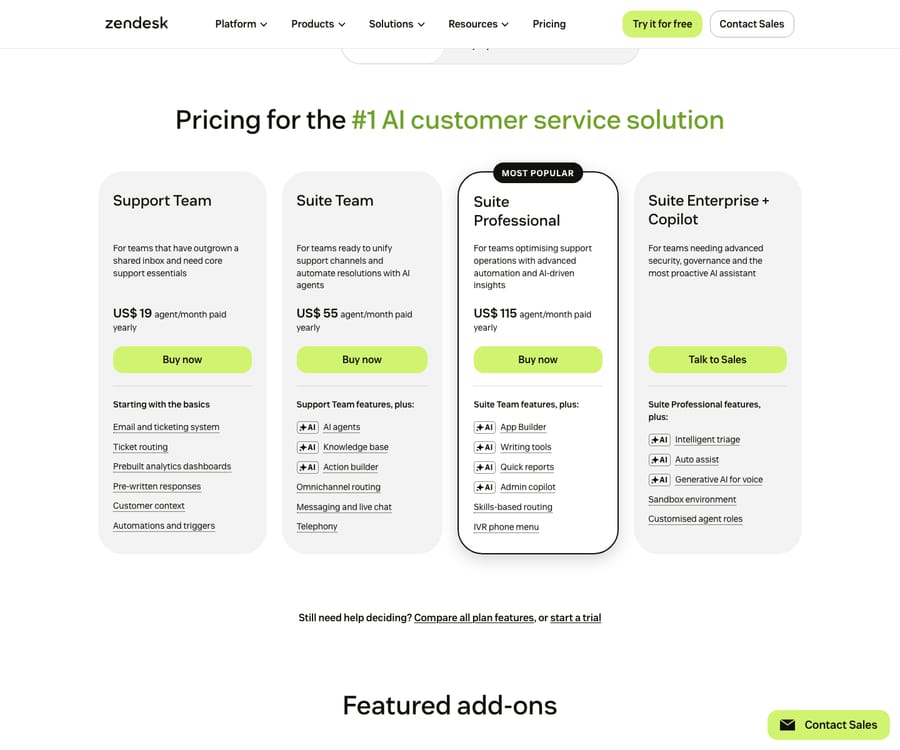
Zendesk's pricing looks simple on the surface — a few per-agent plans, pick one, done. In practice it's one of the more layered prices in customer support software: a base seat price, an AI add-on, usage-based AI resolutions on top of that, optional voice and workforce bundles, and an annual contract with escalation built in. The sticker you see on the pricing page is rarely the bill you pay.

This guide breaks down every Zendesk plan and add-on as of June 2026, what each tier actually includes, the costs that don't show up on the marketing page, and a worked example so you can estimate your real monthly spend. Pricing is verified against Zendesk's official pricing page; where a number comes from a third-party source or is an estimate, it's flagged inline.
The 30-second version
| Plan | Price (annual, per agent/mo) | Best for |
|---|---|---|
| Support Team | $19 | Email/ticketing only, no chat or help center |
| Suite Team | $55 | The real entry point — adds messaging, live chat, help center, AI agents |
| Suite Growth | ~$89 (third-party) | Adds SLAs, multiple ticket forms, CSAT, light agents |
| Suite Professional | $115 | Adds skills-based routing, IVR, custom apps, reporting, HIPAA |
| Suite Enterprise | Contact sales (legacy list ~$169) | Adds custom roles, sandbox, multi-brand |
Prices are per agent per month on an annual contract. Monthly billing runs roughly 15–25% higher. The $19, $55, $115 and "Enterprise = contact sales" figures are official; Growth's price and the legacy Enterprise list price are third-party estimates (Zendesk's public page now shows only a curated four-card view).
On top of any plan sit the things that actually move your bill: the Copilot AI add-on ($50/agent), per-resolution AI charges, and optional voice and workforce bundles ($50 each). We'll get to all of them.
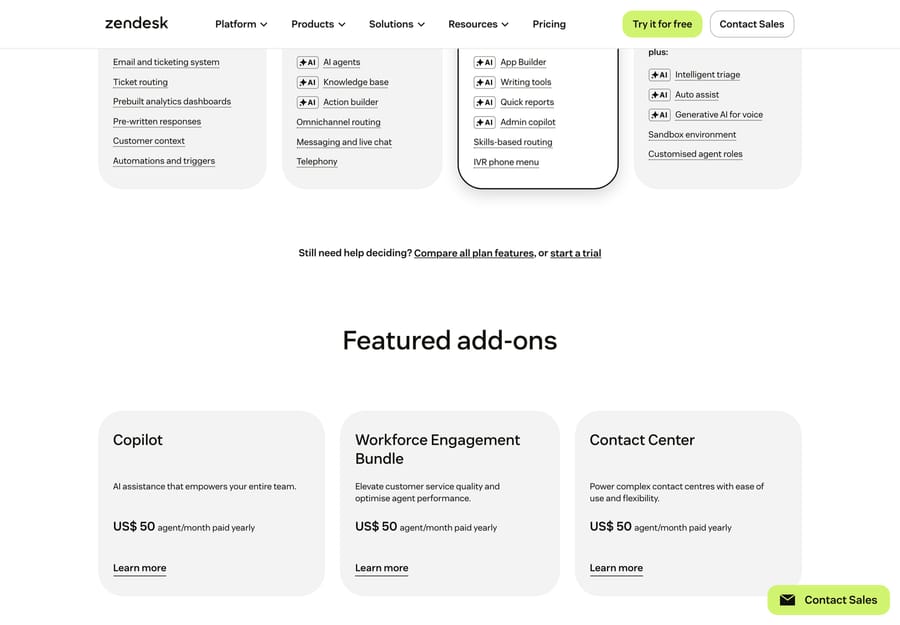
Beyond the per-seat plans, Zendesk’s AI and CX capabilities are sold as separate add-ons — each priced per agent on top of your base plan:
Zendesk Suite plans, broken down
The Suite is what Zendesk actively sells — it bundles ticketing, messaging, live chat, voice, a help center, and AI into one per-agent price. There are four tiers (a fifth, Growth, sits between Team and Professional but is no longer featured on the main card view).
- Suite Team — $55/agent/mo. The genuine starting point for omnichannel support. Adds messaging and live chat, social channels, a help center/knowledge base, the unified agent workspace, basic AI agents (with a small included automated-resolution allowance), and prebuilt analytics. If you want anything beyond email, this — not the $19 Support Team plan — is where Zendesk really begins.
- Suite Growth — ~$89/agent/mo (third-party). Adds SLA management, multiple ticket forms, light agents (free-ish collaborators), CSAT surveys, a self-service customer portal, and more automation. A reasonable step up for teams that need service-level tracking without full enterprise features.
- Suite Professional — $115/agent/mo. The most popular mid-market tier. Adds skills-based routing, IVR/call routing, the App Builder for custom apps, conversation/quick reporting, side conversations, integrated community forums, HIPAA-eligible enablement, and regional data hosting.
- Suite Enterprise — contact sales. Now sold as "Suite Enterprise + Copilot," quote-only. Adds custom agent roles and permissions, a sandbox (test environment), multi-brand / multiple help centers, contextual/dynamic workspaces, and advanced knowledge management. The old public list price was ~$169/agent/mo; in 2026 you'll need a quote.
If you're trying to work out which of these you actually need, we go tier-by-tier in which Zendesk Suite plan do you actually need.
Zendesk Support (standalone) plans — the cheaper, narrower path
Separately from the Suite, Zendesk still sells Support as a standalone ticketing product. The only tier it actively promotes is:
- Support Team — $19/agent/mo. Email and ticketing, basic routing and automations, prebuilt dashboards, and the app marketplace. No native messaging, live chat, or help center — those require the Suite.
Zendesk's own help documentation still references Support Professional and Support Enterprise tiers (roughly $55 and $115 annual, per third-party teardowns), but they're no longer on the public page, and we couldn't confirm whether a new customer can still buy them. For most teams the decision is simpler than it looks: if email-only is genuinely all you need, Support Team at $19 is the cheapest door in; the moment you want chat or a help center, you're buying the Suite.
The add-ons that change your real bill
This is where Zendesk's "simple" pricing stops being simple. Most of the capabilities buyers associate with modern support — advanced AI, voice, workforce management — are separate $50/agent bundles stacked on top of your seat price:
- Copilot (formerly "Advanced AI") — $50/agent/mo (official). Agent copilot, intelligent triage, AI-generated replies, and macro/answer suggestions. In 2026 it's bundled into the top tier as "Suite Enterprise + Copilot," but on lower tiers it's a paid add-on. For a Suite Professional team this effectively turns $115 into $165/agent/mo.
- Contact Center (Zendesk Talk / voice) — $50/agent/mo bundle (official), plus per-minute usage on top (inbound browser calls ~$0.012/min, forwarded/outbound ~$0.022/min, recording and transcription extra — third-party). Voice is never just the seat fee.
- Workforce Engagement (WFM + QA) — $50/agent/mo bundle (official). Forecasting/scheduling and conversation quality scoring.
- Advanced Data Privacy & Protection (ADPP) — ~$50/agent, Enterprise only (price third-party).
- Zendesk Sell (CRM) — a separate product at roughly $19/$49/$99 per seat (third-party).
The pattern: Zendesk increasingly sells in $50 modular bundles. Two or three of them and you've doubled your per-agent cost.
AI pricing: the part most buyers underestimate
Zendesk's AI has two cost layers, and they work very differently:
- Copilot ($50/agent/mo) — the assistive layer above, priced per seat.
- Automated Resolutions (AR) — the autonomous layer, priced per outcome. When an AI agent resolves a customer issue without a human, that's a billable "automated resolution."
Each Suite tier includes a small free AR allowance per agent per month (official, from Zendesk's automated-resolutions help doc):
| Tier | Included automated resolutions |
|---|---|
| Team | 5 per agent/mo |
| Growth & Professional | 10 per agent/mo |
| Enterprise | 15 per agent/mo |
Beyond the allowance you pay per resolution. Zendesk's page only says committed (bulk) usage costs less than overage; third-party teardowns consistently put committed at ~$1.50/resolution and pay-as-you-go at ~$2.00 (flagged as estimate — confirm in a quote). As of January 2026, overage is reportedly auto-billed with no monthly cap unless you negotiate one into an enterprise contract (third-party), so AI cost scales with success and is the line item most likely to surprise you.
2026 update — "verified resolutions" (Relate 2026): at Relate 2026 Zendesk shifted toward outcome-based pricing, and on May 18, 2026 it introduced a three-tier model (per its automated-resolution-tiers doc): Assisted Escalation (AI helped, a human finished) and Contained Resolution (AI finished but unverified) are now free, while only a Verified Resolution — where the AI resolved the issue and a separate LLM evaluation model confirmed it within 72 hours — counts against your allowance and is billed. So the committed/overage rates (~$1.50–$2.00, estimate) now apply to verified resolutions only; confirm which billing model your contract uses.
We go deep on this — including what does and doesn't count as a resolution — in Zendesk AI pricing explained.
The costs that aren't on the pricing page
The sticker price assumes a frictionless annual contract. The real total usually includes some of these (most figures third-party, via supp.support):
- Monthly-billing penalty. Pay monthly instead of annually and prices run ~15–25% higher (Suite Team $55 → ~$69).
- Annual lock-in. No refunds for early cancellation; typically 30 days' written notice to cancel, and you generally can't reduce seats or downgrade mid-term.
- Price escalation. Contracts commonly carry 5–7% annual escalation clauses, with renewal increases of 15–25% reported.
- Implementation. DIY is free; a real rollout (triggers, SLAs, routing, multi-brand) often means a consultant at $150–$300/hr, 40–100 hours → $6k–$30k, or Zendesk Premier onboarding from ~$8,000.
- Uncapped AI overage. As above — the automated-resolution meter has no built-in ceiling unless negotiated.
We catalog these in detail (and how to push back on them) in what Zendesk really costs: hidden fees & add-ons.
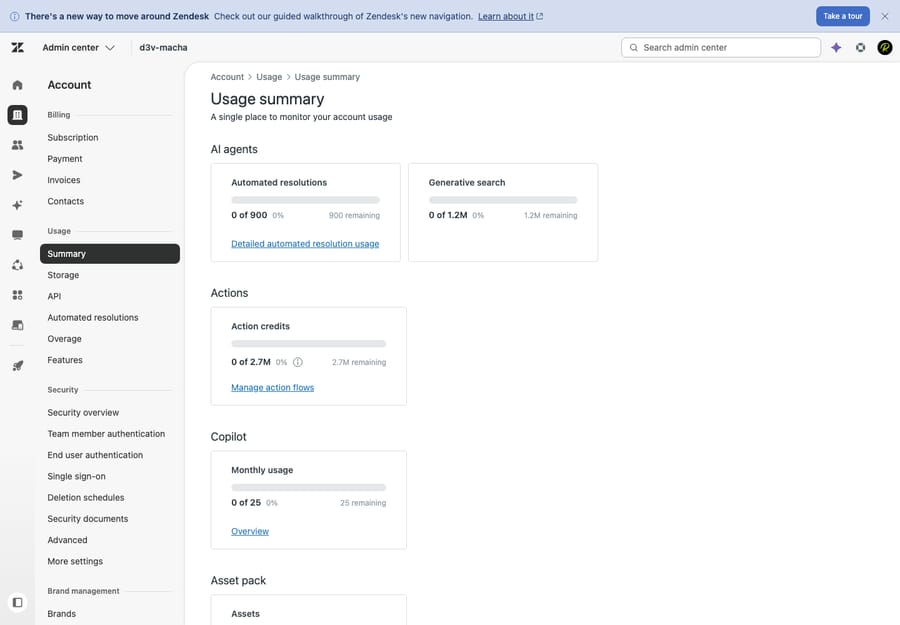
Where to check this in your own account: your plan and seat count live in Zendesk under Admin Center → Account → Billing → Subscription. The metered AI charges are tracked separately under Admin Center → Account → Usage — look for Automated resolutions and any Overage. The key thing to notice: agent seats are billed on your plan, while AI automated resolutions accrue as usage on top, so your real bill is "seats + usage," not just the sticker price.
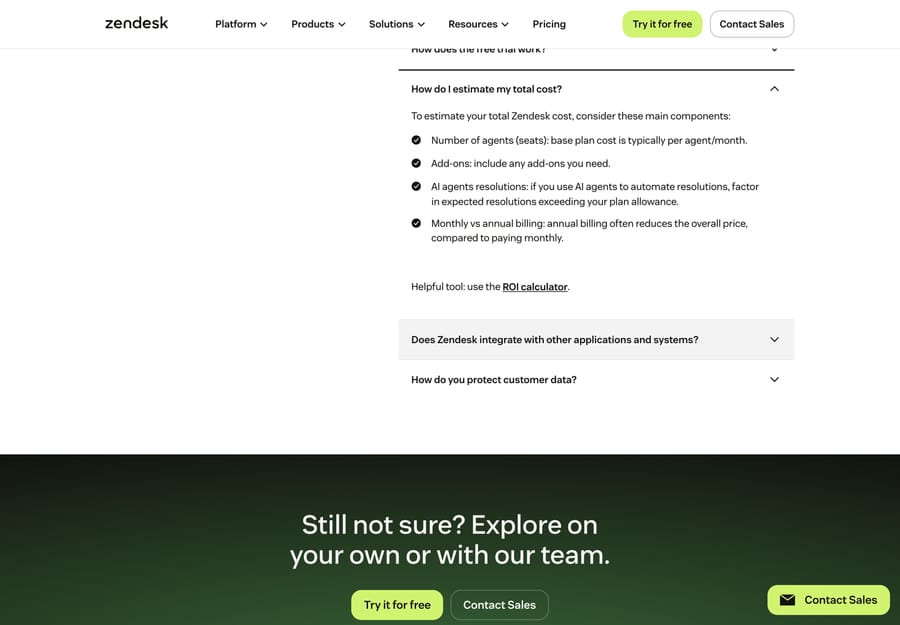
A worked example: 20-agent Suite Professional with AI
| Line item | Monthly |
|---|---|
| Suite Professional — 20 × $115 | $2,300 |
| Copilot add-on — 20 × $50 | $1,000 |
| Included automated resolutions (20 × 10) | 200 free |
| AI handles ~500 resolutions → 300 overage @ ~$1.50 (committed) | ~$450 |
| Estimated total | ~$3,750/mo (~$45,000/yr) |
Illustrative list math, not a quote — your real cost depends on volume, commitments, and discounts. The same team on Suite Team with no AI add-on would be 20 × $55 = $1,100/mo (~$13,200/yr), with 100 free resolutions included. The gap between those two numbers — roughly 3.4× — is the whole point of understanding what you're actually buying before you sign. For how this scales seat-by-seat, see Zendesk per-agent cost as you scale.
So, is Zendesk priced fairly?
That depends entirely on what you need. For a high-volume team that uses the omnichannel breadth, routing, and analytics, Zendesk's per-agent model is competitive and predictable. For a small team that just wants tickets and a bit of AI, the effective cost (seat + Copilot + resolutions) can feel steep next to leaner tools. We tackle the value question head-on in is Zendesk worth it? an honest 2026 assessment, and if the answer is "maybe not," the 12 best Zendesk alternatives compares the field.
One thing worth ruling out first. If the reason you're eyeing the price is specifically the AI — Copilot fees plus per-resolution overage stacking up — note that autonomous resolution doesn't have to come from your help desk. An AI agent layer like Macha runs on top of Zendesk (or whichever desk you keep), resolves tickets end-to-end, and is priced per ticket — one thread with one person, charged once however many messages it takes — rather than per seat plus per vendor-defined resolution. The honest caveat: it's another vendor and integration to manage, it only performs as well as the knowledge you connect, and per-ticket pricing still costs money at volume — it's additive to your desk, not free. (Native AI vs. an AI layer →)
Frequently asked questions
How much does Zendesk cost per month? On an annual contract, from $19/agent/mo (Support Team, email-only) to $115/agent/mo (Suite Professional), with Suite Enterprise quote-only. Monthly billing runs ~15–25% higher. Most teams that want chat and a help center start at Suite Team ($55).
Is there a free Zendesk plan? No ongoing free plan. Zendesk offers a free trial, and an eligible-startup program (up to ~50 agents free for ~6 months, third-party). For genuinely free options see the best free Zendesk alternatives.
Why is my Zendesk bill higher than the sticker price? Usually some combination of the Copilot add-on ($50/agent), per-resolution AI overage, voice/WFM bundles ($50 each), monthly-billing premium, and annual escalation. The seat price is just the base layer.
What's the difference between Zendesk Support and Suite? Support is standalone ticketing (email-first, from $19). Suite bundles ticketing plus messaging, live chat, voice, help center, and AI (from $55). If you need more than email, you need the Suite.
How does Zendesk's AI pricing work? Two layers: Copilot (assistive, $50/agent/mo) and automated resolutions (autonomous, per-outcome). Each tier includes 5–15 free resolutions per agent/month; beyond that you pay roughly $1.50–$2.00 per resolution (third-party estimate). Details in Zendesk AI pricing explained.
The bottom line
Zendesk's pricing is best understood as layers, not a number: a seat price (Support $19 or Suite $55–$115+), an AI add-on ($50/agent for Copilot), usage-based AI resolutions on top, and optional $50 bundles for voice and workforce — all on an annual contract with escalation. For most teams the realistic question isn't "what's the cheapest plan" but "what's my effective per-agent cost once AI and add-ons are in." Model that number for your volume — the worked example and our hidden-costs guide will get you most of the way — and you'll negotiate (and budget) from a much stronger position.
Pricing verified against Zendesk's official pricing page, June 2026; third-party and estimated figures are flagged inline. Zendesk changes pricing and packaging periodically — confirm current numbers and your specific quote before budgeting.
Add AI agents to your Zendesk
Macha reads the ticket, drafts the reply and takes the action, inside the Zendesk you already run.