





 Shopify
 Stripe
 Slack
Slack Notion
 Google Workspace
 Confluence

What Is Observe.ai? Features, Pricing and Alternatives (2026)


Observe.ai is a contact-center AI platform that transcribes and scores every customer call, coaches agents from that data, and runs AI agents that handle calls on their own. It sells through custom quotes, with third-party estimates starting near $69 per agent per month, and fits 100+ seat voice operations best.
Key takeaways
- Observe.ai is a contact-center AI platform that transcribes and scores 100% of customer calls, drives agent coaching, and runs Voice AI and Chat AI agents that resolve defined conversations.
- Observe.ai launched Companion Agent on 13 May 2026 to guide human agents before, during and after calls, replacing its older Agent Assist positioning.
- Observe.ai publishes no prices, and third-party estimates put its entry point near $69 per agent per month, with 100-seat deployments at $60,000 to $180,000 a year.
- Observe.ai has reportedly raised about $213 million, and its most recent round is still the $125 million Series C in 2022 led by SoftBank Vision Fund 2.
- Observe.ai fits voice contact centers with 100+ agents in regulated industries; for text-and-ticket support, Macha is the done-for-you option at about $0.40 a ticket, including a dedicated success manager.

Observe.ai is an AI platform for voice contact centers that transcribes and scores 100% of customer calls, coaches agents from that data, and now runs AI agents that handle calls on their own. It doesn't publish prices: third-party estimates put the entry point near $69 per agent per month and a 100-seat deployment at $60,000 to $180,000 a year. It fits 100+ seat voice operations, often in regulated industries. Pricing, funding and product claims below were re-checked on 24 September 2026; figures we couldn't confirm are labeled as estimates.
| Question | Answer (checked 24 September 2026) |
|---|---|
| What it is | Conversation intelligence plus AI agents for contact centers |
| Main channel | Voice, with chat support |
| Products | Voice AI, Chat AI, Companion Agent, Insight Agent, Performance Agent |
| Published pricing | None; quote only |
| Reported entry price | ~$69 per agent per month (third-party estimate) |
| Funding | ~$213M total; last round a $125M Series C in 2022 |
| Best for | 100+ seat voice centers in regulated industries |
What is Observe.ai?
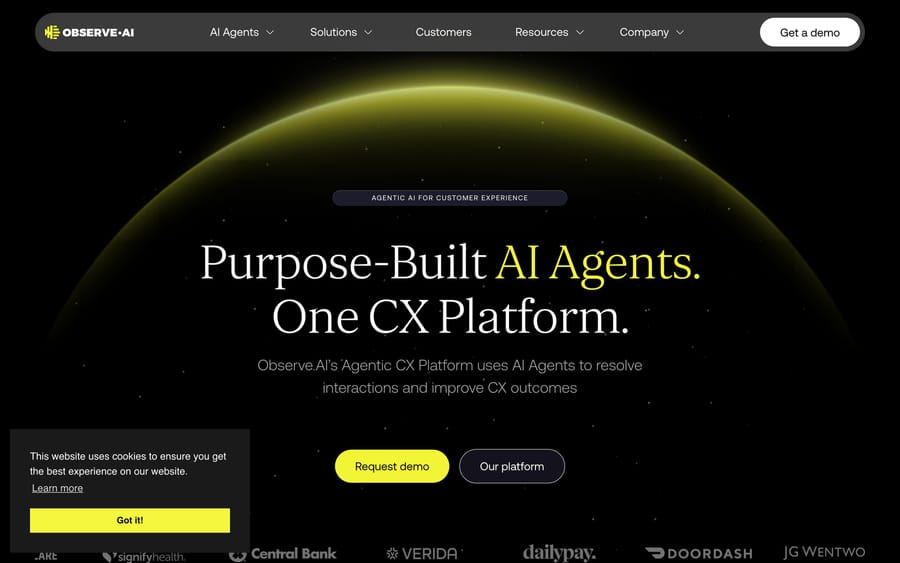
Observe.ai is a conversation intelligence and automation platform built for contact centers. Its core job is to capture every customer interaction (mostly voice calls), transcribe it, analyze it, and turn the analysis into quality scores, coaching, reporting and, increasingly, automated call handling. Its homepage tagline in September 2026 is "Purpose-Built AI Agents. One CX Platform."
The company was founded in 2017 in San Francisco. It has reportedly raised ~$213 million across roughly seven rounds, including a $125 million Series C in 2022 led by SoftBank Vision Fund 2 (with Zoom Ventures participating) and an earlier $54 million Series B (per Crunchbase and Tracxn). We found no newer round as of September 2026. In July 2026 it signed a multi-year strategic collaboration agreement with AWS to run its agent platform on AWS. The funding history tells a buyer two things: the vendor can fund R&D and large deployments, and it prices and sells like an enterprise platform rather than a self-serve tool. Observe.ai has previously reported more than 350 organizations on the platform; its current site doesn't restate a count.
Teams use Observe.ai for four connected jobs:
- Automated quality assurance (Auto QA): scoring 100% of interactions against a scorecard, instead of the 1–2% a human QA team can review by hand.
- Agent coaching and performance: finding where individual agents struggle, tracking improvement, and feeding structured coaching workflows.
- Business and CX analytics: mining conversations for churn signals, compliance risks, product complaints and sentiment shifts.
- AI agents that handle calls: its Voice AI and Chat AI agents resolve certain call and chat types end to end, which moves Observe.ai from analytics toward automation.
It's aimed at mid-to-large voice contact centers (100+ agents), often in regulated industries like healthcare, financial services, insurance and collections, where compliance scoring and call auditing are required.
How does Observe.ai's AI work?
The pipeline starts with speech-to-text transcription of recorded calls (and text transcripts for chat and messaging). The models are tuned for contact-center audio: regional accents, cross-talk, background noise, and jargon like policy numbers, drug names or billing codes.
The distinctive technical bet is a domain-specific large language model. Observe.ai announced in 2023 a ~30-billion-parameter LLM trained on hundreds of millions of real contact-center conversations. The argument is that a model trained on support and sales dialogue reads intent, disposition and compliance language more reliably than a generic model prompted after the fact, at the latency and cost a high-volume center needs. The current homepage doesn't repeat the parameter count, and the platform blends this model with others depending on the workload.
On top of the transcript, the AI does the analysis: intent and sentiment detection, automated scorecard evaluation, redaction of sensitive data (PCI/PII), and generative summaries so supervisors don't have to read full transcripts. Dispositions and insights can flow into downstream systems.
The architectural fact that matters most: Observe.ai's historical center of gravity is post-call analysis. It's strong at evaluating what already happened across your whole call volume. Its live-assist and autonomous-agent products are newer (more below), so if you're comparing it with a platform built for live coaching, post-interaction QA and coaching is where Observe.ai has the longest track record.
What are Observe.ai's key features?
- Auto QA / 100% scorecard coverage: evaluate every interaction against a customizable scorecard, not a 1–2% human sample. Scores trace back to the exact moment in the call that triggered them.
- Post-interaction analytics: sentiment, intent, compliance adherence, escalation risk and CSAT prediction across your full call volume, with dashboards for QA and operations leaders. Observe.ai now packages this as the Insight Agent and Performance Agent.
- Agent coaching workflows: evidence-backed coaching tied to specific moments in specific calls, with tracking so supervisors can see whether coaching moves the numbers.
- Voice AI agents: autonomous agents (launched in March 2025 as VoiceAI agents) that handle inbound and outbound calls for defined use cases, from password resets to routine billing questions, escalating to a human when needed. Chat AI covers the same job on chat.
- Companion Agent (live assist): launched on 13 May 2026, it supports human agents before, during and after a call: customer history before, real-time guidance and knowledge during, and summaries, dispositions and system updates after. It replaces the older Agent Assist positioning.
- Automated redaction: masking PCI/PII in transcripts and recordings for compliance.
- Generative summaries and after-call work: auto-generated recaps and dispositions to cut wrap-up time.
What does Observe.ai integrate with, and how is it deployed?
Observe.ai sits as an AI layer on top of your existing contact-center stack rather than replacing it. It ingests calls and interaction data from major CCaaS platforms (Genesys, Five9, NICE, Talkdesk, Amazon Connect and similar) and pushes analysis, dispositions and scores back out. It also connects to CRMs and help desks such as Salesforce and Zendesk, so call insights land where agents and managers already work.
Deployment is guided enterprise onboarding, not a sign-up form. A typical rollout connects call recording and CCaaS data, configures scorecards to match your QA rubric, tunes transcription and redaction for your vertical, and trains supervisors on coaching workflows. Value scales with call volume and configuration quality, so budget for implementation time and QA-team involvement.
Which industries use Observe.ai?
Observe.ai's customer base skews toward high-volume, often regulated voice operations: financial services, insurance, collections, healthcare, retail and consumer services. Its homepage shows logos including DoorDash and Accolade. These are environments where the economics work: enough call volume and compliance exposure that automating QA across 100% of interactions replaces meaningful manual audit labor and reduces regulatory risk. The company frames results around QA coverage, coaching-driven performance and reduced after-call work rather than one headline metric.
How much does Observe.ai cost?
Observe.ai uses custom, quote-based pricing. There's no public price list, and the old observe.ai/pricing URL returned a 404 on 24 September 2026. You'll go through a sales conversation and usually a scoping call before you see a quote.
What drives the price. From buyer reports and how the platform is packaged:
- Seats / agents: pricing is commonly per agent (or named user) per month, so headcount is the main lever.
- Call and interaction volume: the AI transcribes and analyzes 100% of interactions, so minutes of audio and number of conversations feed into cost.
- Modules: QA/analytics, coaching, Companion Agent and Voice AI agents can be priced separately. A QA-only deployment costs less than one that adds autonomous voice agents.
- Contract term: annual and multi-year commitments usually unlock better per-seat rates, as does higher volume.
Third-party estimates (not official figures) give this directional picture:
- Entry point: around ~$69 per agent per month for a baseline package, per multiple third-party breakdowns.
- Typical annual deployment: roughly $60,000–$180,000 per year for 100 seats, depending on modules and volume.
Your quote could fall outside this range. Per-seat pricing means Observe.ai's revenue grows with your headcount, which is the opposite of what an automation buyer wants to scale; ask how Voice AI agents are billed before you sign. The platform makes most economic sense at 100+ agents, where automating QA replaces real review labor. For a small team, per-seat pricing and an enterprise sales process will feel heavy. Confirm current numbers with Observe.ai.
What are Observe.ai's pros and cons?
Pros
- Strong post-call QA and coaching: widely regarded as one of the leading platforms for scoring 100% of interactions and driving structured coaching.
- Ease of use: the most-cited positive on G2; reviewers find the interface intuitive for detailed conversation analysis.
- Actionable insights: turns raw call volume into trends leaders can act on.
- Responsive support: support quality shows up repeatedly as a strength.
- G2 rating: around 4.6/5 across ~236 reviews when recorded in August 2026 (G2 blocks scripted requests, so this wasn't re-pulled).
Cons
- Transcription accuracy: the most common complaint in the reviews. Analytics are only as good as the transcript, and noisy audio, heavy accents or overlapping speech degrade results. Every downstream score depends on it, so test it hardest in a trial with your own calls.
- Live assist is newer than the post-call core: Companion Agent only launched in May 2026. If live, mid-call guidance is your top requirement, run it head-to-head against a tool built for real-time coaching.
- Setup and learning curve: full value takes configuration time, a mapped scorecard and QA-team buy-in.
- Enterprise pricing and sales process: smaller teams may find per-seat cost and quote-only buying hard to justify.
- Voice-first focus: if most of your volume is email, chat and tickets, much of the platform's strength doesn't apply.
Who is Observe.ai best for?
Observe.ai is a defensible buy for a 100+ seat voice contact center, especially in a regulated industry (healthcare, finance, insurance, collections) where post-call QA, compliance scoring and call auditing are core requirements. If your problem is "we can only review 1% of calls, we need to score all of them, and we need to coach from that," Observe.ai is close to a category leader, and its Voice AI agents give you a path to automating repetitive call types.
It's a weaker fit if live, in-call guidance is your number-one need, if you're a small team that can't absorb enterprise pricing, or if your volume is mostly text and tickets. That last case is a different problem, and it's where a tool like Macha, rather than a voice-QA platform, is the relevant option.
How does Observe.ai compare with alternatives, including Macha?
Observe.ai competes with other contact-center AI and speech-analytics platforms:
| Tool | Core strength | Primary channel | Real-time in-call assist | Pricing model | Best for |
|---|---|---|---|---|---|
| Observe.ai | Post-call QA, coaching, analytics + Voice AI agents | Voice | Yes, via Companion Agent (launched May 2026) | Custom / ~$69+ per agent/mo (est.) | Large voice contact centers, regulated industries |
| Balto | Real-time in-call guidance | Voice | Yes (its whole point) | Custom | Live coaching mid-call |
| Level AI | QA + analytics | Voice + digital | Partial | Custom | QA-focused CX teams |
| CallMiner | Deep speech analytics at scale | Voice | No | Custom (enterprise) | Large-scale interaction analytics |
| Cresta | Real-time assist + generative coaching | Voice + chat | Yes | Custom (enterprise) | Live agent assist at scale |
| Macha | AI agents that resolve email/chat/ticket support inside your help desk | Text / tickets | N/A (not a voice-QA tool) | From $299/mo for 750 tickets (~$0.40/ticket) | Help-desk teams automating email + chat |
Where Macha fits, since it's our product: Macha is not an Observe.ai competitor. If your job is voice QA and post-call coaching, Observe.ai (or a real-time tool like Balto) is the right category. Macha is an AI agent layer that runs on top of your existing help desk (Zendesk, Freshdesk, Gorgias, Front, HubSpot or Intercom) to resolve inbound email and chat tickets, and it's done for you: the Macha team analyzes your past tickets, builds the knowledge base and the agent, and runs it in safe mode until the drafts are right. Billing is per ticket rather than per seat, about $0.40 a ticket from $299/month for 750 tickets, which includes setup and a dedicated success manager who handles your changes. Some contact centers run both: Observe.ai on the voice channel, Macha on the text channel. If your support is mostly written, see Macha's AI agents, custom tools and our per-ticket pricing.
The two platforms Observe.ai is shortlisted against most often both have guides here: Cresta, which tackles real-time coaching from the agent-assist side, and Level AI, the closer match if auto-QA rather than live coaching is what you're buying.
How we researched this: Features and customer figures come from Observe.ai's own pages, press releases and the third-party sources linked below. On 24 September 2026 we re-checked the homepage product lineup, the Companion Agent launch, the AWS agreement, funding (no round since 2022) and the pricing URL (404). Price estimates are third-party figures from August 2026; the G2 figures were recorded in August 2026 and not re-pulled, because G2 blocks scripted requests.
Frequently asked questions
What does Observe.ai do? Observe.ai is a contact-center AI platform. It transcribes and analyzes customer interactions (mainly voice calls) to automate quality assurance, drive agent coaching and surface CX and compliance insights across 100% of interactions, and it runs Voice AI and Chat AI agents that handle defined conversations on their own.
How much does Observe.ai cost? Observe.ai uses custom, quote-based pricing and doesn't publish a list price. Third-party estimates put the entry point around $69 per agent per month, with 100-seat deployments commonly between roughly $60,000 and $180,000 per year depending on modules and volume. Confirm current numbers with Observe.ai.
Does Observe.ai offer real-time agent assist? Yes. Companion Agent, launched on 13 May 2026, guides human agents during calls, surfaces knowledge and handles after-call work. Its longest track record is still post-call QA and coaching, so if live guidance is your main requirement, evaluate dedicated real-time tools alongside it.
Who is Observe.ai best for? Large voice contact centers (roughly 100+ agents), particularly in regulated industries where auditing every interaction for quality and compliance is essential.
What are the best Observe.ai alternatives? Common alternatives include Balto (real-time in-call coaching), Cresta (real-time assist and generative coaching), Level AI (QA plus analytics) and CallMiner (large-scale speech analytics). For teams whose support is mostly text and tickets, an AI agent layer like Macha addresses a different need: resolving written tickets rather than analyzing calls.
What is Observe.ai's LLM, and does it use its own model? Observe.ai announced in 2023 a domain-specific, 30-billion-parameter model trained on hundreds of millions of contact-center conversations, designed to read support and sales dialogue, intent, disposition and compliance language. The platform blends this model with others depending on the workload.
Does Observe.ai have AI agents that handle calls on their own? Yes. Observe.ai introduced VoiceAI agents in March 2025, now sold as Voice AI alongside Chat AI. They handle defined inbound and outbound conversation types end to end (for example password resets and routine billing questions) and escalate to a human when needed.
What integrations does Observe.ai support? Observe.ai connects to major CCaaS platforms (such as Genesys, Five9, NICE, Talkdesk and Amazon Connect) plus CRMs and help desks (such as Salesforce and Zendesk), so recordings flow in and analysis, scores and dispositions flow back out. Since July 2026 its agent platform also runs on AWS under a multi-year collaboration agreement.
How much funding has Observe.ai raised? Observe.ai has reportedly raised about $213 million across roughly seven rounds, including a $125 million Series C (2022, led by SoftBank Vision Fund 2) and an earlier $54 million Series B, per Crunchbase and Tracxn. We found no newer round as of September 2026.
Can I use Observe.ai for chat and email support instead of calls? Observe.ai supports chat through Chat AI and can analyze text transcripts, but it's built and strongest for voice. If your support is mostly email, live chat and help-desk tickets, a tool built for that channel will usually serve you better, whether a text-native QA product or an AI agent layer like Macha that resolves those tickets.
Sources
- Observe.ai: Homepage and product lineup
- Observe.ai: Platform Overview
- Observe.AI launches Companion Agent (May 2026)
- Observe.AI strategic collaboration agreement with AWS (July 2026)
- Observe.AI raises $125M Series C
- SiliconANGLE: Observe.AI extends its platform with new VoiceAI agents
- Crunchbase: Observe.AI Company Profile & Funding
- G2: Observe.AI Reviews
- G2: Observe.AI Alternatives






