





 Shopify
 Stripe
 Slack
Slack Notion
 Google Workspace
 Confluence

Which Zendesk Suite Plan Do You Need? Pricing by Tier (2026)


Zendesk sells the Suite in tiers from $55 to a quote-only Enterprise plan, and most teams should stop lower than the demo suggests. The difference between tiers is a handful of feature gates, and usually only one of them matters to you.
Key takeaways
- Most teams should start at Zendesk Suite Team, $55 per agent a month billed annually, the cheapest plan with messaging, live chat and a help center.
- Zendesk Suite Growth still exists at $89 per agent a month annual and $115 monthly in Zendesk's plan data, but it no longer has its own card on the pricing page.
- Zendesk Suite Professional at $115 per agent a month is the lowest tier that can buy the Advanced Compliance add-on needed for HIPAA enablement.
- Zendesk's help center describes the included AI allowance as a dollar amount per agent seat: $2 on Suite Team, $5 on Growth and Professional, and $10 on Enterprise, capped at $5,000 a year.
- Paying Zendesk monthly instead of annually costs 25-32% more, for example $69 instead of $55 for Suite Team and $149 instead of $115 for Professional.

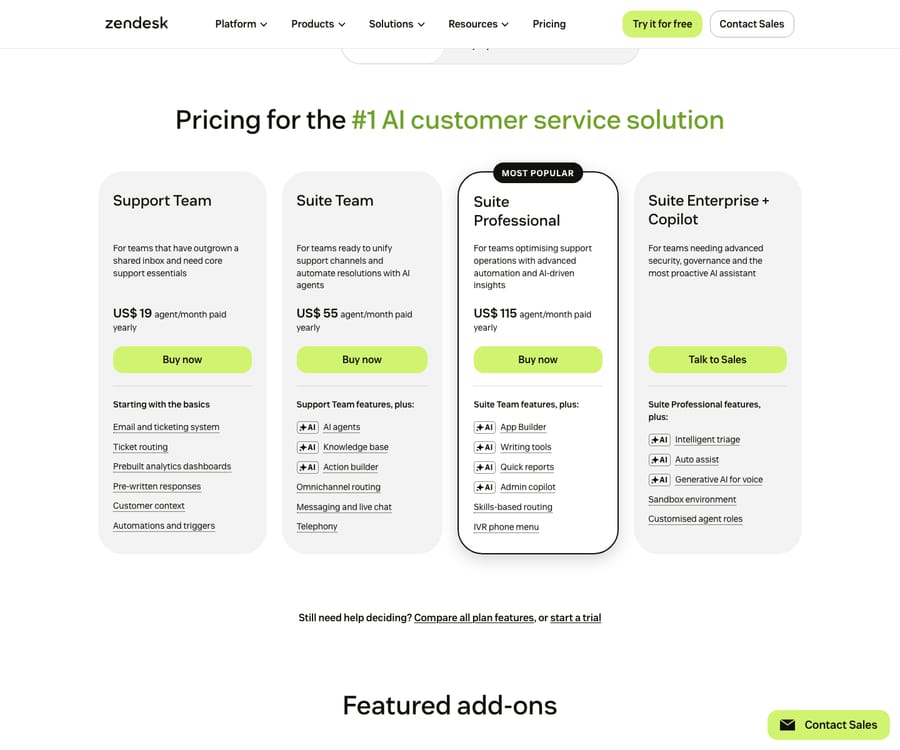
Most teams need Suite Team at $55 per agent a month (billed annually): it's the cheapest Zendesk plan with messaging, live chat and a help center, and you only climb when one specific feature forces you. Suite Growth ($89) is for SLAs and CSAT, Suite Professional ($115) for skills-based routing, IVR and HIPAA eligibility, and Suite Enterprise (quote only) for custom roles and a sandbox. Teams that only answer email can stop at Support Team for $19.
| Plan | Annual, per agent/mo | Monthly billing | Buy it for |
|---|---|---|---|
| Support Team | $19 | $25 | Email-only ticketing |
| Suite Team | $55 | $69 | Messaging, live chat, help center, AI agents |
| Suite Growth | $89 (not shown on the plan cards) | $115 | SLAs, CSAT, multiple forms, light agents |
| Suite Professional | $115 | $149 | Skills-based routing, IVR, App Builder, HIPAA eligibility |
| Suite Enterprise | Contact sales (plan data still lists $169) | Contact sales | Custom roles, sandbox, approval workflows |
This is a spoke of our Zendesk pricing explained pillar, which covers add-ons, AI overage, and hidden fees in full; here we stay focused on picking a tier.
Where do these prices come from, and what should you double-check?
We read every price from Zendesk's pricing page in September 2026. The public cards show Support Team $19, Suite Team $55, Suite Professional $115, and Suite Enterprise + Copilot (contact sales), plus the $50 Copilot add-on. Suite Growth has no card of its own, but the plan data behind the page still carries it at $89 annual and $115 monthly, and Suite Enterprise at $169 with the price hidden. Monthly billing costs 25-32% more than annual: $25 vs $19, $69 vs $55, $115 vs $89, $149 vs $115.
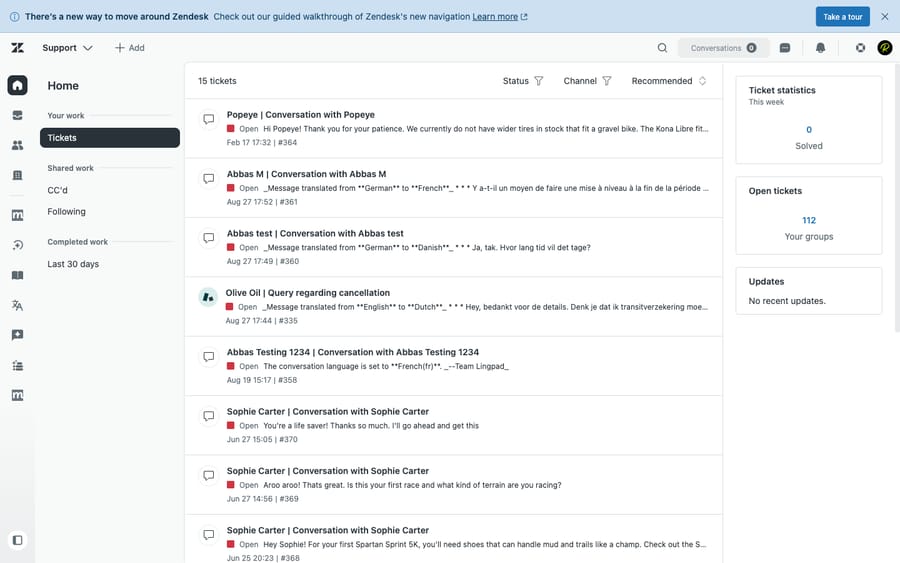
One caveat: the exact tier each feature lands on is the least stable part of any Zendesk write-up. Zendesk reshuffles its comparison grid, and today's cards list only a few headline features per plan. The gates below follow Zendesk's plan descriptions, its help center, and current teardowns, so verify the one feature you care about against the live page before you sign. We also tested in a live Zendesk account, and the screenshots below are our own.
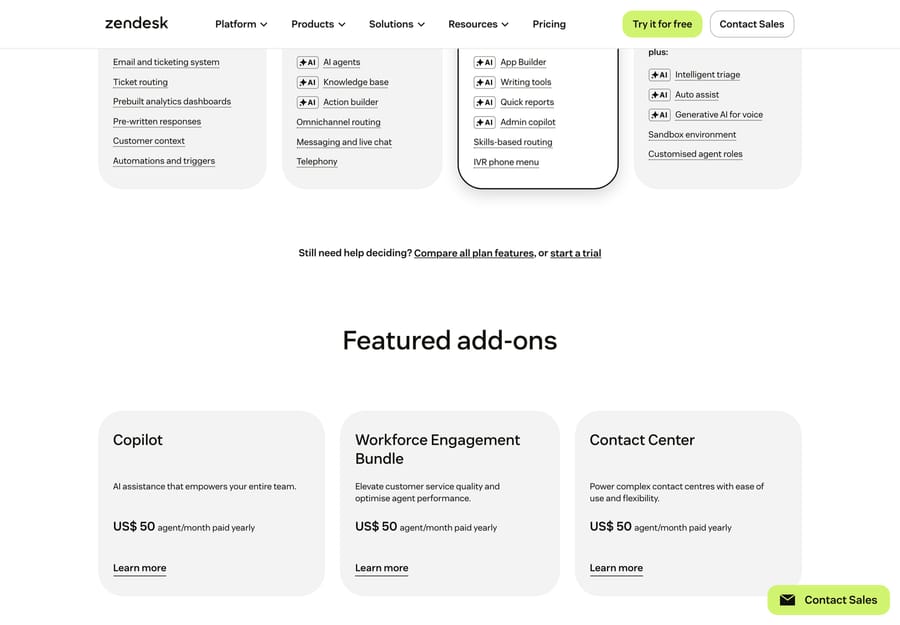
Beyond the per-seat plans, Zendesk sells its AI and CX capabilities as separate add-ons, each priced per agent on top of your base plan:
Do you even need the Suite?
Before comparing Suite tiers, rule out the cheapest door in. Zendesk still sells Support Team at $19/agent/mo: standalone ticketing with email, routing, pre-written responses, automations and triggers, and analytics. What it does not include is what most people picture when they think "Zendesk": no native messaging, no live chat, and no help center / knowledge base. Those only appear once you move to the Suite.
So the baseline test is simple. If your support is genuinely email-only (a small B2B team, an internal IT queue, a back-office function where customers never expect chat or a self-service portal), Support Team at $19 is all you need, and the Suite is overpaying. The moment you want a chat widget, a messaging channel, or a public help center, you're buying the Suite, and the real entry point becomes $55. Everything below is about the Suite.
What does Suite Team ($55) add, and who is it for?
What it adds over Support Team ($19): the omnichannel jump. Suite Team turns email-only ticketing into multichannel support: live chat and messaging (web, mobile, and social channels like WhatsApp, Facebook, and Instagram), a help center / knowledge base, omnichannel routing into the unified agent workspace, telephony, Action Builder, and AI agents. AI agents are included on every plan but billed per automated resolution; Suite Team's included allowance is $2 per agent a month.
Who it's right for: small-to-mid teams that want real omnichannel support without service-level machinery. If you need chat, a help center, and one place for agents to work tickets, and you don't yet track formal SLAs or run CSAT surveys, Team is where most teams should start.
Who's overpaying: nobody, really. If you've ruled out email-only, $55 is the floor. The risk runs the other way: teams that do need SLA tracking or CSAT trying to make Team stretch with workarounds. If you're missing one specific governance feature, that's the signal to look at Growth, not to live without it.
The unified workspace is the headline of this tier, and it's worth seeing what you get for the jump from $19. Here's the agent view from our test account:
Is Suite Growth ($89) worth it over Suite Team?
What it adds over Suite Team ($55): the service-management layer. Zendesk describes Growth as the plan "for scaling teams streamlining operations with automations, enhanced self-service and SLAs." In practice that means SLA management (track and enforce response and resolution targets), multiple ticket forms with conditional fields, light agents (read-and-comment seats that don't count as full paid agents), CSAT surveys, a fuller self-service customer portal, and more automation headroom. The included AI allowance rises to $5 per agent a month.
Who it's right for: growing teams that have to prove service quality: anyone with SLA commitments to customers, several request types that need their own forms, or a need to measure satisfaction with CSAT. Light agents alone can pay for the upgrade if you have many internal stakeholders who only read and comment.
Who's overpaying: teams buying Growth as "Team but a bit more." If you don't have SLA targets, don't need CSAT, run a single intake form, and have no light-agent use case, the $34/agent jump from Team buys you very little. Wanting the SLA engine "for later" is the most common way teams overpay here.
A note on visibility: Growth no longer has its own card on the public pricing page, even though its $89 price is still in Zendesk's plan data. Zendesk's incentive is plain: a three-card page pushes buyers from $55 straight to $115. Ask sales for Growth by name if it's the tier you want.
What does Suite Professional ($115) add, and who needs it?
What it adds over Suite Growth ($89): routing, voice depth, extensibility, and compliance. Professional is where you get skills-based routing (send tickets to agents by skill, language, or expertise rather than round-robin), an IVR phone menu for voice, the App Builder for custom in-workspace apps, admin copilot and writing tools, quick reports beyond the prebuilt dashboards, side conversations, and the compliance options regulated industries need. HIPAA enablement requires Zendesk's Advanced Compliance add-on, which is sold only on Professional, Enterprise, and Enterprise Plus, plus a signed healthcare agreement (Zendesk). Data residency comes through the Data Center Location add-on. Included AI stays at $5 per agent a month.
This is the Team vs Professional decision in a nutshell: Team is "can we do omnichannel support at all," Professional is "can we route, extend, report on, and govern it at scale." Most mid-market teams that pick Zendesk end up here.
Who it's right for: mid-market and scaling teams that route by skill, run a phone line that needs IVR, build custom workflows or apps, or operate under HIPAA. Any one of those justifies the tier on its own, because HIPAA enablement doesn't exist below it.
Who's overpaying: teams that buy Professional as "the popular plan" but only use what Growth offers. If you route round-robin, don't run voice with IVR, never build a custom app, and have no compliance mandate, you're paying $26/agent over Growth for capabilities sitting idle. Across 25 agents that's $650 a month, or $7,800 a year, for features you don't touch.
When is Suite Enterprise worth a sales call?
What it adds over Suite Professional ($115): governance and scale controls. Zendesk pitches Enterprise "for teams needing advanced security, governance and the most proactive AI assistant," and its card lists customized agent roles, a sandbox environment for testing config changes before production, approval workflows, intelligent triage, auto assist, and generative AI for voice. Teardowns also place multi-brand / multiple help centers and contextual workspaces here. The included AI allowance rises to $10 per agent a month, and Zendesk now sells this tier as "Suite Enterprise + Copilot," with Copilot bundled.
Who it's right for: large support orgs that need tight access control, a safe place to test changes before rollout, or approval steps on sensitive changes. If a botched config change would page someone at 2 a.m., the sandbox alone is worth it; if compliance demands least-privilege access, custom roles are non-negotiable.
Who's overpaying: smaller teams seduced by the feature list. A 15-person team almost never needs custom roles or a sandbox, and Enterprise is quote-only, which means a sales conversation and, typically, an annual commitment. Unless you can name the specific Enterprise gate you need, Professional is almost certainly the right ceiling.
Which plan should you pick?
Work down this list and stop at the first match. The gates are ordered by what forces the decision, not by price:
- Is your support email-only, with no chat, messaging, or help center on the horizon? → Support Team ($19). Don't buy the Suite for channels you won't use.
- Do you operate under HIPAA, or need data residency? → Suite Professional ($115) at minimum, plus the relevant add-on. HIPAA enablement doesn't exist on lower tiers, so this overrides everything below it.
- Do you need custom agent roles, a sandbox, or approval workflows? → Suite Enterprise (contact sales). These are the reasons to go quote-only.
- Do you need skills-based routing, an IVR phone menu, the App Builder, or ad-hoc reporting? → Suite Professional ($115).
- Do you need SLA management, CSAT surveys, multiple ticket forms, or light agents? → Suite Growth ($89).
- Do you just need omnichannel: chat, messaging, a help center, and one agent workspace? → Suite Team ($55). This is where most teams land.
If two gates pull you to different tiers, the higher tier wins (a tier includes everything below it). And if a single must-have feature is the only reason you're climbing, price that feature: sometimes a marketplace app or a focused third-party tool closes the gap for less than the per-agent jump across your whole team.
How do the Zendesk Suite plans compare side by side?
| Support Team | Suite Team | Suite Growth | Suite Professional | Suite Enterprise | |
|---|---|---|---|---|---|
| Price (annual, /agent/mo) | $19 | $55 | $89 (no card) | $115 | Contact sales (plan data: $169) |
| Email / ticketing | ✅ | ✅ | ✅ | ✅ | ✅ |
| Messaging + live chat | ❌ | ✅ | ✅ | ✅ | ✅ |
| Help center / knowledge base | ❌ | ✅ | ✅ | ✅ | ✅ |
| Unified agent workspace | ❌ | ✅ | ✅ | ✅ | ✅ |
| SLAs · CSAT · multiple forms · light agents | ❌ | ❌ | ✅ | ✅ | ✅ |
| Skills-based routing · IVR · App Builder · side convos | ❌ | ❌ | ❌ | ✅ | ✅ |
| HIPAA enablement (add-on) · data residency (add-on) | ❌ | ❌ | ❌ | ✅ | ✅ |
| Custom roles · sandbox · approval workflows | ❌ | ❌ | ❌ | ❌ | ✅ |
| Included AI resolution allowance / agent/mo | $2 | $2 | $5 | $5 | $10 |
Feature placement follows Zendesk's plan cards and descriptions plus current third-party teardowns; Zendesk reshuffles its grid, so confirm the specific feature you need on the live pricing page. Allowances and per-resolution rates per the pricing page's plan comparison table and Zendesk's resolution allowances article; see also about automated resolutions.
What costs sit on top of the tier?
Picking the right tier is half the budget; the add-ons are the other half. The biggest one is Copilot, a $50/agent/mo add-on on every tier except Enterprise, where it's bundled. That turns a $115 Professional seat into an effective $165. The included AI allowance appears in two forms. Zendesk's pricing table lists it as included automated resolutions: 5 per agent a month on Support Team and Suite Team and 10 on Suite Professional, up to 10,000 a year. Its help center describes it as a dollar amount: $2 per agent a month on Suite Team and every Support plan, $5 on Growth and Professional, $10 on Enterprise, capped at $5,000 a year, with no rollover of unused allowance (Zendesk). Light agents don't count toward it. Once your AI agents resolve more than the allowance covers, you pay per resolution, so the meter scales with success. Voice and workforce features carry their own $50 bundles, and App Builder, Action Builder, and Voice are billed on consumption above plan allowances.
2026 update, "verified resolutions" (Relate 2026): Zendesk shifted toward outcome-based pricing, and on May 18, 2026 it introduced a three-tier model (per its automated-resolution-tiers doc): Assisted Escalation (AI helped, a human finished) and Contained Resolution (AI finished but unverified) are now free, while only a Verified Resolution, where the AI resolved the issue and a separate LLM evaluation model confirmed it within 72 hours, counts against your allowance and is billed. Zendesk's pricing page lists the per-resolution rate at $1.50 committed and $2.00 pay-as-you-go; confirm which billing model your contract uses.
Net effect: your effective per-agent cost is often well above the tier sticker. We model the full stack (Copilot, AI overage, voice, escalation, and implementation) in what Zendesk really costs, break down the AI line in Zendesk AI pricing explained, and show how it scales seat by seat in Zendesk per-agent cost. If the tiers feel expensive for what you get, the best Zendesk alternatives compares the wider field.
One thing to weigh before you tier up for AI. A common reason teams climb to Professional or add Copilot is better automation, but autonomous resolution doesn't have to come from your help desk. An AI agent layer like Macha runs on top of whichever Zendesk tier you pick (it's not a help desk and not a Zendesk replacement), resolving tickets end to end. It's priced per ticket, one conversation charged once however many messages it takes, on one plan from $299 a month for 750 tickets, rather than per seat plus per vendor-defined resolution. The watch-out: it's another vendor to manage, it's only as good as the knowledge you connect, and it's additive to your desk, not free. If that fits, you can start a trial and keep your existing tier lean.
Frequently asked questions
Which Zendesk plan should I choose?
Start email-only at Support Team ($19) only if you'll never need chat or a help center. Otherwise begin at Suite Team ($55) for omnichannel; move to Growth ($89) for SLAs, CSAT and light agents; Professional ($115) for skills-based routing, IVR, App Builder, or HIPAA; and Enterprise (contact sales) only for custom roles, a sandbox, or approval workflows. Use the decision tree above and stop at the first match.
What's the difference between Zendesk Team and Professional?
Suite Team ($55) gives you omnichannel basics: chat, messaging, help center, and the unified workspace. Suite Professional ($115) adds the scale and governance layer: skills-based routing, an IVR phone menu, the App Builder, quick reports, side conversations, and eligibility for HIPAA enablement through the Advanced Compliance add-on. Pick Team to do omnichannel; pick Professional to route, extend, and govern it at scale.
Do I need the Suite, or is Support Team enough?
Support Team ($19) is email and ticketing only, with no messaging, live chat, or help center. If your support is genuinely email-only it's all you need. The moment you want chat or a self-service help center, you're into the Suite, where the entry point is Suite Team at $55.
How much is Zendesk Suite per agent?
On annual billing: Suite Team $55, Suite Growth $89 (no public card), Suite Professional $115, and Suite Enterprise is contact sales ($169 in the plan data). Monthly billing is $69, $115 and $149 for the first three, and add-ons like Copilot ($50/agent) sit on top.
Is Suite Growth still available?
Yes. It no longer has its own card on Zendesk's public pricing page, but the plan data behind the page still lists it at $89 a month annual and $115 monthly, so ask sales for it by name. It's the tier that adds SLAs, CSAT, multiple ticket forms, and light agents over Suite Team.
Can I mix tiers or pay monthly?
All agents on an account are generally on the same Suite tier; you can't put some agents on Team and others on Professional. You can pay monthly, but it costs 25-32% more than the annual prices above, and Zendesk contracts typically lock seats for the term. See what Zendesk really costs for the contract details.
How many AI resolutions does each Zendesk plan include?
Zendesk's pricing table lists 5 included automated resolutions per agent a month on Support Team and Suite Team and 10 on Suite Professional, up to 10,000 a year. Its help center describes the same allowance in dollars per full agent seat: $2 on Suite Team and all Support plans, $5 on Growth and Professional, and $10 on Enterprise, capped at $5,000 a year with no rollover.
What should you confirm before you sign?
Zendesk Suite pricing is a feature-gate decision dressed up as a price ladder. Suite Team ($55) is where most teams should start once they need more than email; climb only when a specific gate forces you: SLAs and CSAT push you to Growth ($89), routing, IVR, App Builder or HIPAA push you to Professional ($115), and custom roles or a sandbox push you to Enterprise. If you can't name the single feature driving an upgrade, you probably don't need it yet. Run the decision tree, confirm your one must-have feature on the live page, and add the Copilot and AI-resolution costs that ride on top before you sign.
Plan prices read from Zendesk's pricing page and its plan data, September 2026 (annual, per agent/mo unless stated). Per-tier feature placement follows Zendesk's plan cards, help center and current teardowns. Zendesk changes pricing and packaging periodically, so confirm your feature and quote before budgeting.






