





 Shopify
 Stripe
 Slack
Slack Notion
 Google Workspace
 Confluence

What Are the Best Free Zendesk Alternatives in 2026? What's Actually Still Free


Zendesk has no free plan, so a free alternative means Zoho Desk (3 users), Jira Service Management (3 agents), Help Scout (5 users), HubSpot Service Hub (2 users), Spiceworks (up to 5 technician seats), Crisp (2 seats), Chatwoot (2 agents), Tidio (50 conversations a month) or a self-hosted open-source desk. Freshdesk dropped its free-forever plan and now offers a 6-month Free Program for 2 agents, and Peppermint, once a popular open-source pick, was archived in July 2026. If Zendesk's AI bill is why you're looking, our top pick is Macha, which isn't free but runs on Zendesk and is set up and run for you at about $0.40 a ticket.
Key takeaways
- Zendesk offers no free plan, only a 14-day trial, with paid tiers starting at US$19 an agent a month for Support Team and rising to US$115 for Suite Professional.
- Macha is our top pick for teams staying on Zendesk whose problem is the AI bill: it isn't free, but the Macha team sets up and runs the agent at about $0.40 a ticket, including a dedicated success manager.
- Freshdesk no longer lists a free plan on its pricing page, but its help center still offers a Free Program for up to 2 agents that lasts 6 months.
- Spiceworks Cloud Help Desk's free Core Plan is capped at five technician seats, and Tidio's free plan allows 50 billable conversations a month across 10 seats.
- Peppermint, once recommended as a modern open-source Zendesk alternative, was archived by its owner on July 17, 2026, and Libredesk has taken its place in self-hosting discussions.

Zendesk has no free plan, only a 14-day trial, so a free alternative means one of these: Zoho Desk (3 users), Jira Service Management (3 agents), Help Scout (5 users), HubSpot Service Hub (2 users), Spiceworks Cloud Help Desk (up to 5 technician seats), Crisp (2 seats), Chatwoot (2 agents), Tidio (50 conversations a month) or a self-hosted open-source desk. Freshdesk no longer lists a free plan on its pricing page; what's left is a 6-month Free Program for up to 2 agents that you switch to from inside a Freshdesk account.
We re-checked every claim on this page against the vendor's own live pricing page on September 20, 2026, captured the screenshots the same day, and re-checked Freshdesk and Zendesk on September 24. Where a page refused to show us a dollar figure, we say so instead of reprinting an old number. If you want the wider market rather than the free end of it, our open-source ticketing roundup and free IT ticketing systems cover the self-hosted and ITSM halves in more depth.
One disclosure: we make Macha, and we rank it first. It isn't free and it isn't a help desk. It's an AI agent layer that runs on top of Zendesk, and it's our pick for teams staying on Zendesk whose real complaint is the AI resolution bill and who want the agent set up and run for them. The free desks follow it, numbered in the order we'd try them.
This page is one of five we keep on leaving Zendesk, each for a different question. The other four cover Zendesk alternatives for small businesses (picks for small teams and startups), Zendesk's competitors (the full competitor map by category), AI-first Zendesk alternatives (help desks and agents built around AI) and enterprise Zendesk alternatives (options for large and regulated teams).
Which free Zendesk alternatives give you the most seats?
Every figure here comes from the vendor's own pricing page, checked September 20, 2026. "Seats" means people who answer tickets; end users and requesters are usually unlimited and are called out where they are not.
| Tool | Free tier | Seat cap | The real limit | What the free tier removes | Cheapest paid step |
|---|---|---|---|---|---|
| Macha (our top pick, AI agent layer) | No free plan; $50 of free usage on the trial | Unlimited team seats | Not a help desk: runs on top of the Zendesk you keep | n/a: every feature and the done-for-you setup are on the trial | $299 a month for 750 tickets |
| Zoho Desk | Free Edition, free forever | 3 users | Email ticketing only | Light users, live chat, telephony, social | Express, price shown in local currency only |
| Jira Service Management | Free forever | 3 agents | One site, 2 GB storage, 100 emails a day | Rovo Agents, Assets, SLAs, audit logs | Standard $20 per agent a month |
| Help Scout | Free | 5 users | 1 Inbox, 1 Docs site, 100 contacts a month | Extra inboxes, workflows, SLAs, chat | Standard $25 per user a month |
| HubSpot Service Hub | Free tools, $0 | 2 users | Free tools with HubSpot branding | Ticketing automation, help desk workspace, Customer Agent | Starter from $7 per seat a month |
| Spiceworks Cloud Help Desk | Core Plan, free | 1 to 5 technician seats | Ad-supported, unlimited end users | Seats above 5, white labeling | Premium $5 per seat a month billed annually |
| Crisp | Free forever | 2 seats | 100 customer profiles, no AI credits | Shared email inbox, knowledge base, analytics | Mini $45 a month per workspace |
| Chatwoot Cloud | Hacker, $0 | 2 agents | 500 conversations a month, live chat only | Help center, Captain AI, teams, automation rules | Startups $19 per agent a month |
| Tidio | Free | 10 seats | 50 billable conversations a month | Advanced analytics, permissions, extra Lyro volume | Starter $24.17 a month |
| osTicket, FreeScout, Zammad, Chatwoot, Libredesk | Self-hosted, $0 license | Unlimited | Your server, your upgrades, your backups | Nothing, and also nobody to call | A VPS, roughly $10 to $40 a month |
| Freshdesk | No free-forever plan; 6-month Free Program | 2 agents | Started from inside an account, ends after 6 months | Not listed on the pricing page | Growth $19 per agent a month |
| Zendesk | None | n/a | 14-day trial only | n/a | Support Team $19 per agent a month |
What does Zendesk cost if there is no free plan?
There is a 14-day trial and nothing else. Zendesk's pricing page, read on September 20, 2026, starts at Support Team US$19 an agent a month paid yearly, then Suite Team at US$55 and Suite Professional at US$115, with Suite Enterprise+ on request. So the cheapest way to run Zendesk for a five-person team is $95 a month, or $1,140 a year, before any AI.
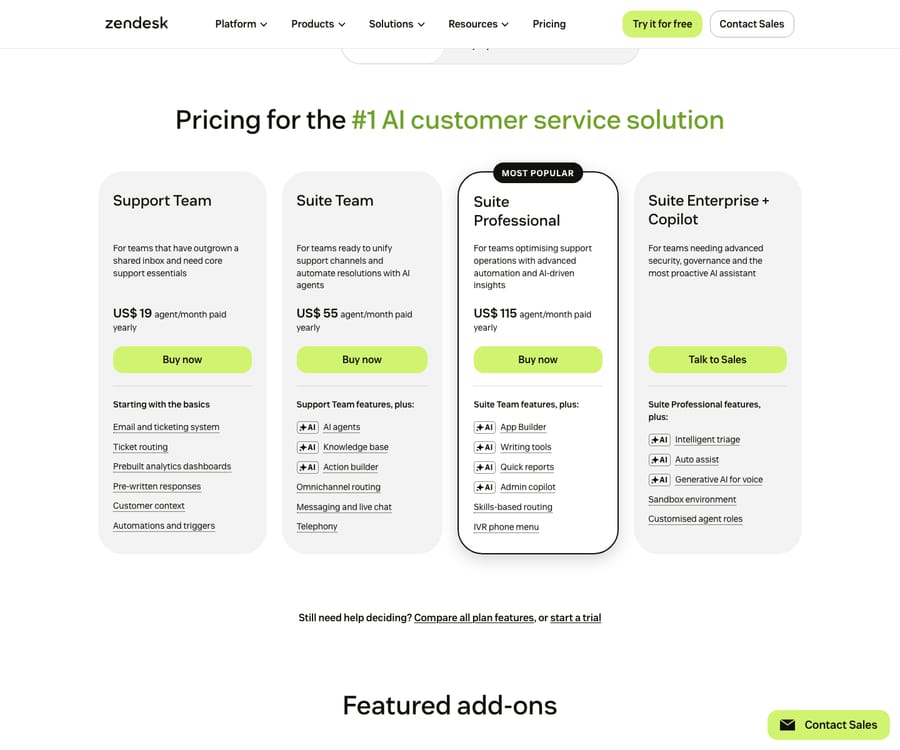
AI sits on top of that. Zendesk bills AI agents per automated resolution, and the rate it publishes is $1.50 per automated resolution on a committed plan, or $2.00 pay-as-you-go. Each seat carries a small monthly dollar allowance against that meter, $2 on Suite Team, $5 on Growth and Professional, $10 on Enterprise, per Zendesk's own help center article on resolution allowances. Five Suite Team seats gets you $10 of allowance a month, which is six resolutions at the committed rate, or five pay-as-you-go. The full arithmetic is in our Zendesk pricing breakdown.
That is the number the free tools on this page are measured against.
Which free help desk plans changed in 2026?
This is the part most roundups have not caught up with, and it is the reason this page was rewritten.
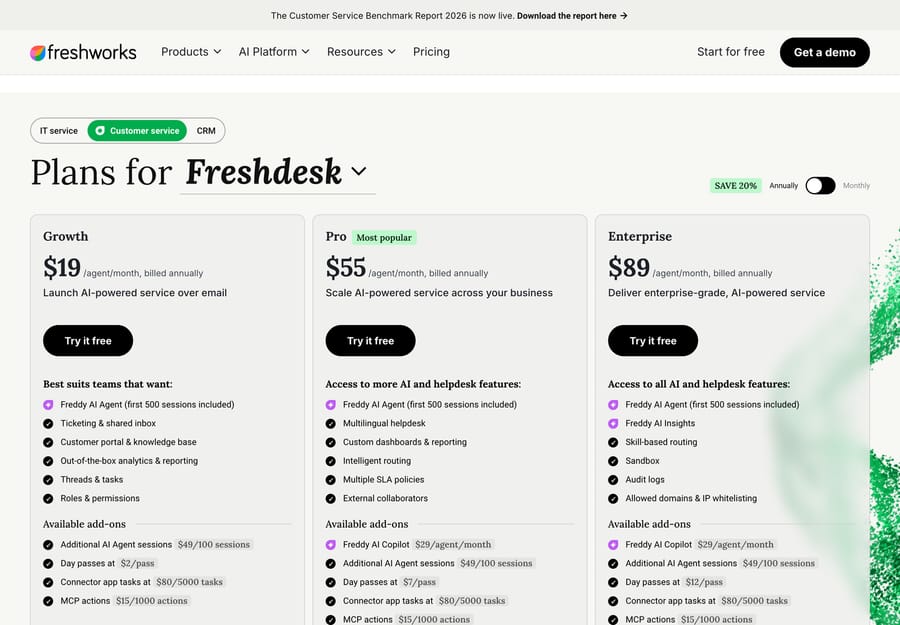
Freshdesk's free-forever plan is off the pricing page, and a time-limited version replaced it. Freshworks' Freshdesk pricing page lists exactly three plans: Growth $19, Pro $55 and Enterprise $89 per agent a month billed annually. The string "free plan" appears nowhere on it, the public free entry is a 14-day trial, and the old /freshdesk/free-help-desk-software/ URL now returns a 404. What survives is the Freshdesk Free Program, updated by Freshworks on September 22, 2026: up to 2 agents, free for 6 months, aimed at small businesses and startups, and switched on from Admin > Account > Plans and Billing > Switch plan inside an existing account. After 6 months you upgrade to a paid plan. So "Freshdesk Free for up to 2 agents" is half right: the 2 agents are real, the "forever" is not. Our free Freshdesk alternatives guide is the version of this list written for people migrating off it.
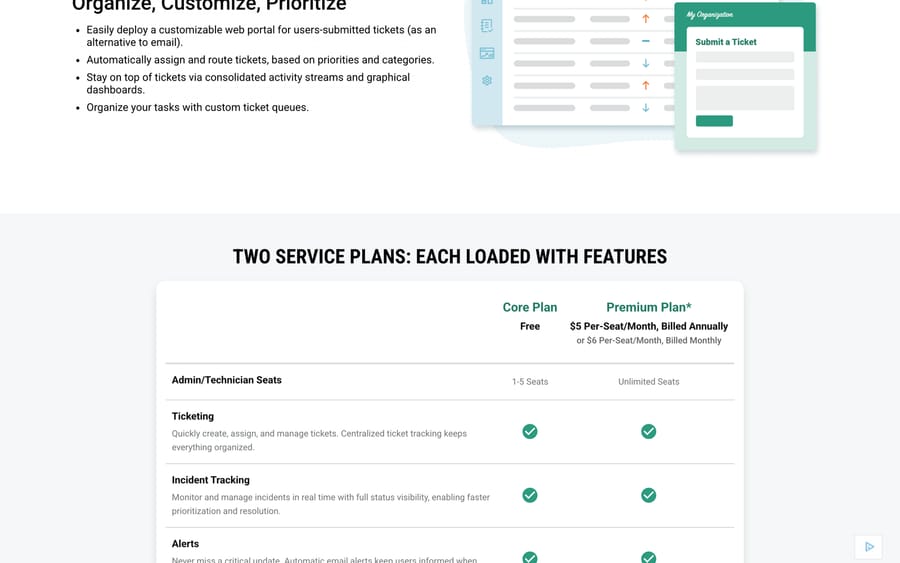
Spiceworks free is five technician seats, not unlimited agents. Spiceworks' own plan table reads "Core Plan Free, Admin/Technician Seats 1-5 Seats" against "Premium Plan $5 Per-Seat/Month, Billed Annually, Unlimited Seats", or $6 billed monthly. End users are unlimited on both. A previous version of this page called Spiceworks the only unlimited-agent free desk. That was wrong, and it is corrected here. The footnote under the table is the part to read twice: "Pricing is based on the total number of active employees. It is not based on seats beyond the free limit or the number of help desk end-users." Crossing the fifth technician therefore prices Premium off your whole headcount, not off your support team.
Tidio's free plan is 50 billable conversations a month, not a visitor count. The plan card on Tidio's pricing page states it directly: "50 Billable conversations / mo." with 10 seats included. The "100 unique visitors" figure that circulates instead is real but belongs to a different feature: Tidio's FAQ on Flows says "the Free Customer Service plan limits them to interact with only 100 unique visitors per month," which caps the separate automation builder, not the plan's overall conversation quota. The Lyro AI agent has its own allowance again: "your first 50 conversations are free," and Tidio's own comparison table marks that one "(lifetime)", not monthly. Three different 50s and 100s on one plan, each metering something different.
HubSpot's free service tools are capped at 2 users. The card says so in as many words: "Free for up to 2 users. No credit card required."
What should you pick if Zendesk's AI bill is the problem?
1. Macha: our top pick if you want AI support set up and run for you
If you're looking at free alternatives mainly because the AI resolution meter has made the Zendesk bill unpredictable, you may not need to leave. Macha is an AI agent layer that runs on top of Zendesk, Freshdesk, Gorgias, Front, HubSpot or Intercom, Zendesk included. Its agents read tickets, reply, tag, route and update fields inside the desk you already have, so there's no migration.
Pricing: one plan priced on monthly ticket volume, from $299 a month for 750 tickets, about $0.40 a ticket at every tier. A ticket is one thread with one person and costs the same however many replies it takes. Zendesk's published AI rate is $1.50 per automated resolution on a committed plan, or $2.00 pay-as-you-go, so the comparison that matters is billing unit against billing unit. The trial is $50 of free usage, about 125 tickets, with no credit card and no time limit.
Best for: teams staying on Zendesk, or on another desk Macha runs on, who want an agent handling real tickets and have nobody free to build and tune one.
Done for you: you connect Zendesk and the tools your answers come from, which takes about 15 minutes. The Macha team then analyzes about a month of your past tickets, builds the knowledge base and the agent, tests it on a sample of those tickets, and runs it in safe mode, with drafts as internal notes in Zendesk, until the drafts are right. It goes live in under a week. That's included on the trial and every plan: about $0.40 a ticket covers the setup and a dedicated success manager who handles your changes after go-live, such as new ticket categories, instruction changes and new tools.
- Pros: someone else builds and runs the agent; per-ticket billing that doesn't change with the model the agent runs on; unlimited team seats; no help desk migration.
- Watch-outs: no free plan, and the trial is $50 of usage rather than a free tier. It's not a help desk or a standalone chat widget, so it needs a desk underneath it. If your problem is that Zendesk's seat price is too high for a three-person team, a free desk below fixes that and an AI layer does not.
Our Macha on Zendesk page has the integration detail and pricing has the tiers.
Which free help desk plans are worth using?
2. Zoho Desk: the most capable free ticketing plan
Zoho Desk's Free Edition is still free forever with three user licenses, confirmed on its pricing page and in the pricing FAQ. You get email ticketing, a help center, a knowledge base and basic workflows. Light users, which is how Zoho lets internal people read tickets cheaply, are paid-only.
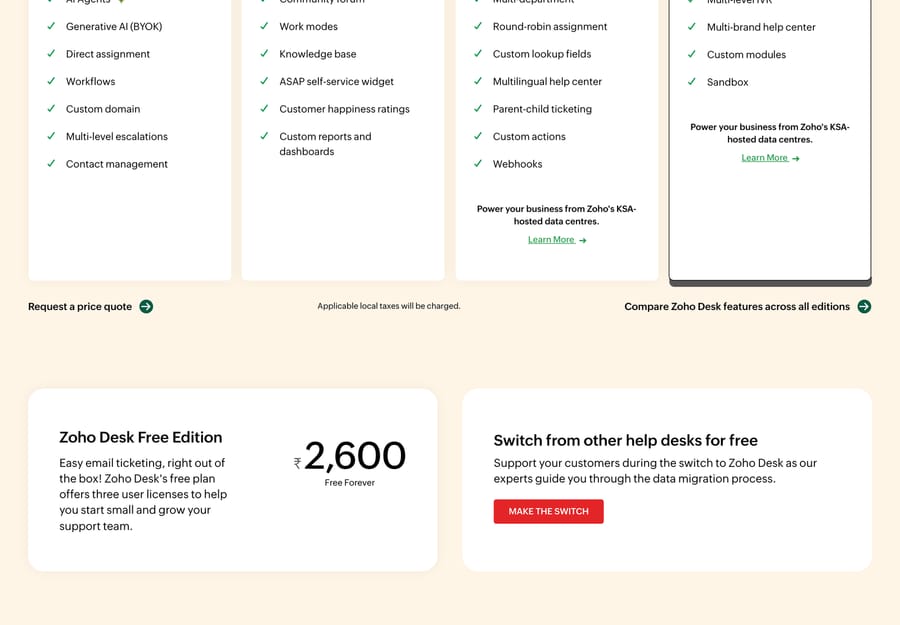
It suits a small team whose support is email-shaped and who can live inside three seats. One caveat we hit: Zoho's pricing page geolocates aggressively and served us Indian rupees in both a scripted fetch and a real browser, so we are not quoting a USD figure for the paid tiers on this page. The free edition's three-user limit is the same in every currency.
3. Jira Service Management: free for three agents, if you are already on Atlassian
Atlassian now sells this inside a "Service Collection" bundle, and the Free column reads: three agents, unlimited customers, one site, 2 GB of file storage and 100 emails a day. The apps included at Free are Jira Service Management Free and Customer Service Management. Rovo Agents and Assets start at Standard, which is $20 an agent a month.
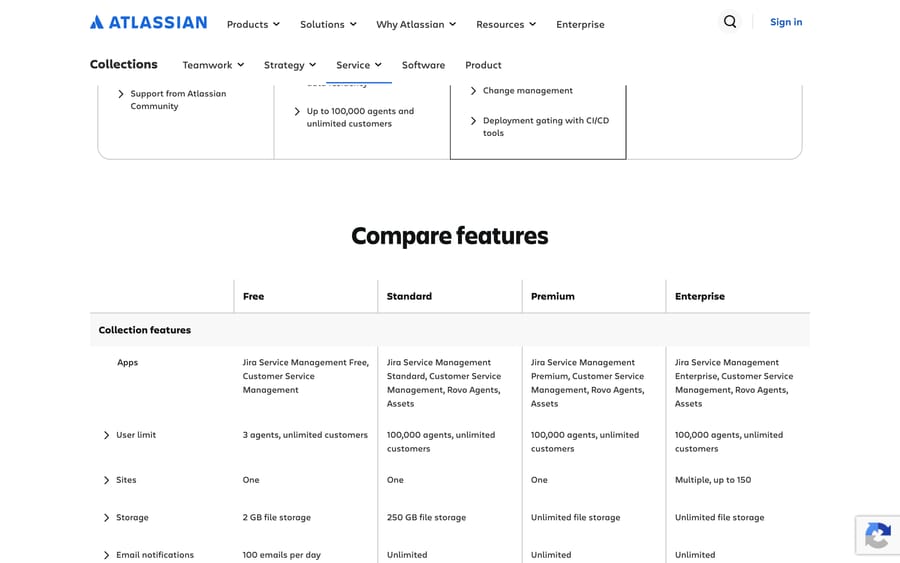
The 100-emails-a-day cap is the one that bites. It is fine for internal IT and it is not fine for a customer-facing queue of any size. Choose it if your requests already arrive from people who have Jira accounts.
4. Help Scout: five users, one inbox
Help Scout's free plan gives you 5 users, 1 Inbox, 1 Docs site and 100 contacts a month, with 10 saved replies. The line sits under the plan cards on the pricing page in exactly those words. Standard is $25 a user a month, Plus $45 and Pro $75.
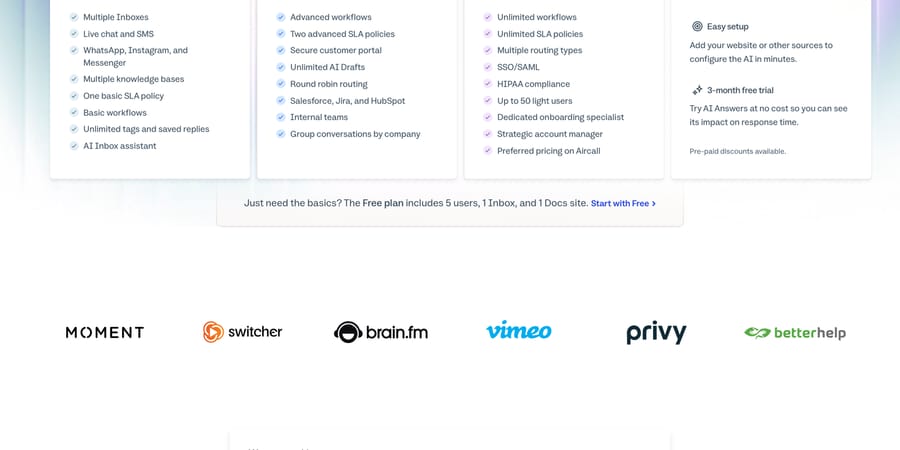
Watch the 100-contacts meter rather than the seat count. A contact is a person, and multiple conversations with the same person count once, but a store doing a few hundred distinct customers a month will cross it well before it runs out of seats. Help Scout also now sells AI Answers as an add-on at $0.75 a resolution with a three-month free trial, so the AI is a separate meter from the seats.
5. HubSpot Service Hub: free if you want the CRM underneath
HubSpot's free tools include ticketing, a shared inbox and live chat with HubSpot branding, for up to 2 users. Starter is advertised from $7 a seat a month against a struck-through $20, Professional at $90 against $100, and Enterprise at $150.
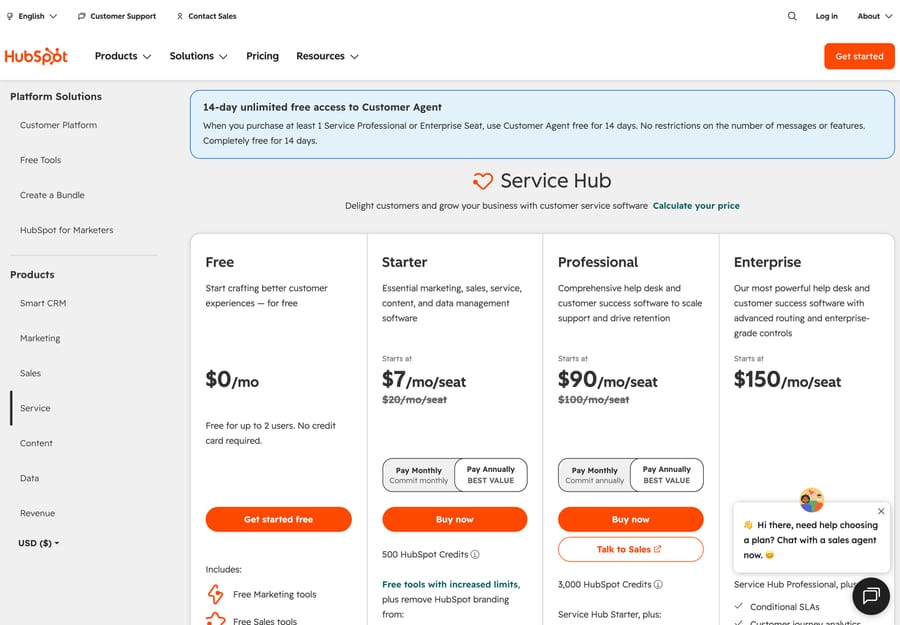
Two things the plan cards make easy to miss. Professional and Enterprise carry a required one-time onboarding fee of $1,500 and $3,500. And HubSpot's Customer Agent, its AI, is Professional and above and costs 50 HubSpot Credits per resolved conversation, with credits at $9.00 per 1,000 paid annually. That works out at about $0.45 a resolved conversation on top of the seat price, which is worth doing on a calculator before you assume the AI is included.
6. Spiceworks Cloud Help Desk: free because you are the product
Core is free, ad-supported, and capped at five technician seats with unlimited end users. Spiceworks has run this model since the on-premise days: the software is free and the business is advertising and vendor marketing aimed at the IT admins using it. That is the incentive to keep in mind, and it is also why the free tier has lasted when others have not.
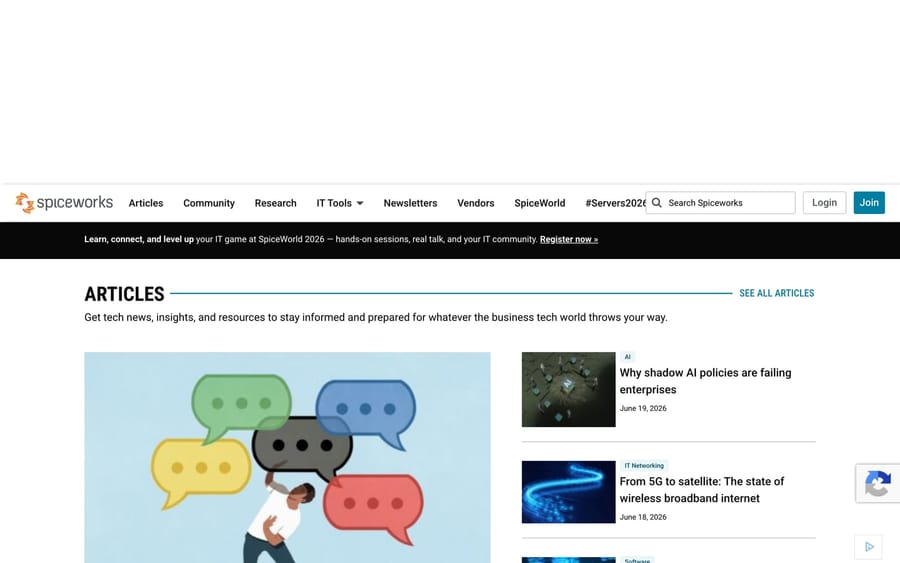
It fits internal IT at a small company. It is the wrong fit if you need to put a support desk in front of paying customers without ads.
7. Crisp and Chatwoot: free chat, with sharper edges than the marketing suggests
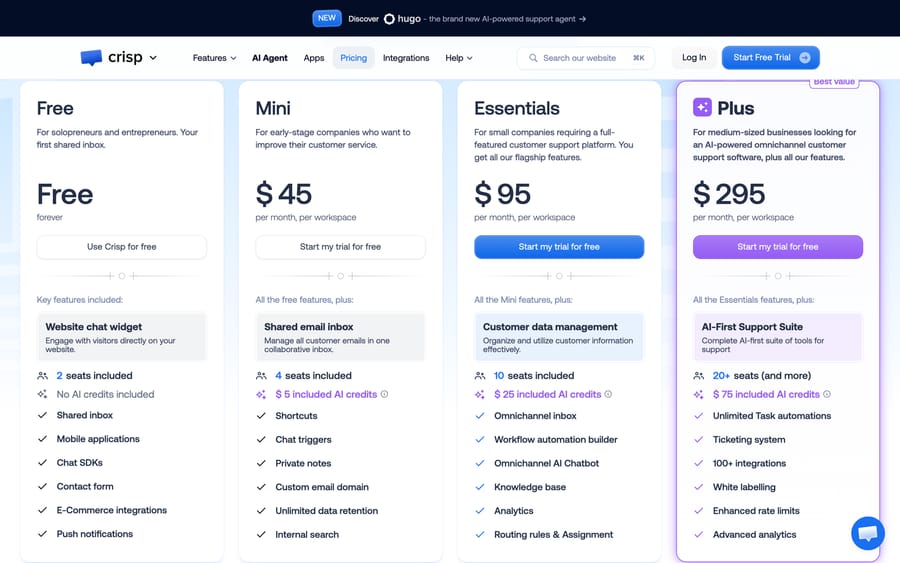
Crisp's Free plan is free forever with 2 seats included, no AI credits, and a cap of 100 customer profiles per workspace. Crisp prices flat per workspace rather than per seat, which is unusual and genuinely cheaper for a growing team: Mini is $45 a month, Essentials $95, Plus $295, regardless of conversation volume.
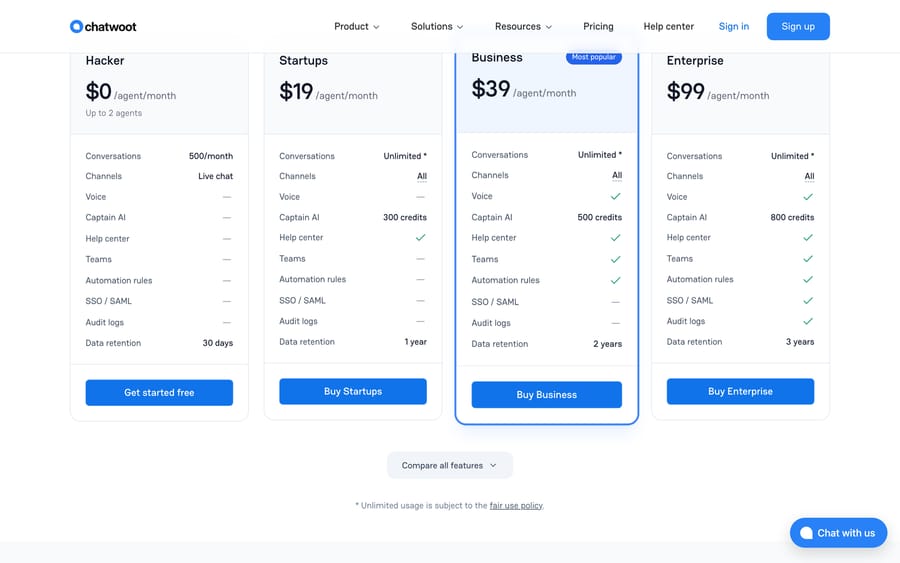
Chatwoot Cloud's Hacker plan is $0 an agent a month for up to 2 agents, 500 conversations a month, live chat only, and 30 days of data retention. The help center, Captain AI, teams and automation rules are all paid. Startups is $19 an agent a month.
Chatwoot is also the one tool here you can run both ways, which is the next section. Our Chatwoot explainer covers the cloud and self-hosted split in detail.
Is an open-source Zendesk alternative really free?
This is where most of the "free alternative to Zendesk" search traffic actually ends up, and it deserves more than a footnote. We checked each project on GitHub on September 20, 2026, for its license, its star count and the date of its last commit, because an unmaintained self-hosted help desk is a liability rather than a saving.
| Project | License | Stars | Last commit | What it is |
|---|---|---|---|---|
| Chatwoot | MIT Expat outside its enterprise/ directory | 37,002 | 2026-09-19 | Omnichannel inbox and live chat, the closest open-source shape to Intercom |
| GLPI | GPL-3.0 | 6,367 | 2026-09-18 | ITSM with asset management built in |
| Zammad | AGPL-3.0 | 5,928 | 2026-09-18 | Structured ticketing with email, chat and Telegram |
| FreeScout | AGPL-3.0 | 4,543 | 2026-09-19 | PHP and Laravel, runs on shared hosting, shaped like Help Scout |
| osTicket | GPL-2.0 | 3,917 | 2026-06-17 | The long-running classic, v1.18.4 |
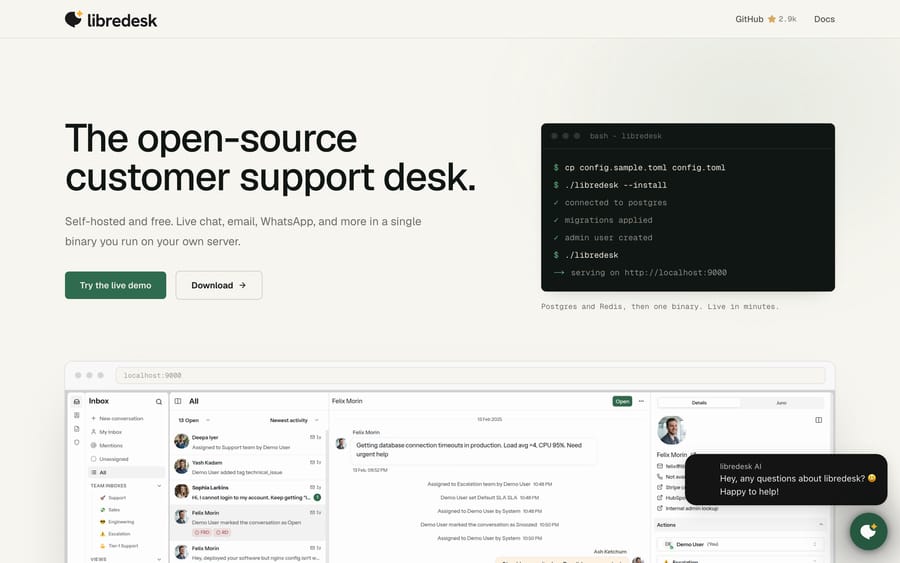
| Libredesk | AGPL-3.0 | 2,946 | 2026-09-20 | A single Go binary, v2.8.0, no paid tiers at all |
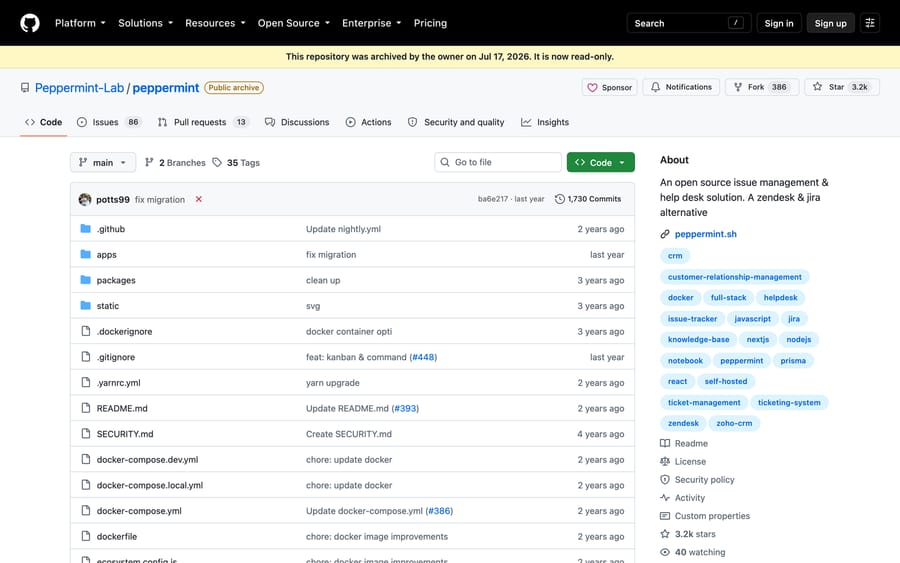
| Peppermint | Archived 2026-07-17 | 3,162 | 2025-09-21 | Read-only. Do not start here. |
Two of these need saying out loud.
Peppermint is dead. Its GitHub repository carries the banner "This repository was archived by the owner on Jul 17, 2026. It is now read-only", the last commit landed in 2025, 86 issues are still open, and peppermint.sh returns a Cloudflare 520. Several 2026 roundups, including an older version of ours, still list it as the modern newcomer.
Libredesk is the project that replaced it in the r/selfhosted conversation. It ships as one binary you run on your own server, its FAQ says "libredesk is open source and free to self-host. Every feature is included, and there are no paid tiers", and it was committed to on the day we checked. It is young, which is the honest caveat.
If you want the longer version of this table, with UVdesk, Faveo, Frappe Helpdesk and Znuny, that is what our open-source ticketing systems guide is for.
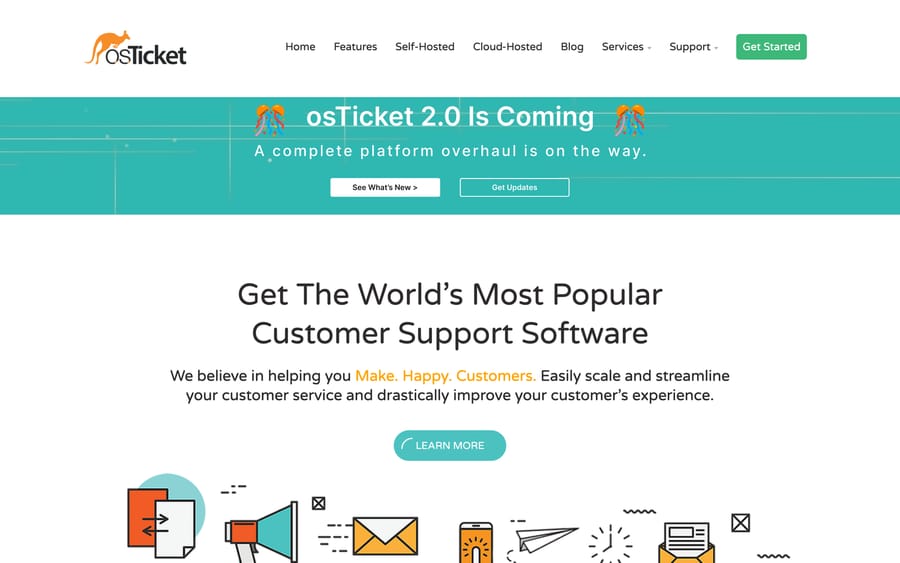
The arithmetic that matters: a $0 license and a $20 VPS beats $1,140 a year of Zendesk seats until the first time an upgrade breaks inbound email on a Friday. Budget for the person who fixes that, and self-hosting is still usually cheaper. Pretend that person does not exist and it is not.
What do you give up on a free help desk plan?
Free tiers are not charity. Each one is a funnel, and the shape of the funnel tells you where it will pinch.
- Seat caps are the upgrade trigger. Three at Zoho and Atlassian, two at HubSpot, Crisp and Chatwoot, five at Help Scout and Spiceworks. Hiring is what moves you to paid, so the vendor's incentive is to make the free tier good enough to build a workflow on and small enough that a fourth hire breaks it.
- Volume meters are the quieter trigger. Help Scout's 100 contacts a month, Chatwoot's 500 conversations, Tidio's 50 billable conversations and Atlassian's 100 emails a day are all easier to hit than the seat cap, and harder to notice until a customer says nobody replied.
- AI is a separate bill everywhere. HubSpot's Customer Agent needs Professional and bills 50 credits a conversation. Help Scout's AI Answers is $0.75 a resolution. Crisp's Free plan says "No AI credits included". Chatwoot's Captain AI starts at Startups. Nothing on this page gives you a working AI agent for $0.
- Data retention has a clock. Chatwoot Hacker keeps 30 days. That is a migration problem later, not a feature gap today.
- Branding is the fee you pay in attention. Spiceworks runs ads at your technicians. HubSpot puts its name on your chat widget. tawk.to charges to take its badge off. All three are honest about it.
When does a free plan stop being worth it?
Price the next step before you commit, because the jump from $0 is what the free tier is designed to produce.
- Four support people. Zoho and Atlassian break at three, so a fourth hire costs you $20 an agent a month at Atlassian Standard, or a move to Zoho's paid tiers. Help Scout gives you one more year of runway at five.
- A second inbox. Help Scout Free is one inbox, and additional inboxes are $10 a month on Standard. Splitting sales and support is the most common reason teams leave.
- A real knowledge base. Crisp puts it on Essentials at $95 a month per workspace. Chatwoot puts the help center on Startups at $19 an agent.
- More than 500 conversations a month. Chatwoot Hacker stops there, and Startups at two agents is $38 a month.
- Any AI at all. This is where the numbers get large fastest, and where the billing unit matters more than the headline price. It's also where Macha, our top pick above, comes in.
Which paid Zendesk alternatives are worth it if free won't do?
Past three to five seats, every free plan above turns into a paid one, so the real comparison becomes Zendesk's US$55 Suite Team seat against another vendor's paid seat. These are the paid help desks teams most often move to. Prices are per agent or seat a month on annual billing unless noted, read from each vendor's own pricing page on October 8, 2026. Zendesk itself was unchanged that day: Support Team US$19, Suite Team US$55, Suite Professional US$115, Enterprise on request.
| Help desk | Best for | Price (checked October 8, 2026) | Full comparison |
|---|---|---|---|
| Freshdesk | The closest like-for-like swap | Growth $19, Pro $55, Enterprise $89 per agent; Freddy Copilot $29 per agent on Pro and Enterprise | Zendesk vs Freshdesk |
| Intercom (Fin) | AI-first, in-app support | Essential $29, Advanced $85, Expert $132 per seat, plus Fin from $0.99 per outcome | Zendesk vs Intercom |
| Front | Shared email inbox for collaborative teams | Starter $25 (up to 10 seats), Professional $65 (up to 50), Enterprise $105 per seat; Copilot $20 a seat, Autopilot $0.05 triage / $0.39 handoff / $0.89 resolution per conversation (as of October 2026) | Zendesk vs Front |
| Gorgias | Shopify and e-commerce stores | Billed by tickets: Starter $10 for 50, Basic $60 for 300, Pro $360 for 2,000 a month; AI Agent $1.00 per automated interaction on monthly contracts | Zendesk vs Gorgias |
| Salesforce Service Cloud | Teams already on Salesforce | Starter Suite $25 and Pro Suite $100 per user, then Core $195, Advanced $395, Max $550 | Zendesk vs Salesforce Service Cloud |
| ServiceNow | Enterprise IT and internal service | Custom quote, usually with a partner implementation | Zendesk vs ServiceNow |
| Pylon | B2B and SaaS support over Slack and email | No public price; the pricing page is a demo booking form | Zendesk vs Pylon |
| Kustomer | High-volume omnichannel CX | Quote only: "we don't post one-size-fits-all pricing" | Zendesk vs Kustomer |
The pattern in that table is where each vendor puts its meter. Freshdesk, Front and Salesforce charge per seat and sell AI as a seat add-on. Intercom and Gorgias charge for AI per outcome or per automated interaction, which means the bill grows with the share of tickets the AI handles. Gorgias goes further and meters the help desk itself by ticket volume, not by seat. Kustomer, Pylon and ServiceNow don't publish a price, which usually means an annual contract and a sales cycle before you see one.
If you're replacing Zendesk because of cost, Freshdesk is the closest swap and Gorgias is the cheaper fit for a Shopify store. If the complaint is complexity, Front is the simplest of the paid group. If you're B2B, look at Pylon; if you're enterprise IT, ServiceNow or Jira Service Management. And if the only complaint is the AI, you may not need to switch at all: Macha, our top pick above, is set up and run for you on the Zendesk you already have.
What does migrating off Zendesk actually cost?
The subscription is only part of the bill. A move to any desk on this page, free or paid, carries costs that never show up on a pricing table:
- Data migration. Tickets, contacts, macros and knowledge base articles all have to move. Most vendors ship an importer, and custom fields and ticket history are where it gets messy.
- Reconfiguration. Triggers, automations, SLAs, views and routing get rebuilt in the new tool's model, not copied.
- Integrations. Every connected app (CRM, store, billing) needs reconnecting and re-testing.
- Team ramp. Agents are slower for a few weeks while they learn a new interface.
- Overlap. You usually pay for both tools during the cutover.
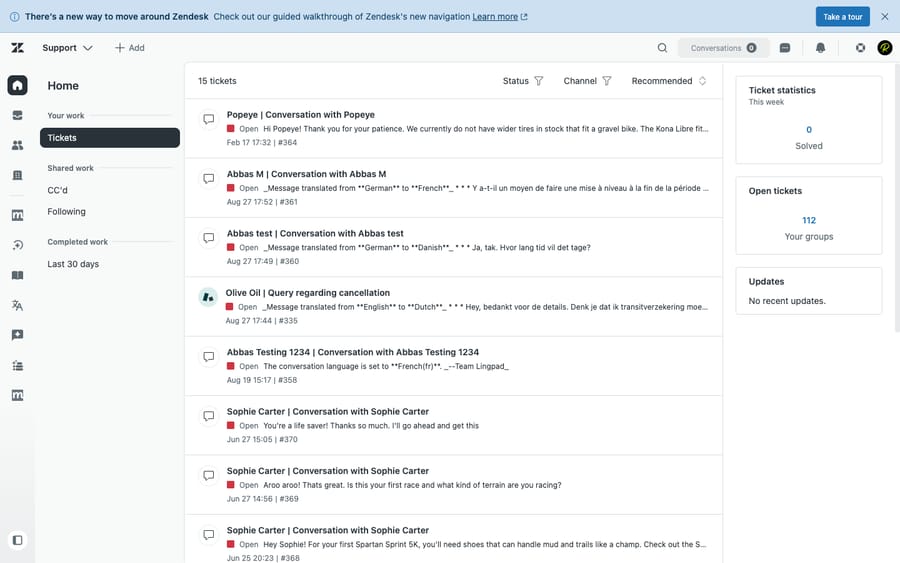
That screenshot is the baseline a replacement has to beat: Zendesk's Agent Workspace in a live test account, with the queue, views and macros your team already knows. None of this means don't switch. It's why teams whose only complaint is the AI often keep the desk and add an agent layer instead, so their data, configuration and habits stay where they are.
How did we research this?
We opened each vendor's own pricing page on September 20, 2026, in a scripted browser, captured the plan tables as screenshots, and read the free column rather than the marketing copy above it. Where a page rewrote its prices by IP, we read the server-rendered version with JavaScript disabled (Freshdesk) or switched the page's own currency control to USD (HubSpot). Zoho refused both, so no USD paid price for Zoho appears here. For the open-source projects we queried the GitHub API for license, stars and last commit date. We did not build an agent on any of these tools for this page; the free tiers are quoted from published plan tables, not from test accounts. Macha's details come from our own pricing page and trial process. The paid alternatives table was added on October 8, 2026, with every price read that day from the vendor's own pricing page; where a vendor shows no price (Kustomer, Pylon, ServiceNow), we say so.
Frequently asked questions
Does Zendesk have a free plan?
No. Zendesk offers a 14-day free trial and then charges from US$19 an agent a month on Support Team, paid yearly. There is no permanently free tier, and there has not been one for years.
Is Freshdesk still free?
Not forever. Freshworks' Freshdesk pricing page lists only Growth $19, Pro $55 and Enterprise $89 per agent a month billed annually, plus a 14-day trial, and the old free-plan page returns a 404. Freshworks' help center still describes a Free Program for up to 2 agents that lasts 6 months, started from Admin > Account > Plans and Billing inside an account. Any roundup calling Freshdesk free forever is out of date.
What is the best free alternative to Zendesk?
For email-shaped customer support, Zoho Desk's Free Edition with three users. For internal IT, Jira Service Management's free three-agent plan if you are already on Atlassian, or Spiceworks Cloud Help Desk if you are not and can live with ads. For chat-first teams, Crisp or Chatwoot at two seats. If you'd rather keep Zendesk and fix the AI bill, Macha is our top pick: not free, but set up and run for you by the Macha team at about $0.40 a ticket, including a dedicated success manager.
Which free help desk has unlimited agents?
Only the self-hosted ones: osTicket, FreeScout, Zammad, Chatwoot and Libredesk all let you add as many agents as your server can carry, because nobody is counting seats. Spiceworks Core, which is often described as unlimited, is capped at five technician seats on its own plan table.
Is there an open-source Zendesk alternative?
Several. Chatwoot is the closest in shape and by far the most active, at 37,000 stars and commits the week we checked. Zammad is the closest to structured ticketing, FreeScout the easiest to host, and Libredesk the newest. Avoid Peppermint: its repository was archived in July 2026 and its site is down.
How many agents do I get on each free plan?
Zoho Desk 3, Jira Service Management 3, Help Scout 5, HubSpot Service Hub 2, Spiceworks 1 to 5 technicians, Crisp 2, Chatwoot 2. All figures read from each vendor's pricing page on September 20, 2026.
Can I get AI on a free help desk plan?
Not a working one. Crisp's Free plan states "No AI credits included", Chatwoot's Captain AI starts on a paid plan, HubSpot's Customer Agent requires Professional and bills 50 credits per resolved conversation, and Help Scout's AI Answers is a $0.75-per-resolution add-on with a three-month trial. Free plans give you the inbox, not the agent. Macha's trial is $50 of free usage, about 125 tickets, and the Macha team sets the agent up on it the same way it does on a paid plan.
What is the best paid Zendesk alternative?
For a like-for-like swap, Freshdesk at $19 to $89 an agent a month. For a Shopify store, Gorgias, which bills by ticket volume from $10 a month for 50 tickets. For a simpler shared inbox, Front from $25 a seat. If the AI bill is the only problem, Macha is our top pick: it runs on the Zendesk you keep and is set up and run for you at about $0.40 a ticket. Prices checked October 8, 2026.
Does self-hosting actually save money?
Usually, and not for free. A $0 license and a $10 to $40 a month VPS is far less than $1,140 a year for five Zendesk seats, but you own upgrades, backups, TLS certificates and the mail deliverability problem. If nobody on your team wants that job, a free hosted tier is cheaper in practice.
What happens when I outgrow a free plan?
You pay the step price, which is the point of the tier. Atlassian Standard is $20 an agent a month, Help Scout Standard $25 a user, Chatwoot Startups $19 an agent, Crisp Mini $45 a month per workspace, Spiceworks Premium $5 a seat billed annually, HubSpot Starter from $7 a seat. Check the meter that will actually break first, which is usually volume rather than seats.
Sources:
- Zendesk pricing and Managing resolution allowances, both checked September 20, 2026
- Freshdesk pricing (checked September 20, 2026; the old free-plan URL returns 404) and the Freshdesk Free Program article (updated September 22, 2026, checked September 24)
- Spiceworks Cloud Help Desk, Zoho Desk pricing, Jira Service Management pricing
- Help Scout pricing, HubSpot Service Hub pricing, Crisp pricing, Chatwoot pricing, Tidio pricing
- Paid alternatives, checked October 8, 2026: Freshdesk pricing, Intercom pricing, Front pricing, Gorgias pricing, Salesforce Service Cloud pricing, Kustomer pricing, Pylon pricing, and Zendesk pricing again the same day
- GitHub, checked September 20, 2026: Chatwoot, Zammad, FreeScout, osTicket, Libredesk, Peppermint (archived)
- Community threads reached through search: r/opensource on open-source Zendesk alternatives, r/selfhosted on Libredesk, r/sysadmin on Freshdesk no longer being free






