Shopify
 Stripe
 Slack
Slack Notion
 Google Workspace
 Confluence

Zendesk vs Kustomer (2026): Which Costs Less and Which Should You Pick?


Zendesk is built around tickets and publishes prices from $19 an agent a month, while Kustomer is built around one customer timeline and quotes every deal through sales. The data model shapes the agent experience, the pricing and how each product's AI gets its context.
Key takeaways
- Zendesk suits teams that want a published price ladder starting at $19 an agent a month, while Kustomer suits high-volume brands that want one unified customer timeline.
- Kustomer's pricing page publishes no prices, so third-party figures such as about $0.60 per engaged conversation for AI Agents for Customers need confirming in a sales quote.
- Zendesk lists Copilot at $50 per agent a month and Contact Center at $83, on top of Suite plans from $55 billed annually.
- Zendesk's ecosystem counts 1,800+ apps, partners and integrations, far more than Kustomer's integration directory, which matters when leaving Zendesk strands existing connections.
- Meta bought Kustomer in a deal closed in February 2022 and sold it in May 2023, so Kustomer is an independent, venture-backed vendor again.

Pick Kustomer if you want one CRM-style customer timeline for high-volume omnichannel CX; pick Zendesk if you want a published price ladder from $19 an agent and the largest ecosystem, with 1,800+ apps, partners and integrations. Zendesk lists its plans publicly (Support Team $19, Suite Team $55, Suite Professional $115 per agent a month, billed annually). Kustomer publishes no prices at all and quotes every deal through sales (both pages checked 24 September 2026).
| Zendesk | Kustomer | |
|---|---|---|
| Data model | Ticket-centric: one customer, many tickets | One unified customer timeline |
| Entry price | $19 per agent a month (Support Team, annual) | Not published; quote from sales, annual contract |
| AI pricing | AI agents billed per automated resolution; Copilot $50 per agent | About $0.60 per engaged conversation; $40 per user for AI Agents for Reps (third-party figures) |
| Ecosystem | 1,800+ apps, partners and integrations | A much smaller directory; no total published |
| Ownership | Private (Hellman & Friedman and Permira) | Independent again since Meta sold it in 2023 |
Which should you pick, in 30 seconds?
| If you are… | Pick |
|---|---|
| A high-volume omnichannel B2C/DTC brand at scale | Kustomer |
| Wanting one unified customer record (not ticket sprawl) | Kustomer |
| Heavy on repeat contacts where context continuity matters | Kustomer |
| With high conversations-per-agent or seasonal spikes | Kustomer (ask about usage-based terms) |
| Wanting a low, published entry price and the biggest integration ecosystem | Zendesk |
| Running structured queues with strict SLAs and routing | Zendesk |
| An SMB or anyone wanting a cheap pilot path | Zendesk |
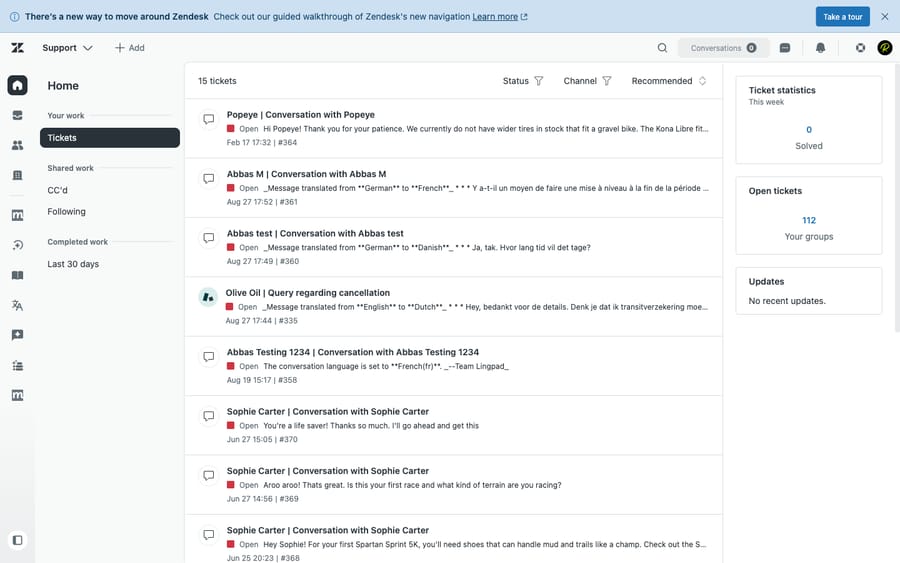
How we compared: Zendesk pricing is checked against its official page (24 September 2026). Kustomer's pricing page publishes no numbers ("we don't post one-size-fits-all pricing"), so every Kustomer figure below is third-party and labelled as such. We ran Zendesk hands-on in a live test account (screenshot below). Review scores come from G2, Capterra and TrustRadius as observed in June 2026. Macha is our own product, and we flag that wherever it comes up.
How do Zendesk and Kustomer price, and which costs more?
Zendesk (per agent a month, billed annually): Support Team $19, Suite Team $55, Suite Professional $115, Suite Enterprise contact sales. Copilot is $50 per agent on Suite Professional and above. AI agents are billed per automated resolution, and Zendesk's page lists the rate: $1.50 committed and $2.00 pay-as-you-go. The same page includes 5 automated resolutions per agent a month on Support Team and Suite Team and 10 on Suite Professional (up to 10,000 a year); Zendesk's help center describes this as a monthly AI allowance per seat ($2, $5 or $10 depending on plan since 18 May 2026, capped at $5,000 a year). Annual billing is 20% off the monthly price. Source: Zendesk pricing.
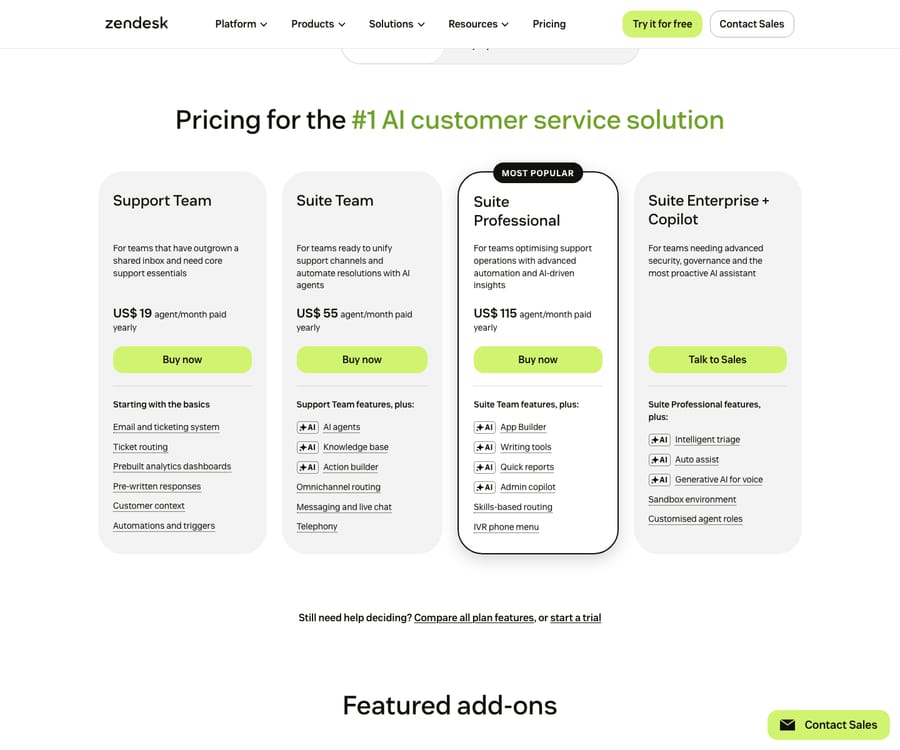
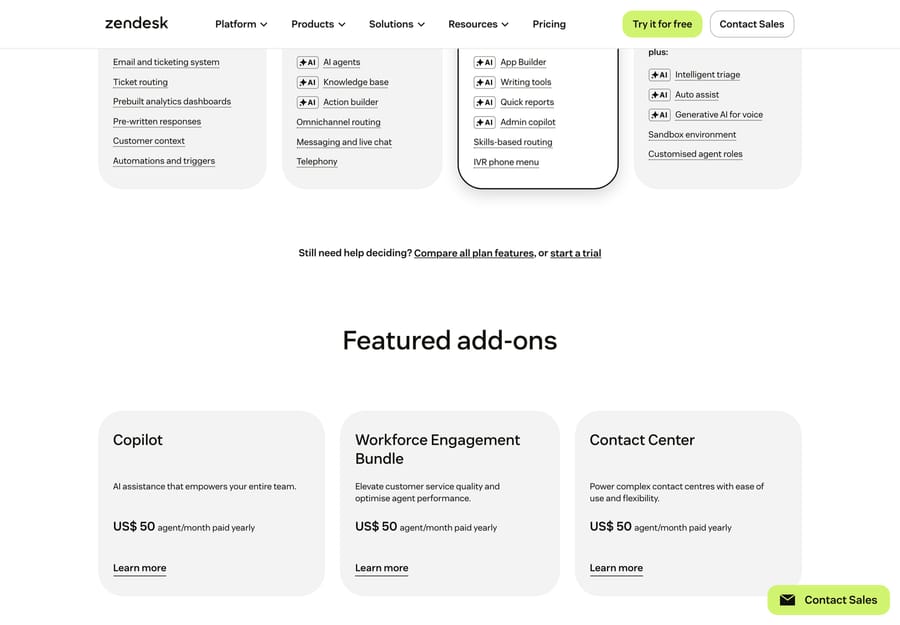
Beyond the seat plans, Zendesk sells add-ons priced per agent on top of your base plan. On 24 September 2026 the page listed Copilot and the Workforce Engagement Bundle at $50 each and Contact Center at $83:
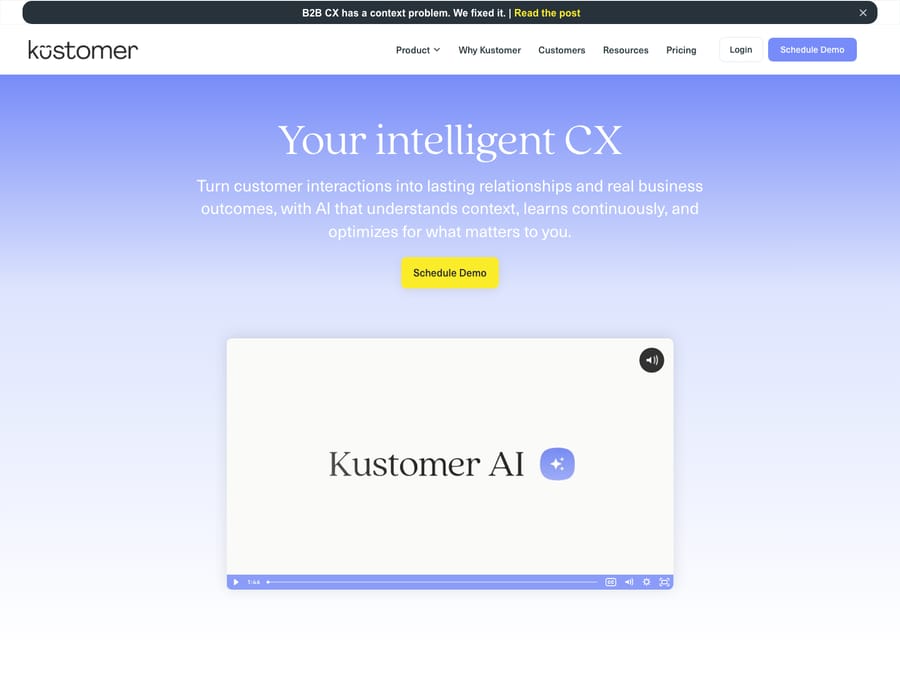
Kustomer: the pricing page now shows an ROI calculator and a sales form, not prices. Kustomer sells two packages, "Kustomer AI" and "Kustomer AI + Platform", both on annual contracts quoted by sales. The figures that do circulate come from third parties, so treat them as estimates and confirm with a quote:
- Base platform: not publicly disclosed, per eesel's May 2026 breakdown. Older trackers quoted Enterprise around $89 a seat and Ultimate around $139 with an 8-seat minimum, plus a per-conversation option from about $0.35; we could not confirm any of those against a current Kustomer source.
- AI Agents for Customers: about $0.60 per engaged conversation.
- AI Agents for Reps: about $40 per user a month.
- Other add-ons: voice from $0.02 a minute, HIPAA compliance $25 per user, data storage overage $50 per GB.
The contrast: Zendesk has a low entry point and a published ladder, but cost climbs with Copilot, per-resolution AI and WFM/QA add-ons. Kustomer gives you nothing to compare until you talk to sales, and its AI is priced separately on top of whatever platform deal you sign.
When can usage-based pricing beat seats?
If Kustomer offers you a per-conversation deal, the maths is simple: divide the seat price you were quoted by the per-conversation rate. On the older tracker figures ($89 to $139 a seat against $0.35 to $0.50 a conversation), the break-even sat around 250 to 280 conversations per agent a month. Above that, per-conversation pricing wins, and it also helps seasonal teams that would otherwise pay for idle seats. Zendesk has no per-conversation seat equivalent. Run the sum on your own quote and your real conversations-per-agent ratio, not on these old numbers.
Which platform wins on each feature?
| Capability | Winner | Why |
|---|---|---|
| Data model | Kustomer | One unified customer timeline vs ticket sprawl, with full context on one record |
| Omnichannel at scale | Tie (Kustomer edge) | Both cover all channels; Kustomer threads them into one timeline natively |
| Automation / workflows | Zendesk | 15+ years of mature triggers, automations, macros, skills-based routing, SLAs |
| Native AI | Zendesk (breadth) / contested | Zendesk's AI is broader and more productized; Kustomer's is better grounded in the timeline but narrower |
| Knowledge base & self-service | Zendesk | Guide is a mature multi-brand help center + community |
| Reporting / analytics | Zendesk (out-of-box) / Kustomer (custom) | Explore is polished for ops metrics; Kustomer is flexible at the customer-object level but a steeper build |
| Integrations | Zendesk (decisive) | 1,800+ apps, partners and integrations vs Kustomer's much smaller directory |
| Voice | Zendesk | More mature Talk/Contact Center; Kustomer Voice is newer and pay-as-you-go |
| Agent workspace / efficiency | Kustomer | Timeline view means less tab-switching and full context in one pane |
| Scalability (high volume) | Tie (different shapes) | Zendesk for structured queues + strict SLAs; Kustomer for relationship-driven, repeat-contact CX |
What are the strengths and weaknesses of each?
Zendesk strengths: lowest entry price; published tiers; 1,800+ apps, partners and integrations; mature KB, voice, WFM/QA; proven from SMB to enterprise; deep routing, SLA and automation; a large talent pool. Zendesk weaknesses: the ticket-centric model fragments customer context; costs climb with add-ons (Copilot gated to Professional and above, per-resolution AI, WFM/QA); AI spend rises with every automated resolution; it can feel heavy.
Kustomer strengths: the unified customer-timeline data model (a genuine differentiator); CRM-native context; a clean modern UI; strong omnichannel threading; built for high-volume DTC. Kustomer weaknesses: no public pricing and annual contracts only, so no cheap pilot; a small integration directory; thinner KB/self-service and voice; a smaller ecosystem and talent pool; AI add-ons priced separately that can stack.
What do real users say about Zendesk and Kustomer?
The headline ratings flatter both, but the base is very different. Zendesk has thousands of reviews; Kustomer's count is a fraction of that, so its averages move more on a handful of opinions. (Observed June 2026.)
| G2 | Capterra | Other | |
|---|---|---|---|
| Zendesk | 4.3 / 5 (~6,700) | 4.4 / 5 (4,079) | TrustRadius 8.7/10 |
| Kustomer | 4.5 / 5 (~513) | 4.6 / 5 (79)* | Smaller base across every site |
*Kustomer's review base is small: 79 on Capterra and a few hundred on G2, against Zendesk's thousands. Treat its slightly higher averages as directional. A small base is easier to skew and tends to over-represent enthusiasts.
- Zendesk: reviewers praise feature breadth and everyday omnichannel usability, while the recurring knocks are pricing/add-on creep and the cost-to-value ratio for leaner teams. Praise: "a very good tool to provide customer support in an omnichannel way, it's easy to use" (Pablo T., CX Consultant, Capterra, Dec 2025). Criticism: "packed full of features… [but] for organizations with a tighter budget, it might be hard to justify the price" (Alexandra V., People Business Partner, Capterra, Mar 2026).
- Kustomer: fans love the unified customer timeline and the automation built around it, and say little context slips through the cracks. The main criticisms are complexity and the learning curve and cost gating (advanced automation and reporting behind higher tiers), plus a sense the product has been slow to evolve. Praise: "the best application for customer service and CRM" (Natalia Isabel R., Customer Experience, Capterra, Feb 2025). Criticism: "[it] seems somewhat stagnant in terms of API updates" (Aaron F., SVP of Engineering, Capterra, Jan 2025).
The pattern tracks the rest of this comparison: Zendesk users grumble about what they pay, while Kustomer users grumble about what it takes to set up and master, and they do so from a much thinner review base.
Who is each platform for?
- Kustomer → high-volume omnichannel B2C/DTC or e-commerce brands where customers contact you repeatedly and context continuity drives CSAT; teams that want a CRM-style unified customer view at the center of support; orgs with high conversations-per-agent or seasonal spikes that can negotiate usage-based terms, and that can sign an annual contract.
- Zendesk → broad, general-purpose teams (SMB to enterprise) that want the safest, most extensible, best-supported option; high-volume structured queues with strict SLAs and skills routing; teams that rely on a deep integration ecosystem; anyone wanting a low entry price and a gradual scale path.
Is Kustomer owned by Meta?
No, not since 2023. Meta (Facebook) agreed to buy Kustomer in 2020 in a deal reported at about $1 billion and closed it in February 2022. It then divested Kustomer in May 2023 during its "year of efficiency", selling it back to the founders and original venture backers at a reported valuation of about $250 million. Kustomer is now an independent, venture-backed company again. If you're evaluating it in 2026, you're buying from an independent vendor, which matters for procurement and for the smaller-vendor risk you weigh against Zendesk's scale.
Can either platform resolve tickets with AI on its own?
Both vendors' native AI is mainly assistive plus first-line deflection. Zendesk's is the broader product line: Copilot, AI agents billed per automated resolution, and intelligent triage. Kustomer's AI is grounded in the unified timeline and now sold as AI Agents for Customers and AI Agents for Reps. Both charge for AI as stacking add-ons (Zendesk per resolution; Kustomer per engaged conversation plus per rep).
An external AI agent layer is the other route, if you stay on a help desk it supports. A layer like Macha (our product) runs on Zendesk, Freshdesk, Gorgias, Front, HubSpot or Intercom. Kustomer is not on that list today, so this route applies to the Zendesk side of the decision. On Zendesk, Macha reads your KB and past tickets and resolves tickets inside the help desk you keep, priced per ticket (one conversation charged once) from $299 a month for 750 tickets, with setup and monitoring by the Macha team included. It's an automation layer on top of your help desk, not a replacement. The honest caveat: a layer is another vendor to manage, it only resolves as well as the knowledge you connect, and per-ticket pricing adds up at high volume. (More: native AI vs. an AI layer.)
What should you know before switching?
The hard part is data-model translation. Moving to Kustomer means re-architecting from tickets to customer objects and timelines: historical tickets get mapped onto customer records, and routing and automation get rebuilt around events rather than ticket states. Moving to Zendesk from Kustomer means flattening rich timelines into tickets, with some relationship context lost. Also weigh:
- Integrations: leaving Zendesk's 1,800+ ecosystem for Kustomer's smaller directory may strand integrations and require custom API work.
- KB and macros rarely port cleanly, so plan to rebuild.
- Reporting baselines reset (ticket-based vs conversation/customer-based metrics).
- Commitment friction: Kustomer quotes annual contracts only, so there's no cheap pilot path. Get the full quote, including AI add-ons, before committing.
Frequently asked questions
Is Kustomer owned by Meta/Facebook? No. Meta acquired Kustomer (closed 2022) but divested it in May 2023; it's now an independent, venture-backed company again.
How is Kustomer different from Zendesk? Data model. Zendesk is ticket-centric (one customer can have many tickets); Kustomer organizes everything around a single unified customer timeline, CRM-style.
Is Kustomer cheaper than Zendesk? Almost certainly not at entry. Zendesk starts at $19 per agent a month (Support Team) or $55 (Suite Team), billed annually. Kustomer publishes no prices, sells annual contracts through sales, and prices AI separately at about $0.60 per engaged conversation. A usage-based Kustomer deal can win for teams with very high conversations per agent.
Which is better for high-volume e-commerce CX? Kustomer's unified timeline suits high-volume, relationship-driven DTC; Zendesk suits structured, SLA-driven queues and anyone needing the bigger ecosystem.
Can I add autonomous AI to either? On Zendesk, yes: an AI agent layer like Macha adds autonomous resolution on top, priced per ticket (one conversation, charged once) with no migration. Macha does not connect to Kustomer today, so on Kustomer you would use its own AI Agents for Customers.
Which should you choose?
Choose Kustomer if a unified customer timeline is the point: high-volume, omnichannel, relationship-driven CX where context continuity matters, and you're ready for a sales-quoted annual contract. Choose Zendesk if you want a published entry price, the deepest integration ecosystem, mature voice/WFM, and a gradual scale path. Both native AIs lean assistive; on Zendesk, an AI layer on top is one way to get autonomous resolution without changing help desks.
Staying on Zendesk and want autonomous AI on top? See how Macha layers AI agents over your help desk, priced per ticket. $50 of free usage, no credit card required. Start Trial.