Shopify
 Stripe
 Slack
Slack Notion
 Google Workspace
 Confluence

Zendesk vs. Salesforce Service Cloud (2026): Which Costs Less and Who Should Pick Each?


Zendesk is the cheaper, faster choice for support-first teams at $55 an agent a month on Suite Team, while Salesforce Service Cloud starts its full Core edition at $195 a user and wins when your sales team already lives in Salesforce. Salesforce now sells the product as Agentforce Service, with repriced Core, Advanced and Max editions and AI billed by Flex Credits.
Key takeaways
- Zendesk Suite Team costs $55 an agent a month billed annually, while Salesforce's full Core Service Cloud edition costs $195 a user before any add-ons.
- Salesforce Service Cloud editions now run Starter Suite $25, Pro Suite $100, Core $195, Advanced $395 and Max $550 a user a month, billed annually.
- Salesforce Core plus the $75 Digital Engagement add-on comes to $270 a user a month at list, before Service Cloud Voice, implementation or Agentforce.
- Agentforce bills Flex Credits at $0.005 each, so a standard 20-credit action costs $0.10, and the $2-per-conversation model is now sold only to existing customers.
- Zendesk AI agents bill $1.50 per automated resolution on a committed pack or $2.00 pay-as-you-go, and Copilot is a $50-per-agent add-on.

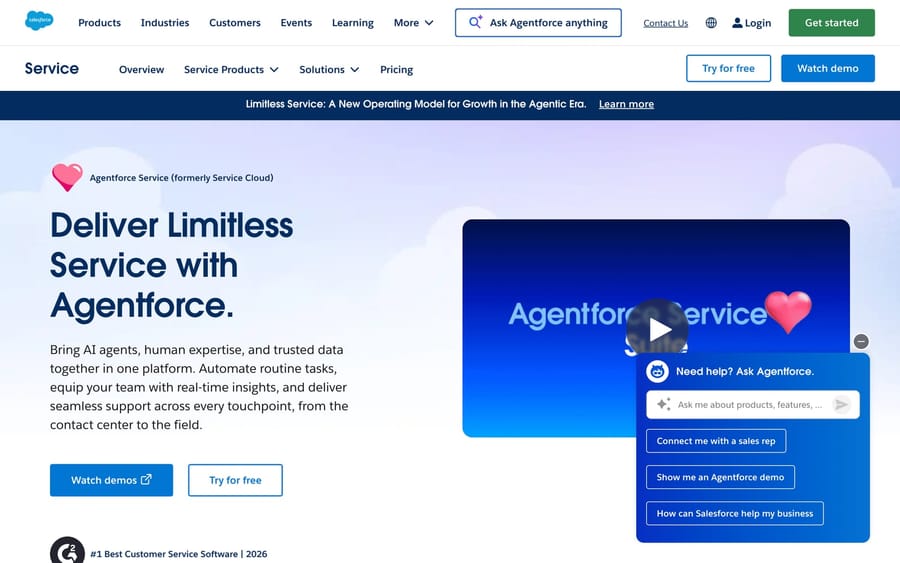
Zendesk costs less and goes live faster: Suite Team is $55 an agent a month against $195 a user for Salesforce's Core Service Cloud edition, before Salesforce's $75 Digital Engagement add-on. Salesforce wins when you already run it for sales, because cases sit on the same customer record as deals, marketing and billing, and it has the higher customization ceiling if you have admins to use it. Salesforce now sells Service Cloud as Agentforce Service, and its editions were repriced: Core, Advanced and Max replace the old Enterprise, Unlimited and Einstein 1 lines on the pricing page (checked 24 September 2026).
| Zendesk | Salesforce Service Cloud | |
|---|---|---|
| Entry price | $19 (Support Team), $55 (Suite Team) per agent/mo, annual | $25 (Starter Suite) per user/mo, annual |
| Main tiers | Suite Professional $115; Enterprise by quote | Pro Suite $100, Core $195, Advanced $395, Max $550 |
| Omnichannel | Included in Suite plans | Digital Engagement +$75 a user on Core and Advanced |
| AI pricing | Copilot $50/agent; $1.50 committed or $2.00 pay-as-you-go per automated resolution | Flex Credits $0.005 each (20 per action, $0.10); $2 per conversation for existing customers only |
| Setup | Days to weeks, no admin team | Months, admins or a partner |
| Best for | Support-first teams | Companies already on Salesforce |
Which should you pick: Zendesk or Salesforce Service Cloud?
| If you are… | Pick |
|---|---|
| A support-first team that wants value in days, not months | Zendesk |
| An SMB or mid-market CX team without a Salesforce admin | Zendesk |
| E-commerce/DTC wanting native omnichannel + voice | Zendesk |
| Already running Salesforce (Sales Cloud / Data Cloud) | Salesforce Service Cloud |
| Needing sales + service on one customer record | Salesforce Service Cloud |
| A large/regulated enterprise with admins & consultants | Salesforce Service Cloud |
| Mainly chasing better autonomous AI | Compare the native options, or add an AI layer on Zendesk (below) |
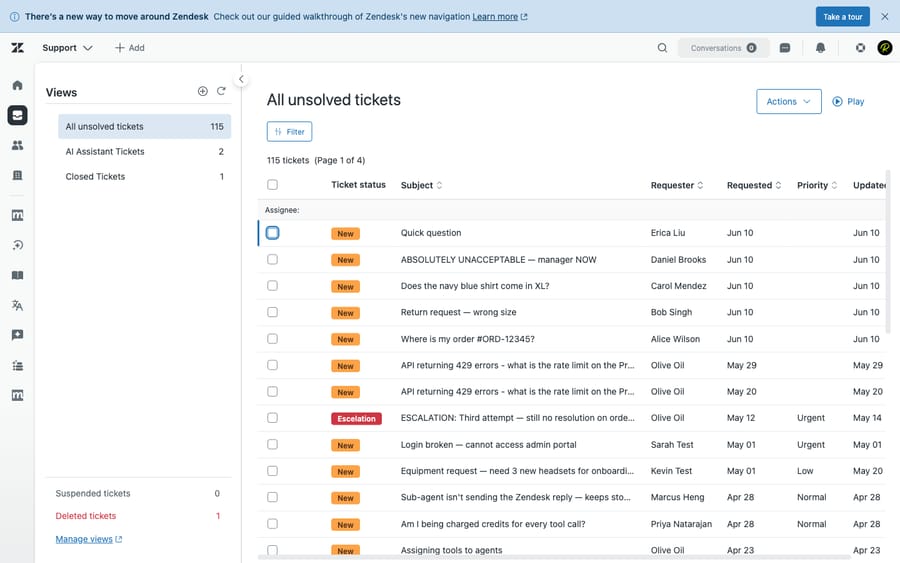
How we compared: both vendors' prices were re-read from their own pricing pages on 24 September 2026. Features are checked against the products, and we ran Zendesk hands-on in a live test account (screenshot below). User sentiment comes from G2, Capterra, TrustRadius and Gartner reviews read in June 2026. Macha is our own product, and we flag that where it comes up.
How much do Zendesk and Salesforce Service Cloud really cost?
Zendesk (per agent/month, annual): Support Team $19 ($25 monthly), Suite Team $55, Suite Professional $115, Suite Enterprise by quote. Copilot is a $50-per-agent add-on on Professional and higher. AI agents are included on every plan and billed per automated resolution: $1.50 on a committed pack or $2.00 pay-as-you-go. Source: Zendesk pricing, checked 24 September 2026.
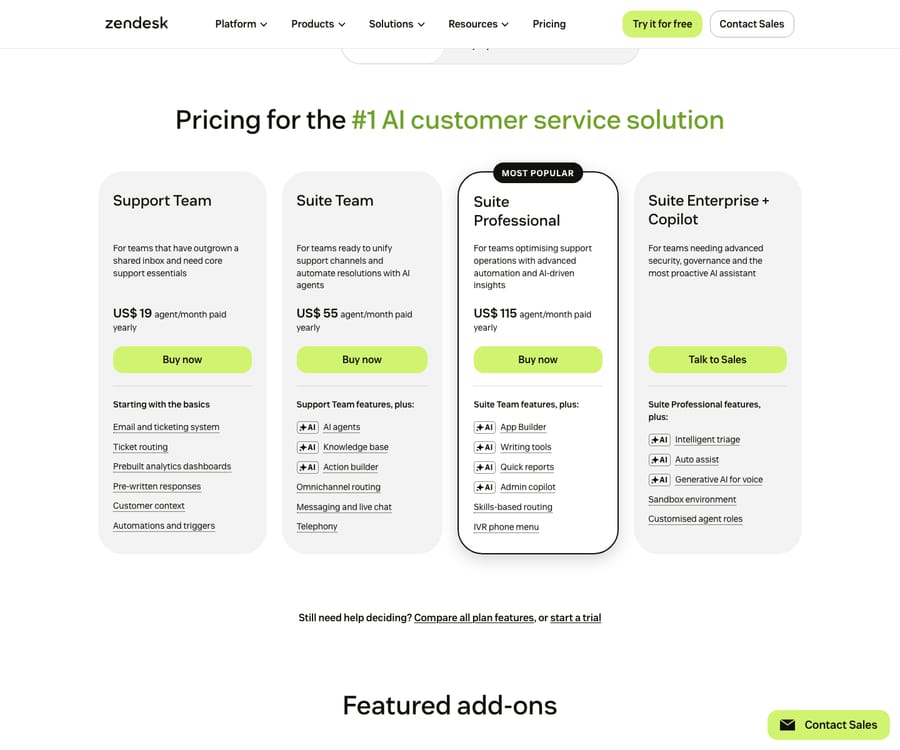
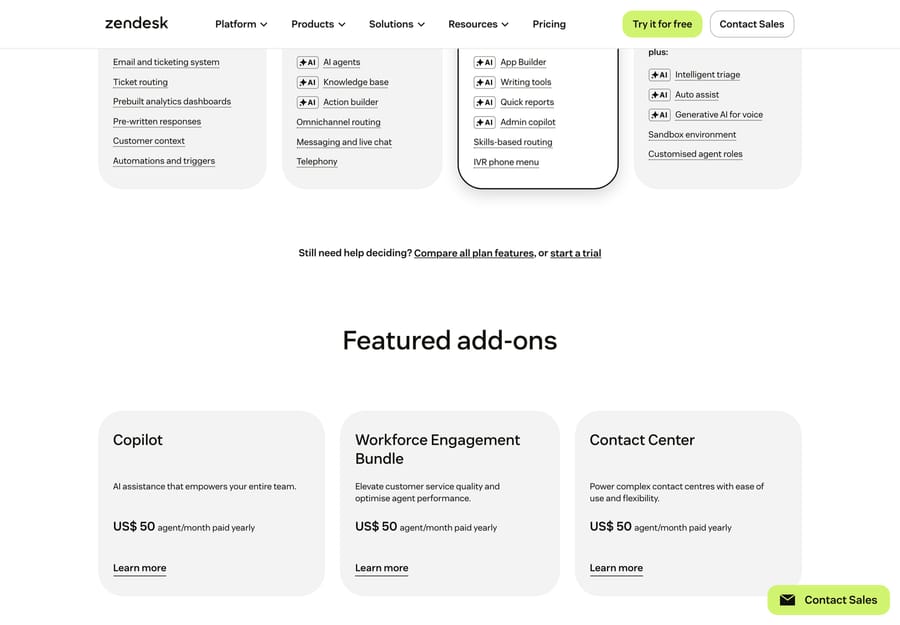
Beyond the seat plans, Zendesk sells its AI and contact-center tools as per-agent add-ons on top of the base plan:
Salesforce Service Cloud editions (per user/month, annual, checked 24 September 2026):
| Edition | Price | Notes |
|---|---|---|
| Starter Suite | $25 | Basic case management |
| Pro Suite | $100 | SMB, light customization |
| Core | $195 | The full Service Cloud tier: case management, Flow automation, API |
| Advanced | $395 | Adds AI-powered channels, data protection and more insight |
| Max | $550 | Includes 2.75M Flex Credits per org per year for Agentforce |
The pricing page cards now show Core, Advanced and Max. The same page's FAQ still lists the older names Enterprise, Unlimited and Agentforce 1 Service, so expect both sets in quotes and older reviews. Our earlier version of this table showed Enterprise at $165 and Unlimited at $330 from aggregators; the list prices on Salesforce's own page are higher.
The edition price isn't the effective price, because a real deployment needs add-ons:
- Digital Engagement (messaging, social, WhatsApp, Einstein Bots): +$75 a user on Core and Advanced. Zendesk includes these channels in Suite.
- Service Cloud Voice: priced separately on Salesforce's Voice pricing page and dependent on your telephony provider. Zendesk's voice is built in.
- Knowledge (read-write): +$75 a user on Core.
- Implementation: usually partner-led and quoted per project, plus ongoing admin or developer headcount.
Do the arithmetic at list price. Core plus Digital Engagement is $270 a user a month before Voice, Knowledge or implementation; on Advanced it's $470. For a 20-seat team that's $5,400 or $9,400 a month, against $1,100 on Zendesk Suite Team or $2,300 on Suite Professional. Negotiated discounts narrow the gap, but list prices are the only public numbers, so get both quotes at your seat count.
How does Agentforce pricing work?
Salesforce's AI, Agentforce, is billed by consumption rather than a flat seat fee (Agentforce pricing, checked 24 September 2026):
- Flex Credits at $500 per 100,000, or $0.005 each. A standard action is 20 credits ($0.10); a voice action is 30 ($0.15).
- The flat $2 per conversation model, cheaper once a conversation needs more than about 20 actions, is now marked "for existing Agentforce Conversations customers" only. New buyers get Flex Credits.
- The token rule: Salesforce's help article on Flex Credits billable usage counts one action per 10,000 tokens, so an action that uses 20,001 tokens bills as 3 actions ($0.30). The long, hard tickets you most want automated are the ones that multiply.
- Per-user options: the Agentforce add-on at $125 a user, and Agentforce 1 editions from $550 a user.
Zendesk's model is $50 an agent for Copilot plus $1.50 to $2.00 per automated resolution. Both vendors make autonomous AI a real line item on top of seats, and both are hard to forecast: Salesforce by how many tokens your conversations burn, Zendesk by how many conversations its AI counts as resolved. Each vendor earns more as usage climbs, so model it at your real ticket complexity, not the headline rate.
Which is better, feature by feature?
| Capability | Winner | Why |
|---|---|---|
| Ticketing / case mgmt & agent console | Toss-up | Zendesk is cleaner and faster to learn; Salesforce's Lightning console is more powerful but heavier |
| CRM unification (case on the customer record) | Salesforce (decisive) | Cases live on the same record as sales, marketing and billing; Zendesk's CRM is a bolt-on |
| Omnichannel | Zendesk | Native unified inbox; Salesforce charges +$75 a user for Digital Engagement |
| Automation | Salesforce at ceiling; Zendesk for ease | Zendesk triggers are point-and-click; Salesforce Flow is far more capable but needs admin skill |
| Native AI | Split | Zendesk AI works on day one; Agentforce is CRM-grounded but needs configuration and consumption billing |
| Knowledge & self-service | Slight Zendesk | Help center is strong and easy; Salesforce Knowledge needs more setup and a read-write add-on on Core |
| Reporting / analytics | Salesforce | CRM Analytics and Tableau go deeper than Explore for cross-functional reporting |
| Marketplace / ecosystem | Salesforce | AppExchange is far larger than Zendesk's Marketplace |
| Ease of setup & admin overhead | Zendesk (decisive) | Days to weeks with minimal IT; Salesforce typically needs admins or consultants and months |
| Voice | Zendesk | Voice built in; Service Cloud Voice is a paid add-on |
| Customization / scalability ceiling | Salesforce | Highest ceiling for complex, regulated, multi-cloud enterprises (FedRAMP, HIPAA, data residency) |
What are the strengths and weaknesses of each?
Zendesk strengths: fastest deployment; agent UX that's easy to learn; native omnichannel and voice; built for support; published pricing; AI that works on day one; lower total cost. Zendesk weaknesses: shallower CRM view; smaller app ecosystem; less deep analytics; AI costs that depend on resolution volume; lower customization ceiling; Enterprise tier by quote only.
Salesforce Service Cloud strengths: one customer record across sales and service; the deepest customization and automation (Flow); strong analytics; the largest ecosystem; enterprise compliance and data residency. Salesforce Service Cloud weaknesses: steep learning curve; long, expensive implementation; needs admins or consultants; fragmented add-on pricing; consumption-based AI that's hard to forecast; overkill for support-first SMBs.
What do real users say?
Ratings are close on the surface, but the review bases and the complaints differ. (Read in June 2026; the review sites block automated re-checks.)
| G2 | Capterra | Other | |
|---|---|---|---|
| Zendesk | 4.3 / 5 (~6,000+) | 4.4 / 5 (4,081) | TrustRadius 8.7/10 |
| Salesforce Service Cloud | ~7,300 reviews (now listed under "Agentforce Service")* | 4.5 / 5 (824) | "Top Rated" on TrustRadius |
*Salesforce's G2 listing was renamed "Agentforce Service" and now blends in AI-agent sentiment, so its recent star average is hard to isolate. Treat rating gaps as directional. Salesforce's Capterra base is also much smaller (824 against Zendesk's 4,081).
- Zendesk is praised for feature breadth and everyday usability: "strong value for money considering the wide range of features" (Ifra S., Zendesk developer, Capterra, Dec 2025). The two recurring complaints are add-on and pricing creep and Zendesk's own support quality: "Their support is some of the worst I've ever experienced and keeps getting worse" (Katie Y., Head of Customer Success, Capterra, Mar 2025).
- Salesforce Service Cloud is praised for the unified customer record: "Full customer history alongside active cases made conversations feel informed" (Riley R., Legal Project Analyst, Capterra, Feb 2026). The main criticisms are complexity and cost: "Customization [is] powerful but overwhelming if not used to Salesforce; pricing high" (Harshul S., Sr. Tech Support Specialist, Capterra, Mar 2026), with others citing a steep learning curve and a total cost well above the sticker. Reddit threads often describe a "Jenga tower" where one change breaks dependencies.
The pattern matches the pricing: Zendesk users complain about what they pay; Salesforce users complain about what it takes to run it.
Who is each platform for?
- Zendesk: support-first companies that want value in days, from SMB to CX-led enterprises that put agent experience and omnichannel ahead of deep CRM customization; teams without a Salesforce admin; e-commerce and DTC.
- Salesforce Service Cloud: companies already on Salesforce (Sales Cloud, Data Cloud); businesses that need sales and service on one CRM record; large, complex or regulated enterprises (financial services, healthcare, public sector) with the budget and admin staff to use it.
The deciding question is usually simple: are you already a Salesforce shop? If yes, the shared record is worth the overhead. If not, Zendesk gets you a better support operation faster and cheaper.
How hard is it to migrate between them?
Moving between the two is a project, not a toggle. The data models differ (Zendesk tickets against Salesforce's Case, Account and Contact objects), so mapping takes work.
- Zendesk to Salesforce: usually consultant-led. You rebuild automations as Flows, recreate routing and import case history; budget weeks to months.
- Salesforce to Zendesk: generally faster. The work is extracting from the Salesforce data model and rebuilding reports, and agents pick up Zendesk's simpler UI quickly.
- Both directions: macros and triggers don't port to Flows or back, knowledge bases need re-importing, SLAs and business hours get reconfigured, integrations (telephony, billing) are re-wired, and contract or credit commitments can lock spend. Plan agent retraining and a parallel run.
None of this is a reason not to switch, but "the data moves fine" hides where the effort and cost sit.
Should you buy AI from your help desk or add a separate layer?
Both vendors are pushing AI hard: Zendesk AI agents and Copilot, and Salesforce's Agentforce, grounded in CRM data. Both are capable. For a team that already owns one of these platforms, both carry the same two frictions: AI is a real cost on top of seats (Zendesk's $50 an agent plus per-resolution fees; Salesforce's credits, plus Data Cloud for the best results), and it's tied to the vendor's data model. Agentforce answers best when your data is already in Data Cloud.
If you run Zendesk, you don't have to buy autonomous resolution from Zendesk. An independent AI agent layer sits on top of the help desk and bills per ticket: one conversation, charged once however many messages it takes, rather than per credit or per vendor-defined resolution. Macha is one such layer. It isn't a CRM or a help desk replacement. It connects to Zendesk, Freshdesk, Gorgias, Front, Intercom and HubSpot, not to Service Cloud, so on Salesforce, Agentforce is the native route. Macha's pricing is one plan by volume, $299 a month for 750 tickets up to $3,999 for 10,000, with setup and monitoring by the Macha team included. The caveat: a layer is still another vendor to manage, it only resolves as well as the knowledge you connect, and per-ticket pricing adds to your stack rather than replacing it. (More: native AI vs. an AI layer and the best AI help desk software.)
Frequently asked questions
Is Zendesk cheaper than Salesforce Service Cloud? Almost always, once you count the real stack. Zendesk's omnichannel is included at $55 to $115 an agent. Salesforce's Core edition plus Digital Engagement is $270 a user at list before Voice, implementation and admins. Confirm both with quotes, since Salesforce discounts on volume.
Should I use Service Cloud if I already use Salesforce? Usually yes; that's its strongest case. Cases on the same customer record as sales and marketing are a real advantage if you're already invested in Salesforce.
Which is easier to set up? Zendesk, clearly: days to weeks with minimal IT. Salesforce Service Cloud typically takes months and needs admins or consultants.
How does Agentforce pricing work vs. Zendesk AI? Agentforce bills Flex Credits at $0.005 each (20 credits, or $0.10, per standard action); the $2-per-conversation option is now for existing customers only. Salesforce counts an extra action for every 10,000 tokens. Zendesk charges $50 an agent for Copilot plus $1.50 to $2.00 per automated resolution. Both add real cost to seats and both are hard to forecast, so model them at your volume.
Can I get autonomous AI without committing to either platform's AI? On Zendesk, yes: an AI agent layer like Macha adds agents on top, billed per ticket, with no migration. Macha doesn't connect to Salesforce Service Cloud, so on Salesforce the practical choice is Agentforce or another Salesforce-native tool.
Is Service Cloud still called Service Cloud? Salesforce now markets it as Agentforce Service, and its G2 listing carries that name. The pricing page still lives under salesforce.com/service and sells the same editions, now named Starter Suite, Pro Suite, Core, Advanced and Max.
How should you make the final call?
Price your real stack before you compare features. For 20 seats, that's $1,100 to $2,300 a month on Zendesk Suite against $5,400 to $9,400 at list for Salesforce Core or Advanced with Digital Engagement, before AI on either side. Choose Zendesk if you want a strong support operation running fast with native omnichannel and no admin team. Choose Salesforce Service Cloud if you're already on Salesforce or need sales and service on one CRM record, and you have the budget and people to run it. Keep the AI decision separate and price it at your own ticket volume.
Running Zendesk and want autonomous AI billed per ticket? See how Macha adds AI agents to the help desk you already use. $50 of free usage, no credit card required. Start Trial.