Shopify
 Stripe
 Slack
Slack Notion
 Google Workspace
 Confluence

Zendesk vs Front (2026): Which Should Your Support Team Pick?


Front is a collaborative shared inbox priced at $25 to $105 a seat per month, while Zendesk is structured ticketing priced at $19 to $115 an agent. The right pick depends on whether your team works like a shared email client or a high-volume ticket queue.
Key takeaways
- Front suits smaller, relationship-driven teams that want a collaborative shared inbox, while Zendesk suits high-volume, structured support that needs self-service, routing and automation.
- Front prices per seat at $25 for single-channel Starter up to 10 seats, $65 for Professional up to 50 seats, and $105 for unlimited-seat Enterprise with Copilot included.
- Front's Autopilot AI bills $0.89 per resolution ($0.05 triage, $0.39 handoff), while Zendesk bills AI agents per automated resolution and sells Copilot at $50 per agent.
- Zendesk cites 1,500+ apps in its marketplace, while Front says it integrates with 160+ tools, and Front's knowledge base is its biggest gap against Zendesk's help center.
- A 20-agent team on Zendesk Suite Professional pays $2,300 a month in seats before the Copilot add-on adds another $1,000.

Pick Front if you're a smaller, relationship-driven team that wants a collaborative shared inbox ($25 to $105 a seat per month, billed annually); pick Zendesk if you run high-volume, structured support that needs deep self-service, routing and automation ($19 to $115 an agent per month, Enterprise quote-only). Both charge extra for AI on top of seats.
| If you are… | Pick |
|---|---|
| A team that wants a collaborative shared inbox with a human touch | Front |
| Ops / logistics / B2B / professional services, email-heavy | Front |
| Under ~50 seats and value simplicity over depth | Front |
| Running high-volume, structured support (100s of tickets/day) | Zendesk |
| Needing a strong knowledge base and self-service deflection | Zendesk |
| Scaling to 100+ agents with deep automation and voice | Zendesk |
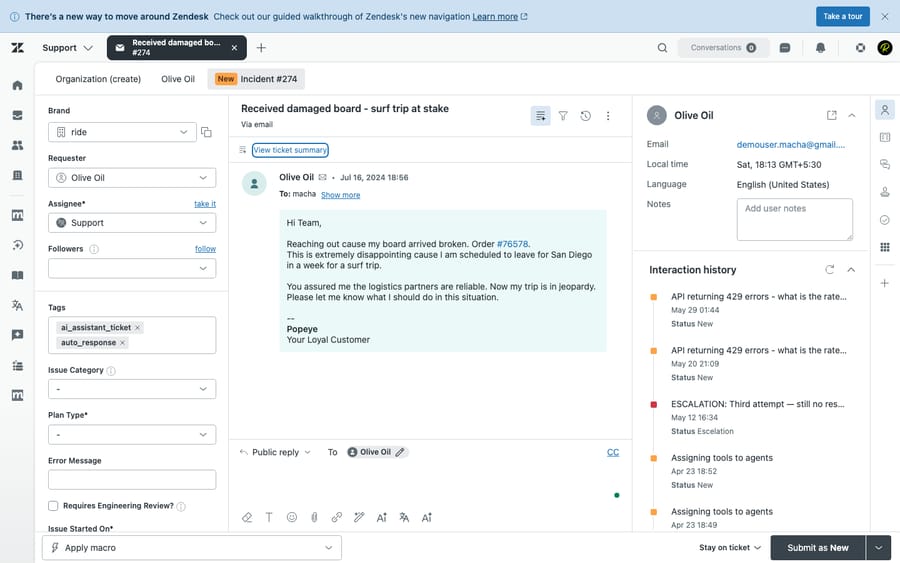
How we compared: prices were checked against Zendesk's pricing page and Front's pricing page on 24 September 2026. We ran Zendesk hands-on in a live test account (screenshot below). User sentiment comes from G2, Capterra and TrustRadius reviews. Macha is our own product, and we flag that wherever it comes up.
How much do Zendesk and Front cost in 2026?
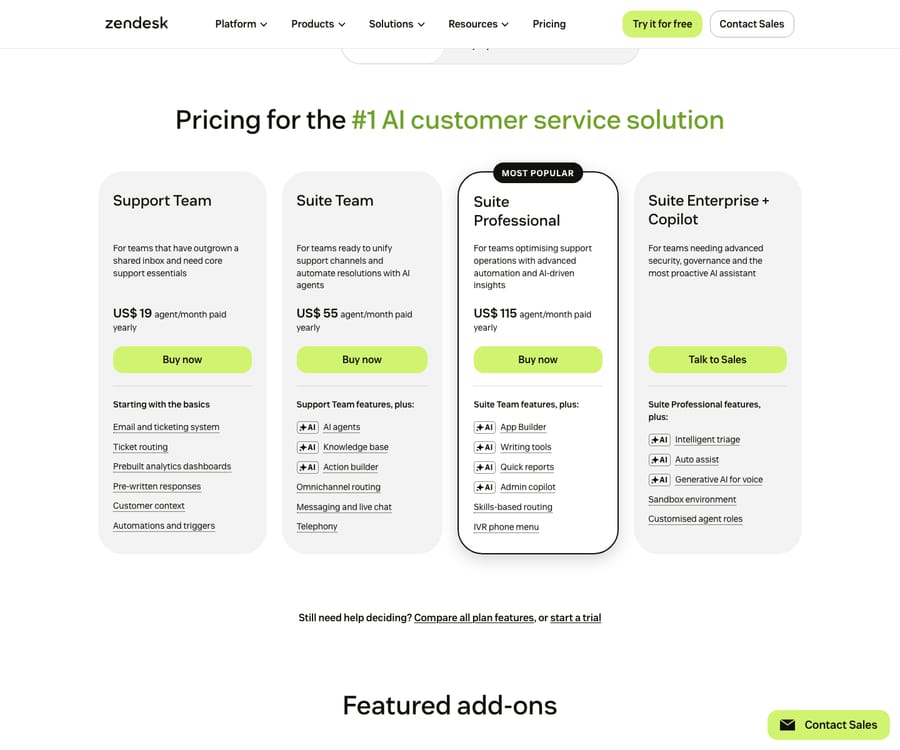
Zendesk Suite (per agent/month, annual): Support Team $19, Suite Team $55, Suite Professional $115, Enterprise contact sales. Copilot is a $50/agent add-on on Suite Professional and above. AI agents are included and billed per automated resolution at $1.50 committed / $2.00 pay-as-you-go, the rates on Zendesk's pricing page. Source: Zendesk pricing.
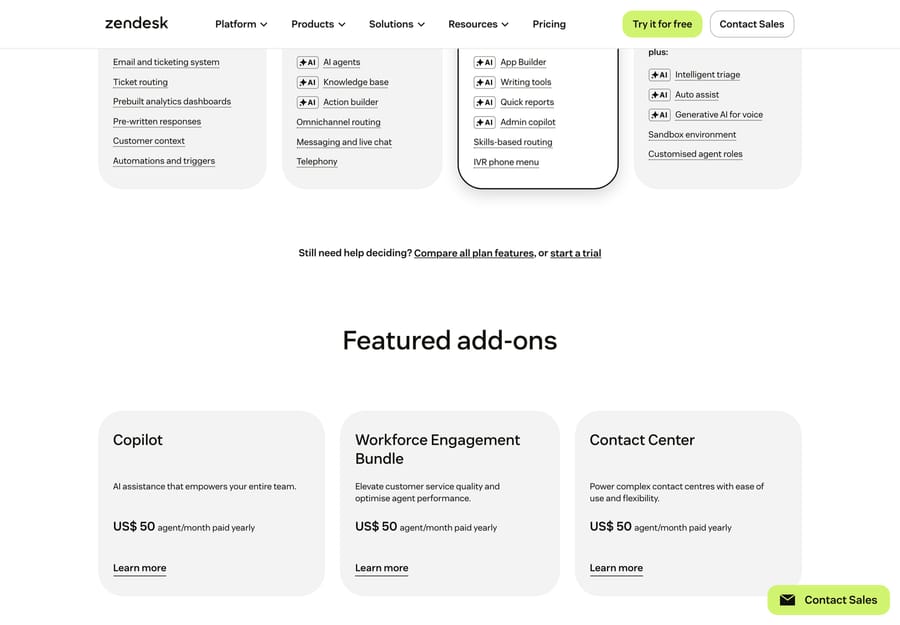
Beyond the per-seat plans, Zendesk sells its featured add-ons per agent on top of the base plan: Copilot at $50, the Workforce Engagement Bundle at $50 and Contact Center at $83.
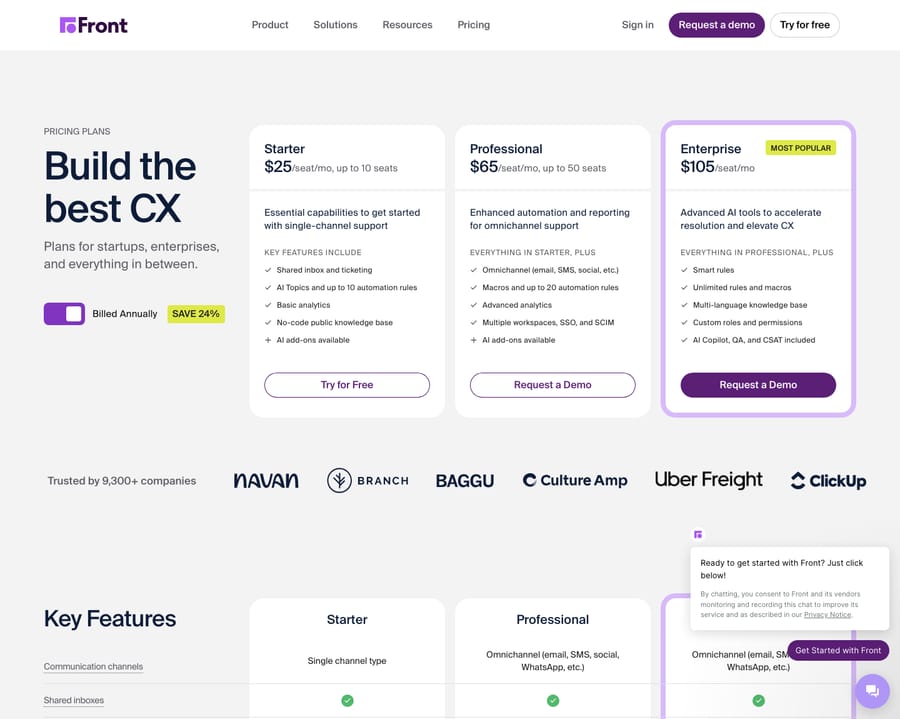
Front (per seat/month, annual) has three tiers:
| Plan | Per seat | Seats | Channels |
|---|---|---|---|
| Starter | $25 | up to 10 | single channel type (email or chat or SMS), up to 10 automation rules |
| Professional | $65 | up to 50 | omnichannel, macros, advanced analytics, up to 20 rules |
| Enterprise | $105 | unlimited | unlimited rules; Copilot, Smart QA and Smart CSAT included |
Source: Front pricing. Front's free trial runs 14 days on Professional features with no credit card. Front consolidated from its old four-tier plan ($19/$59/$99/$229), so articles still citing those numbers are out of date.
Three things decide the real bill:
- Front's entry is higher than Zendesk's ($25 vs $19), and Starter is single-channel and capped at 10 seats. Omnichannel or a growing team pushes you to Professional ($65) fast.
- Both meter AI on top of seats. Front's Autopilot (autonomous resolution) bills each conversation once at the highest level it reaches: $0.05 for triage, $0.39 for a handoff and $0.89 for a resolution (as of October 2026, per Front's Autopilot pricing), so a resolved conversation costs $0.89. Front Copilot is $20/seat, included at Enterprise; Smart QA and Smart CSAT are Enterprise only as of October 2026.
- Zendesk's AI stacks. The $50/agent Copilot add-on plus a per-resolution charge for AI agents means a 20-agent team on Suite Professional pays $2,300 a month in seats before Copilot adds another $1,000.
Notice the incentive in both models: per-resolution and per-conversation AI pricing pays the vendor more as more of your volume flows through their bot. Model both at your real ticket count.
Which one wins on features?
| Capability | Winner | Why |
|---|---|---|
| Shared inbox and collaboration | Front | Internal comments, @mentions, shared drafts, comment-before-send, clean handoffs: a team email client, not a ticket queue |
| Ticketing and workflow at scale | Zendesk | Mature ticket objects, statuses, triggers, SLAs, multi-brand, skills-based routing |
| Omnichannel | Zendesk | Voice, email, chat, social and SMS in one workspace; Front's voice is weaker |
| Automation / rules | Zendesk at scale / Front for simplicity | Front's visual rules are easy but capped at 10 and 20 on the lower tiers; Zendesk's triggers, automations and AI triage go deeper |
| Native AI | Zendesk (breadth) | AI agents, intelligent triage, generative voice; Front's Copilot and Autopilot are newer and narrower |
| Knowledge base and self-service | Zendesk (clear) | Multi-brand help center plus AI content tools; Front includes a knowledge base on every plan (multi-language on Enterprise), but it's materially lighter |
| Reporting / analytics | Zendesk | Custom dashboards in Explore go deeper; Front's are good for team productivity |
| Integrations | Zendesk | 1,500+ marketplace apps (Zendesk's figure) vs Front's 160+ (Front's figure) |
| Ease of setup | Front | Email-client familiarity means fast onboarding and little admin |
| Voice / SLA / CSAT | Zendesk | Native voice and IVR plus mature SLA and CSAT; Front's are lighter or gated to add-ons and Enterprise |
The contrast in one line: Front makes a small team's shared email feel personal and quick; Zendesk makes a large operation's ticket flow structured and scalable.
What are the strengths and weaknesses of each?
Front strengths: the best collaborative shared inbox in the category; replies read like real emails, not ticket numbers; fast setup; a clean rule builder; a good fit for relationship-driven, B2B and ops workflows. Front weaknesses: a lighter knowledge base and self-service; fewer integrations (160+); weaker native voice; rule and seat caps on lower tiers force upgrades; shallower analytics; newer AI with per-conversation pricing that's hard to predict; not built for very high ticket volume.
Zendesk strengths: scales to high volume; deep automation, routing, SLAs and multi-brand; the stronger self-service knowledge base and AI content management; 1,500+ integrations; mature omnichannel including voice; a broad AI suite. Zendesk weaknesses: complexity and admin overhead; expensive once add-ons (Copilot, per-resolution AI, workforce engagement, Contact Center) stack; can feel impersonal; longer implementation; overkill for small collaborative teams.
What do real users say about Zendesk and Front?
Both score well overall, but the base size and the recurring complaints tell the real story. Ratings below were observed in June 2026 and move over time.
| G2 | Capterra | TrustRadius | |
|---|---|---|---|
| Zendesk | 4.3 / 5 (~6,000+) | 4.4 / 5 (4,081) | 8.7 / 10 |
| Front | 4.7 / 5 (~2,400+) | 4.5 / 5 (286) | 9.1 / 10 (119) |
Front's averages edge Zendesk's on a much smaller base. Its Capterra (286) and TrustRadius (119) counts are a fraction of Zendesk's, so treat the gap as directional.
- Front is praised for the collaborative shared-inbox experience and email-like feel: "Being on the front line on customer services it assist in channeling communication directly to customers, creates a friendly platform to chat, send messages and files and engage the right agents on time" (Nancy W., Customer Care Representative, Capterra, Jun 2025). The recurring knocks are cost for small teams and integration gaps, notably a weakened Outlook sync: "The Outlook integration is no longer a true two-way sync. Emails are pulled into Front, but actions taken in Front don't sync back to Outlook, leaving shared and personal mailboxes full of unread messages" (Grey H., Director, Capterra, Feb 2026).
- Zendesk is praised for feature breadth and value at scale: "Zendesk Suite offers strong value for money considering the wide range of features included — ticketing, automation, analytics, and omnichannel support" (Ifra S., Zendesk Developer, Capterra, Dec 2025). The two dominant complaints are add-on pricing creep and Zendesk's own support quality: "Their support is some of the worst I've ever experienced and keeps getting worse" (Katie Y., Head of Customer Success, Capterra, Mar 2025).
The themes mirror the model split: Front reviewers love the inbox feel but hit cost and integration ceilings; Zendesk reviewers value the depth but grumble about stacked pricing and inconsistent vendor support.
Who is each tool built for?
- Front: smaller-to-mid CX teams (well under 50 seats) that want a collaborative shared inbox with a personal touch. Think ops, logistics, B2B account management, professional services and e-commerce relationship teams, where several people touch the same email threads and setup speed matters more than deep ticketing.
- Zendesk: teams running high-volume, structured support (hundreds of tickets a day), planning 100+ agents, and needing self-service deflection, deep automation and routing, multi-brand, native voice, advanced analytics and a large integration ecosystem.
It's a use-case choice, not a contest: shared inbox vs. ticketing at scale. Pick the model that matches how your team already works.
How do their AI options compare, and where does Front's knowledge base fall short?
Zendesk's AI is broader and more mature (AI agents, triage, generative voice) but priced in layers, and it only works inside Zendesk. Front's AI (Copilot for assist, Autopilot for autonomous resolution, plus Smart QA and Smart CSAT) is a real step up in 2026, but it's newer, narrower, and bounded by Front's thinner knowledge base. Autopilot can only deflect as well as the knowledge behind it, and self-service is exactly where Front is lightest.
That's why an independent AI agent layer suits Front teams in particular. A layer like Macha runs on Zendesk, Freshdesk, Gorgias, Front, HubSpot or Intercom, reads knowledge the native bots can't reach (external docs, sites, CRM context, past tickets), and resolves tickets inside the help desk without replacing the inbox you chose Front for. It's billed per ticket: one conversation, charged once however many messages it takes, from $299 a month for up to 750 tickets, with setup and monitoring by the Macha team included. The honest caveat: a layer is another vendor to manage, it only resolves as well as the knowledge you connect, and per-ticket pricing still adds up at high volume. (More: native AI vs. an AI layer and connecting a knowledge base to an AI agent.)
What should you know before migrating between Zendesk and Front?
There's no native Zendesk-to-Front connector, so moves rely on APIs, CSV export and import, or third-party migration tools. The bigger issue is the model mismatch:
- Front conversations aren't Zendesk tickets. Front to Zendesk means mapping conversations and comments to tickets, statuses and tags; Zendesk to Front means flattening structured ticket fields and SLA logic into a conversation model, and some metadata gets lost.
- Knowledge base: moving to Zendesk usually means building self-service, not just porting it, because Front's is light.
- Automation rewrite: Zendesk triggers, automations and macros and Front rules don't translate one to one.
- Budget for agent retraining (email client vs. ticket queue) and for keeping historical, CSAT and SLA data continuous during cutover.
Frequently asked questions
What's the real difference between Zendesk and Front? Front is a collaborative shared inbox (email-client feel, personal replies, team collaboration); Zendesk is structured ticketing built for scale, automation and self-service. Different models for different teams.
Is Front cheaper than Zendesk? Not at entry: Front starts at $25 a seat vs Zendesk's $19, and Front's Starter is single-channel and capped at 10 seats. Front's Professional ($65) undercuts Zendesk Suite Professional ($115) but with far less ticketing depth. Both charge for AI on top.
Does Front have a knowledge base like Zendesk? Front includes one on every plan, with multi-language support on Enterprise, but it's much lighter. Self-service and deflection are a clear Zendesk strength.
Which is better for a small, relationship-driven team? Front. The shared inbox and personal replies fit ops, logistics, B2B and professional-services teams well.
Can I add stronger AI deflection to Front? Yes. An AI agent layer like Macha adds knowledge-grounded resolution on top of Front (or Zendesk), reaching knowledge Front's native bot can't, billed per ticket from $299 a month for 750 tickets.
On Front and want real AI deflection on top? See how Macha layers knowledge-grounded AI agents over your help desk, billed per ticket. $50 of free usage, no credit card required. Start Trial.