





 Shopify
 Stripe
 Slack
Slack Notion
 Google Workspace
 Confluence

How Much Does Zendesk Cost per Agent in 2026? What You Pay as You Scale


Zendesk charges $19 to $115 per agent a month on annual billing, and add-ons such as the $50 Copilot are charged on every seat, so the bill grows in a straight line with headcount. Customers and tickets are free and unlimited.
Key takeaways
- Zendesk costs $19 per agent a month for Support Team, $55 for Suite Team and $115 for Suite Professional on annual billing, with Suite Enterprise priced by quote.
- Zendesk's $50-per-agent Copilot add-on, available on Suite Professional and above, adds $2,500 a month for a 50-agent team because the fee applies to every seat.
- A 100-agent Zendesk team on Suite Professional with Copilot pays about $16,500 a month, roughly $198,000 a year, in seat cost alone.
- Converting 15 of 50 Zendesk agents to light agents on Suite Professional cuts billable seats to 35 and saves $1,725 a month, or $20,700 a year.
- Zendesk light agents can add private comments but cannot reply to customers, with caps of 50 on Suite Growth, 100 on Suite Professional and 1,000 on Suite Enterprise.

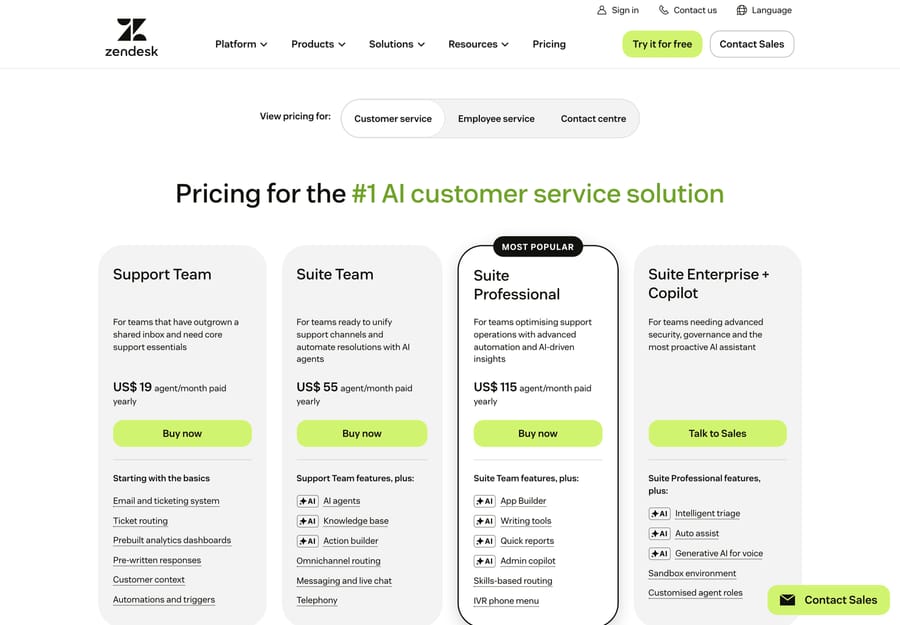
Zendesk costs $19 to $115 per agent per month on annual billing: $19 for Support Team, $55 for Suite Team and $115 for Suite Professional, with Suite Enterprise priced by quote. Every full agent seat pays that price, and per-agent add-ons stack on top: Copilot is $50 per agent on Suite Professional and above, and Contact Center is $83 per agent (zendesk.com/pricing, checked 24 September 2026). Customers and tickets are free and unlimited, so your bill moves with headcount.
| Item | Price per agent / month (annual) | Note |
|---|---|---|
| Support Team | $19 | Email ticketing |
| Suite Team | $55 | Messaging, live chat, help center |
| Suite Professional | $115 | 14-day free trial |
| Suite Enterprise | Contact sales | Sold as "Suite Enterprise + Copilot" |
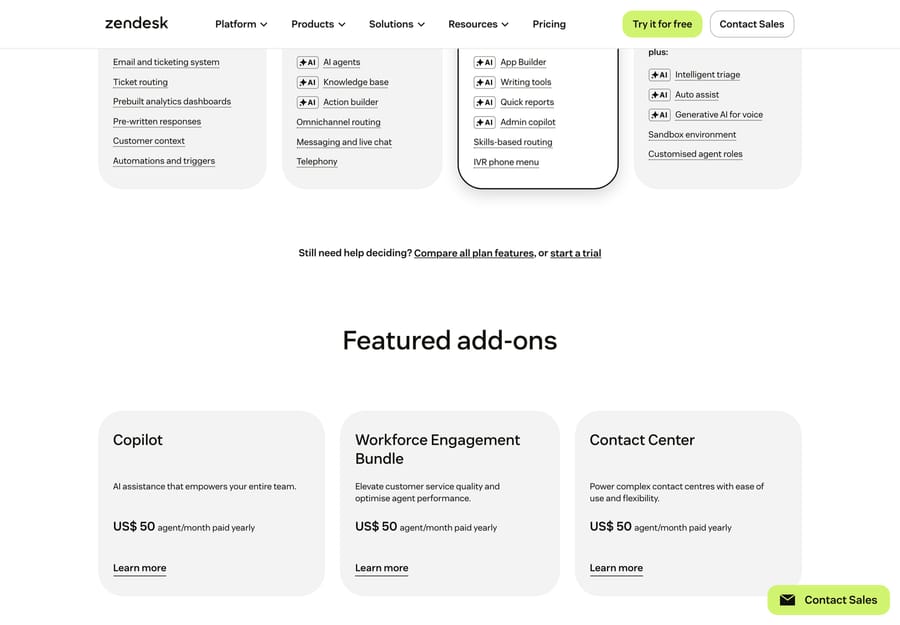
| Copilot add-on | +$50 | Suite Professional and above only |
| Workforce Engagement add-on | +$50 | WFM and QA |
| Contact Center add-on | +$83 | Voice, plus usage |
The rest of this page is the scaling math: what counts as a billable agent (versus a free light agent or an end-user), how add-ons multiply across seats, a table of monthly cost at 5, 20, 50 and 100 agents, the "headcount tax" built into per-seat pricing, how discounts work at scale, and how AI changes the equation. For the full plan-by-plan breakdown, start with our Zendesk pricing explained pillar.
Copilot and Zendesk's other AI and CX capabilities are sold as separate add-ons, each per agent, on top of your base plan:
Methodology: per-agent prices are checked against Zendesk's official pricing page on 24 September 2026, annual billing, USD. Where a number comes from a third party or is no longer on the public page, it's flagged inline. The scaling table is illustrative list math, not a quote.
How does Zendesk charge per agent?
Zendesk bills a flat monthly fee for each agent seat. An agent is anyone who works tickets: replies to customers, manages conversations, handles calls. You buy a number of seats on a plan, and your base subscription is seats × plan price. On an annual contract you commit to that seat count for the term and generally can't drop below it mid-term (one of the costs that don't show up on the sticker).
Three groups are easy to conflate:
- Full agents: the paid seats. They work in the agent workspace, respond to customers, and each one carries the per-agent price.
- Light agents: included internal collaborators. They can view tickets and add private comments, but they cannot publicly respond to customers. They're for subject-matter experts in engineering, billing or legal whose input you need without paying for a full seat. Zendesk's light agent seats doc lists the caps: up to 50 on Suite Growth, 100 on Suite Professional, 1,000 on Suite Enterprise and 5,000 on Enterprise Plus; on Suite Team they're an add-on. We come back to them below.
- End-users (customers): the people who submit tickets. They are always free and unlimited. Zendesk doesn't charge by contact or by ticket volume, the opposite of a per-ticket tool like Gorgias.
So your seat bill is driven by one number: how many full agents you put on the platform.
What does each Zendesk plan cost per agent?
Here's what a single full-agent seat costs per month on an annual contract:
| Plan | Per agent / month (annual) | What it unlocks |
|---|---|---|
| Support Team | $19 | Email ticketing only, no messaging or help center |
| Suite Team | $55 | The real entry point: messaging, live chat, help center, AI agents |
| Suite Growth | Not on the public plan cards (last listed at $89) | SLAs, CSAT, multiple ticket forms, up to 50 light agents |
| Suite Professional | $115 | Skills-based routing, advanced reporting, Copilot eligibility, up to 100 light agents |
| Suite Enterprise | Contact sales | Custom roles, sandbox, up to 1,000 light agents |
The $19, $55, $115 and "Enterprise = contact sales" figures are on Zendesk's pricing page. Suite Growth no longer appears on the public plan cards, so confirm it in a quote. Zendesk doesn't show monthly-billing rates on the page; it says only that annual subscriptions often include a discount compared with paying monthly.
For most teams that want more than email, the real entry point is Suite Team at $55/agent, not the $19 Support Team plan. If you're unsure which tier fits, see which Zendesk Suite plan do you actually need.
Where to check this in your own account: your plan and seat count live in Zendesk under Admin Center → Account → Billing → Subscription. Metered AI charges are tracked separately under Admin Center → Account → Usage; look for Automated resolutions and any Overage. Agent seats are billed on your plan, while AI automated resolutions accrue as usage on top, so your real bill is "seats + usage," not the sticker price.
Do Zendesk add-ons cost per agent?
Yes, and this catches buyers off guard. When Zendesk says Copilot is $50/agent/month, that's not $50 for your account; it's $50 added to every seat. Turn it on for a 50-agent team and you've added $2,500/month ($30,000/year), not $50.
Every add-on you enable re-prices your whole roster, so the bigger your team, the more each toggle costs. The main per-seat add-ons on Zendesk's pricing page:
- Copilot (advanced AI): +$50/agent/mo. Agent assist, intelligent triage, AI-drafted replies. Zendesk says it can be added to Professional and higher plans, so on Suite Professional it turns a $115 seat into a $165 seat. Suite Team can't add it.
- Contact Center (voice): +$83/agent/mo, plus per-minute usage on top.
- Workforce Engagement (WFM + QA): +$50/agent/mo. Forecasting, scheduling and quality scoring.
Add Copilot and Workforce Engagement to Suite Professional and a $115 seat becomes a $215 seat, 87% more, before any usage-based AI charges. We unpack the AI side in Zendesk AI pricing explained.
One thing scales with you: an AI allowance. Since 18 May 2026 each seat earns a monthly dollar allowance toward automated resolutions, $2, $5 or $10 depending on plan, capped at $5,000 a year, as Zendesk's help center describes it; the pricing page's plan table lists the same allowance as 5 included automated resolutions per agent a month on Support Team and Suite Team and 10 on Suite Professional. Useful, but it doesn't change the seat math; it only softens the AI bill on top.
How are Zendesk AI resolutions billed now? Zendesk's pricing page says AI agents are billed per automated resolution and lists the rate: $1.50 committed and $2.00 pay-as-you-go. On 18 May 2026 Zendesk introduced three resolution tiers (per its automated-resolution-tiers doc): Assisted escalation (AI helped, a human finished) and Contained resolution (AI finished, unverified) are free, and only a Verified resolution counts against your allowance and is billed. Verification happens after the conversation ends: 72 hours after the last email, or 2 hours after the last message on messaging by default. Confirm which billing model your contract uses.
What does Zendesk cost for 5 to 100 agents?
This is where per-agent pricing compounds. Below is the monthly base subscription at four team sizes on Suite Team and Suite Professional, with Copilot shown for Professional (the lowest plan that can add it). Voice, workforce and usage-based AI are excluded so you can see the seat math.
| Agents | Suite Team ($55) | Suite Pro ($115) | Suite Pro + Copilot ($165) |
|---|---|---|---|
| 5 | $275 | $575 | $825 |
| 20 | $1,100 | $2,300 | $3,300 |
| 50 | $2,750 | $5,750 | $8,250 |
| 100 | $5,500 | $11,500 | $16,500 |
Illustrative list math, not a quote: annual per-agent price × seats (+ $50/agent for Copilot). Excludes voice, WFM, usage-based AI resolutions, implementation and any negotiated discount.
At 100 agents on Suite Professional with Copilot, you're at $16,500/month, roughly $198,000/year in seat cost alone. The same 100 agents on Suite Team run $5,500/month (about $66,000/year). Copilot alone adds $5,000/month at 100 agents, nearly the whole Suite Team bill for the same 100 people. That's the multiplier in numbers.
What is the "headcount tax" in per-agent pricing?
Per-agent pricing has an incentive structure worth naming, because it should shape how you staff and automate.
Per-seat pricing rewards high tickets-per-agent. You pay the same $55 or $115 whether an agent closes 200 tickets a month or 2,000, so the more volume each seat handles, the lower your cost per ticket. A lean, efficient team gets a good deal.
The same model penalizes adding seats. Every new hire is a monthly cost that recurs for as long as they're on the platform, and more on an add-on like Copilot. Headcount is the main lever that moves your Zendesk seat bill, and adding people only moves it up. A team that's underwater on volume and responds by hiring makes the bill worse. We call this the headcount tax: with per-agent pricing, growth and cost are welded together.
That's the opposite of a per-ticket model. Gorgias charges by billable ticket, so its cost tracks volume, not headcount: add ten agents and the bill doesn't change, but a spike in tickets costs you. Neither model is better everywhere. Per-agent suits stable, efficient teams with steady volume; per-ticket suits small teams with spiky or seasonal volume. We do the crossover math in Zendesk vs. Gorgias, the clearest illustration of how the pricing model, not just the price, decides what you pay.
Does Zendesk give volume discounts at scale?
The list prices above are rack rates. They're what a small or mid-size team pays at face value, and they bend as you scale.
- Enterprise is quote-only by design. Suite Enterprise has no public price because it's negotiated. Once you're at 50 to 100+ seats, the per-agent number is on the table.
- Discounts grow with commitment. Larger seat counts, multi-year terms and annual prepayment are the usual levers. Bundling add-ons (Copilot, voice, WFM) into the deal is another.
- The flip side: lock-in and renewal increases. Discounts usually come with a committed seat count you can't easily reduce mid-term, and buyers report price increases at renewal, so check the contract for escalation clauses. A first-year discount can erode by renewal. Read the full hidden-cost rundown before you sign.
At scale, the price in the table is a starting point for negotiation. Get a quote and benchmark it.
How does AI change the per-agent math?
If your Zendesk seat cost only goes up when you add agents, the way to bend the curve is to handle more support without adding agents, which is what ticket deflection and automation do.
When AI resolves repetitive tickets end to end (password resets, order status, return policy, "where's my refund"), those tickets never reach a human queue, and your existing team absorbs growth instead of you hiring for it. On a per-agent model, every seat you don't add is the full annual price saved: $660/year per avoided Suite Team seat, $1,380 on Suite Professional, $1,980 with Copilot. On a per-seat platform, deflection goes straight at the one cost lever that scales against you.
Zendesk's own AI plays into this, but note how it's priced: Copilot is per seat (so it raises the headcount tax), and AI agents are billed per verified resolution beyond your allowance. We cover both in Zendesk AI pricing explained. In short, AI can slow your seat growth while adding a usage line you need to watch.
An honest aside, if AI deflection is what you're after. The capability that reduces seats, autonomous resolution, doesn't have to come from your help desk. An AI agent layer like Macha runs on top of Zendesk (or whichever desk you keep), resolves repetitive tickets before they reach an agent, and is priced per ticket rather than per seat or per vendor-defined resolution: one conversation, charged once however many steps it takes (triage, lookup, draft or full resolution), from $299 a month for up to 750 tickets. The cost tracks the volume you handle, not the size of your team. The caveats: it's another vendor and integration to manage, it only performs as well as the knowledge you connect to it, and per-ticket usage still costs money at volume. If the headcount tax is your real problem, deflecting tickets is the most direct fix; you can try it with a free trial ($50 of usage, no credit card required). (Native AI vs. an AI layer →)
How do light agents cut the per-agent bill?
Before you buy more full seats, check whether the people you're seating need to respond to customers. If they only need to read tickets and add internal notes (engineers, product, finance weighing in on an escalation), they can be light agents, which are included in your plan rather than billed at the full per-agent rate.
On a 50-agent team where 15 of those "agents" are really internal collaborators, converting them to light agents takes the billable count from 50 to 35. On Suite Professional that's $1,725/month saved ($20,700/year) for the same people, well inside the plan's 100 light-agent cap. Light agents are the most underused cost lever in Zendesk's per-agent model. The catch: they're included from Suite Growth up (an add-on on Suite Team), and they can't publicly reply, so they're for collaborators, not front-line support.
Frequently asked questions
How much does Zendesk cost per agent? On an annual contract: $19/agent/mo for Support Team (email only), $55 for Suite Team, $115 for Suite Professional, and contact-sales for Suite Enterprise. Suite Growth is no longer on the public plan cards. Add-ons like Copilot add $50 per agent on top.
Does Zendesk charge per agent or per ticket? Per agent. You pay a flat monthly price for each full seat, however many tickets they handle. End-users and tickets are free and unlimited. AI agents are the exception: they're billed per verified automated resolution beyond your allowance.
Do Zendesk add-ons cost per agent too? Yes, and this is the trap. Copilot ($50, Suite Professional and above), Contact Center ($83) and Workforce Engagement ($50) are all priced per agent, so they multiply across your team. Enabling Copilot for 50 agents is $2,500/month, not $50.
What's a light agent, and is it free? A light agent is an internal collaborator who can view tickets and add private comments but cannot respond to customers. They're included on Suite Growth and above, with caps of 50 on Growth, 100 on Professional and 1,000 on Enterprise, and available as an add-on on Suite Team.
Does Zendesk offer volume discounts as you scale? Yes, but they're negotiated, not published. Enterprise is quote-only, and larger seat counts, multi-year terms and annual prepayment are the usual levers. Watch for committed seat counts and renewal escalation clauses that can erode the discount.
How can I reduce my Zendesk cost per agent? Three levers: (1) buy the right tier instead of over-buying, (2) move internal collaborators to included light agents, and (3) deflect repetitive tickets with AI so you scale support without scaling seats, since every seat you avoid is the full annual price saved.
What does Zendesk really cost per agent at scale?
Zendesk's per-agent model is simple to budget and expensive to scale unchecked: your bill is seats × plan price, plus per-seat add-ons that re-price the whole roster at once. At 100 agents, Suite Professional with Copilot is roughly $198,000/year in seats alone, and Copilot's $50 accounts for $60,000 of that. The model rewards pushing more tickets through each agent and punishes adding headcount, so the cost levers all point the same way: right-size the tier (see which Suite plan), use included light agents for collaborators, negotiate at scale, and deflect volume with AI so you don't add seats in the first place. Run the table for your own team size, factor in the costs that aren't on the page, and if the per-agent math doesn't work for you, the best Zendesk alternatives compare the field, including tools that price by usage instead of headcount.
Per-agent pricing checked against Zendesk's official pricing page on 24 September 2026; third-party figures are flagged inline. The scaling table is illustrative list math, not a quote. Zendesk changes pricing and packaging periodically, so confirm current numbers and your quote before budgeting.






