Intercom
 Shopify
 Stripe
 Slack
Slack Notion
 Google Workspace
 Confluence

What Does Zendesk Really Cost? Hidden Fees & Add-On Pricing (2026)


Open Zendesk's pricing page and the math looks easy: pick a per-agent plan, multiply by headcount, done. Suite Team is $55 a seat, Suite Professional is $115 — what's complicated about that?

The complication is that the seat price is only layer one. The real total cost of ownership stacks several more layers on top: a penalty for paying monthly, an annual contract you can't shrink mid-term, escalation clauses that raise the price every year, one-time implementation that can run five figures, a row of $50 add-on bundles, and — the one most teams miss — usage-based AI charges that have been auto-billed with no cap since January 2026. By the time you've added the pieces, the bill can land 40–80% above the sticker.
This guide is the hidden-cost companion to our Zendesk pricing explained pillar. There we break down every plan; here we focus on the gap between what Zendesk quotes and what you actually pay — and how to push that gap back down.
How we sourced this
Base plan prices are verified against Zendesk's official pricing page, June 2026 (annual, per agent/month). The add-on prices ($50 each for Copilot, Contact Center, and Workforce Engagement) are also official on that page. The hidden-cost figures — monthly penalty, escalation clauses, renewal hikes, implementation rates, AI overage per resolution — come from third-party teardowns and customer reports, and every one is flagged inline as such; treat them as directional, not quotes. We also ran Zendesk hands-on in a live test account, so the screenshots below are real product UI, not marketing pages. Zendesk changes packaging often — confirm your own numbers before budgeting.
Layer 1: the base seat price (the part you already see)
For reference, here's what Zendesk publishes (annual contract, per agent/month):
| Plan | Price (annual) | Notes |
|---|---|---|
| Support Team | $19 | Email/ticketing only |
| Suite Team | $55 | Real entry point — adds messaging, chat, help center, AI agents |
| Suite Growth | ~$89 (third-party) | Adds SLAs, CSAT, multiple forms |
| Suite Professional | $115 | Adds routing, IVR, custom apps, HIPAA |
| Suite Enterprise | Contact sales | Legacy list ~$169 (third-party) |
The $19 / $55 / $115 figures and "Enterprise = contact sales" are official; Growth and the legacy Enterprise price are third-party estimates. Watch out for stale numbers floating around the web (Suite at $49/$79/$99 or $69/$149/$219) — those are old.
That's the number on the page. Everything below is what gets added to it.
Layer 2: the monthly-billing penalty
The advertised prices assume you commit to a year up front. Choose to pay month-to-month instead and Zendesk charges roughly 15–25% more per seat (third-party). Suite Team at $55 annual becomes ~$69 monthly; Suite Professional's $115 climbs toward ~$149.
Across a 20-agent team, that's the difference between $13,200 and roughly $16,500 a year for the exact same product — a ~$3,300 tax for keeping the flexibility to leave. Which raises the obvious question: how much flexibility does the annual commitment actually buy back?
Layer 3: annual lock-in (the flexibility you give up)
Less than you'd hope. The standard Zendesk annual agreement (third-party, confirm in your contract) typically means:
- No refunds for cancelling early — you pay out the term.
- ~30 days' written notice required to cancel or to stop auto-renewal.
- You generally can't reduce seat count or downgrade mid-term. You can add seats any time (Zendesk happily bills more), but if you over-provisioned, you're stuck paying for empty seats until renewal.
That asymmetry matters at budgeting time. The annual price is cheaper per seat, but it bakes in a bet on your headcount for the next 12 months. Buy for your peak and you overpay through every quiet month; buy lean and you'll add seats at less favorable terms.
Layer 4: price escalation and renewal hikes
The third layer of contract cost is the one that compounds. Customer reports and procurement teardowns (third-party) describe two recurring patterns:
- Annual escalation clauses of ~5–7% written into multi-year deals — a built-in price increase each year of the term, regardless of usage.
- Renewal increases of ~15–25% when an initial discounted term ends and you re-sign at closer to list.
Neither shows up in your first-year quote, which is exactly why they sting. A 20-agent Suite Professional contract that starts near $27,600/year can quietly become $30k+ by year three on escalation alone, before any renewal reset. Always ask for the escalation cap in writing and model the out-year cost, not just year one.
Layer 5: implementation and onboarding (the one-time five-figure line)
Zendesk is self-serve in theory — you can configure it yourself for $0. In practice, a real rollout (custom ticket fields, triggers and automations, SLAs, skills-based routing, multi-brand, migrating historical tickets, integrating your CRM and other tools) is a project.
Typical numbers (third-party):
- Independent consultants / Zendesk partners: $150–$300/hour, and a mid-complexity implementation runs 40–100 hours → roughly $6,000–$30,000 one-time.
- Zendesk's own Premier onboarding / professional services: packages reported from ~$8,000.
A small email-only team can skip this entirely. But anyone buying Suite Professional or Enterprise for the routing and multi-brand features is usually buying complexity that needs configuring — so budget the one-time cost alongside the recurring one.
Layer 6: the $50 add-on stack
Here's where the sticker price and the real bill diverge most. Many capabilities buyers assume are "in Zendesk" are actually separate $50/agent/month bundles stacked on top of your seat. From Zendesk's pricing page (official):
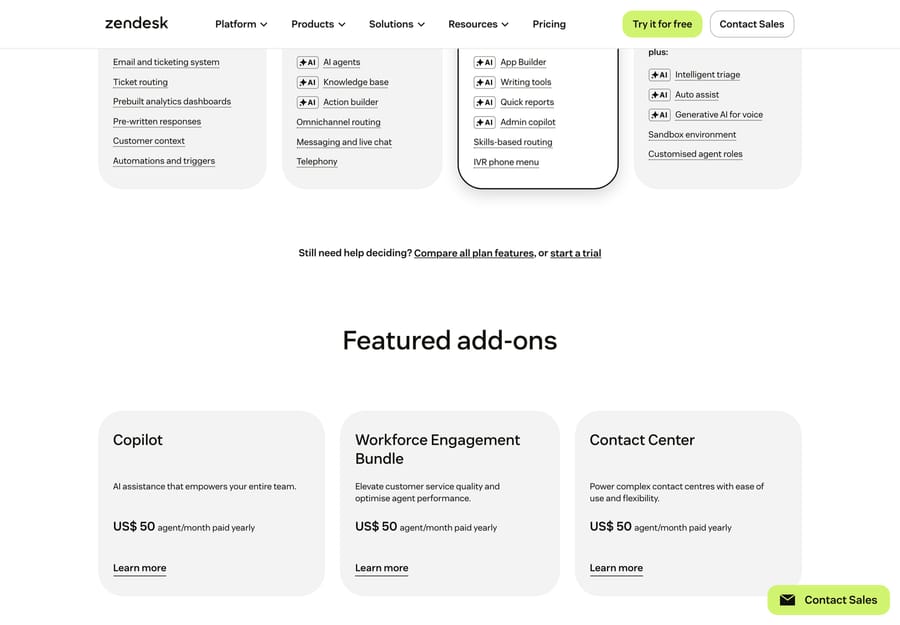
- Copilot (formerly "Advanced AI") — $50/agent/mo. Agent-assist suggestions, intelligent triage, AI-drafted replies, macro suggestions. On Suite Professional this turns $115 into an effective $165/agent/mo. (It's bundled into the top "Suite Enterprise + Copilot" tier, but a paid add-on everywhere below.)
- Contact Center (Zendesk Talk / voice) — $50/agent/mo bundle, plus per-minute usage on top (see Layer 8).
- Workforce Engagement (WFM + QA) — $50/agent/mo bundle. Forecasting and scheduling plus conversation quality scoring.
- Advanced Data Privacy & Protection (ADPP) — ~$50/agent, Enterprise only (price third-party).
The pattern is deliberate: Zendesk increasingly sells in $50 modular bundles. Add two or three and you've roughly doubled your per-agent cost. If you're still choosing a tier, our guide to which Suite plan you actually need helps you avoid paying for a tier and an add-on that overlap.
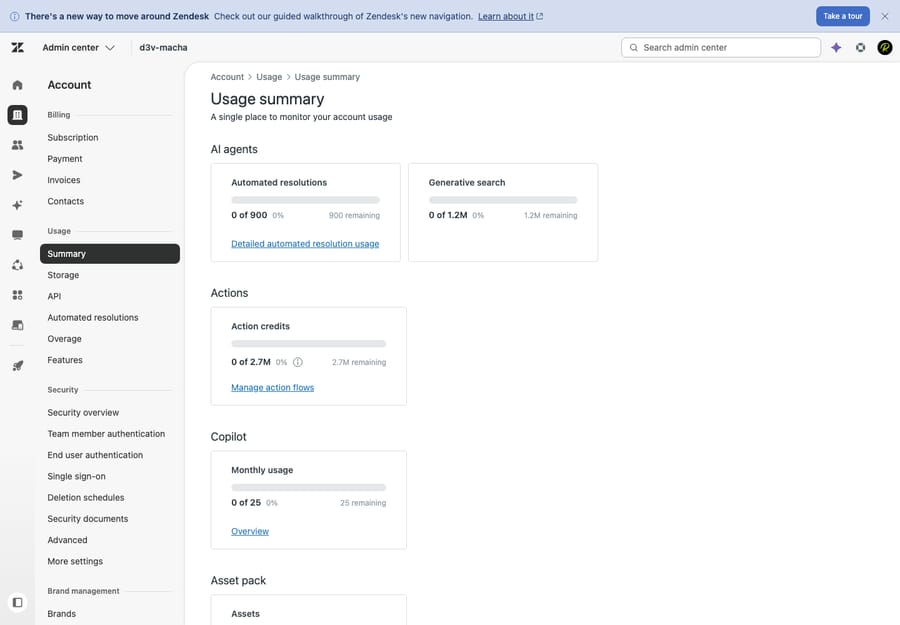
Where to check this in your own account: your plan and seat count live in Zendesk under Admin Center → Account → Billing → Subscription. The metered AI charges are tracked separately under Admin Center → Account → Usage — look for Automated resolutions and any Overage. The takeaway: agent seats are billed on your plan, while AI automated resolutions accrue as usage on top — so your real bill is "seats + usage," not just the sticker price.
Layer 7: usage-based AI overage (the uncapped one)
This is the line item most likely to surprise you, because it doesn't behave like the others. Zendesk's autonomous AI bills per outcome: when an AI agent resolves a customer issue without a human, that's a billable automated resolution.
Each tier includes a small free allowance (official, from Zendesk's automated-resolutions help doc):
| Tier | Included automated resolutions |
|---|---|
| Team | 5 per agent/mo |
| Growth & Professional | 10 per agent/mo |
| Enterprise | 15 per agent/mo |
Beyond the allowance you pay per resolution. Zendesk's page only states that committed (bulk-purchased) usage costs less than overage; third-party teardowns consistently put committed at ~$1.50/resolution and pay-as-you-go at ~$2.00 (flagged as estimate — confirm in your quote).
The important part: as of January 2026, overage is reportedly auto-billed with no monthly cap unless you negotiate one into the contract (third-party). That inverts the usual SaaS dynamic — your AI bill grows the more successful the AI is, with no automatic ceiling. A spike in ticket volume (a product launch, an outage, a sale) can quietly run the resolution meter into thousands of dollars of overage before anyone checks the dashboard. We go deep on how resolutions are counted in Zendesk AI pricing explained.
Copilot and Zendesk’s other AI/CX capabilities are sold as separate add-ons — each per agent, on top of your base plan:
2026 update — "verified resolutions" (Relate 2026): at Relate 2026 Zendesk shifted toward outcome-based pricing, and on May 18, 2026 it introduced a three-tier model (per its automated-resolution-tiers doc): Assisted Escalation (AI helped, a human finished) and Contained Resolution (AI finished but unverified) are now free, while only a Verified Resolution — where the AI resolved the issue and a separate LLM evaluation model confirmed it within 72 hours — counts against your allowance and is billed. So the committed/overage rates (~$1.50–$2.00, estimate) now apply to verified resolutions only; confirm which billing model your contract uses.
Layer 8: voice usage (per-minute, on top of the bundle)
If you turn on voice, the $50 Contact Center bundle is just the access fee. Talk usage is metered per minute on top (third-party): inbound browser calls around ~$0.012/min, forwarded and outbound calls around ~$0.022/min, with call recording, transcription, and number rental billed separately. For a team handling real call volume, the usage line can rival the seat line. Voice is never just the seat fee — model your minutes.
Sticker price vs. real bill: a worked example
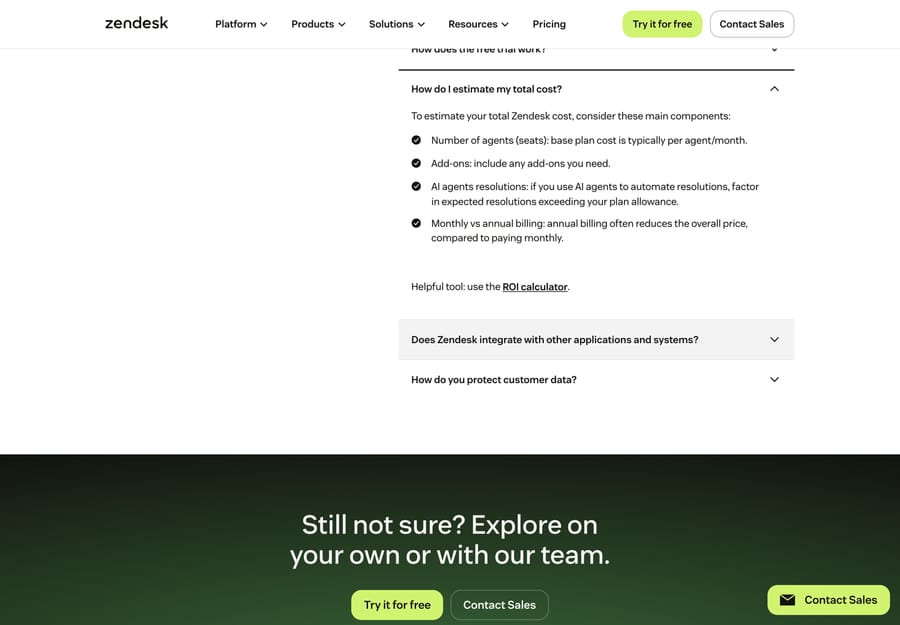
Take a 20-agent team on Suite Professional that wants AI. Here's the sticker math against the realistic one (illustrative list math, not a quote):
| Line item | Monthly |
|---|---|
| Sticker: Suite Professional — 20 × $115 | $2,300 |
| Copilot add-on — 20 × $50 | +$1,000 |
| Included automated resolutions (20 × 10) | 200 free |
| AI handles ~500 resolutions → 300 overage @ ~$1.50 committed (est.) | +$450 |
| Realistic recurring total | ~$3,750/mo (~$45,000/yr) |
| Plus one-time implementation | +$6,000–$30,000 once |
The $2,300 sticker becomes ~$3,750/month recurring — about 63% higher — before the one-time implementation and before any voice or workforce bundles. Pay monthly instead of annually and add escalation, and the real first-year outlay clears $50,000 comfortably.
For contrast, the same 20 agents on Suite Team with no AI add-on run 20 × $55 = $1,100/mo (~$13,200/yr), with 100 free resolutions included. The spread between the lean and loaded configurations is roughly 3.4× — which is the whole reason to model your effective per-agent cost before you sign, not the headline one.
How to reduce (and negotiate) these costs
The good news: most of these layers are negotiable or avoidable.
- Commit annually if you're confident in headcount — it's the easy 15–25% saving. But buy lean; you can add seats, you can't easily remove them.
- Cap the AI overage in the contract. This is the single most important ask in 2026. Negotiate a committed-usage rate and a hard monthly ceiling (or alerting) so a volume spike can't silently run up the meter.
- Push back on escalation. Ask for the annual escalation cap in writing and the renewal increase capped too — these are commonly conceded, especially on multi-year deals.
- Right-size the add-ons. Don't buy Copilot for every seat if only your tier-1 team uses it; question whether you need the WFM bundle or just QA. Audit overlap between your tier and the add-ons.
- Scope implementation tightly — a phased rollout (go live on core ticketing, add routing/multi-brand later) keeps the one-time bill smaller than a big-bang project.
- Time your purchase. End of quarter/year, sales reps have more room. Get competing quotes; the best Zendesk alternatives make useful leverage even if you stay.
Whether all of this nets out to good value is a separate question — we tackle it head-on in is Zendesk worth it?.
If your cost pain is specifically the AI. Re-read Layer 7. For a lot of teams the line that's actually growing isn't seats — it's Copilot fees plus uncapped per-resolution overage. If that's you, it's worth knowing that autonomous resolution doesn't have to come from your help desk. An AI agent layer like Macha runs on top of Zendesk (or whichever desk you keep — it's helpdesk-agnostic, not a Zendesk replacement) and is priced per ticket rather than per seat plus per vendor-defined resolution. One conversation is charged once, however many replies, lookups or drafts it takes, so the bill tracks the volume you handle rather than an outcome definition someone else writes — and it can't run away from you: when the month's tickets are used, the agents pause instead of auto-billing. Pricing starts at $299 a month for 750 tickets, about $0.40 a ticket. The honest watch-outs: it's another vendor and integration to own, it's only as good as the knowledge you connect, and at real volume it's real money — it's additive to your desk, not free. You can pressure-test it with $50 of free usage, no credit card required. (Native Zendesk AI vs. an AI agent layer →)
Frequently asked questions
Does Zendesk have hidden fees? Not "hidden" in a deceptive sense — but several real costs sit off the headline price: the monthly-billing premium (~15–25%), one-time implementation ($6k–$30k typical, third-party), $50/agent add-on bundles (Copilot, voice, workforce), per-minute voice usage, and usage-based AI overage that's auto-billed with no cap since January 2026. The seat price is just the base layer.
What is the real total cost of ownership of Zendesk? Add four things to the seat price: (1) any $50 add-ons you need, (2) usage-based AI resolutions beyond your free allowance, (3) one-time implementation, and (4) year-over-year escalation. In our worked example a 20-agent team's $2,300/mo sticker becomes ~$3,750/mo recurring plus a one-time five-figure implementation — roughly 60%+ above the sticker.
How much does Zendesk implementation cost? DIY is free. A real rollout via a consultant or partner runs ~$150–$300/hour for 40–100 hours, so roughly $6,000–$30,000 one-time (third-party); Zendesk's own Premier onboarding is reported from ~$8,000. Email-only teams can usually skip it.
Can I cancel Zendesk or reduce seats mid-contract? On a standard annual contract, generally no — no refunds for early cancellation, ~30 days' written notice to stop renewal, and you typically can't drop seats or downgrade until the term ends (you can always add seats). Confirm the exact terms in your agreement.
What are Zendesk's add-ons and how much do they cost? The main ones are $50/agent/month each (official): Copilot (advanced agent-assist AI), Contact Center (voice — plus per-minute usage), and Workforce Engagement (WFM + QA). Advanced Data Privacy & Protection (~$50, Enterprise-only) is a fourth. Stack two or three and you roughly double your per-agent cost.
Why is my Zendesk bill higher than the price I was quoted? Most often: the Copilot add-on, per-resolution AI overage above your allowance, voice/WFM bundles, the monthly-billing premium, or an annual escalation/renewal increase. Reconcile the line items against your contract, and check the in-product Usage screen for AI overage.
The bottom line
Zendesk's real cost is best read as layers, not a number: a seat price, a monthly penalty if you don't commit annually, an annual contract you can't easily shrink, escalation and renewal hikes, one-time implementation, a stack of $50 add-ons, and uncapped usage-based AI on top. The sticker is the floor, not the ceiling.
None of that makes Zendesk a bad buy — for a team that uses the breadth, it's competitive. But the teams that negotiate well and budget accurately are the ones that model their effective cost: every layer, the out-year escalation, and a hard cap on the AI meter. Do that math before you sign, and start from the pricing pillar if you need the full plan-by-plan breakdown first.
Base prices verified against Zendesk's official pricing page, June 2026; hidden-cost and usage figures are third-party estimates, flagged inline. Zendesk changes pricing and packaging periodically — confirm current numbers and your specific quote before budgeting.
Add AI agents to your Zendesk
Macha reads the ticket, drafts the reply and takes the action, inside the Zendesk you already run.