





 Shopify
 Stripe
 Slack
Slack Notion
 Google Workspace
 Confluence

Is Zendesk Worth It in 2026? An Honest Assessment of Cost, Strengths and Fit


Zendesk is worth it for mid-market and enterprise teams that will use its omnichannel routing, automation and analytics, and usually not for small, price-sensitive teams that mainly answer email. The deciding number is the effective per-agent cost once Copilot, add-ons and AI resolution charges sit on top of the seat.
Key takeaways
- Zendesk is worth it for mid-market and enterprise teams running omnichannel support at scale, but a small email-only team usually pays for depth it never uses.
- A Zendesk Suite Professional seat costs $115 an agent a month, and the $50 Copilot add-on lifts it to $165 before any AI agent resolution charges.
- A 20-agent Zendesk team on Suite Professional with Copilot pays $3,300 a month for seats before a single AI resolution is billed.
- Since May 18, 2026, Zendesk bills only Verified Resolutions, confirmed by a separate LLM evaluation within 72 hours, while Assisted Escalations and Contained Resolutions are free.
- Zendesk's Marketplace lists 1,800+ apps, partners and integrations, and Capterra rates the Zendesk Suite 4.4 out of 5 from about 4,092 reviews.

Zendesk is worth it for teams of roughly 20 or more agents running real omnichannel support, and usually not for a small email-only team, because a Suite Professional seat at $115 an agent a month becomes $165 once you add the $50 Copilot add-on, before any AI agent usage (zendesk.com/pricing, checked 24 September 2026). The price is fair for the depth; the question is whether you'll use the depth.
| What you pay for | Price (annual billing) | Note |
|---|---|---|
| Support Team | $19/agent/mo | Email and ticketing only |
| Suite Team | $55/agent/mo | Adds messaging, live chat, telephony, AI agents |
| Suite Professional | $115/agent/mo | Skills-based routing, IVR, admin AI tools |
| Copilot add-on | $50/agent/mo | Assistive AI for human agents |
| Workforce Engagement Bundle | $50/agent/mo | QA and workforce management |
| Contact Center | $83/agent/mo | Complex voice operations |
| AI agents | Per verified resolution | $1.50 committed to $2.00 pay-as-you-go (Zendesk pricing page) |
How we assessed it: we've been hands-on in a live Zendesk account, re-checked prices against Zendesk's pricing page on 24 September 2026 (the full breakdown lives in our Zendesk pricing pillar), and pulled ratings and attributed quotes from G2, Capterra and TrustRadius, naming reviewers where we could verify them. One disclosure: Macha is our own product, an AI agent layer rather than a help desk, and we flag it wherever it appears.
Who should buy Zendesk, and who should walk away?
Zendesk is worth it if you're a mid-market or enterprise team running real omnichannel support (email, chat, messaging, voice, social), you'll use its routing, automation, and analytics, and you can amortize a layered per-agent price plus setup across enough agents and ticket volume that the platform pays for itself in efficiency.
Zendesk is probably not worth it if you're a small team that mostly needs shared-inbox email support, you're price-sensitive, you don't have an admin to configure it, or you'd be paying enterprise-grade money to use a fraction of an enterprise-grade tool. At that size, the effective cost — seat plus AI add-on plus per-resolution charges — tends to feel steep against leaner competitors that do 80% of what you need for a lot less.
What are you actually paying for with Zendesk?
Zendesk didn't become the default by accident. Strip away the pricing arguments and the product underneath is genuinely strong on several axes.
- Omnichannel breadth, done properly. Email, live chat, messaging (web, mobile, WhatsApp, social DMs), voice, and a help center all land in one unified agent workspace. Plenty of tools claim omnichannel; Zendesk's is mature and the channels actually behave as one conversation rather than separate bolt-ons. This is the single thing reviewers praise most.
- Routing and workflow automation. Skills-based routing, triggers, automations, SLAs, and macros let you model genuinely complex support operations — multi-team, multi-brand, tiered escalation. For a 50- or 500-agent org, this is the difference between a tool you can grow into and one you outgrow in a year.
- Analytics and reporting (Explore). Zendesk Explore gives you deep, customizable dashboards on volume, performance, CSAT, and SLA attainment. It's powerful — though, as we'll see, the recent changes to it are also one of the loudest complaints.
- The ecosystem. The Zendesk Marketplace lists 1,800+ apps, partners and integrations, plus a documented API and developer platform. Whatever you use — CRM, e-commerce, Slack, internal tooling — there's almost certainly a connector. For a platform you'll build workflows around for years, that breadth is real insurance.
- Scale and reliability. Reviewers across TrustRadius consistently describe Zendesk as dependable for high ticket volumes — stable, mature, able to support complex environments once configured. It's boring in the way infrastructure should be boring.
- Mature AI. Zendesk's AI (the Copilot assistive layer plus autonomous "automated resolutions") is among the more developed native options in a help desk. It's not free — that's the rub, covered below — but it's real, integrated, and improving.
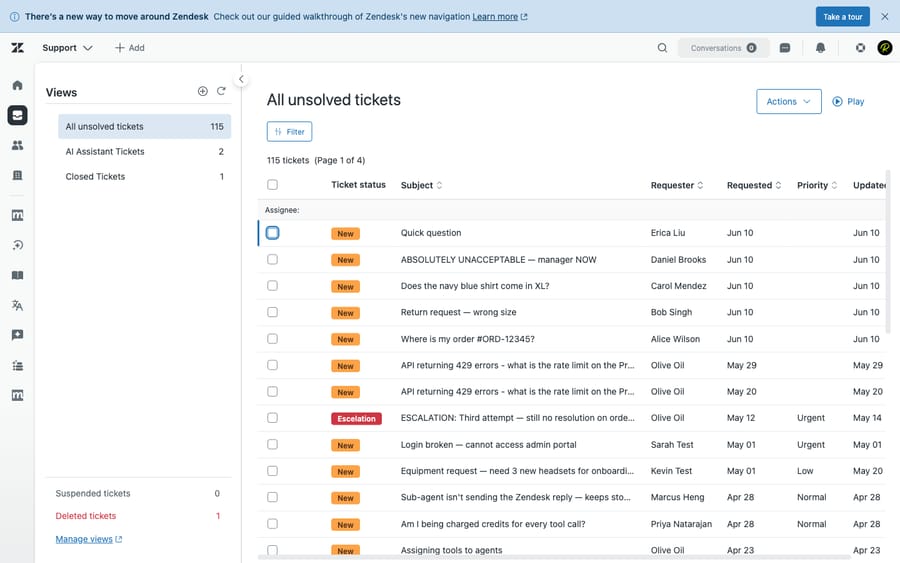
That screenshot is the thing you're really buying: the day-to-day workspace agents live in. When it's configured well, it's a genuinely good place to do support work. The honest caveat is in those last three words — configured well — and the cost of getting there.
What does Zendesk really cost, and what frustrates users?
A fair verdict has to weigh the strengths against what reviewers actually complain about. Four themes come up again and again.
1. The price — and especially the add-on stacking. Zendesk's headline plans look reasonable (Support Team at $19/agent/mo, Suite Team at $55, Suite Professional at $115, all annual). But the capabilities most buyers want sit on top: the Copilot AI add-on is $50/agent/mo, autonomous AI resolutions are billed per outcome beyond an included allowance (Zendesk's pricing page lists $1.50 committed and $2.00 pay-as-you-go), the Workforce Engagement Bundle is another $50 an agent, and Contact Center is $83 an agent. A Suite Professional team that wants real AI is effectively paying $165/agent before usage charges. The sticker is rarely the bill — we walk through a full worked example in what Zendesk really costs.
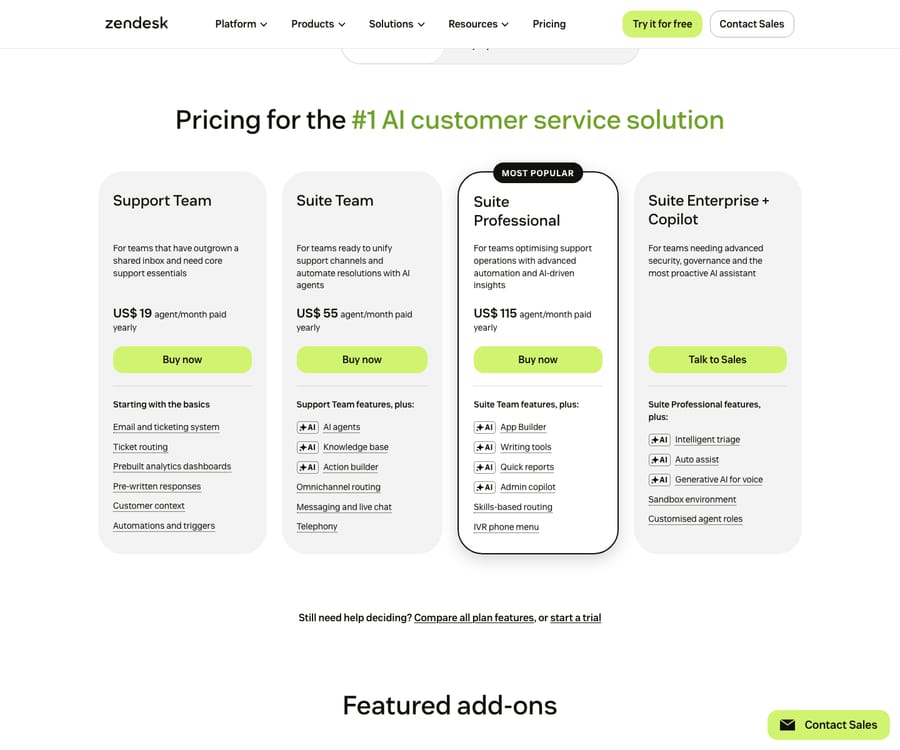
Beyond the per-seat plans, Zendesk’s AI and CX capabilities are sold as separate add-ons — each priced per agent on top of your base plan:
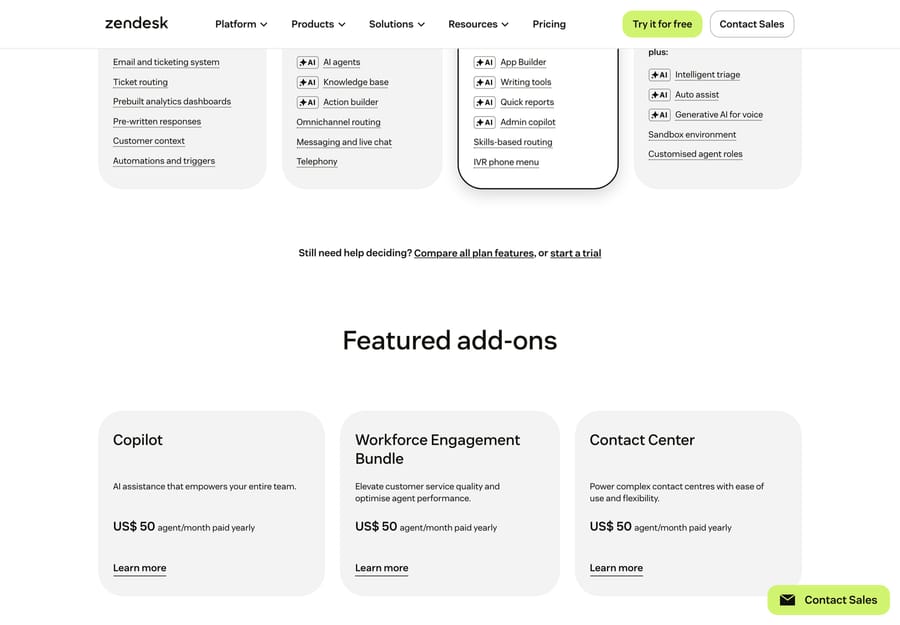
To make "worth it" concrete: a Suite Professional seat is $115/agent/month, and adding the Copilot AI layer pushes that to $165/agent before any per-resolution usage , so a 20-agent team pays $3,300 a month for seats and Copilot before a single resolution is billed. Whether that's worth it depends entirely on how much of the breadth above you'll actually use.
2. Complexity and setup. The flip side of all that power is that Zendesk is not something most teams switch on in an afternoon. Triggers, SLAs, routing rules, multi-brand, and a properly tuned help center take real configuration — often an in-house admin or a paid implementation partner. For larger orgs that's a worthwhile investment; for a small team it's a tax on time you may not have.
3. AI behind a gate. Some buyers are frustrated that the AI they were sold on is largely a paid add-on plus metered usage, rather than something included. If your interest in Zendesk is primarily the AI, the economics deserve a hard look before you commit — more on that below.
4. Zendesk's own support quality. This is the one that surprises people. For a customer-support company, Zendesk's own support draws recurring criticism: slow responses, difficulty reaching a human, and a tendency to send help-center articles rather than work a problem through. When you're paying premium money, support that feels gated stings more than it would elsewhere.
None of these is disqualifying on its own. Together they explain why the value question is genuinely contested rather than obvious.
2026 update — "verified resolutions" (Relate 2026): at Relate 2026 Zendesk shifted toward outcome-based pricing, and on May 18, 2026 it introduced a three-tier model (per its automated-resolution-tiers doc): Assisted Escalation (AI helped, a human finished) and Contained Resolution (AI finished but unverified) are now free, while only a Verified Resolution — where the AI resolved the issue and a separate LLM evaluation model confirmed it within 72 hours — counts against your allowance and is billed. So the committed and pay-as-you-go rates on Zendesk's pricing page ($1.50 and $2.00) now apply to verified resolutions only. Since the same date each seat also earns a monthly dollar allowance toward AI usage, $2, $5 or $10 depending on plan and capped at $5,000 a year, as Zendesk's help center describes it; the pricing page's comparison table lists the included amount as 5 automated resolutions per agent a month on Support Team and Suite Team and 10 on Suite Professional. Confirm which billing model your contract uses.
What do real Zendesk users say?
We pulled ratings (G2 and TrustRadius observed June 2026, Capterra re-checked 24 September 2026) and attributed quotes from the three largest software review platforms. The aggregate picture is clearly positive — but the texture of the reviews is what tells you whether it's worth it for you.
| Platform | Rating | Reviews (approx.) | One-line read |
|---|---|---|---|
| G2 | 4.3 / 5 | ~6,707 | 63% five-star, 29% four-star — strong, with a small but consistent unhappy tail |
| Capterra | 4.4 / 5 | ~4,092 | Praised for omnichannel + ease of use; price-at-scale is the recurring gripe |
| TrustRadius | 8.7 / 10 | (Support Suite) | "Dependable at high volume" — offset by setup effort and gated support |
Ratings are approximate and move over time. G2 blocks automated reads, so its figures are the June 2026 snapshot; verify on each platform before quoting. The bases are large enough (thousands of reviews each) to be meaningful rather than cherry-picked.
What reviewers praise:
"It's a very good tool to provide customer support in an omnichannel way, it's easy to use and quick to start doing some amazing quality work." — Pablo T., CX Consultant (IT & Services), Capterra (2+ years of use)
"Overall, my experience with Zendesk Suite has been positive." — Sonu P., Systems Analyst (Consumer Goods), Capterra (5.0/5, May 2026), who values having email, chat, and tickets centralized in one place.
The praise clusters exactly where you'd expect from the strengths above: omnichannel consolidation, ease of getting started on the basics, and one place for every conversation.
What reviewers criticize:
"The latest updates with reporting are difficult to navigate and removed helpful features. I have continued using the legacy versions since I can't understand these." — Melanie J., HR Manager (Retail), Capterra
"When I do connect with support, the responses often rely on sending help articles rather than working through the issue directly… It can sometimes be difficult to get in touch with a live support agent, and response times can be slower than expected." — Verified user, G2 (on Zendesk's own support)
The criticism clusters just as tightly: price as you scale, change fatigue (especially around reporting/Explore), and Zendesk's own support responsiveness. If you read enough reviews, the pattern is consistent across G2, Capterra, and TrustRadius — people who use a lot of Zendesk and grow into it tend to stay positive; people who feel they're paying for more than they use, or who hit a wall and need help, are where the friction shows.
Which teams is Zendesk genuinely worth it for?
Strong fit:
- Mid-market and enterprise support teams (roughly 20+ agents) running true omnichannel support, where routing, SLAs, multi-brand, and Explore analytics earn their keep.
- High-volume operations that need a platform proven to stay stable under load.
- Teams that will use the ecosystem — integrating Zendesk deeply with CRM, commerce, and internal tooling, where 1,800+ marketplace listings and a real API matter.
- Orgs with an admin or budget for implementation, so the platform is configured to its potential rather than half-set-up.
Probably look elsewhere:
- Small teams (1–10 agents) who mostly need shared-inbox email support and a simple help center — you'll pay for depth you won't touch.
- Price-sensitive buyers for whom seat + AI add-on + per-resolution charges add up faster than the value returned.
- Teams without setup capacity who need something that works well out of the box with minimal configuration.
- AI-first buyers whose main goal is automation/deflection rather than a full help-desk platform — there are more cost-efficient ways to get there (next section).
If you land in the second list, the field is crowded with strong options — we compare them in the best Zendesk alternatives, and the closest head-to-head most shoppers run is Zendesk vs Freshdesk.
What if your real frustration is Zendesk's AI pricing?
Here's an honest aside, since it's the case we know best. If the only reason you're questioning Zendesk's value is the AI economics — the Copilot add-on plus per-resolution charges stacking up — that's a problem you can solve without abandoning a help desk that's otherwise serving you well.
Macha is an AI agent layer that runs on top of Zendesk, Freshdesk, Gorgias, Front, HubSpot or Intercom — it's not a help-desk replacement and not a competitor to Zendesk's ticketing. Instead of charging per vendor-defined "resolution," it's priced per ticket — one thread with one person, charged once, whether the agent drafts a reply, triages and routes it, looks something up in another system, or resolves it end-to-end. That framing fits teams whose automation isn't only deflection, and it keeps the bill off an outcome definition you don't control. It's one plan priced by volume, from $299 a month for up to 750 tickets, with setup and monitoring by the Macha team included (pricing).
The honest watch-outs: it's another vendor and integration to own, it only performs as well as the knowledge and systems you connect it to, and per-ticket pricing still costs money at volume — it's additive to your stack, not free. But if "is Zendesk worth it?" really means "is Zendesk's AI worth it?", layering automation onto a desk you otherwise like is worth weighing before you rip and replace. You can try Macha on top of your existing setup, and we go deeper on the trade-off in native Zendesk AI vs. an AI agent layer.
Frequently asked questions
Is Zendesk worth the money in 2026? For mid-market and enterprise teams that use its omnichannel breadth, routing, analytics, and ecosystem, yes — the per-agent cost is competitive for the depth you get, and reviewers reflect that (G2 4.3 in June 2026, Capterra 4.4, TrustRadius 8.7/10). For small or price-sensitive teams that need mostly email support, the effective cost (seat + AI add-on + per-resolution charges) often isn't worth it versus leaner tools.
What are Zendesk's main pros and cons? Pros: mature omnichannel support, deep routing and automation, Explore analytics, 1,800+ marketplace listings, proven scale, and capable native AI. Cons: add-on stacking inflates the real bill, meaningful setup/admin effort, AI largely behind a paid gate, and recurring complaints about Zendesk's own support responsiveness.
Why do people say Zendesk is too expensive? Because the sticker price is just the base layer. The Copilot AI add-on ($50/agent), per-resolution AI charges, the Workforce Engagement Bundle ($50/agent) and Contact Center ($83/agent) sit on top, and small teams end up paying for capabilities they don't use. See what Zendesk really costs for a full breakdown.
Is Zendesk good for small businesses? It can work, but it's often more platform than a small team needs. If you mostly want shared-inbox email and a simple help center, a leaner tool usually delivers better value. Compare options in the best Zendesk alternatives.
How does Zendesk's own customer support rate? Mixed. The product scores well overall, but reviewers on G2 and elsewhere repeatedly cite slow responses, difficulty reaching a human, and a tendency to send help articles rather than resolve issues directly — a notable sore point for a customer-support company.
Is Zendesk's AI worth paying extra for? It's genuinely capable, but it's largely a paid add-on (Copilot) plus metered per-resolution usage rather than something included. If AI is your primary reason for buying, model the cost carefully — and consider whether an AI agent layer on top of a desk you already like is a more cost-efficient route.
How do you decide if Zendesk is worth it for your team?
Is Zendesk worth it? For the right team, genuinely yes — and for the wrong team, genuinely no. It's a mature, deep, extensible platform that rewards organizations with the volume, the use cases, and the admin capacity to use it fully. The reviews bear that out: strong aggregate ratings, with the unhappiness concentrated among teams paying for more than they use, frustrated by change, or let down by Zendesk's own support.
The smartest way to answer the question for yourself is to ignore the sticker price and model your effective per-agent cost — seat plus AI plus the add-ons you'll actually turn on — then weigh it against how much of the platform you'll really use. Start with the Zendesk pricing pillar and the hidden-costs guide to build that number, and if the math doesn't land, the alternatives are worth a look before you sign.
Pricing re-verified against Zendesk's pricing page on 24 September 2026; third-party and estimated figures are flagged inline. Ratings and review quotes were observed in June 2026 on G2, Capterra and TrustRadius (Capterra re-checked 24 September 2026) and may change — verify before relying on them. Macha is our own product (an AI agent layer), disclosed as such.






