Intercom
 Shopify
 Stripe
 Slack
Slack Notion
 Google Workspace
 Confluence

What Happened to Zendesk Answer Bot? The Move to AI Agents Explained (2026)


Zendesk Answer Bot now lives on as Zendesk AI agents, after a rename to "bots" and a fold into the broader AI agents product. The last legacy Answer Bot functionality entered maintenance mode on August 31, 2026 and is removed on December 10, 2026.
Key takeaways
- Zendesk renamed Answer Bot to 'bots' in 2023, folded it into AI agents through 2024, and removes the remaining legacy functionality on December 10, 2026.
- Zendesk stopped technical development on legacy AI agents, including bot builder and autoreplies with articles, on August 31, 2026, leaving only critical bug fixes.
- Classic Answer Bot recommended existing Help Center articles instead of writing answers, and could not use information stored outside the knowledge base.
- Zendesk rolled out new AI agent packaging between May 11 and June 12, 2026, merging Essential and Advanced and including API integrations across Suite and Support plans.
- Zendesk AI agents pricing is tied to automated resolutions, while Macha bills per ticket on a plan that starts at $299/month for up to 750 tickets.
Zendesk Answer Bot no longer exists under that name: Zendesk renamed it "bots," folded it into AI agents, and removes the last legacy Answer Bot functionality (bot builder and autoreplies with articles) on December 10, 2026, with technical development already stopped on August 31, 2026. If you're searching for "Answer Bot" today, the thing you want in your admin is AI agents, and any legacy setup has to migrate before December 10.
| Date | What happened |
|---|---|
| 2023 | "Answer Bot" renamed "Zendesk bots" |
| 2024 | Bots folded into the broader AI agents product |
| February 2, 2025 | Bot builder, answers and intents move to legacy |
| July 31, 2025 | Autoreplies with articles moves to legacy |
| May 11 to June 12, 2026 | New AI agent packaging rolls out; Essential and Advanced merge into one offering |
| August 31, 2026 | Legacy functionality enters maintenance mode; development stops |
| December 10, 2026 | Legacy functionality removed; agents left on it stop working |
The rest of this page is the plain-English history: what Answer Bot was and how its article recommendations worked, where it showed up for customers, how teams set it up, and what changed in the move to AI agents. Dates are checked against Zendesk's own documentation. For the wider picture of Zendesk's AI stack, our Zendesk AI explained hub is the place to start.
What was Zendesk Answer Bot?
Answer Bot was Zendesk's original self-service deflection tool. Its job was narrow: when a customer wrote in, Answer Bot scanned your published Help Center, picked the articles most likely to answer the question, and surfaced them, hoping the customer would read one and self-serve before a ticket reached a human agent. The industry word for that is deflection: resolving a request with existing content instead of an agent's time.
The mechanics were a content-matching engine. Answer Bot read the customer's message (the subject and body of an email, or what they typed into a chat window), compared it against the text of your knowledge base, and returned its best matches. Three things mattered about how it worked:
- It recommended articles, not answers. Classic Answer Bot didn't write a reply. It pointed the customer at a short list of existing articles and let them do the reading. If the answer wasn't already published in your Help Center, Answer Bot had nothing to offer.
- It ran on a feedback loop. After showing an article, Answer Bot asked whether it solved the problem. A "yes" marked the ticket as deflected (often auto-solving it); a "no" passed the request to an agent. That signal also fed Zendesk's reporting, so you could see which articles were deflecting tickets and which were dead weight.
- It was grounded only in your Help Center. Answer Bot's entire world was your published Zendesk Guide content. It couldn't look up an order, read a billing record or pull from an internal doc.
That last point is why Answer Bot was both useful and limited: a fast, cheap way to shave the most repetitive FAQs off your queue, but it could never do more than hand someone a link.
Where did Answer Bot appear for customers?
Answer Bot wasn't one button in one place. It was a behavior Zendesk wired into several customer touchpoints:
- The Web Widget. On a help center or website, the Web Widget could surface article recommendations as a customer typed. Instead of a plain search box, they got a chat-style window where the bot offered relevant articles, and only routed them to a contact form or live agent if none helped.
- Messaging. In Zendesk's messaging channels (web and mobile chat), Answer Bot greeted the customer and recommended articles conversationally. In Flow Builder, admins could drop an "article" step into a conversation flow to recommend targeted articles at a specific point.
- Email and web form (autoreplies). When a request came in by email or a support form, Answer Bot could send an automatic reply with suggested articles, the "autoreplies with articles" feature. If one resolved the issue, the customer clicked to confirm and the ticket closed itself; if not, it went to an agent.
So Answer Bot covered the proactive, self-service moment (someone browsing your site) and the reactive one (someone who already emailed you). In both cases the play was the same: try to answer with content before spending an agent's time.
How did teams set up Answer Bot?
Setup was deliberately light. Because Answer Bot ran on content you'd already written, the prerequisite was a populated, well-organized Help Center; the bot was only ever as good as the articles behind it. An admin enabled article recommendations on the relevant channel (Web Widget, messaging via Flow Builder, or email/form autoreplies), optionally tuned the messaging and branding to match the company's tone, and watched Zendesk's deflection reporting to see which articles were earning their keep. Ongoing maintenance was about the knowledge base more than the bot: keep articles accurate, fill the gaps the bot kept failing on, and retire content that confused it.
When did Answer Bot become AI agents?
The name disappeared in stages:
- 2023: "Answer Bot" becomes "Zendesk bots." Zendesk simplified its naming, retiring "Answer Bot" as the product name in favor of "bots" (the announcement of the updated bot naming and admin experience marked the change). Same core idea, new label.
- 2024: bots fold into "AI agents." As generative AI matured, Zendesk consolidated its bot capabilities under the broader AI agents banner, a deliberately bigger concept than article suggestions.
- 2025: the classic pieces go legacy. Bot builder, answers and intents became legacy functionality on February 2, 2025. The original autoreplies-with-articles deflection, the truest descendant of Answer Bot, became legacy on July 31, 2025.
- 2026: the wind-down. Zendesk announced on March 30, 2026 that it would drop the split between "Essential" and "Advanced" AI agents and roll out one offering between May 11 and June 12, 2026. Its removal announcement then set the dates: legacy functionality entered maintenance mode on August 31, 2026, and on December 10, 2026 "any AI agents left on this technology will no longer function."
The throughline: Answer Bot wasn't killed so much as absorbed. The deflection behavior you knew is now one small slice of a much broader AI agents product, and the last copies of the old behavior have until December 10, 2026.
What can AI agents do that Answer Bot couldn't?
AI agents aren't Answer Bot with a fresh coat of paint. They do three things classic Answer Bot couldn't:
- Generative, not just retrieval. Where Answer Bot handed over a link, an AI agent can write a tailored, conversational reply, synthesizing an answer rather than pointing at an article.
- Multi-step conversations. AI agents can carry a back-and-forth conversation, work through vague or multi-step issues with procedures, and aim to resolve the request end to end, not merely deflect it.
- Actions in connected systems. This is the biggest leap. Through external API integrations, an AI agent can look things up or make changes in systems you already use. Since the 2026 repackaging, Zendesk says these agentic features, once limited to the AI agents - Advanced add-on, are included across Zendesk Suite and Support plans.
In short: Answer Bot deflected with content; AI agents try to resolve with reasoning and actions. We compare the two side by side in Zendesk AI agents vs Answer Bot.
What stayed the same, and what changed?
A few things stayed familiar:
- The goal is still deflection and resolution. Whether it's called Answer Bot or an AI agent, the objective is to handle customer requests without burning agent time.
- Your knowledge still matters most. Answer Bot needed a good Help Center; AI agents still lean on the content and data you connect.
- It lives on the same channels. Messaging, email, web form and the widget are the same surfaces.
What changed:
- Billing follows outcomes. Zendesk ties AI agent pricing to automated resolutions, and its removal announcement warns that moving to the upgraded experience "may impact your overall usage and associated costs." That pricing model pays Zendesk more as more tickets resolve automatically. We break the numbers down in Zendesk AI pricing explained.
- Setup is more involved. Real resolution means configuring procedures, connecting systems and testing, more than flipping on article recommendations. Zendesk now offers a guided self-service setup for simpler email and messaging cases.
- The name in your admin is different. If you're hunting for "Answer Bot," you're looking for AI agents.
What should you do if you still use Answer Bot features?
First, the feature isn't gone; the modern equivalent is AI agents in your Zendesk admin. Second, the classic article-recommendation behavior is in maintenance mode and stops working on December 10, 2026, so anything still running on bot builder or autoreplies with articles needs to migrate before then; Zendesk publishes step-by-step migration guidance per configuration type. Third, the capabilities and the pricing model are broader than the Answer Bot you remember, so don't assume "the bot that suggests articles" still describes what you're turning on.
Where AI agents still fall short, and the alternatives if native Zendesk AI doesn't fit, is its own topic; we cover it in Zendesk Answer Bot limits & alternatives.
Where does an AI layer on top of Zendesk fit?
This matters if the gap you feel is automation rather than deflection. Answer Bot (and native AI agents) is built around one outcome: deflect or resolve a customer-facing ticket. A lot of useful support automation isn't a "resolution" at all: summarizing a long thread, tagging and triaging a ticket, routing it, looking up an order in another system, drafting an internal note for an agent.
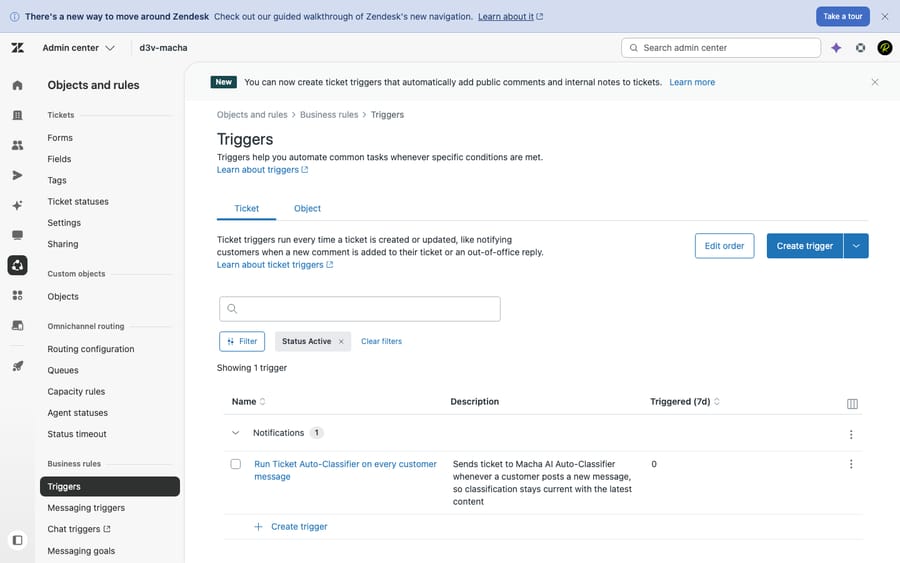
That's the niche an AI agent layer like Macha fills. Macha is not a help desk and not a Zendesk replacement; it runs on top of your existing Zendesk.Connected to your tickets and knowledge, it can auto-triage and route incoming tickets, draft replies for an agent to approve, look up data in other systems, or resolve routine tickets end to end, while anything it can't handle stays a normal ticket for a human with full context intact. It can also power a public website chatbot, much like Answer Bot's old web widget but backed by an agent that can take action.
The watch-outs: it's another vendor and integration to manage, and it only performs as well as the knowledge and rules you connect. On cost, Macha bills per ticket, one conversation charged once however many steps it takes to summarize, tag, answer or resolve, on one plan priced by volume that starts at $299/month for up to 750 tickets. It doesn't bill per resolution, because an outcome definition isn't something you control. You can try it with $50 of free usage, no credit card required.
Frequently asked questions
What was Zendesk Answer Bot? Answer Bot was Zendesk's original self-service deflection tool. When a customer asked a question on the Web Widget, in messaging, or by email/web form, it scanned your published Help Center and suggested the most relevant articles, aiming to resolve the request before it reached a human agent. It recommended articles rather than writing answers, and it only knew what was in your Help Center.
Has Zendesk Answer Bot been renamed or discontinued? Both. Zendesk renamed "Answer Bot" to "bots" in 2023, then folded that capability into AI agents through 2024. The classic bot builder and autoreply-with-articles features became legacy in 2025, entered maintenance mode on August 31, 2026, and are removed on December 10, 2026. The modern equivalent in your admin is AI agents.
What's the difference between Answer Bot and Zendesk AI agents? Answer Bot recommended existing Help Center articles (retrieval-based deflection). AI agents are generative: they write tailored replies, hold a multi-step conversation, resolve issues autonomously, and take actions in connected systems via API. We compare them directly in Zendesk AI agents vs Answer Bot.
Where did Answer Bot appear for customers? On the Web Widget (article recommendations as customers typed), in messaging channels (including an article step in Flow Builder), and in email/web form autoreplies that suggested articles. The same channels now host AI agents.
Is Zendesk Answer Bot free? The classic article-deflection behavior was bundled in some plans. Since the 2026 repackaging, Zendesk includes AI agent capabilities across Suite and Support plans but prices them on automated resolutions, so usage drives the bill. See Zendesk AI pricing explained for the numbers, and the limits & alternatives guide for when it's worth it.
Where should you go from here?
Answer Bot matched a customer's question to a Help Center article and deflected the ticket before it cost an agent's time. Zendesk renamed it ("Answer Bot" to "bots" to AI agents) and widened it from suggesting articles to generating answers, resolving autonomously and taking actions, and the legacy version stops on December 10, 2026. Get the lay of the land in Zendesk AI explained, see the direct comparison, and weigh the limits and alternatives if native AI doesn't fully fit.
Answer Bot history and the AI agents timeline verified against Zendesk's official documentation, September 2026. Zendesk updates its product and timelines periodically, so confirm specifics in your own account before relying on them.
Add AI agents to your Zendesk
Macha reads the ticket, drafts the reply and takes the action, inside the Zendesk you already run.