Intercom
 Shopify
 Stripe
 Slack
Slack Notion
 Google Workspace
 Confluence

Kommunicate Guide (2026): What It Is, What It Costs and the Best Alternatives


Kommunicate is an AI chatbot and live chat platform that starts at $40 a month for 250 conversations, with a model-agnostic bot builder and a human handoff. Here is how it works, what each plan includes, where it falls short and which alternatives fit other setups.
Key takeaways
- Kommunicate is an AI chatbot and live chat platform whose Starter plan costs $40 a month for 250 conversations, 1 AI agent and 1 team member.
- Kommunicate's Professional plan costs $200 a month, or $167 billed yearly, for 2,000 conversations, 2 AI agents, 3 team members and 2-year chat history.
- Kommunicate's Kompose bot builder lets teams build on OpenAI, Google Gemini, Anthropic, Dialogflow, Amazon Lex, IBM Watson or a custom framework.
- Kommunicate gates integrations by plan: Zendesk, Freshdesk and Google Analytics start at Professional, while Salesforce, HubSpot and Zapier need Enterprise.
- On Capterra, Kommunicate holds 4.6 out of 5 from 44 reviews, scoring highest on customer service at 4.67 and lowest on value for money at 4.38.

Kommunicate is an AI chatbot and live chat platform for small and mid-market support teams, and it starts at $40 a month for the Starter plan (250 conversations, 1 AI agent, 1 team member), with Professional at $200 a month for 2,000 conversations, per kommunicate.io/pricing checked 24 September 2026. It grew out of the Applozic chat SDK, lets you build bots on OpenAI, Gemini, Anthropic, Dialogflow and others, and hands conversations to a human agent when the bot runs out of answers.
| Question | Short answer (checked 24 September 2026) |
|---|---|
| What it is | AI chatbot, live chat and AI Copilot in one platform |
| Starter | $40/month ($34 billed yearly): 250 conversations, 1 AI agent, 1 team member, 1-year history |
| Professional | $200/month ($167 billed yearly): 2,000 conversations, 2 AI agents, 3 team members, 2-year history |
| Enterprise | Custom: AI agents, seats and conversation pricing quoted per customer |
| Extra conversations | $15 per 1,000 on Starter, $10 per 1,000 on Professional |
| Voice AI agent | $0.06 per minute on all plans |
| Free trial | 30 days, no credit card |
| AI models | OpenAI, Google Gemini, Anthropic, Dialogflow, Amazon Lex, IBM Watson or custom |
Disclosure: we build Macha, an AI agent layer for Zendesk, Freshdesk, Gorgias, Front, HubSpot or Intercom. Kommunicate is a category peer, and we explain the difference near the end. Everything below comes from Kommunicate's own pages plus third-party review data, and anything we couldn't verify is flagged.
What is Kommunicate?
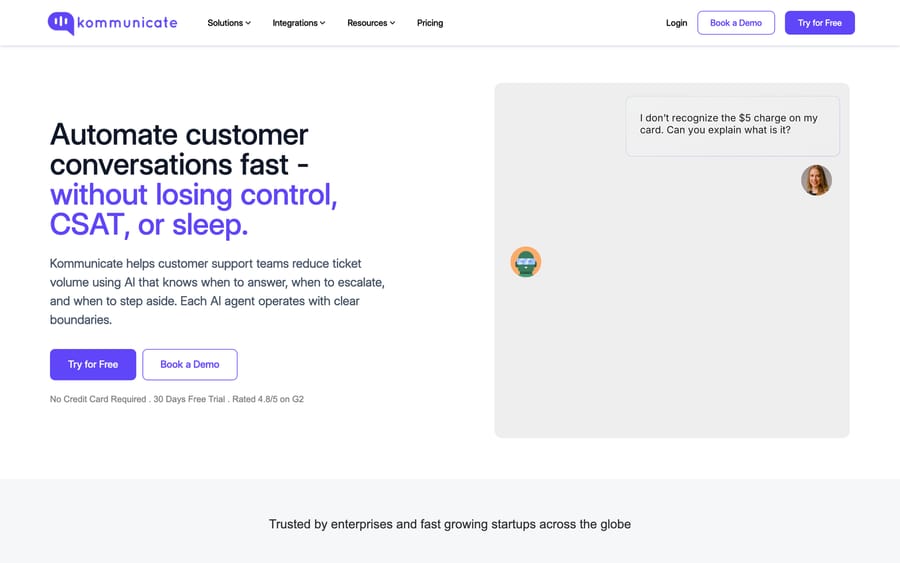
Kommunicate's homepage, focused on automating customer conversations.
Kommunicate calls itself an AI-powered customer service automation platform. The pitch is a combined stack: an AI chatbot that answers and automates conversations, live chat for when a human needs to step in, and an AI Copilot that assists agents, with automated routing, escalation and a handoff from bot to person (kommunicate.io). The homepage says it is "trusted by 500+ support teams worldwide."
Kommunicate grew out of Applozic, a messaging and chat SDK company. Several long-time reviewers describe their experience as "Applozic / Kommunicate," which is useful history when you're judging maturity (Capterra). The heritage shows: Applozic shipped chat SDKs for web, iOS and Android, and dropping a chat widget into a native app is still a first-class use case in Kommunicate rather than an afterthought. Today the product targets small and mid-market teams that want bot-first support with a human safety net across web, mobile and messaging channels.
The short version: Kommunicate is an all-in-one chatbot and live chat platform, cheap to start, broad in features, model-agnostic under the hood, and suited to teams that want a bot with human fallback without an enterprise implementation.
How does Kommunicate work?
Kommunicate's model is bot-first with a human safety net. A bot fields the incoming conversation, resolves what it can, and escalates the rest to a human, all behind one chat interface your team monitors. The main pieces:
- AI chatbot. You build a bot that answers common questions and automates routine conversations, trained on your content and FAQs. Its job is to absorb repetitive volume before a human gets involved.
- Live chat and human handoff. When the bot hits its limits, the conversation escalates to a live agent. Kommunicate treats this fallback as a core selling point, reviewers cite it as a strength (G2), and the homepage claims a 99.9% handoff success rate. You can route by rules, team or availability, and the bot passes context along so the agent doesn't start from scratch.
- AI Copilot. An assistant for human agents once a conversation is in their hands: it suggests replies and surfaces knowledge so the agent isn't hunting for answers mid-chat.
- Multichannel. Deploy across your website, mobile apps and messaging channels, with routing and escalation rules sending conversations to the right place (full channel list below).
- Support infrastructure. Knowledge base management, ticket management, reporting and third-party integrations let you run basic support end to end without a separate help desk.
What is the Kompose bot builder?
The center of the product is Kompose, Kommunicate's no-code bot builder. It's a visual canvas where you assemble conversation flows without writing code, and it's what separates Kommunicate from a plain scripted chat widget. Kompose supports buttons, forms, carousels, quick replies and API calls, so a flow can collect a customer's details, look something up and branch on the answer (Kompose).
Kompose is also model-agnostic. You can build a bot on OpenAI, Google Gemini, Anthropic, Dialogflow, Amazon Lex, IBM Watson or a custom framework, and Kommunicate acts as the deployment, handoff and analytics layer on top of whichever engine you choose (Kompose). Teams that already have a Dialogflow agent can plug it in rather than rebuild, and teams that don't can use Kommunicate's own generative setup.
What can you train the bot on?
You can train a bot on your own content: point it at website URLs, uploaded documents or a knowledge base and it ingests them to answer questions in natural language. Kommunicate lists training sources including intents, help centers, web URLs, files, and Zendesk and Salesforce knowledge bases, which helps if your content already lives in one of those systems (Kompose). The result behaves more like a retrieval-style answer bot than a rigid decision tree, and you can combine both: generative answers for open questions, structured Kompose flows for transactional ones.
Which channels does Kommunicate support?
You can deploy the same bot and live-chat setup across your website widget, native mobile apps (iOS and Android SDKs), and messaging channels including WhatsApp, Facebook Messenger, Instagram, Telegram and LINE, plus email, Slack and voice (Kommunicate). The Starter plan lists web, mobile apps, WhatsApp, Telegram and Instagram. For an SMB that wants one bot answering across its site, its app and WhatsApp without wiring up three tools, this breadth is one of Kommunicate's better arguments.
What features does Kommunicate include?
- Kompose no-code bot builder: visual flows with buttons, forms, carousels and API calls.
- Model-agnostic AI: build on OpenAI, Gemini, Anthropic, Dialogflow, Amazon Lex, IBM Watson or custom.
- Generative training: train on URLs, files, help centers, and Zendesk or Salesforce knowledge bases.
- Live chat with bot-to-human handoff and context passing.
- AI Copilot for agent assistance (suggested replies, knowledge surfacing).
- Multichannel: web, mobile SDKs, WhatsApp, Messenger, Instagram, Telegram, LINE, email, Slack, voice.
- Voice AI agent billed at $0.06 per minute on every plan.
- Knowledge base and ticket management.
- Reporting and analytics on conversations and bot performance.
- Integrations: Zendesk, Freshdesk and Google Analytics from Professional; Salesforce, HubSpot and Zapier on Enterprise.
- 30-day free trial, no credit card (kommunicate.io/pricing).
How much does Kommunicate cost?
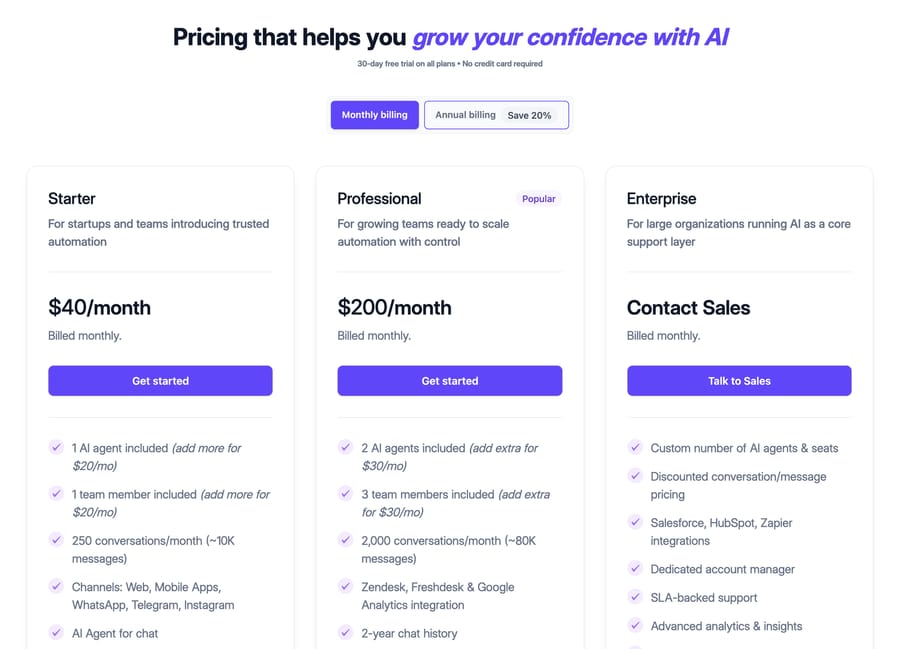
Kommunicate's pricing tiers. The screenshot predates the September 2026 plan names; the figures below are current.
Kommunicate publishes its prices, which is rarer than it should be in this category. The plans on kommunicate.io/pricing, checked 24 September 2026:
- Starter: $40/month, or $34/month billed yearly. 1 AI agent and 1 team member (each extra one is $20/month), 250 conversations per month (Kommunicate estimates about 10,000 messages), 1-year chat history, and web, mobile, WhatsApp, Telegram and Instagram. Extra conversations cost $15 per 1,000. This is the entry point for a small team piloting bot-first support.
- Professional: $200/month, or $167/month billed yearly. 2 AI agents and 3 team members (each extra one is $30/month), 2,000 conversations per month (about 80,000 messages), 2-year chat history, and the Zendesk, Freshdesk and Google Analytics integrations. Extra conversations cost $10 per 1,000. The yearly plan adds a phone-call AI feature.
- Enterprise: custom. Custom AI agents, seats and conversation pricing, plus the Salesforce, HubSpot and Zapier integrations. This is where you land if you outgrow 2,000 conversations or need specific security and SLA terms.
The structural point: Kommunicate prices mainly on conversation volume, with seats and AI agents as add-ons, not per resolution. A conversation is a session-style unit (a distinct customer chat within the billing period), so cost tracks how many people you talk to, not how many messages fly back and forth. That's friendlier than pure per-seat pricing for a small team with a lot of traffic. It also means the bill scales with traffic: a busy season on Starter at 1,250 conversations costs $40 plus 1,000 extra conversations at $15, before any extra seats.
Every plan includes a 30-day free trial. Before buying, estimate your monthly conversation count and check it against the plan limit and overage rate. That number, not the base fee, decides whether Kommunicate stays cheap as you grow. Earlier versions of this guide listed Lite at about $100 per user per month and Advanced at about $200; those plan names are gone from the pricing page.
Which tools does Kommunicate integrate with?
Kommunicate is designed to sit in the middle of a support stack rather than replace it. It connects to CRM and help-desk systems, ticketing platforms and workflow tools so conversations and contacts don't stay trapped in the chat widget (Kompose). The pricing page gates them by plan: Zendesk, Freshdesk and Google Analytics from Professional, Salesforce, HubSpot and Zapier on Enterprise. It can also train directly on Zendesk and Salesforce knowledge bases, which tells you the intended shape: many customers already run one of those systems and use Kommunicate as the conversational front end on top of existing content. On the AI side, the integrations that matter most are the model connections (OpenAI, Gemini, Anthropic, Dialogflow, Amazon Lex, IBM Watson) plus API and webhook calls inside Kompose flows, so a bot can call your own systems mid-conversation. Check that the specific tool you rely on has a supported connector on the plan you're buying before you build around it.
Which industries use Kommunicate?
Kommunicate positions itself across several verticals. Its materials and case studies most often feature e-commerce and retail (order status, product questions, WhatsApp support), education (student and admissions queries), healthcare (appointments and information), banking and financial services, and travel and hospitality. The common thread is high-volume, repetitive, mostly informational conversations across web and messaging, which is exactly what bot-first-with-handoff is built for. If your support is heavily transactional in a regulated industry, weigh Kommunicate's compliance posture against your requirements. If it's high-volume Q&A with occasional escalation, you're in its sweet spot.
What reviewers say: Kommunicate holds 4.6 out of 5 from 44 reviews on Capterra, scoring highest on customer service (4.67) and lowest on value for money (4.38), checked 21 September 2026. That is a small sample, so treat it as a signal rather than a verdict. The homepage's own figures (80%+ of queries automated on average across active customers over the last 90 days) are Kommunicate's claim and aren't independently audited.
What are Kommunicate's pros and cons?
Pros
- All-in-one. Chatbot, live chat and Copilot in one platform, so you're not stitching tools together.
- Model-agnostic bot builder. Kompose lets you build on OpenAI, Gemini, Anthropic, Dialogflow, Amazon Lex or a custom framework, so you're not locked into one provider and can reuse an existing Dialogflow agent.
- Low, published entry price. Starter at $40 a month is accessible for a small team, and rates are public rather than gated behind sales.
- Strong human handoff. Reviewers consistently call out the bot-to-human fallback, with conversation context carried across.
- Multichannel out of the box. Web widget, mature mobile SDKs and a broad messaging set (WhatsApp, Messenger, Instagram, Telegram, LINE), which matters for SMBs.
- Quick to start. Self-serve 30-day trial and no-code setup, no enterprise procurement.
Cons
- Mixed reliability reviews. Some users praise it; others report the product "doesn't do what it says it will," so pilot against your real content and volume (Saufter).
- Small entry allowance. Starter covers 250 conversations, and the jump to Professional is $40 to $200 a month. Overage fees and $20-to-$30 add-on seats fill the gap between.
- Integrations are plan-gated. The Zendesk and Freshdesk integrations start at Professional, and Salesforce and HubSpot need Enterprise.
- Bring-your-own-model complexity. Getting the best results can mean configuring and tuning an external NLP or LLM engine, which is more moving parts than a fully managed single-vendor bot.
- Best for SMB and mid-market. It isn't an enterprise contact-center platform, and deep action-taking automation (refunds, order edits, account updates) isn't its core strength. It's built more to answer and route than to act.
- Standalone tool. If you already run a mature help desk, Kommunicate is another system to operate alongside it rather than an AI layer inside it.
Who is Kommunicate best for?
Kommunicate fits small and mid-market teams that want a bot-first setup with a reliable human fallback across website, mobile app and messaging channels, without an enterprise implementation. If your priority is absorbing repetitive chat volume cheaply and escalating cleanly to a person, it's built for exactly that.
It's a weaker fit if you're an enterprise contact center, if you need action-taking automation (refunds, order changes, account updates) rather than answering and routing, or if your support already runs through a mature help desk and you'd rather add AI on top than run a separate chat platform.
How does Kommunicate compare with the alternatives?
Kommunicate competes with chatbot and live chat platforms like Tidio, Chatbot.com and Intercom's entry tiers, plus help-desk-native automation. Here's the comparison, including where we fit:
| Kommunicate | Tidio / Chatbot.com | Intercom (entry) | Macha | |
|---|---|---|---|---|
| Category | AI chatbot + live chat platform | Chatbot + live chat | Messaging + support suite | AI agent layer on your help desk |
| Pricing | $40 or $200/mo + conversation overage | Flat monthly + volume | Per seat + resolution fees | Per ticket, from $299/mo for 750 tickets |
| Bot builder | Kompose, model-agnostic (BYO LLM/Dialogflow) | Native visual builder | Fin (Intercom's own AI) | Plain-English agents, no flow-building |
| Channels | Web, mobile SDK, WhatsApp, IG, Telegram, more | Web, some messaging | Web, mobile, messaging | Runs in your help desk's channels |
| Handoff | Strong bot-to-human fallback | Bot-to-human | Native to the suite | Escalates within your help desk |
| Action-taking | Mostly answer + route | Mostly answer | Some, via apps | Resolves and takes actions via tools |
| Best for | SMB/mid-market bot-first support | Small sites, basic chat | Teams standardizing on Intercom | Teams automating support on an existing help desk |
Some notes on reading the table. Tidio and Chatbot.com overlap heavily with Kommunicate at the small end; Kommunicate's edge is channel breadth and model choice, while Tidio often wins on polish and Chatbot.com on flow-building depth. Intercom is a different weight class: a full suite with its own Fin AI, priced per seat plus per resolution, so it costs more but is more integrated if you're all-in on Intercom. Macha isn't a like-for-like swap at all.
Where Macha differs: we're not a standalone chat widget, and we don't try to replace your website live-chat stack. Macha is an AI agent layer that runs on top of the help desk you already use, Zendesk, Freshdesk, Gorgias, Front, HubSpot or Intercom, where you build agents in plain English and pay per ticket rather than per seat and per conversation. Pricing starts at $299 a month for up to 750 tickets, with setup and monitoring by the Macha team included. Kommunicate is built to deploy a chatbot with human fallback; Macha is built to resolve support work inside your existing help desk, including real actions through connected tools. If you want a cheap all-in-one chatbot and live chat for a small team, Kommunicate is a sensible pick. If your support runs through a help desk and you want automation priced per ticket, that's our lane.
Two comparisons are worth making before you commit. Chatbase is the closest thing to Kommunicate's self-serve, train-it-on-your-docs half, and Landbot covers the visual flow-builder half, which is the part of Kommunicate most teams actually spend their time in.
How we researched this: Features and customer figures come from Kommunicate's public pages and the third-party sources linked inline. Pricing was re-checked against kommunicate.io/pricing on 24 September 2026, when the plans had changed from Lite and Advanced to Starter and Professional. Capterra's figures are quoted with the date checked; G2 blocks scripted requests, so no G2 rating is claimed here.
FAQ
What is Kommunicate? Kommunicate is an AI chatbot and live chat customer support platform. It combines an AI chatbot, live chat and an AI Copilot with automated routing, escalation and bot-to-human handoff across web, mobile and messaging channels. It grew out of the Applozic chat SDK.
How much does Kommunicate cost? On 24 September 2026, Starter cost $40 a month ($34 billed yearly) for 250 conversations, 1 AI agent and 1 team member, and Professional cost $200 a month ($167 billed yearly) for 2,000 conversations, 2 AI agents and 3 team members. Enterprise is custom. Extra conversations cost $15 or $10 per 1,000, and every plan has a 30-day free trial.
Is Kommunicate good? Reviews are mixed but mostly positive: 4.6 out of 5 from 44 Capterra reviews. Users praise the automation breadth, price and human fallback, while some report reliability issues. Pilot it against your real conversation volume before committing.
What channels does Kommunicate support? Kommunicate deploys across your website, iOS and Android apps, WhatsApp, Facebook Messenger, Instagram, Telegram, LINE, email, Slack and voice, with automated routing and escalation.
What are good Kommunicate alternatives? Tidio and Chatbot.com for chatbot plus live chat, Intercom if you want a fuller suite with its own Fin AI, or a help-desk layer like Macha if your support runs through a help desk and you want agents that resolve tickets and take real actions with per-ticket pricing.
What is Kompose? Kompose is Kommunicate's no-code bot builder: a visual canvas for conversation flows with buttons, forms, carousels and API calls. It's model-agnostic, so you can build bots on OpenAI, Gemini, Anthropic, Dialogflow, Amazon Lex, IBM Watson or a custom framework, and train them on your website, files or knowledge base.
Does Kommunicate use Dialogflow? It can. Kommunicate integrates with Google Dialogflow, so an existing Dialogflow agent can be connected and Kommunicate used as the deployment, handoff, live-chat and analytics layer on top, rather than rebuilding. It also supports OpenAI, Gemini, Anthropic, Amazon Lex, IBM Watson and its own generative training.
How does Kommunicate handle the bot-to-human handoff? The bot resolves what it can, then escalates to a live agent when it hits its limits or the customer asks for a person. Routing can follow rules, team or availability, and the conversation context goes to the agent so they don't start cold. Reviewers praise this fallback more consistently than any other feature.
Is Kommunicate a help desk? Not exactly. It's a chatbot and live chat platform with light support infrastructure (knowledge base, ticket management, analytics) added. Small teams can run basic support on it, but it isn't a full help desk like Zendesk or Freshdesk. Many customers run one of those and use Kommunicate as the conversational front end, since it can train on Zendesk and Salesforce knowledge bases.
Researching AI support tools? If your support runs through a help desk like Zendesk or Freshdesk and you want agents that resolve tickets, not just answer and route, with per-ticket pricing, take a look at Macha, our AI agents for customer service, and how custom tools let agents take real actions.
Simple per-ticket AI pricing
One thread with one person is one charge, however many replies it takes.