Intercom
 Shopify
 Stripe
 Slack
Slack Notion
 Google Workspace
 Confluence

Chatbase Review and Complete Guide (2026)


We checked Chatbase's pricing page, model docs and FAQ on September 20, 2026, and the review evidence below comes from its Trustpilot and Capterra pages, read in a browser on September 19, 2026.
Key takeaways
- Chatbase scores 24 out of 30 on Macha's six-criteria rubric for AI support tools, clearing the 18-point shortlist bar.
- Chatbase's self-serve plans cost $0 for 50 message credits, $40 a month for 700 credits, $150 a month for 4,000 credits, and $500 a month for 15,000 credits.
- A Chatbase message credit is spent per model request, ranging from 1 credit on models like Auto or GPT-5.6 Luna up to 5 credits on Claude 4.6 Opus.
- Chatbase holds a 4.8 out of 5 rating from 45 reviews on G2, 4.3 from 73 reviews on Capterra, and 3.9 from 64 reviews on Trustpilot, all checked 22 September 2026.
- Chatbase answers tickets in place inside Zendesk but only escalates into Freshdesk, Intercom, Gorgias, HubSpot, and Help Scout, and lists no Front integration.

Chatbase review: our verdict, scored
We score products on six criteria, 0 to 5 each, for a maximum of 30, and 18 out of 30 is the bar a product has to clear before it goes on one of our shortlists. It is the same rubric we publish and show the working for on best help desk software. For an AI agent builder rather than a help desk, we read "AI that resolves" as answers the customer end to end, and not as drafts a suggestion for a human, and everything else is scored exactly as it is there.
| Criterion (0-5) | Chatbase | Why |
|---|---|---|
| Published pricing | 5 | Four self-serve prices, the credit allowance on each, a per-model credit table, and every add-on rate. Chatbase publishes more of its own cost model than almost anything we score. |
| Entry cost for a small team | 4 | Free at $0, but 50 credits a month is a demo, not a deployment, and the first usable tier is $40 a month for a workspace. It bills the workspace instead of the seat, which helps a small team. |
| AI that resolves | 5 | This is the entire product: a RAG agent answering from your own content, with AI Actions for lookups and a credit rate you can calculate per answer. |
| Write actions | 4 | AI Actions call external APIs, and the native Stripe integration handles billing tasks. It loses a point because the depth is lighter than a workflow platform, and because the Actions allowance is one on Hobby. |
| Independent review base | 2 | 45 ratings on G2, 73 on Capterra, 64 on Trustpilot and a single rating on TrustRadius, all checked 22 September 2026. Around 180 ratings for a product used by a reported 10,000 businesses. |
| Channel coverage | 4 | Website widget, iframe, shareable link, API, Slack, WhatsApp, Instagram and Messenger, plus its own Helpdesk and voice and telephony from the Standard plan. |
| Total | 24 / 30 | Clears the 18/30 bar. |
Chatbase scores well for a reason worth stating plainly: it tells you what it costs. The credit table, the per-model rates and the auto-recharge price are all public, which is rarer in this category than it should be, and it is why the problems section below can do arithmetic instead of guessing. The points it drops are about volume. Honesty is not the problem. A thin review base and a free tier that cannot hold a real deployment are both consequences of being a small, bootstrapped company selling a cheap product to a lot of people.
Is Chatbase worth it?
It is worth it if your support surface is a website or an in-product widget, you want a trained agent live this week, and you are willing to pick the cheapest model that answers your hardest question. At $150 a month the Standard plan buys 4,000 credits, its own Helpdesk and a Zendesk integration that answers tickets in place, which is a lot of capability for a workspace price rather than a seat price.
It is not worth it if your tickets already live in Freshdesk, Intercom, Gorgias, HubSpot or Help Scout, where Chatbase's documented behavior is to escalate into them and not to answer in them. It is also the wrong choice if you need a predictable monthly number, because the model dropdown moves the bill by a factor of five without changing anything a customer sees.
Name the incentive, because it explains the whole credit system. Chatbase earns more when you pick a heavier model and when your agent takes more steps per answer. It does not earn more when a conversation is resolved. Its own docs tell you to start from the cheapest model that handles your hardest questions, which is good advice against its own interest, and the arithmetic below agrees with it.
What is Chatbase?
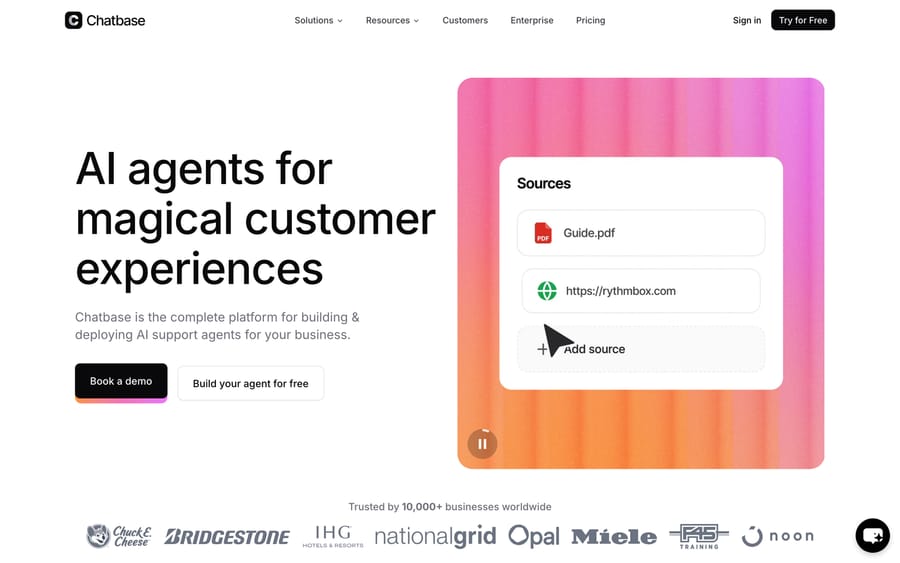
Chatbase is a build-your-own AI agent platform. You point it at your data (website pages, uploaded files in PDF, DOC/DOCX, TXT or CSV, plain text and question/answer pairs) and it trains a chatbot on that content so it can answer customer and user questions in natural language. The classic use case is a support chatbot embedded on your website or inside your product, but teams also use it for lead capture, sales qualification, internal knowledge Q&A and in-app product assistance.
Chatbase was founded by Yasser Elsaid in late 2022 (incorporated in 2023) and was one of the first SaaS products to productize RAG, Retrieval Augmented Generation, the technique that lets you "train" a large language model on your own documents without fine-tuning it. When a user asks a question, Chatbase retrieves the most relevant chunks from your indexed content and hands them to the underlying LLM (GPT-class, Claude, Gemini and others) to generate a grounded, company-specific answer, ideally with citations back to the source.
Notably, Chatbase is bootstrapped. By 2025 the company reportedly reached roughly $8 million in ARR with an ~18-person team and no venture funding, serving a reported 10,000+ businesses (third-party estimates). That is an unusually lean, capital-efficient story in a category flooded with VC money. Over the past couple of years it has repositioned itself from a simple "chatbot builder" toward being an AI agent platform, adding "AI Actions" (custom tools the agent can call) and integrations like Stripe for billing support, so the bot can do things, not just answer them. It also reaches into help desks now. From the Standard plan it includes its own Helpdesk, a ticket inbox for chat, email, WhatsApp and API conversations, and its Zendesk integration lets the agent answer Zendesk tickets itself or draft replies for a person to review. With Freshdesk, Intercom, Gorgias, HubSpot and Help Scout, Chatbase's docs describe escalation only: the agent opens a ticket when a chat needs a human. Which of those your team uses is the most important thing to check when you compare it with help-desk-native tools.
How Chatbase's AI works
Under the hood, Chatbase is a clean, well-executed implementation of the modern RAG-plus-actions pattern. It's worth understanding each stage, because that's where both the capabilities and the cost live.
- Data ingestion (the "sources"). You connect a website, which Chatbase crawls and indexes page by page, upload documents, paste raw text, or add explicit Q&A pairs for answers you want to control word-for-word. You can also sync from sources like Notion. Chatbase chunks that content, generates embeddings, and stores them in a vector index it manages for you. There's no separate vector database to run.
- Retrieval + generation. At query time it embeds the user's question, retrieves the most semantically relevant chunks from your index, and passes them to the LLM as context. Because answers are grounded in your material instead of the model's generic training data, the bot stays on-topic and can cite sources, which is the core value proposition of RAG.
- Model choice. You pick the model per agent. Chatbase exposes a menu that spans economy and premium tiers: lightweight, cheap models for high-volume FAQ deflection, and frontier models (GPT-class, Claude Sonnet/Opus, Gemini Pro, Grok) for harder reasoning. This is a real lever: the same question answered by a premium model can cost several times more credits than an economy one (details in the pricing section).
- Instructions and guardrails. Each agent has a system prompt where you set persona, tone, scope, refusal behavior and fallbacks ("if you don't know, say so and offer to hand off"). You can constrain it to only answer from your sources, which reduces hallucination without eliminating it. Chatbase also supports confidence-based handoff so uncertain queries route to a human or a lead form.
- AI Actions. Beyond answering, agents can call custom actions: collect a lead, hit an external API, look up an order, trigger a workflow, or handle billing questions via the native Stripe integration. This is what moves Chatbase from "answer bot" toward "agent", though the depth of what you can wire up is lighter than a full workflow-automation platform.
- Deployment. Ship it as a chat bubble embedded on your site, an iframe, a full-page shareable link, or via the API if you're building it into your own product. From there it can be surfaced on messaging channels too (see integrations below).
Data, privacy and where your content lives
For a support or product bot, this matters. Chatbase stores your ingested sources and the resulting embeddings on its own infrastructure (it runs on major cloud providers). Your data is used to answer your users' questions. Chatbase's public position is that customer data is not used to train the underlying foundation models, which are accessed through the model providers' APIs. Conversations are logged so you can review transcripts, spot gaps and improve answers.
The platform advertises SOC 2 compliance and GDPR alignment, which is table stakes for handling customer conversations. If you operate in a regulated space or move sensitive PII, dig into the specifics with their team, meaning data residency, retention windows, sub-processor list and DPA terms, before you commit, instead of relying on a marketing badge. The practical point: with any hosted RAG tool you are trusting a third party with your knowledge base and your customers' messages, so treat the security review as a real step.
Key features
- Train on your own data: websites (crawled), files (PDF/DOC/TXT/CSV), pasted text, Q&A pairs and Notion, indexed via RAG
- No-code agent builder with an embeddable widget, iframe and shareable link
- Multiple LLMs: choose economy or premium models per agent, trading cost for quality
- AI Actions: custom actions, API calls and workflows, including the native Stripe integration for billing tasks
- Integrations: Slack, WhatsApp, Instagram/Messenger, Zendesk, Slack-style handoff, plus webhooks and API for anything else
- Multiple agents for different audiences, products or languages (limited by plan)
- Lead capture forms and CRM-style contact collection
- Analytics: conversation logs, sentiment and topic breakdowns, and "revise answer" tooling to correct the bot
- Auto-retraining to keep the index in sync with changing source content (higher tiers)
- Custom branding / custom domain / branding removal as paid add-ons
Chatbase pricing in 2026: plans, message credits and add-ons
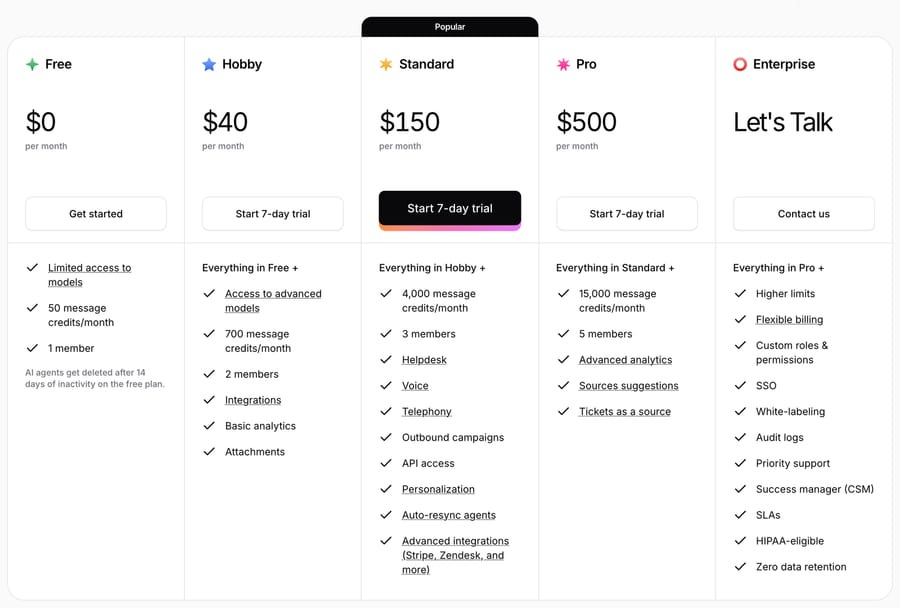
The short answer: Chatbase costs $0, $40, $150 or $500 a month, and what you actually pay depends on which model your agent runs. There are four self-serve plans: Free ($0, 50 message credits a month), Hobby ($40/month, 700 credits), Standard ($150/month, 4,000 credits) and Pro ($500/month, 15,000 credits), plus a quoted Enterprise plan. You pay a flat monthly fee per workspace, 20% less if you pay yearly, and every AI response spends 1 to 6 of those credits depending on which model the agent runs. The problems section below covers what to do when that bill or that agent misbehaves.
Chatbase plans and prices
| Plan (checked 22 September 2026) | Monthly | Yearly | Credits / month | Limits |
|---|---|---|---|---|
| Free | $0 | $0 | 50 | 1 seat, no AI Actions, 1 MB |
| Hobby | $40 | $32/mo ($384/yr) | 700 | 2 seats, 1 Action, 10 MB |
| Standard | $150 | $120/mo ($1,440/yr) | 4,000 | 3 seats, 8 Actions, 20 MB |
| Pro | $500 | $400/mo ($4,800/yr) | 15,000 | 5 seats, 11 Actions, 40 MB |
| Enterprise | Quoted | Quoted | Committed volume | Set in the contract |
Every self-serve plan includes one agent. "Actions" is AI Actions per agent, and the MB figure is the training content an agent can hold (extracted text, not file size). Paid plans start with a 7-day trial. What each tier adds:
- Free: limited model access, and agents are deleted after 14 days of inactivity.
- Hobby: advanced models, integrations, basic analytics and attachments.
- Standard: helpdesk, voice, telephony, outbound campaigns, API access, auto-resync and advanced integrations such as Stripe and Zendesk.
- Pro: advanced analytics, source suggestions and tickets as a source.
- Enterprise: SSO, white-labeling, custom roles, audit logs, SLAs, HIPAA eligibility and zero data retention, priced on a commitment to credits, conversations or resolutions.
Plan prices, credit allowances and add-on rates were re-read on chatbase.co/pricing on 22 September 2026 and are unchanged from our 20 September read, when we also took the seat, Action and training-size figures from the comparison table. All figures are USD. Sources: the pricing page, Chatbase's models comparison and its FAQ docs.
Four of these details have changed since the first version of this guide: Hobby now includes 700 credits rather than 500, API access starts at Standard rather than Hobby, every self-serve plan includes exactly one agent with a second sold as a $25-a-month add-on, and the AI Actions allowance moved. On September 20, 2026 the comparison table showed 0 Actions on Free, 1 on Hobby, 8 on Standard and 11 on Pro; earlier versions of this guide printed 5 on Hobby and 12 on Pro, and both are corrected above.
What a Chatbase message credit actually buys
A message credit is spent per request to the AI model, and the price of a request depends on the model. Chatbase's own model docs list eight recommended models running 1 to 5 credits and point to Build > AI Model in the app for the full list; its pricing FAQ names a sixth tier above those. Read on September 20, 2026:
| Credits | Models (as listed by Chatbase) |
|---|---|
| 1 | Auto (Chatbase's router), GPT-5.6 Luna, Gemini 3 Flash, and any model not listed below |
| 2 | GPT-5.6 Terra, GPT-5.2, Gemini 3.5 Flash, Gemini 2.5 Pro, Gemini 3.1 Pro |
| 3 | Claude 4.6 Sonnet, Claude 4.5 Sonnet, Grok 3 |
| 4 | GPT-5.5, Grok 4 |
| 5 | Claude 4.6 Opus, Claude 4.5 Opus |
| 6 | The "enhanced deep analysis" tier, named in Chatbase's pricing FAQ; the models in it are listed in the app under Build > AI Model |
One answer isn't always one request. Chatbase's pricing FAQ gives the example of a booking agent: the first model call decides to run the calendar action, the second writes the reply, so the customer sees one message and you pay twice. Credits renew on the 1st of each calendar month, and unused credits don't carry over. Voice minutes draw from the same pool, according to Chatbase's voice API docs, though the pricing page doesn't give a per-minute rate.
Chatbase earns more when you pick a heavier model and when your agent takes more steps per answer, not when it resolves more conversations. Its own docs say to start from the cheapest model that handles your hardest questions, and the arithmetic below agrees.
Worked example: 2,000 support conversations a month
Assume a support bot handling 2,000 conversations a month, averaging 3 AI responses per conversation. That's 6,000 model requests before any actions fire. These are our assumptions, not Chatbase figures, so swap in your own volume. Prices are monthly billing.
| Model | Credits needed | Cheapest setup | Monthly cost |
|---|---|---|---|
| Auto (1 credit) | 6,000 | Standard + 2,000 recharge credits | $230 (about $0.12 a conversation) |
| Claude 4.6 Sonnet (3) | 18,000 | Pro + 3,000 recharge credits | $620 (about $0.31) |
| Claude 4.6 Opus (5) | 30,000 | Pro + 15,000 recharge credits | $1,100 (about $0.55) |
Same traffic, same plan page, and the bill moves almost fivefold on one dropdown. If each conversation also triggers one action, add another 2,000 requests: 2,000 credits on Auto ($80 more), 6,000 on Sonnet ($240 more). Paying yearly cuts only the plan portion, so Standard drops from $150 to $120 but the recharge credits cost the same.
What drives a Chatbase bill up
- Model choice. The single biggest lever, from 1 credit per response to 6.
- Actions. Every tool call is an extra model request, charged at the same model rate.
- Running out. When credits hit zero, Chatbase's FAQ says the agent shows "This AI Agent is currently unavailable" until the 1st. Auto-recharge prevents that at $40 per 1,000 credits, which is 4 cents a credit against about 3.75 cents on Standard and 3.33 cents on Pro. Recharge credits don't expire; plan credits do.
- Extra agents. $25 per agent per month, since each plan includes one.
- Branding. Removing "Powered by Chatbase" is $99 a month. Custom domains exist (see Chatbase's FAQ) but the public pricing page doesn't list their price, and extra seats are bought from the dashboard.
- Peak months. Because unused credits expire monthly, you size the plan for your busiest month and pay for the gap in quiet ones.
Independent teardowns like Lindy's review and SiteGPT's breakdown flag the same credit-and-overage dynamic, though their plan figures may predate the current page. For contrast, Macha's pricing is per ticket: one thread with one person is one charge however many replies it takes, and the model doesn't change it.
Realistic accuracy: what to expect
RAG grounding meaningfully reduces hallucination compared with an ungrounded LLM, but it does not eliminate it. Real-world quality with Chatbase (or any tool in this class) depends almost entirely on the quality of your sources. Clean, well-structured, non-contradictory docs produce confident, correct answers. Stale pages, duplicated content, or two articles that say different things will produce confidently wrong answers, because the retriever surfaces whatever is most similar, not whatever is most current.
Set expectations accordingly: expect strong performance on clearly-documented FAQ-style questions and weaker performance on anything requiring account-specific data, multi-step reasoning across systems, or judgment. The practical playbook is to constrain the agent to your sources, add explicit Q&A pairs for your highest-volume questions, wire up confidence-based handoff so it escalates instead of guessing, and then use the conversation logs and "revise answer" tooling to close gaps every week. Treat launch as the start of a tuning loop, not the finish line.
What real users say
We checked all four rating sites in a real browser session on 22 September 2026. That pass closed a gap in the previous version of this guide, which said G2 had turned away every request we made and carried no G2 score. It does now.
| Source | Rating | Ratings counted | Checked |
|---|---|---|---|
| G2 | 4.8 / 5 | 45 | 22 September 2026 |
| Capterra | 4.3 / 5 | 73 | 22 September 2026 |
| Trustpilot | 3.9 / 5 | 64 | 22 September 2026 |
| TrustRadius (trustradius.com/products/chatbase/reviews) | 10 / 10 | 1 | 22 September 2026 |
Three things to read off that table before the complaints below. The spread is the real finding: a 4.8 on G2 and a 3.9 on Trustpilot are the same product measured by different populations, and the Trustpilot distribution is the one that matters, because it is where billing disputes land. The TrustRadius row rests on one rating and should be ignored. And the Trustpilot count moved from 65 on 19 September to 64 on 22 September, which is normal churn on a small base and a good reason not to quote a review count without a date beside it.
One number we deliberately do not print: G2's own star breakdown for Chatbase showed 42 five-star and 3 four-star ratings on 22 September 2026, which averages 4.93 rather than the 4.8 the page displays. When a distribution and an average disagree we drop the distribution, so the 4.8 above is G2's published figure and nothing is inferred from the split.
What users complain about
Six complaints recur, and each one gets a section of its own with a fix below, so this is the summary rather than the substance. In rough order of how often they appear: the bill is higher than the plan price because credits are spent per model request and not per conversation; the agent stops answering when the monthly credit pool empties; the agent produces confident wrong answers and occasionally invented URLs; training limits are hit on an agent that looks nearly empty; support is slow and an email does not cancel a subscription; and features move up a tier at renewal.
The newest complaints in the G2 set are gentler than the Trustpilot ones and point at capability gaps rather than billing. A reviewer in computer games at a mid-market company wrote on 17 September 2026 that "AI phrases are highly noticeable in gaming communities. We had to spend time adjusting the voice such that it doesn't sound like corporate support dressing up in a gamer outfit", while still praising the flexibility that let them fix it. A reviewer in leisure, travel and tourism at a mid-market company asked on 10 September 2026 for something the platform does not ship: "We test high-risk flows prior to each season, and it would be great if the platform offered some simulation tools." And a reviewer in food and beverages, on 9 September 2026, named the limit every RAG tool shares: "The menu and operating times change frequently, and the location managers are not always diligent enough to update the source. The system is unable to address the issue for us."
That last one is the honest summary of this product class. Chatbase answers from your content, so the quality ceiling is your content, and no amount of model choice raises it.
Who should not buy Chatbase
- Teams whose tickets live in Freshdesk, Intercom, Gorgias, HubSpot or Help Scout. Chatbase's docs describe escalation into those desks instead of resolution inside them, and they list no Front integration. On Zendesk it does answer tickets in place.
- Teams that need a fixed monthly number. The model dropdown swings the bill roughly fivefold on identical traffic, and credits expire monthly, so you size for your busiest month.
- Teams whose source content is maintained by people who will not maintain it. A reviewer named this exactly, and it is the failure mode with no product fix.
- Buyers who need a deep independent review base. Around 180 ratings across all four sites is thin for a purchase you will defend to a finance team.
Common problems and how to fix them
Chatbase's public review record splits hard. Its Trustpilot page showed 3.9 from 65 reviews when we read it on September 19, 2026, with 36 five-star and 19 one-star and almost nothing in between, and 3.9 from 64 when we re-read it on 22 September; its Capterra page showed 4.3 from 73 on both dates, with ease of use at 4.6 and customer service at 3.8. We read every one- and two-star Trustpilot review and the 25 most helpful Capterra reviews. Six problems recur, and five of the six have a fix in Chatbase's own settings.
1. The bill is higher than the plan price
A message credit is spent per request to the model, not per conversation, so three things quietly multiply your usage: the model (1 credit on Auto, up to 6 on the deepest tier), actions (a tool call is a second request, charged at the same model rate), and auto-recharge, which buys credits at $40 per 1,000 once the monthly pool empties. At 3.75 cents a credit on Standard, moving an agent from Auto to a 3-credit model triples the cost of every reply without changing a thing the customer sees.
Check: the Usage screen, which breaks spend down by agent and by day. Fix: set every agent to the cheapest model that handles your hardest questions, which is what Chatbase's own model docs recommend, and count your actions before you launch. A booking agent that runs a calendar lookup before it answers costs two credits a turn, not one.
2. The agent goes silent in the last week of the month
When the pool hits zero, the widget shows "This AI Agent is currently unavailable" until credits renew on the 1st, per Chatbase's pricing FAQ. Unused plan credits do not carry over, so you size the plan for your busiest month and pay for the gap in quiet ones.
Fix: turn on auto-recharge in Workspace settings and set the threshold above a day's normal usage. Recharge credits cost more per credit than plan credits, but they do not expire, so the ones you buy in a busy month carry into the next.
3. Confidently wrong answers, and invented URLs
This is the retrieval problem every RAG tool shares, and Chatbase reviewers name it precisely. Rik H., in IT services, wrote on Capterra that "the bot WILL generate a totally wrong answer with that greatest of eloquence and confidence," in a review he still rated four stars. Isaiah A., at a nonprofit, wrote that "It sometimes makes up URLs with our domain." Mike C., in the US, put it in two words on September 1, 2026: "Often incorrect".
The mechanism is the one described under accuracy above: the retriever returns the chunks most similar to the question, not the ones most current, so two pages that disagree produce a fluent answer built on the wrong one.
Fix, in order of payback. Use Revise Answer on the conversation in the Activity screen; Chatbase's best-practices doc says the revised answer is stored as a Q&A data type, so it becomes a pinned answer for that question and not a one-off correction. Then delete the stale source that produced the wrong answer instead of adding a correcting one, because the retriever will keep finding both. Then constrain the agent to its sources in the system prompt and turn on confidence-based handoff, so an uncertain query becomes a lead form or a ticket instead of a guess. Chatbase's response-quality guide covers the prompt settings.
4. "Over your training limits" on a nearly empty agent
A UK buyer on the $150 Standard plan wrote on June 1, 2026 that he "Added less than 1MB of training data against the 10MB limit and it immediately told me I was over my training limits." The same surprise shows up on Reddit as Chatbase MB issue.
The cause is what the megabyte counts. It is extracted text across every source on the agent, and a website crawl adds one source per URL it finds, so pointing Chatbase at a documentation site or a blog archive can pull in several hundred pages in one click. Re-crawling adds to that rather than replacing it.
Fix: open Sources, sort by size, and delete the crawled links you never meant to include before retraining. Chatbase's data-sources doc covers the sync behavior for each type. One thing to note about the review itself: the 10 MB figure the reviewer quotes is the Hobby allowance, and the pricing page showed 20 MB on Standard and 40 MB on Pro when we checked it on September 20, 2026, so check which plan the agent is actually on before you buy more.
5. Support is slow, and an email does not cancel anything
Capterra scores Chatbase 3.8 on customer service against 4.6 on ease of use, and the reviews explain the gap. Brian, in the US, titled his May 12, 2026 review "Where's the support" after Chatbase's own agent offered to book a demo and then errored; Chatbase replied publicly six weeks later. Rik H. again, in a four-star review: "Don't expect service or support anytime soon."
The sharpest version is about money. David T., in Israel, wrote on September 9, 2026 that he was "Charged three times after I explicitly told them to close my account," $42 each time, and that support told him "I was required to cancel manually through Workspace Settings > Plans."
Fix: cancel in the product, not by email. Chatbase's workspace-settings doc says that "Clicking 'Cancel Plan' under your active plan disables auto-renewal," and that the plan stays active until the renewal date. Export your conversations through the export API first, since API access starts on Standard and disappears when you drop below it.
6. Features move up a tier at renewal
Long-time customers object to what the current plans took away rather than to what the agent does. Andrés La Torre, in Spain, a customer for more than three years, wrote on April 1, 2026: "Usage costs have tripled and features from the plans have disappeared." Chatbase answered him the same day, saying prices rose with the platform's capabilities and offering a walkthrough. A second Spanish reviewer, on March 31, 2026, said Chatbase removes "features you'd paid for because they want to charge more per customer." A 2023 Reddit thread, Chatbase appears to be running a bait and switch, makes the same complaint about an earlier plan change.
The pricing page bears out the direction. API access now starts at Standard rather than Hobby, Hobby is down to a single AI Action, and every self-serve plan includes exactly one agent with more at $25 a month each.
Fix: there is nothing to configure here, so treat it as a procurement step. Read the plan comparison before each renewal, and keep the export running if a feature you depend on sits one tier above you. Annual billing locks the price for the year at 20% off, which is the only hedge Chatbase publishes.
Pros and cons
Pros
- Fast to launch: you can have a trained bot embedded on your site in an afternoon, genuinely no-code for the common case.
- Clean RAG execution: indexing, retrieval, citations and source management are handled for you; no vector DB to run.
- Model flexibility: pick economy or premium models per agent and trade cost for quality.
- Multichannel reach: the same bot can appear on your site, Slack, WhatsApp and social DMs.
- Transparent, low entry price compared with opaque enterprise AI vendors.
- Bootstrapped and profitable, which tends to mean steady, customer-driven development rather than churn from a pivot.
Cons
- Credit system is easy to misread: real costs scale with volume and premium models, and overages add up fast.
- Add-on stacking: branding removal, custom domain and extra agents are all separate line items on top of the plan.
- Help desk coverage is uneven: the agent can answer Zendesk tickets and Salesforce cases, but with Freshdesk, Intercom, Gorgias, HubSpot and Help Scout it only opens a ticket to escalate a chat, and its docs list no Front integration. Its own Helpdesk and the Zendesk integration start on Standard ($150/month).
- Automation depth is lighter than enterprise contact-center AI for complex, multi-system ticket resolution.
- Answer quality is only as good as your sources: messy or contradictory content produces confident errors, so it needs ongoing curation.
Who Chatbase is best for (and who outgrows it)
Chatbase is a strong fit for SMBs, startups, SaaS products and marketing sites that want a self-serve, on-site AI chatbot trained on their content, which is fast, cheap to start and needs no engineering. It's ideal for deflecting website FAQs, answering pre-sales and product questions, powering an in-app help widget, and capturing top-of-funnel leads. If your primary support surface is a website widget with no help desk behind it, Chatbase's simplicity is a real advantage.
Teams typically outgrow it when support graduates from "answer questions on the website" to "resolve real tickets inside our help desk." On Zendesk, Chatbase can now answer those tickets in place. On Freshdesk, Intercom or Gorgias it can't: it escalates into them, and it has no Front integration at all, so the tickets already in your queue stay manual unless you move support into Chatbase's own Helpdesk. If you'd rather keep the help desk you have, an AI layer that works inside it is the better structural fit. The tools solve different shapes of problem, and the honest advice is to match the tool to where your support actually happens.
Chatbase vs alternatives (including Macha)
| Chatbase | On-site bot peers (SiteGPT, Lindy, My AskAI) | Enterprise AI agents (Ada, Sierra) | Macha | |
|---|---|---|---|---|
| Core model | AI agent builder with its own Helpdesk (Standard and up) | Standalone website chatbot builders | Standalone enterprise AI agent | AI agent layer on top of your existing help desk |
| Best for | SMB/SaaS on-site chatbots & lead capture | SMB/SaaS on-site chatbots | Large-enterprise CX | Teams on Zendesk, Freshdesk, Gorgias or Front |
| Setup | No-code, an afternoon | No-code, an afternoon | Long, services-heavy | Connect help desk, build agents in plain English |
| Pricing | Published, credit-based (model-weighted) | Mostly published, per-message/credit | Custom/opaque, high | From $299/mo for 750 tickets (~$0.40/ticket), transparent |
| Help-desk native | Zendesk and its own Helpdesk; escalation only elsewhere | No | Varies | Yes |
| Resolves tickets in your workflow | Zendesk tickets and Salesforce cases | No | Enterprise-focused | Yes, inside the help desk |
The key distinction is not "which is better" but which shape of problem you have. Chatbase gives you a chatbot you embed on your own surfaces. Its on-site peers (SiteGPT, Lindy, My AskAI) solve the same shape and compete mostly on price and polish. Enterprise agents like Ada and Sierra target large CX orgs with services-heavy rollouts. If you want a builder with flows and more channels instead of a content-trained widget, our Botpress guide and Voiceflow guide cover the two closest options and how each one bills.
Macha is a different shape. It's an AI agent layer that runs on top of the help desk you already use. Macha fits teams already running Zendesk, Freshdesk, Gorgias, Front, HubSpot or Intercom who want agents acting inside the ticket, where the customer conversation already lands. It connects to the help desk, reads your knowledge base and your past tickets, and resolves or drafts responses in that native workflow, respecting your queues, macros and handoff rules. You build agents in plain English and give them custom tools to take real actions (look up an order, process a refund, update a record). Pricing is per ticket (one charge per thread, from $299/month for 750 tickets), so you pay for conversations handled rather than a seat count or a monthly credit bucket weighted by model. If your support lives on a website widget, or you'd move it into Chatbase's own Helpdesk, Chatbase may be exactly right; if it lives inside Freshdesk, Front or Gorgias, where Chatbase only escalates or has no integration, Macha is the closer fit, and on Zendesk both answer tickets in place, so compare pricing and actions. See our broader take on AI agents for customer service.
How we researched this
The plans, message-credit rules and model details here were read off Chatbase’s own pricing page, model documentation and FAQ on September 20, 2026, and the review evidence comes from its Trustpilot and Capterra pages, opened in a browser on September 19, 2026 — we read every one- and two-star Trustpilot review and the 25 most helpful Capterra reviews. On September 21, 2026 we re-checked the internal links in this post; we did not re-price the plans or re-read the review pages on that pass. On 22 September 2026 we re-read the pricing page and checked all four rating sites in a headed browser session, which is how the G2 score finally landed: an earlier version of this guide said G2 turned away every request we made and carried no G2 figure, and that is now corrected to 4.8 from 45 ratings. We have not run a paid Chatbase workspace at volume ourselves, so no number here comes from our own invoice.
Frequently asked questions
Is Chatbase worth it? It scores 24 out of 30 on our rubric, clearing the 18-point bar, with full marks on published pricing and on AI that actually resolves. It drops points on the thinness of its independent review base and on a free tier too small to run anything real. It is worth it when your support surface is a website widget or your own product and you will manage the model choice deliberately. It is not worth it when your tickets already live in a help desk Chatbase can only escalate into.
What do Chatbase reviews score it? 4.8 out of 5 from 45 ratings on G2, 4.3 from 73 on Capterra and 3.9 from 64 on Trustpilot, all read on 22 September 2026. TrustRadius carries a single rating and should be ignored. The spread between the G2 and Trustpilot figures is the useful part: Trustpilot is where the billing complaints land, and they are specific enough to check.
What do users complain about with Chatbase? Six things recur: a bill higher than the plan price because credits are spent per model request, the agent going silent when the monthly pool empties, confidently wrong answers and occasionally invented URLs, hitting a training limit on an agent that looks nearly empty, slow support plus a cancellation that only works in the product, and features moving up a tier at renewal. Each one has its own fix in the problems section above, and five of the six are settings you control.
What is Chatbase used for? Building AI chatbots (now positioned as AI agents) trained on your own data (website, docs, files, Q&A pairs) that answer customer or user questions, capture leads, and via AI Actions perform tasks. You embed it on your site or product, or surface it on channels like Slack, WhatsApp and social DMs, all without writing code.
How much does Chatbase cost? Chatbase costs $0 on Free (50 message credits a month), $40/month on Hobby (700 credits), $150/month on Standard (4,000 credits) and $500/month on Pro (15,000 credits), or $32, $120 and $400 a month if you pay yearly. Enterprise is quoted. What you actually spend depends on the model your agent runs (1 to 6 credits per response) and on auto-recharge credits at $40 per 1,000 once the monthly allowance runs out. Plan prices re-checked 22 September 2026.
What counts as a message credit in Chatbase? Each request Chatbase sends to the AI model. A reply on a 1-credit model (Auto, GPT-5.6 Luna, Gemini 3 Flash) costs 1 credit; Claude 4.6 Sonnet costs 3, GPT-5.5 costs 4, and Claude 4.6 Opus costs 5, with Chatbase's FAQ naming a sixth, deeper tier above those. If the agent runs an action before answering, such as checking calendar slots, that's a second request and a second charge. Credits reset on the 1st of each month and unused ones don't carry over.
Is there a free Chatbase plan? Yes. The Free plan gives you 50 message credits a month, one agent, one member and limited model access, and Chatbase deletes agents on it after 14 days of inactivity. That's enough to test answers, not to run support. Hobby, Standard and Pro each start with a 7-day trial.
What happens when you run out of Chatbase credits? The agent stops answering and shows "This AI Agent is currently unavailable" until your credits renew on the 1st. Auto-recharge avoids that: when your balance drops below a threshold you set, Chatbase adds credits at $40 per 1,000, and those recharge credits don't expire.
Is Chatbase cheaper if you pay yearly? Yes, by 20%. Hobby is $384 a year ($32/month), Standard $1,440 ($120/month) and Pro $4,800 ($400/month). The discount is on the plan fee; the pricing page lists auto-recharge at $40 per 1,000 credits with no separate yearly rate.
What LLMs does Chatbase support? You choose the model per agent from a menu spanning economy and premium tiers, including GPT-class models, Claude (Sonnet and Opus), Gemini Pro and Grok. Premium models cost more credits per answer.
Is Chatbase secure and where is my data stored? Chatbase stores your ingested content and embeddings on its own cloud infrastructure and advertises SOC 2 and GDPR alignment; its position is that your data isn't used to train the foundation models. For sensitive data, review their DPA, retention and sub-processor details directly before committing.
Who owns Chatbase? It's an independent, bootstrapped company founded by Yasser Elsaid; as of 2025 it reportedly had ~$8M ARR with an ~18-person team and no venture funding (third-party estimates).
What's a good Chatbase alternative? For on-site chatbots, tools like SiteGPT, Lindy and My AskAI are direct peers. If your support runs through a help desk, a help-desk-native AI agent layer like Macha is a closer fit because it works inside Zendesk, Freshdesk, Front and Gorgias, while Chatbase answers tickets only in Zendesk and Salesforce cases and escalates into Freshdesk and Gorgias.
Why does Chatbase say my agent is over its training limit when I added almost nothing? Because the megabyte allowance counts extracted text across every source on the agent, and a website crawl adds one source per URL it finds, so pointing it at a docs site or a blog archive can add hundreds of pages in one click. Open Sources, delete the crawled links you did not mean to include, and retrain. Hobby holds 10 MB, Standard 20 MB and Pro 40 MB, checked September 20, 2026.
How do I cancel Chatbase? In the product, from Workspace Settings > Plans. Chatbase's workspace-settings doc says clicking "Cancel Plan" under your active plan disables auto-renewal and the plan runs to its renewal date. A September 2026 Trustpilot reviewer was charged three times after asking support by email to close his account, so an email is not a cancellation. Export your conversations through the API first, since API access starts on Standard.
If your team already runs a help desk and you want AI agents that resolve tickets inside it, with pricing tied to tickets handled rather than credits or seats, take a look at Macha's pricing and how AI agents for customer service work on top of your existing stack.
Resolve tickets automatically with AI agents
Macha's AI agents work on top of the help desk you already use — no code.