





 Shopify
 Stripe
 Slack
Slack Notion
 Google Workspace
 Confluence

What Is Botpress and What Does It Cost? The Complete Guide (2026)


Botpress is a hosted AI agent platform with a free plan and paid plans from $150 a month billed annually or $189 billed monthly, priced per conversation. Here is how its three builders and Botpress Desk fit together, what the per-conversation pricing works out to at real volumes, and the six problems builders report most, with the fix for each.
Key takeaways
- Botpress offers a free plan with 25 conversations and paid plans from $150 a month billed annually, or $189 billed monthly, for the Plus tier.
- The Botpress Team plan costs $750 a month billed annually, includes 1,500 conversations, and charges $50 per 100 extra conversations.
- At 95% of a workspace's conversation quota, Botpress automatically adds a pack of 100 conversations, and the packs persist month to month until you remove them.
- Botpress counts emulator test chats, each anonymous session and every month a conversation spans, so the conversation count can run higher than real customer traffic.
- Macha is the done-for-you alternative to building on Botpress: the Macha team builds and runs the agent on your existing help desk, at about $0.40 a ticket including a dedicated success manager.

Botpress is a hosted AI agent platform with a free plan of 25 conversations and paid plans from $150 a month billed annually (Plus, 250 conversations) to $750 a month (Team, 1,500 conversations), priced per conversation rather than per seat. If you last looked two years ago, most of what you remember has been renamed or repriced: the ranking reviews for "botpress pricing" still quote an $89 Plus plan and a $495 Team plan. Neither exists on the pricing page, which we re-checked on September 24, 2026. We build AI agents for customer service ourselves, so we read vendor pricing pages for a living, and we've tried to separate what Botpress publishes from what third parties report.
What is Botpress?
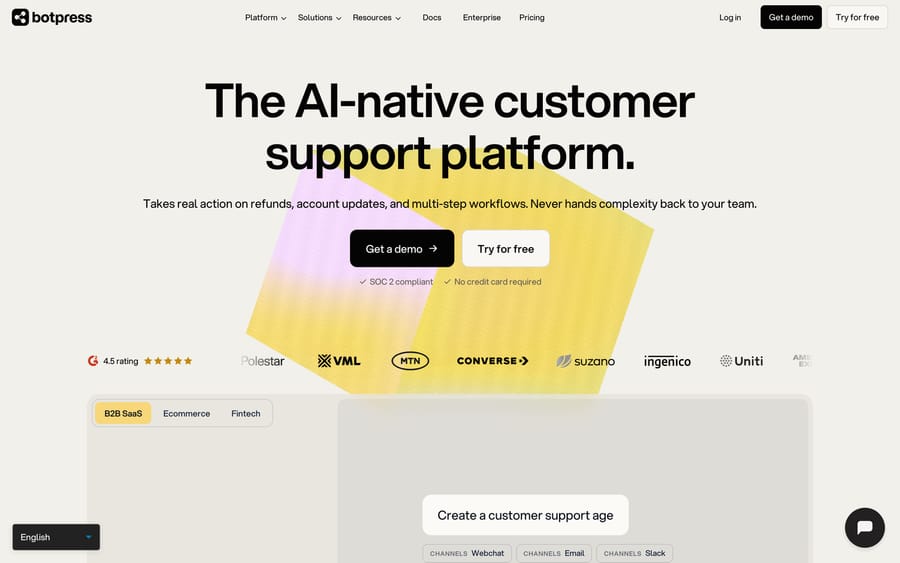
Botpress started as an open-source chatbot framework and is now a hosted AI agent platform. Press coverage puts its founding at 2017 under CEO Sylvain Perron. In June 2025 it raised a $25 million Series B led by Framework Venture Partners, with Deloitte Ventures, HubSpot Ventures, Inovia and Decibel participating. The Logic reported a $120 million post-money valuation and about $45 million raised in total.
The open-source part still exists, in a narrower form. The botpress GitHub repository (about 14.9k stars when we checked) holds the MIT-licensed CLI, SDK, API client and public integrations for the cloud product. The self-hosted v12 platform lives in a separate legacy repo. If you were drawn to Botpress because you could run the whole thing on your own servers, that's no longer the main product.
The homepage now pitches Botpress squarely at support: agents that "process refunds, update accounts, and run multi-step workflows." It claims 750k agents built. The company also sells a help desk of its own, which matters for how you evaluate it (more on that below).
People researching Botpress usually fall into three groups: developers and agencies who want a flexible builder, support leads comparing AI agent vendors, and teams who outgrew a simple website chatbot and want something that can call APIs.
How do Botpress AI agents work?
Botpress now has three ways to build, and they suit different people.
Botpress Viber is the newest. On the Viber page, you describe the agent in plain language and Viber builds, tests and publishes it. What it builds has five parts: instructions (identity, tone, memory, safety rules), playbooks (reusable procedures such as "escalate refunds over $500"), tools and integrations (including HTTP requests and MCP tools), escalation conditions, and simulations you rerun before publishing. Editing happens by talking to Viber. You can open the underlying screens to inspect what it built, but changes go through the conversation.
Botpress Studio is the older visual builder, and it's where most of the tutorials you'll find online live. The docs index shows the building blocks: workflows made of nodes, cards inside nodes (send message, execute code, capture information, AI task, AI transition), an Autonomous Node that lets an LLM pick the next step, knowledge bases, tables, hooks, variables at four scopes, and versioning. Studio also ships prebuilt "agents" that run alongside the main flow: a Summary Agent, Policy Agent, Knowledge Agent, Translator Agent, HITL (human-in-the-loop) Agent and a few others.
The ADK is a TypeScript library for developers who'd rather write agents in code.
At runtime, the pieces work the same way whichever builder you use. A message arrives on a channel (webchat, WhatsApp, Slack, Messenger, Telegram, Instagram, or Twilio for voice and SMS). The agent retrieves from its knowledge base, follows its instructions and playbooks, calls whatever tools it's been given, and either answers or hands off to a human with the conversation history attached.
Does Botpress replace your help desk?
Botpress Desk is described as "our built-in helpdesk, handling L1, L2, and L3 tickets." The same page says Botpress "connects to your existing Zendesk or Intercom helpdesk," and the homepage offers both routes: work on top of your current help desk, or use Desk as a standalone one.
Look at how the page argues for it. It prices out seats: "Every agent you add costs $165/month on Zendesk, $114/month on Intercom, and $0 on Botpress." That's a pitch to move your human team into Desk as well as your AI. A vendor that owns the inbox keeps the whole support budget, where an AI layer on someone else's help desk only earns the automation line. Neither route is wrong, but you should know which one a sales conversation is steering you toward.
The Zendesk integration itself is conversation-led. Per its listing, a Botpress bot can create tickets from chat, update fields, check ticket status, add notes or tags, and hand a conversation to a live Zendesk agent. Its model is a chatbot conversation that opens or updates Zendesk tickets, which differs from an agent that picks up tickets already sitting in Zendesk queues.
What features does Botpress include?
- Three builders: Viber (prompt-built), Studio (visual) and the ADK (TypeScript).
- Knowledge bases: websites, FAQs and files, with vector storage limits per plan (100MB free, 1GB Plus, 5GB Team).
- Tables: a built-in database for agents to read and write (1K, 100K and 500K rows by plan).
- Actions through integrations: Zendesk, Intercom, HubSpot, Salesforce and a hub of others, plus HTTP and MCP tools.
- Human handoff: escalation rules with conversation context passed to the person who picks it up.
- Channels: webchat, WhatsApp, Slack, Messenger, Telegram, Instagram; voice is an Enterprise feature on the pricing grid.
- Help Center: a public knowledge base, with a custom domain on paid plans.
- Botpress Desk: an optional help desk with routing, teams and RBAC on the Team plan.
- Compliance: SOC 2 on the homepage, plus DPA and BAA (HIPAA) listed in the plan comparison.
How much does Botpress cost in 2026?
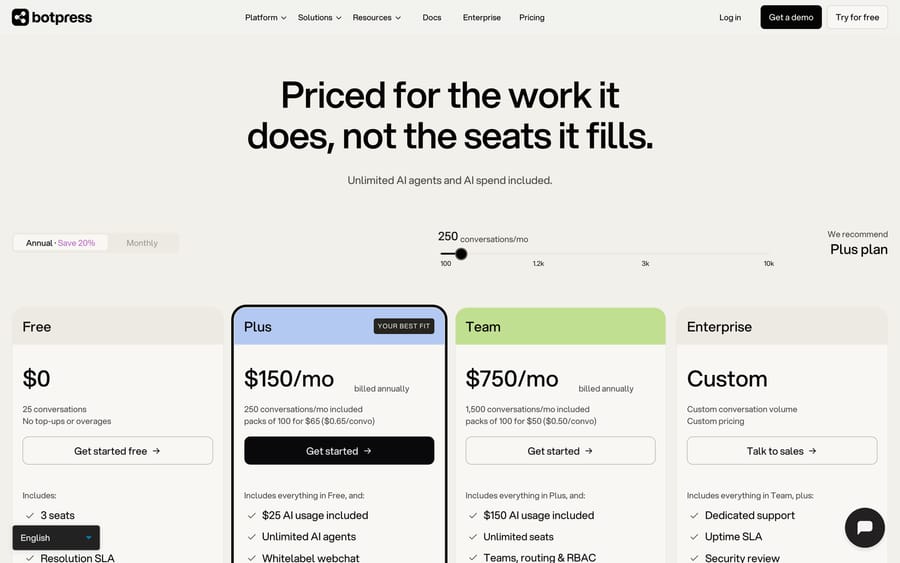
Botpress publishes its prices. The pricing page headline is "Priced for the work it does, not the seats it fills," and the unit is the conversation.
| Plan | Billed annually | Billed monthly | Conversations included | Extra conversations | AI usage included | Seats |
|---|---|---|---|---|---|---|
| Free | $0 | $0 | 25 | None, hard cap | Included | 3 |
| Plus | $150/mo | $189/mo | 250/mo | $65 per 100 | $25 | 3 |
| Team | $750/mo | $939/mo | 1,500/mo | $50 per 100 | $150 | Unlimited |
| Enterprise | Custom | Custom | Custom | Custom | Custom | Unlimited |
The page defaults to annual billing with a "Save 20%" label. Billed monthly instead, Plus is $189 and Team is $939, read in Chrome on September 19, 2026; the page's HTML carries only the annual figures, which is why several reviews quote the annual price as if it were the monthly one. Storage beyond the plan limits is a $40/month add-on (100K table rows, 1GB vector, 10GB files).
What counts as a conversation
The FAQ on the pricing page defines it precisely, and the definition drives your bill more than the headline price does:
- Any exchange with at least two messages from the end user in the billing month counts.
- A conversation that spans two months counts in both months.
- Multiple anonymous sessions each count separately.
- Three minutes of voice counts as one conversation.
- AI-only and human-assisted conversations count the same, and so do emulator (test) conversations.
When you pass 95% of your quota, Botpress automatically adds a pack of 100 conversations. Packs persist month to month until you remove them, and unused conversations in a pack expire at month end.
AI usage on top of conversations
Each conversation includes $0.10 of LLM cost, which is where the $25 (Plus) and $150 (Team) allowances come from. When a workspace reaches 95% of its AI spend limit, the FAQ says Botpress buys a $10 credit grant "sold at cost." A long, tool-heavy conversation on a large model can use more than its $0.10, so the conversation price is a floor.
The arithmetic at three volumes
Here's the math, using the published annual prices and assuming conversations stay within their AI allowance:
- 250 conversations a month: Plus at $150, or $0.60 a conversation.
- 1,000 conversations a month: Plus at $150 plus 750 extra at $0.65 = $637.50. Team at $750 covers it with 500 to spare, so the break-even sits a little above 1,100 conversations.
- 3,000 conversations a month: Team at $750 plus 1,500 extra at $0.50 = $1,500, or $0.50 a conversation, and $9,000 a year for the base plan committed up front.
Auto-added packs persist until you remove them, so a busy month quietly raises every later month's bill. Counting a month-spanning conversation twice, and counting test conversations, ties more of the vendor's revenue to how your traffic behaves than to what the agent resolved. That incentive is spelled out in the FAQ, which few buyers read before signing.
What problems do Botpress builders hit, and how do you fix them?
Botpress rates well where it is reviewed: 4.5 from 512 reviews on G2 and 4.5 from 37 on Capterra, both checked September 19, 2026, and it has no Trustpilot profile at all. So the complaints below come from Capterra, from Botpress's own public community forum at discord.botpress.com, and from its pricing FAQ. The forum sits behind a bot check that blocks both scripted requests and a browser session, so its threads are named below with their dates and not linked. Six problems recur, and the first two account for most of the forum traffic.
1. The agent works in the emulator and fails on the published site
This is the single most-asked question in Botpress's community, and it has been for years. Botpress's forum carries "Emulator works perfect but Bot does not work as similar to Emulator" from March 28, 2024 and "Huge differences between the emulator and production" from June 9, 2023. It is still being posted: Reddit's r/AI_Agents thread Botpress Bot Works in Emulator but Stops After Single Message describes an agent that answers perfectly in the built-in emulator and then stops once the shared link is used.
Three causes, in the order worth checking. The agent was not published. The emulator runs your working draft; the webchat runs the last published version, so an unpublished edit is invisible to customers and obvious to you. Allowed Origins is blocking the page. Botpress's Configure Webchat doc says the setting "lets you manage which domains are allowed to access Webchat," default All Origins, and the Preventing Abuse doc describes it as a whitelist of approved domains. A staging domain that was never added fails silently. The flow depends on something the emulator supplies and the channel does not, typically a variable set by a test payload or a session that the emulator keeps alive between turns.
Fix: publish, then test the published webchat link in a private window before you test the embed, then add every domain you embed on to Allowed Origins. Debug against the published bot's logs rather than the emulator's, because the emulator does not reproduce channel behavior.
2. The knowledge base is ignored, or a second one changes every answer
Kodey C., in education, wrote on Capterra that "Once we added a second knowledge base, the results of the chat changed." The forum has the same complaint from both directions: "Knowledge Base appears to not be working" (March 19, 2024) and "Pulling from knowledge base has gotten worse" (July 13, 2023), which quotes a log line reading "Skipping KB agent because no KBs are enabled" on a bot that had one enabled.
The mechanism is in Botpress's own Knowledge Bases doc, and it catches people who built their flow in Studio rather than in Viber: "Your bot searches Knowledge Bases differently depending on whether it's executing an Autonomous Node or a Standard Node." A Standard Node does not consult a knowledge base on its own. You have to put a Query Knowledge Bases Card in the node, and an agent built out of Standard Nodes will answer from its instructions and never touch your content.
Fix: add the Query Knowledge Bases Card to any Standard Node that should answer from content. When you have more than one knowledge base, scope each node with the Search Knowledge Card's Included Knowledge Bases dropdown, which is what stops a second knowledge base from bleeding into answers that used to come from the first. For the case where nothing matches, the doc gives two options: an Autonomous Node generates its own fallback, or you branch on the condition !event.state.agentVariables.KnowledgeAgent.turn.answer and write the response yourself.
3. The conversation count is higher than your traffic
The definition on the pricing page is precise, and it counts more than a buyer expects. Verbatim: "Any exchange with at least two messages from the end user in the billing month counts as a conversation. A conversation that spans two months counts in both months. Multiple anonymous sessions each count as separate conversations. For voice calls, 3 minutes counts as 1 conversation. AI-only and human-assisted conversations are counted the same, as well as emulator conversations."
Every clause has a billing consequence. Your own test chats during a build week draw down the quota you paid for. A customer who writes on the 30th and again on the 2nd is billed twice. A visitor who clears cookies and comes back is a second conversation. None of this is hidden, and almost nobody reads it before signing.
Fix: do heavy iteration on a Free workspace, which carries 25 conversations and no top-ups, and move to the paid workspace once the flow is stable. Then size the plan against a real month of traffic rather than against your ticket count, because the two are not the same number.
4. The bill goes up on its own, and the top-up cannot be switched off
Two automatic mechanisms sit under the plan fee. At 95% of your conversation quota, Botpress adds a pack of 100, and the pricing FAQ says you cannot disable this. Packs persist month to month until you remove them, so one busy month quietly raises the base of every later month. Separately, each conversation includes $0.10 of model spend (that is where the $25 on Plus and $150 on Team come from), and at 95% of the AI spend limit Botpress buys a $10 credit grant "sold at cost."
Name the incentive plainly: counting emulator chats, anonymous sessions and month-spanning threads ties Botpress's revenue to how your traffic behaves rather than to what the agent resolved. A vendor billing per resolution has the opposite exposure. Neither is wrong, and you should know which one you bought.
Fix: check the packs on your workspace after any spike and remove the ones you no longer need, since they do not fall off by themselves. If a long tool-heavy conversation on a large model is burning more than its $0.10, shorten the prompt or move the step to a cheaper model before you raise the spend limit.
5. Anything past a basic FAQ agent needs a builder
Capterra's ease-of-use score for Botpress is 4.1, the lowest of its sub-scores. Kamsi O., at a religious institution with 11 to 50 staff, wrote that "Botpress has a steep learning curve, especially for beginners and non-technical users" (February 15, 2024). Wisdom B., a founder in logistics, gave it four stars and still said "setting up advanced Features can be a bit technical for beginners" (October 30, 2025). Varun T., an agency owner, added "Sometimes it gets buggy" (February 13, 2024). Reddit's r/OpenAI has the blunt version in Trying to use Botpress but it's failing miserably.
Fix: match the builder to the person. Viber builds and edits an agent from a plain-language description and is the right entry point for a support lead; Studio's prebuilt agents (Summary, Policy, Knowledge, Translator, HITL) cover most of what people try to build by hand in nodes; the ADK exists so a developer can skip the canvas entirely. The failure mode we see most is a non-technical owner starting in Studio because that is what the tutorials show.
6. The tutorials describe a product that no longer exists
Botpress has changed shape three times, and the internet has not caught up. Pricing changed on May 14, 2026, so reviews quoting an $89 Plus plan or a $495 Team plan describe tiers you cannot buy. The self-hosted platform most people mean by "open-source Botpress" is v12, which now lives in a separate legacy repository while the main repo holds the MIT-licensed CLI, SDK and integrations for the cloud product. Viber and Botpress Desk did not exist when most of the YouTube tutorials were recorded.
Fix: treat the docs index as the current source and date-check anything else. If an article quotes a Botpress price that is not $0, $150, $189, $750 or $939, it is out of date.
What are the pros and cons of Botpress?
Pros
- Published pricing, a real free plan and no per-seat charge, which is rare in this category.
- Three builders cover the no-code lead, the flow designer and the TypeScript developer.
- Tools, HTTP requests and MCP let agents take actions beyond answering questions.
- A large community: the Desk page cites a 31k+ community, and there are years of YouTube tutorials.
- Funded and compliance-ready (SOC 2, DPA, BAA) for teams that need paperwork.
Cons
- Learning curve. eesel's review and Voiceflow's review both say anything past a basic FAQ agent tends to need developer skills. Both reviews predate the current pricing and Viber, so weigh that accordingly.
- The billing unit is broad. Test conversations, anonymous sessions and month-spanning threads all count.
- Many tutorials and third-party articles describe older Studio flows and the retired pricing, so research takes longer than it should.
- Help desk integration is chat-first: the bot opens and updates tickets rather than working the queue you already have.
- Voice sits on Enterprise.
Who is Botpress best for?
Botpress fits teams that want a general-purpose agent builder they control, especially when someone on the team is comfortable with flows, APIs or TypeScript. Agencies building agents for several clients are a natural match, and so are SaaS or e-commerce companies whose support starts in a website or WhatsApp chat and needs to call their own backend.
It's also a reasonable pick if you're small and don't yet run a help desk. Botpress Desk plus the Plus plan gives you an inbox and an AI agent from one vendor.
It's the wrong fit if your team already lives in Zendesk, Freshdesk, Gorgias, Front, HubSpot or Intercom and most volume arrives as email tickets. In that case the question is whether an agent can work the tickets in the tool you already pay for, and a chat-first builder answers a different question.
How does Botpress compare with Chatbase and Macha?
Botpress usually gets compared with Chatbase (simpler, trained on your content) and with agent layers that run inside a help desk. Our Chatbase guide covers that tool in depth, our Voiceflow guide covers the closest design-led builder, and if your shortlist runs to the enterprise end of purpose-built support agents, our Decagon AI guide covers that one.
| Botpress | Chatbase | Macha | |
|---|---|---|---|
| Model | AI agent builder with an optional help desk (Desk) | AI chatbot and agent trained on your content | AI agent layer on your existing help desk |
| Builders | Viber (prompt), Studio (visual), ADK (code) | No-code dashboard | Agents written in plain English |
| Pricing | Free; Plus $150/mo, Team $750/mo billed annually, per conversation, published | Free; Hobby $40/mo, Standard $150/mo, Pro $500/mo, message credits, published | From $299/mo for 750 tickets (~$0.40/ticket), published |
| Where it runs | Webchat, WhatsApp, Slack and more; Zendesk and Intercom via integration | Website widget and messaging channels | Inside Zendesk, Freshdesk, Gorgias, Front, HubSpot, Intercom |
| Setup | Self-serve, or "Built by Botpress" service | Self-serve | Done for you by the Macha team, with a dedicated success manager, included |
| Trial | Free plan, 25 conversations | Free plan | $50 free usage |
Chatbase prices are from its pricing page on September 15, 2026.
Macha takes the other route from Botpress Desk. It never replaces your help desk; it's an AI agent layer on the help desk you already use, so agents read and act on tickets where your team already works, with connectors such as Shopify, Stripe, Slack and Notion for the lookups and actions. A ticket is one thread with one person and one charge however many replies it takes, and the model doesn't change the price. That suits teams already running Zendesk, Freshdesk, Gorgias, Front, HubSpot or Intercom who want agents working the existing queue and who'd rather not build them. Macha is the done-for-you option: the Macha team analyzes your past tickets, builds the knowledge base and the agent, and runs it in safe mode until the drafts are right. It costs about $0.40 a ticket from $299/month for 750 tickets, which includes setup and a dedicated success manager who handles your changes. Current tiers are on the pricing page.
If you want to design and own a chat agent across web and WhatsApp and have someone technical on the team, Botpress is the stronger fit.
How did we research this?
Everything here comes from Botpress's own pages (pricing, product, Desk, integration and docs), its public GitHub repository, press coverage of its 2025 Series B, and the review sites named above, all listed in the sources at the end of this post. The conversation prices, pack prices and AI allowances were re-checked against botpress.com/pricing on September 24, 2026; the monthly-billing figures ($189 and $939) and the review scores are from our September 19 reading, because the page's HTML carries only the annual prices. We have not run a paid Botpress deployment at volume ourselves.
Frequently asked questions
Is Botpress free? Yes, there's a Free plan with 25 conversations, 3 seats and 3 agents, and no top-ups or overages. Paid plans start at $150 a month billed annually for Plus, or $189 billed monthly. The Free plan is also the sensible place to build and test, because emulator conversations count against a paid quota.
How much does Botpress cost? Plus is $150/month and Team is $750/month billed annually, or $189 and $939 billed monthly, with 250 and 1,500 conversations included. Extra conversations cost $65 or $50 per 100. Enterprise is custom. See the pricing page.
Is Botpress still open source? Partly. The GitHub repository holds MIT-licensed tools, SDKs and integrations for the cloud platform. The old self-hosted v12 is in a separate legacy repository.
What is Botpress Viber? Viber builds an agent from a plain-language description: instructions, playbooks, tools, escalation rules and simulations. You edit it by describing changes rather than dragging nodes.
Does Botpress integrate with Zendesk? Yes. The Zendesk integration lets a Botpress bot create, update and close tickets, add notes and tags, and hand conversations to live Zendesk agents.
What counts as a conversation in Botpress pricing? Any exchange with at least two end-user messages in a billing month. Conversations spanning two months count twice, anonymous sessions count separately, and test conversations count.
Is Botpress a help desk? It offers one. Botpress Desk is a full ticketing system, but Botpress can also run on top of Zendesk or Intercom.
What are the best Botpress alternatives? Chatbase for a simpler content-trained chatbot, Voiceflow for teams that want a design-led builder, and Macha if you want agents working inside Zendesk, Freshdesk, Gorgias, Front, HubSpot or Intercom, set up and run by the Macha team at about $0.40 a ticket including a dedicated success manager.
Why does my Botpress bot work in the emulator but not on my website? Three things cause most of it. The emulator runs your draft while the webchat runs the last published version, so publish first. Allowed Origins in the webchat configuration may be blocking the domain you embedded on. And a Standard Node does not query a knowledge base unless you add the Query Knowledge Bases Card, so an agent that answers in testing can go blank in production. Test the published webchat link in a private window before you test the embed.
Why is my Botpress conversation count higher than my traffic? Because the pricing FAQ counts emulator conversations, anonymous sessions and month-spanning threads. A conversation is any exchange with at least two end-user messages in the billing month; one spanning two months counts in both; each anonymous session counts separately; and three minutes of voice counts as one. Build and test on a Free workspace to keep your own chats out of the paid quota.
Sources: Botpress homepage, Botpress pricing, Botpress Viber, Botpress Desk, Botpress Zendesk integration, Botpress customers, Botpress docs index, botpress on GitHub, GlobeNewswire: Botpress Series B, The Logic: Botpress Series B, eesel: Botpress deep dive, Voiceflow: Botpress review, Chatbase pricing.






