





 Shopify
 Stripe
 Slack
Slack Notion
 Google Workspace
 Confluence

What Is Voiceflow and What Does It Cost? The Complete Guide (2026)


Voiceflow is a platform for building AI agents that talk to customers over web chat, phone, SMS and WhatsApp, billed on self-serve plans by the message, the phone minute and the model token. Its pricing page lists no plan prices, so the figures here come from its own billing docs, in-app plan screen and named third parties.
Key takeaways
- Voiceflow is a platform for designing, testing and running AI agents that talk to customers across a web widget, phone line, SMS and WhatsApp.
- On self-serve plans, Voiceflow charges $0.005 each time a user sends a message and $0.05 per phone minute, with model calls billed per 1,000 tokens.
- Third-party reviews report Voiceflow Pro at $60 a month and Business at $150 a month, with each additional editor seat costing $50 a month.
- Voiceflow's handoff capability matrix showed every provider-specific cell empty for Zendesk on September 24, 2026, while Ujet had four of six capabilities.
- For support teams whose tickets already live in a help desk, Macha is the done-for-you option: the Macha team builds and runs the agent there, at about $0.40 a ticket including a dedicated success manager.

Voiceflow is a platform for building AI agents that talk to customers over web chat, phone, SMS and WhatsApp, and on its self-serve plans it bills usage at $0.005 per customer message and $0.05 per phone minute, plus model tokens per 1,000. Its pricing page shows no plan prices at all, third-party reviews report Pro at $60 a month and Business at $150, and Vendr puts the median negotiated contract at $258,625 a year. Buyers tend to be one of three people: a CX lead who wants a support agent across chat and voice, an agency building agents for clients, or a developer comparing agent builders. Voiceflow now splits its pricing page along the second line, with one track for agencies and another for businesses. If you're still deciding what category of product you need, our overview of AI agents for customer service is the better starting point.
| Question | Answer (checked September 2026) |
|---|---|
| What it is | AI agent builder with its own runtime, widget and phone line |
| Channels | Web chat, phone, SMS, WhatsApp |
| Published price | None on the pricing page; usage $0.005/message, $0.05/phone minute |
| Reported plans | Free, Pro ($60/mo), Business ($150/mo), Enterprise (custom) |
| Help desk handoff | Genesys, Ujet, Kustomer, Dixa, Zendesk |
| Reviews | G2 4.6 (113), Trustpilot 4.1 (15) |
| Best for | Voice-first teams with a technical owner; agencies |
What is Voiceflow?
Voiceflow is a platform for designing, testing and running AI agents that hold conversations with customers, on a web widget, a phone line, SMS or WhatsApp. You build the agent as a mix of scripted steps and model-driven goals, connect it to your systems with tools, deploy it, then measure and iterate on it with environments, A/B tests and transcript evaluations. The conversation runs in Voiceflow's own runtime, and your help desk is a system the agent calls into or escalates to.
True Ventures, an early investor, records that Voiceflow was founded in June 2018 by a Toronto team of four: Braden Ream, Andrew Lawrence, Tyler Han and Michael Hood. It started as a no-code builder for Alexa and Google Assistant skills, which is why the name says "voice" and why voice is still the strongest part of the product. BetaKit reported in April 2023 that the company raised a $15 million Series B led by OpenView, bringing its total to $35 million, with 130,000 users at the time. Tracxn lists a slightly different round history, so treat the exact figures as press-reported. We found no newer funding announcement.
Today the homepage pitches "the AI agent platform that helps CX teams own every customer interaction, from resolution to ROI." Two groups of logos sit on it, and the distinction matters when you're judging traction. The hero strip runs Turo, Superloop, StubHub, Sanlam and Trilogy. Further down, against named testimonials, the page carries Allstate, JPMorgan Chase, Cisco, Optum, Vodafone, Joolca, Rocket Companies and Rocket Mortgage. We read those off the image alt text on September 15, 2026. Voiceflow also states SOC 2 Type II, ISO/IEC 27001:2022, GDPR and HIPAA compliance, and it carries a G2 Best Software 2026 award badge. Those are the vendor's own claims.
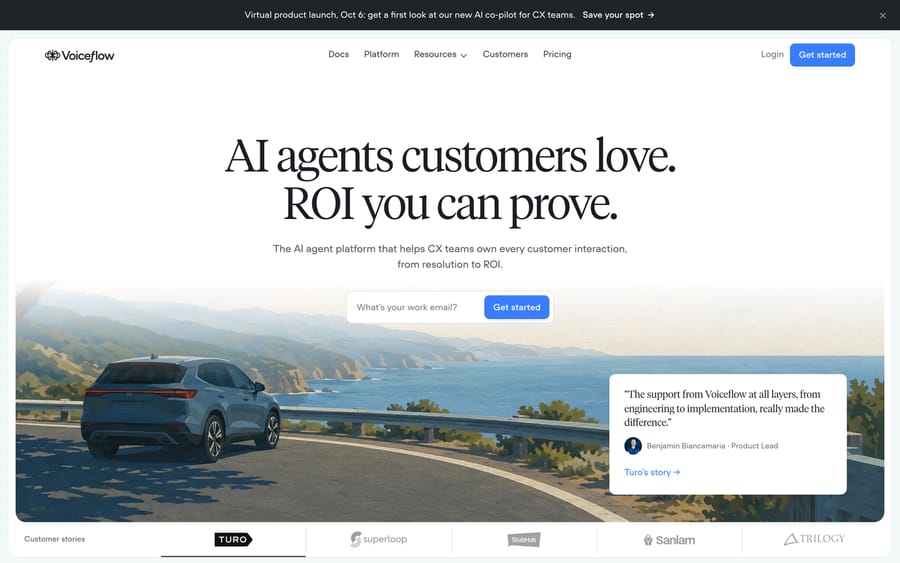
The company is also in the middle of a product shift. Its changelog shows an in-app copilot called Atlas launching on August 26, 2026, followed by releases that let Atlas write regression tests and read transcripts in bulk. A banner on the site advertises an October 6 launch of "our new AI co-pilot for CX teams." Expect the builder experience to look different by the end of the year.
How we researched this
The product mechanics here come from Voiceflow's own documentation and changelog, all read on September 15, 2026, and we captured the Zendesk action list, the handoff capability matrix and the playbook editor directly from those doc pages rather than describing them secondhand. We checked the pricing page the same day and found no dollar figure on it, so the plan prices below are third-party, and the table names the company that reported each one. For user evidence we read Trustpilot and Product Hunt in full; G2 blocks both automated fetching and a headless browser, so we report its rating without quoting the reviews behind it, and Capterra lists the product with no published reviews at all. Voiceflow does publish its credits pricing table in its docs, which we missed on that first pass and read on September 19, 2026: on self-serve plans it charges $0.005 each time a user sends a message and $0.05 per phone minute, with model calls billed per 1,000 tokens.
How does Voiceflow's AI work?
An agent in Voiceflow is a stack of four layers, and the build documentation describes each one.
The global prompt and instructions. A Voiceflow agent starts from an always-on prompt that shapes tone and behavior, plus instructions that decide how to route a request and which tool to use.
Playbooks. A playbook is goal-based. You describe an outcome ("process a return") and the model decides how to get there, calling tools as it goes. The docs flag a detail that affects how you write them: once a playbook is active, the agent-level instructions drop out of context and only the playbook's own instructions remain. A tool whose description says both what it does and when to use it keeps working inside any playbook. A tool that relies on the global instructions for its "when" loses that guidance.
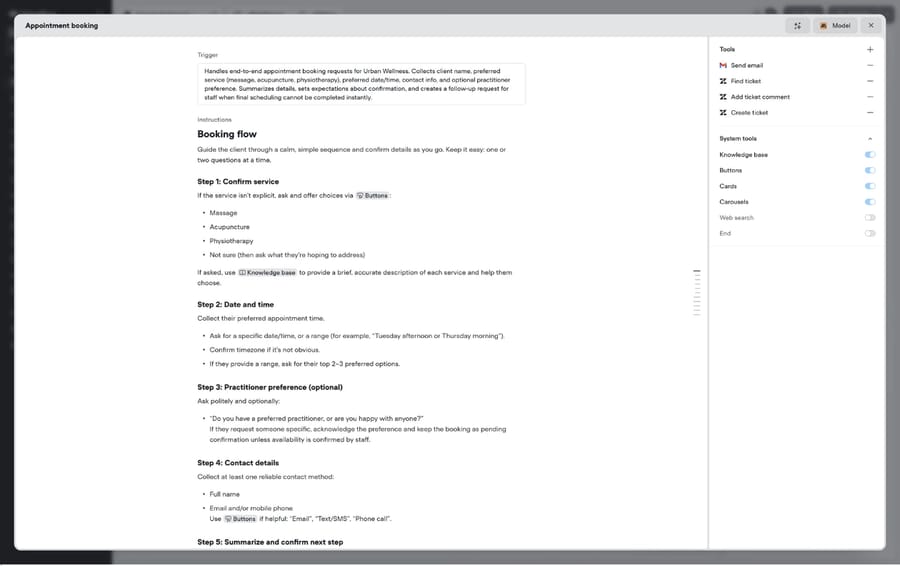
Workflows. A workflow is a canvas of steps that run in a fixed order: messages, buttons, conditions, API calls, code, handoffs. You can drop a playbook, an LLM-powered "operator" branch or a "crew" of several playbooks into the middle of a workflow. This hybrid is Voiceflow's main design idea. Identity checks and refund eligibility go in deterministic steps, and the open-ended conversation goes to the model.
Tools and knowledge. Playbooks and workflows call tools: pre-built integrations, a generic API tool, an MCP tool for any MCP server, JavaScript functions, and system tools for the knowledge base, web search and call forwarding. The knowledge base ingests your documents, and a Zendesk Help Center can sync straight in.
Model choice sits under all of this. The homepage lists GPT, Claude, Gemini and Llama and offers bring-your-own-model. The billing docs say Business adds fallback models. A September 5, 2026 changelog entry added a reasoning-effort control for Claude models served through Bedrock, and on September 16, 2026 Voiceflow released Core 4.2 as its newest agent model, replacing Core 4.1.
How do you test and release a Voiceflow agent?
The less visible half of the platform is the production tooling. Environments let you keep draft and published versions side by side, split live traffic between them for A/B tests, and roll back from a recorded version history. Evaluations score finished transcripts against criteria you define with an LLM grader and return a verdict with reasoning. The analytics API reports token usage, call minutes and transcript cost per project, which is how you'd find out which playbook is eating your credits.
A team with an engineer or a technical CX ops person can run a real release process on this. A team without one will spend most of its time on the canvas and never touch it, which is the single best predictor of whether Voiceflow is worth its price to you.
What features does Voiceflow include?
- Channels: A web widget with text and voice input, inbound and outbound phone calls, inbound and outbound SMS on a Twilio number, and WhatsApp, per the docs and homepage.
- Pre-built tools: Zendesk, Salesforce, HubSpot, Shopify, Airtable, Google Sheets, Gmail, Twilio and Make, listed on the integrations page.
- Live agent handoff: A step that connects the customer to a human in Genesys, Ujet, Kustomer, Dixa or Zendesk.
- Data controls: Secrets storage, PII redaction in transcripts and test personas.
- Widget customization: Colors, launcher style and layout. Removing Voiceflow branding requires the Business plan, per the widget docs.
- Agency tooling: Multi-client workspaces, white-labeling and client handoff, on the agency track of the pricing page.
Does Voiceflow work with Zendesk?
Most Voiceflow evaluations start with "will it work with our help desk?" Voiceflow touches Zendesk in three separate places, and they do different jobs.
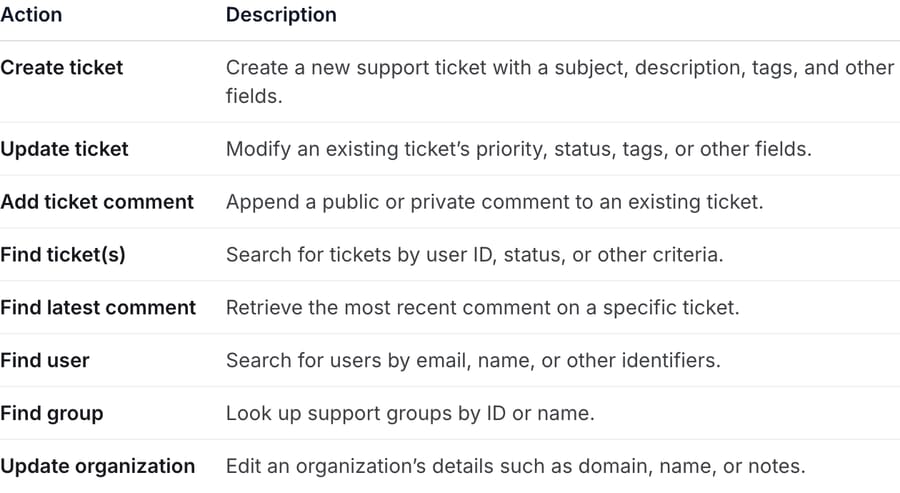
The Zendesk tool gives a playbook eight actions: create ticket, update ticket, add a public or private comment, find tickets, find the latest comment, find a user, find a group, and update an organization. It reads custom fields from your account. The knowledge base connector syncs Help Center articles. The handoff step passes a live conversation to a Zendesk agent, relays messages and files both ways, logs the human's replies back into Voiceflow transcripts and can return the customer to the AI afterward.
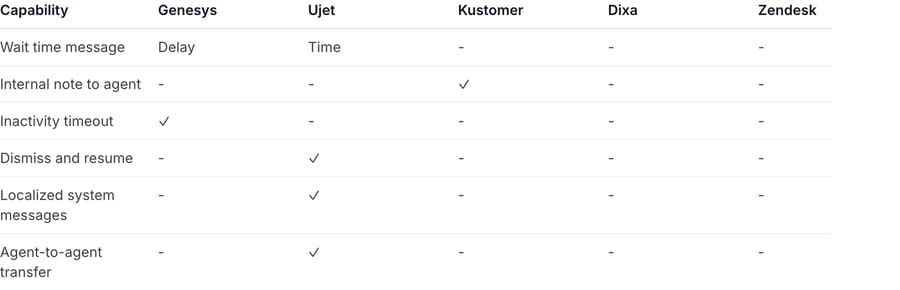
The handoff docs include a table of provider-specific extras (wait-time messages, internal notes, inactivity timeouts, agent-to-agent transfer). On September 15, 2026, every cell in the Zendesk column was empty, and it was still empty when we re-read the page on September 24. Ujet had four of the six, Genesys two, Kustomer one. Zendesk does get the baseline every provider shares: file upload, conversation context, back to AI, transcript logging, a fail path and agent identity, though Zendesk messaging shows your brand name rather than the individual agent's. Voiceflow says it adds providers and capabilities on request.
Voiceflow runs the conversation in its own runtime, and Zendesk is a system the agent calls or escalates into. The customer talks to the Voiceflow widget or phone line, and the ticket in Zendesk is a record of what happened. That suits a team that wants a front-door agent. It's a poor match if most of your volume arrives as email tickets that already sit in Zendesk, because nothing in the handoff or tool docs describes Voiceflow picking up an inbound email ticket and working it inside the help desk.
How much does Voiceflow cost?
We checked Voiceflow's pricing page on September 15, 2026 and again on September 24. It publishes no plan prices and no dollar figure of any kind. It offers two tracks, each ending in a call rather than a checkout:
- For Agencies & Partners: the button says "Start building for clients," and the card promises a free trial with no credit card, usage-based billing, multi-client workspaces and white-labeling.
- For Businesses: the buttons say "Book a demo" and "Request pricing," and the card promises implementation support that is either self-serve or fully managed, voice and chat channels, and real-time observability.
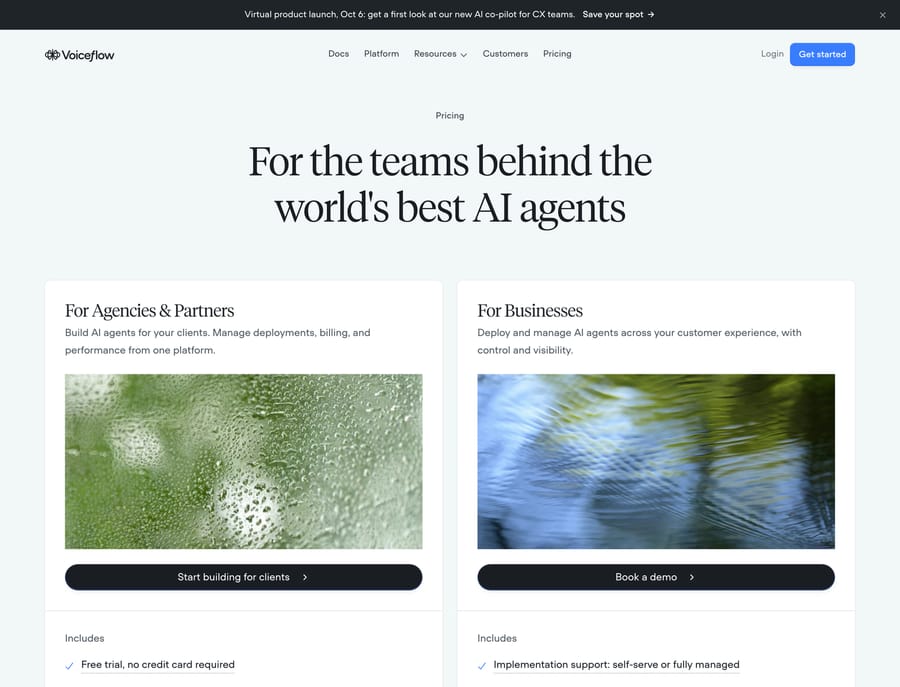
The billing overview explains the structure even without the numbers. Your bill has three parts: a monthly plan fee, add-ons, and credit-based usage. The add-ons are named explicitly as extra editor seats, extra phone numbers and increased concurrent calls, and the docs say they are "billed monthly alongside your plan subscription." Every paid plan "includes some free editor seats, and you can purchase more as needed," so seats are a real line on the invoice, not a maybe. There are four plans. Free has a one-time credit grant that doesn't renew. Pro is for individual builders. Business adds LLM fallback models and priority support. Enterprise adds single sign-on, private cloud hosting and custom credit allotments. Viewers are free and unlimited. Credits are shared across every workspace in the organization.
Credits are consumed by LLM calls, voice minutes and orchestration, at rates that vary "depending on the vendor and model you use." The per-action rates are in a public credits pricing table in Voiceflow's docs: on self-serve plans, $0.005 every time a user sends a message, $0.05 per minute of phone calls, and model calls per 1,000 tokens at rates listed by vendor and model. When credits run out, an optional auto top-up buys more automatically, according to the subscription docs.
What do third parties report Voiceflow costs?
The plan prices below come from other companies' reviews. Their credit allowances (100, 10,000 and 30,000 credits) describe Voiceflow's older credit system. On self-serve plans today, credits are dollars equal to the plan fee, which is what the table shows, as read on Voiceflow's in-app plan screen on September 19, 2026:
| Plan | Reported price | Reported inclusions | Source |
|---|---|---|---|
| Free | $0 | $1 of credit, one-time (older reviews: 100 credits), 2 agents | Botpress review, updated April 2026 |
| Pro | $60/month | $60 of credit a month (older reviews: 10,000 credits), 20 agents | Botpress review; Dograh lists it as $60 per editor |
| Business | $150/month | $150 of credit a month (older reviews: 30,000 credits), unlimited agents | Botpress review; Dograh lists it per editor |
| Enterprise | Custom | Unlimited usage, SSO, private cloud | Both, and consistent with Voiceflow's docs |
There is one neutral figure worth having next to those. Voiceflow has no listing on AWS Marketplace, Azure Marketplace or Google Cloud Marketplace, so the only third-party contract data is Vendr's, which puts the median Voiceflow contract at $258,625 a year across a $56,040 to $322,250 range, read on September 18, 2026. That is the band the "Book a demo" button leads to, and it sits two orders of magnitude above the in-app Pro and Business fees, so make sure you know which product you are being quoted.
Two more third-party figures, both from the Botpress review: each tier includes one editor and each additional editor seat costs $50 a month, and credits can't be topped up. The seat charge is consistent with Voiceflow's own billing docs, which list editor seats as a paid add-on. The top-up claim is not: Voiceflow's subscription docs describe an optional auto top-up that buys more credits when you run out. Botpress sells against Voiceflow, so read its review with that in mind, and check both points with a salesperson before you budget.
On the current rate card, a phone minute costs $0.05 plus speech-to-text, text-to-speech and model tokens. With Deepgram transcription ($0.005 a minute), ElevenLabs speech ($0.045 per 1,000 characters, about $0.0225 if the agent speaks roughly 500 characters a minute) and two Core 4.2 replies ($0.0133), that's $0.05 + $0.005 + $0.0225 + $0.0133 = about $0.09 a minute. At that rate, Pro's $60 of monthly credit covers about 660 minutes of voice before top-ups. Treat it as our estimate. It depends on the model and voice vendor you pick.
What Voiceflow costs for a chat-support volume
Voice is the headline use case, but most support teams reading this run chat, so here is the arithmetic for a chat volume. On self-serve plans, credits are dollars. Voiceflow's in-app plan screen (checked September 19, 2026) gives Pro $60 and Business $150 of usage credit a month, equal to the plan fee, and auto top-ups buy more at face value. Each chat then costs $0.005 per customer message plus the model tokens for each reply.
Take 3,000 chat conversations a month, the volume where a support team usually stops experimenting and starts budgeting. Assume 4 customer messages and 4 agent replies per chat, with each reply costing $0.00665, the average of two turns we ran on September 19, 2026 on Voiceflow's default Core 4.2 model:
- Per chat: 4 × $0.005 + 4 × $0.00665 = $0.0466.
- 3,000 chats: 3,000 × $0.0466 = $139.80 of usage. On Pro that's the $60 plan fee plus $79.80 of top-ups; on Business the $150 fee covers it.
The model moves this more than anything else. Priced from the rate card with the same token counts (3,499 in and 127 out per reply), the same 3,000 chats cost about $246 on Claude Sonnet 4.6 and $380 on GPT-5.5. A longer prompt or a knowledge-base search adds tokens to every reply.
Then add seats. A CX team where five people tune playbooks pays for four extra editors at a reported $50 each, or $200 a month, before a single customer talks to the agent. Agencies price that into client retainers. An in-house support team does not.
So at 3,000 chats a month on the default model, seats can cost more than the usage itself. Usage is the line you can't pin down until you've run real traffic and read the transcript-cost analytics, because it moves with model choice and prompt size. That's the number to press a salesperson on.
What does the credit model mean for your budget?
Credit pricing tracks the vendor's real costs closely. Voiceflow pays model providers per token and telephony providers per minute, so billing in credits that map to those inputs means Voiceflow's margin holds whatever model you choose. The incentive runs the other way for the buyer. The cost of one resolved customer depends on how long the conversation runs, how many tools the playbook calls, and which model you picked. You can forecast it, but only after you've run real traffic and read the transcript-cost analytics.
What do Voiceflow reviews say?
Voiceflow's review footprint is lopsided, and knowing where the reviews are is half the answer.
G2: 4.6 out of 5 from 113 reviews, checked September 19, 2026, up from 111 four days earlier, and the homepage carries a G2 Best Software 2026 badge. G2 returns a 403 to automated fetching and blocks a headless browser too, so we can report the score and not the reviews behind it. Capterra lists the product with no published reviews at all, which is unusual for a company at this stage and means the peer evidence a procurement team normally leans on isn't there.
Trustpilot: 4.1 from 15 reviews, checked the same day, and the shape is more informative than the average: five-star and one-star reviews with almost nothing in between. Abdullah Yahya, reviewing from the Netherlands in October 2025, gives five stars and captures the appeal precisely: "Nothing comes close to Voiceflow. It is perfect for all audiences, you can build a simple chatbot in minutes or go deep with custom JS functions." Lloyd Sivo, five stars from Aruba in November 2025, singles out support: "They help you in an instant. If you are having a problem their customer support will help you real quick." The one-star reviews complain about the same thing from the other side; one from the US in April 2026 is titled "Terrible Support when launching the Agent." Support quality at launch is the coin-flip in this data set.
Product Hunt gives 4.6 from 5 reviews and names the other recurring complaint. Donvoy Omweri writes that "Voiceflow is very beginner friendly, and it is capable of growing with your needs." Ryan yang disagrees on exactly that point: "The learning curve is just too steep, you know? It's just not accessible enough for most folks."
Those two reviews are the whole debate. Voiceflow is fast for someone comfortable with logic, flows and a bit of JavaScript, and slow for everyone else, and the gap between those two experiences is wider here than on lighter builders. The Botpress review scores pricing value 2.5 out of 5 and blames credits depleting quickly on advanced models, which matches the chat arithmetic above. Botpress is a competitor, so weigh it accordingly.
What problems do Voiceflow builders hit, and how do you fix them?
Voiceflow's public complaint record is thin, because most of its users are builders who like it and its review footprint is small. The problems below come from the two one-star Trustpilot reviews, from the Product Hunt split on the learning curve, from public threads, and from Voiceflow's own documentation, which is unusually candid about the settings that cause them. Six recur, and the first two are the ones that cost money.
1. Credits drain faster than the plan fee suggests
On self-serve plans credits are dollars: Pro's $60 fee returns $60 of usage credit a month and Business's $150 returns $150, so the plan fee is a floor, not a budget. Every turn is metered in model tokens on top of $0.005 per customer message, which means the same conversation costs several times more on a frontier model than on the default. Reddit's r/Chatbots has the three-year-old version of this complaint still being read today, Voiceflow Token Usage is Insanely High, and Botpress's own review of Voiceflow scores pricing value 2.5 out of 5 and blames credits depleting quickly on advanced models. Botpress sells against Voiceflow, so weigh that one accordingly; the arithmetic earlier on this page reaches the same place independently, at about $140 a month on the default model and about $380 on GPT-5.5 for 3,000 chats.
Three settings do most of the damage, in order of size. The model, which multiplies every reply. The knowledge-base chunk limit, which Voiceflow's query documentation describes as controlling "how many content chunks are returned per query (1-10, default 3)" with its own warning that "Higher values return more context but increase latency and token usage." Every extra chunk is added to the input of every reply that fires that search. The global prompt, which is prepended to every turn, so a 1,000-word persona is paid for on each one.
Fix: read the transcript-cost figures in the analytics API before you tune anything, because they tell you which playbook is spending the credits. Then drop the chunk limit back to 3 if someone raised it, move routine intents to the cheapest model that answers them well, and cut the global prompt down to what has to apply everywhere, pushing the rest into the playbooks that need it.
2. The agent stops following your instructions once a playbook starts
This one looks like a model problem and is a documented design choice. Voiceflow's playbook docs state that once a playbook is active, the agent-level instructions drop out of context and only the playbook's own instructions remain. So a rule you wrote once at the agent level, "always confirm the order number before refunding," is in force in normal conversation and gone the moment a playbook takes over.
The same mechanic breaks tools. A tool whose description says what it does but not when to use it relies on the global instructions for its trigger, and inside a playbook there are no global instructions left.
Fix: write every tool description as both halves, what it does and when to call it, which is the practice Voiceflow's instructions doc points to for routing failures: "If your agent doesn't route make sure you're following best practices for tool name and trigger." Repeat any non-negotiable rule inside each playbook that could violate it. And when a playbook misbehaves, start where the docs say the fault usually is: "If your playbook isn't performing the way you expect, start by improving the instructions - they're almost always the culprit."
3. It improvises where you wanted a fixed script
Playbooks are goal-based by design, so the model decides how to reach the outcome. That is the right tool for an open-ended conversation and the wrong one for identity checks, refund eligibility and anything with a compliance line attached. r/voiceflow carries the workaround question directly: How to bypass AI Playbook / Agentic mode and force Web....
Fix: use the hybrid the platform is built around instead of fighting it. Put the deterministic steps in a workflow, where they run in a fixed order, and drop a playbook into the middle of that workflow for the part that genuinely needs to improvise. Emptying the instructions to suppress generative behavior is the wrong lever; moving the step onto the canvas is the right one.
4. Handoff to your help desk does less than the integration list implies
Voiceflow's handoff step lists five providers: Genesys, Ujet, Kustomer, Dixa and Zendesk. The capability matrix in its handoff docs then shows what each one actually supports for wait-time messages, internal notes, inactivity timeouts and agent-to-agent transfer. On September 15, 2026 every cell in the Zendesk column was empty. Ujet had four of the six, Genesys two, Kustomer one. Intercom, Freshdesk, Gorgias, Front and Salesforce Service Cloud are not on the list at all.
This is the gap that turns up after purchase, because the integration exists and the extras around it do not. A customer handed to a Zendesk agent gets no wait-time message and no inactivity timeout unless you build both.
Fix: open the matrix for your provider before you sign, not after. Where a capability is missing, build it in the workflow: a timed message before the handoff step covers wait time, and an inactivity branch covers the timeout. Voiceflow says it adds providers and capabilities on request, so ask for yours in writing during the sales conversation, while the contract is still unsigned.
5. Support at launch is the coin flip in the review data
Trustpilot shows 4.1 from 15 reviews with five-star and one-star and almost nothing in between, and the split is about the same thing. Alfredo, reviewing from the US on April 7, 2026, titled his one-star review "Terrible Support when launching the Agent." Brandon Parkash, from the UK on March 5, 2025, said Voiceflow made it "difficult to contact them" about technical issues. Against that, Lloyd Sivo, five stars from Aruba in November 2025: "They help you in an instant. If you are having a problem their customer support will help you real quick."
Fix: priority support is a plan feature, so treat it as one. Voiceflow's billing docs put priority support on Business, and the agency track advertises a free trial with no credit card, which is the cheapest way to find out which experience you are going to get before you commit. Build your launch plan so the go-live does not depend on a support answer arriving the same day.
6. Voice concurrency runs out before the minutes do
The self-serve voice limits are small and they are about simultaneous calls, not volume. Pro includes 5 concurrent calls and one phone number; Business includes 15; extra numbers cost $5 a month and extra concurrent calls $10 a month each. A queue that takes 20 calls at once needs Business plus five add-on lines before a single minute is billed, which is a cost most people miss because they model the monthly minutes and not the busiest ten minutes of the day.
Fix: size concurrency from your peak, not your average. Pull the highest simultaneous call count from your existing phone system for the busiest hour of the busiest day, add headroom, and price the add-on lines into the comparison before you conclude that Pro at $60 covers you.
What are Voiceflow's pros and cons?
Pros
- The playbook-plus-workflow design lets you pin down the risky steps and leave the rest to the model.
- Real release tooling: environments, traffic splits, version rollback and transcript evaluations.
- Voice and SMS run on the same agent as chat, so one set of logic covers the website and the phone line.
- Model choice across the major providers, with bring-your-own-model at Enterprise.
- A published case study with a timeline. Trilogy, which supports 90 individual products and brands, reports 35% AI resolution in week one, 59% after 12 weeks and 70% now, per Voiceflow's case study. The case study says Trilogy came to Voiceflow wanting an AI solution that would work with its existing Amazon Connect system, and that it was already running Forethought chatbots alongside a human agent-led IVR channel. Trilogy's own support and technical staff built the agents.
Cons
- Prices are no longer public for businesses, so you can't model cost before a sales call.
- Credit consumption varies by model, conversation length and voice minutes, so even with the public credits table you can't forecast a conversation's cost until you've run real traffic.
- Editor seats are a paid add-on, so the cost of the team maintaining the agent scales with headcount.
- Handoff covers five contact-center systems. Intercom, Freshdesk, Gorgias, Front and Salesforce Service Cloud aren't on the list, and the Zendesk column of the capability matrix is empty.
- Getting the most from playbooks, environments and evaluations takes a technical owner. A non-technical team will use a fraction of what it pays for.
- The builder is changing fast (Atlas in August, a new co-pilot launch on October 6), so tutorials and third-party reviews go stale quickly.
Who is Voiceflow best for?
Voiceflow fits teams that want to own a customer-facing agent as a product: a CX ops person or engineer who writes playbooks, runs A/B tests between environments, and reads transcript evaluations every week. It's strongest when voice matters. A business that answers phones, books appointments or runs a call center gets one agent across the widget, the phone line and SMS, and the handoff list (Genesys, Ujet, Kustomer, Dixa, Zendesk) leans toward contact-center stacks.
It also suits agencies. Voiceflow gives them their own pricing track, with white-labeling, client handoff tools and multi-client workspace management.
It's the wrong fit if your support lives in email tickets inside a help desk, if nobody on the team will maintain the agent after launch, or if you need a fixed monthly number before you sign.
How does Voiceflow compare with Botpress and Macha?
What you want the agent to do decides this one. Botpress is the closest rival as an agent builder, and our Botpress guide covers its per-conversation pricing and the emulator-versus-production trap in detail. Chatbase is the lighter option for a docs-trained chat widget, covered in our Chatbase guide. If voice is the reason Voiceflow is on your list, our Parloa guide covers the contact-center end of that market. Macha is a different shape: an agent layer that works inside the help desk you already run.
| Voiceflow | Botpress | Macha | |
|---|---|---|---|
| Model | Agent-building platform with its own runtime, widget and phone line | Agent-building platform with its own runtime and help desk (Botpress Desk) | AI agent layer on your existing help desk |
| Where the customer talks to it | Voiceflow widget, phone, SMS, WhatsApp | Botpress webchat, WhatsApp, Slack and other channels | Inside the tickets and chats already in Zendesk, Freshdesk, Gorgias, Front, HubSpot or Intercom |
| Voice | Yes, inbound and outbound calls | Voice channel on Enterprise | Not a phone-agent product |
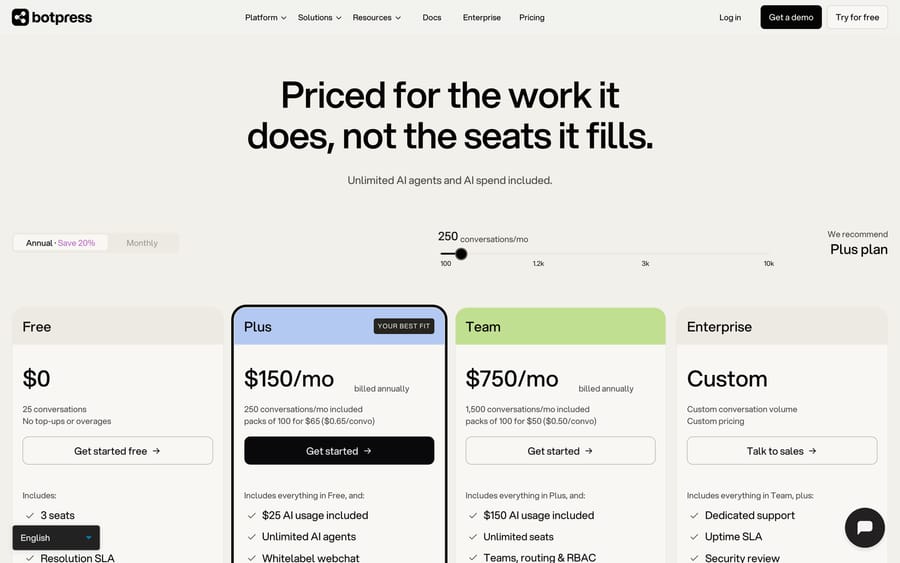
| Pricing | Not published for businesses; plan fee plus seats plus credits | $150/mo Plus (250 conversations) or $750/mo Team (1,500), billed annually, published | From $299/mo for 750 tickets (~$0.40/ticket), published |
| Setup | Self-serve builder or managed implementation | Self-serve builder, or built and managed by Botpress | Done for you by the Macha team, with a dedicated success manager, included |
| Trial | Free plan with a one-time credit grant | Free plan, 25 conversations | $50 free usage |
Botpress prices per conversation with AI spend included up to a cap, which makes cost easier to forecast than credits. Its Plus plan is $150 a month billed annually for 250 conversations with $25 of AI usage included, and extra conversations come in packs of 100 for $65. Team is $750 a month for 1,500 conversations with $150 of AI usage, and packs of 100 drop to $50, so $0.50 a conversation. Team lists unlimited seats; Plus carries the Free plan's three, which is still a sharper seat deal than Voiceflow's paid editors. Its builder is comparable to Voiceflow's, and it has moved into selling its own help desk.
Macha makes sense when the tickets already live in a help desk and you want agents working those tickets there: reading an email ticket in Zendesk, checking the order in Shopify, writing the reply or internal note, tagging and routing. There's no separate widget to embed and no handoff step, because the human agents are already in the same tool. Pricing is one plan set by monthly ticket volume, and one ticket is one charge however many replies or tool calls it takes, so the model you pick doesn't change the bill. It's also the done-for-you option, which covers the "who maintains this" problem that tends to stall builder platforms: the Macha team analyzes your past tickets, builds the knowledge base and the agent, and runs it in safe mode until the drafts are right. It costs about $0.40 a ticket from $299/month for 750 tickets, which includes setup and a dedicated success manager who handles your changes. Check Macha pricing for the tiers.
At the 3,000-conversation volume modeled above, Macha's published price is $1,199 a month and it doesn't move with seats, model choice or conversation length. Voiceflow's usage at the same volume is about $140 a month on its default model and about $380 on GPT-5.5, before editor seats, and it moves with model choice, prompt size and the number of editors. That difference is the decision, not a detail of it.
If voice is the main channel, or you want a technical team to own a custom agent across phone and web, Voiceflow is the better fit, and Macha isn't trying to replace it.
For how Voiceflow compares with the support-specific products we score on one rubric, see our roundup of the best AI chatbots for customer service.
FAQ
What is Voiceflow used for? Building and running AI agents for customer support, sales and appointment handling across web chat, phone, SMS and WhatsApp. It's also used by agencies that build agents for clients.
How much does Voiceflow cost? Voiceflow lists no prices at all on its pricing page as of September 2026. Its docs describe a monthly plan fee, paid add-ons including extra editor seats, and credit-based usage across Free, Pro, Business and Enterprise plans. Third-party reviews report Pro at $60 a month, Business at $150 a month and $50 a month per additional editor seat, all of which may be out of date.
Are Voiceflow reviews any good? G2 shows 4.6 out of 5 from 113 reviews and Trustpilot 4.1 from 15, both checked September 2026, while Capterra has no published reviews. Reviewers split hard on the learning curve and on support responsiveness at launch, with almost nothing in the middle of the Trustpilot distribution.
Does Voiceflow have a free plan? Yes. The Free plan comes with a one-time credit grant that doesn't renew, and the docs say it isn't meant for production. The agency track advertises a free trial with no credit card.
Does Voiceflow integrate with Zendesk? Yes, in three ways: a tool that creates, updates and searches tickets and users; a knowledge base sync for Zendesk Help Center; and a live agent handoff step. Voiceflow runs the conversation itself and calls into Zendesk.
Which help desks can Voiceflow hand off to? The handoff docs list Genesys, Ujet, Kustomer, Dixa and Zendesk. Voiceflow says it adds providers on request.
What's the difference between Voiceflow playbooks and workflows? A playbook is goal-based: the model decides how to reach an outcome and which tools to call. A workflow runs fixed steps in order. You can put playbooks inside workflows to mix the two.
What are the best Voiceflow alternatives? Botpress is the closest agent-builder alternative, with published per-conversation pricing. Chatbase suits simpler docs-trained chat widgets. Macha fits teams that want agents working tickets inside Zendesk, Freshdesk, Gorgias, Front, HubSpot or Intercom without building them: the Macha team sets up and runs the agent, at about $0.40 a ticket including a dedicated success manager who handles your changes.
Is Voiceflow secure enough for regulated industries? Voiceflow's homepage claims SOC 2 Type II, ISO/IEC 27001:2022, GDPR and HIPAA compliance, and Enterprise adds SSO and private cloud hosting. Ask for the reports during procurement.
Why is my Voiceflow credit usage so high? Three settings account for most of it: the model, since every turn is metered in tokens; the knowledge-base chunk limit, which the docs describe as "1-10, default 3" and warn "increase latency and token usage" at higher values; and the global prompt, which is prepended to every turn. Read the transcript-cost figures in the analytics API to find which playbook is spending, then drop the chunk limit back to 3 and move routine intents to a cheaper model.
Why does my Voiceflow agent ignore its instructions inside a playbook? Because once a playbook is active, the agent-level instructions drop out of context and only the playbook's own instructions remain, which Voiceflow's playbook docs state directly. Repeat any non-negotiable rule inside each playbook, and write every tool description to cover both what it does and when to call it, since a tool that relies on the global instructions for its trigger loses that guidance inside a playbook.
If your tickets already arrive in Zendesk, Freshdesk, Gorgias, Front, HubSpot or Intercom and you want a fixed number rather than a demo, start a free Macha trial: $50 of usage, no credit card, and the Macha team builds and monitors the first agent with you.
Sources: Voiceflow homepage, Voiceflow pricing, Voiceflow integrations, Voiceflow docs: building an agent, playbooks, workflows, live agent handoff, Zendesk tool, environments, billing overview, managing your subscription, Voiceflow changelog, Trilogy case study, BetaKit funding report, True Ventures on Voiceflow's founding, Product Hunt reviews, Botpress Voiceflow review, Dograh Voiceflow review, Botpress pricing. Trustpilot (trustpilot.com/review/voiceflow.com) and G2 (g2.com/products/voiceflow/reviews) both return 403 to automated requests, so they are cited without hyperlinks.






