Intercom
 Shopify
 Stripe
 Slack
Slack Notion
 Google Workspace
 Confluence

What Are the Best AI Customer Service Agents in 2026? 25 Compared With Real Prices


Fin at $0.99 an outcome is the cheapest standalone AI customer service agent with a published price, and help-desk add-ons such as Macha and eesel AI cost about $0.40 a ticket. We compared 25 agents by where they run, with prices, G2 and Gartner ratings, the cost of 3,000 chats a month, and a hands-on test of an order-lookup tool.
Key takeaways
- Fin at $0.99 per outcome is the cheapest standalone AI agent with a published price, while eesel AI and Macha at about $0.40 a ticket are the cheapest add-ons to an existing help desk.
- At a modeled volume of 3,000 chats a month with half resolved, published AI costs ranged from about $9 on Amazon Lex's runtime alone to about $2,900 on Zendesk AI agents at the pay-as-you-go rate.
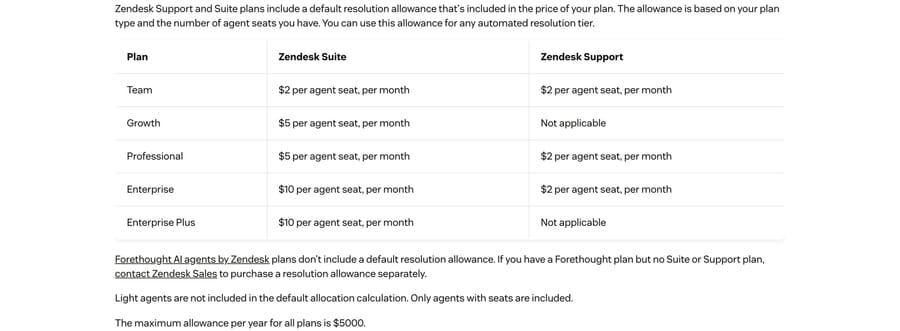
- Zendesk includes a monthly dollar allowance per agent seat, $2 on Team, $5 on Growth and Professional, and $10 on Enterprise, capped at $5,000 a year, before charging $1.50 per committed resolution or $2.00 pay-as-you-go.
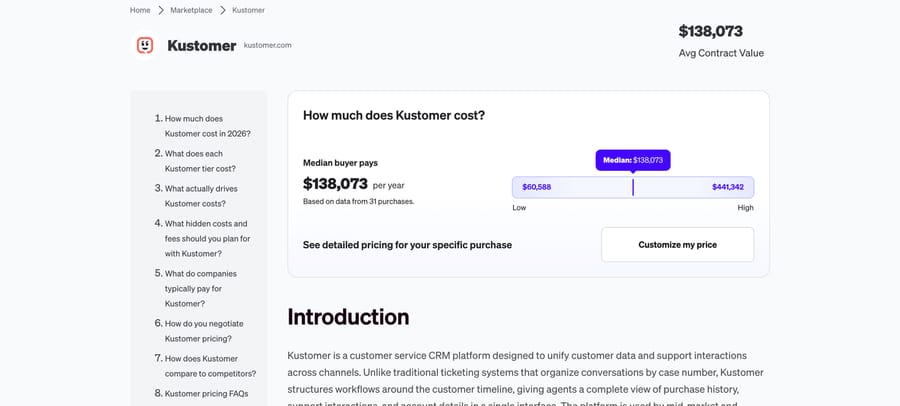
- Vendr's buyer data puts median annual contracts at $72,000 for Ada, $138,073 for Kustomer, and $432,750 for Decagon, each covering the whole platform rather than AI alone.
- In a test order lookup, both ElevenLabs Agents and Voiceflow correctly returned an order's six items and $1,103.65 total, but both offered a human handoff for an address change neither had a tool to execute.

Of the 25 AI customer service agents we compared on September 18 and 19, 2026, the ones most teams should shortlist are Zendesk AI agents, Freddy AI Agent, Salesforce Agentforce, Gorgias AI Agent and HubSpot Customer Agent if you want your help desk’s own; Fin, Ada, Sierra, Decagon and Forethought if you want a standalone agent beside it; Macha or eesel AI if you want a layer on the desk you already run; and Kore.ai, NiCE Cognigy or PolyAI for a large contact center with voice. Fin at $0.99 an outcome is the cheapest standalone agent with a published price, and eesel AI and Macha at about $0.40 a ticket are the cheapest way to add one to a help desk you are keeping.
Which AI customer service agent should you shortlist?
| Your situation | Where to look | Start with |
|---|---|---|
| You run Zendesk and want the least new software | Help-desk-native AI | Zendesk AI agents |
| You run Freshdesk, Gorgias, HubSpot or Help Scout | Help-desk-native AI | That help desk's own agent, priced against an add-on |
| Staying on Zendesk, Freshdesk, Gorgias, Front, HubSpot or Intercom, and you want agents resolving tickets inside that workflow at a monthly price you can forecast | AI agent layer | Macha |
| One agent across whatever help desk you use | Standalone support agent | Fin |
| Enterprise budget, want the vendor to build it | Standalone support agent, managed | Sierra, Decagon or Ada |
| You're on Salesforce Service Cloud | Help-desk-native AI | Salesforce Agentforce |
| Large contact center, voice and many languages | Enterprise CX platform | NiCE Cognigy or Kore.ai; PolyAI for voice |
How do the 25 agents compare on price and ratings?
Prices were checked on each vendor's page, on AWS, Azure and Google Cloud Marketplace, and on Vendr on September 18, 2026, and the published per-unit prices (Zendesk, Freshdesk, Salesforce, HubSpot, Help Scout, Fin, Yellow.ai, eesel AI and Botpress) were re-checked on September 24, 2026. Ratings are stars and review count. Gartner figures come from its "AI Agents for Customer Service and Support" market unless the cell says otherwise.
| Agent | Where it runs | Price we found (September 2026) | G2 | Gartner Peer Insights | Best for |
|---|---|---|---|---|---|
| Zendesk AI agents | Native to Zendesk | $1.50 per automated resolution on a committed plan, or $2.00 pay-as-you-go, after an allowance of $2 to $10 per seat a month | 4.3 (7,075, whole suite) | 4.3 (47) | Zendesk teams |
| Freshworks Freddy AI Agent | Native to Freshdesk | $49 per 100 sessions, after 500 free sessions once per account | 4.4 (3,771, Freshdesk) | 4.4 (2,294, Freshworks whole company) | Freshdesk teams on chat |
| Salesforce Agentforce | Native to Salesforce | $500 per 100,000 Flex Credits; 20 credits an action | 4.3 (1,694) | 4.3 (72) | Service Cloud orgs |
| Gorgias AI Agent | Native to Gorgias | $1.50 per automated interaction past the plan's allowance | 4.6 (582) | Not in this market | Shopify stores |
| HubSpot Customer Agent | Native to HubSpot | 50 credits per resolved conversation, about $0.45 | 4.4 (3,014, Service Hub) | Not in this market | Service Hub Professional teams |
| Help Scout AI Answers | Native to Help Scout | $0.75 a resolution | 4.4 (431) | Not in this market | Small email-first teams |
| Kustomer | Native to Kustomer | Quote; Vendr median $138,073 a year (whole platform) | 4.4 (566) | Not in this market | Kustomer customers |
| Fin | Standalone, on most help desks | $0.99 an outcome; 50-outcome monthly minimum off Intercom | 4.5 (3,912, whole Intercom listing) | 4.6 (18, conversational AI market) | One agent across help desks |
| Ada | Standalone | AgentExchange: from $30,000 a year; Vendr median $72,000 | 4.6 (173) | 4.5 (21, conversational AI market) | Enterprise, multilingual |
| Sierra | Standalone, vendor-built | AWS: private-offer placeholder, outcome-based | 4.5 (130) | 4.7 (7) | Enterprises wanting it built for them |
| Decagon | Standalone, vendor-built | AWS: private-offer placeholder; Vendr median $432,750 a year | 4.8 (30) | No reviews | Enterprises, six-figure budgets |
| Forethought (Zendesk) | Standalone, any platform | Quote through Zendesk sales | 4.3 (166) | 5.0 (1, conversational AI market) | Enterprises, any help desk |
| Crescendo | Standalone, with human agents | Quote; AWS listing is a $0.01 placeholder unit | No reviews yet | 4.5 (2) | Outsourcing support end to end |
| Kore.ai | Enterprise CX platform | AWS: $0.20 a session plus $40,000 a year support | 4.6 (505) | 4.2 (10); 4.3 (167) in conversational AI | Large orgs with a platform team |
| NiCE Cognigy | Enterprise CX platform | AWS: $43,080 a year for 60,000 conversations | 4.6 (13) | 4.8 (156, conversational AI market) | Contact centers, NICE CXone shops |
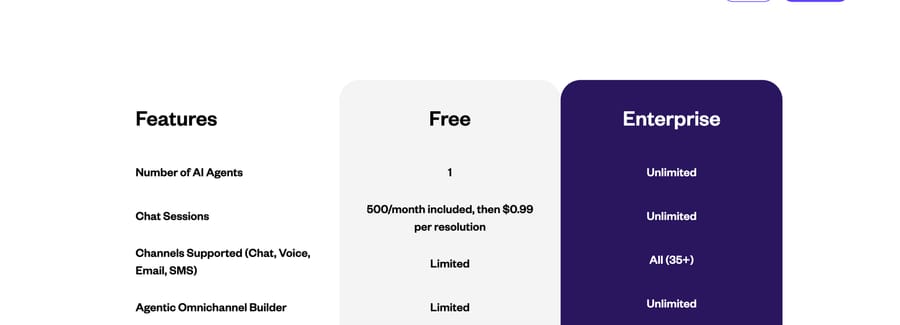
| Yellow.ai | Enterprise CX platform | Free: 500 sessions, then $0.99 a resolution | 4.4 (107) | 4.4 (102, conversational AI market) | Multilingual, multichannel |
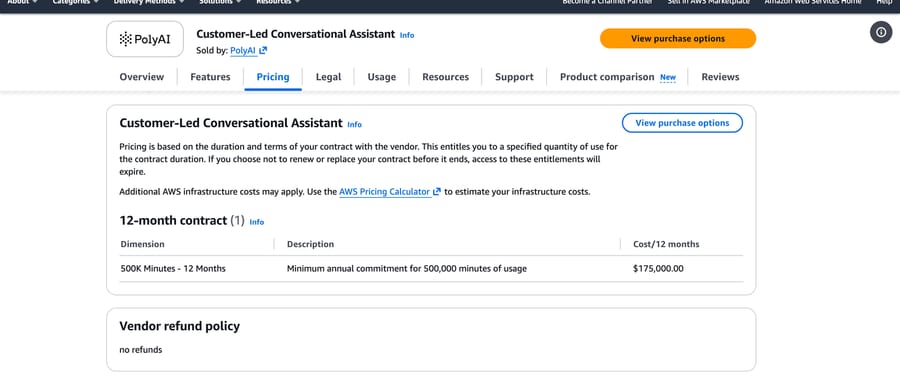
| PolyAI | Voice agent platform | AWS: $175,000 a year for 500,000 minutes | 5.0 (12) | 4.2 (5) | Phone-heavy contact centers |
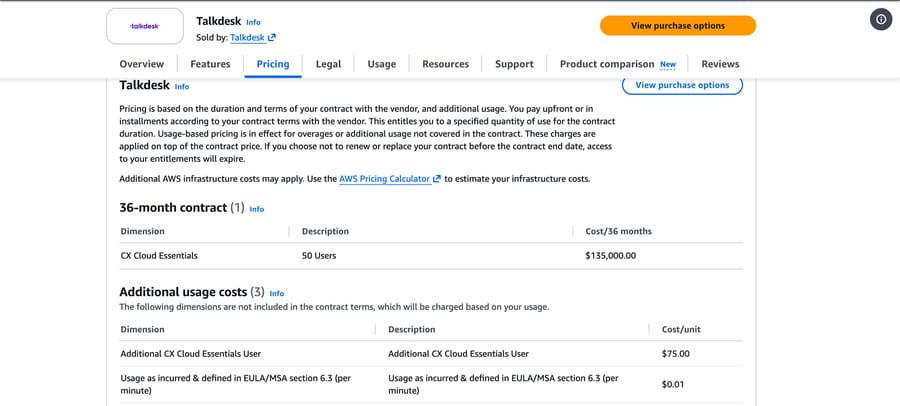
| Talkdesk | Contact-center suite | AWS: $135,000 over 36 months for 50 users | 4.4 (2,601) | 4.4 (29) | Replacing the contact center |
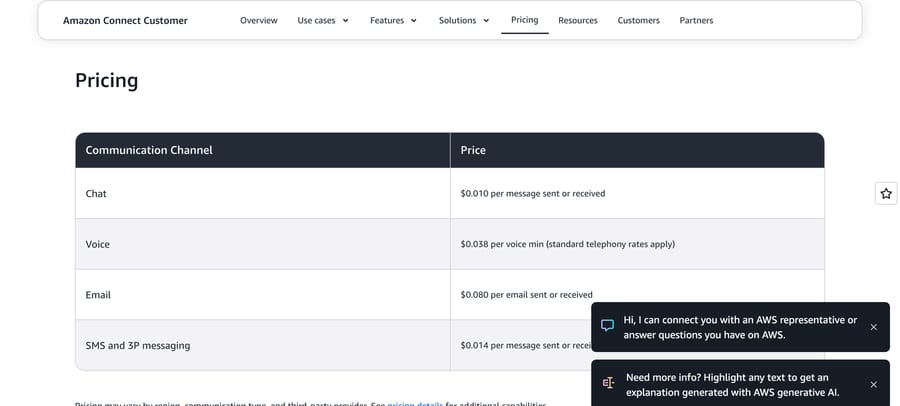
| Amazon Connect and Lex | Cloud components | Connect chat $0.010 a message; Lex $0.00075 a request | 4.2 (43, Lex) | 4.4 (45, Amazon Quick) | AWS engineering teams |
| Google Conversational Agents | Cloud components | $0.007 (Flows) or $0.012 (Playbooks) a request | 4.4 (144, Dialogflow) | 4.4 (19, conversational AI market) | Google Cloud engineering teams |
| Microsoft Copilot Studio | Cloud components | $200 per 25,000 credits; 2 credits an answer | 4.4 (155) | 4.2 (71, conversational AI market) | Microsoft 365 organizations |
| IBM watsonx Orchestrate | Enterprise and employee | $530 a month (Essentials); AWS $6,360 a year | 4.4 (393) | 4.3 (120, conversational AI market) | IBM and SAP-heavy enterprises |
| eesel AI | Layer on your help desk | $0.40 a ticket, or $0.30 with an annual commitment | 4.6 (20) | Not listed | Low-cost add-on to an existing desk |
| Macha | Layer on your help desk | From $299 a month for 750 tickets, about $0.40 a ticket, published | No profile | Not listed | Teams on Zendesk, Freshdesk, Gorgias, Front, HubSpot, Intercom who want it built and monitored for them |
| Botpress | Agent builder | $150 or $750 a month, billed annually | 4.5 (512) | Not listed | One technical builder, web chat |
Macha is our own product. It sits with the other layer in that group rather than at the end of the table, it is scored against the same five criteria as every other agent here, and it carries the same where-it-falls-short line. It has no G2 or Gartner profile, so both ratings columns are blank for it and it is left out of every rating count on this page.
How did we evaluate the agents?
Disclosure: Macha publishes this blog. Macha is one of the 25 agents below, scored on the same criteria as everything else on this page, placed where those criteria put it, and carrying the same where-it-falls-short line as every other entry. We include ourselves where we genuinely compete and say so here rather than in a footer.
We scored each agent against the questions a support lead asks before buying, in this order:
- Where it runs. Native to one help desk, standalone beside it, or a layer on top. This decides whether you migrate, where conversations live and who owns reporting.
- What it costs at a real volume. A published unit price where one exists, a cloud marketplace listing or Vendr buyer data where it doesn't, and a normalized month of 3,000 chats.
- What real users say. G2 and Gartner Peer Insights ratings with review counts, the leading complaint tags, and a recent verified quote.
- What it can do. Answer only, or take actions through tools, and how the handoff to a human works.
- Who should skip it. Every agent here wins for someone and loses for someone else.
Three of the pages ranking for this search are lists written by vendors: Kore.ai and Botpress each rank themselves first, and Gumloop lists itself second. We didn't borrow any vendor's order. The order below groups agents by where they run, then roughly by how many shortlists and review sites name them; inside the last group the layers come before the builders, because a layer needs no build.
Where do AI customer service agents run, and what do you pay for?
The kind of agent decides whether you migrate, where conversations live and what you pay for.
| Kind | Examples | Help desk | Who builds | Billing unit |
|---|---|---|---|---|
| Native to your help desk | Zendesk, Freshworks, Salesforce, Gorgias, HubSpot, Help Scout, Kustomer | Required: theirs | Your support ops team | Per resolution, session or action, plus seats |
| Standalone support agent | Fin, Ada, Sierra, Decagon, Forethought, Crescendo | Works with yours | The vendor with you, or configured from your help center | Per outcome, or an annual contract |
| Enterprise CX and voice | Kore.ai, NiCE Cognigy, Yellow.ai, PolyAI, Talkdesk | Integrates or replaces | Developers or an integrator | Sessions, minutes or an annual contract |
| Cloud components | Amazon, Google, Microsoft, IBM | Whatever you build | Your engineers | Per request, message, minute or credit |
| Layer on your help desk | Macha, eesel AI | Works inside yours | The vendor's team or yours | Per ticket |
| Agent builder | Botpress, Voiceflow, ElevenLabs Agents | Connects to yours | One technical builder | Conversations, credits or minutes |
The billing unit tells you whose incentive you're buying. Per-resolution vendors earn more when they count more conversations as resolved, and they decide what counts: Zendesk has an LLM check whether each request "was satisfactorily resolved" before billing it, per its resolution tiers article, and Fin bills a "procedure handoff" to a human at the same $0.99 as a resolution, per its pricing page. Per-session and per-ticket vendors charge for failures too, in exchange for a bill you can forecast. Per-action pricing, like Salesforce's Flex Credits, charges more for agents that do more, which is fair until an agent loops. Annual contracts buy predictability at the cost of a renewal negotiation where the vendor holds your usage data.
If you're weighing whether to keep your help desk at all, our comparison of native Zendesk AI agents and third-party agents and our note on running one agent across several help desks cover the tradeoff. Our guide to what an AI customer support agent is explains the mechanics, and our list of AI agents for customer support ranks the same market for smaller support teams.
Which AI agents work with which help desk?
The live searches that land on this page ask the same thing in different words: which agent works with Zendesk, and which runs on the help desk I already have without a migration. The table answers from each vendor's own integration pages, read September 18 and 19, 2026. "Not listed" means the vendor's public pages we read don't name that help desk, not that it can't be connected.
| Agent | Zendesk | Salesforce | Freshdesk | HubSpot | Intercom | Gorgias | Front | Help Scout |
|---|---|---|---|---|---|---|---|---|
| Zendesk AI agents | Native | No | No | No | No | No | No | No |
| Freddy AI Agent | No | No | Native | No | No | No | No | No |
| Salesforce Agentforce | No | Native | No | No | No | No | No | No |
| HubSpot Customer Agent | No | No | No | Native | No | No | No | No |
| Gorgias AI Agent | No | No | No | No | No | Native | No | No |
| Help Scout AI Answers | No | No | No | No | No | No | No | Native |
| Fin | Yes | Yes | Yes | Yes | Native | Not listed | Not listed | Not listed |
| Forethought (Zendesk) | Yes | Yes | Yes | Yes | Yes | Yes | Yes | Yes |
| eesel AI | Yes | Yes | Yes | Yes | Yes | Yes | Yes | Yes |
| Macha | Yes | No | Yes | Yes | Yes | Yes | Yes | No |
| Ada, Sierra, Decagon, Crescendo | Not listed on the public pages we read; integrations are scoped per contract |
Sources: Fin's homepage names Intercom, Salesforce, HubSpot and Freshdesk, and its Zendesk integration page covers Zendesk tickets and messaging. Forethought's integrations page lists Zendesk, Salesforce, Freshworks, HubSpot, Intercom, Gorgias, Front, Help Scout, Kustomer and others. eesel's integrations page lists all eight. Macha runs on Zendesk, Freshdesk, Gorgias, Front, HubSpot and Intercom, per our help desk page. Tidio's Lyro, in "Also considered" below, says on its pricing page that it adds "an AI Agent to Zendesk, Salesforce, or any other help desk software".
What do 3,000 chats a month cost on each agent?
Assumptions: 3,000 chat conversations a month handed to the agent, 4 customer messages each (12,000 customer messages and 12,000 replies), half resolved by the agent (1,500). Rows show the AI charge only; seats and the help desk are noted where they apply. Checked September 18 and 19, 2026. The chart plots every row below.
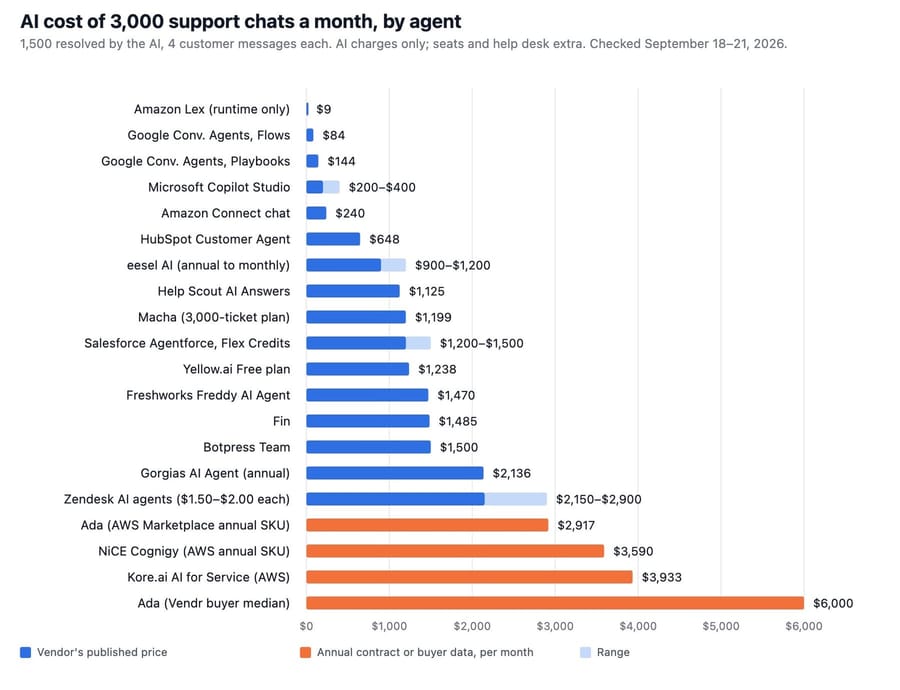
| Agent | Monthly AI cost (September 2026) | How we got it |
|---|---|---|
| Amazon Lex (runtime) | About $9 | 12,000 text requests × $0.00075; channel and handoff not included |
| Google Conversational Agents | About $84 (Flows) to $144 (Playbooks) | 12,000 requests × $0.007 or $0.012 |
| Microsoft Copilot Studio | $200 to $400 | 24,000 credits for 12,000 generative answers is one $200 pack; one 5-credit tool call per chat adds a second |
| Amazon Connect chat | About $240 | 24,000 messages sent or received × $0.010 |
| HubSpot Customer Agent | About $648 | 75,000 credits, less 3,000 included on Professional, × $0.009; plus Service Hub Professional seats |
| Help Scout AI Answers | About $1,125 | 1,500 × $0.75 |
| Macha | $1,199 | The 3,000-ticket plan on our pricing page |
| eesel AI | $900 to $1,200 | 3,000 tickets × $0.40, or $0.30 with the 25% annual-commit discount on eesel's pricing |
| Salesforce Agentforce | $1,200 to $1,500 | 12,000 actions × 20 credits = 240,000 credits: $1,200 pay-as-you-go at $0.005 a credit, $1,500 in prepaid 100,000-credit packs |
| Yellow.ai Free | About $1,238 | 500 sessions included, then 1,250 resolutions × $0.99 |
| Freshworks Freddy AI Agent | About $1,470 | 30 packs of 100 sessions at $49; the 500 free sessions are a one-time allowance per account |
| Fin | About $1,485 | 1,500 outcomes × $0.99; more if handoffs count |
| Botpress Team | About $1,500 | $750 (billed annually) for 1,500 conversations plus 15 packs of 100 at $50 |
| Gorgias AI Agent | About $2,136 | On the 2,000-ticket plan billed annually: $171 for 190 automated interactions, then 1,310 × $1.50 ($2,155 month to month); the help desk adds about $660 at 3,000 tickets |
| Zendesk AI agents | $2,150 committed to $2,900 pay-as-you-go | 1,500 resolutions × $1.50 on a committed plan = $2,250, or × $2.00 pay-as-you-go = $3,000, less a $100 allowance for 20 Suite Professional seats |
| Ada (annual contract) | About $2,500 to $6,000 | From $30,000 a year on Salesforce AgentExchange, volume unstated; Vendr's buyer median is $72,000 |
| NiCE Cognigy (annual contract) | About $3,590 | $43,080 a year on AWS Marketplace for 60,000 conversations |
| Kore.ai (annual contract) | About $3,933 | $0.20 × 3,000 sessions plus $40,000 a year of enterprise support, on AWS Marketplace |
Sierra, Decagon, Forethought, Crescendo and Kustomer have no usable number at this volume: two show a $1,000,000 private-offer placeholder on AWS, two sell by quote only, and Crescendo's AWS listing prices a single unit at $0.01. PolyAI and Talkdesk sell minutes and seats, not chats.
The spread is wide, but the middle has converged: eight of the fifteen rows with a published price can land between $900 and $1,500 for this month. The cheap rows are cheap because you build everything around them. The two native agents that cost the most at this volume, Zendesk and Gorgias, are also the two charging $1.50 a resolution or more, and Zendesk charges $2.00 if you buy pay-as-you-go instead of committing, so a store or team resolving most of what it sees can pay more for the native option than for an add-on on the same help desk.
A month of voice calls
For phone support, assume the same 3,000 conversations as 4-minute calls: 12,000 minutes a month, with 4 customer turns per call. Checked September 18 and 19, 2026.
| Option | Monthly cost (September 2026) | How we got it |
|---|---|---|
| Amazon Connect | About $456 plus telephony | 12,000 × $0.038 a voice minute, per Connect pricing |
| Google Conversational Agents, Flows | About $720 | 720,000 seconds × $0.001, per Google's pricing |
| ElevenLabs Agents, Pro plus overage | About $960 plus LLM and telephony | $99 for 1,238 minutes, then 10,762 × $0.08, per ElevenLabs pricing |
| Microsoft Copilot Studio, classic voice | $1,000 | 12,000 minutes × 10 credits = 120,000 credits, five $200 packs, per Microsoft's billing rates |
| Google Conversational Agents, Playbooks | About $1,440 | 720,000 seconds × $0.002 |
| Salesforce Agentforce, voice actions | $1,800 to $2,000 | 12,000 voice actions (one per customer turn) × 30 Flex Credits = 360,000 credits: $1,800 pay-as-you-go, $2,000 in prepaid 100,000-credit packs |
| PolyAI | About $14,583 minimum | $175,000 a year for 500,000 minutes on AWS Marketplace; at 12,000 minutes a month you'd use under a third |
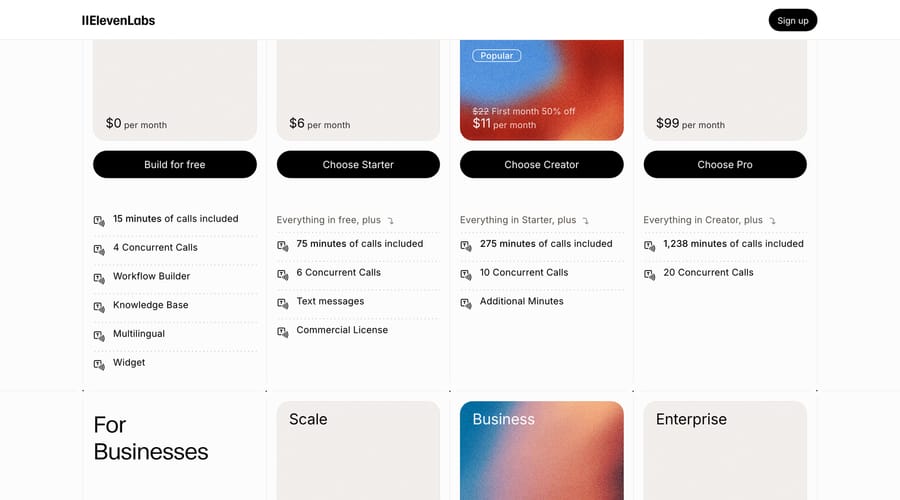
Per-minute pricing is honest about cost and says nothing about whether the call went well, so the incentive to keep calls short sits with you.
What broke when we tested two agents with an order-lookup tool?
We couldn't build on the enterprise agents here: Sierra, Decagon, Ada, Kore.ai and Cognigy are sold by demo and contract. We did build the same small agent on two platforms with free plans, using test accounts opened for an earlier post: a new agent on ElevenLabs Agents and a new project on Voiceflow. It's an order desk for Northwind Candles, a fictional shop. The prompt says to look up orders with a tool, answer only from what the tool returns, never invent dates or tracking numbers, and never promise refunds.
Each agent got one tool, get_order, which calls a public mock orders API, so the items it returns are sample products rather than candles. We sent both agents the same two messages, "Hi, where is my order? The number is 7" and a request to change the delivery address to 12 Elm Street, and asked ElevenLabs a third question about order 999, which doesn't exist. We did not run a voice turn. Starting a call on ElevenLabs requires agreeing to its recording terms, which we didn't accept on the test account. We didn't build an agent on any other product in this roundup.
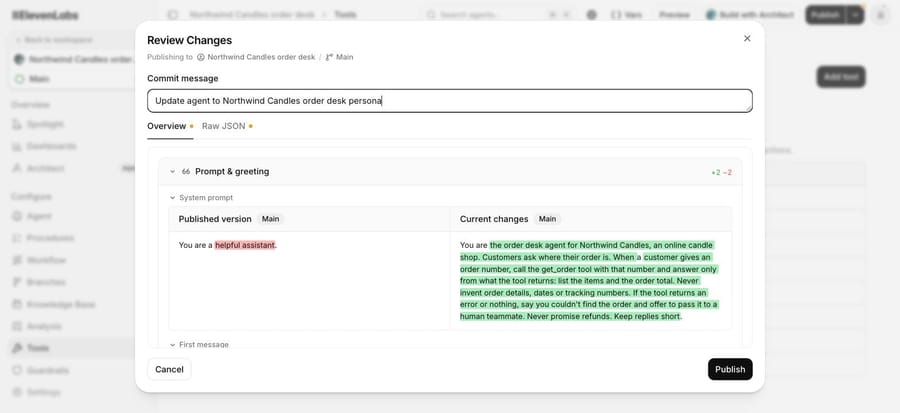
ElevenLabs asks for a commit message and shows a diff of every change before you publish, so each prompt edit can be reviewed and rolled back.
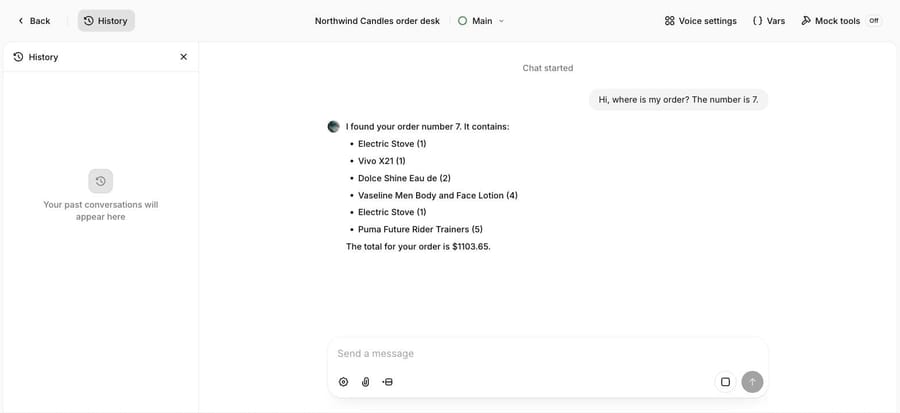
The order lookup worked on both. Each agent called the tool, listed the six items and gave the $1,103.65 total the API returned, and neither invented a tracking number or delivery date.
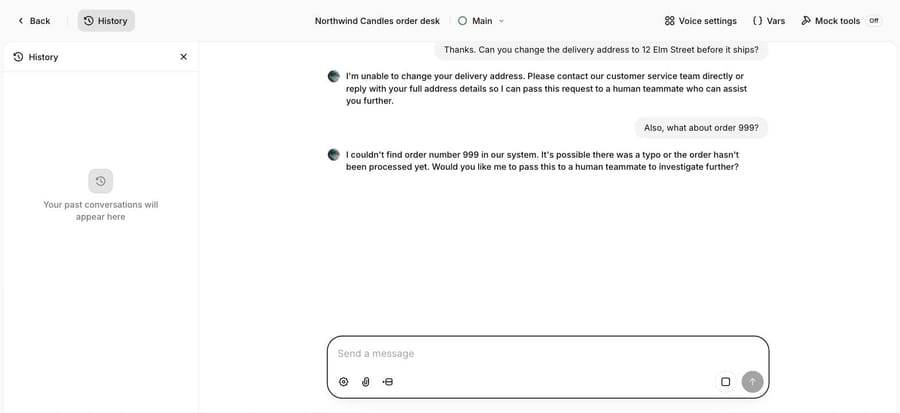
The address change is where both slipped. Neither agent had a tool to change an address or create a handoff. ElevenLabs asked for the full address "so I can pass this request to a human teammate", and Voiceflow said it could "pass that request to a human teammate". Neither had a way to do that. It's the same failure an earlier tool-less test of ours found: the agent describes work that has no mechanism behind it. One tool fixed the question it covered and left the neighboring one exposed. On order 999, ElevenLabs said plainly that it couldn't find the order.
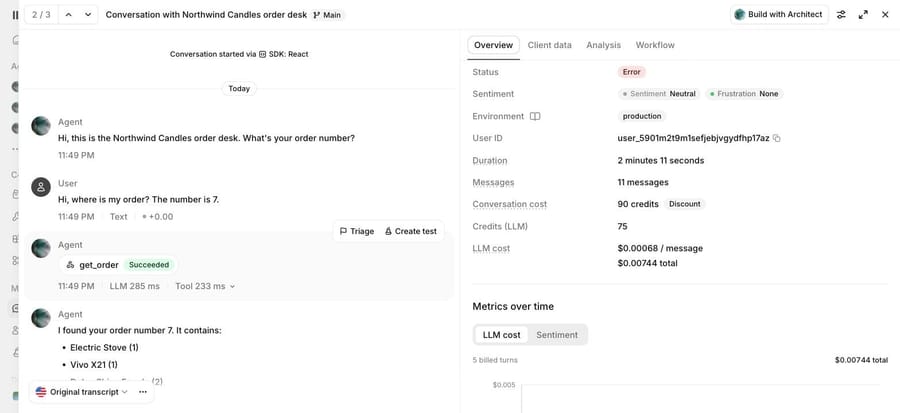
ElevenLabs's log put the model cost at $0.00068 a message, $0.00744 for the whole 11-message conversation, and showed the tool call "Succeeded" with 285 ms of model time and 233 ms of tool time. It also marked the conversation "Error", because nobody sent a message for 60 seconds and the connection closed.
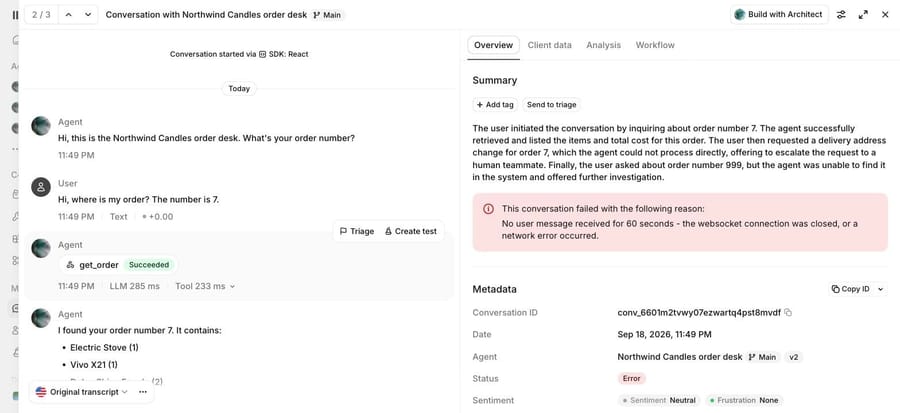
That status says nothing about how the conversation went, which only the transcript shows.
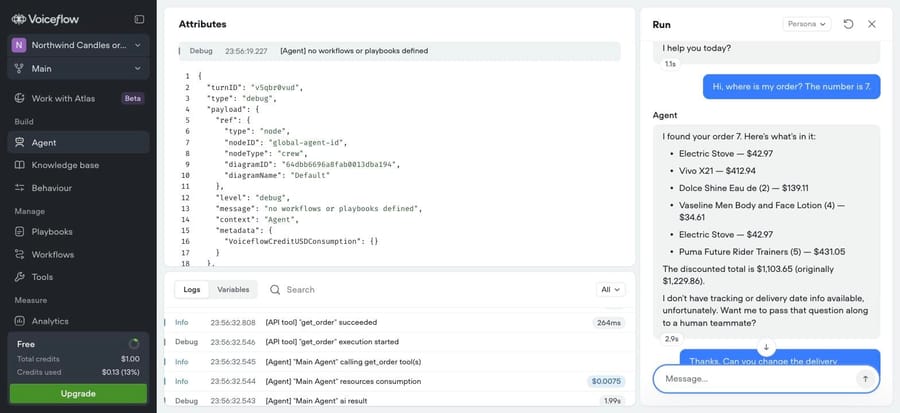
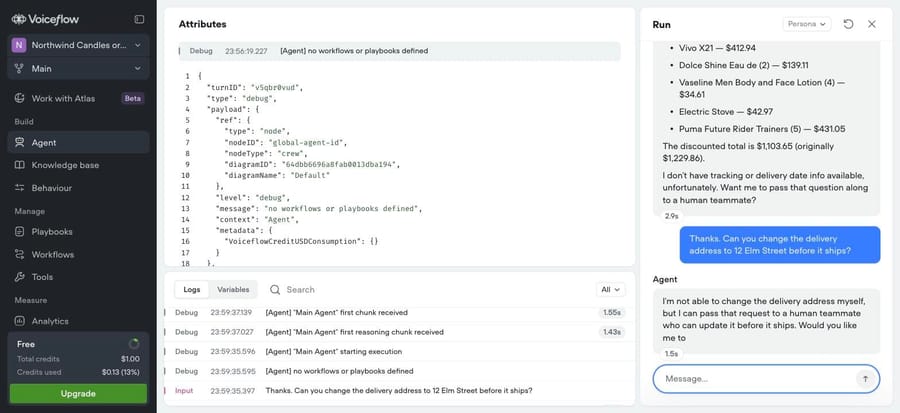
Voiceflow offered the handoff even earlier: its first reply ended "Want me to pass that question along to a human teammate?" Voiceflow logged the get_order call at 264 ms and billed the model step that made it at $0.0075. Its replies took 1.1 to 2.9 seconds to appear in the run panel. Both logs are good enough to build a regression test from; the test we'd add first is one that fails whenever a reply offers a handoff without a handoff tool call. Our guide to testing an AI agent before going live covers that kind of check, our human handoff guide covers what the handoff itself should pass along, and our explainer on how AI support agents use tools and hand off covers the mechanics behind both.
Which AI agents are built into your help desk?
These are the cheapest to switch on, because they already sit on your tickets, macros and help center. The catch is that each works only inside its own help desk.
Zendesk AI agents
Zendesk includes AI agents in every Suite and Support plan and bills them by "automated resolution". Each plan carries a dollar allowance per agent seat each month: $2 on Team, $5 on Growth and Professional, $10 on Enterprise, capped at $5,000 a year, per Zendesk's resolution allowance article. Only "verified" resolutions draw it down, after Zendesk's own LLM checks the customer was satisfied. Past the allowance, "Zendesk charges $1.50 per automated resolution", according to its own blog post on outcome-based pricing, and its customer service chatbot buyer's guide markets the same agents. The pricing page prints two rates, identically on every Suite and Support plan: $1.50 for a committed automated resolution and $2.00 pay-as-you-go. Suite Team is $55 and Professional $115 per agent a month billed yearly, and Copilot is $50 per agent. Zendesk also completed its acquisition of Forethought on March 26, 2026, per the PR Newswire release, and now sells Forethought's agents for any platform.
G2 rates the Zendesk suite 4.3 from 7,075 reviews, with "Missing Features" (216) and "Learning Curve" (179) leading the cons, and Gartner shows 4.3 from 47 in the AI agents market. A mid-market admin wrote that "the help files in the academy section are a bit outdated for the AI Agents part" (G2, September 16, 2026).
It's the path of least resistance for a team that lives in Zendesk and wants one vendor. Skip it if you need a bill you can forecast to the dollar, or if most of your answers live outside Zendesk's help center. More in our Zendesk AI pricing guide.
Freshworks Freddy AI Agent
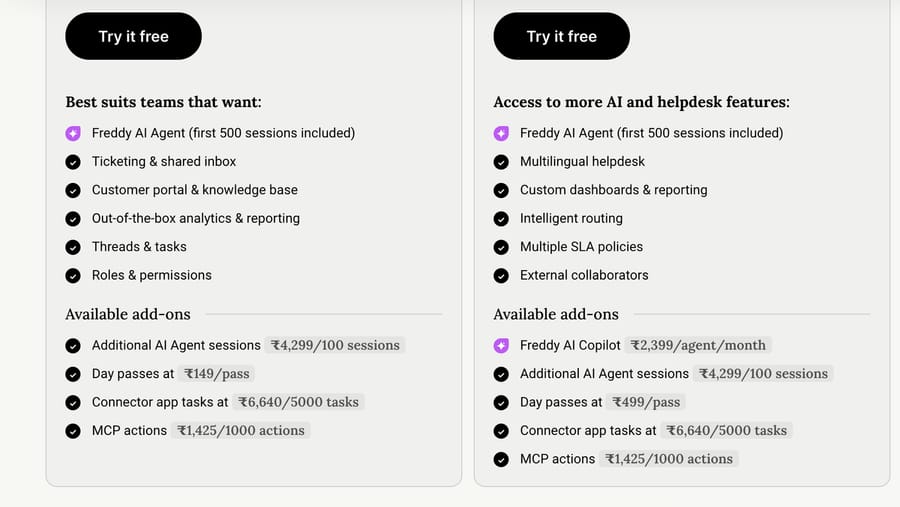
Freddy AI Agent is Freshdesk's customer-facing agent, built in its AI Agent Studio and deployed on web chat and messaging. Every Freshdesk account gets 500 free sessions, then pays $49 per 100 sessions, and Freddy AI Copilot, the drafting assistant for human agents, is $29 per agent a month, per Freshdesk's pricing. Plans run $19 (Growth), $55 (Pro) and $89 (Enterprise) per agent a month, billed annually. Actions outside Freshdesk are metered separately: the same page lists connector app tasks at $80 per 5,000 and MCP actions at $15 per 1,000, with a yearly allowance that grows with the plan.
A session is billed whether or not the conversation is resolved, which makes the bill predictable and means you pay for failures. The free sessions don't renew: the pricing page's FAQ says "We offer 500 free sessions on the Growth, Pro, and Enterprise plans to try out Freddy AI Agent. This is limited to once per account". So a steady month of our 3,000 chats is 30 packs of 100, or $1,470.
G2 shows 4.4 from 3,771 for Freshdesk, with "Missing Features" (69) and "Limited Features" (62) leading the cons, and Gartner lists Freshworks at 4.4 from 2,294 reviews across its 16 products. The AI gets the sharpest recent criticism: an AI engineer at an enterprise wrote that "the Freddy ai features and connections are very limited" (G2, September 11, 2026).
It fits Freshdesk teams whose chat volume is mostly simple questions and who want one vendor for the desk and the AI. Skip it if most of your volume needs actions in outside systems, where the task and action meters add up, or if you'd rather pay only for resolved conversations. Our Freddy AI guide covers setup.
Salesforce Agentforce
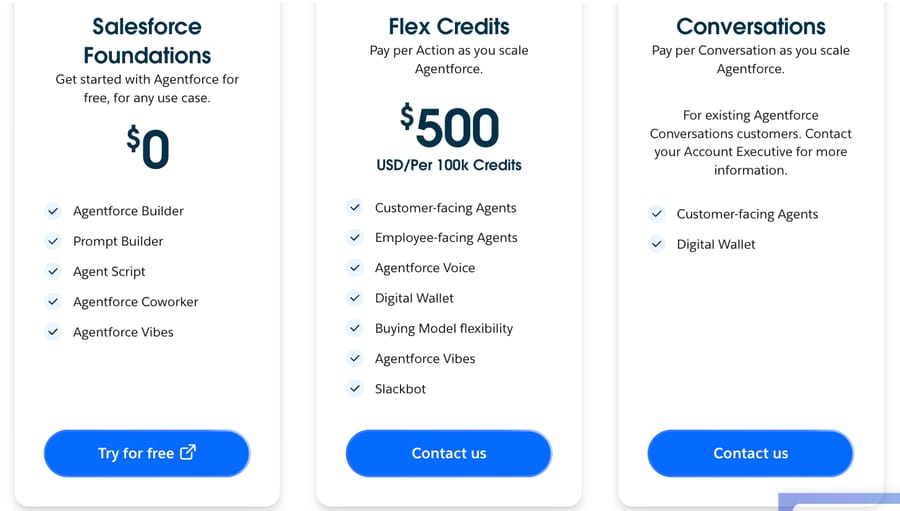
Agentforce is Salesforce's agent platform, and the customer-facing agent runs on Service Cloud data. Pricing starts at $0 with Salesforce Foundations, then Flex Credits: $0.005 a credit pay-as-you-go, billed monthly in arrears, or $500 for a prepaid 100,000-credit pack. Each Agentforce action costs 20 credits and a voice action 30, or $0.10 and $0.15, per Salesforce's pricing page. The older per-conversation plan is now offered only to existing Conversations customers. Employee-facing add-ons are $125 per user a month. Salesforce also completed its acquisition of Fin on September 10, 2026, so it now owns two of the agents on this list.
It's the most-rated product in Gartner's AI agents for customer service market, 4.3 from 72, and G2 shows 4.3 from 1,694. Recent reviews praise the reasoning and question the bill: an enterprise reviewer in consulting listed "hallucinations of course and consumption costs", adding that "the pricing is complex and this leaves my clients very confused" (G2, September 17, 2026).
It fits organizations already on Service Cloud with admins who can own it. Skip it if you're not on Salesforce, because the platform is the prerequisite. Our Agentforce guide covers the credit model in detail.
Gorgias AI Agent
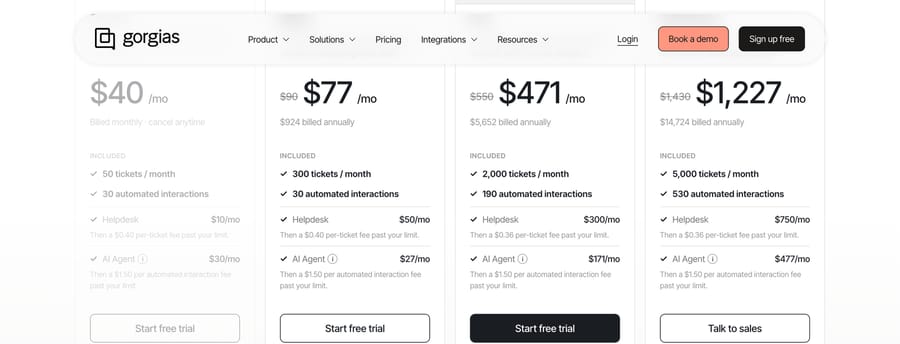
Gorgias sells its help desk and AI Agent together, priced by tickets rather than seats. Billed annually, the plans run from $77 a month (300 tickets, 30 automated interactions) to $1,227 (5,000 tickets, 530 automated interactions), and each automated interaction past the allowance costs $1.50, per Gorgias's pricing. It's trained on Shopify store data, and G2 rates Gorgias 4.6 from 582. At our volume its AI charge is $2,136 a month on annual billing, one of the two most expensive published rows. Watch-out: the $1.50 overage applies to every automated interaction past a small allowance, so a store that automates most of its volume pays more here than on a per-ticket add-on. Our Gorgias AI Agent guide covers what it automates.
HubSpot Customer Agent
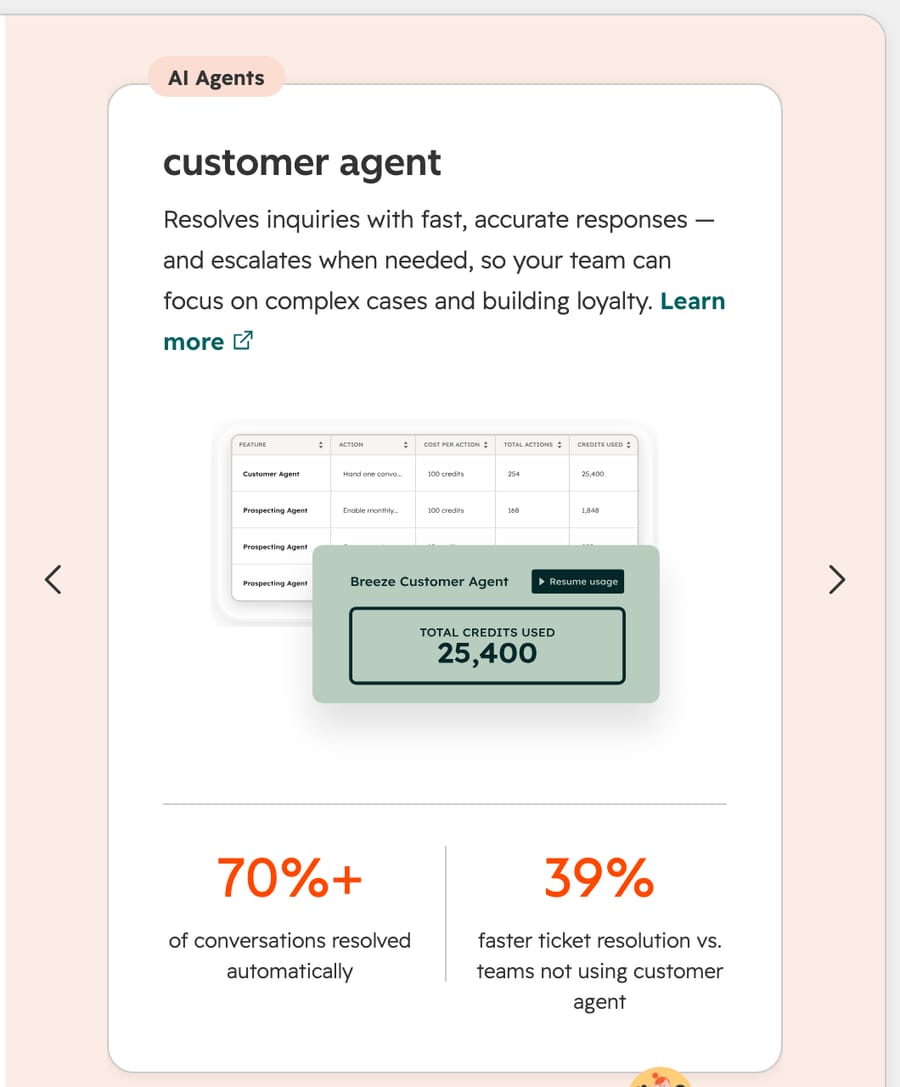
HubSpot's Customer Agent runs on Service Hub Professional and Enterprise, and uses 50 HubSpot credits per resolved conversation. Credits cost $9 per 1,000 paid annually, so a resolution costs about $0.45, the lowest per-resolution rate on this page, per HubSpot's pricing. Professional includes 3,000 credits a month and costs $90 a seat billed annually, plus a $1,500 onboarding fee. G2 rates Service Hub 4.4 from 3,014. The per-resolution price is low; the seats and onboarding are the real cost, and the agent only works inside HubSpot. More in our HubSpot Breeze agent guide.
Help Scout AI Answers
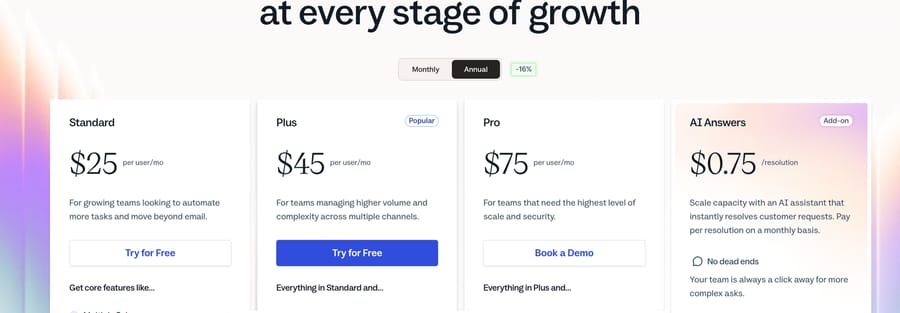
Help Scout sells AI Answers as an add-on at $0.75 a resolution, billed monthly, with a three-month trial for new accounts, on top of plans from $25 to $75 per user a month, per Help Scout's pricing. It suits small, email-first teams that want AI answers without a separate vendor. G2 shows 4.4 from 431. Watch-out: it answers from your knowledge base and can't take actions in other systems, so order changes and refunds still reach a person. Our Help Scout AI guide covers what it can and can't do.
Kustomer
Kustomer quotes privately. Vendr's buyer data puts the median Kustomer contract at $138,073 a year, from $60,588 to $441,342 across 31 purchases, which covers the whole platform rather than the AI alone. G2 rates it 4.4 from 566. Its pricing page asks for your agent count and monthly conversation volume before it shows an estimate. It's a help desk decision first and an AI decision second; watch for a price that bundles seats, AI and channels so tightly that you can't compare the AI part. Our Kustomer AI guide covers the AI features.
Which standalone agents run beside your help desk?
These run beside or on top of your help desk and are sold as the agent itself. Most enterprise ones are built by the vendor's team with yours.
Fin
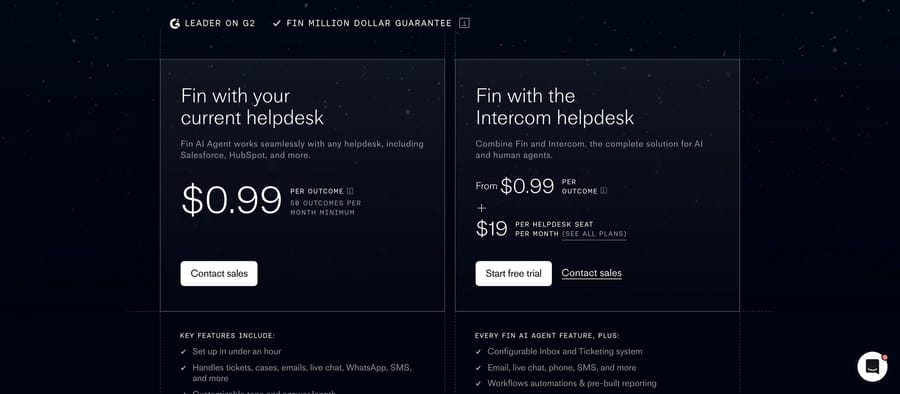
Fin is the agent formerly sold as Intercom Fin, now owned by Salesforce. It costs $0.99 an outcome on your current help desk, with a 50-outcome monthly minimum, or from $0.99 an outcome plus a help desk seat on Intercom's own help desk, per Fin's pricing page. Intercom's Essential seat is $29 a month on annual billing (it showed $19 during a pricing test earlier in September), Advanced is $85 and Expert $132 on the same basis, per Intercom's pricing on September 24, 2026. Fin counts a resolution when "no further help is requested after Fin's last answer", and it also bills when it completes a handoff you configured; a qualified sales lead bills at $9.99.
G2 shows 4.5 from 3,912, a figure that covers the whole Intercom listing, and Gartner shows 4.6 from 18 for Fin AI Agent in the conversational AI market. The recent complaints are about long conversations: a customer support specialist at a mid-market company wrote that "sometimes Fin can be repetitive in the way it handles a conversation, which can make the interaction longer than necessary" (G2, September 11, 2026).
It fits teams that want one proven agent on whatever help desk they run, with pricing on the page. Skip it if most of your volume needs multi-step actions in back-office systems, or if you can't live with handoffs billing like resolutions. Our Fin guide predates the acquisition but covers the product.
Ada
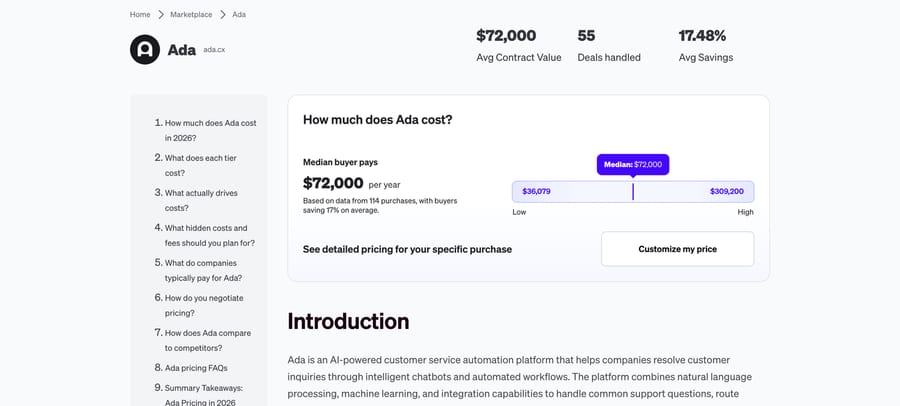
Ada is one of the longest-running dedicated AI customer service platforms, strong on multilingual and brand controls, and it quotes privately. Its homepage (ada.cx, which blocks our automated link check) claims an "84% automated resolution rate" and names customers including Pinterest, monday.com, Sky, Barnes & Noble, Grab and GoFundMe; those figures are Ada's own. AWS Marketplace also lists a joint Ada and Swarm package for retail, travel and banking, without a price. Two numbers are public. Its Salesforce AgentExchange listing starts at $30,000 per company a year (checked 25 September 2026), with the volume unstated, and Vendr's buyer data puts the median contract at $72,000 a year across 114 purchases, from $36,079 to $309,200. Its AWS Marketplace listing sold a 12-month contract at $35,000 when we read it on 22 September 2026 and now shows custom pricing only.
G2 shows 4.6 from 173, and Gartner shows 4.5 from 21 in the conversational AI market. Cost comes up even in positive reviews: an insurance broker at an enterprise wrote that "scaling this could become an issue because of the costs involved and inaccurate data" (G2, April 28, 2026).
It fits mid-size and large companies that want a mature, brand-safe agent across many languages and can run a procurement cycle. Skip it below about $30,000 a year of budget, the AgentExchange entry price, or if you need to see per-conversation pricing before a sales call. Our Ada guide has more.
Sierra
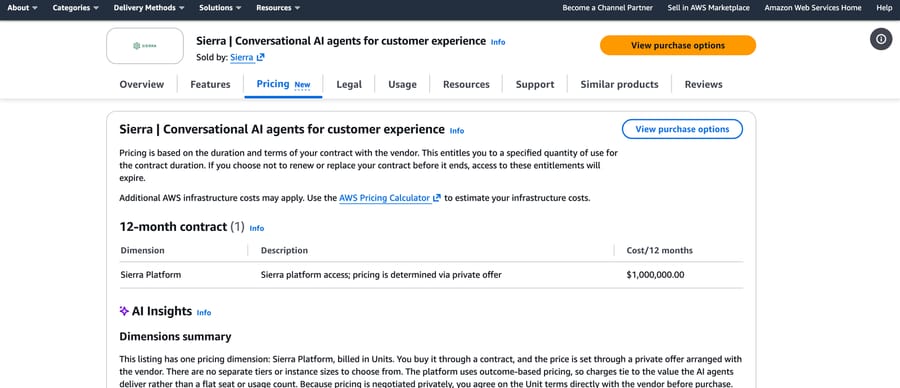
Sierra builds brand-specific agents with its own team embedded with yours, and it prices on outcomes. Its homepage names Rocket Mortgage, SiriusXM, Wayfair, Gap, DIRECTV and Vanguard among its customers, and its own post on outcome-based pricing counts resolved conversations, saved cancellations and upsells as outcomes, so the vendor also earns on revenue events. Its AWS Marketplace listing has one dimension, "Sierra platform access; pricing is determined via private offer", shown at a $1,000,000 placeholder, and AWS's summary describes the pricing as outcome-based.
G2 rates it 4.5 from 130, and Gartner 4.7 from 7 in the AI agents market, a strong score on a thin base. "Expensive" is among G2's con tags, and a small-business reviewer wrote that it "can be expensive, may need technical setup, and sometimes requires human support for complex or unusual issues" (G2, September 17, 2026).
It fits large consumer brands that want the vendor to build and tune the agent, and that value a named team over a self-serve builder. Skip it if you want to change the agent yourself the same afternoon, or if you can't define outcomes tightly in the contract, since that definition sets the real price. Our Sierra guide covers the model.
Decagon
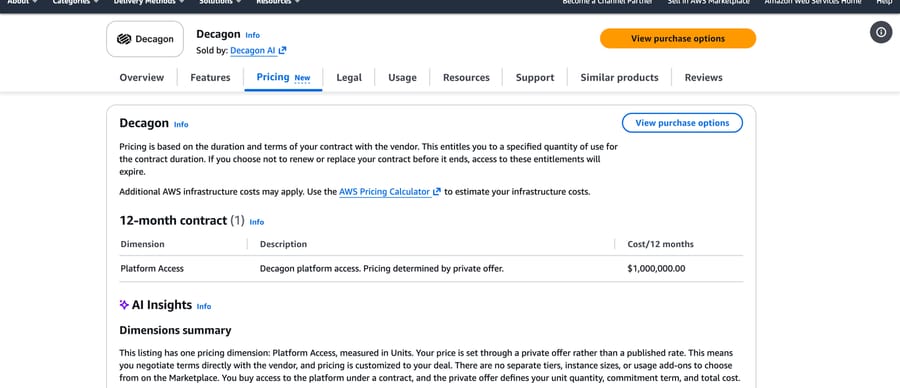
Decagon is Sierra's closest peer: an enterprise agent built with a high-touch implementation, across chat, email and voice. Its homepage publishes customer results, all vendor-reported: "70% chat and voice resolution" at Chime and an "80% deflection rate" at Duolingo. Its AWS listing shows a single "Platform Access" dimension, "Pricing determined by private offer", at a $1,000,000 placeholder. Its Google Cloud Marketplace listing routes to the vendor for a custom price, so the neutral number is Vendr's: a median contract of $432,750 a year, from $105,000 to $923,183.
G2 shows 4.8 from 30, one of the highest ratings on this page on a small base, with "Missing Features" (6) and "Limited Customization" (5) among the cons; Gartner has no reviews of it yet. The complaint pattern is edge cases: a team lead at a mid-market company wrote that one area to improve "is how Decagon handles more complex or unusual customer questions" (G2, September 3, 2026).
It fits enterprise CX teams with six-figure budgets that want a managed build and published peers to call. Skip it below about $100,000 a year, where Vendr's lowest recorded contract sits, and read the definition of a deflection in the contract as carefully as the rate. See our Decagon guide.
Forethought
Forethought now sells as "Forethought AI Agents by Zendesk" and says it works on any CX platform, not only Zendesk. Pricing goes through Zendesk sales; we found no marketplace listing or Vendr price, and Zendesk notes that Forethought plans don't include a default resolution allowance. G2 rates Forethought AI Agents 4.3 from 166, with "Long Delays" (5) and "Expensive" (4) among the cons. A software developer at a small business wrote that the area to improve is "the accuracy and consistency of responses in more complex or nuanced situations" (G2, August 8, 2026). It's the standalone agent to consider if you're on another help desk but expect to consolidate on Zendesk. Skip it if you want a price before a sales call, since every quote now goes through Zendesk and no marketplace or buyer-data figure exists for it, or if a Zendesk-owned vendor sitting on a rival help desk's tickets is a question your security review will ask. Our Forethought guide predates the acquisition.
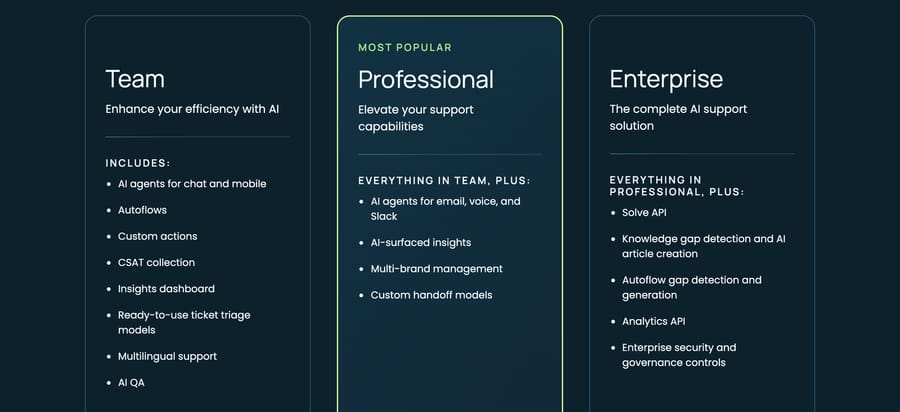
Crescendo
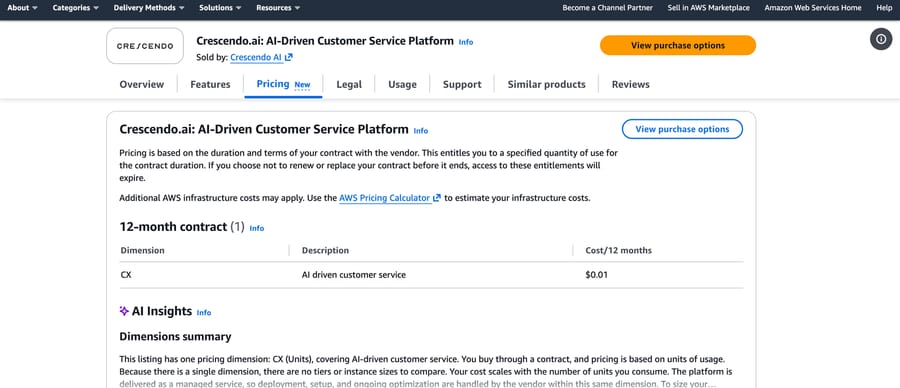
Crescendo sells AI agents together with human support staff as one managed service, priced on outcomes. Its pricing page routes to a demo, and its AWS listing prices a single "CX" unit at $0.01, a placeholder rather than a rate. Gartner shows 4.5 from 2, and G2 has no reviews yet. It suits a company willing to outsource the support operation, not just automate it; the watch-out is dependence, since the people and the AI come from the same vendor. More in our Crescendo guide.
Which enterprise contact-center platforms sell AI agents?
These serve large contact centers with voice, many languages and an RFP process. They're usually built by developers or an integrator.
Kore.ai
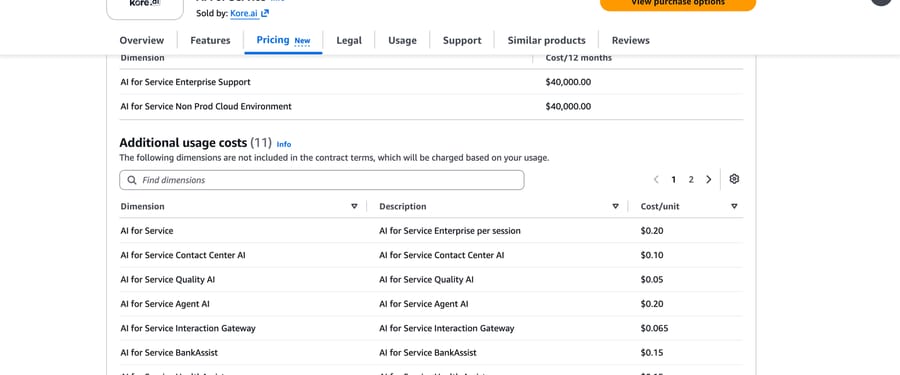
Kore.ai sells customer-facing and employee-facing agents on one platform. Its website quotes privately, but its AWS listing prices AI for Service at $0.20 a session on top of a 12-month contract whose dimensions are $40,000 for enterprise support and $40,000 for a non-production environment. Sessions last 15 minutes, per its usage docs. Kore.ai says it was named a Leader in Gartner's 2026 Magic Quadrant for Conversational AI Platforms and in Forrester's Q2 2026 Wave, per its analyst page. Kore.ai also wrote one of the listicles ranking for this search, and ranks itself first.
G2 shows 4.6 from 505; Gartner shows 4.2 from 10 in the AI agents market and 4.3 from 167 in conversational AI. G2's leading con tags are "Learning Curve" (46) and "Usage Limitations" (43), and a junior developer at an enterprise wrote that "the platform can occasionally present unexpected bugs or inconsistent behavior" (G2, July 27, 2026).
It fits large organizations with a platform team and several use cases to share the contract. Skip it with one use case and no engineers. See our Kore.ai guide.
NiCE Cognigy
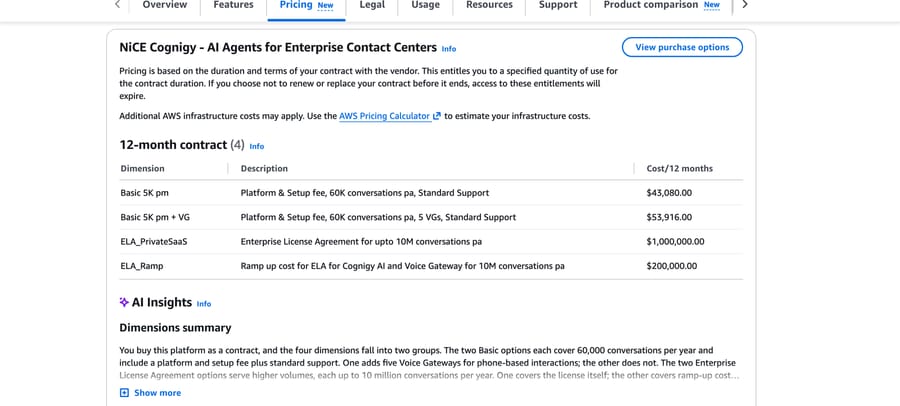
Cognigy is owned by NiCE, which closed the acquisition on September 8, 2025, per NiCE's announcement. Its homepage says it was named a Leader in the Forrester Wave 2026 for conversational AI platforms for customer service. The website quotes privately, but its AWS listing sells a Basic tier at $43,080 a year, covering platform, setup, standard support and 60,000 conversations, which is about $0.72 a conversation at full use; five voice gateways take it to $53,916.
It has the best peer rating among the enterprise platforms, 4.8 from 156 on Gartner's conversational AI market, against only 13 reviews on G2 (4.6). The G2 complaints are about depth: an assistant manager at a mid-market company listed "limited analytical possibilities, less possibilities of advanced chat flow" (G2, September 18, 2024; Cognigy's newest G2 review is from 2024).
The same listing shows the next steps up: an enterprise license for up to 10 million conversations a year at $1,000,000, with a $200,000 ramp-up fee. Cognigy is built for voice as much as chat, with voice gateways as a line item, and the NiCE ownership ties it to the CXone contact center.
It fits contact centers running voice and digital at scale, especially NICE CXone customers. Skip it well below 5,000 conversations a month, since the smallest listed tier's 60,000 conversations a year cost more than most per-use rows in our model. See our Cognigy guide.
Yellow.ai
Yellow.ai is the enterprise platform with a self-serve start: a Free plan with one AI agent and 500 chat sessions a month, then $0.99 a resolution, per its pricing page. G2 shows 4.4 from 107, and Gartner shows 4.4 from 102 in its conversational AI market (and 4.5 from 2 in the AI agents market). It's strong on multilingual deployments. Watch-out: the free tier allows one AI agent, so it's a trial rather than a production plan, and Enterprise is by quote. See our Yellow.ai guide.
PolyAI
PolyAI builds voice agents for enterprise contact centers and prices per minute without publishing the rate. Its AWS listing sells a minimum annual commitment of $175,000 for 500,000 minutes, which is $0.35 a minute at full use; its Azure listing is a $1 private-offer template. G2 shows 5.0 from 12, Gartner 4.2 from 5. It's for phone-heavy operations, not chat, and the AWS listing states "no refunds", so the $175,000 commitment is paid whether or not you use the minutes.
Talkdesk
Talkdesk is a contact-center suite with AI agents inside it. Its AWS listing sells CX Cloud Essentials at $135,000 over 36 months for 50 users, $75 a month per user, with extra users at $75. G2 rates it 4.4 from 2,601 and Gartner 4.4 from 29. AWS also carries a usage-based Talkdesk Express listing for small businesses, priced on product mix and volume. Buy it for the contact center, not the agent; the listed contract runs 36 months.
What do the Amazon, Google, Microsoft and IBM cloud components cost?
These are the cheapest per conversation and the most work per agent: you assemble the product from parts, with engineers.
Amazon Connect and Lex
Amazon Connect prices chat at $0.010 per message sent or received and voice at $0.038 a minute, per Connect's pricing, and Lex, the conversation engine, at $0.00075 a text request. Gartner's AI agents market lists Amazon Quick at 4.4 from 45; G2 rates Lex 4.2 from 43. It fits AWS shops building their own contact center. Watch-out: Lex's $9 month buys no channel, handoff or analytics, and Connect's rates assume you move to Amazon's contact center rather than keep your current help desk.
Google Conversational Agents
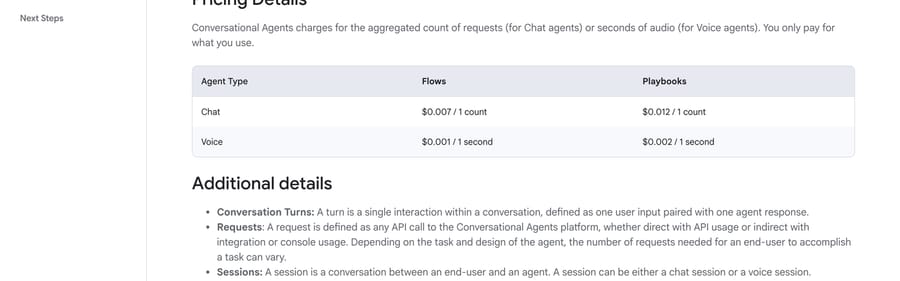
Google's Conversational Agents (formerly Dialogflow CX) charges $0.007 a chat request on Flows and $0.012 on Playbooks, per Google's pricing, which gives the $84 and $144 months above before engineering. Voice runs $0.001 or $0.002 a second. G2 rates Dialogflow 4.4 from 144, and Gartner 4.4 from 19 in its conversational AI market. It suits teams with Google Cloud engineers who want to own the agent end to end. Watch-out: requests are metered per API call, so set a budget alert in Google Cloud before launch.
Microsoft Copilot Studio
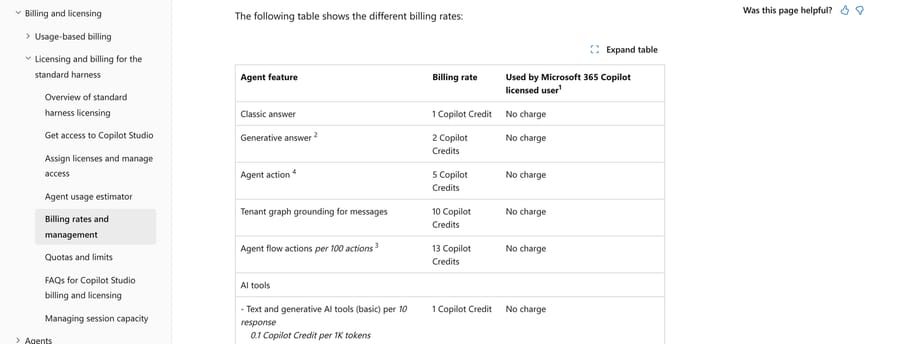
Copilot Studio bills in Copilot Credits: 1 for a classic answer, 2 for a generative answer and 5 for an agent action, per Microsoft's billing rates page, sold in $200 packs of 25,000. G2 rates it 4.4 from 155, and Gartner 4.2 from 71 in its conversational AI market. It fits Microsoft 365 organizations, especially for employee-facing agents. Watch-out: when a tenant passes 125% of its prepaid capacity, Microsoft disables its custom agents until capacity is added, per the same billing page.
IBM watsonx Orchestrate
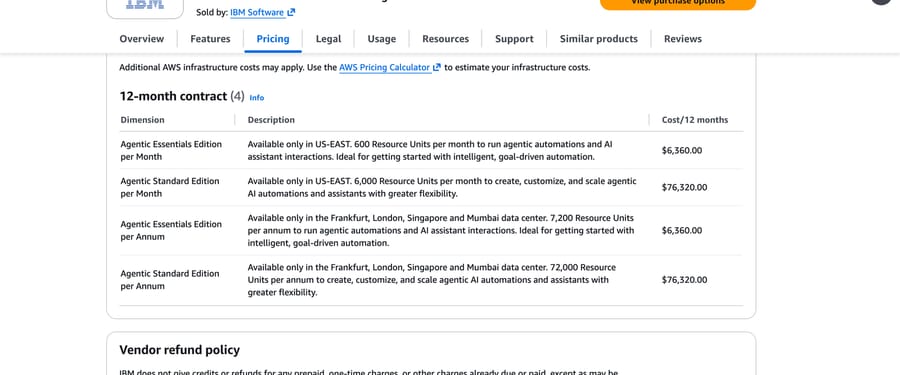
IBM publishes Essentials from $530 a month, and its AWS listing sells the same edition at $6,360 a year with 600 "Resource Units" a month, without saying how many conversations that covers; Standard is $76,320 a year on the same listing. G2 rates it 4.4 from 393, and Gartner 4.3 from 120 in its conversational AI market. It's aimed at enterprises automating work across HR, IT and procurement more than at customer chat, and the Resource Unit meter makes a support-volume estimate guesswork until IBM translates it.
Which layers and builders sit on top of your help desk?
eesel AI
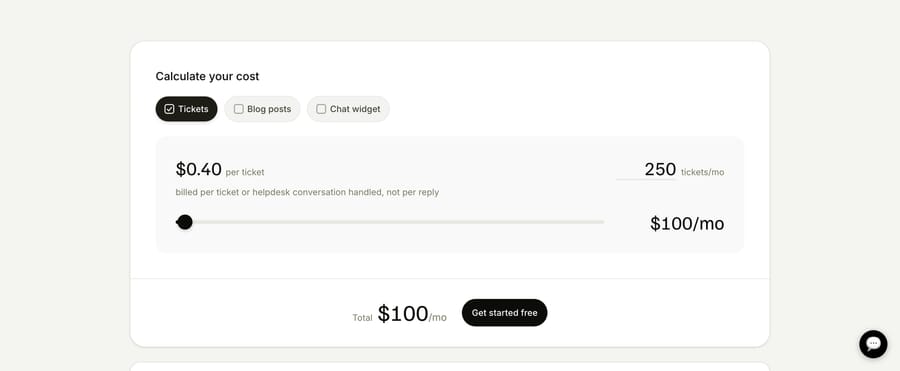
eesel AI sits on top of the help desk you already use and charges $0.40 per ticket or chat session handled, or 25% less with an annual commitment, with no platform fee, no seat fee and no monthly minimum on self-serve, and $50 of free usage, per its pricing page. A separate Enterprise tier adds a $1,000/month flat platform fee on top of that usage. Its integrations page lists Zendesk, Freshdesk, Intercom, HubSpot, Gorgias, Help Scout, Front and Salesforce. G2 shows 4.6 from 20, a thin base for a rating. Watch-out: like any per-ticket product, it bills for tickets it doesn't resolve. It fits small and mid-size teams that want an inexpensive add-on to their current desk. See our eesel AI guide.
Macha
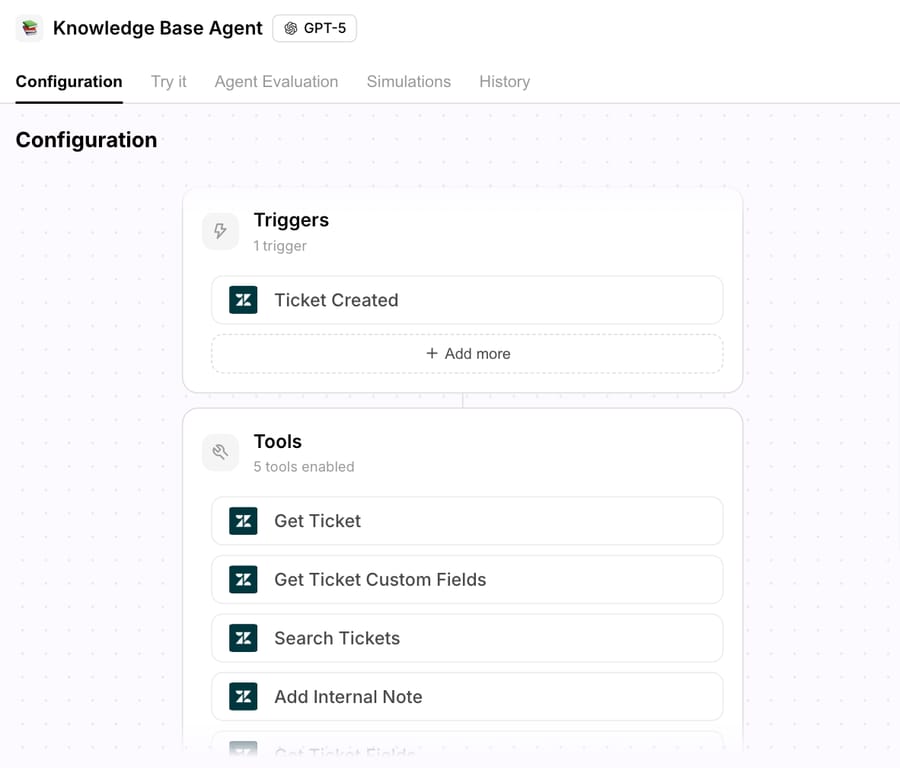
Macha is our product, and it gets the same treatment as everything else on this page. It's an AI agent layer that runs inside the help desk you already use: Zendesk, Freshdesk, Gorgias, Front, HubSpot or Intercom. Agents read the ticket, reply or write an internal note, and take actions in connected tools such as Shopify, Stripe, Confluence, Notion or Google Workspace, with custom API tools for anything else. It isn't a help desk and it doesn't answer the phone.
Pricing is one plan set by monthly ticket volume, from $299 for 750 tickets, about $0.40 a ticket at every tier, and each thread with one person counts once however many replies it takes. Setup and monitoring by the Macha team are included on every plan. It fits teams on one of those help desks whose conversations are tickets, who want an agent that acts inside the ticket and don't have engineers to build it. Skip it if your help desk isn't one of those, or if the volume you want automated is phone calls, since there's no voice channel. We're also a much smaller company than Ada, Decagon or Sierra, with no G2 or Capterra profile and no analyst coverage, so a procurement process that scores third-party review volume will fail us. And an agent does what its written instructions say: a vague instruction produces a vague agent, which is why the Macha team writes and tunes them with you rather than handing over an empty console. See how Macha works on your help desk.
Botpress
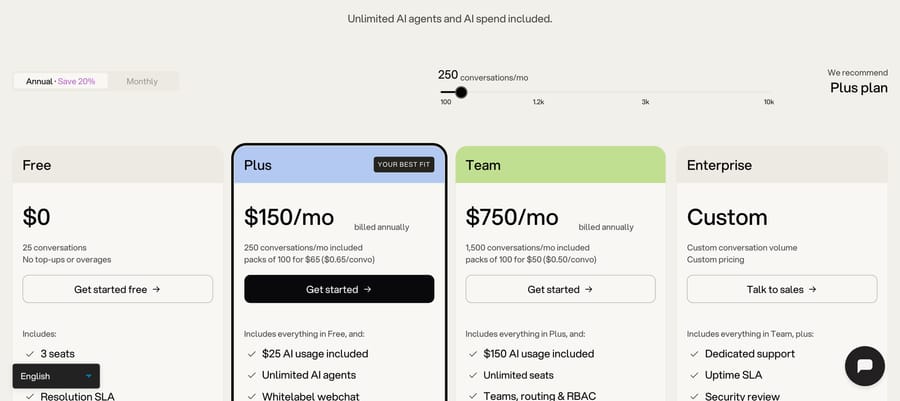
Botpress is an agent builder with published prices: Plus at $150 and Team at $750 a month billed annually, including 250 and 1,500 conversations, with extra packs of 100 at $65 or $50. G2 rates it 4.5 from 512, and Google's AI Overview for "customer service ai" names it. It fits a team with one technical builder who wants to own the agent. Watch-out: the Free plan's 25 conversations are a demo, and Plus overage packs cost $0.65 a conversation. Botpress also wrote one of the listicles ranking for this search and lists itself first. See our Botpress guide.
Voiceflow and ElevenLabs Agents, the two platforms we tested, belong in this group too. Our Voiceflow guide covers the first. ElevenLabs is voice-first and bills per minute, and our ElevenLabs integration guide shows how a voice agent can sit in front of a help desk.
Also considered
SoundHound AI, which now owns both Amelia and LivePerson, and Omilia and Sprinklr appear on Kore.ai's list and suit large enterprise contact centers. Five9 (4.2 from 6), NiCE CXone (4.0 from 2) and Hiver (4.8 from 3) appear in Gartner's AI agents market with too few ratings to compare; our Hiver AI guide covers the last. Chatbase and Tidio's Lyro appear on the Botpress list and fit small websites; see our Chatbase guide and our Tidio Lyro guide. Fini, Gumloop, Yuma AI and Beam.ai appear on one list each; our Fini guide and Yuma AI guide cover two of them.
What should you evaluate before you sign?
- Accuracy on your own tickets. Run the agent against a few hundred past conversations before signing, and read the answers.
- Actions and their log. Which tools can it call, which need a human's confirmation, and does every action leave a record?
- Handoff. What reaches the human, and does the agent ever promise a handoff it can't make? Both our test agents did.
- Versioning and tests. Can you see a diff before publishing, roll back, and turn a bad transcript into a test?
- The billing definition. What counts as a resolution, outcome or session, and who decides?
- Compliance by plan. HIPAA, SSO and data residency are often top-tier only.
- Languages and channels. Which languages is it tested in, and does it bill a two-day messaging thread once or several times?
Which agent is best for your situation?
- Best if you're on Zendesk: Zendesk AI agents at $1.50 per automated resolution on a committed plan, or $2.00 pay-as-you-go; compare it with a per-ticket layer at $0.40 a ticket, which costs less once the agent resolves more than about 20% to 27% of what it sees.
- Best if you're on Freshdesk: Freddy AI Agent for simple chat; an agent layer if you need actions in outside systems.
- Best on Salesforce: Agentforce, with Flex Credits modeled at your real turns per conversation.
- Best standalone agent with a published price: Fin at $0.99 an outcome.
- Best cheap add-on to an existing help desk: eesel AI at $0.40 a ticket ($0.30 on an annual commitment), or HubSpot's $0.45 resolution if you're already on Service Hub Professional.
- Best for keeping your help desk and having the agent built for you: Macha, on Zendesk, Freshdesk, Gorgias, Front, HubSpot or Intercom.
- Best managed enterprise build: Sierra or Decagon, at six figures a year.
- Best mature enterprise agent: Ada, multilingual and brand-safe, from $30,000 a year on Salesforce AgentExchange.
- Best for large contact centers: NiCE Cognigy or Kore.ai; PolyAI for voice.
How do you choose between the kinds of agent?
- Do you want to keep your help desk? If yes, the native agent, a standalone agent and a layer all work without a migration. If you're consolidating anyway, the help desk decision comes first and the AI follows; our comparison of AI customer service software covers help desks with AI built in. Our build vs buy breakdown covers the third route, building your own.
- How predictable does the bill need to be? Per-resolution pricing is cheapest early and hardest to forecast; per-ticket and per-session are easiest to forecast and charge for failures; annual contracts suit tens of thousands of conversations a month.
- Does the agent need to act, or only answer? If order changes, refunds and cancellations drive your volume, shortlist only agents that call tools in your systems with confirmation rules, and test the handoff as hard as the answers.
Who shouldn't buy each kind of agent?
A native agent is the wrong choice if your answers live outside the help desk, or if you might change help desks within a year. A standalone enterprise agent is wrong below a five-figure annual budget or if you need to change behavior weekly without a request. An enterprise CX platform is wrong with one use case and no platform team. Cloud components are wrong if nobody will build the channel, handoff and analytics around them. A builder is wrong if nobody will own the canvas after launch. And Macha is the wrong fit if you don't use a help desk it connects to (Zendesk, Freshdesk, Gorgias, Front, HubSpot or Intercom), or if the conversations you want automated are phone calls.
Frequently asked questions
What is an AI customer service agent? Software that holds a support conversation with a customer and resolves it, by answering from your knowledge and taking actions through tools, such as looking up an order or changing a subscription, and hands off to a person when it can't. Our explainer on what an AI customer support agent is covers how they work.
Are there AI customer service agents? Yes, from every major help desk (Zendesk, Freshdesk, Salesforce, Gorgias, HubSpot, Help Scout) and from standalone vendors such as Fin, Ada, Sierra and Decagon. This page compares 25, one of which is our own.
Which is the best AI customer service agent in 2026? It depends on your help desk and budget. Among agents with 100 or more G2 reviews, Gorgias (4.6 from 582), Kore.ai (4.6 from 505) and Ada (4.6 from 173) rate highest, and Fin (4.5 from 3,912) has the largest review base among the standalone agents. On Gartner's AI agents market, Salesforce Agentforce is the most-rated (4.3 from 72). Pick the kind first, then compare within it.
How much does an AI customer service agent cost? At 3,000 chats a month with half resolved, published prices run from about $9 (Amazon Lex's runtime alone) to about $2,900 (Zendesk AI agents at the $2.00 pay-as-you-go rate), and eight of the fifteen can land between $900 and $1,500. The annual contracts in our chat model come to about $2,500 (Ada's AgentExchange floor) to $3,933 (Kore.ai on AWS) a month, and Vendr's buyer medians run from $72,000 a year (Ada) to $432,750 (Decagon).
How much does it cost to hire an AI call center agent? Voice is priced per minute or by annual commitment. The voice table above works out 12,000 minutes a month on seven options, from about $456 on Amazon Connect (before telephony) to a $14,583 monthly minimum on PolyAI's AWS listing.
How do I create an AI agent for customer service? Pick one high-volume category, such as order status. Write instructions that say what the agent may and may not do, connect the knowledge it needs, and give it the tools for the actions that category requires, such as an order lookup. Test it on real past conversations, including ones where it should hand off, then run it in draft mode before letting it reply. Our pre-launch testing guide walks through the checks.
How can you tell if a customer service agent is AI? Many say so in the chat header or their first message. Otherwise, instant replies at any hour, perfectly consistent tone and polished answers to vague questions are signs. The simplest test is to ask; a well-configured agent will say it's an AI and offer a person.
Do I need to replace my help desk to use an AI agent? No. Native agents assume you're on their help desk, but standalone agents such as Fin run on most help desks, and layers such as Macha and eesel AI work inside the one you already have.
What's the difference between an AI agent and a chatbot? A chatbot follows scripted branches for intents someone planned. An AI agent reads the whole conversation, decides what to do from written instructions, and calls tools to act. That handles unplanned phrasing, and it means rules become sentences you test rather than branches you inspect.
What does Gartner say about AI customer service agents? Gartner runs a Peer Insights market for "AI Agents for Customer Service and Support", led by Salesforce Agentforce, Zendesk and Amazon Quick by rating count on September 18, 2026. In a January 26, 2026 press release, Gartner predicted that generative AI's cost per resolution will exceed $3 by 2030 and that right-to-a-human rules will raise assisted service volume by 30% by 2028. Kore.ai says it's a Leader in Gartner's 2026 Magic Quadrant for Conversational AI Platforms, and NiCE Cognigy and Kore.ai both say they're Leaders in Forrester's 2026 Wave for customer service.
Is there a free AI customer service agent? Several have free tiers: Yellow.ai (500 sessions a month), Botpress (25 conversations), Help Scout AI Answers (three-month trial), HubSpot Customer Agent (14 days on a paid seat), Salesforce Foundations ($0), eesel AI and Macha ($50 of free usage each). None covers production volume.
If your tickets already live in Zendesk, Freshdesk, Gorgias, Front, HubSpot or Intercom, start a Macha trial with $50 of free usage and put an agent on one ticket category first.
Sources: Zendesk pricing, Zendesk, resolution tiers, Zendesk, resolution allowances, Zendesk completes acquisition of Forethought, PR Newswire, Voiceflow, Zendesk AI agents, Freshdesk pricing, Salesforce Agentforce pricing, Salesforce completes acquisition of Fin, Gorgias pricing, HubSpot Service Hub pricing, Help Scout pricing, Fin pricing, Ada on AWS Marketplace, Ada on Salesforce AgentExchange, Vendr, Ada, Sierra on AWS Marketplace, Decagon on AWS Marketplace, Vendr, Decagon, Crescendo on AWS Marketplace, Vendr, Kustomer, Kore.ai on AWS Marketplace, Kore.ai usage plans, Kore.ai analyst recognition, NiCE closes acquisition of Cognigy, NiCE Cognigy on AWS Marketplace, Yellow.ai pricing, PolyAI on AWS Marketplace, Talkdesk on AWS Marketplace, Amazon Connect pricing, Amazon Lex pricing, Google Conversational Agents pricing, Microsoft Copilot Studio billing rates, IBM watsonx Orchestrate on AWS Marketplace, eesel AI pricing, Botpress pricing, ElevenLabs Agents pricing. Gartner Peer Insights "AI Agents for Customer Service and Support" and "Conversational AI Platforms" market and vendor pages, and the Gartner newsroom release of January 26, 2026, read in a browser on September 18, 2026 and named rather than linked because gartner.com returns 403 to our automated link check. G2 product and review pages, Azure Marketplace and Google Cloud Marketplace searches, all read September 18, 2026. Our own free-plan builds on ElevenLabs Agents and Voiceflow, September 18, 2026.
Simple per-ticket AI pricing
One thread with one person is one charge, however many replies it takes.