Intercom
 Shopify
 Stripe
 Slack
Slack Notion
 Google Workspace
 Confluence

Zendesk Copilot Explained: The Agent-Assist AI, in Plain English


If you've turned on AI in Zendesk lately, you've run into the word Copilot — in the pricing page, in the admin center, and as a panel that quietly suggests replies while your agents type. It's easy to lump it in with "Zendesk's AI" and move on. But Copilot is a specific thing with a specific job, and getting it wrong leads to the two most common mistakes teams make with Zendesk AI: paying for the wrong add-on, and expecting a tool to resolve tickets that was never built to.
Key takeaways
- Zendesk Copilot is agent-assist AI that drafts replies, summarizes tickets, and suggests next steps for a human agent, who must review and send every suggestion.
- Zendesk lists Copilot as a separate add-on priced at $50 per agent per month, paid yearly, requiring Suite Professional or Support Professional plans or above.
- Copilot is the rebranded successor to Zendesk's former Advanced AI add-on, so older guides referencing Advanced AI describe the same product now called Copilot.
- Zendesk's usage metering tracks Copilot separately from Automated resolutions and Generative search, confirming it is billed as its own product rather than bundled AI.
- Even as Zendesk folds autonomous AI agents into Suite plans in 2026, Copilot remains its own $50 per agent per month add-on rather than becoming included.

This guide is the plain-English explainer. We'll define exactly what Zendesk Copilot is, draw the one distinction that matters most (Copilot assists a human; AI agents work without one), walk through everything Copilot can actually do, show where it lives in the agent workspace, cover the packaging and the mid-2026 changes that trip people up, and end with its honest limits. Capabilities and pricing here are verified against Zendesk's own documentation.
What Zendesk Copilot is — and the one distinction that matters
Zendesk Copilot is, in Zendesk's words, "a set of powerful artificial intelligence (AI) tools that are purpose-built for the customer service experience." The key word is assist: Copilot is agent-assist AI. It sits beside a human agent in the workspace and helps them work faster — drafting replies, summarizing the thread, suggesting next steps, polishing tone. The human stays in the loop and clicks the button. Copilot makes that human better and quicker; it doesn't replace them.
That's the distinction to lock in before anything else, because Zendesk now ships two very different categories of AI and people constantly conflate them:
- Copilot (agent assist) helps the human handle a ticket. A person is always in the driver's seat; Copilot is the co-pilot. Nothing goes to the customer until an agent approves it.
- AI agents (autonomous) — Zendesk's bots, the evolution of the old Answer Bot — handle conversations without a human, resolving routine questions end to end in chat or email.
Same vendor, same "AI" umbrella, completely different jobs. One speeds up your team; the other deflects work away from your team. If you're mapping the whole landscape, start with our hub on what Zendesk AI is and does, and for the bot side specifically see Zendesk AI agents vs. Answer Bot. The rest of this article is about the assist side: Copilot.
What Copilot can actually do
Copilot is a bundle of features, not a single button. Here's the capability set, verified against Zendesk's docs, in roughly the order an agent meets them on a ticket.
- Suggested (and expanded) replies. Copilot drafts a first reply grounded in your macros and help center articles, so the suggestion reflects your real answers rather than generic boilerplate. The agent can accept it as-is, edit it, or dismiss it. It also works the other direction: jot a rough one-line note and Copilot expands it into a full, properly worded response.
- Tone and rewrite ("enhance writing"). Highlight any draft and have Copilot change the tone (friendlier, more formal), simplify dense wording, expand a terse note, or run a custom prompt. This is the writing-assistant layer that keeps replies on-brand without an agent agonizing over phrasing.
- Summarize the ticket. On a long, messy thread, Copilot generates a quick recap of the public conversation so an agent picking it up (or handing it off) gets the gist in seconds instead of reading twenty messages.
- Suggested next steps via auto assist. This is Copilot's most capable piece. Admins define procedures — step-by-step playbooks for common scenarios (a refund, an address change, a troubleshooting flow) — and Copilot's auto assist reads the ticket, follows the relevant procedure, and proactively suggests the next reply or action. Agents accept, edit, or skip each step. It turns tribal knowledge into a consistent, guided process.
- Knowledge-grounded answers. Because suggestions are tied to your help center and macros, Copilot's drafts are grounded in your actual content rather than invented from thin air — which is also why its quality rises and falls with how good that knowledge is (more on that below).
- Intelligent triage signals (agent-facing). Copilot's intelligent triage automatically reads incoming tickets and classifies them by topic/intent, sentiment, and language. Those signals surface to agents and feed your business rules, so tickets can be routed and prioritized without someone reading each one first.
- Merge and voice helpers. Copilot flags likely duplicate tickets from the same requester (shown in the ticket's context panel) and, if you use Zendesk Talk, transcribes and summarizes calls and offers real-time suggestions during them.
The throughline: every one of these is assistive. Copilot proposes; the agent disposes.
How Copilot shows up in the agent workspace
Copilot isn't a separate screen — it's woven into the ticket the agent is already on. The clearest way to picture it is the context panel on the right side of the workspace and an assist surface around the composer:
- In the composer, the suggested first reply appears as a draft an agent can insert, and the "enhance writing" tools sit one click away on selected text.
- The ticket summary is generated on demand at the top of the conversation.
- Auto assist runs alongside the conversation, proposing the next step from the matching procedure as the ticket progresses.
- The Intelligence section of the context panel is where triage classifications and merge suggestions show up — Zendesk's docs note merging suggestions appear there specifically.
(One honest note: the in-ticket Copilot assist panel is behind a login wall on our test instance, so we're describing it rather than showing a populated screenshot of it.) What we can show is just as telling — where Copilot lives in Zendesk's billing and usage metering, which is the cleanest proof that it's a distinct, separately-tracked product rather than a vague "AI" blob:
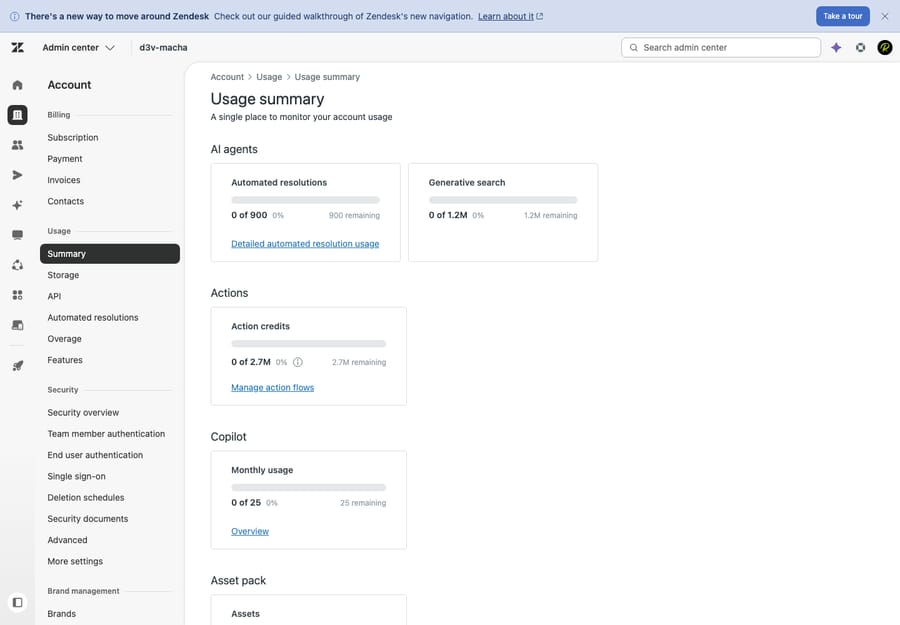
Notice that Copilot usage is metered on its own line, apart from automated resolutions (the autonomous AI-agent metric) and generative search. That separation is the whole point of the next section.
Packaging: Copilot is a separate per-seat add-on
Copilot is not included in your base Suite subscription. It's a paid add-on, and Zendesk lists it at $50 per agent per month (paid yearly) on its official pricing page. A few specifics worth internalizing:
- It's a per-seat charge — every agent who needs Copilot is another $50/month, not a flat platform fee.
- It requires Suite Professional or Support Professional and above; lower tiers can't add it.
- Copilot is the rebranded successor to what Zendesk used to call the "Advanced AI" add-on. If you read older guides or an old order form referencing Advanced AI, that's the same lineage — now branded Copilot.
We keep the full breakdown — what counts toward usage, how it stacks with automated-resolution fees, and whether it's worth it for your volume — in the dedicated Zendesk AI pricing guide, so we won't rehash the math here.
The mid-2026 change everyone conflates
Here's the trap. Through 2026 Zendesk has been folding the autonomous "AI agents" capability (the old "Advanced AI – AI agents" tier) into the Suite plans themselves — so the bots that resolve tickets without a human increasingly come bundled with your plan rather than as a separate SKU. That's a real and welcome change.
But it does not mean AI is now "free" or that the $50 line went away. Copilot — the agent-assist add-on — remains a separate $50/agent/month add-on. The bundling applies to autonomous AI agents (with usage-based fees for automated resolutions on top); the agent-assist Copilot is still its own per-seat purchase. Conflating "AI agents are folding into plans" with "Copilot is now included" is the single most common pricing mistake we see right now. They're two products, billed two ways.
The honest limits
Copilot is genuinely useful, but it's worth being clear-eyed about what it is and isn't:
- It still needs agent oversight — by design. Copilot drafts and suggests; a human reviews and sends. That's a feature (no rogue replies to customers), but it means Copilot speeds your agents up — it does not reduce headcount or deflect tickets on its own. If your goal is fewer tickets reaching humans at all, that's an autonomous-AI-agent job, not a Copilot job.
- Quality is only as good as your knowledge base. Suggested replies and auto-assist procedures are grounded in your help center, macros, and the playbooks you write. Thin, stale, or contradictory content produces thin, stale suggestions. Copilot rewards teams who've invested in good content and frustrates those who haven't.
- It's per-seat and tier-gated. At $50/agent/month on Professional-and-above, the cost scales linearly with your team — worth modeling before you roll it out org-wide.
- It lives inside Zendesk. Copilot assists agents working in Zendesk, grounded in Zendesk content. It isn't an orchestration layer that reaches across your other systems to take actions.
None of these are dealbreakers — they're just the shape of the tool. Copilot is an excellent way to make the humans you already have faster and more consistent.
Where an AI agent layer fits alongside Copilot
Copilot makes your agents faster. A different category of tool — an AI agent layer like Macha — aims to resolve routine tickets end to end so fewer of them reach an agent at all. These aren't competitors; they're complementary, and they answer different questions ("help my team work faster" vs. "handle the repetitive volume before it hits my team").
Worth being precise about what Macha is and isn't: it's not a help desk and not a Zendesk replacement — it's a layer that runs on top of your existing Zendesk, connected to your tickets and knowledge. Where Copilot proposes a reply for an agent to send, an AI agent layer can triage, draft, look things up across connected systems, and resolve the routine cases autonomously — while anything it can't handle stays a normal ticket for a human, with full context intact. Many teams run both: Copilot for the tickets humans handle, an AI layer for the ones that don't need a human.
The honest watch-outs are the same as for any added tool: it's another integration to manage, and it only performs as well as the knowledge and rules you connect to it. One pricing note that matters for comparison — Macha bills per ticket — one conversation, charged once, however many steps it takes: summarize, triage, look up data, draft, resolve — and not per seat, so the cost tracks the volume you handle rather than the size of your team. If reducing the volume that reaches your agents is the goal Copilot can't reach, that's the gap a layer fills. You can try it free — $50 of free usage, no credit card required.
Frequently asked questions
What is Zendesk Copilot? Zendesk Copilot is Zendesk's agent-assist AI — a bundle of tools that help a human agent work faster inside the ticket: suggesting replies grounded in your macros and help center, summarizing the conversation, adjusting tone, guiding multi-step procedures via auto assist, and surfacing triage signals. The agent always reviews and sends; Copilot proposes, the human disposes.
How is Copilot different from Zendesk AI agents? Copilot assists a human; AI agents replace the human for routine conversations. Copilot drafts a reply for your agent to approve. An AI agent (the evolution of Answer Bot) handles a chat or email end to end without a human. Same vendor, different jobs — see Zendesk AI agents vs. Answer Bot for the autonomous side.
How much does Zendesk Copilot cost? Zendesk lists Copilot as a separate add-on at $50 per agent per month (paid yearly), available on Suite or Support Professional plans and above. It's a per-seat charge on top of your base subscription. The full breakdown — including how it stacks with automated-resolution fees — is in our Zendesk AI pricing guide.
Is Copilot the same as the old "Advanced AI" add-on? Essentially yes — Copilot is the rebranded successor to Zendesk's former "Advanced AI" add-on. If you see older docs or order forms referencing Advanced AI, that's the same product line now branded Copilot.
Didn't Zendesk fold its AI into the plans in 2026 — so isn't Copilot free now? No. The change that's folding into Suite plans is the autonomous AI agents capability (with usage-based fees for automated resolutions). Copilot, the agent-assist add-on, remains a separate $50/agent/month add-on. Don't conflate the two — that's the most common pricing mistake right now.
Do I still need agents if I have Copilot? Yes. Copilot is built to make human agents faster and more consistent, not to remove them — every suggestion is reviewed and sent by a person. If your goal is to reduce the tickets that reach humans, that's the domain of autonomous AI agents or an AI agent layer, not Copilot.
The bottom line
Zendesk Copilot is the agent-assist half of Zendesk AI: it sits next to your human agents and makes them faster — suggested and expanded replies grounded in your knowledge, tone and rewrite tools, ticket summaries, procedure-driven auto assist, and triage signals, all inside the workspace they already use. It's a separate $50/agent/month add-on on Professional-and-above plans, it's the successor to the old Advanced AI add-on, and — crucially — it stays a separate add-on even as Zendesk folds its autonomous AI agents into the base plans. Copilot speeds your team up; it doesn't deflect tickets away from them. Get that distinction right and the rest of Zendesk's AI lineup — and where an AI agent layer fits on top — falls into place.
Copilot capabilities and packaging verified against Zendesk's official documentation, June 2026. Zendesk updates its AI products and pricing frequently — confirm specifics in your own account and on zendesk.com/pricing before relying on them.
Add AI agents to your Zendesk
Macha reads the ticket, drafts the reply and takes the action, inside the Zendesk you already run.