





 Shopify
 Stripe
 Slack
Slack Notion
 Google Workspace
 Confluence

How Do You Triage and Route Support Tickets by Topic With AI?


Manual triage means someone reads each new ticket, guesses a topic, sets a priority, adds tags and picks a queue before anyone starts on the answer. An AI agent can make those five decisions in one run on the help desk you already use.
Key takeaways
- An AI triage agent on Macha reads each new ticket, picks a topic, sets priority, adds tags and assigns a Zendesk group in one run, billed as one ticket.
- IrisAgent puts rules-based triage at a 40% to 50% accuracy ceiling, against 85% to 95% for mature AI triage, and eesel reports a retailer trial reaching 93% triage accuracy.
- Zendesk Intelligent Triage classifications need a Professional plan or above, and acting on them in workflows needs the Copilot add-on at $50 per agent per month.
- Macha's Zendesk triage toolset includes Get Ticket, Read Attachment, List Groups, Update Priority, Update Type, Update Tags and Assign Ticket.
- At about 2 minutes of manual triage per ticket, 1,000 tickets a month is roughly 33 hours of dispatching, and Macha plans start at $299 a month for 750 tickets.

An AI triage agent reads each new ticket, picks a topic from your own list, sets priority from the content and the customer's tone, adds tags and assigns the ticket to a group, and on Macha it does all of that in one run on the Zendesk you already have, billed as one ticket (plans start at $299 a month for 750 tickets). Macha isn't a help desk and doesn't replace Zendesk. It's an agent layer that takes the same actions a human dispatcher would, through the connector's real write tools.
| Triage step | What the agent decides | Zendesk tool it uses |
|---|---|---|
| Read | Subject, thread, custom fields, image attachments | Get Ticket, Get Custom Fields, Read Attachment |
| Classify | Topic from your taxonomy, ticket type | Update Type |
| Prioritize | urgent / high / normal / low, nudged by sentiment | Update Priority |
| Tag | Topic tags, added without removing existing ones | Update Tags |
| Route | Group queue, a named agent, or both | List Groups, Assign Ticket |
What does "triage" actually mean for an AI agent?
Triage is three decisions stacked on top of a classification:
- Classify — what is this ticket about? (Billing, shipping, a bug, a refund, an access problem…)
- Prioritize — how urgent is it, and how is the customer feeling?
- Route — which queue or person owns it, and what tags/fields should travel with it?
A rules engine can do a crude version of step one with keyword matching, but keywords don't understand intent — "charged twice" and "I see two of the same line on my statement" are the same problem in different words, and a keyword rule catches one and misses the other. IrisAgent's automation playbook puts the ceiling of rules-based systems at 40% to 50% triage accuracy, against 85% to 95% for AI triage on mature deployments (IrisAgent, vendor figures). eesel's triage guide reports a trial with a jewelry retailer on about 1,000 tickets a month that reached 93% triage accuracy (eesel, last edited 14 June 2026). Both are vendors describing their own results, so read them as direction rather than a promise. The point isn't the exact number; it's that reading intent beats matching strings.
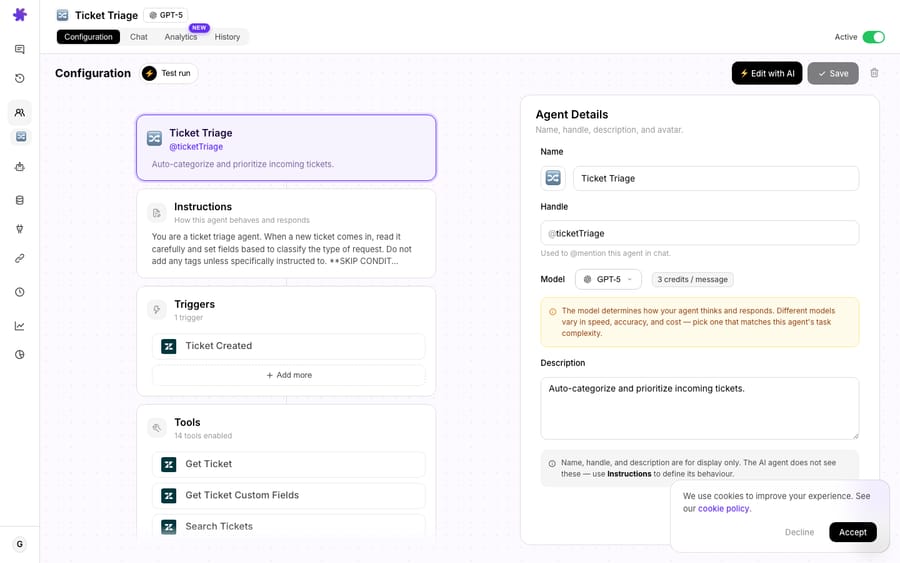
Macha's triage agent reads intent because it's a language model with the whole ticket in front of it — subject, description, the full comment thread, custom fields, and even image attachments via AI vision (it can read a screenshot of an error or a receipt). Then, instead of stopping at a label, it acts.
What does AI triage look like on a real ticket?
Here's the worked case from Macha's use-case library. A customer opens a ticket that reads:
"My account was charged but I never received access to the premium features I paid for."
A keyword router sees "charged" and "premium" and might fling it at general billing. The triage agent does the full job:
- Classify: Topic → Billing → Access Issue.
- Prioritize: Priority → High. Sentiment → Frustrated.
- Route: Assigned to the Billing Team, priority set to High, tags added:
billing,access-issue.
That's a single inbound message turned into a fully-routed, correctly-prioritized, tagged ticket sitting in the right queue before a human ever opens it. The agent under the hood is doing exactly two connector operations — Get Ticket to read everything, then Update Ticket actions to write the decision back — but the classification in between is where the value lives.
How do you build the auto-classifier?
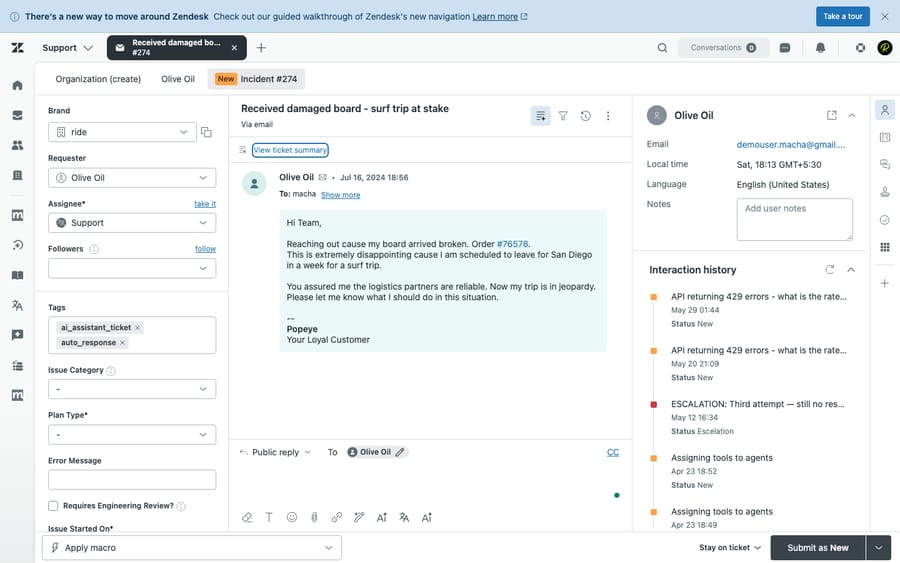
You don't write routing rules; you describe the desk in plain language and let the agent reason. In the Macha builder you create a triage agent, point it at your Zendesk connector, and give it instructions that map your topics to your actual teams and priorities. That prose lives in the Instructions panel shown in the agent above ("You are a ticket triage agent. When a new ticket comes in, read it carefully and classify the type of request…") — the agent never sees the name or description, only these instructions, so this is where the real configuration happens.
A solid set of instructions for the classifier covers four things:
- Your topic taxonomy — the categories that mean something on your desk (e.g. Billing, Shipping, Returns, Technical/Bug, Account/Access, Sales). List them explicitly; ambiguity is what produces sloppy routing.
- Priority rules — when something is
urgentvshighvsnormalvslow. Tie it to real signals: a payment failure for an active subscriber, a frustrated tone, a VIP, an outage keyword. - Sentiment — instruct the agent to read tone (frustrated, anxious, neutral, happy) and let it influence priority. A technically trivial issue from a furious customer can legitimately outrank a complex one from a calm one.
- Routing map — which topic goes to which group, and any exceptions (e.g. anything tagged
legalorchargebackskips straight to a senior queue).
Because it's an LLM, the classifier handles the messy reality keyword rules choke on: typos, multi-issue tickets ("my order's late and I was double-charged"), non-native phrasing, and screenshots. Macha agents run on GPT-5.4 by default; you can drop to the lighter GPT-5.4 Mini for a high-volume desk (a triage classification is essentially one model response), or move to a stronger model such as GPT-5.6 Terra where the taxonomy is subtle. The model you pick changes accuracy and latency, not what you pay. Macha bills per ticket, one conversation charged once however many steps it takes, so a triage-only agent's bill tracks your ticket volume and nothing else.
Which Zendesk tools does the triage agent use?
Classification is the brain; the Zendesk connector's write tools are the hands. The triage agent has a tight, purpose-built toolset:
| Tool | What it does in triage |
|---|---|
| Get Ticket | Reads the full ticket — subject, description, the entire comment thread, tags, requester, brand. |
| Get Custom Fields | Resolves custom field values (order number, plan, language) so routing can use them. |
| Read Attachment | AI vision on image attachments + text from PDFs/CSVs — classify on a screenshot of an error, not just the words. |
| List Groups | Lists active Zendesk groups so the agent resolves a name ("Billing Team") to the correct group ID before routing. |
| Update Priority | Sets urgent / high / normal / low. |
| Update Type | Sets the ticket type — problem, incident, question, or task — so triage categorizes cleanly without touching custom fields. |
| Update Tags | Adds tags without overwriting the existing set — a fix that shipped specifically so tagging is non-destructive. |
| Assign Ticket | Routes to a group queue, a specific agent, or both. |
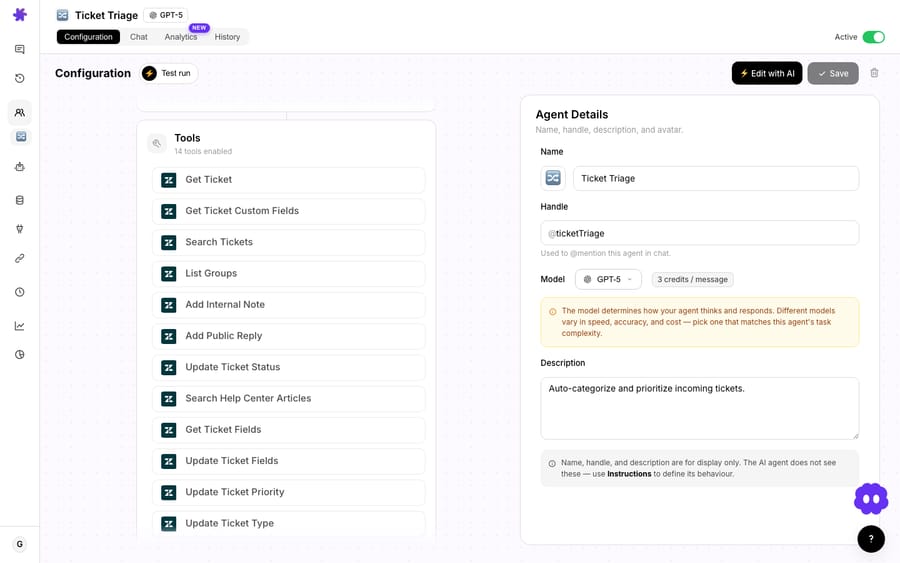
Two of these are worth dwelling on, because they're where naive automations usually go wrong.
Tagging that doesn't clobber. Early on, adding a tag could silently wipe the tags already on a ticket — or report success while applying nothing. Macha's Update Tags tool now reliably applies the new tag and preserves the existing set; removing one tag leaves the rest intact, and the tool reports back the verified final tag list so the agent sees the truth, not just its intent. For a triage agent that's load-bearing: you do not want auto-triage destroying the tags your reporting depends on.
Routing to a queue, not just a person. The Assign Ticket tool accepts a group, an agent, or both, so you can route to "Billing" or "Tier 2 Support" as a queue rather than always picking an individual who might be on leave. Pairing it with List Groups matters because Zendesk routing happens by group ID; the agent looks up the live group list first instead of guessing, which keeps routing correct even after you rename or add teams.
What starts the triage run?
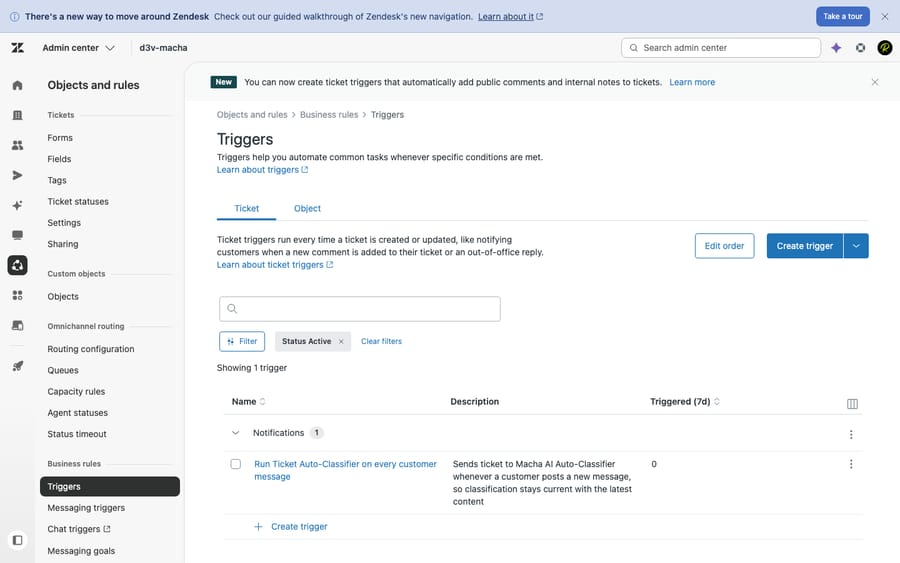
The whole flow hangs off one trigger — New Ticket, which fires on the first customer message, before any agent replies. That's the moment triage is worth the most.
A couple of configuration notes that keep this production-safe:
- Debounce. Inbound tickets can emit several events in quick succession (a create, then an edit, then an attachment lands). The New Ticket trigger exposes a debounce control — set a delay in seconds and Macha collapses the burst into a single run, so the agent classifies the settled ticket once instead of firing three times.
- Confirmation on activation. Because a "fire on every new ticket" trigger is high-impact, Macha shows an explicit confirmation modal when you switch it on, plus a persistent advisory card on the agent — a small guardrail against accidentally pointing an untested agent at your entire inbound stream.
How is this different from Zendesk's Intelligent Triage?
Zendesk ships its own Intelligent Triage, and it's good: it classifies tickets by topic, sentiment, language, and entities such as product names (Zendesk docs). If you're already paying for it, use it — Macha is a layer on top of your helpdesk, not a replacement for it, and the two coexist happily. The practical differences worth knowing:
- Plan gating. Zendesk says Intelligent Triage classifications are available on Suite and Support Professional plans and above, and using them in workflows needs the Copilot add-on, which costs $50 per agent per month on Suite Professional and above. Macha's triage agent runs against the Zendesk API through the connector, so it works on the plan you already have.
- Classify and act. Native triage predicts fields; you still wire Zendesk triggers/automations to do something with the prediction. Macha's agent does the routing itself — set priority, set type, tag, assign to a group — in the same run, and can keep going (draft a reply, pull order data, escalate) if you let it.
- Open taxonomy. You describe topics, priority logic, and routing in instructions and change them by editing prose, not by retraining an intent model.
This isn't "better than Zendesk" — it's a different shape. Native triage is a managed classifier inside the product; Macha is a configurable agent on top of it that turns the classification into actions. (See Macha on Zendesk for how the layer sits on your instance.)
How this compares to dedicated triage tools
Standalone triage products — IrisAgent, and the routing features inside platforms like Kustomer or SentiSum — solve the same classify-and-route problem, and several do it well. The structural difference is where they live. Most are either a separate system you point your tickets at, or a capability locked to one helpdesk's higher tiers. Macha's triage agent runs on top of the help desk you already operate (Zendesk, Freshdesk, Gorgias, Front, HubSpot or Intercom), using that helpdesk's own API as its hands — so the ticket never leaves your system of record, and the same agent that triages can also draft a reply, pull order data, or escalate in the same run. If you want a managed, single-purpose classifier, a dedicated tool may fit you fine. If you want one configurable agent layer that triages and acts across the tools you already use, that's the shape Macha is built for.
How much time does auto-triage save, and what does it cost?
Our working estimate is that manual triage takes one to three minutes per ticket: read it, classify it, set priority, tag, assign. That is an assumption from watching queues, not a published benchmark, so swap in your own figure. It feels trivial until you multiply it by volume. At about 2 minutes of human handling per ticket:
| Monthly ticket volume | Triage time @ ~2 min/ticket | Roughly equivalent to |
|---|---|---|
| 500 | ~17 hrs/month | half a work-week of dispatching |
| 1,000 | ~33 hrs/month | ~4 working days |
| 5,000 | ~167 hrs/month | ~1 full-time dispatcher |
An agent that classifies and routes in seconds collapses most of that to near-zero — and, more importantly, it does it consistently at 2 a.m. and during a Monday-morning spike alike, where human triage quality sags exactly when volume is highest. (These figures are arithmetic on the 2-minute assumption, not a Macha guarantee; outcomes depend on your taxonomy and volume.)
The second number to watch is reassignment rate — the share of tickets a human has to re-route after triage. It's the cleanest signal of whether triage is calibrated. IrisAgent's playbook claims 50% fewer reassignments from AI-assisted assignment and an 80% cut in manual triage time (IrisAgent, vendor figures). Track your own reassignment rate before and after; if it isn't falling, the fix is almost always a tighter taxonomy or routing map — not a bigger model.
On cost, triage is the easiest agent to budget for: Macha bills per ticket — one conversation, charged once, however many steps the agent takes to finish it — so a triage-only agent's bill scales linearly and predictably with ticket volume. Pricing starts at $299 a month for 750 tickets, about $0.40 each; see the pricing page. The comparison that matters is that $0.40 against the one to three loaded minutes of human dispatch time it removes; for most desks that trade is lopsided in triage's favour.
When should you not point AI at your queue?
Auto-triage is one of the safer agents to run, but it isn't a "set it and forget it":
- Don't auto-route blind on day one. Run the agent in a shadow/test mode first, or have it tag and suggest before it assigns, and review a sample. Trust the routing only after you've watched it agree with your team on real tickets.
- Mind the irreversible-ish actions. Setting priority and tags is cheap to correct; reassigning across teams creates churn if it's wrong. Keep your routing map tight and your topic list unambiguous to minimize reassignment rate (the metric that tells you triage is miscalibrated).
- Sentiment is a signal, not a verdict. Let tone nudge priority, but don't let "frustrated" auto-escalate everything to urgent, or urgent stops meaning anything.
- Garbage taxonomy in, garbage routing out. If two of your topics overlap or your group names are inconsistent, the model will reflect that. Clean the taxonomy first; it's the highest-leverage thing you can do.
- It bills per ticket. Every ticket the classifier touches counts as a ticket, the same as any other agent run. Scope the agent to the queues you actually want sorted rather than pointing it at everything that arrives.
What should you build after the triage agent?
Triage is usually the first agent a team builds, because everything downstream gets easier once tickets land in the right place pre-tagged. From here you can layer on:
- An auto-reply agent for the topics that are fully self-serviceable (order status, policy questions).
- A draft-for-review agent that writes a suggested response for the assigned human.
- A VIP/urgent relay that pings Slack the moment triage flags a high-priority ticket from a key account.
The triage agent's tags and priority become the routing signals those agents key off — which is exactly why getting classification right first pays off everywhere else. For the full builder mechanics, see the Triggers and Agents docs.
FAQ
What does the AI use to classify a ticket? The whole thing — subject, description, the full comment thread, custom fields, and image attachments (it reads screenshots and receipts via AI vision). It reasons over intent rather than matching keywords, which is why it catches paraphrased and multi-issue tickets that rules miss.
Can it assign to a team/queue, not just a person? Yes. The Assign Ticket tool routes to a Zendesk group queue, a specific agent, or both, and it uses List Groups to resolve a group name to the correct ID first.
Will auto-tagging overwrite my existing tags? No. Update Tags adds (or removes) tags non-destructively — your existing tag set is preserved, and the tool verifies the final tag list after writing.
How does it decide priority? By the rules you give it, informed by content and sentiment. You define what counts as urgent/high/normal/low; tone (e.g. frustration) can raise priority where you allow it.
Does this replace Zendesk's Intelligent Triage? No — Macha runs on top of Zendesk. If you already use Intelligent Triage, keep it; Macha's agent adds the acting layer (route, tag, assign, then optionally reply or escalate) and works on the plan you already have. See Macha on Zendesk.
How much does a triage agent cost to run? Macha bills per ticket — one conversation, charged once, however many steps the agent takes, whichever model it runs on. Pricing starts at $299 a month for 750 tickets, about $0.40 each; see the pricing page.
How do you start?
If your queue still gets hand-sorted, this is the agent to build first. Start a free trial ($50 of usage, no credit card required), connect Zendesk, describe your topics, priorities, and teams, and let the classifier route your next ticket before anyone reads it. Read the docs for the full builder walkthrough, or see the Zendesk connector for every tool it can use.
Written by Abbas (Customer Support & AI, Macha) · Reviewed by Ankeet Guha (Co-founder & CTO) · Published 2026-06-24 · Last updated 2026-09-24.






