Shopify
 Stripe
 Slack
 Notion
 Google Workspace
 Confluence


HubSpot Breeze Customer Agent Pricing (2026): Credits, Resolutions, Spam Chats and the $11k Auto-Upgrade Trap


HubSpot's Breeze Customer Agent costs 50 HubSpot Credits per resolved conversation on text channels, which is $0.50 at HubSpot's list rate of $0.010 a credit, plus a Professional or Enterprise seat to switch it on. Service Hub Professional includes 3,000 credits a month, enough for about 60 resolutions. This guide explains what HubSpot counts as a resolution, why bot and spam chats can bill, what happens when the credits run out, and how the auto-upgrade rule turned one bad month into an $11,000 bill for a team on Reddit.
Key takeaways
- HubSpot's customer agent uses 50 HubSpot Credits per resolved text conversation, and extra credits cost $0.010 each, so one resolution costs $0.50 once included credits are gone.
- HubSpot counts a conversation as resolved when the customer agent replies with a content source and the visitor doesn't ask for a human; assignment by a workflow doesn't stop the charge.
- When HubSpot Credits run out, the customer agent stops being assigned to new conversations on every connected channel until the reset date or until more credits are bought.
- Accounts that bought extra HubSpot Credits before September 16, 2026 default to auto-upgrade, which raises the monthly credit tier for the rest of the contract after a single heavy month.
- Service Hub Professional costs $90 a seat a month billed annually, plus a $1,500 onboarding fee, and includes 3,000 HubSpot Credits a month.

How much does Breeze Customer Agent cost?
The meter is simple. The bill around it isn't. Here is every line that decides what a support team pays. We checked each one on HubSpot's own pages on November 21, 2026 and captured the pages shown below.
| Cost line | What HubSpot charges | Source |
|---|---|---|
| Customer agent, text channels | 50 credits per resolved conversation | Products & Services Catalog rate sheet |
| Customer agent, voice (beta) | 50 credits per minute | Rate sheet |
| Extra credits | $0.010 each; capacity packs of 1,000 for $10 a month | Catalog |
| Included credits | 500 (Starter), 3,000 (Professional), 5,000 (Enterprise) a month | Catalog |
| Edition needed | Professional or Enterprise | Customer agent product page |
| Service Hub Professional seat | $90 a month billed annually, $100 monthly | Service Hub pricing page |
| Service Hub Enterprise seat | $150 a month | Service Hub pricing page |
| Onboarding | $1,500 (Professional), $3,500 (Enterprise), one time | Service Hub pricing page |
| Rollover | None: unused credits expire each month | Manage HubSpot Credits |
HubSpot's product page rounds the meter to "$0.50 per resolution" for messaging and "$0.50 per minute" for voice, and says customer agent is "available at half the price of leading competitors." It doesn't name the competitors. For one comparison, Intercom's Fin lists $0.99 per outcome on its HubSpot Marketplace listing, which we compare in Fin vs Breeze pricing.
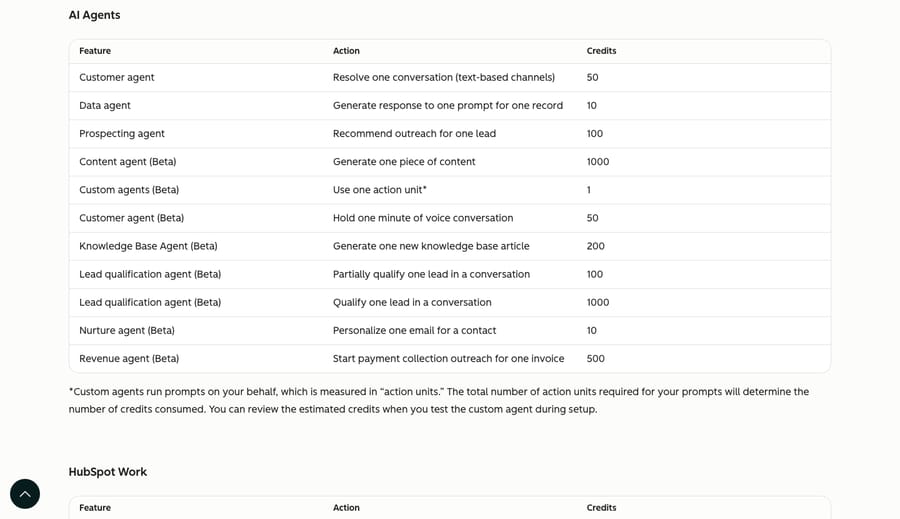
The same table prices HubSpot's other agents from the same pool. The Knowledge Base Agent uses 200 credits per article it writes and the Data agent 10 credits per record. That's the first thing a support lead should know: the credits customer agent needs are shared with every other team on the account.
The price also moved. In HubSpot's June 2025 Community AMA on credits, a HubSpot product strategist wrote "100 credits = 1 conversation = $1." The current rate sheet halves that and bills only resolved conversations. Any comparison page that still quotes $1 a conversation is out of date.
What counts as a resolution?
This definition decides your bill more than the unit price does. HubSpot's "Understand the customer agent" article (updated September 16, 2026) says credits are used "only when the agent delivers a resolution", and a conversation counts as resolved when either of two things happens:
- The customer agent sends at least one reply that shares a content source, or performs an action, and no qualifying handoff follows.
- The agent marks a lead qualified, partially qualified or not qualified.
A qualifying handoff is narrow. Only the visitor can trigger one, by asking for a human or tripping a handoff phrase you configured. HubSpot's article states that "manual agent assignment, including assignment through workflows, is not considered a qualifying handoff." So a conversation that a workflow later routes to your team can still bill as resolved.
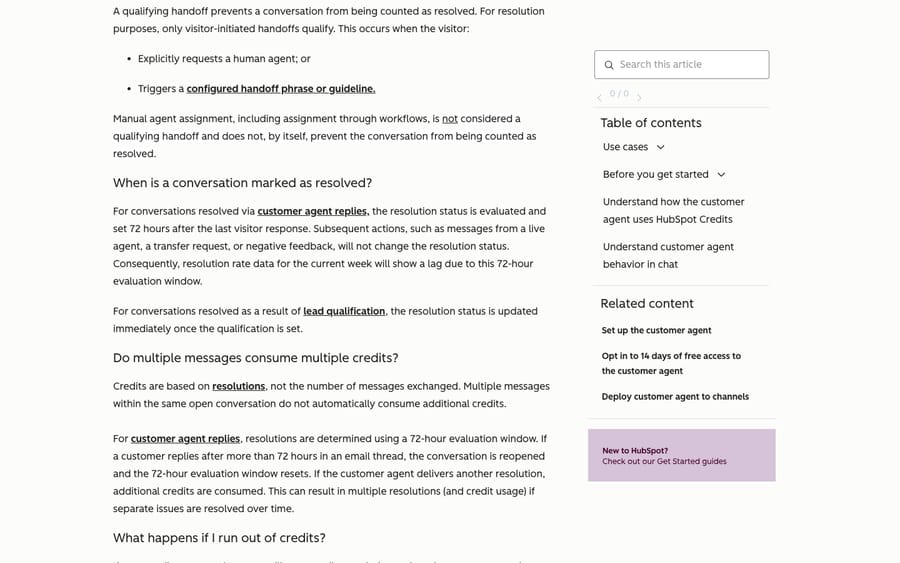
Two timing rules matter too. The status is set 72 hours after the visitor's last message, and later events (a rep replying, negative feedback) don't change it. On email, a customer who replies after more than 72 hours reopens the conversation and starts a new window, and HubSpot says that "can result in multiple resolutions (and credit usage)" on the same thread.
The incentive is worth naming. HubSpot sets the meter, writes the definition and reports the resolution rate it sells on ("70% average resolution rate" on the product page). A per-resolution price is fair when the vendor's idea of resolved matches yours. Here the gaps (workflow assignment, silent visitors, reopened email threads) all fall on the billable side.
What does customer agent cost at 500, 2,000 and 5,000 conversations a month?
Our assumptions: Service Hub Professional, all 3,000 included credits go to customer agent, text channels only, and two resolution rates. 70% is the average on HubSpot's customer agent page in November; when our implementation cost guide read HubSpot's Service Hub pricing page in October, it claimed "65%+", and that guide modeled 30% and 50%. 40% is a cautious case we chose for a first quarter, before the content sources are tuned.
| Conversations a month | Resolved at 40% | Credit cost at 40% | Resolved at 70% | Credit cost at 70% |
|---|---|---|---|---|
| 500 | 200 (10,000 credits) | $70 | 350 (17,500 credits) | $145 |
| 2,000 | 800 (40,000 credits) | $370 | 1,400 (70,000 credits) | $670 |
| 5,000 | 2,000 (100,000 credits) | $970 | 3,500 (175,000 credits) | $1,720 |
The middle row at 70%: 1,400 resolutions times 50 credits is 70,000 credits, less 3,000 included, leaves 67,000 credits at $0.010, or $670 a month. Spread over all 2,000 conversations, that's about $0.34 each.
Then add the seats. Five Professional seats are 5 × $90 = $450 a month on annual billing, and the $1,500 onboarding fee lands once. A team already on Professional pays none of that extra. A team on Starter pays it before the first credit, which our Service Hub pricing breakdown works through. For setup and partner costs by route, see what customer agent costs to implement.
Do spam chats burn HubSpot credits?
They can. Nothing in HubSpot's customer agent or credits articles excludes spam, bot traffic or junk chats from the resolution count. Apply the definition above to a typical spam chat: a bot opens the widget, asks something generic, gets a reply that cites a help article, and never asks for a human. That meets HubSpot's resolution test, so it bills 50 credits, the same as a real customer.
At our 2,000-conversation example, if 10% of chats are bots or spam and the agent answers each one, that's 200 × 50 = 10,000 credits, or $100 a month spent on nobody.
HubSpot's own answer, from its June 2025 credits AMA: a customer asked how to keep credit usage "from getting out of hand with spam chats", and the customer agent team replied that you can set the agent up "in specific web pages or specific list via the targeting feature in chatflows." The current customer agent article adds that workflows can filter which conversations the agent handles "by criteria such as customer tier or issue type." In practice, four settings cut the waste:
- Target the chatflow. Show the customer agent on help pages and to known contacts, not on every page of the marketing site where form-fill bots land.
- Add a handoff phrase for obvious junk so those conversations count as visitor handoffs, not resolutions.
- Set a feature-level credit limit for customer agent so a spam wave stops at a cap you chose (next section).
- Watch resolved conversations weekly in resolution analytics. A spike in one-message resolutions from unknown contacts is the tell.
What happens when HubSpot Credits run out?
The agent stops. HubSpot's article says that if credits run out, "the agent will temporarily stop being assigned to new conversations across all connected channels until your next reset date or until you purchase more credits." New conversations then follow your handoff process, which on most accounts means a person's queue.
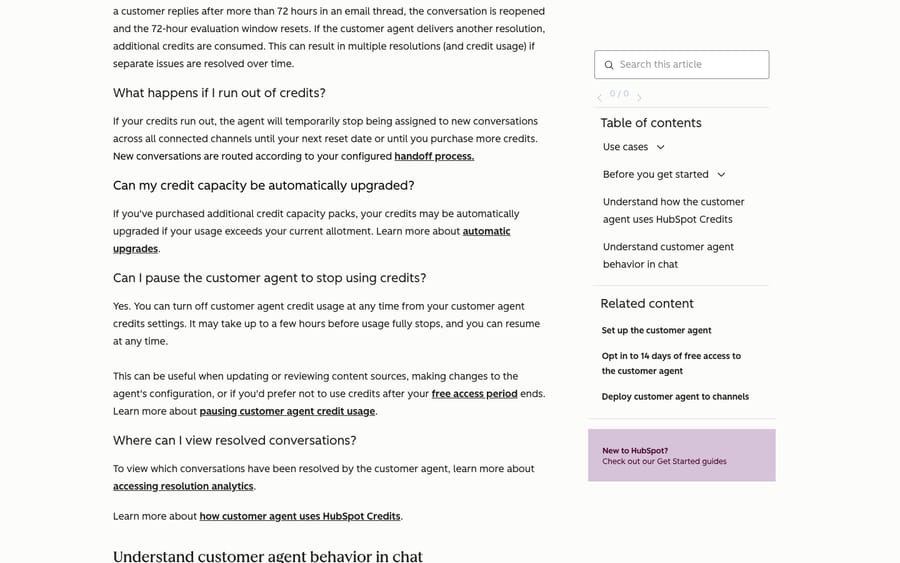
If you haven't bought any capacity packs, that pause happens as soon as the included credits are gone. Professional's 3,000 credits cover about 60 resolutions, so a team that turns the agent on without buying packs can hit the wall in the first week. The chat widget keeps working, so new conversations go to your handoff queue whether or not anyone is staffed for them.
You can also pause on purpose. Customer agent credit usage can be turned off from its credits settings at any time, but HubSpot warns it "may take up to a few hours before usage fully stops."
How did one bad month cost a team $11,000?
In June 2025, a poster on r/hubspot titled a thread "Be careful when using Breeze Intelligence credits". They described manually enriching a large contact list by mistake, which used more than 100,000 credits in minutes. A commenter summed it up: on an annual plan, a roughly $1,400 overage became an $11,000 one, because the account was then upgraded to a higher credit level for the rest of the term.
That was data enrichment, not the customer agent. But it's the same credit pool and the same billing rule, and it's still how many accounts are set up. HubSpot's "Manage HubSpot Credits" article (updated November 12, 2026) describes auto-upgrade like this:
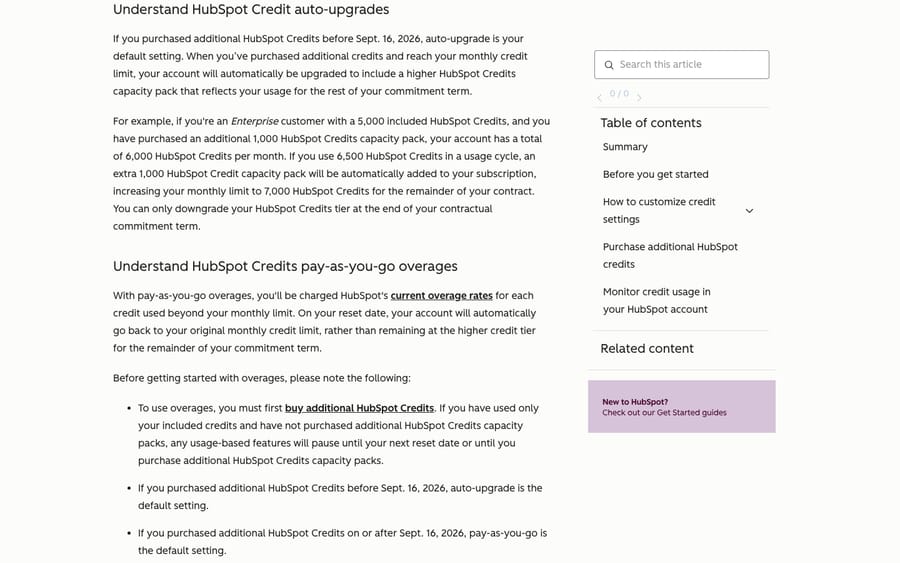
HubSpot's own example: an Enterprise account with 5,000 included credits and one 1,000-credit pack has 6,000 a month. Use 6,500 once, and a second pack is added, "increasing your monthly limit to 7,000 HubSpot Credits for the remainder of your contract." You can only downgrade at the end of the term.
Here is the same rule on a support team's Black Friday. Our assumptions: Professional, 3,000 included credits plus 20 packs (23,000 credits, $200 a month), nine months left on an annual contract, and a peak month that uses 60,000 credits.
| Overage setting | What the peak month adds | Over the rest of the contract |
|---|---|---|
| Auto-upgrade | Tier rises to 57 packs ($570 a month) | 9 × ($570 − $200) = $3,330 |
| Pay-as-you-go | 37,000 extra credits × $0.010 = $370, once | $370 |
One more rule caps both rows. After you buy packs, HubSpot sets an account-level spend limit "up to" 50% above your monthly credits, so this account would pause at about 34,500 credits unless someone raised the limit. If you raise that limit during a busy month so the agent keeps answering, check which overage setting you're on first.
The incentive is plain. Auto-upgrade turns one spike into recurring revenue for the rest of the term, and the buyer finds out on the next invoice. HubSpot changed the default on September 16, 2026: accounts that bought extra credits on or after that date start on pay-as-you-go. Accounts that bought before it are still on auto-upgrade unless someone switched them.
How do you cap what customer agent can spend?
HubSpot gives you four controls, all in Account & Billing settings under usage and limits:
- Overage setting. Switch to pay-as-you-go if you bought packs before September 16, 2026. It bills the peak month and resets on the reset date.
- Account-level limit. The default is up to 50% above your monthly credits. Raise it on purpose, not in a panic.
- Feature-level limit for customer agent. HubSpot's article says these "are monthly spending limits, not credit allocations", so a limit doesn't reserve credits for support. Marketing's AI workflows can still use the pool first. Set limits on the other tools too if support's budget has to survive.
- Alerts. Billing contacts (or Super Admins and Billing Admins if none are set) get notices at 75%, 85% and 90% of usage and when the limit is exceeded. Make sure the support lead is one of them.
Where Macha fits
Macha runs AI agents inside HubSpot Service Hub, on the tickets your team already works. It connects over OAuth and works through tickets, contacts and deals: it reads the record, replies to the customer, logs notes, and updates status, owner, priority or pipeline stage. Runs start on HubSpot events such as New Ticket Created, so a chat that never becomes a ticket doesn't start one. A spam ticket that does reach the queue is a ticket like any other, so filter it in HubSpot before the trigger. The HubSpot integration page lists every action and trigger.
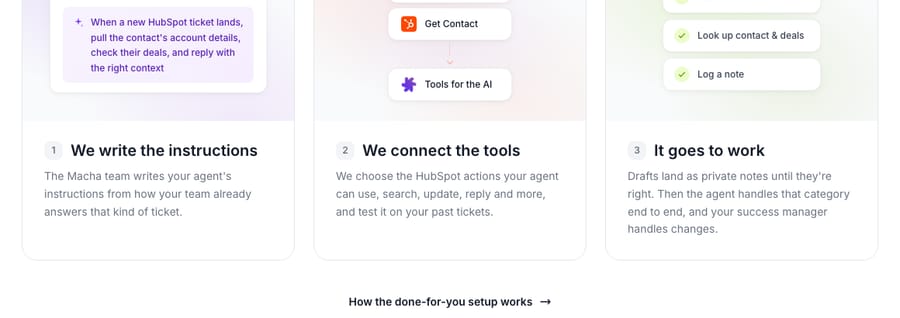
Macha is the done-for-you option. The Macha team analyzes your past tickets, builds the knowledge base and the agent, tests it on a sample of those tickets, and runs it in safe mode with drafts as internal notes until they're right. A dedicated success manager then handles your changes after go-live. All of that is included on the trial and every plan, under done-for-you setup.
The meters differ. Macha bills about $0.40 per ticket: one thread between Macha and one person, charged once no matter how many messages it takes, resolved or not. Breeze bills $0.50 only for resolved conversations, so its cost per conversation handled stays under $0.40 only while its resolution rate is below 80% (0.80 × $0.50 = $0.40), and it needs Professional or Enterprise seats first. Breeze's price covers the meter; setup and tuning stay with your team or a partner.
Both products stop at a limit. Customer agent stops when credits run out; Macha has no overages, ever, and agents pause when the month's tickets are used until you move up a tier. The tiers are $299 a month for 750 tickets, $599 for 1,500, $1,199 for 3,000, $1,999 for 5,000, $2,999 for 7,500 and $3,999 for 10,000, with custom pricing above that, and the pricing page has the details. Macha suits teams on HubSpot that want the agent working the ticket queue and don't want to staff the tuning themselves. If your volume is mostly live chat in HubSpot's own widget, customer agent is the more direct fit there, and the two can run side by side. The Macha on HubSpot page shows the setup.
Common questions
How much does HubSpot's Breeze Customer Agent cost per conversation?
It costs 50 HubSpot Credits per resolved text conversation, which is $0.50 at $0.010 a credit. Conversations the agent doesn't resolve cost nothing. Voice is 50 credits per minute. Your edition's included credits (3,000 on Professional) are used first.
Is Breeze Customer Agent free with Service Hub Professional?
Not beyond the included credits. Buying a Professional or Enterprise seat gives 14 days of customer agent access, which HubSpot's pricing page describes as having "no restrictions on the number of messages or features." After that, resolutions draw from your monthly credits, and Professional's 3,000 cover about 60.
Do unused HubSpot Credits roll over?
No. HubSpot's catalog says credits reset monthly and unused credits don't roll over. A quiet October doesn't bank anything for November.
Why did my customer agent stop replying?
The most common cause is that the account ran out of credits. The agent then stops being assigned to new conversations until the reset date or a purchase. Check usage and limits in Account & Billing, and check whether a feature-level limit on customer agent was reached.
How do I stop auto-upgrade on HubSpot Credits?
Switch the overage setting to pay-as-you-go in your credit settings. Accounts that bought extra credits on or after September 16, 2026 start on pay-as-you-go already. Auto-upgrade tiers already applied stay until the end of the contract term.
Can I keep spam chats from using customer agent credits?
You can reduce them. Target the chatflow to specific pages or contact lists, add handoff phrases for obvious junk, and set a feature-level credit limit for customer agent. HubSpot doesn't document a spam filter that excludes conversations from billing.
How we researched this
Every HubSpot figure on this page comes from HubSpot's public pages, read on November 21, 2026:
- HubSpot Products & Services Catalog: the credit rate sheet, included credits by edition, $0.010 per credit, capacity packs and the no-rollover rule.
- Manage HubSpot Credits (updated November 12, 2026): auto-upgrade, the September 16, 2026 default change, pay-as-you-go, spend limits, feature-level limits and alert thresholds.
- Understand the customer agent (updated September 16, 2026): the resolution definition, qualifying handoffs, the 72-hour window, email reopens and what happens when credits run out.
- HubSpot's customer agent product page: $0.50 per resolution, the 70% average resolution claim and the edition requirement.
- Service Hub pricing: seat prices, onboarding fees and the 14-day access. The page served US dollars to us on November 21; HubSpot has served other currencies from our location before.
- HubSpot Community credits AMA (June 2025): the earlier 100-credits-per-conversation rate and the chatflow-targeting answer on spam chats.
- r/hubspot, "Be careful when using Breeze Intelligence credits" (June 2025): the $11,000 auto-upgrade account, paraphrased from the post and the poster's comments.
We captured every HubSpot screenshot on this page the same day. The scenario tables are our arithmetic with the assumptions stated above each one; your resolution rate, spam share and contract dates will differ. We didn't run customer agent on a paid HubSpot account for this page. Macha's capabilities come from Macha's own HubSpot connector and product page, and its prices from our pricing page: $299/month for 750 tickets, with $50 of free usage (about 125 tickets), no credit card, no time limit.
For the full picture of how customer agent works and how to set it up, see our customer agent guide, and for other agents that run in HubSpot, the Breeze alternatives.