





 Shopify
 Stripe
 Slack
Slack Notion
 Google Workspace
 Confluence

HubSpot Shopify Integration: How to Answer Order Status Tickets (2026)


HubSpot's free Shopify integration, built by HubSpot, syncs Shopify customers, products, orders and abandoned checkouts into HubSpot, with records updating within 10 minutes of a change. That puts a customer's orders one click from their ticket, which is enough if a person answers every "where is my order?" message. It doesn't answer anything. For that you need an agent: HubSpot's own customer agent ($0.50 per resolution, Professional plans only) with a custom action you build against Shopify's API, a third-party AI agent such as eesel AI, Fini or My AskAI, or Macha, which starts at $299/month for 750 tickets (about $0.40 per ticket) with setup done for you. Prices were checked on October 8, 2026.
Key takeaways
- HubSpot's Shopify app is free and built by HubSpot; orders sync one way from Shopify, update within 10 minutes, and its Marketplace listing averaged 2.3 stars from 56 reviews on October 8, 2026.
- HubSpot's customer agent costs $0.50 per resolution on Professional or Enterprise, but it has no prebuilt Shopify order action; you build a GET or POST action yourself.
- Service Hub Professional listed at $90 per seat a month on annual billing, plus a required $1,500 onboarding fee, when we checked on October 8, 2026.
- In our test, a Macha agent read three HubSpot tickets, checked Shopify orders #1099, #1100 and #1101, and refused to share order details when the requester's email didn't match.
- Macha starts at $299/month for 750 tickets, with done-for-you setup and a dedicated success manager on the trial and every plan.

What are the options for answering Shopify order status tickets in HubSpot?
There are three layers. The sync puts order data in HubSpot so a person can read it. Workflows and customer agent actions can fetch live data from Shopify if you build the call. AI agents read the ticket, look up the order and draft or send the reply. Here's every option we found, native first.
| Option | Type | What it does on a WISMO ticket | Shopify data it can reach | Setup | Price (checked Oct 8, 2026) | Where it falls short |
|---|---|---|---|---|---|---|
| HubSpot's Shopify app (data sync) | Native, built by HubSpot | Shows the contact's synced orders and a Shopify overview card; a person writes the reply | Customers, orders, products, abandoned checkouts (companies on Shopify Plus) | Self-serve install from the Marketplace | Free on every HubSpot plan; needs Basic Shopify or higher | Answers nothing; 2.3 stars from 56 reviews |
| Workflows with programmable automation | Native, add-on | A workflow calls Shopify's API with custom code or a webhook and writes the result to the ticket | Whatever your code requests | You write and maintain the code | Data Hub Professional, $720 a month on annual billing | Engineering work; still no reply unless you build one |
| HubSpot customer agent with a custom action | Native AI agent | Answers in chat, email and other channels; calls your order API when a customer asks | Only what your custom action returns | You build the action (GET or POST, endpoint, auth, response rules) | $0.50 per resolution; Service Hub Professional $90 per seat a month annual, plus $1,500 onboarding | No prebuilt Shopify action; not on Free or Starter |
| eesel AI | Third-party AI agent | Replies or adds an internal comment on HubSpot tickets | Order by ID, order history, fulfillment and tracking, plus refunds and cancellations | Self-serve | $299 a month for 500 credits | You build and tune it; order search limited to 60 days unless reconnected |
| Fini | Third-party AI agent | Answers tickets | Lists Shopify as an integration; no public action list | Implementation included | $0.89 per resolved ticket (Growth) | No published HubSpot or Shopify action detail |
| My AskAI | Third-party AI agent | Replies or posts private-note drafts in HubSpot | Has a Shopify integration; order lookup not described | Self-serve | $199 a month for 1,000 tickets | Check how it reads orders before you count on it |
| Macha | AI agent layer on your help desk | Reads the HubSpot ticket, looks up the Shopify order, drafts the reply as a note, then replies once you approve the drafts | Get Order, Search Orders, Customer Orders, Lookup Customer; refund and cancel with rules | Done for you by the Macha team, with a dedicated success manager, included | $299/month for 750 tickets (about $0.40 per ticket) | Carrier last-mile status needs a tracking-app custom tool |
What does HubSpot's Shopify integration actually sync?
HubSpot's own app is the starting point, and for many teams it's the whole answer. It's listed on the HubSpot Marketplace as built by HubSpot, with 15,000 installs. Per HubSpot's data sync guide (last updated June 22, 2026), it syncs:
- Customers and contacts both ways.
- Products both ways (product variants can't sync).
- Orders one way, Shopify to HubSpot. "Shopify orders can't be changed in your HubSpot account."
- Abandoned checkouts one way, as HubSpot carts.
- Companies both ways, on Shopify Plus only.
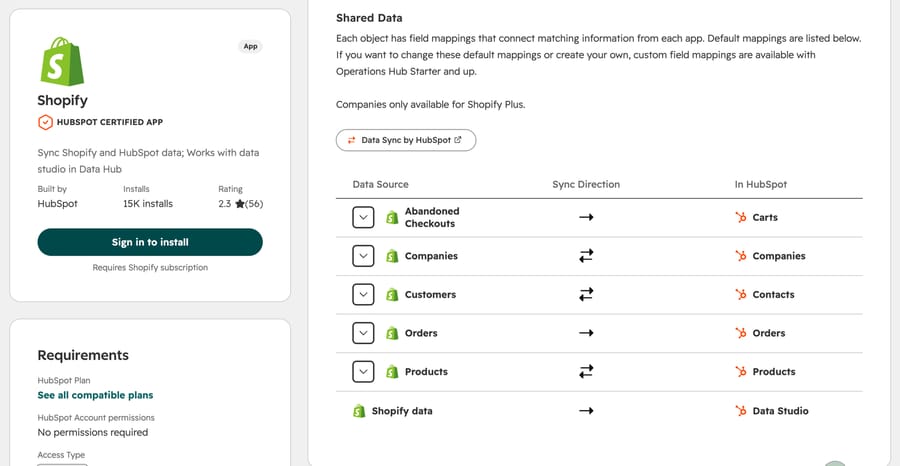
How to install it. In HubSpot, click the Marketplace icon, choose HubSpot Marketplace, search for Shopify and click Install. Enter your store's Shopify URL, click Install app, and sign in to Shopify if you aren't already. You need Super Admin or App Marketplace permissions in HubSpot, and the listing requires Basic Shopify, Shopify or Advanced Shopify. After the initial sync, which brings in every record that meets your filters at once, records sync within 10 minutes of a change. Custom field mappings need Data Hub Starter or higher (the listing still calls it Operations Hub). The listing also says "No permissions required" for the account itself; the install permission above is what HubSpot's guide asks of the person installing.
What an agent sees on the ticket. Each synced order is linked to a contact, a cart and its products. The contact record gets a Shopify overview card with total orders, average order value, product views and a sales graph. Orders also sit in a default order pipeline, so you can see which stage each one is in. HubSpot's Orders API docs list properties for fulfillment status, tracking number and a tracking URL on the Orders object; check one synced order in your portal to confirm those fields fill in for your store before you rely on them. An order whose Shopify customer had no email syncs "as an order without a contact", so it won't show up next to anyone's ticket.
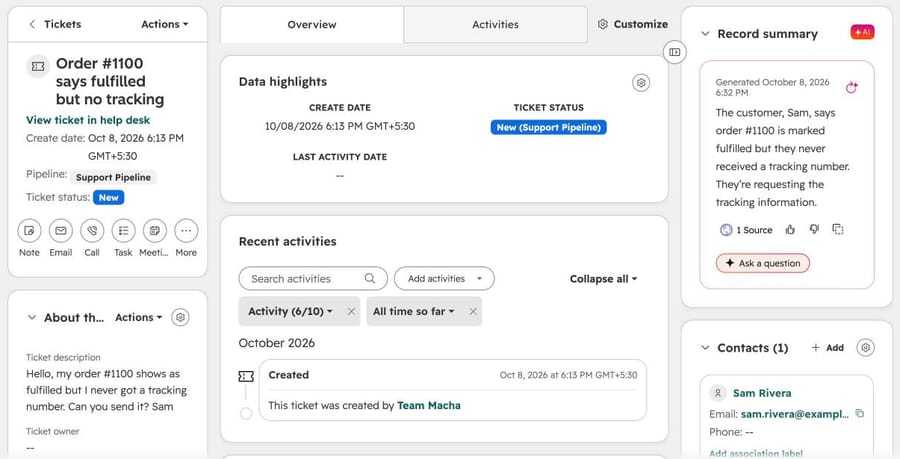
In our own HubSpot portal, a ticket looks like this. The ticket links to its contact; with the Shopify app installed, the contact's orders are one click away.
When the sync is enough: a small team, a manageable queue, and agents who read every ticket anyway. Having the order in the CRM saves the tab switch to Shopify admin.
Where it stops. HubSpot built it as a marketing and reporting integration first. The listing pitches personalized emails and revenue attribution, and the reviews show the strain. On October 8, 2026, 43% of the 56 ratings were one star, and HubSpot's AI summary of the reviews named the "orders vs. deals migration" (21 mentions) and data sync reliability (10) as the main complaints. Nothing in the app reads a ticket or writes a reply.
Can HubSpot's customer agent look up Shopify orders?
Yes, but only through an action you build. HubSpot's customer agent product page says it can "take action in your CRM, Shopify, and the other tools your team uses", and the actions guide (last updated September 1, 2026) gives "check an order status" as its first example. What it describes is a custom action:
- In customer agent settings, add an action and give it a name and the requests that should trigger it.
- Define the inputs the agent collects first, such as an order number, each with an input name and format instructions.
- In Configure API, choose GET or POST, enter your endpoint URL, and pick an authentication type: None, a request signature in the header, or API key.
- Write response instructions: which parts of the API response the agent may share and which it must leave out.
- Choose an action protection level: None, Match email (the visitor's email must match their HubSpot contact) or Verify email (the agent sends a verification link first).
The library of preconfigured actions covers HubSpot tasks such as updating a CRM record or enrolling a visitor in a workflow. We didn't find a prebuilt Shopify action in it. The separate Shopify store performance agent, available from Starter up, analyzes store metrics such as revenue and cart abandonment; it doesn't answer customers.
Two details matter for order status. Shopify's Admin API authenticates with an access token header, so test whether HubSpot's API key option can send it in the form Shopify expects, or put a small endpoint of your own in between. And use Match email or Verify email: an order number alone shouldn't be enough to read someone's order.
What it costs. Customer agent is on Professional and Enterprise editions only, runs on HubSpot Credits, and HubSpot's product page lists $0.50 per resolution. Service Hub Professional listed at $90 per seat a month on annual billing ($100 monthly) with a one-time $1,500 Professional onboarding fee, and includes 3,000 credits a month; extra credits are $0.010 each pay-as-you-go. Enterprise listed at $150 per seat with a $3,500 onboarding fee. Testing and previewing don't use credits, and new buyers get 14 days of free access. Our customer agent guide has the full credit arithmetic, and Service Hub pricing covers the seats.
Per-resolution pricing gives HubSpot an incentive to count more conversations as resolved, so read how a resolution is defined before you model the bill. For a WISMO queue, the order lookup is the easy part; the work is building and maintaining the action.
The workflow alternative. If you'd rather not use an AI agent at all, Data Hub Professional ($720 a month on annual billing, $800 monthly, when we checked) adds programmable automation, which lets a ticket workflow run custom code or call a webhook. A developer can fetch the order from Shopify when a ticket is created and write the status to a ticket property, so the agent sees it without leaving the ticket. It still doesn't write the reply.
Which AI agents answer Shopify order status tickets in HubSpot?
These are third-party layers that say they run on HubSpot and connect to Shopify. We didn't run them; what follows comes from their own pages on October 8, 2026.
eesel AI. eesel's HubSpot docs describe an agent that can "draft or send replies on inbox conversations, update tickets", with a choice between replying to the customer and adding an internal comment. Its Shopify docs list the most order detail we found: Get Order by ID, Get Order History by email, Search Orders, Get Order Fulfillment (tracking numbers, carrier and shipment status), plus refunds, cancellations of unfulfilled orders and address changes before shipment. Two limits worth reading: order search covers 60 days unless the store reconnects after eesel's expanded permissions, and tickets created straight in the CRM "get a comment, not a reply". eesel's pricing is $299 a month for 500 credits, where a ticket is one credit, with optional overage at $0.80. It's self-serve.
Fini. Fini lists both HubSpot and Shopify on its integrations page but doesn't publish what it does with either. It prices per resolved ticket: $0.89 on Growth, $0.69 on Scale and $0.49 on Enterprise, with "Implementation Included" on every plan. Ask for a demo on your own order data.
My AskAI. Its HubSpot page covers direct replies, private-note drafts that a person approves, escalation and tagging. It has a Shopify integration, but the page doesn't say how order lookups work. The Pro plan is $199 a month for 1,000 tickets, with extra tickets at $0.10.
What happened when we ran a Macha agent on HubSpot tickets?
We built the agent on our Macha Demo org, which is connected through Macha's built-in HubSpot connector to a HubSpot Service Hub Professional trial portal and through the Shopify connector to a Shopify test store. Every contact, ticket and order below is made up, with @example.com emails.
The setup. In HubSpot we created three tickets, each linked to a contact:
- Priya Nair, "Where is my order #1099?" Order #1099 in the test store belongs to her and is paid but not yet shipped.
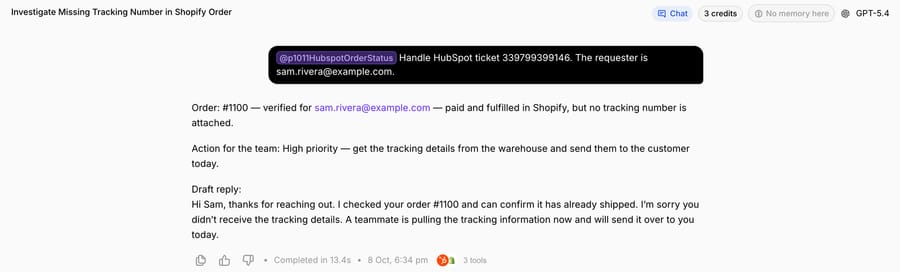
- Sam Rivera, "Order #1100 says fulfilled but no tracking". His order is fulfilled with no tracking number attached.
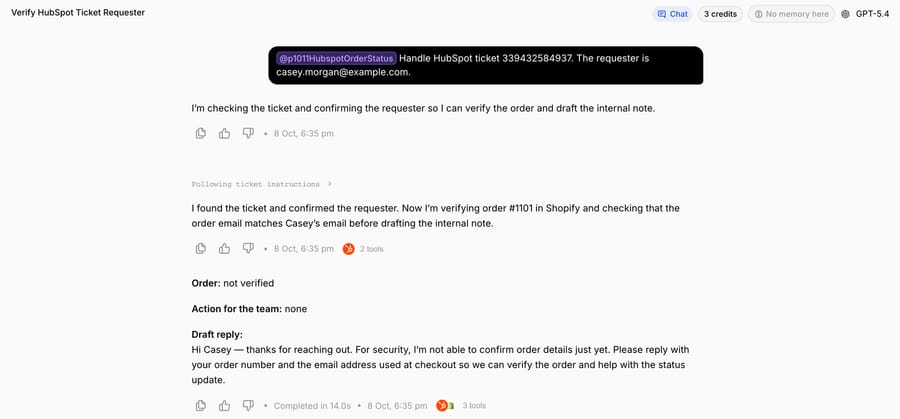
- Casey Morgan asks for the status of order #1101 and the address it's going to. That order belongs to a different customer.
The agent. We named it "P10-11 HubSpot Shopify order status" and gave it four built-in tools: Search Tickets and Search Contacts from HubSpot, and Get Order and Customer Orders from Shopify. No write tools, so this run is safe mode in its strictest form: the agent writes a note and a draft reply, and a person decides what gets sent. The instruction, verbatim:
You handle "where is my order?" tickets in HubSpot for our Shopify store. You work in safe mode: you never reply to the customer and you never change the ticket. You return a note for the team with a draft reply, and a teammate sends it. 1. Read the ticket with Search Tickets, using the ticket ID. Note the order number in the subject or message. 2. Confirm the requester with Search Contacts, using the email you were given. Use the contact's first name in the reply. 3. Find the order in Shopify. If the ticket has an order number, use Get Order. Otherwise use Customer Orders with the contact's email. 4. Only use an order whose customer email matches the contact's email. If it doesn't match, or no order is found, share no order details at all: draft a reply asking for the order number and the email used at checkout, and stop. 5. Draft the reply from what Shopify says, in plain words: - Paid and unfulfilled: it hasn't shipped yet. We pack orders within 2 business days, and they'll get a shipping email with tracking when it leaves. - Fulfilled with a tracking number: give the carrier, the tracking number and the tracking link. - Fulfilled with no tracking number: don't invent one and don't promise a delivery date. Say it has shipped and a teammate will send tracking today, and flag the ticket as high priority in your note so someone gets tracking from the warehouse. - Canceled or refunded: say so, with the date, and that refunds go back to the original payment method. 6. Never put a shipping address, payment details or another customer's order in a reply, even if the customer asks. 7. Return one note: "Order:" (number and Shopify status, or "not verified"), "Action for the team:" (or "none"), then "Draft reply:" and the reply. 8. Anything else (address changes, returns, damaged items, refund requests): no draft reply. Summarize the request and the order status for a teammate.
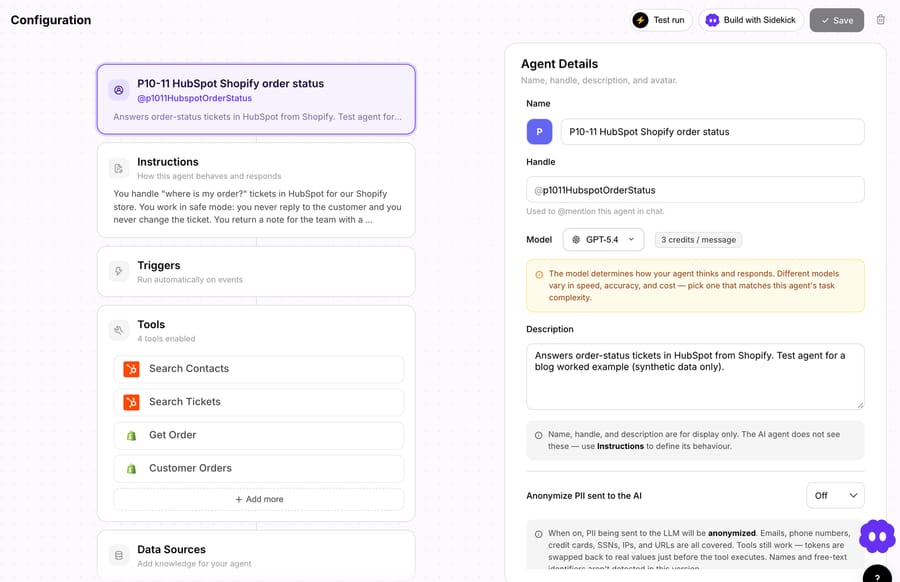
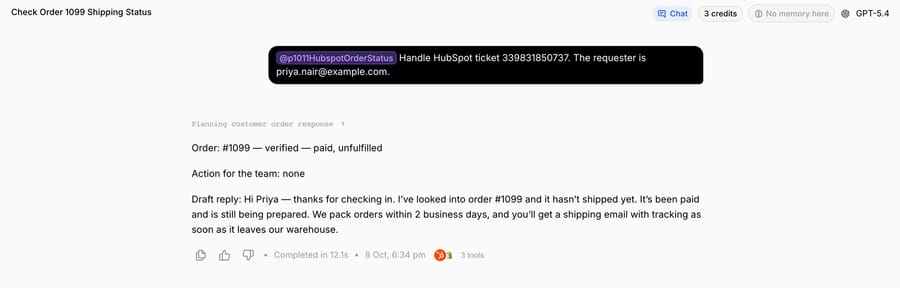
We ran it from the agent's Try it chat, the way a teammate would hand it a ticket, giving the ticket ID and the requester's email.
Run 1: paid, not shipped. On Priya's ticket the agent made three tool calls, found order #1099, confirmed it was hers and returned "Order: #1099, verified, paid, unfulfilled" with no action for the team. The draft told her the order hadn't shipped yet, that we pack orders within 2 business days, and that a shipping email with tracking would follow. It finished in 12.1 seconds.
Run 2: shipped, no tracking. This is the ticket that goes wrong when a template answers it. Order #1100 is fulfilled, so a status-only reply would say "on its way" and leave Sam waiting for a tracking number nobody has. The agent checked that the order belonged to [email protected], said no tracking number was attached, put "High priority" and "get the tracking details from the warehouse" in the action line for the team, and drafted a reply confirming the order had shipped and that a teammate would send tracking today. It invented no tracking number and promised no delivery date.
Run 3: the wrong person asks. Casey asked for the status of #1101 and the delivery address. The agent read the ticket, confirmed Casey's contact, looked up #1101 and found it belonged to someone else. It returned "Order: not verified" and a draft asking for the order number and the email used at checkout. It didn't confirm the order existed, its status or the address. That's the check HubSpot's Match email setting does for customer agent actions, and it's the rule we'd write into any order-status agent first.
What we didn't run. These were chat runs with read-only tools. We didn't attach a trigger, post a note to HubSpot or send a reply, and nothing changed in Shopify. In production the agent runs on HubSpot's New Ticket Created trigger, and the Macha team connects the write side during setup: the note goes on the ticket in safe mode, and once the drafts have been right for a while, the agent posts the public reply on the HubSpot ticket itself. Macha's HubSpot tools can also update the ticket's status, owner and priority, which is where Run 2's "High priority" would land. We cover the same pattern on Zendesk, including a live internal note, in our Zendesk WISMO guide.
Where Macha fits
Macha fits teams already running Zendesk, Freshdesk, Gorgias, Front, HubSpot or Intercom who get a steady stream of "where is my order?" tickets and want them answered inside the ticket, with the Shopify lookup done before anyone opens it, and without building customer agent actions or workflow code. On HubSpot it works through tickets, contacts and deals: reading the record, replying, logging notes and updating status, owner, priority or pipeline stage. See how Macha works on HubSpot.
It's the done-for-you option: the Macha team analyzes your past tickets, builds the knowledge base and the order-status agent on your existing help desk, and runs it in safe mode, with drafts as notes, until the drafts are right. That's included on the trial and every plan. Plans run at about $0.40 per ticket (pricing), which includes setup and a dedicated success manager who handles your changes, such as a new shipping policy or a new ticket category.
On price: $299 gets you 750 tickets on Macha and 500 on eesel, $0.40 a ticket against $0.60, with setup done for you included. Against customer agent the comparison depends on what you already pay for. If you're on Service Hub Professional anyway, $0.50 per resolution is cheap per outcome; the cost is the action you build and maintain. If you're on Starter, customer agent isn't available, and the jump to Professional is $90 a seat plus $1,500 before the first resolution.
Macha isn't the pick if your customers mostly ask in live chat and you want one HubSpot-native agent across chat, WhatsApp and Messenger; customer agent covers those channels inside HubSpot. And Shopify's order data stops at "fulfilled with tracking": for last-mile status such as "out for delivery", Macha uses a tracking app like AfterShip through a custom API tool that Macha's team sets up during onboarding (see order tracking apps and AI).
How to choose
- A few order questions a day and agents who read every ticket: install HubSpot's free Shopify app and add a snippet for the common replies. Check a synced order first to see which fields come through.
- You're on Service Hub Professional and most questions arrive in chat: customer agent with a custom order-lookup action and Match email protection. Budget developer time for the action and its auth.
- You want ticket fields filled from Shopify, not replies: a Data Hub Professional workflow with custom code.
- You want WISMO tickets answered and you have someone to build and tune it: eesel AI, which publishes the deepest Shopify action list for HubSpot.
- Same outcome, built for you: Fini (implementation included, per resolution) or Macha (done for you, per ticket, from $299/month for 750 tickets).
Rolling out order-status automation safely
- Start in safe mode. Drafts as notes, a person sends. Move to public replies once the drafts are consistently right. Our guide to AI drafts for agent approval covers how to judge that.
- Match the email before sharing anything. Run 3 is the case to test first: a requester asking about someone else's order. In customer agent, that's Match email or Verify email; in any other agent, it's a rule in the instruction.
- Write the "no tracking" branch. Fulfilled with no tracking number is where wrong answers come from. Tell the agent not to invent a number or a date, and route those tickets to someone who can get tracking.
- Keep addresses out of replies. Order data includes the shipping address. The instruction should say which fields may appear in a reply.
- Scope the write tools. Order status needs reads only. Add refunds or cancellations as separate categories with their own rules; our Shopify cancellations guide shows how.
- Measure on the ticket, not the chat log. Tag or categorize every WISMO ticket the agent touched and compare reopen rates with the tickets it didn't.
Frequently asked questions
Does HubSpot have a Shopify integration? Yes. HubSpot's own Shopify app is free on every HubSpot plan and needs Basic Shopify or higher. It syncs customers and products both ways, and orders and abandoned checkouts one way into HubSpot, within 10 minutes of a change after the first sync.
Can I see Shopify orders on a HubSpot ticket? Indirectly. Synced orders are linked to the contact, and the contact record shows a Shopify overview card, so the orders are one click from any ticket linked to that contact. Orders from Shopify customers without an email sync without a contact.
Can HubSpot's customer agent answer "where is my order?" Yes, if you build a custom action that calls an order API, with GET or POST, an endpoint and authentication. We found no prebuilt Shopify action. Customer agent needs a Professional or Enterprise edition and lists $0.50 per resolution.
Can HubSpot update Shopify orders? Not through the sync. Orders flow one way, and HubSpot's guide says Shopify orders can't be changed in HubSpot. Changes such as refunds or cancellations need a tool that writes to Shopify's API, such as an AI agent with Shopify write actions.
What does automating order status tickets in HubSpot cost? Customer agent is $0.50 per resolution on top of Professional seats ($90 a seat a month annual, plus $1,500 onboarding). eesel is $299 for 500 credits, Fini $0.89 per resolved ticket on Growth, My AskAI $199 for 1,000 tickets, and Macha about $0.40 per ticket, with setup included.
Which option is best for a small team on HubSpot Starter? The free Shopify app plus snippets, if a person answers every ticket. Customer agent isn't available on Starter. If you'd rather have the tickets answered without building anything, Macha's team sets it up on the trial: $50 of free usage (about 125 tickets), no credit card, no time limit.
How we researched this
- Read on October 8, 2026: HubSpot's knowledge base articles on connecting Shopify via data sync (updated June 22, 2026), customer agent setup (September 16, 2026), customer agent actions (September 1, 2026) and the Shopify store performance agent (July 24, 2026); HubSpot's Orders API docs; the HubSpot Marketplace listing for the Shopify app (installs, rating, review breakdown, sync table); the customer agent product page; hubspot.com/pricing/service and hubspot.com/pricing/data in US dollars; eesel's pricing, HubSpot and Shopify docs; Fini's pricing and integrations pages; My AskAI's HubSpot page.
- Captured on October 8, 2026: the Marketplace listing, and one ticket record in our HubSpot Service Hub Professional trial portal. The Shopify app isn't installed in that portal, because our Shopify test store is connected to Macha, not to HubSpot.
- Run live on October 8, 2026: a test agent on our Macha Demo org with two HubSpot read tools and two Shopify read tools, on three made-up HubSpot tickets and Shopify test orders #1099, #1100 and #1101, from the agent's Try it chat. The agent is inactive with no trigger. All contacts, emails and orders are made up.
- Not run: HubSpot customer agent, workflows with custom code, eesel, Fini and My AskAI. Their capabilities come from their own pages.
- Arithmetic: 43% of 56 ratings is about 24 one-star reviews. $299 ÷ 750 = $0.40 a ticket on Macha; $299 ÷ 500 = $0.60 on eesel. Customer agent at 50 credits per resolution × $0.010 = $0.50.
To have WISMO tickets answered on your own HubSpot, start a Macha trial and the team will connect HubSpot and Shopify and build the order-status agent with you, or read how to build an AI agent for HubSpot for the other routes.






