Intercom
 Shopify
 Stripe
 Slack
Slack Notion
 Google Workspace
 Confluence

What Are Zendesk's API Rate Limits, and How Do You Fix 401, 403, 422 and 429 Errors? (2026)


Zendesk's API allows 200 requests a minute on Suite Team, 400 on Growth and Professional, 700 on Enterprise and 2,500 on Enterprise Plus, with tighter limits on specific endpoints. Each error code below comes with its real cause, a copy-paste request and the fix.
Key takeaways
- Zendesk's per-minute API rate limit by plan is 200 requests for Suite Team, 400 for Growth and Professional, 700 for Enterprise, and 2,500 for Enterprise Plus.
- The Zendesk High Volume API add-on sets a qualifying plan's limit to 2,500 requests per minute and requires Suite Growth or above with at least 10 agent seats.
- The Zendesk Update Ticket endpoint allows only 30 updates per 10 minutes per user per ticket, so a script writing status, tags and fields separately on one ticket hits that ceiling first.
- A Zendesk 429 response carries a Retry-After header giving the exact number of seconds to wait, so a retry loop should read it before falling back to exponential backoff.
- A Zendesk API token for Basic auth needs the literal /token suffix on the username, so the string to Base64-encode is email_address/token:api_token, and omitting it is the most common 401.

Zendesk's REST API allows 200 requests per minute on Suite Team, 400 on Growth and Professional, 700 on Enterprise and 2,500 on Enterprise Plus, and every 429 it returns carries a Retry-After header with the exact seconds to wait. The other errors each point at one layer: 401 is the auth header, 403 is role or scope, 422 is a field named in the details object, and 5xx is Zendesk's side.
| Status | What it means | First thing to check |
|---|---|---|
| 401 | Zendesk can't authenticate the caller | The /token suffix on the username, or Basic vs Bearer |
| 403 | Authenticated but not allowed | Role, OAuth scope, plan or IP allowlist |
| 404 | Resource not found | URL, ID and subdomain |
| 422 | A value failed validation | The field named in details |
| 429 | A rate limit was exceeded | The Retry-After header |
| 5xx | Server-side problem at Zendesk | The status page for your subdomain |
If you want the conceptual background first, including base URLs, auth and pagination, start with the Zendesk API explained. This page assumes you are already making calls and want the error to stop. Everything here was checked against Zendesk's developer documentation on 20 September 2026 and re-checked on 24 September 2026.
What are the Zendesk API rate limits?
There are three layers of limit, and mixing them up is why a script that respects the per-minute account ceiling still gets throttled.
Layer 1: the per-minute account limit, by plan
These are the Support and Help Center API limits. The Chat API is capped at 200 requests per minute on every Suite plan.
| Zendesk Suite plan | Requests per minute |
|---|---|
| Team | 200 |
| Growth | 400 |
| Professional | 400 |
| Enterprise | 700 |
| Enterprise Plus | 2,500 |
Zendesk publishes a separate table for legacy Zendesk Support plans, where Essential (legacy) is 10 requests per minute, Team is 200, Professional is 400 and Enterprise is 700. If your account predates Suite, read that table rather than this one, because the Essential number is an order of magnitude below anything in the Suite column.
The High Volume API add-on raises a qualifying plan to 2,500 requests per minute. It sets the limit to 2,500, so it does not add 2,500 on top of what you already have. It is sold on Suite Growth and above and on Support Professional and above, with a minimum of 10 agent seats, and Enterprise Plus does not need it because it already sits at 2,500.
Worth naming the incentive here, because it shapes the right fix. The ceiling is a priced feature, so the vendor's path when you outgrow it is an add-on. Fewer, larger calls cost nothing and usually get you further, which is why the section on cutting call volume below matters more than the plan you are on.
Layer 2: endpoint-specific limits
These apply on top of the account limit, and they are tighter than people expect.
| Endpoint | Limit |
|---|---|
| List Tickets, pages past 500 | 50 requests per minute |
| Update Ticket | 30 updates per 10 minutes per user per ticket, plus 100 requests per minute per account (300 with the add-on) |
| Incremental Exports | 10 requests per minute (30 with the add-on) |
| Export Search Results | 100 requests per minute per account |
| Side Conversations | 300 requests per 10 minutes |
| Incremental Side Conversation Events | 600 requests per 10 minutes |
| Update User | 5 requests per minute per user |
| Attachment Content | 2,500 requests per minute |
The Update Ticket pair is the one that surprises integrations. A sync that writes a status change, then a tag, then a field, three times a minute on a busy ticket, hits 30 updates per 10 minutes on that single ticket long before it troubles the account ceiling. Batch the writes into one call instead.
Layer 3: everything else Zendesk counts
Four more limits exist that most integrations never read about until one bites:
- Account limit. Zendesk states that it "might limit requests if it detects an unusual spike in requests from all sources for the account, including internal product requests", giving denial-of-service as the example, and puts the account-wide ceiling at 100,000 requests per minute. The phrase that matters is "from all sources": your agents clicking around the product count toward the same account.
- Job limit. Up to 30 queued or running jobs at once. The response carries
zendesk-ratelimit-inflight-jobs: total=30; remaining=29; resets=60, which is the header to log if bulk imports stall. - Apps rate limit. Calls from Zendesk apps get their own ceiling: 100 requests per minute per user per app at the client level, and 700 calls per 5 minutes per user per app at the API level.
- External Content API limits. The Help Center API limits apply, with 770 records per minute, 10,000 bytes per record, 20 sources, 20 types and 50,000 records in total.
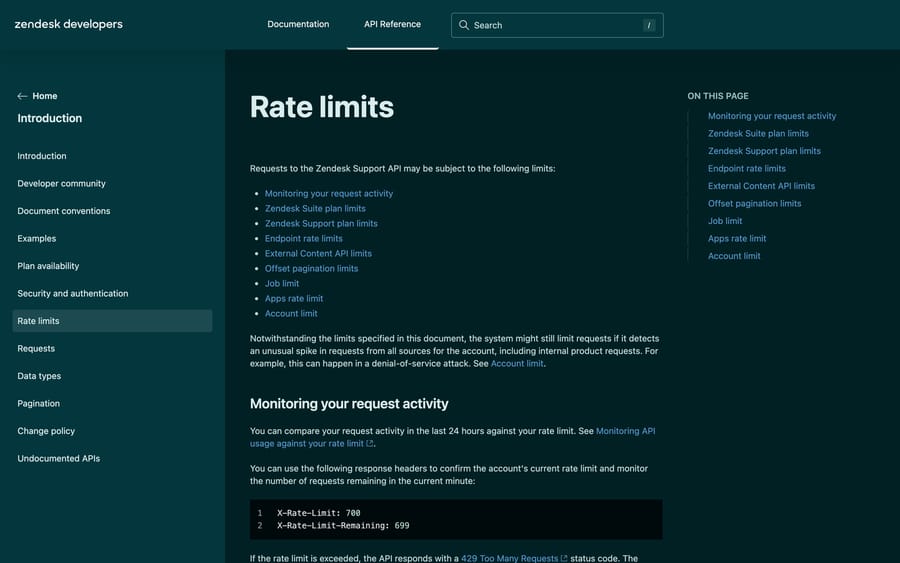
How do you see how close you are to the limit?
Two response headers tell you where you stand on the current minute:
X-Rate-Limit: 700
X-Rate-Limit-Remaining: 699
Log both on every response, not only on failures. A job whose X-Rate-Limit-Remaining is regularly in single digits is one busy afternoon away from paging someone. Zendesk also lets you compare your request activity over the last 24 hours against your limit inside the product, which is the better view when you are trying to work out which integration is the noisy one.
How do you fix a Zendesk 429 Too Many Requests error?
A 429 means you exceeded one of the limits above. Zendesk tells you exactly how long to wait, so guessing is unnecessary.
Honor the Retry-After header
Every 429 comes back with a Retry-After header giving the number of seconds to wait.
HTTP/1.1 429 Too Many Requests
Retry-After: 38
X-Rate-Limit: 700
A minimal retry loop that honors it:
import time, requests

def zendesk_get(url, auth, max_retries=5):
    for attempt in range(max_retries):
        resp = requests.get(url, auth=auth)
        if resp.status_code != 429:
            return resp
        wait = int(resp.headers.get("Retry-After", 2 ** attempt))  # fall back to backoff
        time.sleep(wait)
    resp.raise_for_status()
If Retry-After is ever absent, fall back to exponential backoff (1s, 2s, 4s, 8s) with jitter, so parallel workers do not all retry in lockstep.
How do you stop hitting the limit in the first place?
Backoff handles the spike. Making fewer, larger calls is the actual fix, and these are Zendesk's own best practices:
- Sideload related data.
?include=users,groupspulls associated records in one response instead of an N+1 storm. - Use cursor-based pagination (
page[size],links.next). Offset paging is itself limited past the first pages, as the List Tickets row above shows. - Pull bulk data with Incremental Exports, which is built for periodic syncs, instead of paging every ticket.
- Use bulk endpoints such as Update Many Tickets, which takes up to 100 records per request.
- Cache anything that does not change every minute: groups, custom field definitions, organization records.
- Spread requests evenly under your per-minute ceiling instead of bursting at the top of the hour, because a minute is the window the ceiling is measured in.
This error is common enough to be multilingual. The r/Zendesk thread "API error 429 Too Many Requests" is indexed in several translated variants, and "ZD Guide: to many requests error" covers the help-center side of the same ceiling.
What should you log when a Zendesk API call fails?
Before any specific fix, build the habit that resolves most Zendesk API errors in one pass, which is reading the whole response instead of the status line.
- The status code classifies the failure.
4xxmeans you sent something wrong: auth, permissions, validation or rate.5xxmeans Zendesk had a problem. - The response body names the specifics. Zendesk returns JSON for most
4xxerrors with anerrorkey and often adetailsmap pointing at the offending field. Some400 Bad Requestresponses come back astext/plainfor API-level errors, so don't assume JSON.
Log the status code, the body and the headers. Headers carry Retry-After on a 429 and the rate-limit counters on everything. The minimum you want to capture:
curl -sS -D - \
  -u "[email protected]/token:YOUR_API_TOKEN" \
  "https://your_subdomain.zendesk.com/api/v2/tickets/123.json"
# -D - prints response headers (status line, Retry-After, X-Rate-Limit) to stdout
What causes a Zendesk API 401 Unauthorized error?
A 401 means Zendesk couldn't identify the caller. It never reached the permissions check, because the credentials themselves didn't parse or weren't accepted. This is almost always an auth-header problem.
The correct auth header patterns
There are two auth methods, and mixing them up is the most common cause of a 401.
API token via Basic auth. The username is not just your email. It's your email with /token appended, then a colon, then the token, all Base64-encoded:
Authorization: Basic base64( {email_address}/token:{api_token} )With curl, -u does the encoding, and the literal /token suffix is required:
# CORRECT - note the /token suffix on the username
curl -u "[email protected]/token:abc123APITOKEN" \
  "https://your_subdomain.zendesk.com/api/v2/users/me.json"
OAuth access token via Bearer. OAuth tokens don't go in a Basic header:
# CORRECT - OAuth uses Bearer, never Basic
curl -H "Authorization: Bearer YOUR_OAUTH_ACCESS_TOKEN" \
  "https://your_subdomain.zendesk.com/api/v2/users/me.json"
Common causes and fixes
- Omitting the
/tokensuffix.[email protected]:TOKENis read as email and password, and fails. Add/token. - Bad Base64 or hidden whitespace. A trailing newline sneaks in when piping through shell tools. Re-encode and log the exact header.
- OAuth token sent as Basic, or an API token sent as Bearer. Match the scheme to the credential.
- Token revoked, expired or deleted. Regenerate it.
- Password or token access switched off in Admin Center security settings. If
email:passwordauth suddenly started failing, that's the likely reason, so move to an API token or OAuth. - Wrong subdomain or environment. A sandbox token returns
401against production and the reverse. Confirm the subdomain matches the account that issued the credential.
API tokens and OAuth clients both live in Admin Center › Apps and integrations › APIs › Zendesk API, with OAuth on its own tab in the same area.
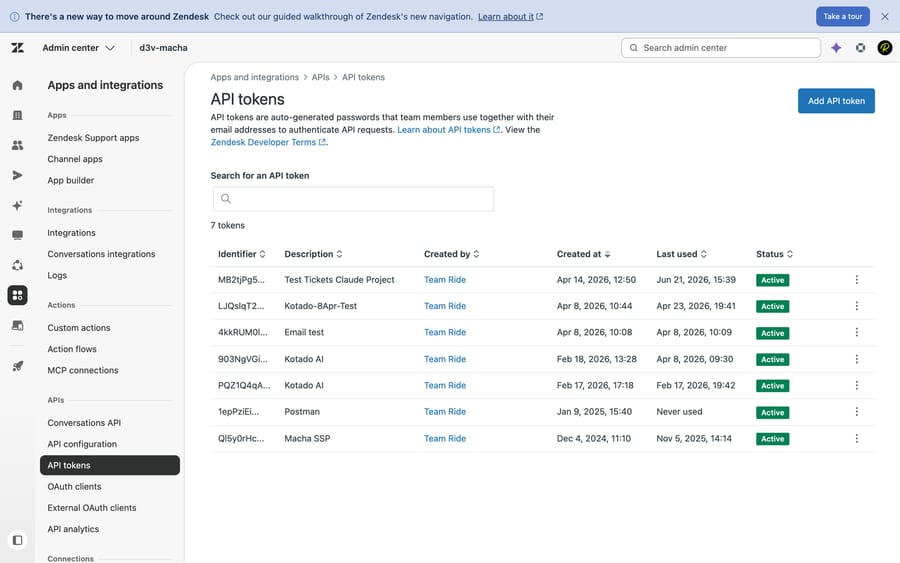
Generate a token there, test it with the users/me.json call above, and a clean 200 confirms the auth header before you debug anything else.
Why does Zendesk return 403 Forbidden when the token works?
A 403 is the opposite of a 401 in one important way: Zendesk knows who you are and won't let that identity do this. The credential is fine, so stop re-checking the token format. The problem is permissions or scope.
{
  "error": "Forbidden",
  "description": "You do not have access to this page. Please contact the account owner of this help desk for further help."
}- End-user credentials on an agent endpoint. Many endpoints require an agent or admin. Use credentials with the right role.
- Agent calling an admin-only action. Account settings and some user changes need an admin.
- OAuth token missing a scope. Scopes are fixed at creation and can't be widened afterwards. A
read-only token that tries toPOSTgets a403, so mint a new token with the scope you need. - Feature not on your plan. Some endpoints are gated to specific Suite plans or add-ons, and an admin gets a
403all the same. - IP allowlist restrictions. Requests from an unlisted address are rejected.
- Cross-brand or suspended access. Reaching another brand's resource, or calling as a suspended agent, returns
403too.
Quick triage: if the same credential works on some endpoints and 403s on one, it's a scope, role or plan issue on that endpoint.
How do you find the field behind a 422 Unprocessable Entity?
A 422 means the request authenticated, parsed and was understood, and then a value inside it failed validation. It's the friendliest error to debug, because Zendesk names the field in the details object.
Creating a user with an email that already exists:
curl -u "[email protected]/token:abc123APITOKEN" \
  -X POST "https://your_subdomain.zendesk.com/api/v2/users.json" \
  -H "Content-Type: application/json" \
  -d '{"user": {"name": "Jane Doe", "email": "[email protected]"}}'
{
"error": "RecordInvalid",
"description": "Record validation errors",
"details": {
"email": [
{
"description": "Email: [email protected] is already being used by another user",
"error": "DuplicateValue"
}
]
}
}The key in details is the offending field and the array says why. Match on the structure and the error type rather than the prose, because the human-readable string varies.
- Missing a required field. Creating a ticket without
comment, or a user withoutname.detailsreportserror: "blank". - Invalid value. An unknown
priority, a malformed date, a non-existentgroup_id. - Duplicate. An email or external ID already in use, reported as
DuplicateValue. Look the record up and update it instead. - Bad field format. A numeric custom field sent a string, or a tag with illegal characters.
One related code: 409 Conflict, returned when simultaneous requests touch the same resource. For writes that need to be idempotent, key off your own external ID, check then create, and treat a 422 duplicate on retry as "already done".
What do 404 and 5xx errors mean on the Zendesk API?
404 Not Found is almost always a URL or ID problem: a typo in the path, a missing .json, a deleted resource, or an ID belonging to a different subdomain. Confirm the record exists with a list call before fetching it by ID.
5xx (500, 502, 503) means the problem is on Zendesk's side. Don't refactor your code. Check the Zendesk status page for your own subdomain, because Zendesk runs accounts on isolated pods and an incident can hit yours alone, then retry with backoff. A 503 may carry a Retry-After header during maintenance, and you honor it the same way you do on a 429. A 504 under sustained load is usually a request that should have been an Incremental Export, which is the pattern behind the r/Zendesk "504 Gateway Timeout" thread.
Which habits prevent most Zendesk API errors?
- Store tokens securely, in environment variables or a secrets manager, never in source control or client-side code.
- Read the body and headers on every failure. The
detailsmap andRetry-Afterhand you the fix. - Build retries in from day one. Honor
Retry-After, back off exponentially with jitter, cap attempts, and make writes idempotent. - Minimize calls. Sideload, cache, use cursor pagination, use bulk endpoints.
- Check the status page before debugging a 5xx, and save yourself an hour chasing an incident.
- Match scope to need. Mint OAuth tokens with exactly the scopes the integration uses.
Do you need to build the integration yourself?
If you're hitting these errors because you're hand-rolling an integration that reads tickets, drafts replies, tags and routes, there's a layer that owns the plumbing. Macha is an AI agent layer that runs on top of Zendesk instead of replacing it. Under the hood it talks to Zendesk through the same REST API covered here, which means it manages the auth handshake, honors rate limits and Retry-After backoff, and deals with pagination and validation, so nobody on your side is writing retry loops.
Keeping it honest for a developer audience: it's still an integration with its own setup, and it's only as useful as the knowledge and tools you connect to it. On cost, Macha bills per ticket, where one thread with one person is one charge however many replies it takes, so a chatty ticket and a one-reply ticket cost the same. It fits teams already running Zendesk, Freshdesk, Gorgias, Front, HubSpot or Intercom who want agents acting inside the ticket, and it's the wrong fit if you need a general-purpose API client. Setup and monitoring by the Macha team are included on every plan, and the pricing page has the tiers. If you're building it yourself, the Zendesk API guide, webhooks, side conversations and how the ticketing system models its objects are the references to keep open.
How was this checked?
We checked Zendesk's rate-limits reference on 20 September 2026, re-checked it on 24 September 2026, and captured it as the screenshot above, taking every number in the three limit tables from that page rather than from memory. We checked the auth header patterns, the details object shape and the 409 behavior against the same set of developer docs. We did not run a load test against a production Zendesk account to confirm the thresholds empirically, so the numbers are Zendesk's published limits, and Zendesk revises them, which is why the tables carry a checked date.
Frequently asked questions
What are Zendesk's API rate limits? They are per minute and per account, and they vary by plan: Suite Team 200, Growth and Professional 400, Enterprise 700, Enterprise Plus 2,500 requests per minute. Legacy Support plans have their own table, where Essential is 10 per minute. The High Volume API add-on raises a qualifying plan (Growth or above, 10 agent seats minimum) to 2,500. Specific endpoints have tighter limits on top of that, and an account-wide ceiling of 100,000 requests per minute applies across all sources.
How do I handle Zendesk API 429 rate limit errors? Read the Retry-After response header, which gives the seconds to wait, then wait and retry. If it's missing, fall back to exponential backoff with jitter. Longer term, cut the number of calls: sideload related records with ?include=, use cursor pagination, pull bulk data with Incremental Exports, batch writes with Update Many, and cache slow-changing data.
Which Zendesk endpoints have their own rate limits? Incremental Exports is 10 requests per minute, 30 with the add-on. Update Ticket allows 30 updates per 10 minutes per user per ticket plus 100 per minute per account. List Tickets drops to 50 per minute past page 500. Side Conversations is 300 per 10 minutes, Update User is 5 per minute per user, Export Search Results is 100 per minute, and Attachment Content is 2,500 per minute.
How do I check how close I am to the Zendesk rate limit? Log the X-Rate-Limit and X-Rate-Limit-Remaining response headers on every call, not only on failures. They report your account's ceiling and the requests left in the current minute. Zendesk also lets you compare your request activity over the last 24 hours against your limit inside the product.
Why am I getting a 401 from the Zendesk API when my token is correct? Usually the username format. For API-token Basic auth the username must be email/token with the literal /token suffix, so the string you Base64-encode is [email protected]/token:YOUR_TOKEN. Other causes: an OAuth token sent with Basic instead of Bearer, hidden whitespace in the encoded header, a revoked token, token access switched off in Admin Center, or a sandbox token used against production.
What's the difference between a 401 and a 403 on the Zendesk API? A 401 means Zendesk can't authenticate you, so it can't tell who is calling. A 403 means it authenticated you and you aren't authorized for that action: the wrong role, an OAuth token missing a scope, an IP restriction, or a feature that isn't on your plan. If one credential works on some endpoints and 403s on another, it's permissions and not auth format.
How do I find which field caused a Zendesk 422 error? Read the response body. A 422 returns error: "RecordInvalid" with a details object keyed by field name, such as details.email with an array describing the problem, which might be blank, DuplicateValue or an invalid value. Fix that field and resend.
A Zendesk API call returns 500 or 503. Is it my code? Probably not, because 5xx codes are server-side. Check the Zendesk status page for your own subdomain, since accounts sit on isolated pods and an incident can affect yours alone, then retry with backoff. A 503 may carry a Retry-After header you should honor the same way you do on a 429.
Rate limits, error behavior and header names read off Zendesk's developer documentation on 20 September 2026 and re-checked on 24 September 2026. Zendesk revises rate limits periodically, so confirm specifics in the developer docs and in your own account.
Sources:
Add AI agents to your Zendesk
Macha reads the ticket, drafts the reply and takes the action, inside the Zendesk you already run.