Intercom
 Shopify
 Stripe
 Slack
Slack Notion
 Google Workspace
 Confluence

What Are the Most Common Zendesk Setup Mistakes? 10 Fixes for 2026


Zendesk works on day one, so the setup feels finished, and six months later tickets route to the wrong group and reports can't be trusted. These are the ten configuration gaps behind that drift, what each one costs, and where to fix it.
Key takeaways
- The most common Zendesk setup mistake is a trigger list with no naming convention or order, because triggers re-run as a cycle and a wrong order mis-routes tickets.
- Zendesk business-hours schedules allow a single schedule on Suite Growth and Professional, and multiple schedules only on Enterprise plans, so SLAs without one count overnight hours.
- Custom agent roles with granular permissions are Enterprise only in Zendesk, so teams on Team, Growth and Professional must apply least privilege with the predefined agent, admin and light agent roles.
- Zendesk's public pricing page lists Suite Team at $55 and Suite Professional at $115 per agent a month billed annually, and no longer shows Suite Growth.
- Enabling Zendesk email authentication without correct SPF and DKIM records makes legitimate mail land in Suspended tickets with the cause Failed email authentication.

The most common Zendesk setup mistake is a trigger list with no naming convention or order, followed by missing business-hours schedules and a composer that defaults to public replies. Each of the ten mistakes below is a configuration gap, not a bug, and most take an afternoon to fix once you know where the setting lives. Plan limits are checked against Zendesk's documentation and pricing page on 24 September 2026; Zendesk renames settings often, so confirm labels in your own account.
| # | Mistake | The fix | Plan needed |
|---|---|---|---|
| 1 | Unnamed, unordered triggers | One job per trigger, prefix names, value-setting triggers first | All plans |
| 2 | No business-hours schedule | Create a schedule, add holidays, measure SLAs in business hours | Suite Growth or higher (one schedule; multiple on Enterprise) |
| 3 | Composer defaults to public reply | Default to internal note | All plans |
| 4 | No ticket fields or forms | Drop-down fields for your top 5 to 10 contact reasons | All plans |
| 5 | Everyone is an admin | Least privilege; custom roles where available | Custom roles: Enterprise only |
| 6 | No knowledge base | Articles for your top 10 to 20 contact reasons | All Suite plans |
| 7 | Unwatched suspended tickets, bad email auth | Daily suspended-ticket check; correct SPF and DKIM first | All plans |
| 8 | CSAT off, or never read | Route every bad rating to a lead the same day | Suite Growth or higher |
| 9 | Too many groups, brands and views | Quarterly audit; archive what nobody opens | All plans |
| 10 | AI switched on and left alone | Fix knowledge and fields first, then review AI answers on a schedule | Depends on the AI product |
One packaging note before you start: the public pricing page now lists only Support Team ($19), Suite Team ($55) and Suite Professional ($115) per agent a month billed annually, plus Suite Enterprise by quote. Suite Growth no longer appears there, though Zendesk's help articles still list it for features like SLAs and CSAT. If you are buying today, the first listed plan with SLAs, schedules and CSAT is Suite Professional. Where a problem deserves its own deep dive, we link to the dedicated guide rather than repeat it here.
1. Why do disorganized triggers break Zendesk routing?
The single most common mess in any mature Zendesk: dozens of triggers with names like "New trigger 1," no consistent order, and several quietly fighting each other. Because triggers run top-to-bottom on every ticket event — and the whole list re-runs as a cycle until a full pass fires nothing new — order and clarity aren't cosmetic. They decide what actually happens.
Why it hurts. When a value-setting trigger runs after the assignment trigger that depended on it, tickets route wrong. When two triggers each flip a field the other watches, you get a loop — Zendesk has built-in limits that eventually halt the cycle, but not before firing duplicate notifications and burning through the ticket's update history. And when nobody can tell what "Trigger 14" does, no one dares delete it, so the pile only grows.
How to fix it. Adopt Zendesk's own workflow ordering: triggers that set baseline values (priority, type, brand, schedule) run first, then categorization/tagging, then routing and assignment, then notifications. Give every trigger one job and a name that states it — Set Priority – VIP Urgent, Route – Billing to Finance, Notify – Requester Solved. Use a prefix-based naming convention so the list reads like a pipeline. If triggers are already misbehaving, our guide to Zendesk triggers not firing walks through debugging order, conditions, and loops step by step.
2. Why do SLAs breach overnight without a business-hours schedule?
Lots of teams launch Zendesk with no schedule defined, then wonder why SLA timers and away messages behave strangely. A schedule tells Zendesk when your team is actually working — and a surprising number of features quietly depend on it.
Why it hurts. SLA targets can be measured in business hours or calendar hours. With no schedule, a "4-hour first reply" target counts the 2am hours nobody is online — so SLAs breach overnight through no fault of your team, and your reports punish you for it. Messaging and email away-messages also lean on business hours to set the right "we're offline" expectation. Skip the schedule and customers get promised responses that can't physically happen.
How to fix it. Create a schedule in Admin Center under Objects and rules → Business rules → Schedules, set your working days and hours, and add holidays so the clock pauses on days off. Then point your SLA policies at business hours (not calendar hours) for any priority your team doesn't staff 24/7. Note the plan limits: business hours and SLAs start on Suite Growth in Zendesk's docs (Suite Professional is the first such plan on today's pricing page), you get a single schedule on Growth and Professional, and multiple schedules on Enterprise. Our business hours setup guide covers the full flow.
3. Should the Zendesk composer default to public reply or internal note?
The Agent Workspace combines public replies and internal notes in one composer. Whether a new ticket opens on Public reply or Internal note is a setting — and the wrong default is how confidential notes end up emailed to customers.
Why it hurts. The setting Agent comments on all tickets are public by default (and its messaging equivalent, Non-email conversations are public by default) decides which mode the composer lands in. If it's public and an agent types "this customer is being unreasonable, escalate to a manager" assuming it's a note, that goes straight to the requester. One leaked note can torch a relationship — or a deal.
How to fix it. Decide deliberately. Most teams that handle sensitive accounts set the composer to default to internal note so the safe action is the default and going public is a conscious choice. Zendesk has also shipped a logic improvement that keeps internal-note-only tickets defaulting to internal even when "public by default" is on — but don't rely on edge-case logic; set the default you want. For the full breakdown of when each mode applies, see internal notes vs. public replies.
4. What goes wrong without ticket fields and forms?
Out of the box, Zendesk captures a subject and a description and not much else. Teams that never build ticket fields and forms collect a pile of free-text tickets with no structure — and then can't report on or automate any of it.
Why it hurts. Routing, SLAs, and triggers all key off structured data. If "what is this about?" only lives in the customer's prose, you can't auto-route billing tickets to finance, can't set tighter SLAs on outages, and can't build a single trustworthy Explore report on contact reasons. You end up tagging tickets by hand forever — and inconsistent manual tags make the reporting worse, not better.
How to fix it. Map your top 5–10 contact reasons before you build anything, then create custom fields (drop-downs, not free text, wherever possible) for the data you actually want to route and report on. Use conditional ticket forms so customers only see the fields relevant to their issue. Keep it lean — every field an agent has to fill is friction, so capture what drives a decision and nothing more. The full walkthrough is in how to create Zendesk custom fields and forms.
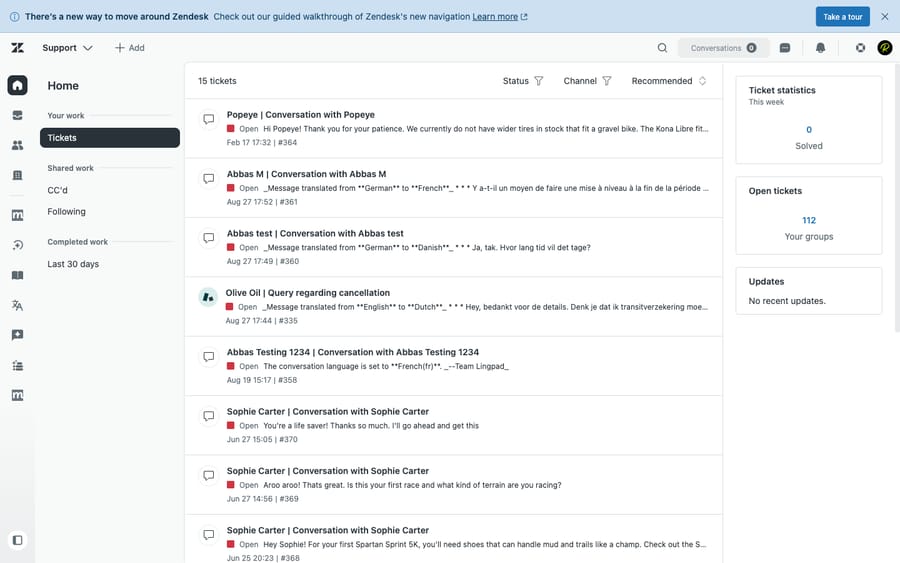
5. Why is making every agent an admin a mistake?
It's tempting to make everyone an admin so nobody is ever blocked. It's also how a well-meaning agent deletes a trigger that quietly ran your whole routing pipeline.
Why it hurts. Admins can edit business rules, automations, fields, and account settings — the exact machinery that, when changed by someone who doesn't know the knock-on effects, breaks routing and SLAs for everyone. Broad access is also a security and compliance liability: the more people who can export data or change settings, the larger your blast radius.
How to fix it. Apply the principle of least privilege — give each person only the permissions their job needs. On lower plans you're limited to Zendesk's predefined roles (agent, admin, light agent), so use them deliberately rather than defaulting everyone to admin. Custom agent roles — where you toggle granular permissions like "edit ticket properties" but not "delete tickets" — are an Enterprise-only feature; if you're on Enterprise, build roles that mirror your real team structure. Full guidance in how to configure Zendesk roles and permissions.
6. What happens if you skip the knowledge base?
Plenty of teams treat the help center as a "later" project. It's a mistake on two fronts — and the second one bites harder every year.
Why it hurts. First, every article you don't write is a ticket a customer can't self-serve, so volume that should deflect lands in your queue instead. Second — and this is the one teams miss — AI has nothing to work with. Zendesk's AI agents surface and reason over your help-center content; modern AI agents pull from your knowledge to actually answer. No knowledge base means even a perfectly configured bot can only say "I couldn't find anything on that." You can't automate your way out of an empty help center.
How to fix it. Start small and high-leverage: write articles for your top 10–20 contact reasons (you already mapped them in mistake #4). Keep each one specific, single-topic, and current. Then connect it to self-service and AI. Our guide to building a Zendesk knowledge base covers structure, content blocks, and rollout — and it's the prerequisite for getting any real value out of AI later.
7. Why do customer emails vanish in suspended tickets?
Email is still where most tickets are born, and it's also where they silently die. Two related gaps: never checking the Suspended tickets view, and never setting up email authentication.
Why it hurts. Legitimate customer emails can land in suspension and sit there unseen — a customer who thinks they've contacted you and hears nothing back. Separately, if you enable Zendesk's email authentication (SPF, DKIM, DMARC) without getting your DNS records right, real mail fails authentication and gets suspended with the cause "Failed email authentication." Either way, tickets vanish and you don't know it's happening.
How to fix it. Make checking the Suspended tickets view a daily habit (or assign it to someone). If you turn on email authentication in Admin Center → Channels → Talk and email → Email, first publish the correct SPF and DKIM records for any domain or forwarding service you send from — then monitor suspensions for a week. Zendesk's own advice is to fix the failing workflow, not disable the security. If inbound email isn't creating tickets at all, our Zendesk email not creating tickets guide covers the full diagnostic path.
8. What is the point of CSAT if nobody reads the comments?
Customer satisfaction surveys are one of Zendesk's highest-value features and one of the most under-used. The two failure modes: never turning CSAT on, or turning it on and then never reading the comments.
Why it hurts. With no CSAT, you're flying blind on quality — you can see how fast you reply but not whether customers are actually happy. And a CSAT score with no follow-up is vanity: a 92% that nobody investigates tells you nothing about the 8% who are about to churn. The signal is in the verbatim comments on the bad ratings, which is exactly the part teams ignore.
How to fix it. CSAT surveys are available on Suite Growth, Professional, Enterprise and Enterprise Plus, and on Support Professional and Enterprise. Turn it on, keep the survey short, and — this is the part that matters — build a trigger or view that surfaces every negative rating to a lead so it gets a same-day follow-up. Tag CSAT comments by theme so you can spot the systemic issues, not just one-off complaints. Step-by-step setup is in how to set up CSAT surveys in Zendesk.
9. How many groups, brands and views is too many?
The opposite of "didn't configure enough" is "configured way too much." New admins often spin up a group for every team, a brand for every product line, and a view for every conceivable filter — and end up with an interface no one can navigate.
Why it hurts. A sidebar with 40 views means agents can't find the three that matter, so they work out of the wrong queue or default to "Unassigned" chaos. Excess brands multiply your help centers, email addresses, and trigger conditions — every one a thing to maintain and keep consistent. Heavy, redundant views also slow the agent interface down. Clutter is a tax you pay on every single ticket.
How to fix it. Be ruthless. Most teams need a handful of shared views (my open, my group's unassigned, breaching SLA, today's solved) plus a few personal ones — not dozens. Create a new group or brand only when it owns genuinely separate work, customers, or branding; don't model your org chart in Zendesk. Audit views and groups quarterly and archive anything nobody opened. Fewer, sharper objects beat a comprehensive mess every time.
10. Why does Zendesk AI underperform on a messy account?
The newest and fastest-growing mistake: switching on an AI bot, watching one good demo answer, and declaring victory — on top of a thin knowledge base and inconsistent ticket data.
Why it hurts. AI in Zendesk is only as good as what you connect it to. Point a bot at six stale articles and unstructured tickets and it will give generic, hedge-everything answers — or escalate everything, which defeats the purpose. Worse, a confidently wrong AI answer erodes trust faster than no AI at all. "Set and forget" assumes the underlying configuration is sound; mistakes #4 and #6 are usually why the AI underperforms.
How to fix it. Treat AI as the last layer, not the first. Clean up your knowledge base, structure your fields, then connect AI — and keep tuning it against real conversations rather than walking away. Review what it answered, what it got wrong, and what it should have escalated, on a regular cadence. AI is a living part of your setup, not a switch.
Where AI fits in (honestly)
Zendesk's built-in AI is a reasonable starting point, but its ceiling is real: it mostly surfaces help-center articles and hands off anything outside a known flow. The honest framing is that no AI fixes a broken setup — it amplifies whatever data and configuration you give it.
That's the layer an AI agent like Macha works in. Macha isn't a help desk and it isn't a Zendesk replacement — it runs on top of your existing Zendesk, reads the customer's actual question, pulls from your connected knowledge and past tickets, and resolves the issue inside the ticket while handling the housekeeping (tagging, routing, status) and escalating to a human, with context attached, when it isn't confident. The catch is the same one this whole article is about: it's only as good as the knowledge and configuration underneath it, so the nine mistakes above are the prerequisites, not optional extras. On cost, Macha bills per ticket: one conversation, charged once however many automated steps it takes, never per "resolution." One plan is priced by volume, from $299 a month for up to 750 tickets to $3,999 for up to 10,000, with setup and monitoring by the Macha team included (pricing). It also runs on Zendesk, Freshdesk, Gorgias, Front, HubSpot or Intercom. If you want to see how an AI agent layer behaves on a clean Zendesk, that's Macha on Zendesk, and the trial is $50 of free usage with no credit card required.
Frequently asked questions
What is the most common Zendesk setup mistake? Disorganized triggers and automations — too many, with no naming convention and no order discipline. Because triggers run in sequence and re-run as a cycle, a wrong order causes mis-routing and a poorly-conditioned pair can loop. Give every trigger one purpose, a descriptive name, and the right position (value-setting before assignment before notifications).
Why are my Zendesk SLAs breaching overnight? Almost always because you never set a schedule, so the SLA clock counts hours when no one is working. Create a schedule in Objects and rules → Business rules → Schedules, add your holidays, and point SLA targets at business hours rather than calendar hours for any priority you don't staff 24/7. Business hours and SLAs are available from Suite Growth up in Zendesk's docs; on today's pricing page the first plan with them is Suite Professional.
How do I stop agents from accidentally sending internal notes to customers? Set the composer to default to internal note rather than public reply, via the comment-privacy settings in Admin Center. That makes the safe action the default and going public a deliberate choice. Zendesk also keeps internal-note-only tickets defaulting to internal, but you should still set the default explicitly.
Do I really need a knowledge base before turning on Zendesk AI? Yes. Zendesk's AI agents reason over your help-center content, so an empty or thin knowledge base means the AI has nothing to answer with and will deflect almost nothing. Build articles for your top contact reasons first, then connect AI.
Why are some customer emails not becoming tickets? They may be landing in the Suspended tickets view — check it regularly. If you enabled email authentication (SPF, DKIM, DMARC) without correct DNS records, legitimate mail fails authentication and gets suspended with the cause "Failed email authentication." Fix the records and forwarding workflow rather than disabling the security.
Are custom roles available on every Zendesk plan? No. Custom agent roles with granular permissions are Enterprise only. On Team, Growth and Professional you're limited to the predefined roles (agent, admin, light agent) — so apply least privilege by assigning those roles deliberately and not making everyone an admin.
Which fix should you do first?
Most Zendesk setup mistakes share a root cause: the product works immediately, so configuration feels finished when it isn't. The fixes are unglamorous but cheap — name and order your triggers, set a schedule and tie SLAs to business hours, default the composer to internal notes, build structured fields and a real knowledge base, apply least privilege, watch your suspended tickets and email auth, act on CSAT, prune the clutter, and treat AI as a tuned layer on clean data rather than a switch you flip once. Work through this list against your own account and you'll prevent the slow-motion failures that otherwise surface months later. And when your knowledge and configuration are solid, that's exactly when an AI agent layer like Macha can actually resolve tickets instead of just deflecting them.
Setup details verified against Zendesk's official documentation, 24 September 2026. Zendesk updates its product and plan packaging periodically — confirm labels and plan availability in your own account before relying on them.
Add AI agents to your Zendesk
Macha reads the ticket, drafts the reply and takes the action, inside the Zendesk you already run.