Intercom
 Shopify
 Stripe
 Slack
Slack Notion
 Google Workspace
 Confluence

Zendesk Internal Note vs Public Reply: Who Sees What?


In Zendesk, a public reply is emailed to the requester and every CC, while an internal note is visible only to agents and light agents and sits on a yellow background. Below: how to switch between them, how to make internal note the default, and what you can and can't undo after a private remark goes public.
Key takeaways
- In Zendesk, a public reply is emailed to the requester and every CC on the ticket, while an internal note is visible only to agents and light agents.
- Zendesk shows internal notes on a yellow composer background and public replies on plain white, which is the quickest check before clicking submit.
- Converting a public comment to an internal note in Zendesk is irreversible, does not work on AI agent tickets, and cannot recall the email the customer already received.
- Zendesk suppresses the Email user (requester and CCs) trigger action when a private comment is added, so the trigger fires but the customer email is dropped.
- Light agents in Zendesk can add internal notes but cannot send public replies, use @mentions or add followers themselves.

In Zendesk, a public reply is emailed to the requester and every CC on the ticket, while an internal note is visible only to agents and light agents and never notifies the customer. The composer shows the difference in color: internal notes sit on a yellow background, public replies on plain white. If you're still getting your bearings on how tickets work in general, our Zendesk ticketing system explainer is the place to start. Everything below is checked against Zendesk's own documentation, but Zendesk revises its UI periodically, so confirm labels in your own account.
Who sees a Zendesk internal note vs a public reply?
The two comment types differ on exactly one axis, audience, and everything else follows from it.
- Public reply. The customer sees it. Specifically, it goes to the requester (the person the ticket is for) and to anyone CC'd on the ticket, and it shows up in their email and in the help center view of the request. This is how you actually talk to the customer.
- Internal note. Agents see it; the customer never does. An internal note is "only visible to agents, not to the ticket requester or any other end-users who might be copied on the ticket," per Zendesk's documentation. No notification email reaches the customer, and it doesn't appear in their help center view. This is how your team talks about the ticket.
So a public reply is customer-facing correspondence, and an internal note is a private backchannel stapled to the same ticket: context, questions for a teammate, a heads-up about a difficult account, all kept in one place instead of scattered across Slack or email. Because the requester and CCs are the audience for public replies, it's worth knowing exactly who falls into each bucket; our guide to requesters, CCs, and followers breaks down who gets notified when you hit submit.
| Public reply | Internal note | |
|---|---|---|
| Who sees it | Requester, CCs and agents | Agents and light agents only |
| Customer emailed | Yes, via the notification trigger | No, and the trigger's email action is suppressed |
| Composer background | Plain white | Yellow |
@mention a colleague | No | Yes |
| Who can post one | Agents and admins | Agents, admins and light agents |
Zendesk uses "internal note", "private note" and "private comment" for the same thing. In its own words: "Private comments, also known as internal notes, are only visible to agents, not to the ticket requester or any other end-users who might be copied on the ticket."
How do you tell an internal note from a public reply?
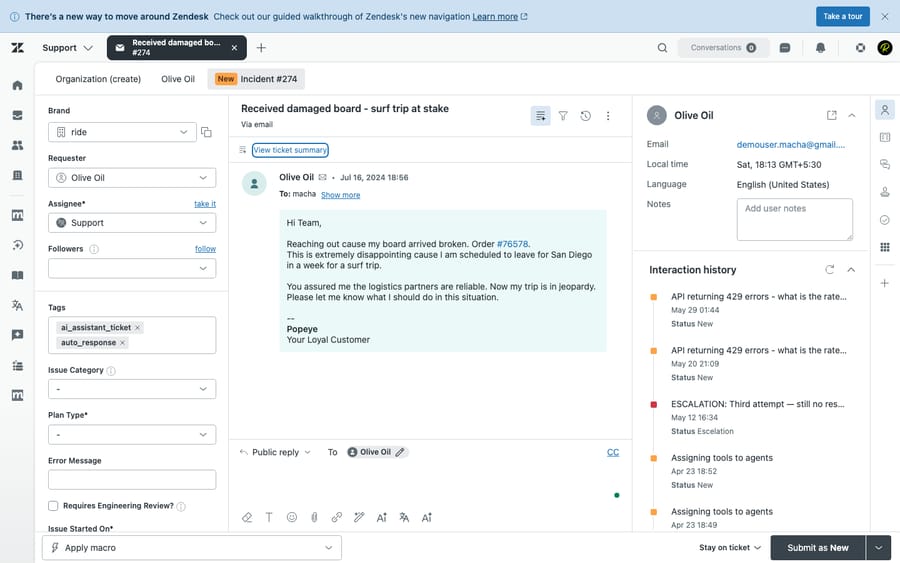
Zendesk gives internal notes a deliberately unmissable signal: a yellow (highlighted) background. In the Agent Workspace, when you select Internal note, the entire composer shifts to a yellow tint, and once submitted the note stays yellow in the conversation log. Public replies stay on a plain white background.
Train your eye on this one cue and most mistakes disappear. White = the customer is reading this. Yellow = only my team is reading this. Before you ever click submit, the color of the composer tells you, at a glance, who is about to receive what you just typed.
How do you switch between a public reply and an internal note?
Switching is a single click, and it's the same in every ticket.
- Open a ticket in the Agent Workspace.
- Above the comment box, you'll see two tabs: Public reply and Internal note.
- Click Public reply to write to the customer, or Internal note to write to your team. The composer changes color to confirm the mode (white vs. yellow).
- Type your comment, then submit the ticket.
You can mix both on a single update if you need to, leaving an internal note for a colleague and sending the customer a public reply in the same session, by switching tabs between comments before you submit. The tab you're on at the moment you click submit is the type that comment is saved as.
Each mode keeps its own draft
This surprises nearly everyone once. The composer holds separate text for each tab. Zendesk's documentation spells it out: "when you write something in an internal note and switch to a public reply, that message will not be displayed in the public reply. However, when you switch back to internal note, you will still be able to find the message you left there." A channel holding unsubmitted text is marked with a blue dot.
The upside is that you can never dump a private note into a public reply by flipping tabs. The downside is that you can't write it privately and then promote it to public by switching, which is what half of support teams assume the tabs do. If you want the text to move, you copy it.
Draft mode, if you want to write a reply without sending it
The workaround people invented for that (write it as an internal note, then paste it into a public reply) has a supported version now. Turn on draft mode with the draft icon in the composer: the text sits on a light grey background, and clicking Submit asks you to confirm before it goes to the public channel. Zendesk remembers your last choice as you move between tickets, and an admin can turn draft mode on by default for public replies, with agents able to switch it off per ticket. See writing drafts of public replies for the mechanics. For a team that keeps leaking private asides, this is a stronger guardrail than a color check, because it puts a confirmation step in front of every customer-facing send.
What happens if you post a private note as a public reply?
Here is the mistake every support team makes at least once: an agent means to leave a private aside ("this customer is being unreasonable, let's just refund them and move on") but the composer is on Public reply, and they submit it. That note doesn't go to a teammate. It's emailed directly to the customer.
It happens because the two modes look similar at a glance, the composer defaults to public, and a busy agent's muscle memory is to type and hit submit. The stakes are real: internal notes are where agents put candid assessments, pricing leeway, account warnings, and half-formed theories, none of which should ever reach a customer.
Can you undo it? Only partly, and the nuance matters. Agents and admins can convert a public comment to an internal note after the fact, but it's irreversible (you can't switch it back to public, and it doesn't work on AI agent tickets), and crucially, converting it does not un-send the email. The customer was notified the instant you submitted; hiding it in the log afterward only cleans up the record. The fix lives before you click submit, not after: check the color every time (yellow for a private remark, white for the customer), read the tab, and, if your team collaborates more than it replies, default the composer to internal note (next section) so the safe mode is the one you fall into by accident.
How do you make the composer default to internal note?
By default, Zendesk opens the composer on Public reply. It is worth noticing whose interest that default serves: the product's headline job is customer correspondence, so the mode that can embarrass you is the one you fall into by accident, and the safe mode is the one an admin has to go and opt into. For many teams, especially ones doing a lot of internal triage and collaboration, flipping it is the better trade, because the worst-case accident becomes "I left a note no customer saw" rather than "I emailed a customer something private."
This is an account-wide setting, so an admin makes the change once for everyone:
- Go to Admin Center → Objects and rules → Tickets → Settings.
- Find the Comment options for agents section.
- Deselect Set composer to public channel by default.
- Deselect Allow agent comments via email to be public by default as well, so replies coming in by email follow the same private-first rule.
A couple of things to know: this applies to the whole account, not per-agent, so there's no individual override. There's also one sensible exception baked in: a ticket that has only internal notes and no public comments yet will always open on internal note regardless of the setting, and live channels (chat, messaging, social) aren't affected by it.
One more path worth knowing, because it catches teams off guard: comments can also become public from inbound email. When an agent replies to a ticket notification from their own inbox, a plain Reply is treated as private by default, while a Reply all (which copies the requester or other recipients) can post as a public comment. Zendesk's mail API also honors a #public true / #public false command in the body to force the privacy of an emailed comment either way. If your agents work tickets from email as much as from the Agent Workspace, set the "Allow agent comments via email to be public by default" option deliberately and tell them which reply button does what.
The trade-off is real, so decide deliberately. If your agents spend most of their time replying to customers, a private-by-default composer just adds a click to every reply and can cause the opposite error, which is forgetting to switch to public and leaving the customer waiting. Set the default to match where your team actually spends its time.
How do you loop in a colleague from inside a note?
Internal notes aren't just a private scratchpad. They're how you pull a specific teammate into a ticket. Inside an internal note, type @ followed by the start of a colleague's name (e.g. @Jan) and pick them from the list. That person gets a notification in the top-right of their Zendesk interface, is notified in the Agent Workspace, and is automatically added as a follower so they keep getting updates on the ticket.
One constraint to know: @mentions only work in internal notes, not public replies, so you can't accidentally @mention a customer into a reply. It's the cleanest way to ask "can you take a look?" without leaving the ticket, keeping the context, the customer's message, and your question in one thread instead of a Slack ping that loses the link back. On messaging conversations the same rule applies and the mentioned agent is added as a follower.
CCs, followers and side conversations
Three collaboration tools sit either side of the privacy line, and picking the wrong one is how internal context reaches a customer.
- CCs are public-side. A CC can be an end user or an agent, they receive ticket updates and can reply into the thread, and an agent CC's email address is visible to end users in it. If you CC a colleague, the customer can see they are there.
- Followers are internal-side. Zendesk's CCs and followers article is explicit: followers "allow you to include additional internal users (agents or administrators) on ticket notifications" and "receive updates on the ticket without exposing their identity to end users." A follower is the right tool for a silent internal collaborator; an @mention adds one for you.
- Side conversations are for people outside the ticket. When you need a vendor, a warehouse, another team or a Slack channel, a side conversation runs in parallel to the ticket without touching the customer-facing thread. One thing to know: adding someone as a CC or BCC on a side conversation does not add them as a CC on the ticket itself.
The short version: internal notes for quick in-thread context, followers and @mentions for pulling a colleague in quietly, side conversations for anyone outside the help desk, CCs only when you mean the customer to see that person.
Who can add and see internal notes?
Internal notes are visible to your internal team, meaning agents and light agents, and never to end users. That second group is worth understanding, because light agents exist specifically to collaborate through internal notes.
A light agent is a free (on most plans) internal collaborator: an engineer, a product manager, or a finance approver who needs to weigh in on tickets but isn't a frontline support rep. The defining rule: light agents can add internal notes, but they cannot send public replies. They read tickets and contribute privately to the team conversation, full stop. That's a feature, not a limitation: it lets you bring subject-matter experts into a ticket with zero risk of one of them accidentally messaging the customer.
One nuance to plan around: light agents (along with contributors and Chat-only agents) can't use the @mentions feature themselves and can't add followers. So a light agent can leave an internal note, but to pull one in, a full agent should @mention them or add them as a follower, per the followers and CCs guide.
Why a customer's email sometimes arrives as an internal note
Not every yellow comment was written by an agent. If someone who is not the requester and not a CC replies to the ticket email, or a recipient hits Reply instead of Reply all, Zendesk files their message as a private comment rather than broadcasting it to everyone on the thread. Zendesk documents both cases in why end-user comments appear as internal notes and when email replies become public or private comments.
It is a safety default, not a bug, and it has a practical consequence: a customer can send you something they believe is part of the conversation which nobody else on the ticket sees. If a thread stops making sense, check whether a yellow comment is actually the customer talking.
How do internal notes affect triggers and notifications?
The public/private split also governs notifications and automation:
- Public reply → the requester and any CCs get an email notification (assuming your notification triggers are on).
- Internal note → no customer notification, ever. The only people pinged are agents following the ticket or @mentioned in the note.
- Triggers can read comment privacy. The
Comment | Is | Publiccondition (orPrivate) branches on the latest comment, so a customer-facing email fires only on an actual public reply while internal notes update the ticket silently. There is also aTicket: Privacycondition for whether the ticket has any public comments at all. - Triggers can write both kinds. A trigger can send an autoreply to the customer or add an internal note for agents only, which is how you post a public status update and log the diagnostics privately in the same rule.
- Private comments suppress the customer email action. This is the one that breaks automations. Per Zendesk's standard ticket triggers article: "When a private comment is added to a ticket, the Email user + (requester and CCs) action is suppressed." The trigger still fires and its other actions still run; only the email is dropped. If you are building private-ticket workflows and a notification never arrives, this is usually why.
The practical upshot: if a customer says they never got your reply, check first whether the comment was public or internal. A note on the yellow background never sends.
Which internal-note mistakes should teams avoid?
A handful of habits keep this clean, and their opposites are the errors that bite teams repeatedly:
- Make the color check a reflex. Yellow for team-only, white for the customer, confirmed before every submit. The headline mistake, submitting a private remark as a public reply, disappears once this is muscle memory.
- Keep candid talk in notes, not replies. Frustrations, pricing flexibility, and account warnings belong on the yellow background. But watch the mirror-image error too: a great answer left on the yellow background never reaches the customer, so a "why no reply?" is often just an internal note that should have been public.
- Use @mentions instead of side channels, and only in notes. Looping a teammate in via @mention keeps the question and answer attached to the ticket; it won't work in a public reply by design.
- Match the default to your workflow. Heavy on internal collaboration? Default to internal note. Heavy on customer replies? Leave it public.
- Remember CCs are part of "public," and a privacy change is one-way. A public reply reaches everyone CC'd, not just the requester, and converting public to private is one-way, so you can't switch a comment back once it's hidden.
- Write internal notes as if the customer could read them anyway. Privacy controls are good, not perfect, and tickets get exported, subpoenaed, audited and pasted into other systems. A note that is professional when it is read out of context costs you nothing to write and saves you the one time it matters.
Can an AI agent reduce accidental public replies?
If accidental public replies are a recurring problem on your team, it is usually a symptom of agents moving fast under volume, and that is the part an AI layer can take pressure off. Macha sits on top of your existing Zendesk rather than replacing it. It reads the ticket and drafts a context-aware reply from your knowledge base and past tickets, so the agent is reviewing and approving a draft rather than typing every word from a cold start.
The honest framing: a human still owns the public/private decision. Macha proposes the reply, your agent reads it and chooses to send it publicly, keep it as an internal note, or escalate. It can also leave its own internal notes (a triage summary, suggested next steps) so the human picks up the ticket with full context already on the yellow background, while the customer-facing send stays a deliberate human action.
It bills per ticket: one thread with one person is one charge however many replies it takes, from $299 a month for 750 tickets on published pricing, with setup and monitoring by our team included and $50 of free usage to start. It fits teams whose reply volume is the pressure. If your problem is two agents and a tidy queue, draft mode and a color check are the cheaper fix.
Frequently asked questions
What's the difference between an internal note and a public reply in Zendesk? A public reply is sent to the customer: the requester and anyone CC'd on the ticket see it in their email and the help center. An internal note is visible only to agents and light agents; the customer is never notified and never sees it. Internal notes appear on a yellow background in the Agent Workspace so you can tell the two apart at a glance.
Can the customer see internal notes in Zendesk? No. Internal notes are "only visible to agents, not to the ticket requester or any other end-users who might be copied on the ticket," per Zendesk. They don't trigger a customer notification and don't appear in the customer's help center view of the ticket.
How do I switch between a public reply and an internal note? In the ticket composer, click the Public reply or Internal note tab above the comment box. The composer turns yellow on internal note and stays white on public reply. The mode you're on when you submit is the type the comment is saved as.
I accidentally sent an internal note as a public reply, can I undo it? Agents and admins can convert a public comment to an internal note after the fact, which hides it from the customer in the ticket and help center. But it's irreversible (you can't switch it back to public), it doesn't work on AI agent tickets, and, most importantly, the customer was already emailed the moment you submitted, so converting it afterward doesn't recall that email. Prevention before submit is the only real fix.
How do I make Zendesk default to internal note instead of public reply? An admin goes to Admin Center → Objects and rules → Tickets → Settings → Comment options for agents and deselects Set composer to public channel by default (and, ideally, Allow agent comments via email to be public by default). It's an account-wide change, not per-agent.
Can light agents add internal notes in Zendesk? Yes, internal notes are exactly what light agents are for. Light agents can read tickets and add internal notes but cannot send public replies, which makes them a safe way to bring engineers, PMs, or approvers into a ticket. Note that light agents can't use the @mentions feature themselves, so a full agent should @mention or add them to loop them in.
Why did my text disappear when I switched from internal note to public reply? It didn't. The composer keeps separate text for each tab, so, in Zendesk's words, "when you write something in an internal note and switch to a public reply, that message will not be displayed in the public reply. However, when you switch back to internal note, you will still be able to find the message you left there." A tab holding unsubmitted text shows a blue dot.
Why is a customer's email showing up as an internal note? Because the sender isn't the requester or a CC on the ticket, or they replied with Reply instead of Reply all. Zendesk files those messages as private comments so they aren't broadcast to everyone on the thread. It's a deliberate default, and it means a customer may have sent you something no one else on the ticket can see.
Can I write a Zendesk reply without sending it? Yes, that's draft mode. Click the draft icon in the composer and your reply sits on a grey background until you submit, at which point Zendesk asks you to confirm before it goes to the public channel. An admin can turn draft mode on by default for public replies, and agents can switch it off per ticket.
How do I loop in a colleague without the customer seeing? Use a follower or an @mention inside an internal note, not a CC. Followers are internal users who get ticket updates "without exposing their identity to end users", while a CC can be an end user and an agent CC's address is visible in the thread. For anyone outside your help desk, use a side conversation instead.
Sources: Adding comments to tickets · Composing messages in the Agent Workspace · Writing drafts of public replies · Using CCs and followers · Collaboration overview · Why end-user comments appear as internal notes · About the standard ticket triggers · Changing a ticket comment from public to private
We checked every behavior above against Zendesk's current documentation on September 20, 2026, and re-checked the public-to-private conversion rules and the yellow-note wording on September 24, 2026. Zendesk revises its interface periodically, so confirm the labels in your own account before relying on them.
Add AI agents to your Zendesk
Macha reads the ticket, drafts the reply and takes the action, inside the Zendesk you already run.