Intercom
 Shopify
 Stripe
 Slack
Slack Notion
 Google Workspace
 Confluence

How Do You Connect Freshdesk to Power BI in 2026? Connector App vs API vs Scheduled Export


Freshdesk reaches Power BI through Freshworks' PowerBI Connector App, the ticket API in Power Query, or a scheduled report export, because Microsoft publishes no Freshdesk connector. The connector app sends six pre-built analytics reports, while the API is the only route to raw ticket rows and custom fields.
Key takeaways
- Freshdesk connects to Power BI through three routes: Freshworks' PowerBI Connector App for six analytics reports, the ticket API through Power Query for raw rows, or a scheduled report export.
- The PowerBI Connector App uses 4 connector tasks per sync, includes 500 free tasks on installation, and sells 5,000 more tasks for $80 through the Connector Apps add-on.
- Freshdesk Growth accounts cannot use the PowerBI Connector App, and Enterprise at $89 per agent a month billed annually is the only plan every version of the chart allows.
- The Freshdesk List All Tickets API returns only the past 30 days unless updated_since is passed, and stops at 300 pages of 100, or 30,000 tickets.
- Freshdesk API rate limits are 100 calls a minute on Growth, 400 on Pro and 700 on Enterprise, so a 30,000-ticket backfill takes about three minutes on Growth.

Freshdesk gets into Power BI three ways: Freshworks' PowerBI Connector App (4 connector tasks per sync, Pro or Enterprise only), the Freshdesk ticket API through Power Query's Web connector (raw rows, up to 30,000 tickets per pull), or a scheduled report export. Microsoft does not publish a Freshdesk connector; its Power Query connector reference has no Freshdesk entry as of 21 September 2026, so every route below uses either Freshworks' own app or the generic Web connector.
Which route should I pick?
| Route | Best for | Plan needed | Real cost | Latency |
|---|---|---|---|---|
| PowerBI Connector App | Freshdesk's own six analytics reports, no code | Enterprise (Pro is ambiguous, see below) | Connector tasks: 4 per sync, $80 per 5,000 | Daily at best |
| Ticket API via Power Query | Raw ticket rows, custom fields, your own model | Any plan with API access | Build time + rate limits | On refresh |
| Scheduled export | One recurring report someone reads in Excel | Any paid plan | Nothing | Daily/weekly file |
| Warehouse first (BigQuery/Snowflake) | More than about 30,000 tickets, or joins with order data | Pro or Enterprise | Connector tasks + warehouse | Scheduled |
How do I set up the Freshworks PowerBI Connector App?
This is Freshworks' own app, and it is the only supported no-code path.
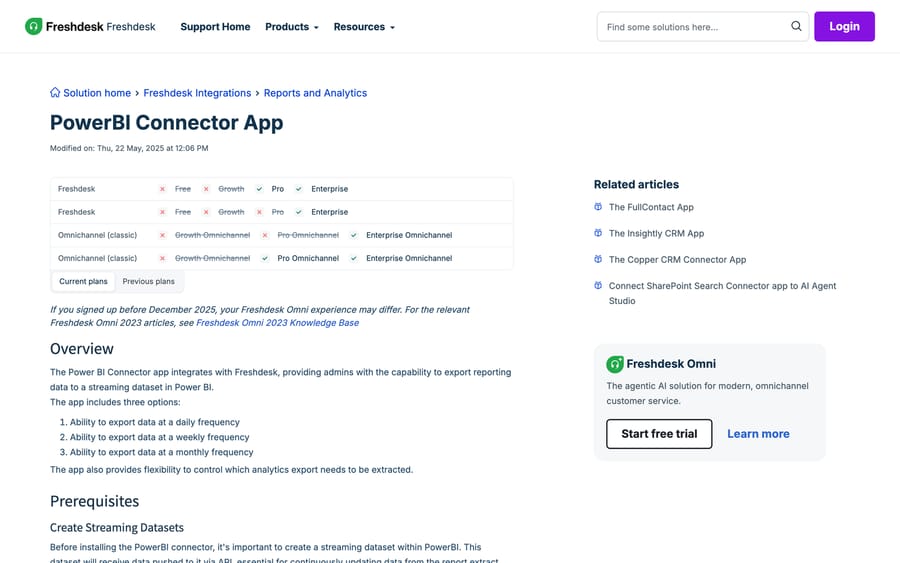
It flows Freshdesk → Power BI, despite what the Marketplace says. The listing's one-line description reads "Sync data from PowerBI to Freshdesk", which is backwards; the help article is right: the app "integrates with Freshdesk, providing admins with the capability to export reporting data to a streaming dataset in Power BI."
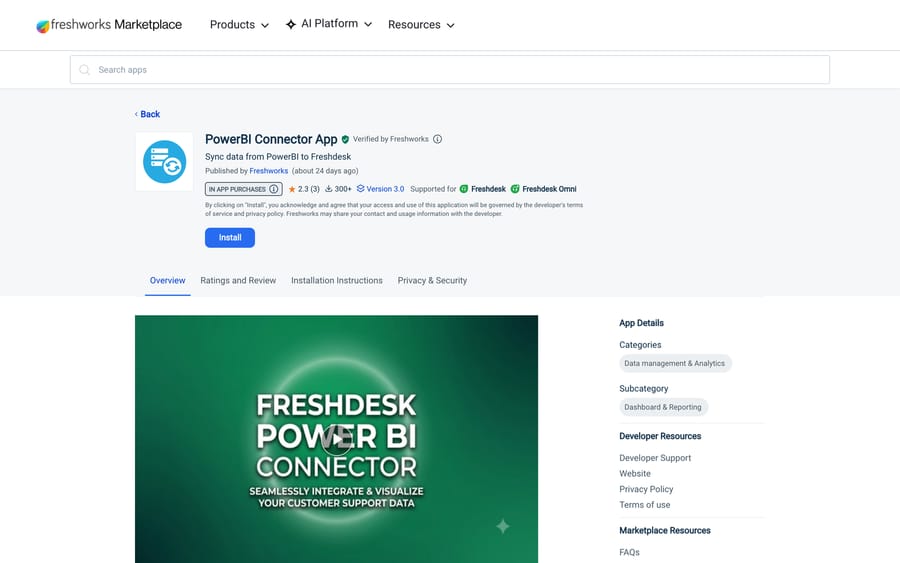
The listing is worth reading before you commit. Published by Freshworks, Verified by Freshworks, version 3.0, updated about 27 days before we re-checked on 24 September 2026, so it is maintained. It also shows 300+ installs and a 2.3-star rating from 3 ratings. Three ratings is far too few to mean anything statistically, but it is the only user signal that exists, and it is not a warm one.
Before you install
Create the Power BI streaming dataset first. Freshworks' setup article is explicit that the dataset "will receive data pushed to it via API," so it has to exist before the connector has anywhere to push to. You will also need a Power BI Embed app registration, because the connector authenticates with an Application ID and Application Secret rather than a personal login.
The steps
- Go to Admin › Support Operations › Apps, find PowerBI Connector App and click Install.
- Enter your Freshdesk domain in the form
yourcompany.freshdesk.comand your Freshdesk API key. (Ours is where to find it: your Freshdesk API key lives under your profile settings.) - On the Data Sync tab, supply the Power BI Application ID and Application Secret from the Embed app registration.
- Set Auth Type to OAuth2 Authorization Code, API Version to 1.0, and Account Type to Multitenant.
- Configure the recipe: pick the Power BI dataset, pick which analytics export to send, and pick a frequency: daily, weekly or monthly.
What it can send
Six analytics exports, not raw tickets: Ticket Report, Surveys Report, Survey Results Report, Average Handling Time Report, Availability-Ticket Report and Agent Activity Report. If the number you want is already a column in one of those, this route is short. If you want per-ticket custom fields, tags or conversation counts, skip to route 2; the connector will not produce them. Our guide to Freshdesk reports and analytics covers what each export contains.
What it costs
The app bills in connector tasks: "The Power BI Connector app uses 4 tasks per sync." You get 500 free tasks on installation. After that, the Connector Apps add-on sells 5,000 tasks for $80, a price Freshworks' pricing page lists on Growth, Pro and Enterprise alike.
Do the arithmetic before you assume this is expensive. A daily sync burns 4 tasks a day, or about 1,460 a year, so the 500 free tasks cover about 125 days, roughly four months. One $80 pack of 5,000 tasks then covers about 1,250 more daily syncs, which is over three years on a single export. Run all six exports daily and you are at 24 tasks a day: the free allowance lasts about three weeks and a $80 pack lasts about seven months. Either way, the connector tasks are not what makes this route expensive.
The plan gate is. And here the documentation contradicts itself. The help article's Current plans chart prints two Freshdesk rows: the first ticks Pro and Enterprise, the second ticks Enterprise only and crosses out Pro. The two Omnichannel (classic) rows disagree the same way. Treat Enterprise as the safe answer, and confirm Pro with Freshworks in writing before you plan a rollout around it. On the pricing page the gap between Pro at $55 and Enterprise at $89 per agent a month, billed annually, is the real bill here, not the $80 task pack.
On Growth, this route is closed. Every version of the chart crosses Growth ($19 per agent a month billed annually) out, along with Free. Freshdesk's pricing page lists no free plan anyway, only a 14-day trial of Enterprise, so there is no lower rung to fall back to. Growth accounts take route 2 or route 3.
How do I pull Freshdesk tickets into Power BI through the API?
This is what people do when they want raw rows, and it is what the Freshworks community thread How to: Integration with Power BI (March 2024, about 1,226 views) settles on after the app is suggested: connect straight to the API and model in Power BI.
In Power BI Desktop: Get data › Web, point it at https://yourcompany.freshdesk.com/api/v2/tickets, and authenticate as Basic, using your API key as the username and any character (conventionally X) as the password.
Then read the four constraints in Freshworks' own note box, because each one silently truncates your dataset rather than erroring.
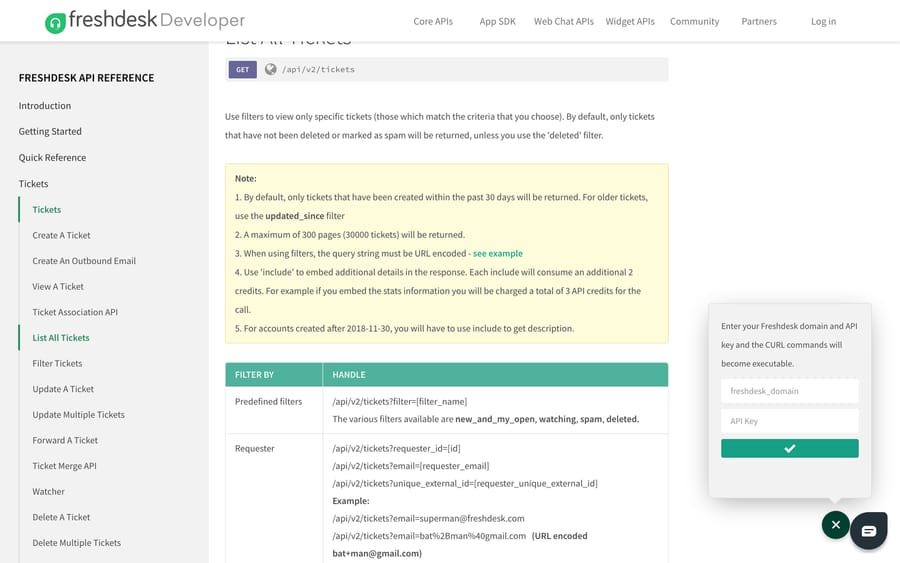
The default window is 30 days. "By default, only tickets that have been created within the past 30 days will be returned. For older tickets, use the updated_since filter." A dashboard built without updated_since looks correct and quietly shows one month of history.
The hard ceiling is 30,000 tickets. "A maximum of 300 pages (30000 tickets) will be returned," at 100 per page. Above that volume you page by date range, a call per week or per month unioned in Power Query, or you move to route 4.
include costs extra API credits. Each include consumes an additional 2 credits, so embedding stats charges 3 credits for the call rather than 1. And for accounts created after 30 November 2018, the ticket description only comes back if you ask for it with include=description, which is the single most common "where did my ticket body go" question.
Rate limits are per plan and per minute, account-wide: 100 calls a minute on Growth and on trial accounts, 400 on Pro, 700 on Enterprise. A full backfill of 30,000 tickets is 300 calls, so a Growth account spends three minutes at the ceiling and will 429 if anything else is using the API at the same time. Build the refresh incrementally on updated_since rather than re-pulling everything, and read Freshdesk API errors and rate limits before you schedule it. The Freshdesk API guide has the authentication details.
The honest trade: this route gives you every field, including custom ones, and it is free. It also makes you the owner of pagination, retries and schema drift, and Power BI's scheduled refresh will happily fail at 3am with no one watching.
When is a scheduled export enough?
If one person needs one recurring report, neither of the above is worth the effort. Freshdesk Analytics will run a report on a schedule and mail it out, and Power BI can pick a file up from a folder or SharePoint and refresh from it.
This is the route that survives staff turnover, because nothing about it is bespoke. It is also the one with the worst latency and no history beyond what the report window covers. Our guides to scheduling reports in Freshdesk and exporting tickets from Freshdesk cover the mechanics, including the export window defaults that catch people.
When should Freshdesk data go through a warehouse first?
Above roughly 30,000 tickets, or once you want to join Freshdesk data to orders or subscriptions, the sensible shape is Freshdesk → warehouse → Power BI. Freshworks' Marketplace carries 13 Connector Apps, and two of them are warehouse destinations: Google BigQuery Connector App and Snowflake Connector App.
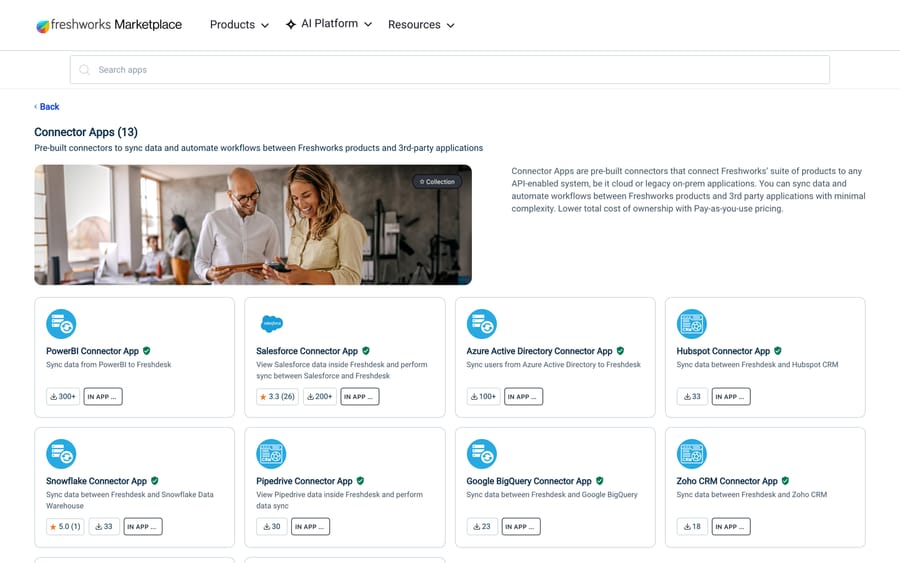
Both are thinly used, with 23 installs for BigQuery and 33 for Snowflake when we checked on 21 September, so treat them as supported rather than battle-tested, and price them on the same connector-task meter as the Power BI app. The advantage is that the 30,000-ticket API ceiling stops being your problem: the warehouse holds history, Power BI queries the warehouse, and the Freshdesk sync only has to move yesterday's changes. Our roundup of Freshdesk Marketplace apps covers the rest of the collection.
How did we research this?
We read Freshworks' PowerBI Connector App help article, its Marketplace listing, the Connector Apps collection and the Freshdesk API v2 reference in a browser on 21 September 2026, and captured each as a screenshot; every number in this post (4 tasks per sync, 500 free tasks, 300 pages, 30,000 tickets, the per-minute rate limits) is quoted from those pages. Microsoft's Power Query connector reference was checked the same day for a Freshdesk entry. On 24 September 2026 we re-checked the help article, the Marketplace listing, the API reference and the Freshdesk pricing page (plan prices and the $80 task pack). We do not have a Freshdesk instance or a Power BI tenant, so no sync was run here: the task arithmetic is derived from Freshworks' own per-sync figure, and the plan-chart contradiction is reported as we found it rather than resolved.
Frequently asked questions
Is there an official Freshdesk connector for Power BI? Yes, but it is Freshworks' app, not Microsoft's. Microsoft's Power Query connector reference carries no Freshdesk entry, so there is nothing to pick from Power BI's own Get Data list. Freshworks publishes the PowerBI Connector App on its Marketplace, which pushes Freshdesk analytics exports into a Power BI streaming dataset.
Which Freshdesk plan do I need for the PowerBI Connector App? Enterprise for certain. The help article's plan chart is internally inconsistent: it prints two Freshdesk rows, one ticking Pro and Enterprise and one ticking Enterprise only. Growth is crossed out in every version of the chart, and the pricing page lists no free plan, so Growth accounts need the API or an export instead.
How much does the PowerBI Connector App cost? The app itself is free to install and bills in connector tasks at 4 tasks per sync, with 500 tasks included on installation. More tasks come from the Connector Apps add-on at $80 for 5,000. A single export synced daily uses about 1,460 tasks a year, so the meter is rarely the expensive part; the plan upgrade is.
Can the connector app send raw ticket data? No. It sends six finished analytics exports: Ticket Report, Surveys Report, Survey Results Report, Average Handling Time Report, Availability-Ticket Report and Agent Activity Report. Per-ticket custom fields, tags and conversation counts come from the API route.
Why does my Power BI report only show 30 days of Freshdesk tickets? Because that is the API default. Freshworks' List All Tickets reference states that only tickets created in the past 30 days are returned unless you pass the updated_since filter. Add updated_since with a date far enough back and page from there.
How many tickets can I pull from the Freshdesk API in one go? 300 pages of 100, so 30,000 tickets. Beyond that, split the pull into date ranges and union them in Power Query, or sync into a warehouse and point Power BI at the warehouse instead.
Why is the ticket description missing from my API results? For accounts created after 30 November 2018, the description is only returned when you ask for it through include. Each include also costs 2 extra API credits per call, so a stats embed is charged as 3 credits rather than 1.
Can I get Freshdesk data into BigQuery or Snowflake instead? Yes. Freshworks publishes a Google BigQuery Connector App and a Snowflake Connector App in the same Connector Apps collection, on the same task-based pricing. Both had fewer than 40 installs when we checked, so pilot them before you depend on them.
What are the Freshdesk API rate limits for a Power BI refresh? 100 calls a minute on Growth and trial accounts, 400 on Pro and 700 on Enterprise, counted across the whole account. A 30,000-ticket backfill is 300 calls, so on Growth it takes about three minutes at the ceiling.
Sources:
- PowerBI Connector App: Freshworks help centre, modified 22 May 2025
- PowerBI Connector App listing: Freshworks Marketplace, read 21 Sep 2026
- Connector Apps collection for Freshdesk: Freshworks Marketplace
- Freshdesk API v2 reference: List All Tickets, rate limits
- Power Query connectors: Microsoft Learn
- Freshdesk pricing: read 24 Sep 2026
- How to: Integration with Power BI: Freshworks community, Mar 2024
Add AI agents to your Freshdesk
Macha reads the ticket, drafts the reply and takes the action, inside the Freshdesk you already run.