Intercom
 Shopify
 Stripe
 Slack
Slack Notion
 Google Workspace
 Confluence

How Do You Use the Freshdesk API in 2026? Auth, Pagination, Rate Limits and Error Fixes


The Freshdesk API authenticates with your API key as the Basic Auth username, returns only 30 days of tickets unless you pass updated_since, and rate-limits both account-wide and per endpoint. Below are the calls, limits and error meanings, checked against Freshworks' developer reference.
Key takeaways
- The Freshdesk API uses Basic Auth against your own subdomain, with the API key as the username and the letter X as the password.
- The Freshdesk List All Tickets endpoint returns only tickets created in the past 30 days by default and at most 300 pages, or 30,000 tickets, per walk.
- Freshdesk rate limits are 100 calls a minute account-wide on Growth, 400 on Pro and 700 on Enterprise, with a tighter Tickets List ceiling of 40, 100 and 200.
- Freshdesk attachment uploads require multipart/form-data with files sent as attachments[], capped at 20 MB total per request.
- A 401 from the Freshdesk API means the credential itself failed, while a 403 means the key is valid but the agent's role does not permit the action.

To use the Freshdesk API, send HTTPS requests to https://YOURDOMAIN.freshdesk.com/api/v2/ with Basic Auth, putting your API key in the username field and X as the password; list calls return only the last 30 days of tickets unless you pass updated_since, and Growth accounts get 100 calls a minute.
| What | Value (developers.freshdesk.com, checked 24 Sept 2026) |
|---|---|
| Base URL | https://YOURDOMAIN.freshdesk.com/api/v2/ |
| Auth | Basic Auth: API key as username, X as password |
| Default ticket list window | Tickets created in the past 30 days |
| List cap | 300 pages (30,000 tickets) |
| Calls per minute | Growth 100, Pro 400, Enterprise 700, trial 50 |
| Tickets List ceiling | Growth 40, Pro 100, Enterprise 200 |
| Attachments | multipart/form-data, 20 MB total per request |
Four things catch almost everyone, in this order: the key won't display, the list endpoint silently returns only the last 30 days, pagination stops at page 300, and a 429 arrives long before the account-wide budget looks spent because there's a second, tighter limit per endpoint.
Where do you find the Freshdesk API key, and why is it hidden?
Freshdesk authenticates with a personal API key tied to an agent account. Calls made with it inherit that agent's permissions, so a key from a restricted agent won't see tickets that agent can't see.
Per Freshworks' How To Find Your API Key article, modified 21 January 2026:
- Log in to your account.
- Click your profile picture, top right, and select Profile Settings.
- In the right-hand pane, click View API key and complete the CAPTCHA verification.
The View API key button and the CAPTCHA are newer than most guides on this topic, including the previous version of ours, which simply said the key was displayed in the right pane.
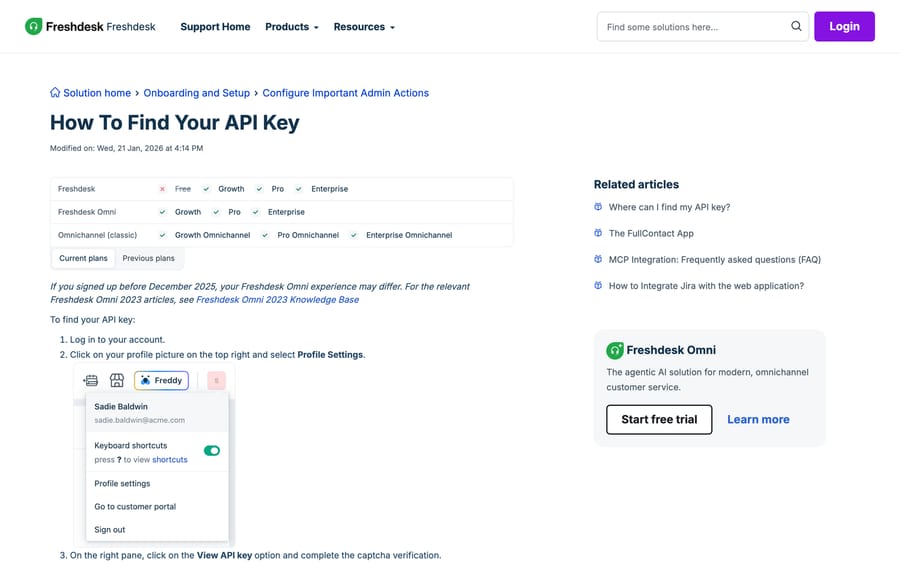
Two gates decide whether you see a key at all:
- Plan. The same article's matrix shows the API key on Growth, Pro and Enterprise, and not on Free (nor on the legacy Sprout plan). Freshdesk no longer lists a free plan on its pricing page; its Free program covers up to 2 agents for 6 months, and on it there is no key to find.
- Agent verification. Freshworks states the key is displayed only when the agent is verified. That one line explains the community's "Can't find API Key" thread, which has drawn about 1,000 views, and a chunk of the longer "Freshdesk api key admin Access" thread at about 3,000 views. If the key isn't there, check the agent's verification email before you open a support ticket.
Resetting the key revokes it everywhere. Freshworks warns that a reset disconnects every other app using that key, so if your Slack app, your BI connector and your script all authenticate as the same agent, a rotation takes all three down together. Give each integration its own dedicated agent account and its own key. Our step-by-step is how to find your Freshdesk API key.
How do you authenticate a Freshdesk API call?
Put the API key in the username field and any non-empty string in the password field. The convention is the letter X, and the password is ignored when a valid key is supplied.
curl -v -u YOUR_API_KEY:X \
  -H "Content-Type: application/json" \
  -X GET "https://YOURDOMAIN.freshdesk.com/api/v2/tickets"
If your HTTP client has no Basic Auth helper, build the header yourself: Base64-encode YOUR_API_KEY:X and send it as Authorization: Basic <encoded>. That's the whole authentication story for server-to-server work. There's no OAuth dance on the core API.
The base URL is always your own subdomain: https://YOURDOMAIN.freshdesk.com/api/v2/. There's no separate API host. Getting this wrong produces a 404 that looks like a missing endpoint.
The long-running "API in Postman" community thread, at roughly 9,500 views the most-read API thread in the forum, is almost entirely about this step. In Postman, set Authorization type to Basic Auth, username to the key, password to X. That's it.
How do you pull tickets older than 30 days?
This is the single most expensive gap in most Freshdesk integrations, and Freshworks documents it in a note box that's easy to scroll past.
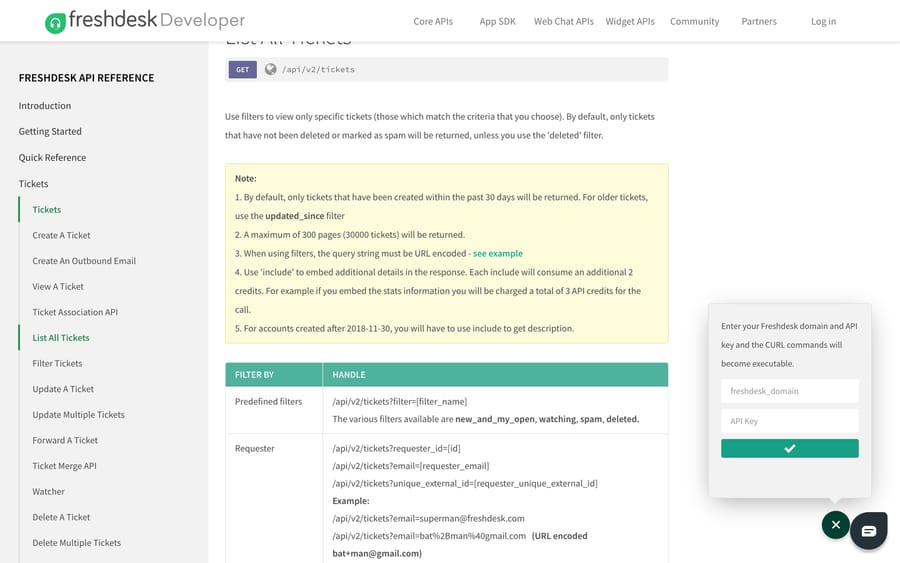
From the List All Tickets reference:
- By default, only tickets created in the past 30 days are returned. For anything older, pass
updated_since. - A maximum of 300 pages (30,000 tickets) will be returned.
- Only tickets that haven't been deleted or marked as spam come back, unless you use the
deletedorspampredefined filter. - Each
includeconsumes an additional 2 API credits. Embeddingstatscosts 3 credits for the call rather than 1. - For accounts created after 30 November 2018, you have to use
include=descriptionto get the ticket body at all. A list call without it returns tickets with no description, which is why "my export has no ticket text" is a recurring question.
So the full-history pull is a GET /api/v2/tickets call with a date filter, not a naive page walk:
GET /api/v2/tickets?updated_since=2020-01-01T00:00:00Z&per_page=100&order_by=updated_at&order_type=ascThen page forward, and when you approach 300 pages, restart the walk with updated_since set to the updated_at of the last ticket you received. That windowing is what the community thread "Load of tickets more than 30 000 using Freshdesk REST API v2" is working out the hard way, and it's the same technique our export guide uses.
Pagination itself: list endpoints return 30 objects per page by default, per_page raises that to 100, and Freshdesk sends a link response header carrying the next page's URL. Follow the header instead of counting pages; when there's no link header you're done.
curl -D - -u YOUR_API_KEY:X \
  "https://YOURDOMAIN.freshdesk.com/api/v2/tickets?per_page=100&include=description"
The search endpoint plays by different rules. /api/v2/search/tickets?query=... returns 30 results per page and a maximum of 10 pages, and the query string is capped at 512 characters and must be URL-encoded. It supports agent_id, group_id, priority, status, tag, type, due_by, fr_due_by, created_at, updated_at, closed_at and custom fields, with AND, OR and parentheses. What it does not do is full-text search across ticket bodies, which is what the 2,700-view thread "Is there a way to search for tickets in API using a keyword?" is asking for. Use search for structured filters and the list endpoint plus your own index for text.
How do you create a ticket, reply and attach files?
The integer-coded fields trip up first-time users. Status: 2 Open, 3 Pending, 4 Resolved, 5 Closed. Priority: 1 Low, 2 Medium, 3 High, 4 Urgent. A "priority": 4 in your JSON means Urgent, not Low. The status codes and what each one does to a ticket's lifecycle are in Freshdesk ticket statuses explained.
To create a ticket you must supply at least one requester identifier: requester_id, email, phone, twitter_id, facebook_id or unique_external_id.
curl -u YOUR_API_KEY:X -H "Content-Type: application/json" \
  -d '{"subject":"Order not delivered","description":"Tracking has not moved in 6 days.","email":"[email protected]","priority":2,"status":2}' \
  -X POST "https://YOURDOMAIN.freshdesk.com/api/v2/tickets"
A successful create returns 201 and the full ticket object including the new id. Our worked walkthrough is how to create a ticket with the Freshdesk API.
Replies go to /api/v2/tickets/{id}/reply and internal notes to /api/v2/tickets/{id}/notes.
Attachments change the request shape. They can't ride inside a JSON body. Freshworks' reference requires Content-Type: multipart/form-data for any create or update carrying files, on tickets, replies, conversations and contacts alike, and caps total attachment size at 20 MB per request.
curl -u YOUR_API_KEY:X -F "[email protected]" \
  -F "subject=Damaged on arrival" -F "description=Photos attached" \
  -F "priority=2" -F "status=2" -F "attachments[]=@/path/photo.jpg" \
  -X POST "https://YOURDOMAIN.freshdesk.com/api/v2/tickets"
Note the -F flags replacing -d, and attachments[] with the array brackets. Sending a JSON body with a base64 blob in it is the usual reason an attachment upload returns a 400.
What are the Freshdesk API rate limits in 2026?
Freshdesk applies a per-minute limit account-wide, regardless of how many agents or IP addresses make the calls. Trial accounts get 50 calls a minute.
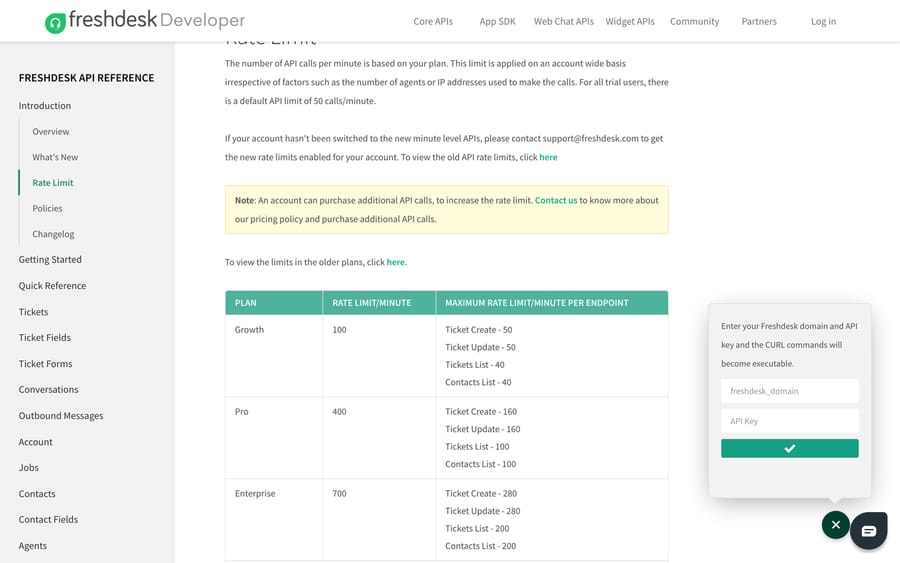
The current table on the developer reference:
| Plan | Calls / minute | Per-endpoint ceilings (calls / minute) |
|---|---|---|
| Growth | 100 | Ticket Create 50, Ticket Update 50, Tickets List 40, Contacts List 40 |
| Pro | 400 | Ticket Create 160, Ticket Update 160, Tickets List 100, Contacts List 100 |
| Enterprise | 700 | Ticket Create 280, Ticket Update 280, Tickets List 200, Contacts List 200 |
| Trial | 50 | not published separately |
The second column is the one that surprises people. On Growth you can make 100 calls a minute in total, but only 40 of them can be Tickets List calls. A backfill job that does nothing except page through tickets hits a 429 at 40% of what looks like its budget. That's the mechanism behind the "API Rate Limit Errors (429)" thread. The previous version of this guide listed approximate account-wide figures and no per-endpoint numbers, which made the limits look twice as generous as they are for a bulk read.
Read your remaining budget from the response headers on every call: X-RateLimit-Total, X-RateLimit-Remaining and X-RateLimit-Used-CurrentRequest. On a 429, Freshdesk sends Retry-After in seconds. Sleep for exactly that, then retry with exponential backoff and jitter if you run more than one worker.
Accounts that buy extra capacity get higher per-endpoint ceilings. At a purchased limit of 1,000 calls a minute the reference lists Ticket Create and Ticket Update at 400 and Tickets List and Contacts List at 300; at 2,000 calls a minute, 800 and 400.
One line in the docs is worth reading as a statement of intent: an account can purchase additional API calls to raise the rate limit, and the plan table on the Freshdesk pricing page shows where that sits next to seats. Rate limit is a product here as well as a safety valve, and the incentive that creates is worth naming: the vendor earns more when your integration is chatty, so the cheapest architecture is usually to pull data out once into your own store and read it from there.
Legacy accounts are a separate case. The docs note that accounts not yet switched to "the new minute level APIs" run on the older plan tiers, where limits were quoted per hour. If your numbers don't match the table above, you're on the old scheme and the docs point you at Freshworks support to move.
What do Freshdesk API errors 400, 401, 403 and 429 mean?
| Code | Meaning | What it usually is |
|---|---|---|
| 200 / 201 | Success | 201 on a create, 200 on everything else |
| 400 | Bad Request | Missing requester identifier, a coded field sent as a word, or JSON where multipart was required |
| 401 | Unauthorized | Key wrong, key reset, or the password field empty. It is not a permissions problem |
| 403 | Access Denied | Key valid, agent's role doesn't allow the action. Check the agent, not the key |
| 404 | Not Found | Wrong subdomain, wrong ID, or a ticket that was deleted |
| 429 | Rate Limited | Account-wide or per-endpoint ceiling hit. Honor Retry-After |
The 401-versus-403 distinction is the one that saves hours. A 401 means the credential failed; a 403 means the credential worked and the agent isn't allowed. Swapping keys to fix a 403 is a dead end, and role changes are the fix. Our longer treatment is Freshdesk API errors and rate limits.
When you get a 400, read the body. Freshdesk returns a description plus an errors array with field, message and code, naming the exact attribute it rejected.
How we researched this
We checked every limit, cap, credit cost and error meaning in this post against Freshworks' own developer reference and support articles in a browser on 20 September 2026, captured the three screenshots in that session, and re-read the limits and caps on 24 September 2026. The plan matrix and key-location steps come from support article 215517, last modified 21 January 2026. Community view counts come from our own crawl of community.freshworks.com, where the API clusters hold 115 threads between them. We don't run a Freshdesk account, so none of the curl commands above were executed against a live help desk. They're built from the documented request shapes, and you should expect to adjust the domain and the field names to your own instance.
Which Freshdesk API page should you read?
Two of our pages answer "Freshdesk API" and they answer different questions. This one is the working guide: keys, calls, limits, errors. Freshdesk API explained is the reference tour of the object model, versioning and where the API sits in the product. If you're writing code right now, stay here. If you're deciding whether to build at all, start there, then come back.
Two adjacent jobs have their own pages: setting up a webhook in Freshdesk for the push direction, and building custom Freshdesk integrations for the shape of a larger project.
When is the API the wrong tool?
The API is right when you want deterministic control: syncing records, creating tickets from other systems, moving history into a warehouse. A lot of projects that start as "we'll use the API" are really "we want repetitive tickets triaged and answered without a human typing the same reply again," and that's a different job. Writing and maintaining classify-then-look-up-then-draft logic by hand is a standing engineering commitment, and it decays every time your product or policy changes.
Macha is an AI agent layer that runs on top of the Freshdesk you already have. It uses the same API, plus your knowledge base and past tickets, to triage, draft and resolve routine tickets without you scripting the decision logic. It doesn't replace Freshdesk and it isn't a help desk. It suits teams whose ticket mix is mostly repeat questions with a lookup attached; it's the wrong fit if every ticket is genuinely novel, because there's nothing for the setup cost to amortize against. Anything it can't handle confidently stays a normal ticket with the context attached.
Pricing is one plan priced on monthly ticket volume, from $299/month for 750 tickets, about $0.40 per ticket at every tier, with setup and monitoring by the Macha team, included on every plan. A ticket is one thread between Macha and one person, charged once no matter how many messages it takes, so a long back-and-forth costs the same as a one-liner. The trial is $50 of free usage (about 125 tickets), no credit card, no time limit. See Macha on Freshdesk and the pricing page.
Frequently asked questions
What is the Freshdesk API base URL? Your own subdomain plus the v2 path: https://YOURDOMAIN.freshdesk.com/api/v2/. An account at acme.freshdesk.com reaches tickets at https://acme.freshdesk.com/api/v2/tickets. There's no separate API host, and a wrong subdomain returns 404 rather than 401.
Where do I find my Freshdesk API key, and why can't I see it? Profile picture, top right, then Profile Settings, then View API key in the right pane, then the CAPTCHA. Two reasons it won't appear: your plan (the key is on Growth, Pro and Enterprise, not the Free program) and agent verification, since Freshworks displays it only for a verified agent.
How do I get all tickets from the Freshdesk API, not just the last 30 days? Pass updated_since with a date. The list endpoint defaults to tickets created in the past 30 days, and it returns at most 300 pages or 30,000 tickets, so for a full history you walk forward in windows, resetting updated_since to the last updated_at you received each time you approach the cap.
Why is the description field empty in my Freshdesk API response? For accounts created after 30 November 2018 the list endpoint omits the ticket body unless you ask for it. Add include=description, and budget for it: each include costs an extra 2 API credits on top of the call.
What are the Freshdesk API rate limits? Per minute, account-wide: 100 on Growth, 400 on Pro, 700 on Enterprise, 50 on trial. Each plan also has tighter per-endpoint ceilings, and Tickets List is the lowest of them at 40, 100 and 200. Read X-RateLimit-Remaining from the response headers and wait out Retry-After on a 429.
How do I upload an attachment through the Freshdesk API? Switch the request to multipart/form-data and send files as attachments[]. JSON bodies can't carry files. Total attachment size per request is capped at 20 MB, across ticket creates, updates, replies and contact calls alike.
What's the difference between a 401 and a 403 from Freshdesk? A 401 means the credential itself failed: wrong key, reset key, or an empty password field where X belongs. A 403 means the key authenticated and the agent's role doesn't permit the action. Rotating the key fixes the first and does nothing for the second.
Does the Freshdesk search API do full-text search? No. /api/v2/search/tickets filters on structured fields such as status, priority, tags, type, agent, group and custom fields, with a 512-character query, 30 results per page and a 10-page ceiling. Searching ticket bodies means pulling tickets with include=description and indexing them yourself.
Sources:
- Freshdesk API reference (developers.freshdesk.com)
- Freshdesk API rate limits
- List All Tickets
- How To Find Your API Key (Freshworks support)
- Community: API in Postman
- Community: Load of tickets more than 30,000 using Freshdesk REST API v2
- Community: API Rate Limit Errors (429)
- Community: Can't find API Key
- Community: Is there a way to search for tickets in API using a keyword?
Add AI agents to your Freshdesk
Macha reads the ticket, drafts the reply and takes the action, inside the Freshdesk you already run.